
What if the difference between burning $10,000 on failed ads and scaling to $100,000 in profitable revenue came down to how well you navigate a single platform?
Facebook Ads Manager controls the gateway to over 3 billion active users across Facebook and Instagram. For millions of businesses, this single platform determines whether their advertising investment generates profit or just evaporates into the digital void. Yet most marketers find themselves in a frustrating middle ground—they know Ads Manager exists, they understand it's important, but the gap between clicking buttons and executing profitable campaigns feels impossibly wide.
The learning curve isn't just inconvenient. It costs real money.
Picture the marketer who spent three hours meticulously setting up their first campaign, configuring every setting with careful attention, only to realize after launch that they'd structured the entire thing wrong. Campaign hierarchy mistakes. Targeting configured at the wrong level. Budget settings that made optimization impossible. The only solution? Start over from scratch, with wasted hours and wasted ad spend as tuition for lessons that could have been avoided.
Here's the thing about Facebook Ads Manager: the interface overwhelm is real. Over 200 settings, endless configuration options, and a three-level hierarchy that isn't immediately obvious create analysis paralysis. Most tutorials make this worse by focusing on exhaustive feature coverage—here's every button, every menu, every possible setting you might someday need. You finish those guides knowing where everything is located but still having no idea how to actually execute a campaign that generates results.
The gap isn't knowledge. It's workflow.
Professional media buyers don't succeed because they've memorized every Ads Manager feature. They succeed because they follow a repeatable operational system—a strategic workflow that moves from campaign architecture to audience targeting to creative testing to optimization decisions. They know which settings actually matter and which ones are distractions. They understand the sequence of decisions that leads to scalable, profitable campaigns.
That's what this guide teaches. Not button-clicking tutorials, but the operational workflow that professional media buyers actually use when managing millions in ad spend. You'll learn how to structure campaigns for testing and scaling, how to make targeting decisions that balance precision with algorithm efficiency, how to create creative that stops the scroll, and how to read performance data that reveals what's working and what needs to change.
By the end, you won't just know how to use Facebook Ads Manager. You'll have a repeatable system for campaign execution—the same strategic path that separates beginners who struggle from professionals who scale.
Let's walk through how to use Facebook Ads Manager step-by-step, the way professionals actually work.
Step 1: Architecting Campaigns That Scale From Day One
Here's where most advertisers sabotage themselves before their first ad even runs: they treat campaign setup like filling out a form instead of making strategic decisions that determine everything that follows.
The choices you make at the campaign level aren't just administrative details. They're architectural decisions that either enable efficient testing and profitable scaling, or lock you into structures that require complete rebuilds when you want to grow. Professional media buyers spend 80% of their setup time on campaign architecture and 20% on the actual ad creation—because they know the structure determines the outcome.
Let's break down the three campaign-level decisions that separate scalable campaigns from structural disasters.
Choosing the Right Campaign Objective for Your Business Goal
Your campaign objective is a contract with Facebook's algorithm. You're telling the machine learning system exactly what action you want it to optimize toward, and it will deliver precisely that—whether it's what you actually need or not.
Facebook offers six objectives that matter in 2025: Awareness (brand exposure), Traffic (website clicks), Engagement (post interactions), Leads (form submissions), App Promotion (app installs), and Sales (purchases or other conversion events). Each objective trains the algorithm to find and show your ads to people most likely to complete that specific action.
Here's the critical mistake: choosing "Traffic" when you actually want "Sales." Traffic objective optimizes for clicks—Facebook finds people who click on things, regardless of whether they buy. Sales objective optimizes for purchases—Facebook finds people with buying behavior patterns, even if they cost more per click. An e-commerce brand selling $50 products should always use Sales objective. Yes, your CPM might be $15 instead of $8, but your conversion rate will be 3-4x higher because the algorithm is finding buyers, not browsers.
The decision framework is simple: match your objective to your actual business goal, not what sounds appealing or cheap. If you want purchases, choose Sales. If you want email signups, choose Leads. If you want app downloads, choose App Promotion. The algorithm will deliver exactly what you ask for—make sure you're asking for what you actually want.
Campaign Budget Optimization: When to Let Facebook Decide
Campaign Budget Optimization (CBO) versus manual ad set budgets isn't a "which is better" question—it's a "which is right for this campaign phase" question.
CBO means you set one budget at the campaign level, and Facebook automatically distributes that money across your ad sets based on performance. Manual ad set budgets mean you control exactly how much each audience segment gets. Neither approach is universally superior; they serve different strategic purposes.
Use CBO when you're testing multiple audiences to find winners. Let's say you're testing five different audience segments with a $100/day total budget. CBO will automatically allocate more money to the ad sets showing better performance—maybe $40 to your best performer, $25 to your second-best, and minimal spend on the underperformers. You're letting Facebook's algorithm identify your winners without manually monitoring and adjusting budgets daily.
Switch to manual ad set budgets when you're scaling proven winners and want precise control. Found an audience that converts at $30 CPA while your target is $50? Lock in a dedicated $200/day budget for that ad set, and you'll know exactly how much you're investing in your most profitable segment. This approach works best when you understand how to optimize ad budget allocation based on performance data rather than guesswork.
Step 2: Precision Targeting Without Over-Narrowing Your Audience
Here's where most advertisers sabotage their own campaigns before they even launch.
The instinct is understandable: you want to find exactly the right people, so you stack interest after interest, layer demographic filters, and narrow your audience down to what feels like a precision-targeted group. You hit publish feeling confident that you've eliminated waste and zeroed in on your ideal customer.
Then the algorithm struggles to find anyone, your CPMs skyrocket, and your campaign never exits the learning phase.
Facebook's machine learning has fundamentally changed how targeting works in 2025. The hyper-specific targeting strategies that worked in 2018—stacking 5-10 interests to reach 50,000 people—now actively fight against the algorithm's optimization capabilities. The platform has evolved, but many advertisers are still using outdated playbooks that cost them money every single day.
The Modern Approach to Audience Targeting
Start with location targeting that matches your business model. Local businesses should target city or radius (10-25 miles around your location). E-commerce brands can go broader—entire countries or regions where you ship products. This isn't the place to get creative; match your targeting to where you can actually fulfill customer demand.
Demographics come next: age range, gender, and language. Here's the counterintuitive part—start broad. Unless you have concrete data proving your product only appeals to 25-34 year old women, begin with wider age ranges like 21-55. Facebook's algorithm will find your actual buyers within that range faster than you can manually guess who they are.
The detailed targeting section is where things get interesting. This is interests, behaviors, job titles—the stuff that feels like "real" targeting. In 2025, less is more. Select 1-2 broad interests that relate to your product category, not 10 hyper-specific ones. If you're selling fitness equipment, target "Fitness and wellness" (audience size: 2M+), not "CrossFit" + "Paleo diet" + "Marathon running" + seven other narrow interests (audience size: 40K).
Why? Facebook's algorithm analyzes thousands of signals you can't manually target—browsing behavior, purchase history, engagement patterns, device usage, time of day activity. When you give it a larger audience pool, it has room to find unexpected high-converters you never would have thought to target. When you narrow too aggressively, you're telling the algorithm "ignore all those signals and only show ads to this tiny group," which limits its optimization power.
Watch the audience size indicator on the right side of the screen. Green zone (500K-2M people) is your target for most campaigns. Red zone (too narrow) extends learning phase and increases costs. Yellow zone (too broad) can work for established brands with strong creative, but most advertisers perform better in the green zone sweet spot.
Custom Audiences: Your Secret Weapon for Retargeting
While interest-based targeting finds new customers, custom audiences reconnect you with people who already know you exist. This is where targeting precision actually pays off.
Website custom audiences retarget people who visited specific pages. Create audiences for homepage visitors (awareness stage), product page viewers (consideration stage), and cart abandoners (high-intent prospects). These segments convert at 3-5x higher rates than cold traffic because you're reaching people who've already demonstrated interest. Understanding facebook ads custom audiences transforms your retargeting from generic follow-ups into strategic conversion funnels that match messaging to buyer journey stage.
Step 3: Creating Ad Creative That Stops the Scroll
You've architected your campaign structure and defined your audience targeting. Now comes the moment where most campaigns live or die: the creative execution that determines whether people scroll past or actually stop to engage.
Here's the uncomfortable truth: 80% of your campaign performance comes from creative quality, not targeting precision or budget optimization. You can have perfect campaign structure and laser-focused audiences, but if your creative doesn't stop the scroll in the first 0.5 seconds, none of that strategic work matters.
The Facebook feed moves fast. Users scroll at 300 feet per minute on mobile devices. Your ad has half a second to interrupt that momentum—to make someone's thumb stop mid-scroll because something caught their attention. That's not hyperbole; that's the actual attention window you're working with.
The Hook-Value-CTA Framework
Professional creative follows a three-part structure that matches how people actually consume content in their feed. Hook (first 3 seconds), Value (middle section), and CTA (final frame or caption). Each component serves a specific psychological purpose in the conversion journey.
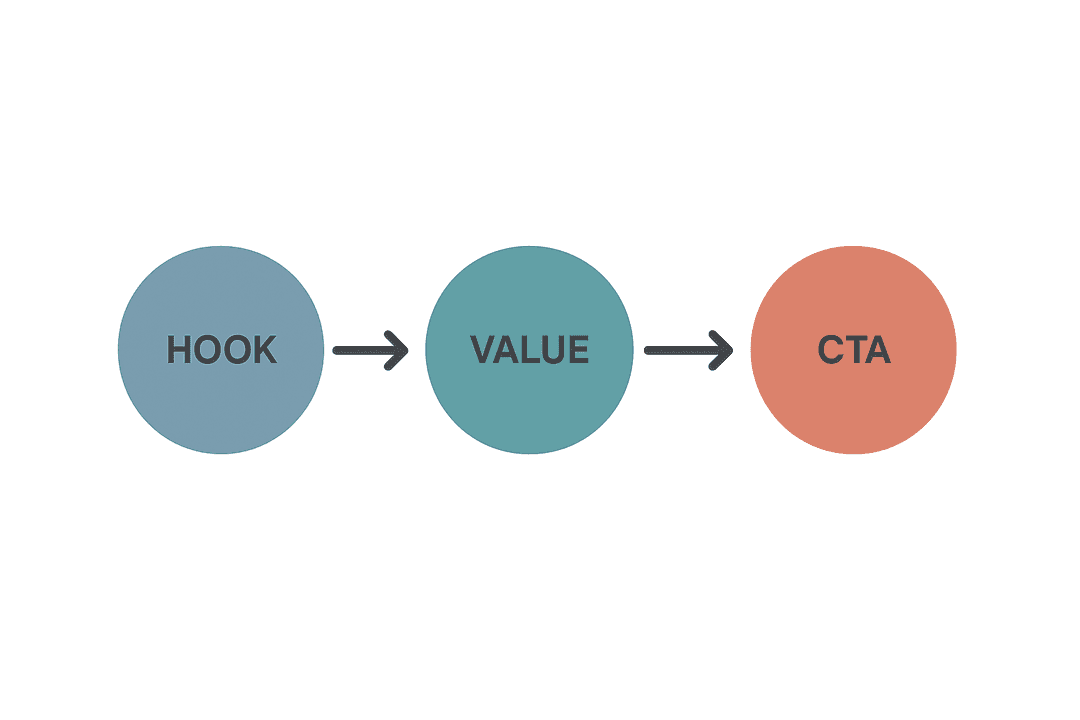
The hook is pure pattern interruption. It's not about explaining your product or listing features—it's about creating a visual or verbal disruption that breaks the scroll momentum. A fitness brand doesn't open with "Our workout program includes 50 exercises." They open with "Why do 90% of people quit their fitness goals in week 3?" The hook creates curiosity or triggers an emotional response that earns you the next 5 seconds of attention.
The value section delivers on the hook's promise. This is where you demonstrate the transformation, showcase the solution, or prove the claim you made in the opening. Video ads use this section to show product demonstrations or customer results. Image ads use caption space to expand on the hook with specific benefits. The goal isn't to tell your entire brand story—it's to create enough value perception that the viewer wants to learn more.
The CTA (call-to-action) gives clear next steps. "Shop Now" for e-commerce. "Learn More" for lead generation. "Download Free Guide" for content offers. The CTA should match your campaign objective and audience temperature. Cold audiences need softer CTAs ("See How It Works"). Warm audiences can handle direct CTAs ("Buy Now—Limited Time").
Testing Creative Variations at Scale
Single creative testing is how beginners operate. Professional media buyers test 5-10 creative variations simultaneously to find winners faster and identify patterns that inform future creative production.
The testing framework is simple: hold everything constant except one variable. Test different hooks with the same value proposition and CTA. Test different value demonstrations with the same hook and CTA. Test different CTAs with the same hook and value section. This isolation approach reveals which specific elements drive performance, not just which complete ads work.
Launch all variations simultaneously in the same ad set with equal budget distribution. Let them run for 3-5 days or until each variation gets 1,000+ impressions. The algorithm will naturally start favoring better performers, but you'll have enough data to identify clear winners and understand why they won. When you discover that hook style A outperforms hook style B by 40%, you've learned something that informs every future creative you produce.
The bottleneck isn't knowing what to test—it's execution speed. Creating 10 creative variations manually takes hours of design work, copywriting, and technical setup. This is where ai ad creation transforms testing velocity from a weekly process into a daily capability, letting you test more angles faster than competitors still building ads one at a time.
Step 4: Reading Performance Data That Reveals What to Do Next
You've launched your campaigns. Creative is running. Budget is flowing. Now comes the skill that separates profitable advertisers from those who just keep spending: knowing how to read performance data and translate numbers into strategic decisions.
Most advertisers open Ads Manager, see a dashboard full of metrics, and experience immediate analysis paralysis. CTR, CPC, CPM, ROAS, frequency, relevance score—dozens of numbers competing for attention with no clear hierarchy of what actually matters. They either obsess over every metric fluctuation or ignore the data entirely and just "let it run."
Both approaches cost money. The obsessive optimizer makes changes too quickly, never letting campaigns stabilize. The hands-off advertiser misses obvious signals that campaigns are failing and need intervention. Professional media buyers follow a structured analysis framework that focuses on the right metrics at the right time.
The Metric Hierarchy: What to Watch When
Not all metrics deserve equal attention. Some are leading indicators that predict future performance. Others are lagging indicators that confirm what already happened. Understanding which metrics to prioritize at each campaign stage prevents wasted analysis time and bad decisions.
In the first 48 hours, watch delivery metrics: impressions, reach, and frequency. These numbers tell you if Facebook can actually deliver your ads to your target audience. Low impressions with high frequency means your audience is too small. High impressions with low frequency means your creative might not be competitive in the auction. These early signals reveal structural problems before you waste budget on campaigns that can't scale.
Days 3-7 shift focus to engagement metrics: CTR (click-through rate), CPC (cost per click), and video view rates. These numbers reveal creative performance—whether your ads are compelling enough to generate action. CTR below 1% on cold traffic means your creative isn't stopping the scroll. CPC above your target threshold means your audience targeting might be too narrow or your creative isn't relevant enough to win auctions efficiently.
After day 7, conversion metrics become your primary focus: conversion rate, CPA (cost per acquisition), and ROAS (return on ad spend). These numbers determine profitability. A campaign with great CTR but terrible conversion rate has a landing page problem, not an ads problem. A campaign with good conversion rate but high CPA needs creative refresh or audience expansion to lower costs. Knowing how to analyze ad performance across these metric layers reveals exactly where optimization efforts should focus.
When to Optimize vs. When to Kill
The hardest decision in campaign management isn't what to optimize—it's when to stop trying and kill underperformers. Most advertisers either kill campaigns too early (before the learning phase completes) or let losers run too long (hoping they'll magically improve).
The decision framework is based on statistical significance and trend direction. If a campaign has spent 2x your target CPA without generating a single conversion, kill it. The algorithm has seen enough data to know this audience-creative combination doesn't work. If a campaign is converting but at 1.5x your target CPA after 50+ conversions, optimize it—there's signal here worth improving.
Optimization moves should be strategic, not reactive. Don't change five things at once because you panicked over one bad day. Change one variable, let it stabilize for 3-5 days, then evaluate. Test new creative while keeping audience constant. Expand audience while keeping creative constant. This isolation approach reveals what actually drives improvement versus what's just random noise.
The goal isn't perfect campaigns—it's profitable campaigns that scale. A campaign converting at your target CPA with room to increase budget is more valuable than a campaign converting at half your target CPA but maxed out at $50/day. Focus optimization efforts on campaigns that can scale, not just campaigns that look good in the dashboard.
Step 5: Scaling Winners Without Breaking What Works
You've found a winner. Your campaign is converting at or below target CPA, creative is performing well, and you're ready to scale. This is where most advertisers break their own success—they increase budgets aggressively, reset the learning phase, and watch their profitable campaign turn into an expensive disaster.
Scaling isn't just "increase the budget and hope it works." It's a strategic process that respects how Facebook's algorithm learns and optimizes. Push too hard, and you'll reset learning and inflate costs. Scale too conservatively, and you'll leave money on the table while competitors capture market share.
The 20% Rule and Vertical Scaling
Vertical scaling means increasing budget within existing campaigns. It's the safest scaling method because you're not changing targeting or creative—just giving the algorithm more money to work with. But there's a threshold where budget increases trigger learning phase resets and performance degradation.
The 20% rule is your safety guardrail: never increase campaign or ad set budgets by more than 20% in a single day. If your campaign is spending $100/day profitably, increase to $120/day, not $200/day. Let it stabilize for 3-5 days at the new budget level, confirm performance holds, then increase another 20%. This gradual approach keeps the algorithm stable while steadily expanding reach.
The math works in your favor over time. A campaign starting at $100/day and scaling 20% every 5 days reaches $1,000/day in about 6 weeks. That's sustainable scaling that maintains performance. The advertiser who jumps from $100 to $1,000 overnight usually sees CPA double and has to scale back down, wasting time and budget on a failed experiment.
Horizontal Scaling: Duplicating Success
Vertical scaling has limits. Eventually, you'll hit audience saturation where increasing budget just drives up frequency and costs. That's when horizontal scaling becomes necessary—duplicating winning campaigns with new audiences or creative variations.
The duplication strategy is straightforward: take your winning campaign structure and test it with different audience segments. If your original campaign targeted "Fitness and wellness" interest, create duplicate campaigns targeting "Health and wellness," "Gym and fitness," and "Nutrition and diet." Keep the creative identical; only change the audience. This approach lets you find new pockets of profitable traffic without risking your proven winner.
Creative duplication works the same way. Take your winning audience and test new creative angles. If your original hook was problem-focused ("Why do 90% of people quit their fitness goals?"), test solution-focused hooks ("The 3-step system that makes fitness sustainable"). Same audience, different creative approach. Winners get scaled; losers get killed. Understanding when to scale ad campaigns through horizontal expansion prevents the plateau that kills most scaling attempts.
Your Path From Setup to Profitable Scaling
You've just walked through the operational workflow that separates beginners who struggle from professionals who scale. From campaign architecture to targeting decisions, from creative testing to performance analysis, you now understand the strategic path through Facebook Ads Manager that actually generates results.
Here's what matters most: mastering the platform mechanics is your foundation, but the real competitive advantage comes from execution speed and optimization efficiency. The agencies managing millions in ad spend don't just know how to use Ads Manager—they've built systems that let them test faster, scale smarter, and optimize continuously without drowning in manual work.
That's where the workflow you've learned meets the efficiency upgrade you need. While you can absolutely execute everything in this guide manually, the bottleneck becomes clear once you're managing 10+ campaigns with dozens of ad sets and hundreds of creative variations. The strategic decisions remain yours—which audiences to test, when to scale, which creative angles to pursue—but the repetitive execution work doesn't have to consume your entire day.
AdStellar AI handles the operational heavy lifting that slows down manual campaign management. Our platform analyzes your top-performing creatives, headlines, and audiences, then automatically builds, tests, and launches new ad variations at scale. You make the strategic calls; we handle the execution speed that turns insights into action before your competition even finishes their weekly reporting.
Ready to transform your Facebook Ads Manager knowledge into a scalable, efficient advertising system? Get Started With AdStellar AI and see how AI-powered automation amplifies the strategic workflow you just mastered.


