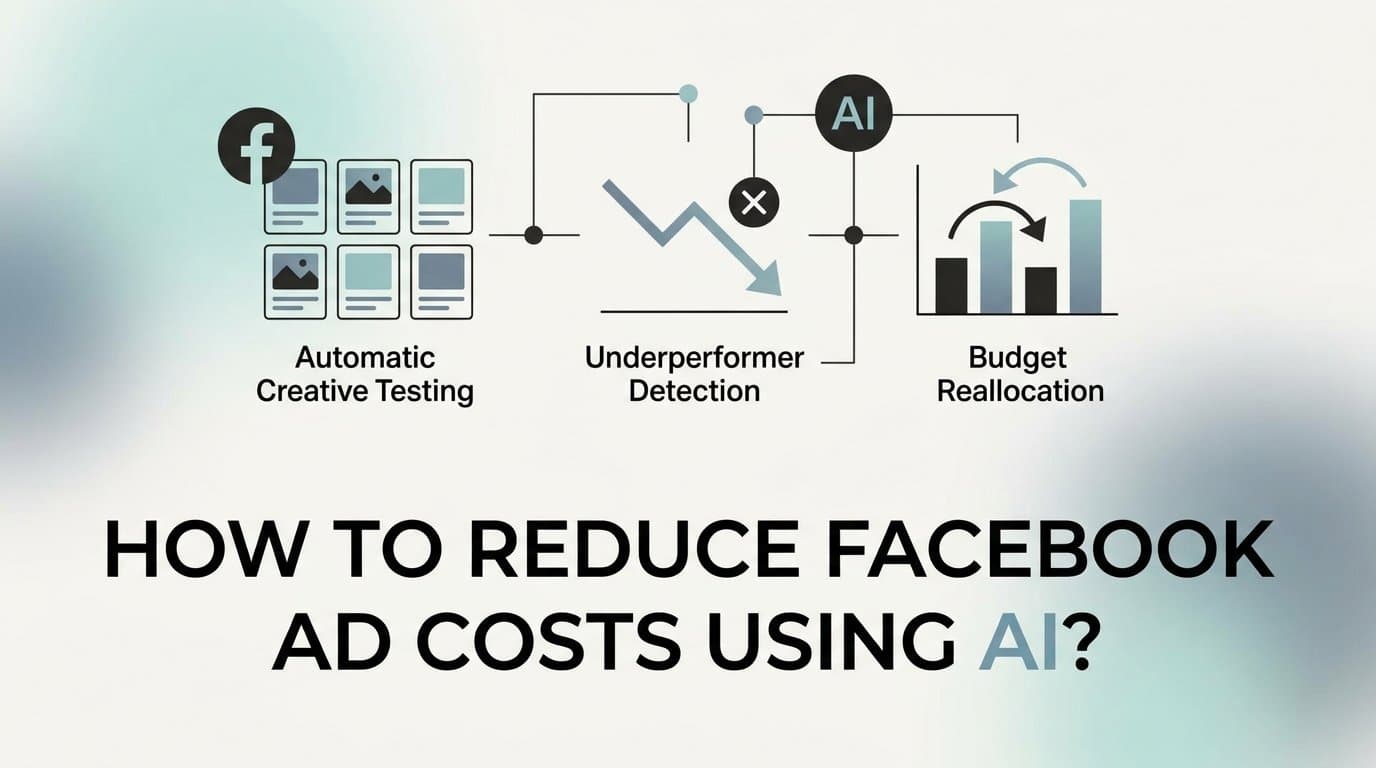
The fastest way to reduce Facebook ad costs using AI is to automate three things: creative testing, underperformer detection, and budget reallocation. Instead of manually reviewing spreadsheets and making gut-call decisions, you use AI to generate more creative variations, identify winners faster, and cut losing ads before they drain your budget. Tools like AdStellar are built specifically for this workflow: it generates image ads, video ads, and UGC-style creatives, launches them directly to Meta, and automatically surfaces winners by ROAS, CPA, and CTR so you stop spending on what does not convert.
The reality of running Meta ads in 2026 is that the platform rewards speed and volume. The advertiser who can test ten creative angles in the time it takes a competitor to test two will consistently find winners faster and spend less to find them. AI makes that speed advantage accessible without a full creative team or an army of media buyers.
This guide walks through six concrete steps to build that system. Whether you are a solo media buyer or managing accounts for multiple clients, the process is the same: audit your waste, generate creative variations with AI, test every combination at scale, cut losers fast, shift budget to winners, and use competitor research to sharpen your edge. Run this cycle every two to four weeks and you have a repeatable system for lowering your cost per result that compounds over time.
Let's get into it.
Step 1: Audit Your Current Ad Spend for Waste
Before you can reduce costs, you need to know exactly where money is leaking. Most advertisers audit at the campaign level and miss the problem entirely. A campaign can look acceptable on the surface while one or two individual ads are quietly burning through budget with nothing to show for it.
Start by pulling your last 30 to 90 days of campaign data and sorting by CPA and ROAS at the ad level, not the campaign or ad set level. This is the granularity where waste actually lives. What you are looking for falls into three categories:
High spend, low ROAS: Ads that have received meaningful budget but are not generating returns above your target threshold. These are your most obvious candidates for immediate pausing.
High frequency, declining CTR: Ads that your audience has seen many times and is no longer clicking. This is a textbook signal of creative fatigue. The ad is not broken, it is just exhausted. The algorithm keeps spending because the ad set is live, but the performance will continue to decline.
Heavy audience overlap: Ad sets targeting audiences that significantly overlap each other compete against themselves in Meta's auction, driving up your CPMs and inflating costs without adding reach.
Doing this manually across a large account is time-consuming. AdStellar's AI Insights leaderboard replaces that spreadsheet work by automatically ranking every creative, headline, audience, and landing page against your target benchmarks. Set your CPA or ROAS goal and the platform scores everything against it in real time. You get a clear ranked view of what is working and what is not, without exporting CSVs or building pivot tables.
The output of this step should be concrete: a ranked list of your worst-performing ads and a clear dollar figure attached to wasted spend. That number is your baseline. Every step that follows is about bringing it down.
Common pitfall: Auditing only at the campaign level. A campaign averaging a 2x ROAS can contain individual ads running at 0.5x ROAS that are masked by stronger performers. Always go to the ad level.
Success indicator: You have identified your bottom-performing ads by spend and can attach a specific dollar amount to the waste before moving to Step 2.
Step 2: Generate More Creative Variations with AI
Creative fatigue is one of the most consistent drivers of rising CPMs and CPAs on Meta. When your audience sees the same ad repeatedly, engagement drops, relevance scores fall, and Meta charges you more to reach the same people. The fix is not spending more. It is testing more creative angles faster than your current process allows.
The problem for most advertisers is that producing creative has always been the bottleneck. A new static image requires a designer. A video requires editing. A UGC-style ad requires a creator or actor. AI removes all three dependencies.
With AdStellar's AI Ad Creative feature, you can generate image ads, video ads, and UGC-style avatar content directly from a product URL. You do not need a designer, a video editor, or anyone on camera. You can also clone competitor ads from the Meta Ad Library to understand which angles, formats, and offers are already resonating in your niche, then generate your own version with a stronger hook or a differentiated message.
Here is how to approach creative generation systematically:
Aim for at least 5 to 10 variations per campaign. Each variation should test a different angle: a problem-focused hook, a social proof hook, a curiosity-driven hook, a direct offer hook, and so on. Covering multiple angles gives Meta's algorithm real options to optimize toward.
Vary the format, not just the copy. A static image, a short video, and a UGC-style avatar ad will perform differently for different audience segments. Testing across formats often reveals that one format dramatically outperforms others for your specific offer.
Use chat-based editing to iterate quickly. AdStellar's chat-based editing lets you refine any ad without starting from scratch. Change the headline, swap the background, adjust the call to action, or shift the tone, all in a single conversation. This makes iteration fast enough to actually keep up with creative fatigue rather than always falling behind it.
The goal at the end of this step is not perfection. It is volume and variety. You are generating hypotheses, not finished campaigns. The testing phase in the next step is where you find out which hypotheses were right.
Common pitfall: Running only one or two creatives per ad set. With limited creative options, Meta's algorithm has almost nothing to optimize toward, and you have no data to learn from. More variations equal faster learning.
Success indicator: You have at least five distinct creative variations ready to test, covering at least two different formats and at least three different hook angles.
Step 3: Use Bulk Launch to Test Every Combination at Scale
Testing one ad at a time is the slowest and most expensive way to find a winner. By the time you have cycled through five creatives one by one, weeks have passed and significant budget has been spent. AI-powered bulk launching collapses that timeline dramatically.
The concept is straightforward: instead of building each ad individually in Ads Manager, you define your creative set, your headline and copy variants, and your audience segments, and then let AI generate every combination and push them all live simultaneously.
In AdStellar's Bulk Ad Launch feature, the workflow looks like this. You select your creatives from the variations you generated in Step 2, write two or three headline variants and two or three copy variants, define your audience sets, and AdStellar generates every combination and launches them to Meta in clicks rather than hours. A setup that would take a full afternoon in native Ads Manager takes minutes.
Structure your bulk test carefully to get clean, readable results:
Isolate variables when testing creatives. Keep audiences consistent across your creative test so that performance differences are attributable to the creative, not the audience. When you switch to testing audiences, keep the creative consistent.
Set a defined budget cap per ad set. During the testing phase, you are looking for early signals, not final winners. Each variation needs enough budget to gather meaningful data, but not so much that a poor performer drains resources before you can act. Define your threshold before you launch.
Have a clear hypothesis for each variation. Know what you are testing and why. "This UGC-style hook will outperform the static image for our retargeting audience" is a testable hypothesis. "Let's see what happens" is not.
The bulk launch approach means you are compressing weeks of sequential testing into days of parallel testing. Winners surface faster, losers get cut faster, and your overall cost per learning drops significantly.
Common pitfall: Launching too many variables at once without enough total budget to give each variation a fair sample. If your daily budget is spread too thin across too many combinations, none of them will gather enough data to draw conclusions. Start with a focused test: three to five creatives, two audiences, two to three copy variants.
Success indicator: Your bulk test is live with multiple combinations running simultaneously, each with a defined budget cap and a clear hypothesis attached to it.
Step 4: Let AI Identify Winners and Cut Losers Fast
The biggest cost reduction in any Meta campaign comes from stopping underperforming ads before they drain your budget. The challenge is that manual review is slow. By the time you notice an ad is underperforming and take action, it may have already consumed a meaningful portion of your testing budget.
This is where AI-driven performance ranking pays off most directly.
AdStellar's AI Insights leaderboards automatically rank every creative, headline, copy variant, audience, and landing page by the metrics that matter to your business. You set your target CPA or ROAS goal and the platform scores everything against that benchmark continuously. You do not need to pull reports or build dashboards. You open the leaderboard and the ranking is already done.
Here is how to use this in practice:
Check your leaderboard after 3 to 5 days. Depending on your daily budget, this is typically enough time for each variation to gather meaningful data. Ads with very low budgets may need slightly longer. Ads with higher budgets will signal faster.
Pause anything scoring below your benchmark. Do not wait for the scheduled campaign end date if the data already shows poor performance. An ad that is clearly underperforming on day four will not recover by day fourteen in most cases. Cut it and reallocate that budget to what is already working.
Look for patterns in your top performers. Which creative formats consistently appear at the top of your leaderboard? Which hooks? Which audience segments? These patterns are more valuable than any single winning ad, because they tell you where to focus your next round of creative production.
Look for patterns in your bottom performers too. If a specific format consistently underperforms across multiple tests, that is a signal about your audience, not just about one ad.
The compounding benefit here is that each testing cycle makes the next one smarter. Your leaderboard history becomes a record of what your audience responds to, and AdStellar's AI gets better at predicting winners as it accumulates more of your performance data.
Common pitfall: Pausing ads too early before they have gathered enough data, or waiting too long and overspending on clear losers. Set a minimum spend threshold before making pause decisions. For most accounts, this is somewhere between one and three times your target CPA per ad before drawing conclusions.
Success indicator: You have paused at least one underperforming ad and can identify the top two or three variables, whether format, hook, or audience, that are consistently driving your best results.
Step 5: Shift Budget to Winners Using AI Campaign Builder
Finding a winner is only half the equation. The other half is moving budget toward it systematically rather than reactively. Most advertisers do this manually and inconsistently. AI makes it a structured, repeatable process.
Once you have identified your top performers from the leaderboard in Step 4, the next step is building your next campaign around them rather than starting from scratch. AdStellar's AI Campaign Builder analyzes your past campaign performance, ranks every creative, headline, and audience by results, and builds complete Meta campaigns in minutes. Critically, every decision the AI makes is explained transparently, so you understand the strategy behind the output, not just the output itself.
The Winners Hub is where this becomes particularly efficient. All of your best-performing creatives, headlines, audiences, and copy variants are stored in one place with their real performance data attached. When you are ready to build your next campaign, you select your winners from the Hub and they populate directly into the new campaign. You are compounding on what already works rather than starting from zero each time.
When it comes to actually scaling the budget on a winning ad set, pace matters:
Increase budgets gradually. Meta's widely cited practitioner guidance recommends increasing budgets by approximately 20 to 30 percent every few days rather than making large jumps. Aggressive budget increases can disrupt Meta's delivery algorithm and trigger a reset of the learning phase, which temporarily increases costs as the algorithm recalibrates.
Keep a portion of your budget in testing. Even as you scale winners, reserve a percentage of your total budget for testing new creative angles. Winners eventually fatigue too. The cycle from Step 2 onward never fully stops.
Common pitfall: Scaling budget too aggressively on a winning ad set. A 3x overnight budget increase on a performing ad set can reset the learning phase and cause CPMs to spike temporarily. Gradual scaling preserves the efficiency you worked to build.
Success indicator: Your next campaign is built primarily from proven winners pulled from the Winners Hub, with a smaller allocation reserved for testing new creative angles from Step 2.
Step 6: Spy on Competitors to Sharpen Your Creative Edge
Reducing costs is not only about cutting waste internally. It is also about making creatives that outperform the market. If your competitors are running ads that resonate more strongly with your shared audience, they will win the auction more efficiently than you will, and your costs will stay elevated regardless of how well you manage your own account.
The Meta Ad Library is a publicly available tool that shows active and historical ads run by any Facebook Page. AdStellar lets you clone competitor ads directly from the library, pulling format, structure, and angle into your creative workflow so you can generate your own version with AI.
When you are browsing competitor ads, pay attention to longevity. An ad that has been running for weeks or months is a strong signal that it is converting, because advertisers do not continue spending on ads that lose money. Long-running ads are the market's validation that a specific angle, format, or offer is working with your shared audience.
Use what you find to inform your next round of creative generation in Step 2. If a competitor's problem-focused hook has been running for two months, test a version of that angle against your current top performer. You are not copying the ad. You are learning from what the market has already validated and then executing it better for your specific offer and audience.
Common pitfall: Copying competitor ads without differentiation. Identical angles from two different brands do not perform identically. Your goal is to understand the formula that is working, then bring a stronger offer, a clearer message, or a more relevant hook to the same angle.
Success indicator: You have identified at least two competitor creative angles to test against your current top performers in your next bulk launch.
Your Repeatable System for Lower Facebook Ad Costs
Here is the full cycle in one place. Run through each step in sequence, then repeat every two to four weeks as creative fatigue sets in and market conditions shift:
1. Audit your current spend at the ad level to find where budget is leaking.
2. Generate at least five to ten creative variations with AI, covering multiple formats and hooks.
3. Use bulk launch to test every combination simultaneously rather than sequentially.
4. Let AI rank your results and pause underperformers before they drain your budget.
5. Shift budget to winners using the AI Campaign Builder and Winners Hub.
6. Use competitor research from the Meta Ad Library to sharpen your next round of creatives.
This is not a one-time fix. The cycle is the system. Each iteration makes the next one faster and cheaper because you are building on a growing library of validated winners and a clearer picture of what your audience responds to.
AdStellar handles the most time-consuming parts of this cycle automatically: creative generation, bulk launching, performance ranking, and winner identification. The result is a leaner, faster feedback loop that works for solo media buyers and agencies alike, without needing a full creative team or a dedicated analyst to make sense of the data.
The advertisers consistently lowering their cost per result on Meta are not spending more. They are testing smarter, cutting faster, and compounding on what works. AI is what makes that speed and precision accessible at any scale.
Start Free Trial With AdStellar and see which of your creatives are actually driving results. Build your first AI-powered campaign, launch every combination in minutes, and let the leaderboard tell you exactly where to put your budget next.