
Meta Ads API: The Complete Guide to Programmatic Campaign Management
It's 11 PM on a Sunday, and you're staring at a spreadsheet with 50 product variations that need individual ad campaigns by Monday morning. Each one requires different targeting, unique creative, and specific budget allocations. You do the math: at 10 minutes per campaign setup in Ads Manager, you're looking at over 8 hours of mind-numbing, click-intensive work. There has to be a better way.
That better way exists, and it's called the Meta Ads API. While you've been manually clicking through campaign creation screens, enterprise advertisers have been launching hundreds of campaigns in minutes, optimizing budgets in real-time based on performance data, and scaling their advertising operations without proportionally scaling their teams. The gap between manual campaign management and API-driven automation isn't just about convenience—it's about competitive survival in an advertising landscape that rewards speed, precision, and scale.
The Meta Ads API represents a fundamental shift in how advertising campaigns are built, managed, and optimized. Instead of being limited by human clicking speed and working hours, API-driven campaigns operate at machine speed, 24/7, with the ability to process performance data and make optimization decisions faster than any human could. This isn't about replacing strategic thinking—it's about removing the operational bottlenecks that prevent your strategy from executing at the speed and scale modern advertising demands.
Here's what makes this transformation so powerful: the API doesn't just automate what you're already doing manually. It enables entirely new approaches that are impossible through traditional Ads Manager interfaces. Imagine automatically launching location-specific campaigns the moment you enter a new market. Picture your ad budgets shifting in real-time based on inventory levels, conversion costs, or competitive activity. Think about testing hundreds of creative variations simultaneously and letting performance data determine winners without human intervention.
What Is the Meta Ads API?
The Meta Ads API is a programmatic interface that allows developers and advertisers to create, manage, and optimize Facebook and Instagram advertising campaigns through code rather than manual interface interactions. Think of it as a direct communication channel between your systems and Meta's advertising platform—instead of clicking through Ads Manager screens, you send structured commands that execute instantly across your entire advertising operation.
At its core, the API translates advertising actions into machine-readable instructions. When you want to launch a campaign through Ads Manager, you navigate through multiple screens, fill in forms, upload creative, and click "Publish." With the API, that same process becomes a single programmatic command that can be executed in milliseconds and replicated across hundreds of campaigns simultaneously. This isn't just faster—it's fundamentally different in what it enables.
The technical architecture consists of RESTful endpoints that accept HTTP requests containing campaign parameters, targeting specifications, creative assets, and budget allocations. Your application sends these requests with proper authentication credentials, and Meta's servers process them, creating or modifying campaigns in real-time. The response includes confirmation data, campaign IDs, and any error messages that need addressing. This request-response cycle happens at machine speed, enabling bulk campaign launch operations that would take hours manually.
What makes the API particularly powerful is its comprehensive scope. You're not limited to basic campaign creation—the API provides access to virtually every advertising function available through Ads Manager, plus additional capabilities that don't exist in the manual interface. You can programmatically manage ad accounts, create custom audiences, upload product catalogs, generate dynamic creative variations, retrieve performance data, and implement automated optimization rules. This complete access means your entire advertising operation can run programmatically if you choose.
The API operates on Meta's Graph API infrastructure, which means it follows consistent patterns across different advertising objects. Whether you're creating campaigns, ad sets, or individual ads, the structure remains similar—you're working with nodes (objects like campaigns) and edges (connections between objects like the ads within a campaign). This consistency makes the API learnable and predictable once you understand the basic patterns.
Access to the API requires proper authentication through Meta's Business Manager system. You'll need a Business Manager account, an ad account with appropriate permissions, and either a system user access token (for server-to-server applications) or a user access token (for applications acting on behalf of specific users). These authentication mechanisms ensure security while enabling programmatic access to your advertising operations.
Why Traditional Campaign Management Hits Scaling Limits
Manual campaign management through Ads Manager works perfectly fine when you're running a handful of campaigns with simple structures. The problems emerge when your advertising operation grows beyond what human clicking speed can reasonably handle. Understanding these limitations explains why the API becomes not just helpful but essential at scale.
The first constraint is pure time mathematics. Creating a single campaign through Ads Manager takes approximately 5-10 minutes when you factor in navigating screens, uploading creative, configuring targeting, and setting budgets. If you need to launch 100 product-specific campaigns, you're looking at 8-16 hours of work. For 1,000 campaigns, that becomes 80-160 hours—multiple weeks of full-time work just for initial setup. The API executes these same operations in minutes, not weeks, because it's not constrained by human interface interaction speed.
Human error compounds exponentially with manual processes. When you're clicking through campaign setup for the 47th time, mistakes happen—wrong targeting parameters, incorrect budget allocations, mismatched creative and copy, forgotten conversion tracking. Each error requires detection, correction, and verification, adding more time to an already time-intensive process. Programmatic campaign creation eliminates these human errors because the same validated code executes identically every time. If your first campaign is correct, your thousandth campaign will be equally correct.
Manual management also creates optimization delays that directly impact performance. When you notice a campaign underperforming, you need to log into Ads Manager, navigate to the campaign, analyze the data, decide on changes, implement those changes, and monitor results. This cycle takes hours at minimum, often days when you're managing multiple accounts. During that delay, you're continuing to spend budget on underperforming campaigns. API-driven optimization can detect performance issues and implement changes in minutes, sometimes seconds, dramatically reducing wasted spend.
The inability to react to external triggers represents another critical limitation. Imagine you run an e-commerce business and a product goes out of stock. With manual management, you need to remember to pause those product campaigns, then remember to restart them when inventory returns. With automated meta campaigns, your inventory system can automatically pause campaigns when stock depletes and restart them when inventory replenishes—no human intervention required, no wasted spend on products you can't fulfill.
Testing complexity becomes unmanageable manually. If you want to test 5 different audiences against 4 creative variations with 3 different offers, you're looking at 60 unique combinations. Creating and managing these manually is prohibitively time-consuming. The API makes this trivial—you define your test matrix programmatically, and the system generates all combinations automatically, launches them simultaneously, and tracks performance across all variations without human effort.
Core API Capabilities That Transform Campaign Operations
The Meta Ads API provides access to virtually every advertising function available through Ads Manager, plus additional capabilities that exist only in the programmatic interface. Understanding these core capabilities reveals why API-driven advertising represents such a fundamental operational shift.
Campaign creation and management forms the foundation. The API allows you to programmatically create campaigns with all standard parameters—objectives, budgets, schedules, and naming conventions. More importantly, you can create campaigns in bulk using loops or batch requests, launching hundreds of campaigns with a single script execution. This bulk creation capability is what enables the scale that's impossible manually. You can also modify existing campaigns programmatically, updating budgets, schedules, or status across your entire account structure in seconds.
Targeting configuration through the API offers more precision and flexibility than manual interface options. You can programmatically define custom audiences, lookalike audiences, and detailed targeting parameters using structured data rather than clicking through interface options. This becomes particularly powerful when you're working with dynamic targeting—imagine automatically creating location-specific campaigns for every city where you have inventory, or audience-specific campaigns for every customer segment in your CRM. The API makes these dynamic targeting scenarios practical.
Creative management capabilities extend beyond simple upload functions. The API supports dynamic creative optimization, where you provide multiple creative elements (images, headlines, descriptions, calls-to-action) and Meta automatically tests combinations to find the best performers. You can also programmatically generate creative variations using templates, enabling personalized creative at scale. For businesses with large product catalogs, the API integrates with catalog feeds to automatically generate product-specific ads without manual creative production.
Performance data retrieval represents one of the API's most valuable capabilities. Instead of manually exporting reports from Ads Manager, you can programmatically query performance data at any level—account, campaign, ad set, or ad. This data can flow directly into your analytics systems, dashboards, or optimization algorithms. The API provides access to virtually every metric available in Ads Manager, plus the ability to break down data by dimensions like age, gender, placement, or time period. This programmatic data access enables real-time monitoring and automated optimization that's impossible with manual reporting.
Budget optimization through the API goes beyond simple budget setting. You can implement sophisticated budget allocation algorithms that shift spending based on performance, inventory levels, profit margins, or competitive activity. Imagine automatically increasing budgets on campaigns with cost per lead below your target threshold while decreasing budgets on underperformers—all happening continuously without human intervention. This dynamic budget management maximizes efficiency in ways manual management can't match.
Automated rules and optimization represent the API's most transformative capability. You can build custom optimization logic that monitors campaign performance and automatically implements changes based on your specific business rules. If a campaign's conversion rate drops below threshold, pause it. If an ad set's cost per acquisition exceeds target, reduce its budget. If a creative's engagement rate is exceptional, increase its delivery. These automated optimization rules operate 24/7, making optimization decisions at machine speed based on real-time performance data.
Real-World Use Cases Where API Access Becomes Essential
Understanding abstract API capabilities is one thing—seeing how they solve real business problems is what makes the value concrete. These use cases represent scenarios where manual campaign management becomes impractical or impossible, making API access not just helpful but essential.
E-commerce businesses with large product catalogs face an impossible manual management challenge. If you sell 500 products and want to run individual campaigns for each product with multiple audience segments and creative variations, you're looking at thousands of campaigns. Creating and managing these manually is completely impractical. With the API, you can programmatically generate campaigns for every product in your catalog, automatically pulling product data, pricing, and images from your inventory system. When products go out of stock, campaigns pause automatically. When new products are added to your catalog, campaigns launch automatically. This level of catalog-driven advertising is only possible through programmatic management.
Multi-location businesses need location-specific campaigns that reflect local inventory, pricing, and promotions. A retail chain with 200 locations running location-specific campaigns faces 200x the management complexity of a single-location business. The API enables you to programmatically create location-specific campaigns using store data from your systems, automatically adjusting targeting radius, creative messaging, and offers based on each location's characteristics. When a location runs a special promotion, campaigns update automatically. When a location closes temporarily, campaigns pause automatically. This location-based automation is impractical to manage manually at scale.
Agencies managing multiple client accounts face exponential complexity. Creating similar campaign structures across 50 client accounts means repeating the same manual process 50 times. With the API, you can build campaign templates that deploy across all client accounts simultaneously, maintaining consistency while customizing for each client's specific parameters. Reporting becomes automated—instead of manually pulling reports for each client, your systems automatically retrieve performance data and generate client dashboards. This operational efficiency is what allows agencies to scale without proportionally scaling their team size.
Performance-based businesses that optimize for specific cost targets need continuous optimization that manual management can't provide. If your business model requires maintaining a specific cost per acquisition, you need to monitor performance constantly and adjust budgets, bids, and targeting in real-time. The API enables automated optimization systems that monitor performance metrics and implement changes within minutes of detecting variance from targets. This continuous optimization maintains efficiency that manual daily or weekly optimization checks can't match, particularly when managing automated ad testing across multiple variables.
Seasonal businesses with dramatic demand fluctuations need advertising operations that scale up and down rapidly. If you're running 10 campaigns during slow periods but need 200 campaigns during peak season, manually creating those 190 additional campaigns is prohibitively time-consuming. The API allows you to programmatically scale your campaign structure up during peak periods and back down during slow periods, maintaining operational efficiency regardless of scale. This seasonal flexibility is particularly valuable for businesses with multiple peak periods throughout the year.
Testing-intensive operations that run continuous experimentation need to manage test complexity that overwhelms manual processes. If you're testing audiences, creative, offers, and landing pages simultaneously across multiple campaigns, you're managing dozens or hundreds of test variations. The API enables you to programmatically generate test matrices, launch all variations simultaneously, track performance across all combinations, and automatically identify winners. This systematic testing approach is what separates sophisticated advertisers from those relying on intuition and limited testing.
Getting Started: API Access Requirements and Setup Process
Accessing the Meta Ads API requires navigating Meta's business infrastructure and authentication systems. While the setup process has multiple steps, understanding the requirements and following the proper sequence makes it straightforward. Here's what you need and how to get it.
The foundation is a Meta Business Manager account. If you're already running Facebook or Instagram ads, you likely have one. If not, you'll need to create a Business Manager account at business.facebook.com. This serves as the central hub for managing your advertising operations, including API access. Your Business Manager needs to be verified, which typically requires providing business documentation and contact information. Verification isn't instant—plan for a few days to a week for Meta to review and approve your business.
Within your Business Manager, you need an ad account with appropriate permissions. The account you'll be accessing through the API must be added to your Business Manager, and you need admin access to that account. If you're working with client accounts or agency structures, ensure you have the proper permission levels before attempting API access. Insufficient permissions are the most common cause of API access failures.
Next comes app creation. You'll need to create a Meta app through the Meta for Developers portal (developers.facebook.com). This app serves as the authentication container for your API access. During app creation, you'll select "Business" as the app type and add the "Marketing API" product to your app. This Marketing API product is what provides access to advertising functionality. The app creation process generates an App ID and App Secret, which you'll use in authentication.
Authentication requires generating access tokens. For testing and development, you can use the Graph API Explorer tool to generate temporary user access tokens. For production systems, you'll need to implement proper OAuth flows or use system user access tokens. System users are special accounts within Business Manager that represent applications rather than individual people—they're the recommended approach for server-to-server API access because they don't expire when individual users leave your organization.
Generating a system user access token involves creating a system user in Business Manager, assigning it appropriate permissions to your ad accounts, and then generating a token through the Business Manager interface. These tokens can be set to never expire (though you should still implement token refresh logic for security best practices). The token is what you'll include in every API request to authenticate your application.
Before making production API calls, you should test your setup using Meta's Graph API Explorer. This web-based tool allows you to make API calls directly from your browser, helping you verify that your authentication is working and your permissions are properly configured. Start with simple read operations like retrieving account information before attempting write operations like campaign creation. This testing phase helps you identify and fix permission or configuration issues before they affect production systems.
Rate limiting is a critical consideration. Meta imposes rate limits on API calls to prevent abuse and ensure platform stability. These limits vary based on your ad spend and account history, but generally allow for substantial API usage. However, if you're building systems that will make thousands of API calls, you need to implement proper rate limit handling—detecting when you're approaching limits, implementing exponential backoff when you hit limits, and batching requests where possible to reduce total call volume.
Building Your First API Integration: A Practical Walkthrough
Understanding API concepts is different from actually building something that works. This walkthrough demonstrates creating a simple but functional API integration that creates a campaign programmatically. We'll use Python for examples, but the concepts apply to any programming language.
The first step is installing the official Meta Business SDK, which provides convenient wrapper functions around the raw API endpoints. For Python, you'll install the facebook-business package using pip. This SDK handles much of the complexity around request formatting, authentication, and error handling, allowing you to focus on business logic rather than HTTP mechanics.
Your code needs to initialize the API connection with your access token and app credentials. This typically happens once at the start of your application, creating an API object that you'll use for all subsequent operations. The initialization includes your access token, app secret, and app ID. Once initialized, this API object maintains your authentication state across all API calls.
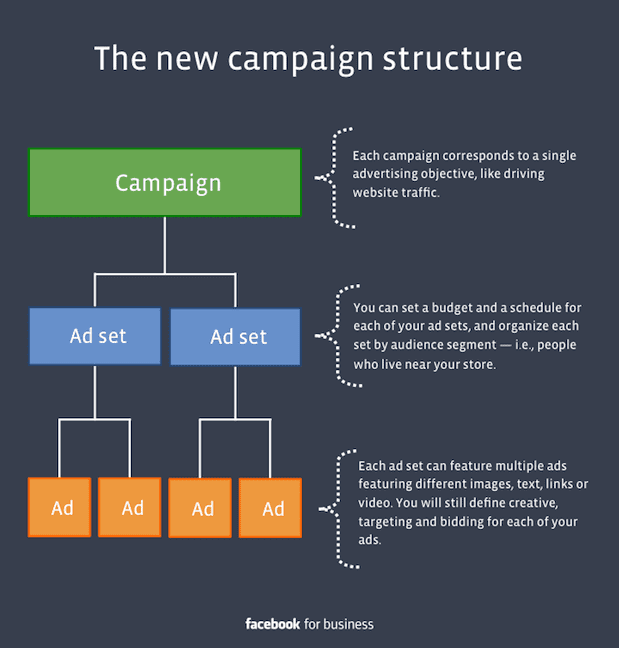
Creating a campaign programmatically involves several API objects working together. First, you create a Campaign object with basic parameters like name, objective, and status. The objective determines what Meta optimizes for—conversions, traffic, brand awareness, etc. The status determines whether the campaign starts running immediately or remains paused. You'll also specify the ad account ID that owns this campaign.
After creating the campaign, you create an AdSet within that campaign. The AdSet defines targeting, budget, schedule, and optimization parameters. This is where you specify who sees your ads, how much you're willing to spend, and what optimization goal Meta should pursue. Targeting configuration can be simple (broad targeting to a country) or complex (custom audiences with detailed demographic and interest targeting). Budget can be daily or lifetime, and you can specify start and end dates for scheduling.
Finally, you create an Ad within the AdSet. The Ad object connects creative assets to your campaign structure. You'll specify the creative (which can be an existing creative or a new one you create through the API), the ad format, and any ad-level parameters. Once created, if your campaign and ad set are active, the ad begins delivering immediately.
Error handling is critical in API integrations. Every API call can potentially fail due to network issues, authentication problems, rate limiting, or invalid parameters. Your code needs to handle these errors gracefully—catching exceptions, logging error details, and implementing appropriate retry logic. For rate limit errors specifically, you should implement exponential backoff, waiting progressively longer between retry attempts.
Once your basic integration works, you can extend it with more sophisticated functionality. Add performance data retrieval to monitor campaign results. Implement automated optimization rules that adjust campaigns based on performance. Build bulk creation logic that generates multiple campaigns from data sources. The API's comprehensive functionality means your integration can grow from simple campaign creation to complete advertising automation, similar to what you'd find in ad launch tools designed for scale.
Advanced API Strategies for Maximum Efficiency
Basic API usage creates campaigns programmatically. Advanced API strategies transform your entire advertising operation into an automated, data-driven system that operates at scale impossible through manual management. These strategies represent how sophisticated advertisers leverage the API for competitive advantage.
Batch requests dramatically improve efficiency when you need to perform multiple operations. Instead of making individual API calls for each campaign creation, you can bundle multiple operations into a single batch request. This reduces total API calls, improves execution speed, and helps you stay within rate limits. A batch request might create 50 campaigns in a single API call rather than requiring 50 separate calls. The efficiency gains become substantial when you're operating at scale.
Dynamic creative optimization through the API enables testing at scale that's impractical manually. Instead of creating individual ads for each creative variation, you provide multiple creative elements (headlines, images, descriptions, calls-to-action) and let Meta's algorithm test combinations to find the best performers. The API allows you to programmatically manage these creative elements, updating them based on performance data or external triggers like inventory changes or seasonal promotions.
Automated budget allocation based on performance data represents one of the most valuable advanced strategies. Your system continuously monitors campaign performance metrics and automatically shifts budget from underperforming campaigns to high performers. This dynamic allocation maintains efficiency without manual intervention. The logic can be sophisticated—considering not just immediate performance but also factors like time of day, day of week, seasonal patterns, and business-specific constraints like inventory levels or profit margins.
Custom audience automation eliminates manual audience management. Your system can programmatically create and update custom audiences based on data from your CRM, website analytics, or transaction systems. When a customer makes a purchase, they're automatically added to a purchaser audience and removed from prospect audiences. When a lead goes cold, they're automatically moved to re-engagement audiences. This continuous audience management ensures your targeting always reflects current customer status without manual list management.
Catalog-driven advertising for e-commerce businesses automates the entire product advertising workflow. Your product catalog feeds directly into campaign creation, with campaigns automatically generated for each product or product category. When products go out of stock, campaigns pause automatically. When new products are added, campaigns launch automatically. Pricing changes update ad creative automatically. This complete automation means your advertising operation stays synchronized with your inventory and pricing without human intervention.
Cross-platform integration connects your advertising operations with other business systems. Your API integration can pull data from analytics platforms, CRM systems, inventory management, and financial systems to inform advertising decisions. It can push performance data to business intelligence dashboards, accounting systems, and reporting tools. This integration creates a unified data ecosystem where advertising operations are informed by and inform other business functions.
Predictive optimization uses historical performance data to make proactive rather than reactive decisions. Instead of waiting for a campaign to underperform before making changes, your system analyzes patterns in historical data to predict likely performance and preemptively adjust campaigns. This might mean automatically increasing budgets during time periods that historically perform well, or adjusting targeting based on seasonal patterns in your data.
Common Pitfalls and How to Avoid Them
API integrations that work in testing can fail in production if you don't anticipate common pitfalls. Understanding these issues before they occur saves significant debugging time and prevents operational disruptions. Here are the most common problems and how to avoid them.
Authentication token expiration catches many developers off guard. User access tokens expire, typically after 60 days. If your system relies on a token that expires, your integration will suddenly stop working. The solution is implementing proper token refresh logic or using system user tokens that can be set to never expire. Even with non-expiring tokens, implement monitoring that alerts you if authentication fails, allowing you to address issues before they impact operations.
Rate limiting becomes problematic when your API usage scales. Meta imposes limits on API calls to prevent abuse, and hitting these limits causes your requests to fail. The solution is implementing proper rate limit handling—tracking your API call volume, implementing exponential backoff when you hit limits, and using batch requests to reduce total call volume. For high-volume operations, consider implementing request queuing that spreads API calls over time rather than making them all simultaneously.
Insufficient error handling leads to silent failures where operations fail without proper notification. Every API call can fail for various reasons—network issues, invalid parameters, permission problems, or platform issues. Your code needs comprehensive error handling that catches all failure modes, logs detailed error information, and implements appropriate retry logic. Critical operations should have monitoring and alerting that notifies you immediately when failures occur.
Permission configuration problems are among the most common issues. Your access token needs appropriate permissions for the operations you're attempting. Creating campaigns requires different permissions than just reading performance data. If you're working with multiple ad accounts, ensure your token has access to all accounts you need to manage. Permission issues often manifest as cryptic error messages, so verify permissions early in your development process.
Inadequate testing before production deployment causes preventable failures. Test your integration thoroughly with small-scale operations before deploying to production. Create test campaigns with minimal budgets to verify functionality. Test error handling by deliberately triggering failure conditions. Verify that your integration handles edge cases like missing data, invalid parameters, and network timeouts. This testing investment prevents production issues that could waste budget or disrupt operations.
Ignoring API versioning leads to unexpected breaking changes. Meta periodically updates the API, and older versions eventually become deprecated. Your integration should specify which API version it's using and monitor Meta's developer announcements for upcoming changes. When new versions are released, test your integration against them before the old version is deprecated. This proactive version management prevents your integration from breaking when Meta deprecates the version you're using.
Poor data validation causes campaigns with incorrect parameters. Just because the API accepts your request doesn't mean the parameters are optimal or even correct. Implement validation logic that checks parameters before sending them to the API. Verify that budgets are within acceptable ranges, targeting parameters are valid, creative assets meet specifications, and campaign structures make sense. This validation prevents creating campaigns that technically work but don't achieve your advertising goals.
Measuring Success: API-Driven Campaign Performance Metrics
API access enables new advertising capabilities, but success still comes down to performance metrics. Understanding which metrics matter and how to track them programmatically ensures your API integration delivers actual business value rather than just technical sophistication.
Operational efficiency metrics measure how the API improves your advertising operations. Campaign creation time compares how long it takes to launch campaigns through the API versus manually. If you're creating 100 campaigns in 10 minutes via API versus 16 hours manually, that's a 96x efficiency improvement. Error rate tracks how often campaigns are created with incorrect parameters—API-driven creation should have near-zero error rates compared to manual creation. Team time savings measures how many hours your team reclaims by automating manual tasks, allowing them to focus on strategy rather than execution.
Scale metrics demonstrate your ability to manage advertising operations that would be impossible manually. Campaign count tracks how many active campaigns you're managing—API-driven operations should enable 10x or more campaigns than manual management. Testing velocity measures how many test variations you can launch and analyze—sophisticated API integrations should enable testing hundreds of variations simultaneously. Geographic coverage tracks how many locations or markets you can advertise in—API automation should enable location-specific campaigns at scale that's impractical manually.
Performance optimization metrics measure whether API-driven automation actually improves advertising results. Response time to performance changes tracks how quickly you can detect and respond to campaign performance issues—API automation should reduce this from hours or days to minutes. Budget efficiency measures whether automated budget allocation improves return on ad spend compared to manual allocation. Cost per result should improve as automated optimization continuously refines campaigns based on performance data.
The API provides programmatic access to all these metrics through performance data endpoints. Instead of manually pulling reports, your systems can automatically retrieve performance data at whatever frequency makes sense—hourly, daily, or even more frequently for time-sensitive operations. This data can flow directly into dashboards, analytics systems, or optimization algorithms, creating closed-loop systems where performance data automatically drives optimization decisions.
Attribution and conversion tracking become more sophisticated with API access. You can programmatically configure conversion tracking, create custom conversion events, and retrieve detailed conversion data broken down by campaign, ad set, ad, and even creative element. This granular conversion data enables optimization at levels impossible with aggregate reporting, particularly when integrated with ai tools for campaign management that can process complex performance patterns.


