A new media buyer inherits three client ad accounts, two different spending limits, and a shared login that nobody really owns. One account has the right pixel but the wrong timezone. Another has several former employees listed as admins. A third still contains closed accounts that reduce the team's room to grow.
That situation is common because many teams treat a Meta ad account as a billing container. It's more accurate to treat it as the operational nervous system of paid social. Spending, identity, permissions, campaign history, conversion signals, creative testing, and third-party tools all meet there. A poorly designed account can make good media buying difficult, while a well-governed account protects continuity when people, agencies, markets, and tools change.
What a Meta Ad Account Really Is
A Meta ad account is the working environment where a business tells Meta what to promote, who may manage it, how payment works, and which actions count as results. It sits within a Meta Business Portfolio and is connected to assets such as Facebook Pages, Instagram accounts, pixels, datasets, and product catalogs.
Think of it as the control room for paid social, not the company credit card. The account carries its own billing currency, timezone, payment methods, spending controls, campaign history, and policy record. It also becomes the place where your team accumulates practical knowledge about which messages, audiences, placements, and creative formats have worked.
That history matters because Meta's built-in reporting doesn't provide unlimited historical access. Independent analysis recommends that advertisers create their own long-term record through scheduled data pulls rather than assuming Meta will preserve every past result indefinitely, as explained in this analysis of Facebook Ads data. If your team changes accounts casually, it can lose the context needed to compare performance over time.
Personal ownership versus business ownership
A personal ad account is connected to an individual's Facebook profile. A business ad account is owned by a Business Portfolio. The second arrangement is usually safer for a company because the business, rather than one employee, holds the operating relationship.
That distinction becomes painful when an employee leaves. With personal ownership, the team may need to recover access through the person who originally created the account. With business ownership, administrators can manage access centrally and remove a departing user without transferring the entire operating foundation.
Teams starting from scratch should separate account creation from individual dependence. This guide to creating a Facebook account for business can help clarify the first steps, but the important principle is broader: create infrastructure that belongs to the organization and document who controls it.
Why account history behaves like an asset
Meta's advertising system is large enough that account decisions take place inside a major global media environment. Meta reported 3.60 billion family daily active people in June 2026, with advertising impressions delivered up 14% year over year in Q2 2026 and advertising revenue of $59.363 billion in that quarter, according to Meta advertising statistics compiled by AdsUploader. That scale makes account structure, reliable records, and controlled experimentation operational concerns, not administrative details.
Your account also carries quality signals associated with payment behavior, policy compliance, and asset activity. You shouldn't assume that moving the same campaign to a new account preserves the same context. Protect the account, retain its data outside Meta, and make ownership explicit before the first campaign launches.
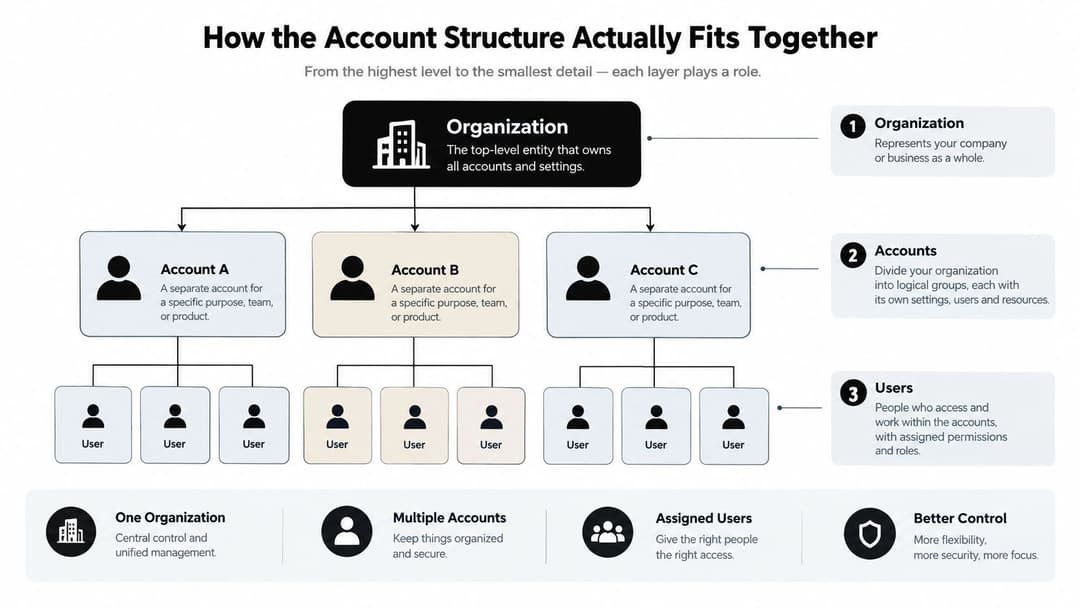
How the Account Structure Actually Fits Together
The easiest way to understand Meta's infrastructure is as a layered system. Each layer answers a different question: who owns the business, who can act, where media runs, and how customer behavior is recorded.
Use an office building as the mental model:
- Business Portfolio: The building's ownership shell. It holds the organization's assets and controls business-level access.
- People and partners: Staff, agencies, and vendors with keycards. Their access should match their job.
- Facebook Pages and Instagram accounts: The storefronts customers see.
- Ad accounts: Billing and media departments that buy placements and organize campaigns.
- Pixels and datasets: Measurement systems that record actions on websites and other connected surfaces.
- Product catalogs: Inventory systems that supply products to dynamic advertising formats.
The portfolio sits above the ad account. A single portfolio can own multiple ad accounts for different brands, markets, currencies, or operating teams. That flexibility helps agencies and multi-brand businesses, but it also creates a responsibility: decide what belongs together before the structure becomes difficult to unwind.
Ownership determines what can move
When you add a Page or pixel to a Business Portfolio, you establish a relationship between that asset and the organization. People receive access to assets, but they shouldn't become the asset's permanent owner merely because they created it.
Many teams get confused here. Giving an agency access to an ad account doesn't necessarily mean transferring ownership. Removing a user also doesn't automatically remove the campaigns, data, or connected assets they worked on. Before making changes, map the relationship between the portfolio, ad account, Page, Instagram account, pixel, dataset, catalog, and external tools.
An asset that becomes orphaned from the correct portfolio may not be easy to reassign later. For that reason, account setup should follow a written ownership rule: the business owns its core assets, employees receive role-based access, and partners receive access through the business rather than through personal credentials.
Design around business boundaries
A separate account can make sense when a brand needs a different currency, legal entity, billing owner, or operational team. It can also create fragmented history and additional administration. Use the Facebook ad account structure guide for scaling as a prompt to define the boundary deliberately, rather than opening a new account for every campaign experiment.
Ownership rule: Create assets in the Business Portfolio that should still exist when the person who set them up no longer works on the account.
Roles and Permissions That Shape Daily Work
Permissions determine who can publish an ad, change payment details, remove a user, or inspect performance. Meta's ad account model uses Admin, Advertiser, and Analyst roles, each with a different operational consequence. The official Meta help documentation on ad account roles defines the boundaries.
| Role | Can Do | Cannot Do | Governance Risk |
|---|---|---|---|
| Admin | Manage ads, payment methods, and other users' access | No meaningful restriction inside the account | A mistaken change can affect billing, security, and ownership |
| Advertiser | Create and edit ads and manage campaign activity | Change billing or user permissions | A contractor or buyer can publish unwanted spend |
| Analyst | View ads and reports | Edit campaigns, billing, or permissions | Low operational risk, but access can still expose sensitive performance data |
Admin is a control role
An Admin can change payment methods and manage access. That makes Admin appropriate for a small group of trusted operators who understand the organization's recovery process. It isn't a reward for seniority, and it shouldn't be assigned just because someone needs to read reports.
Advertiser is usually the practical role for a media buyer. It provides enough control to build, edit, and publish campaigns without giving the person authority over billing or the user list. Contractors still need clear boundaries around budgets, approval procedures, and offboarding.
Analyst suits executives, finance teams, clients, and stakeholders who need visibility without edit rights. It's often the safer starting point for a new partner until the team understands exactly what that partner must do.
Separate business access from account access
Business Portfolio roles operate above ad account roles. A person can hold both types of permission, which explains why removing an ad account role may not fully remove access. If access behaves unexpectedly, inspect both layers rather than assuming the ad account screen tells the whole story.
Audit the user list on a recurring schedule, remove former staff promptly, and require each person to use an identifiable account. Shared credentials erase the audit trail that tells you who changed a budget, payment method, or campaign.
Setting Up an Ad Account the Right Way
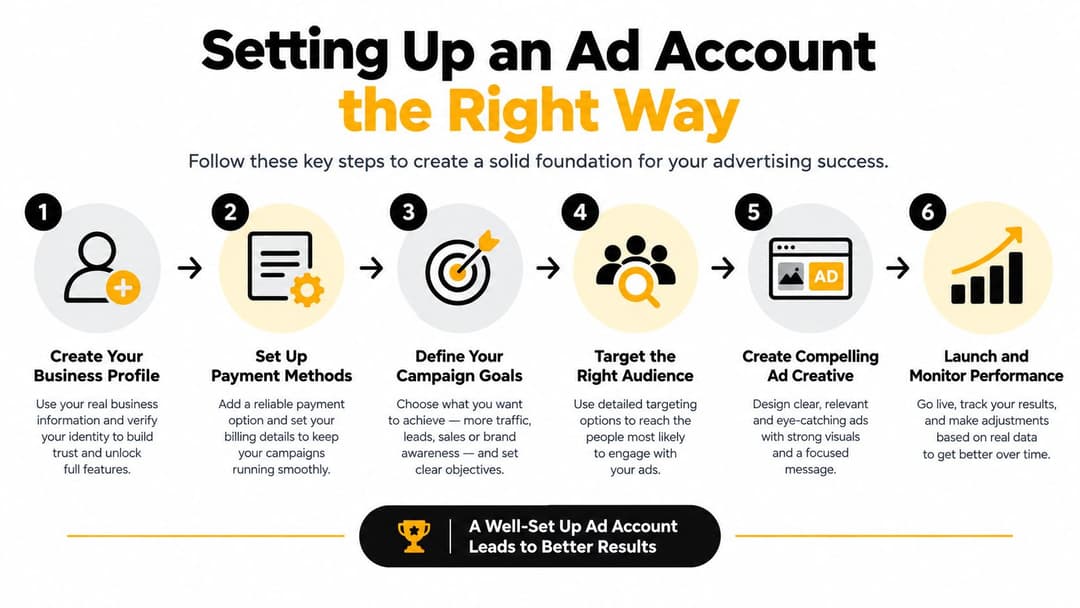
A careful setup starts before the first campaign. The team lead should decide who owns the Business Portfolio, who administers billing, which assets belong to the account, and what reporting conventions everyone will follow.
Use this sequence:
- Create or claim the account inside the Business Portfolio. Avoid making a personal profile the permanent owner of company infrastructure.
- Assign a limited Admin group. Choose people who can manage billing and recovery, not everyone involved in production.
- Connect the correct Page and Instagram account. Verify that the public-facing identity matches the brand and market.
- Install and test the pixel and Conversions API. The Meta Ads Conversions API setup guide provides implementation context, but your team still needs to test the events against real business outcomes.
- Confirm payment and spending controls. Complete payment verification before launch and document who receives billing alerts.
- Lock the naming and reporting conventions. Record the timezone, currency, market, brand, campaign purpose, and attribution assumptions before data accumulates.
Make irreversible choices consciously
Currency and timezone affect how spend and performance appear in reports. A mismatch between the account timezone and the company's reporting calendar can create confusing daily cutoffs. Currency choices can also complicate comparisons across markets, so decide whether the account should represent a business entity, a region, or a brand operation.
Naming should help a new team member understand the account without opening every campaign. Include the brand, market, objective, and lifecycle stage where useful. Keep the system stable enough that dashboards, exports, and automation rules can recognize it.
Treat account capacity as a finite resource
Meta says a person can manage up to 25 ad accounts, and an ad account can be assigned to up to 25 people. Businesses initially have a creation limit of one ad account until a confirmed payment is processed, while a closed account continues to count toward the limit, according to Meta's account creation and management guidance.
That makes account lifecycle management part of setup. Don't create disposable accounts for every experiment. Record why an account exists, who owns it, which markets it serves, and what happens if the operation closes.
Why Account-Level Measurement Is Harder Than It Looks
A campaign can show a large estimated audience and still reach fewer people than expected. Meta defines estimated audience size as the number of Meta accounts that may meet selected targeting criteria, not a guarantee of reachable users, according to its audience-size documentation.
That distinction makes the ad account an operational nervous system rather than a billing container. It connects targeting, delivery, event collection, reporting, and optimization. A weak result may stem from creative, the offer, audience construction, delivery conditions, broken event tracking, or imperfect estimation. Treating every problem as a targeting issue can lead a team to change account structure when the actual fault lies in the signal path.
| Pitfall | What Breaks | Account-Level Impact |
|---|---|---|
| Pixel event failure | Browser actions do not reach the account reliably | The team optimizes toward incomplete conversion signals |
| Server and browser duplication | One action may appear more than once | Reported results can look stronger than underlying activity |
| Inconsistent UTMs | External analytics cannot classify traffic consistently | Meta and analytics platforms disagree about campaign contribution |
| Privacy-related signal loss | Some user actions become harder to observe directly | Delivery and reporting rely more heavily on modeled information |
| Weak event definitions | The tracked action does not match the commercial goal | The account learns from activity that may not represent revenue |
Make the measurement problem operational
Incomplete conversion signals change how buyers manage risk. They may limit spend, delay scaling, or choose broader targeting because the account lacks enough evidence to distinguish small audience differences. Measurement quality therefore affects budget decisions, not only dashboard accuracy.
Use a fixed diagnostic order. Confirm that the event fires once and represents the intended action. Compare browser and server data, inspect deduplication, verify UTMs, and reconcile platform results with the CRM or analytics system. A comparison of Conversions API and Meta Pixel helps clarify how the two signal paths contribute to measurement.
Audience scale and measurement certainty answer different questions. A large potential pool does not prove that delivery is available, that events are complete, or that reported conversions match commercial outcomes. Design the account so those checks are documented and repeatable, rather than relying on a dashboard total that appears precise but rests on incomplete inputs.
Restrictions, Recoveries, and Governance Gaps
A restricted Meta ad account is more than a campaign error. Meta says a restriction can disable the account, its ads, and some related assets, with recovery potentially requiring identity confirmation, security steps, verification, and a review request, as described in its ad account restriction guidance.
The practical states vary, but teams commonly experience a progression from a warning or review, to limited delivery or disabled assets, to a full restriction that stops advertising activity. The underlying trigger may involve an ad, landing page, payment issue, identity concern, business asset, or account history. That's why changing the ad copy alone doesn't always solve the problem.
Diagnose access failures as ownership failures
Permission errors often look technical because a user can't see an asset or make a change. The root cause is frequently organizational. Once an ad account is added to a Business Portfolio, permission changes need to happen through that portfolio, and access can only be granted to people with active Facebook accounts.
Common weaknesses include:
- Orphaned administrators: A former employee remains the only person with meaningful control.
- Shared logins: The team can't prove who made a change or secure the account after a credential leak.
- Unclear portfolio ownership: An agency or employee controls an asset that the business needs to recover.
- Unmanaged integrations: A former tool retains access after the workflow ends.
Build recovery before you need it
Require two-factor authentication for people with account access, maintain more than one trusted administrator, and keep an ownership map outside Ads Manager. Store escalation contacts, business verification records, payment details, and the internal approval path in a controlled company location.
Run access audits on a schedule. Test whether the right people can access the Page, Instagram account, ad account, pixel, dataset, catalog, and reporting tools. If a restriction occurs, preserve the evidence, secure the account, complete requested verification, and submit a clear review request rather than creating a replacement account immediately.
Integrating Tools Without Breaking Account Hygiene
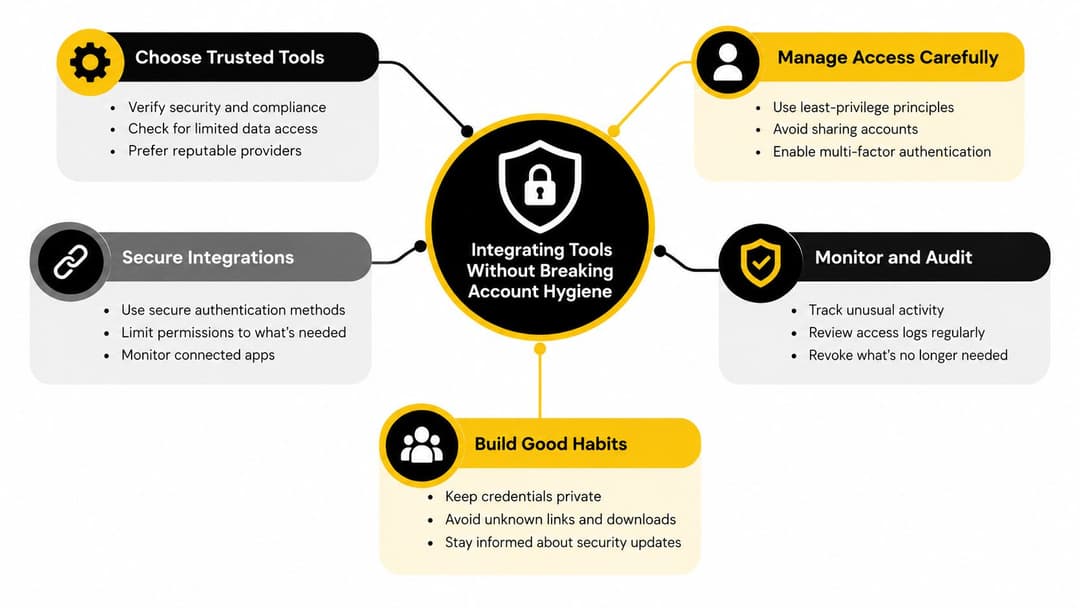
Every connected tool creates an access decision. A creative platform may need to retrieve assets, a reporting dashboard may need read access, and an automation system may need permission to create or edit campaigns. Those workflows are useful only when the team knows what each tool can do, who owns the connection, and how to revoke it.
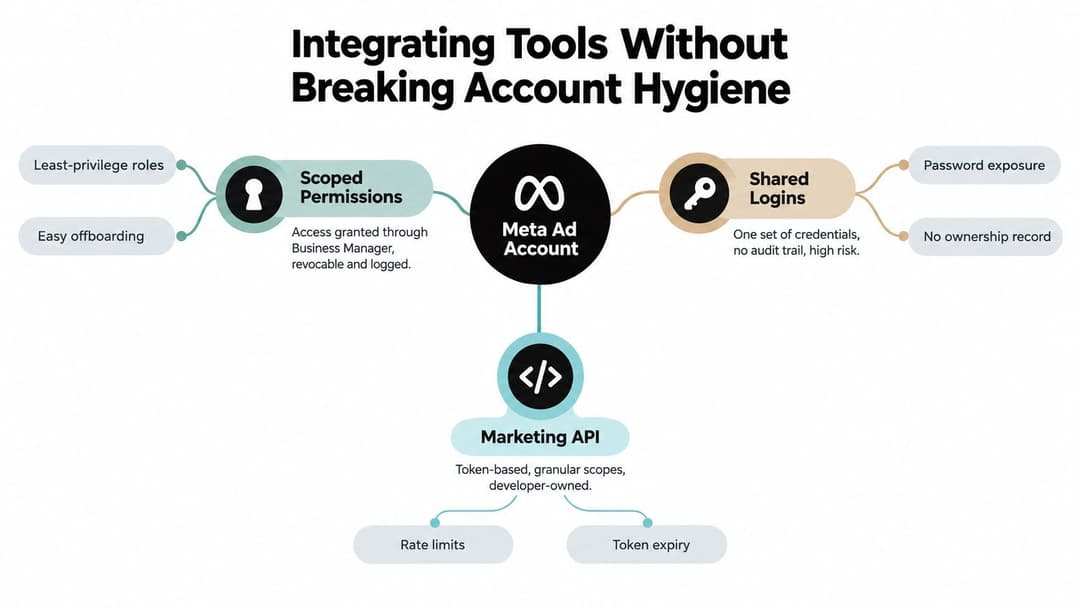
There are three broad connection patterns:
- Business Manager access: The business grants a defined role to a person or partner. This limits the blast radius and leaves a clearer ownership trail.
- Shared credentials: Several people use one login. It's quick to arrange, but it removes individual accountability and makes offboarding unsafe.
- Marketing API access: A software system uses tokens and defined scopes. This can support structured automation, but developers must manage token expiry, rate limits, error handling, and field permissions.
Give every integration a clear job
Create an inventory with four fields: tool name, owner, access level, and data direction. “Data direction” forces useful clarity. Is the tool only reading campaign results, or can it publish ads, change budgets, access audiences, or remove assets?
A reporting dashboard usually needs less authority than a campaign builder. A creative library may need access to media assets without permission to alter billing. An automation workflow needs an explicit stop condition, an approval process, and a documented recovery path if a token expires.
AdStellar AI is one example of a connected workflow. It can connect to a Meta Business account, retrieve historical campaign data and creative assets, work with custom audiences, and launch or manage campaigns from supported connected ad accounts. Teams should evaluate that connection using the same ownership, scope, and offboarding rules they apply to any other platform.
Remove dormant access
Unused integrations are not harmless clutter. They create uncertainty during an incident because nobody remembers why a tool has access or whether its connection still works. Review integrations after team changes, account restructures, and major website or analytics changes.
The operating standard is simple: every tool must have a named owner, a defined permission scope, a business purpose, and an exit procedure. For a broader comparison of platform-native and external workflows, see this guide to Meta-native tools and third-party ad software.
Bringing It All Together as a Working Framework
A dependable Meta ad account functions as the operational nervous system of paid social. Governance, permissions, measurement, and connected tools meet at the same boundary, so the account needs deliberate design rather than inherited settings.
Start with four working disciplines:
- Structure: The Business Portfolio owns the appropriate assets, and each ad account serves a clear business boundary.
- Access: Admin, Advertiser, and Analyst permissions match actual responsibilities.
- Measurement: Pixel, server, CRM, and external analytics signals are checked against commercial outcomes.
- Integration: Each connected tool has a defined scope, owner, data flow, and removal process.
These disciplines support one another. A clear hierarchy makes access easier to audit. Appropriate access protects measurement assets. Reliable measurement helps the team judge campaign changes. Controlled integrations preserve the account's audit trail and reduce the risk that an automated action triggers a restriction.
Keep the operating record outside Ads Manager
Document the account name, owner, timezone, currency, connected assets, naming convention, data sources, administrator list, approval process, and recovery contacts. Include onboarding instructions for access requests and an offboarding checklist for departing employees.
Review the record on a schedule. Audit pixels and datasets after site changes, check catalogs after product-feed changes, and review integrations when a vendor contract ends. Run a recovery exercise before a restriction exposes gaps under pressure.
Because the account boundary sits beneath every surface and operator a business manages, accidental ownership and uncontrolled access become more expensive as programs grow. Treat the account like infrastructure, not a billing container. The team should know who can act, which assets are connected, how results are validated, and how access can be removed.
A Meta ad account should be easy to explain, easy to audit, and possible to recover without relying on one person's memory.
Open the account and record its owner, administrators, connected assets, payment setup, measurement path, and active integrations. Fix the highest-risk gap first, then turn the result into a repeatable operating standard for every brand and market you manage.
AdStellar AI connects with Meta ad accounts to pull historical campaign data, access creative assets and custom audiences, and support campaign creation and management from a centralized workflow. Teams evaluating it should map its permissions and data flows to the same governance record used for other connected tools. Visit AdStellar AI to review how it fits into an existing governance process.