
When you're looking up AdCreative AI reviews, you’re really just trying to answer one core question: can this thing actually make my ads better and save me time? The short answer is yes, but—and this is a big but—it’s not for everyone.
AdCreative.ai is built for a very specific kind of marketer. It’s an absolute powerhouse for churning out a massive volume of ad creatives with almost no manual effort. If your team needs speed and scale above all else, this is a tool you need to know about.
Is AdCreative AI The Right Tool For Your Campaigns?
Let's cut through the hype. You need to know if AdCreative.ai is a smart investment for your ad budget or just another shiny object promising the moon.
At its heart, the platform is a creative assembly line. You feed it the raw materials—your logos, product shots, brand colors, and key messages—and its AI engine spits out hundreds of ad variations in minutes. It's that simple.
This approach is a lifesaver for marketers whose biggest headache is creative production. If you’re constantly fighting to get enough assets for A/B tests or struggling to refresh campaigns before ad fatigue kills your performance, AdCreative.ai is a legitimate solution. But that intense focus on volume comes with some trade-offs.

A Quick Glance Verdict
To give you a quick snapshot, I've broken down how AdCreative.ai stacks up against the criteria that really matter for performance marketers. This table gives you a high-level score so you can see where it shines and where it falls a bit short.
AdCreative AI At a Glance
| Criterion | Rating (out of 5) | Brief Summary |
|---|---|---|
| Creative Quality | 3.5/5 | Good for standard display and social ads, but can lack brand nuance and originality. |
| Speed & Scale | 5/5 | Unbeatable for generating hundreds of creative variations in a very short time. |
| Ease of Use | 4.5/5 | Extremely intuitive interface that requires virtually no design skills to get started. |
| Integration | 3/5 | Basic integrations with major ad platforms, but lacks deeper campaign management features. |
The takeaway here is pretty clear: AdCreative.ai is a production tool first and foremost. It’s brilliant at generating options, but it’s not designed to be an all-in-one campaign management suite. Getting that distinction right is the key to having the right expectations.
For a wider view of where this tool fits in the market, check out our guide on the best AI ad platforms. That piece compares different tools and their approaches. This review will build on that foundation, getting into the nitty-gritty of AdCreative.ai to help you make a fully informed call.
What Is AdCreative AI And How Does It Really Work
Before we get into the nitty-gritty of this review, we need to cut through the marketing fluff and get real about what AdCreative.ai actually is. It’s not a magic button that runs your entire marketing strategy. Think of it less as a strategist and more as a highly specialized, incredibly fast creative production assistant. Its main job? To churn out a massive volume of ad visuals, and to do it quickly.
Picture a sophisticated assembly line, but for ad creatives. As the marketer, you’re in charge of providing the raw materials—the fundamental building blocks that make your brand, well, your brand.

The Assembly Line Workflow
The whole process kicks off when you upload your core brand assets. This is the crucial first step where you give the AI the context it needs to get to work.
Your Inputs (The Raw Materials):
- Logos: Your main logo and any secondary versions you use.
- Color Palettes: The specific hex codes that define your brand’s look and feel.
- Product Images: High-quality shots of whatever you’re selling.
- Core Messaging: The key headlines, value propositions, and calls-to-action that you know work.
Once you feed it these inputs, the AI engine kicks into gear. It starts rapidly assembling countless variations of display banners and social media ads. The platform mixes and matches your images with different layouts, text placements, and background colors, effectively spitting out hundreds of unique ad combinations in just a few minutes. It's a pure-play in automated creative production, designed to smash the bottleneck that manual design work always creates.
"The primary value of AdCreative AI lies in its ability to scale creative output, allowing teams to test more variables than would be humanly possible. It's about quantity and speed, providing the fuel for data-driven testing."
This workflow is worlds away from a tool that manages your campaigns or optimizes your bidding strategy. AdCreative.ai is laser-focused on one thing: the creative generation part of your advertising campaign.
From Inputs To Actionable Outputs
The platform doesn’t just spit out a jumble of random images. It organizes them into formats that are immediately useful for advertisers, generating creatives in all the standard ad sizes you need for major platforms like Meta (Facebook and Instagram) and Google Ads.
This means you can download a complete set of assets, ready to upload, dramatically slashing the time it takes to go from a new idea to a live campaign. This speed is probably its biggest selling point. A task that might take a design team a few days—like creating 50 different ad variations for a product launch—can be knocked out in under an hour.
The tech behind this is a form of generative AI that’s been trained on a massive dataset of successful ad creatives. It has learned what kinds of layouts, color contrasts, and compositions tend to grab attention and get clicks. The concept is pretty similar to Dynamic Creative Optimization (DCO), where various ad components are mixed and matched to find the winning formula. If you want to dive deeper into the mechanics, our detailed guide explains exactly what Dynamic Creative Optimization is and how it all works.
To really see where AdCreative.ai fits, it helps to look at the bigger picture of artificial intelligence in affiliate marketing, where speed and personalization are everything. Getting this foundation right is key before we start dissecting its specific features—and its limitations—in the rest of this review.
A Deep Dive Into AdCreative AI Features
Alright, so you get the big picture of how AdCreative.ai works. But what about the tools you'll actually be clicking on every day? To give you a real sense of the platform, let's break down the core features from a performance marketer's point of view. This isn't just a list; it's a look at how each piece fits into your actual campaign workflow.
Think of the platform as being built on a few key pillars, each designed to tackle the most draining parts of creative production. These are the specialized stations on that creative assembly line we talked about earlier.
The Creative Generator Engine
At the very center of it all is the Creative Generator. This is the engine that pumps out the huge volume of ad visuals the tool is famous for. Once you’ve fed it your brand assets—logos, colors, fonts, and a few key images—this is where the action starts.
You kick things off by telling it your campaign goal and who you're targeting, then pick the ad formats you need, like social posts, stories, or display banners. The AI takes it from there, mixing and matching your assets into hundreds of unique combinations. It plays with different layouts, crops your images in new ways, shifts text around, and experiments with backgrounds, spitting out a massive library of options in minutes.
Here’s a look at the AdCreative.ai dashboard in action, showing the sheer variety it can cook up from a single brief.
This really nails the platform's core promise: churn out a ton of on-brand creative variations with almost no manual effort, all ready for you to start testing.
AI-Powered Text Generation
It’s not just about the visuals. AdCreative.ai also has a Text Generator to handle the ad copy. This tool spits out headlines and descriptions meant to pair with the images it just created. It looks at your project brief and target audience to suggest copy that follows classic direct-response formulas—think benefit-driven language and clear calls-to-action.
It’s a solid starting point, especially when you need to test at a high volume, but the copy can sometimes come off a little generic. It does a great job with straightforward, punchy text but might miss the mark if your brand has a very specific voice or needs to convey complex emotional undertones.
The real magic happens when you combine the text and creative generators. You can instantly pair dozens of visual concepts with multiple copy angles, creating a massive pool of ready-to-test ads without writing a single word yourself.
The AI Performance Scoring System
This is one of the more interesting features: the AI Performance Scoring system. After the platform generates a batch of creatives, it gives each one a score from 1 to 100. This number is essentially the AI's prediction of how well that specific ad will perform, based on its analysis of a gigantic dataset of past ad campaigns.
The system is looking at things like:
- Color Contrast: Do the colors pop and grab attention?
- Text Readability: Is the copy easy to read at a glance?
- Image Composition: Are the key elements balanced and well-placed?
- CTA Prominence: How obvious is the call-to-action?
This score is an incredibly useful filter. It helps you decide which of the hundreds of generated ads to test first. It’s not a guarantee of a winner, of course, but it drastically narrows down the options, saving you time and ad spend you might have wasted on weaker creatives. This predictive power is central to modern marketing, and you can see how other platforms handle this in our breakdown of AI optimization features.
Centralized Brand Asset Management
If you're at an agency or juggling multiple brands in-house, the Brand Asset Management feature is a lifesaver. Instead of uploading your logos, colors, and fonts over and over again for every project, you can set up distinct "Brands" inside the platform.
Each brand profile acts as a central locker for all its assets. When you fire up a new project, you just pick the right brand, and the AI automatically pulls in all the correct files. This keeps everything consistent across all your ads and cuts out the tedious, repetitive setup that can really slow you down. It's a simple idea, but it makes managing multiple clients or product lines so much more efficient.
The Pros And Cons: A Balanced Perspective
No tool is a silver bullet, and an honest look at AdCreative.ai means seeing both its massive strengths and its real-world limitations. The platform is a beast in certain areas, but it comes with trade-offs that every performance marketer needs to understand before jumping in.
The core decision comes down to weighing its incredible speed against potential creative constraints. Let’s break down where it truly shines and where you might feel the pinch.
The Advantages: Speed And Scale
The biggest win with AdCreative.ai is its sheer velocity. The platform can churn out hundreds of unique ad creatives in the time it would take a designer to build just a few. It’s not even a fair fight.
This speed gives you a massive competitive edge in testing. Forget launching a campaign with three or four variations—you can go live with fifty. This lets you gather performance data way faster, pinpoint winning concepts in days instead of weeks, and get ahead of ad fatigue before it kills your campaigns.
For teams without a dedicated in-house designer, this is a total game-changer. It makes high-volume creative production accessible, removing a huge bottleneck and potentially saving thousands on freelance or agency fees.
The value proposition is simple: AdCreative.ai lets you test more, learn faster, and scale your campaigns without scaling your design team. It's a production powerhouse built for rapid-fire iteration.
The Disadvantages: Creative Sameness And Brand Nuance
But that high-speed production model has a clear downside: the risk of your ads looking like everyone else's. When thousands of brands are using the same AI engine and templates, your creatives can start to feel generic and just blend into the noise.
The AI is trained on what's worked in the past, so it naturally leans toward safe, formulaic designs. It has a tough time capturing the subtle nuances, unique personality, and authentic storytelling that make a brand memorable. If your brand relies on a distinct aesthetic or a deep emotional connection, you’ll probably find the platform’s output too rigid.
This touches on a critical gap between how advertisers see AI and how consumers actually feel. A recent study revealed that while 82% of ad execs think young consumers are positive about AI-generated ads, only 45% of those consumers agree. That 37-point disconnect is a serious warning sign about relying too heavily on automation and losing the human touch that builds real brand loyalty. You can see more data on this widening gap in this 2026 digital advertising trends report.
This isn't just an AdCreative.ai problem; it's a central theme in the broader AI vs. traditional advertising methods debate, where machine efficiency has to be balanced with human creativity.
Here’s a simple breakdown of who this platform is built for and who might want to look elsewhere.
AdCreative.ai Is A Great Fit For:
- High-Volume Testers: Marketers who need a constant firehose of new creatives for A/B testing.
- Small Teams & Solopreneurs: Businesses without the budget or need for a full-time design team.
- Direct Response Campaigns: Advertisers focused on clear calls-to-action where performance data is king.
AdCreative.ai May Be A Poor Fit For:
- Prestige & Luxury Brands: Companies whose brand identity is built on unique, bespoke, and highly artistic visuals.
- Complex Storytelling: Campaigns that need nuanced emotional narratives that an AI just won't get.
- Teams with Strong In-House Design: Creative departments with a solid workflow might find the tool more restrictive than helpful.
AdCreative AI Alternatives: How Does It Stack Up Against AdStellar AI?
No tool is an island, and some of the best insights into AdCreative AI come from seeing how it performs against others on the market. To really understand where it shines—and where it doesn’t—we need to compare it to platforms with a totally different approach. For performance marketers, one of the most important matchups is AdCreative AI versus a more complete solution like AdStellar AI.
These two platforms really represent two different ways of thinking about AI in advertising. AdCreative AI is a pure, powerful creative factory. Its entire job is to pump out a massive volume of ad visuals and copy variations at an incredible speed. It’s fantastic at keeping your campaigns fed with a constant stream of new assets to test.
AdStellar AI, on the other hand, is an integrated campaign execution platform built from the ground up for Meta advertising. It doesn't just generate creatives; it handles the entire campaign lifecycle—from automated launching and audience testing to continuous optimization—all in one place. It’s less of a factory for parts and more of the entire assembly line, taking raw ideas and turning them into fully optimized, performance-driven campaigns.
Core Philosophy: The Factory vs. The Operating System
Here’s a simple way to think about it: AdCreative AI hands you a box full of high-performance engine parts. You get top-quality pistons, gears, and spark plugs—way more than you could ever build yourself. But you’re still the one who has to assemble the engine, put it in the car, and figure out how to drive it to win the race.
AdStellar AI, in contrast, gives you a fully assembled, self-driving race car. It doesn’t just build the engine; it connects it to the wheels, fills the tank, and uses its own AI to navigate the fastest route to the finish line based on real-time track conditions. They solve very different problems for different kinds of marketers.
This infographic breaks down the core pros and cons of the AdCreative AI model.
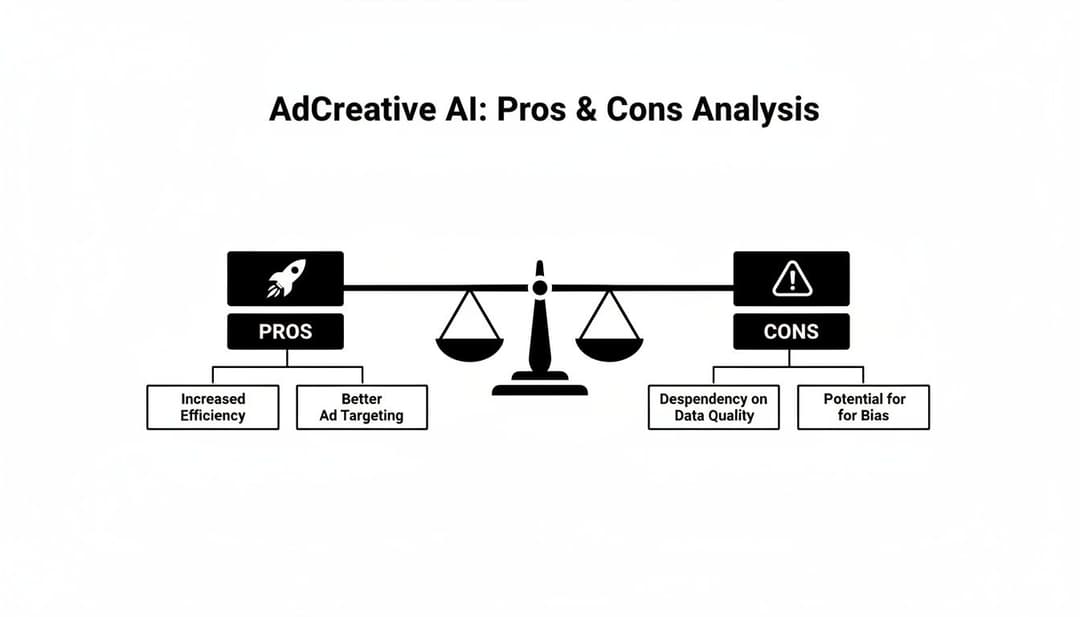
As you can see, the platform’s main trade-off is its incredible speed and scale versus its limits when it comes to creative nuance and deeper strategic control.
Feature And Workflow Comparison
The industry is moving toward automation at a breakneck pace, which makes picking the right tool more critical than ever. Recent data shows that a whopping 83% of ad executives are now using AI in their creative process, a huge leap from just 60% the year before. And with 64% of leaders pointing to cost efficiency as the top benefit, platforms that can automate bulk ad creation are quickly becoming the new normal.
To see how these two platforms really differ in day-to-day use, let's put them side-by-side.
AdCreative AI vs AdStellar AI: A Feature Comparison
This table compares the core functionalities and target use cases of AdCreative.ai and AdStellar AI for performance marketers.
| Feature | AdCreative AI | AdStellar AI |
|---|---|---|
| Primary Function | High-volume creative asset generation for multiple platforms. | End-to-end campaign creation, launch, and optimization for Meta. |
| Workflow | Generate assets, download them, then upload to ad platforms. | Create assets, build campaigns, and launch directly to Meta Ads. |
| Optimization | AI scores creatives based on predictive performance before launch. | AI optimizes live campaigns based on real-time performance data. |
| Ideal User | Marketers needing creative assets for various channels. | Performance marketers focused exclusively on scaling Meta ads. |
For a broader perspective on where AdCreative AI fits in the wider ecosystem, it’s helpful to check out reviews of the best AI content creation tools currently available.
The distinction in the table above is critical. If your main bottleneck is simply getting enough ads made, AdCreative AI is an incredible tool. It will flood your pipeline with assets ready for testing.
But if your biggest challenge is managing the complexity of testing hundreds of creative, copy, and audience combinations on Meta while scaling the winners, you need a more holistic platform. For a closer look at that all-in-one approach, you can learn more about how AdStellar AI streamlines the entire process from start to finish.
Ultimately, the choice boils down to where you need automation the most. Do you need a creative assistant, or do you need a campaign co-pilot? Answering that question will point you straight to the right tool for the job.
The Final Verdict: Is AdCreative.ai Worth It For You?
Alright, we’ve torn down the features, stacked it up against the competition, and weighed the good with the bad. After all that, our AdCreative.ai review has to answer the big question: should you actually invest in this tool?
The answer isn't a simple yes or no. It really boils down to identifying your single biggest marketing bottleneck.
Think of AdCreative.ai as a specialist—a high-speed, high-volume creative production factory. Its one job is to churn out a massive number of ad visuals and copy variations at an incredible clip. And it does that one job exceptionally well.
Who Should Buy AdCreative.ai?
This platform is a game-changer for a few specific types of users who need speed and scale more than anything else. You’ll see a serious return if you're a:
- Small Business or Startup: Don't have a design team on payroll? AdCreative.ai gives you an instant, always-on stream of professional-looking creatives without the hefty price tag of designers or agencies.
- Freelancer or Solopreneur: Juggling multiple clients means your time is gold. The ability to quickly generate on-brand assets saves countless hours, letting you focus on strategy and keeping your clients happy.
- High-Volume E-commerce Store: If your entire strategy is built on constantly testing new product ads and battling ad fatigue with fresh visuals, the sheer output of this platform is a lifesaver.
For anyone in these camps, AdCreative.ai solves the fundamental problem of creative supply. It completely removes the bottleneck that slows down testing and lets you move at the speed you want to.
The core value is crystal clear: AdCreative.ai is for teams whose biggest headache is simply getting enough ad assets made quickly. It's a tool built for creative quantity and velocity.
But if your needs are more complex, its limitations start to show.
For dedicated performance marketers and agencies who live and breathe Meta ads, the focus is usually on deep integration, iterative testing, and holistic campaign management. Here, a more comprehensive solution makes more sense. A tool like AdStellar AI, which bundles creative generation with automated campaign launching and optimization, offers a much more integrated workflow from start to finish.
Ultimately, your decision comes down to what you're trying to achieve. If you just need a firehose of creative assets to fuel your campaigns, AdCreative.ai is absolutely worth it. But if you need an end-to-end system to build, manage, and optimize complex Meta campaigns, you’ll be better served looking elsewhere.
Got Questions About AdCreative AI?
Even after a deep dive, you probably still have a few practical questions kicking around. It’s one thing to see the features, but it's another to know how it’ll slot into your actual day-to-day workflow. This is where the rubber meets the road for most performance marketers.
Let's tackle some of the most common questions we hear, from data privacy and creative ownership to how it plays with your existing ad accounts.
Can AdCreative AI Connect To My Ad Accounts?
Yes, it can. AdCreative AI plugs directly into the big players: Meta (for Facebook and Instagram), Google Ads, and Pinterest. This connection is a huge time-saver, letting you push your finished creatives straight into your campaigns without the hassle of downloading and re-uploading everything.
But it's crucial to understand what this integration doesn't do. It’s essentially a delivery pipeline for your ads. You can’t use it for in-depth campaign management, live optimization, or digging into performance analytics. For that, you’ll still live inside your native ads manager. Think of it as a handy shortcut, not a command center.
Who Owns The Creatives Generated By The AI?
You do, full stop. According to their terms, you get 100% ownership and commercial rights to every creative you generate on the platform. This is a massive relief for agencies and brands who are rightly concerned about intellectual property.
Once you’ve created an ad, it’s yours. You can run it on any channel you want, for as long as you want, with zero strings attached—no weird licensing fees or future restrictions. This is pretty standard for reputable AI tools and means you can scale up your creative engine without worrying about legal headaches down the line.
The platform is the tool, not the co-creator. You bring the brand assets and the strategy, the AI builds the ad, and the final result belongs entirely to you.
What Kind Of Data Does AdCreative AI Use?
AdCreative AI runs on two main types of data. First, there's the data you feed it. This includes your brand’s raw materials: logos, color codes, product shots, and the copy prompts you write. This is what it uses to build ads that actually look like they came from your brand.
Second, the AI model itself was trained on a colossal dataset of millions of anonymized, high-performing ads from all over the web. This is the secret sauce behind its predictive scoring. The AI has learned to spot the patterns that make ads work—things like color contrast, copy placement, and button design—and uses that knowledge to give your new creatives a "potential performance" score. Critically, it does not use your private campaign data to train its general model for other customers.
Ready to stop guessing and start scaling your Meta campaigns? AdStellar AI combines AI-powered creative generation with automated campaign launching and optimization. Stop juggling tools and start driving results. Launch your next winning campaign with AdStellar AI.


