
It’s the notification every advertiser dreads seeing: Facebook ads account disabled. This means Meta has completely shut off your advertising access. All your campaigns grind to a halt, and you’re blocked from launching anything new. It’s usually the result of a policy violation, a payment hiccup, or some unusual activity that spooked Meta's automated systems.
Why Your Facebook Ad Account Was Disabled
You log into Ads Manager, and there it is. The infamous ‘red bar of death’ glaring back at you from the top of your dashboard. It’s a gut-punch moment. Your campaigns are off, revenue has flatlined, and a wave of panic starts to set in.
A disabled Facebook ad account is more than just a minor headache; it's a direct threat to your business, especially if Meta is one of your main channels for acquiring customers.
What makes it even more frustrating is the silence. One minute you’re scaling successful campaigns, the next you’re locked out with no clear reason why. This usually happens because Meta depends almost entirely on automated bots to police its massive, complex, and constantly shifting advertising policies. These systems scan millions of ads every day, and frankly, they often get it wrong.
Common Triggers for Account Disablement
We've seen it all. A single ad, an element on your landing page, or even something as simple as your payment history can be enough to trigger a full account shutdown. While some violations are glaringly obvious, many are surprisingly subtle and can trip up even the most seasoned marketers.
Knowing the most common culprits is your first step toward figuring out what went wrong and how to prevent it from happening again.
To help you quickly diagnose the problem, here’s a breakdown of the most frequent reasons we see accounts get flagged.
Common Triggers for Ad Account Disablement
| Violation Category | Specific Example | Why It's Flagged |
|---|---|---|
| Ad Policy Violations | "Struggling with debt?" or "Feeling anxious?" | This is considered calling out personal attributes, which is a major policy no-go. |
| Payment & Billing | Using a virtual credit card or having a payment fail multiple times. | Meta's system sees this as high-risk and may suspect fraudulent activity. |
| Misleading Claims | "Lose 10 lbs in 10 days!" or promising guaranteed financial returns. | Unrealistic or sensationalized claims are an immediate red flag for the AI. |
| Landing Page Issues | The landing page has pop-ups, redirects, or doesn't match the ad's offer. | Meta requires a consistent and safe user experience from ad click to landing page. |
| Suspicious Behavior | Suddenly increasing your ad spend by 10x overnight. | Drastic changes in spending patterns can look like a hacked or compromised account. |
| Account History | Adding a new admin who has a history of disabled accounts. | Meta associates your account with the "bad history" of the new user, creating risk by association. |
Understanding these triggers is crucial. It’s not just about what you say in the ad itself, but the entire user journey and your account's operational patterns.
The big lesson here? Proactive compliance is your best defense. We’ve consistently found that shifting from aggressive, direct-response claims to more curiosity-driven copy and emotional storytelling can slash your risk of getting banned.
The Role of Automated Enforcement
Meta's heavy reliance on AI for policing its platform is a double-edged sword. On one hand, it’s the only way they can manage the sheer volume of ads. On the other, the AI lacks human context and nuance.
Your ad for a new skincare cream might get flagged for making unproven health claims simply because the bot picked up on a few keywords it associates with violations, even if your ad is perfectly compliant.
The numbers don't lie. While Meta typically rejects 1–5% of all submitted ads for policy issues, that rate can easily jump to 10-15% or higher in sensitive categories like health, finance, or wellness. If you’re a brand launching hundreds of ad variations, that risk adds up fast. The only way to navigate this is to know the rules inside and out, which means a deep dive into the official Facebook Ads Policy is an absolute must for any serious advertiser.
Your Immediate Action Plan For Account Recovery
That flash of red. The dreaded "ad account disabled" notification. It’s enough to send any advertiser into a full-blown panic. But the absolute worst thing you can do right now is make a rash move.
Frantically creating a new account or firing off an angry message will only dig you into a deeper hole. Your first job is to take a breath, stay calm, and start playing detective.
The first place you need to go is the Account Quality dashboard. This is Meta’s command center for every restriction, policy flag, and account issue. It's your only source of truth, even if the explanations are frustratingly vague sometimes. Whatever you do, resist the urge to immediately smash that "Request Review" button. We need a plan first.
Diagnose the Core Problem
Once you're inside the Account Quality section, it's time to figure out exactly what’s broken. The restriction might not even be on your ad account. Meta can flag your personal profile, the ad account, or the entire Business Manager. Each one requires a completely different approach.
- Personal Profile Restriction: This is often the most serious. It means you, the individual, are blocked from advertising. If you're the only admin, this can lock you out of every single ad account and Business Manager you have access to.
- Ad Account Restriction: This is the most common one we see. The problem is isolated to one specific ad account, usually because of a flagged ad, a weird payment issue, or too many rejected ads in a short period. Your other accounts and assets are generally safe.
- Business Manager Restriction: This is when Meta flags your entire business entity. It's less common but can happen after repeated ad account bans or if their system suspects fraudulent activity tied to your business.
Knowing which asset got hit is everything. You can't fix a personal profile ban with an ad account appeal, so this first step dictates your entire strategy.
This decision tree gives you a visual path for those first crucial moments, helping you figure out if you're dealing with a policy mess or a simple payment snag.
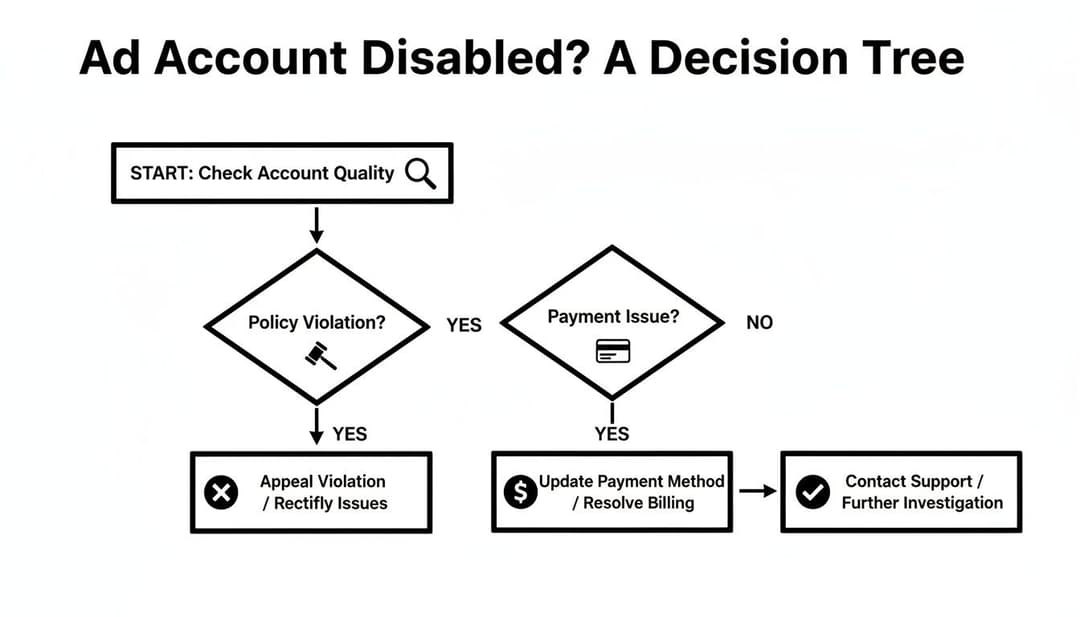
As you can see, the path always starts at the Account Quality dashboard. From there, you follow the clues to diagnose the real issue and choose the right appeal process.
Crafting a Professional and Effective Appeal
Alright, you’ve done your homework and have a good idea of what went wrong. Now it's time to request that review. This appeal is your one real shot to get a human to look at your case, so you have to make it count.
Generic, emotional, or demanding messages get tossed in the virtual trash bin instantly. You need to be professional, clear, and helpful.
Here’s what your appeal needs to do:
- Be Respectful and Professional: Always use a polite, calm tone. You're talking to a person who deals with angry advertisers all day. Be the one who stands out by being professional.
- Be Concise and Factual: Get straight to the point. State the facts, explain that you've reviewed the policies, and you believe it was a mistake or a misunderstanding. No long, rambling stories.
- Be Proactive: Show them you're a good partner. Mention that you’ve already paused your campaigns and are conducting an internal review to ensure compliance. This shows you take their rules seriously.
Here’s a template that actually works: "Hello Meta Team,
My ad account (ID: 123456789) was disabled recently. I've taken the time to carefully review our recent activity against Meta's Advertising Policies, and I honestly believe this may have been done in error.
Our business is committed to maintaining full compliance. As a proactive step, we have paused all campaigns to conduct an internal audit and ensure everything aligns with your guidelines.
Could you please provide any additional details on the specific policy concern and grant us a second review? We are ready to make any necessary changes immediately.
Thank you for your time and consideration."
Submitting a thoughtful appeal like this dramatically increases your odds of getting a real review instead of an automated "no." It signals that you're a serious advertiser, not a scammer trying to bend the rules. For more in-depth strategies, there are some excellent recovery resources available from other experts in the field.
A solid grasp of the platform's structure is also a massive advantage. You can get a better sense of the ecosystem by reading our guide on what is Facebook Ads Manager.
Once you've sent your appeal, the waiting game begins.
Escalating Your Appeal When The First Request Fails
So, you sent off your carefully crafted appeal, waited a day or two, and then it landed in your inbox: "After a final review, your ad account will not be re-enabled." It’s a frustrating, automated slap in the face. This happens all the time, usually because your first appeal never even saw a human—it was just scanned by a bot.
This is the exact moment where most advertisers throw in the towel. Don't be one of them. Your goal now isn't just to appeal again; it's to start a persistent, professional escalation. You have to get your case in front of an actual person with the power to overturn that automated decision.
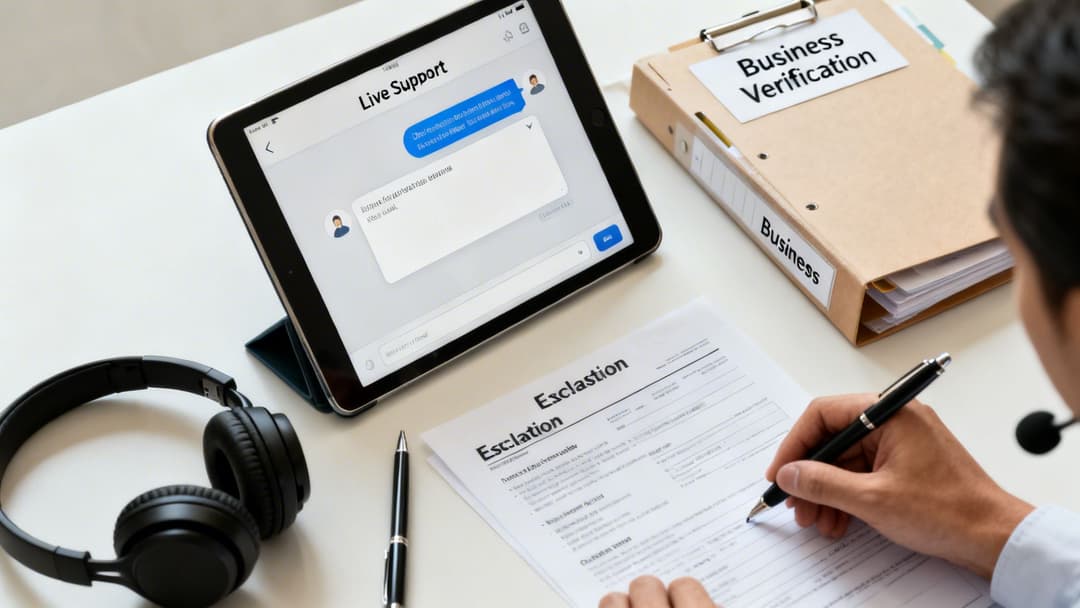
This is where the real work starts. The mission is to find a direct line to a human, and your best bet is usually through Meta Pro Support live chat.
Connecting With A Live Support Agent
Getting to live chat isn't always a straight shot. The option can seem to appear and disappear based on Meta's support traffic and even your account's status. The most reliable path is through the Meta Business Help Center. Hunt for a button that says "Contact support team" or "Get Started."
If chat is available, you’ll be connected with a Tier 1 support agent. Think of them as the gatekeepers. Their main job is to field basic questions, but they are your only way to a manual review. Your job is to calmly and clearly convince them to escalate your case.
Before you even click "start chat," get your info ready. Being prepared shows you’re a serious business, not some fly-by-night account.
- Your Ad Account ID: Have it copied and ready to paste.
- Your Business Manager ID: This is critical, especially if the problem might be tied to your Business Verification.
- Case ID from Your First Appeal: Reference this to prove you've already gone through the standard channels.
- Business Verification Documents: Keep your business license, articles of incorporation, or recent utility bills handy. Proving you're a real, legitimate business goes a long way.
When the chat window opens, stay cool and professional. State the problem concisely, mention your previous appeal, and explain that you believe the facebook ads account disabled status is an error.
Key Insight: The support agent wants to close the ticket. Your job is to give them a compelling reason not to. The magic phrase is, "I understand this might be outside of what you can directly handle, but could you please escalate this to the internal team for a manual review?" It’s respectful and shows you get how their system works.
Articulating Your Case For Manual Review
Once you’ve asked to escalate, the agent will probably ask for more information. This is your shot to make your case to a human. Be ready to explain exactly why you think the shutdown was a mistake.
- Did a bot misunderstand one of your ads? Explain the context and intent behind it.
- Was there a payment issue that's since been fixed? Show them proof of payment.
- Are you a long-time advertiser with a solid track record? Politely mention your history and ad spend.
The agent's role here is to package your side of the story for the internal review team. Make their job easy by providing clear, factual points. Emotional pleas and threats will get you nowhere—in fact, they usually backfire. After the chat, you should get a new case ID. Document everything: agent names, case numbers, and dates.
If live chat isn’t available or the first agent is a dead end, don’t give up. Try again the next day at a different time. Persistence is key. When you're dealing with multiple accounts, these shutdowns can become a huge bottleneck; learning how to manage multiple Facebook ad accounts properly from the start can give you structural advantages that minimize this chaos.
Getting your ad account back online is the immediate goal, but the real win is making sure this kind of fire drill never cripples your business again. Reacting to a disabled Facebook ad account is pure chaos—it's stressful, it costs you money, and it grinds everything to a halt. Building a system that can absorb these shocks isn’t just good practice; it's a massive strategic advantage.
The idea is to create an advertising operation that's "anti-fragile," where one disabled account becomes a minor hiccup, not a full-blown catastrophe. This starts by moving past the idea of having a single ad account as your only point of failure. The bedrock of a resilient setup is a properly configured and fully verified Meta Business Manager. Think of it as your command center—it’s where you keep all your most valuable assets, from pixels and audiences to product catalogs. Fortifying it is job number one.
Fortify Your Meta Business Manager
An unverified Business Manager is a glaring red flag for Meta’s automated systems. It looks temporary and less trustworthy, making it an easy target for a ban. Business Verification is how you prove to Meta that your BM belongs to a legitimate, registered business.
Getting verified shows you’re a serious, long-term advertiser, and it can give you a bit more credibility if you ever need to appeal a decision. You’ll need official paperwork like articles of incorporation, a business license, or even a utility bill showing your business's name and address. Don’t wait until you’re in trouble—start the verification process now.
On top of that, how you manage user permissions is your next critical line of defense.
- Have at least two admins: Never, ever have just one person as the sole admin on your Business Manager. If their personal profile gets hit with an advertising restriction, you’re locked out of everything. A second admin is your emergency key to the kingdom.
- Use the principle of least privilege: Your team members should only have the access they absolutely need to do their jobs. A media buyer doesn’t need to be an admin. Give them "Employee" access and then grant them permission only to the specific ad accounts and pages they work on.
This simple step compartmentalizes your risk. If a team member makes a mistake that gets an ad account flagged, their limited access stops the problem from spreading and taking down your entire Business Manager.
The Backup Ad Account Strategy
Relying on one ad account is like building your entire business on a single support beam. When it cracks, the whole structure can come tumbling down. A backup ad account is your essential insurance policy, giving you a way to get campaigns back up and running in hours instead of weeks.
But here’s the catch: a brand-new, "cold" ad account is next to useless. If you try to launch high-spend campaigns from a fresh account, you’re practically begging Meta’s AI to shut you down for "unusual activity." You have to warm up your backup account over time.
Key Takeaway: Your backup ad account has to be ready to go before you need it. A warmed-up account has a track record of light, compliant spending, making it look established and trustworthy to Meta’s systems.
Start by running a small-budget campaign, like a page likes or video views campaign, for just a few dollars a day. Let it run for a couple of weeks to build up a positive history. Crucially, make sure the same pixel is shared from your Business Manager to both your primary and backup accounts so you don't lose your data. That small investment is your insurance policy against a complete revenue blackout. To further reduce risk, you should also be developing robust multichannel marketing strategies that diversify where your customers come from.
Using AI for Proactive Compliance
Building a resilient infrastructure isn’t just about structure; it’s also about your day-to-day workflow. Manually checking every ad for subtle policy violations is almost impossible, especially when you’re managing multiple campaigns. This is where tools like AdStellar AI can completely change your approach to risk.
Instead of just guessing what might trigger Meta’s algorithm, you can use AI to generate hundreds of ad variations that are designed from the ground up with compliance in mind. The AdStellar platform helps you automate the creation of creative and copy combinations, allowing you to test at a scale that's just not feasible for a human. It also crunches the performance data to show you which ads are not only safe but also driving the best results. To get a better handle on how all this data works, it's worth digging into the details of the Meta Conversions API.
When you manage your ads manually, you're constantly exposed to risks that an AI-powered platform can help neutralize. The difference becomes pretty clear when you put them side-by-side.
AdStellar AI vs Manual Management Risk Profile
Here’s a look at how an AI-powered approach fundamentally lowers your risk compared to doing everything by hand.
| Risk Factor | Manual Ad Management | AdStellar AI-Powered Management |
|---|---|---|
| Policy Violations | High risk; relies on human memory and interpretation of complex, ever-changing rules. | Lower risk; AI generates compliant variations and can flag potentially problematic language before launch. |
| Creative Fatigue | Inevitable; leads to declining performance and tempts you to try risky new creative angles. | Mitigated; AI identifies top performers and automates the creation of fresh, safe variations to keep results steady. |
| Scaling Risk | High; sudden budget increases on a single ad can easily trigger "unusual activity" flags and a shutdown. | Managed; data-driven scaling decisions are based on the proven performance of safe, compliant campaigns. |
As you can see, the AI-powered approach isn't just about efficiency; it's a powerful risk management tool.
By weaving these strategies together—a verified BM, warmed-up backup accounts, and AI-driven compliance—you completely flip the script. You move from a reactive state of panic to a proactive position of control. You’ll have a system built not just to survive a facebook ads account disabled event, but to keep thriving right through it.
Navigating Account Disablement As An Agency
When you're an agency, a disabled Facebook ad account isn't just an internal problem. It's a full-blown client crisis. The stakes are so much higher because one client's mistake can start a domino effect, putting your entire agency's Business Manager and hard-earned reputation on the line. Shifting from panicked, reactive fire-drills to a proactive, structured approach is the only way to survive and keep your clients.
The bedrock of agency resilience is simple: risk isolation. If you're running all your clients under a single agency ad account, stop. You're living on borrowed time. One client’s accidental policy slip-up could get your entire operation shut down, taking every single one of your other clients with it. It's a catastrophic—and completely avoidable—scenario.
Structure for Containment
The only sane way to structure your Business Manager is to build firewalls between clients. This means every client gets their own dedicated ad account. Your agency then gets partner access to manage their specific account. This setup is a non-negotiable.
This structure guarantees that if one client's account gets flagged, the problem is contained. It won't bleed over to your other clients or your agency’s core assets.
Your first line of defense, though, starts way before that. A rock-solid client onboarding process is where you win or lose this game. Before you even think about running an ad, your team needs to run a pre-emptive compliance audit.
This should include:
- Website and Landing Page Scan: Dig through the client’s site and landing pages. Are there aggressive pop-ups, sketchy claims, or a missing privacy policy? Find them now, not after Meta does.
- Historical Ad Review: If they've run ads before, get access and review them. Look for obvious red flags or patterns that might have created a poor account history.
- Business Verification Check: Make sure the client’s own Business Manager is fully verified. This adds a crucial layer of legitimacy in Meta's eyes right from the start.
Doing this homework upfront helps you spot the landmines before you step on them. It also shows the client you're a professional who prioritizes sustainable growth, not risky shortcuts.
A critical mistake I see agencies make all the time is adding clients as "Admins" to the agency Business Manager. This is a massive security risk. Always use the "Partner" access feature to request access to client assets. This keeps your business and their business structurally separate and secure.
Communicating Through the Crisis
When that dreaded facebook ads account disabled notification does hit for a client, how you communicate is just as critical as the technical fix. Your client is going to be panicking about lost revenue. Your job is to be the calm, confident expert in the room, not another source of anxiety.
Get in touch with them immediately with a clear, controlled message. Acknowledge the problem, explain that Meta's automated systems can sometimes get it wrong, and then lay out your immediate plan of action. This instantly positions your agency as a problem-solving partner, not the cause of the problem.
For agencies juggling dozens of accounts, keeping this level of oversight is a huge operational drag. It’s why many are implementing better systems for ad account management for agencies just to streamline these exact processes.
Establishing Clear Protocols
Your agency needs a standard operating procedure (SOP) for when an account goes down. You absolutely do not want to be figuring this out on the fly while a client is breathing down your neck. This protocol needs to be crystal clear to every member of your team.
Your internal checklist should look something like this:
- Immediate Diagnosis: Is it the ad account, a personal profile, or the client's Business Manager that's restricted? Pinpoint the source.
- Client Communication: Fire off a pre-written email template to the client explaining the situation and outlining the next steps.
- Information Gathering: Pull together all the necessary IDs (Ad Account ID, Business Manager ID, Case IDs) to prep the appeal.
- Appeal Submission: Write and submit a professional, concise appeal based on your diagnosis.
- Escalation Path: If the first appeal is rejected, immediately start the escalation process through live chat support.
When you systemize your response, you ensure everyone on your team takes the right steps, presents a united front, and works efficiently to get the ads back on. This not only speeds up the recovery but also strengthens your client’s trust in your expertise when they need it most.
Your Burning Questions About Disabled Ad Accounts, Answered
When that dreaded "Ad Account Disabled" notification pops up, your mind probably starts racing with questions. Panic sets in. When every minute of downtime costs you money, you need clear answers, and you need them fast. We've been in the trenches with countless advertisers, and these are the most urgent questions that come up every single time.
How Long Does It Take For Meta To Review A Disabled Ad Account?
This is what everyone wants to know, and the honest answer is… it depends. An initial automated review often wraps up within 24 to 72 hours. If that first appeal doesn't work and your case moves to a human for a manual review, the timeline can get a lot longer, sometimes stretching from several days to a few weeks.
Unfortunately, there's no secret button to make it go faster. Your best bet is to submit a crystal-clear, professional appeal immediately and then settle in. If you’ve heard nothing but crickets after three to five business days, it’s perfectly reasonable to send a polite follow-up through the Meta Business Help Center to check on your case.
Can I Just Create A New Facebook Profile To Start Advertising Again?
It’s tempting to think, "I'll just create a new profile and get back to business." Please, don't do it. While it might feel like a slick workaround, creating a new profile to sidestep an advertising ban is a major violation of Meta's policies. Their systems are incredibly good at sniffing out linked accounts and any attempts to game the system.
This tactic almost always ends in disaster. The new profile and any ad accounts tied to it will likely get shut down fast, and it can permanently kill your chances of ever getting your original account back. The only real way forward is by working through the official appeal process.
Trying to outsmart the platform is a gamble you're almost guaranteed to lose.
Will I Lose My Pixel Data If My Ad Account Is Permanently Disabled?
Here’s some good news: thankfully, no. Your Meta Pixel is an asset that belongs to your Business Manager, not to one of your ad accounts. This is a crucial detail that prevents a total catastrophe.
Even if an ad account is gone for good, the pixel and all its precious data—your event tracking, custom audiences, and lookalikes—are safe and sound inside your Business Manager. You can simply share that same pixel with a backup or new ad account and get right back to tracking and retargeting without missing a beat.
My Personal Facebook Profile Was Restricted From Advertising. How Does This Affect My Business Manager?
A personal advertising restriction is one of the scariest things that can happen to an advertiser. It means you, the individual, are blocked from doing anything ad-related—creating ads, managing campaigns, or even touching the billing settings on any account you have access to.
If you are the only administrator on your Business Manager, the consequences are devastating. This restriction effectively locks you out of all your business assets. Your Pages, ad accounts, and pixels become digital hostages.
This is exactly why every Business Manager needs at least two trusted administrators. If one person’s profile gets restricted, the other admin can still access everything, keep campaigns running from a different ad account, and handle the appeal. It’s a simple security step that can save your entire business.
Dealing with a facebook ads account disabled is a massive headache, but you don’t have to go through it alone. With the right strategies and tools, you can slash your risk and get back to scaling your campaigns. AdStellar AI helps you launch, test, and manage compliant Meta campaigns 10x faster, so you can focus on growth, not putting out fires. Discover how AdStellar AI can protect your ad spend and unlock more revenue today.


