
You're probably in one of two situations right now. Either you're launching a new brand and need a Facebook presence fast, or you already have ad campaigns in mind and you've realized the page itself can help or hurt performance.
That second part gets missed all the time. Teams obsess over creatives, audiences, and landing pages, then send paid traffic to a Facebook Page that looks half-finished. Missing contact details, no posts, weak branding, no clear CTA. Users notice that immediately. So does anyone who clicks through from an ad, checks your page before buying, or tries to verify that your brand is real.
Creating a Facebook Business Page is still a practical step for performance marketers because the page isn't just a public profile. It's part of your conversion path, your trust layer, and your operating infrastructure inside Meta.
Why Your Facebook Page Is a Critical Performance Asset
A weak Facebook Page can undercut a strong campaign before the first conversion lands. You might have sharp creative and clean account structure, but if someone taps your brand name and sees an empty page, they start asking the wrong questions. Is this company real? Is support active? Has anyone updated this business lately?
That matters because Facebook still sits at enormous scale. The platform had more than 3 billion monthly active users as of Q4 2024, and Hootsuite notes that 38.5% of U.S. Facebook users are expected to make a purchase on the platform in 2025 in its Facebook statistics roundup. For marketers, that makes page setup a commercial decision, not a cosmetic one.

What a page actually does for ad performance
Your Facebook Page influences the context around every ad tied to it. Users can click through to inspect your brand. They can message you. They can scan your recent posts and decide whether your offer feels legitimate.
A good page supports performance in a few direct ways:
- It reinforces trust: Complete business info, active posts, and strong branding make the ad feel attached to a real company.
- It reduces friction: If users need your website, email, hours, or support channel, they can find it fast.
- It improves continuity: Your ad promise, page identity, and landing page offer should all feel like the same brand.
- It gives your campaigns a clean home base: Organic posts, comments, messaging, and paid activity all connect back to the page.
Practical rule: Don't treat the page like paperwork. Treat it like part of the funnel.
What works and what doesn't
What works is a page that looks operational on day one. Clear logo. Relevant category. Real contact details. A CTA that matches the campaign objective. Enough content to show the brand is active.
What doesn't work is using the page as a shell just to enable ad delivery. That usually creates a trust gap. The ad may generate curiosity, but the page fails the inspection step.
If you're also working on the organic side, this guide on getting more likes on Facebook is useful once your page is built properly. Likes aren't the goal by themselves, but an active, credible page tends to support both organic engagement and paid conversion paths.
Gathering Your Foundational Page Assets
Most setup friction happens before you click anything in Meta Business Suite. People open the page creation flow, then stop halfway because they haven't decided on the public business name, the right categories, the cover image, or the first few posts.
That's avoidable. Prep the assets first, then build the page in one pass so it goes live looking finished instead of temporary.
The assets worth preparing before setup
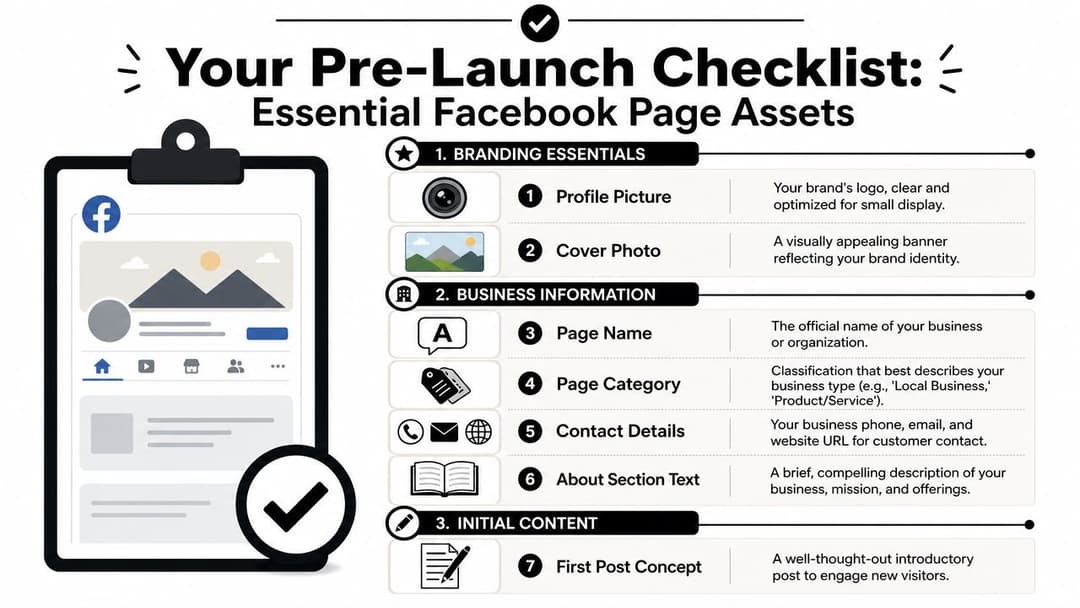
Start with brand identity. Your profile image should usually be your logo, simplified enough to stay recognizable at small sizes. Your cover image should communicate brand context, not cram in every offer you sell. If you need sizing guidance before exporting creative, keep a reference to these Facebook cover photo dimensions.
Then gather the operational details that visitors use.
- Page name: Use the exact business or brand name you want customers to recognize.
- Category shortlist: Prepare a few category options so you don't pick something random under pressure.
- Short bio: Write a concise description that says what you do, who you serve, and why someone should care.
- Contact details: Have your website, email, phone, and location details ready if they apply.
- Hours: Add them if your business depends on calls, visits, or customer service expectations.
Build for first impression, not later cleanup
One mistake I see often is the “we'll fix it after launch” mindset. That usually means the page stays half-baked while ads are already live.
A better approach is to assemble a minimum launch kit:
| Asset | Why it matters |
|---|---|
| Profile image | Shows brand recognition in the feed, comments, and ad placements |
| Cover image | Signals professionalism and visual consistency |
| Bio | Explains the business quickly for new visitors |
| Contact info | Helps users verify and reach you |
| CTA destination | Turns passive visits into action |
| Initial posts | Prevents the page from looking abandoned |
A user who checks your page after seeing an ad is often trying to remove doubt, not gather more inspiration.
Write copy that sounds operational
Your About text doesn't need clever language. It needs clarity. State what the business offers, who it's for, and where to go next.
Good page bios tend to do three things well:
- Name the offer clearly
- Use plain language instead of slogans
- Point to an action such as shop, book, contact, or learn more
If you prepare these assets before creating a Facebook Business Page, the actual setup becomes straightforward. This preparation also ensures your page won't launch looking like an unfinished draft.
The Core Setup Process in Meta Business Suite
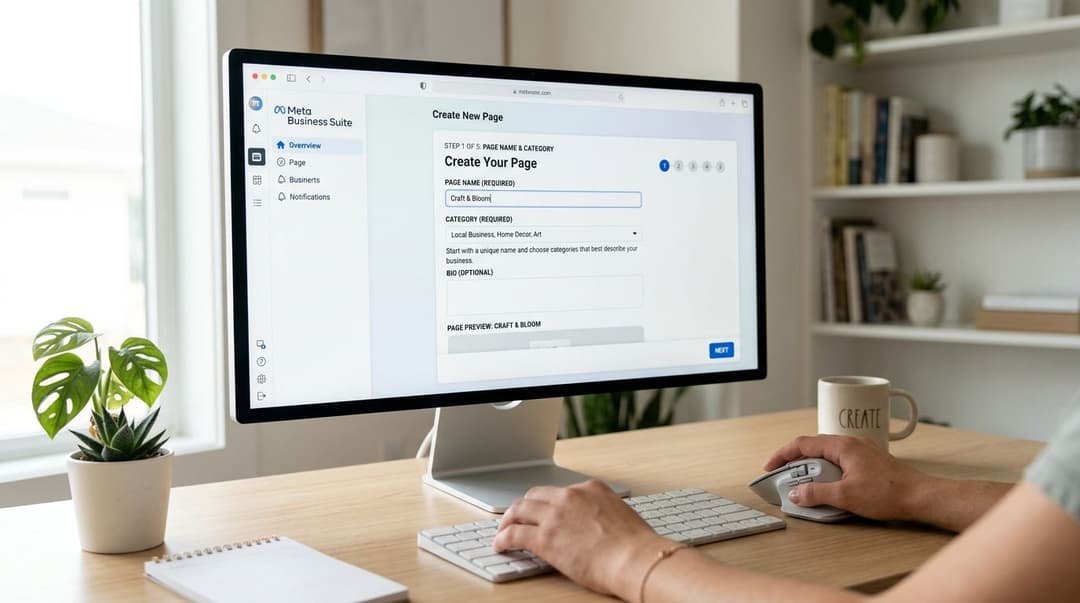
The technical part is simple if you make a few good decisions early. A solid setup starts by using a personal Facebook account to create the Page, then entering the exact business name, selecting up to three relevant categories, and adding a concise bio. Completing fields like website, phone, and email improves discoverability and reduces user friction, as outlined in this Facebook Page setup walkthrough on YouTube.
Start from a personal account
Meta still expects a personal Facebook account to create and administer a business page. That doesn't mean your personal profile becomes your public business identity. It means your profile acts as the admin layer behind the page.
If you're handling setup for a new employee, founder, or client account, make sure they understand that distinction. If they still need help with the account creation side, SMS Activate's Facebook account guide gives background on the account setup process and common access considerations.
If you're setting up an account structure specifically for work, this guide on how to create a new Facebook account for business can help you think through ownership and access cleanly before the page is created.
Use the exact business name
Your page name should match the brand customers already see on your site, packaging, storefront, invoices, or app listing. Don't stuff in keywords. Don't add extra taglines unless they're part of the public brand.
Why this matters:
- It reduces confusion for people looking for you
- It keeps branding consistent across ad touchpoints
- It makes later verification and ownership processes cleaner
Choose categories carefully
Categories do more work than people think. They help frame what your business is, and they shape user expectations before anyone reads your bio.
Pick categories that are specific enough to describe the business, but broad enough to still fit your real operation. If you can select multiple relevant categories, use them intentionally. Don't waste slots on vague labels that say nothing useful.
Add the bio and contact fields immediately
Your short description should explain the business fast. One or two clear lines are enough if they answer the essentials: what you sell, who it's for, and what to do next.
After that, complete the key fields right away:
- Website: Send users to the primary destination you want traffic to hit
- Phone: Add it if support or sales calls matter
- Email: Useful for verification, trust, and contact preference
- Location: Important for local brands, service businesses, and retail
Before moving on, it helps to see a full visual walkthrough of the interface:
Don't optimize for speed alone
Creating a Facebook Business Page quickly isn't the goal. Creating one cleanly is. The fastest bad setup usually creates rework later when ads are live, teammates need access, or the business has to verify identity inside Meta.
That's why I recommend treating the initial setup like account architecture, not profile decoration. If the foundation is right, every later task gets easier.
Configuring Key Settings for Business Functionality
Once the page exists, move straight into settings that affect how people find information about, contact, and judge the business. At this point, the page stops being a basic profile and starts behaving like a working business asset.
Set a clean username and vanity URL
Your username should be simple, brand-aligned, and easy to repeat verbally. People still copy page URLs from search results, profile shares, and screenshots. A messy handle creates avoidable friction.
Good usernames are usually:
- Short: Easier to remember and type
- Brand matched: Consistent with your site and other social handles
- Stable: Unlikely to need changes after the page starts appearing in campaigns
If you're preparing for stricter account controls and trust checks inside Meta, it's worth understanding the broader process around Meta business verification before your ad operation gets more complex.
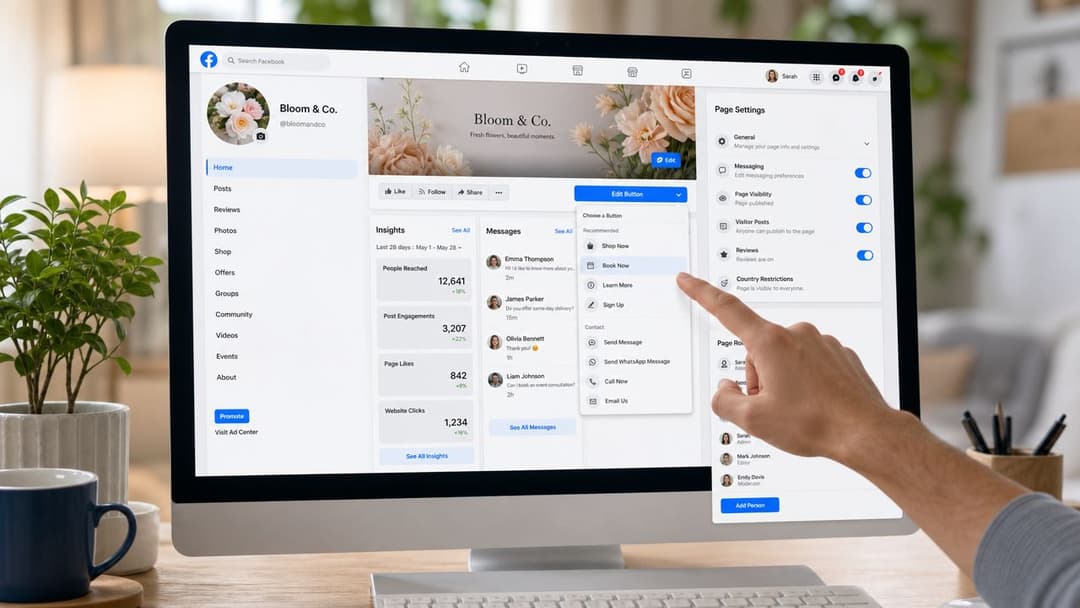
Match the CTA button to your actual objective
This setting gets ignored constantly. Brands leave a generic button in place even when the page supports a very specific funnel.
Use the CTA that reflects your primary business action:
| CTA Button | Best use case |
|---|---|
| Shop Now | Ecommerce and catalog-driven offers |
| Sign Up | Lead generation, trials, webinars, newsletters |
| Contact Us | Service businesses and higher-consideration sales |
| Book Now | Appointments, demos, reservations |
| Learn More | Education-first offers and product explainers |
If your ads push to a signup page but your Facebook Page says Contact Us, the journey feels disjointed. Align the button with your main paid objective.
The page CTA shouldn't be aspirational. It should reflect the next action you actually want from traffic today.
Turn on messaging and basic response handling
If people message your page and get silence, trust drops fast. Even if your main conversions happen off-platform, messaging shows that someone is available.
At minimum, configure:
- Instant replies: Acknowledge the inquiry and set expectations
- Away messaging: Useful if support isn't staffed all day
- Saved replies: Speed up answers to repeat questions
- Inbox ownership: Make sure a real person monitors it
Connect Instagram if the brand uses both
This matters less for vanity and more for workflow. Linking Instagram helps unify publishing, messaging, and identity across Meta properties. It also reduces the chance that your ad account, page, and social presence feel disconnected internally.
The strongest setups make it easy for a customer to move from ad to page to site without hitting uncertainty at any step.
Optimizing Your Page for Ads and Conversions
A new page should never go from zero content to paid traffic in one jump. That's one of the easiest ways to make a brand look unfinished. Practical guidance from Coursera recommends treating the page as launch-ready by adding high-resolution images, publishing at least five to ten initial posts before promotion, and enabling messaging, because a page with incomplete branding or no early content looks abandoned and can suppress trust, as noted in this Coursera guide to creating a Facebook business page.
Publish enough content before you spend
Those early posts aren't there to “go viral.” They exist to answer the inspection click.
When a prospect taps your page from an ad, they should find signs of life:
- A welcome post: Tell visitors what the business does and where to start
- Offer context: Explain your product, service, or category plainly
- Trust content: Customer FAQs, founder story, process overview, or policy clarity
- Visual proof: Product images, brand assets, or examples of the experience
Pin one post that does the most strategic work. For ecommerce, that might be a hero product or current offer. For SaaS, it might be a simple explanation of the product and a demo link. For local services, it might be service area, booking steps, and contact options.
Tie the page into your ad stack
Your page becomes more valuable when it's connected cleanly to the rest of the advertising setup. That includes Ads Manager, event measurement, team permissions, and verification-related workflows.
If you're also building site tracking, this explanation of what the Meta Pixel does is useful for connecting page presence with downstream conversion measurement.
For brands that sell on marketplaces instead of their own store, page quality still matters. If you're trying to connect paid social traffic to marketplace outcomes, this breakdown on how to optimize Amazon sales with Meta is a helpful reference for the bigger attribution picture.
Give the right people the right access
Access control is where a lot of young accounts get sloppy. One founder keeps everything. An agency gets full admin rights it doesn't need. A freelancer logs in through a shared password. All of that creates risk.
Use role-based access instead.
| Role | Key Permissions | Best For |
|---|---|---|
| Admin | Full control over settings, access, content, and business decisions | Owner, senior internal lead |
| Editor | Can create and manage content without full ownership control | Social manager, content lead |
| Moderator | Can manage interactions and messages | Support or community team |
| Advertiser | Can work on ads connected to the page | Media buyer or paid social specialist |
| Analyst | Can view performance and insights | Reporting or analytics stakeholders |
Give agencies and contractors the narrowest level of access that still lets them do the job.
Treat the page as an operational system
Many teams differ in their approach. Some create a page for appearance. Better teams create a page for execution.
If you run a high-volume ad program, the page has to support fast creative testing, clean ownership, audience trust, and campaign continuity. Tools such as Meta Business Suite, Ads Manager, and AdStellar AI can sit in that workflow. AdStellar AI connects to Meta Ads Manager through OAuth and is used to build and launch campaign variations in bulk, which makes page consistency even more important because every ad variation still routes back to a visible brand identity.
That's the core point. A Facebook Page isn't separate from paid media. It's part of the machine.
Troubleshooting Common Facebook Page Setup Issues
Most setup problems fall into a few predictable buckets. The fastest way to fix them is to diagnose the actual failure point instead of clicking around hoping Meta catches up.
You can't complete business verification
The usual cause is mismatch. Your business name on the page, website, legal paperwork, or Business Manager record doesn't line up cleanly.
Check for these issues first:
- Name inconsistency: Make sure the business name is written the same way across assets
- Incomplete site signals: Your website should clearly identify the business
- Wrong documents: Use official business records, not improvised screenshots
- Premature submission: Don't apply before the page and business details are fully filled out
If verification stalls, review the business info everywhere Meta might compare it. Tiny naming differences can create disproportionate delays.
A teammate can't accept their page role
Usually the problem isn't the invitation itself. It's account access, wrong email, or permission conflicts in Meta's business layer.
Try this sequence:
- Confirm you invited the correct Facebook profile or business email
- Make sure the user is logged into the intended account
- Check whether the page is owned through Business Manager and requires assignment there
- Remove the old invite and resend it if needed
A lot of teams invite someone at the page level when the actual control sits higher in the business account structure.
The page doesn't appear in Business Manager
This often happens when the page was created from a personal account but never properly added or claimed inside the business setup.
Look for three things:
- Ownership status: Is the page already claimed by another business account?
- Admin rights: Does the current user have enough control to add it?
- Correct business account: Are you inside the right Business Manager?
If the page exists but isn't connected to the right business account, claim or add it there before building campaigns around it. Otherwise permissions, ad account linking, and team access keep getting messier.
Frequently Asked Questions About Creating a Page
Facebook business pages have evolved from simple business profiles into structured assets, and the platform now hosts over 100 million active business pages, which is one reason a complete setup matters if you want to stand out, according to this overview from Helium SEO on making a Facebook business page.
Can you create a Facebook Business Page without a personal profile?
No. Meta requires a personal Facebook account to create and manage a business page. That personal account acts as the admin identity behind the page. Visitors don't see your personal profile as the brand, but Meta still uses it for ownership and permissions.
What if your page name is already taken?
Use the exact public brand name if you can. If it's unavailable, don't force awkward keyword stuffing just to get a variation. Instead, add a clean brand qualifier such as location or business type if that genuinely reflects the company. Keep it close to how customers already know you.
Should you create a page before running ads?
Yes. In practice, the page should be built, branded, populated, and reviewed before any paid campaign starts. Even if your ads send traffic directly to a website, users often inspect the page before deciding whether to trust the brand.
Can you merge duplicate Facebook Pages?
In some cases, yes, if both pages represent the same business and you control them. The names and details usually need to be closely aligned. Before attempting a merge, update both pages so the business information is consistent and remove anything that could create identity confusion.
How many categories should you choose?
Use only the categories that meaningfully describe the business. More isn't always better. Relevance matters more than coverage.
If your team is building Meta campaigns at scale, AdStellar AI is one option for turning page-ready brand assets into live campaign variations faster. It connects to Meta Ads Manager, helps teams generate and launch multiple ad combinations, and gives media buyers a more structured workflow once the Facebook Page foundation is in place.


