Launch day in ad operations rarely fails because the strategy was weak. It fails because the workflow was fragile.
The creative team has final assets in one Slack thread. Paid social has naming conventions in a spreadsheet. Copy variations sit in a Google Doc with three conflicting edits. Someone exports an audience list, someone else rebuilds it by hand in Meta, and the final approval comes in after the media buyer has already duplicated the campaign twice to keep the deadline alive. By noon, the team is live, but nobody feels confident that the right creative, audience, and tracking setup made it into the account.
That kind of scramble gets normalized fast. Teams call it agility. Most of the time it's just unmanaged operational debt.
Ad teams feel this more sharply than other functions because the work changes shape every week. New offers, fresh creative, budget shifts, audience fatigue, platform policy changes, and urgent launch windows all pile onto the same people. The fix isn't more hustle. It's workflow optimization that removes repeatable friction so your team can spend more time on judgment, testing, and scaling.
From Creative Chaos to Campaign Clarity
A familiar pattern plays out inside performance teams. A brand wants to launch a weekend promotion. The strategist writes the brief. Design produces a batch of statics and a couple of video cutdowns. Copy gets revised after legal review. The media buyer builds the campaign structure manually, duplicates ad sets, renames everything, uploads files, pastes primary text, checks UTMs, and waits for one missing audience exclusion list that lives with another teammate.
Nothing about that process is unusual. That's the problem.
When ad operations run like this, the team loses time in places that don't improve performance. People search for assets, reconcile versions, re-enter the same information across tools, and fix preventable errors after launch. Workflow optimization matters because it attacks those hidden costs directly. Organizations achieve an average ROI of 200% to 300% within 12 months, and employees estimate 240 hours saved per year through task automation, according to workflow automation statistics compiled by Gitnux.
What chaos looks like in ad ops
In paid social, bad workflows usually hide inside normal work:
- Creative testing gets bottlenecked because files arrive without naming standards, aspect ratio labels, or clear ownership.
- Audience setup drifts when exclusions, geo logic, or seed sources are documented in separate places.
- Campaign launches slow down when one buyer becomes the human bridge between strategy, production, QA, and reporting.
- Post-launch analysis gets delayed because nobody trusts the campaign labels enough to slice results cleanly.
That drag compounds. A team that should be learning from tests is spending its energy rebuilding setup.
Practical rule: If your buyer is acting as project manager, QA analyst, and data janitor, your workflow is hurting performance before the ads even enter the auction.
Better process creates more room for good marketing
Good workflow optimization doesn't turn ad teams into bureaucracies. It does the opposite. It standardizes the repetitive work so creative and growth leads can spend their time on decisions that need human judgment.
The biggest shift is cultural. Teams stop glorifying last-minute heroics and start designing repeatable execution. That means cleaner briefs, clearer approvals, a single source of truth for assets and naming, and less manual rebuilding inside ad platforms. It also means you can improve digital marketing performance faster because the team can test more cleanly and react with less friction. A good reference point is this guide on how to improve digital marketing performance, especially if your workflow issues are already spilling into reporting and budget allocation.
Ad teams usually look at performance through ROAS, CPA, and CPL. They should. But when launches are chaotic, process becomes the upstream variable. Fixing it is often the highest-impact work on the board.
How to Map Your Current Ad Workflows
Many teams can't optimize their workflow because they haven't documented the actual one. They have a wishful version. The actual workflow includes side conversations, approval detours, duplicate entry, hidden dependencies, and rescue work nobody planned.
The cleanest starting point is a swimlane diagram. A validated methodology for workflow optimization starts by mapping actual workflows using swimlane diagrams to identify handoff failures, then applying Lean Six Sigma thinking to quantify cycle time, throughput, and error rates, as described in this workflow optimization guide from Superhuman.
Build the map from one recent campaign
Start with a campaign that launched. Don't map the ideal flow. Use the messy one that just happened.
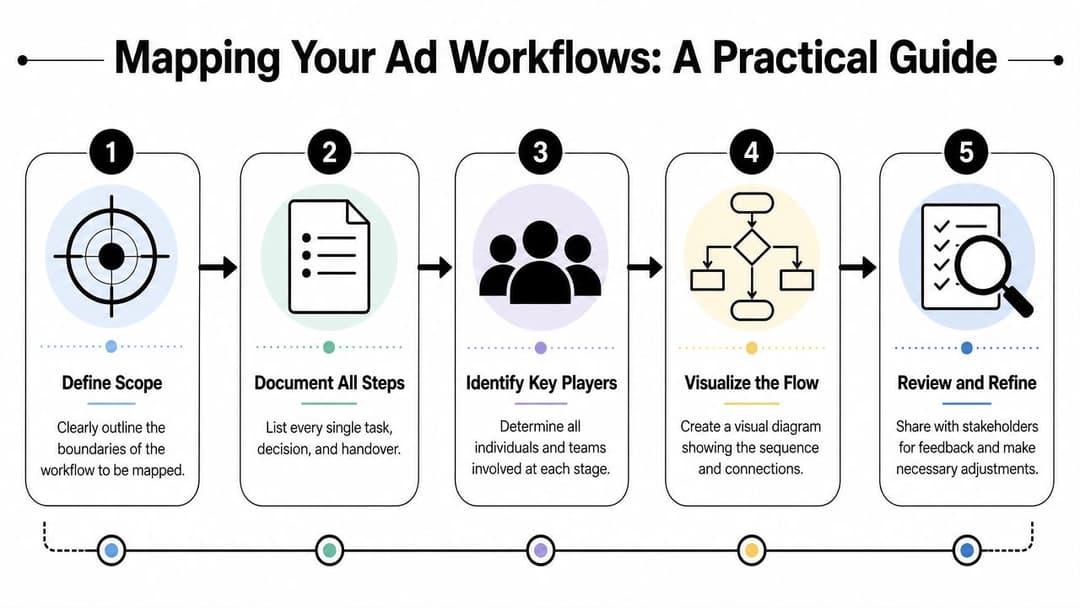
Create swimlanes for the people or functions involved:
| Swimlane | Typical owner | What belongs here |
|---|---|---|
| Strategy | Growth lead or account strategist | Brief, offer, KPI target, audience hypothesis |
| Creative | Designer, editor, copywriter | Assets, revisions, approvals, file delivery |
| Media buying | Paid social manager | Campaign setup, naming, QA, launch |
| Data and analytics | Ops or analyst | UTMs, tracking checks, reporting views |
| Stakeholders | Brand, legal, client, founder | Approval gates, feedback, sign-off |
Then walk the campaign from request to report. Put every task on the board. Every upload. Every approval. Every wait state. Every rework loop.
Questions that expose the real process
A good workshop gets specific fast. Ask the team questions that force operational detail:
- Where does the brief start? Is it a form, a doc, a Slack message, or a meeting?
- Who turns strategy into production tasks? If nobody owns that translation, work gets invented midstream.
- Where do assets live at launch time? Shared drive, Figma, Slack, Dropbox, email attachments.
- Who approves what? Separate content approval from campaign approval and compliance review.
- What has to be entered manually into Meta Ads Manager? Naming, copy, URL parameters, pixel events, budgets, exclusions.
- What gets checked before launch? Tracking, destinations, creative formatting, audience overlap, naming consistency.
- What happens after results come in? Is learning documented, or does the next launch start from zero?
One of the most useful exercises is to mark each step with a tag: create, review, wait, fix, launch, or analyze. Wait and fix steps reveal more than is often anticipated.
Teams often discover that the "workflow" isn't one flow. It's five separate micro-processes stitched together by whoever is under the most pressure that week.
If your team handles a high volume of Meta work, this walkthrough of Facebook ads workflow management is a useful companion because it mirrors the handoffs most paid social teams deal with daily.
What a useful map should show
By the end, your map should answer four things clearly:
- Where handoffs happen
- Where work stalls
- Where the same data gets entered twice
- Where errors are likely before launch
Don't overdesign the artifact. A simple map that reflects reality is far more valuable than a polished diagram nobody believes.
Pinpointing Bottlenecks and Inefficiencies
Once the workflow is visible, bottlenecks stop feeling abstract. They become obvious, and often uncomfortable.
A launch that "takes five days" usually doesn't contain five days of work. It contains a few hours of execution, surrounded by waiting, clarification, and rework. That's why the most productive ad ops leaders treat the workflow map like a crime scene. They look for repeated delays, duplicated labor, and approval dependency.

Organizations that implement workflow automation tools see a 30% reduction in cycle times on average, and some processes are reduced by 50% to 70%, according to these workflow automation benchmarks. In ad operations, that matters because cycle time isn't just an internal metric. It controls how quickly you can launch tests, kill weak variants, and redeploy spend.
The three bottlenecks that show up most in ad teams
Some inefficiencies are loud. Others hide inside normal habits.
Repetitive manual work
This includes work like exporting a CSV from one system, cleaning it, and uploading it somewhere else. It also includes renaming files, duplicating ad sets, rebuilding audience logic, and copying the same UTM rules into every ad.
These tasks don't just consume time. They create variance.
A buyer might launch one ad set with the right exclusions and another without them. One campaign gets the clean naming convention, another gets a rushed version. That's how reporting breaks.
Communication gaps
Creative feedback spread across Slack, comments in Figma, and verbal notes in a meeting creates ambiguity. Nobody knows which revision is final, and media buying ends up chasing answers while the clock runs down.
Teams sometimes add support capacity rather than better process. In some cases, operational help from resources like LATAM Virtual Assistants can reduce admin drag for asset coordination, trafficking prep, and reporting hygiene. But support only helps if the workflow itself is clear enough for someone else to follow.
Approval choke points
One founder approves all copy. One creative director signs off every asset. One senior buyer is the only person trusted to launch campaigns. That setup feels safe until volume increases.
Then everything queues behind one person.
If a single person has become the approval gateway for every launch, the team doesn't have a quality system. It has a dependency risk.
How to diagnose the real source of delay
Use your map and ask three practical questions for each step:
- Does this step change the outcome? If not, remove or automate it.
- Does this step require judgment? If not, standardize it.
- Does this step fail often enough to create rework? If yes, redesign it before adding speed.
A quick comparison table helps:
| Symptom | Likely cause | Better response |
|---|---|---|
| Launches slip even when assets are ready | Approval dependency | Set approval thresholds and backup approvers |
| Buyers spend hours in setup | Manual build process | Standardize templates and automate repeated fields |
| Reports are inconsistent across campaigns | Naming drift or missing metadata | Enforce taxonomy before launch |
| Tests stall after ideation | Creative production handoff | Clarify intake, delivery format, and QA ownership |
For teams struggling with volume on the production side, this breakdown of the ad creative production bottleneck is worth reviewing because creative ops is where many downstream workflow failures begin.
The important shift is this. Don't optimize based on irritation. Optimize based on repeated process failure. That's where the impact is.
Automate and Accelerate with AI-Powered Tools
After you've identified the drag, don't automate everything at once. That's where teams create expensive complexity.
The fastest wins come from automating the work that is frequent, rules-based, and painful to repeat. In ad operations, that usually means campaign setup, versioning, trafficking prep, QA routines, and first-pass analysis.
Use an effort and impact filter
Before touching tools, sort workflow problems into four buckets:
| Category | What it looks like in ad ops | What to do |
|---|---|---|
| High impact, low effort | Auto-generating naming structures, launch checklists, asset routing | Do these first |
| High impact, high effort | Rebuilding campaign creation and reporting flows | Pilot before full rollout |
| Low impact, low effort | Minor notification cleanup | Batch with other fixes |
| Low impact, high effort | Complex automation for edge-case approvals | Leave it alone for now |
This saves teams from automating the wrong pain.
A lot of ad workflows improve dramatically with relatively simple orchestration. Shared intake forms. Creative templates. Trigger-based reviews. Dynamic checklists. Bulk publishing workflows. If you're comparing stack options beyond paid media execution, this roundup of agency social media tool recommendations can help frame where social planning and approval tools fit versus where ad-specific workflow systems need to take over.
What automation should handle in an ad team
The strongest automations remove repetitive assembly work, not strategic choice.
Good candidates include:
- Campaign structure creation based on a predefined naming taxonomy and launch template
- Bulk variation generation for copy, creative combinations, and audience pairings
- Pre-launch QA checks for missing UTMs, destination mismatches, naming gaps, or asset formatting issues
- Performance rollups that summarize winners and losers without requiring manual exports
- Learning capture so the next test starts with prior evidence, not memory
Ad-specific tools are essential. A generic project tool can organize tasks, but it won't build ad variants or sync execution with account structure. In practice, some teams use platform combinations, while others centralize more of the work in a dedicated ad workflow layer. For example, AdStellar AI is built for Meta ad operations and handles bulk ad creation, centralized creative and audience workflows, campaign launching, and AI-driven performance insights inside one system. If you're evaluating implementation details, this guide on AI setup for campaign workflows is a practical place to start.
Measure the automation you actually got
The most common automation mistake in marketing ops is assuming that because a task is "automated," humans are no longer doing meaningful cleanup.
That assumption is often wrong. Recent workflow audits show that 40% to 60% of "automated" processes still require significant manual intervention, which is why tracking human intervention rate matters so much. It measures how often people must step in to fix or complete an automated flow, as discussed in Slack's workflow optimization guide.
Field test: If a buyer still has to inspect, repair, or re-enter key campaign information every time the automation runs, the workflow isn't automated enough to trust at scale.
For ad teams, human intervention rate shows up in concrete ways:
- A bulk build fails because naming conventions weren't enforced upstream.
- Audience logic has to be manually corrected before launch.
- Creative pairings need cleanup because the automation pulled the wrong asset state.
- Reports require hand edits because campaign metadata wasn't passed correctly.
This is the right point in the process to show your team what a modern AI workflow can look like in practice:
When automation is working, people spend less time assembling campaigns and more time judging offers, hooks, angles, audience intent, and budget allocation. That's the job ad operators want.
Measure What Matters and Monitor Success
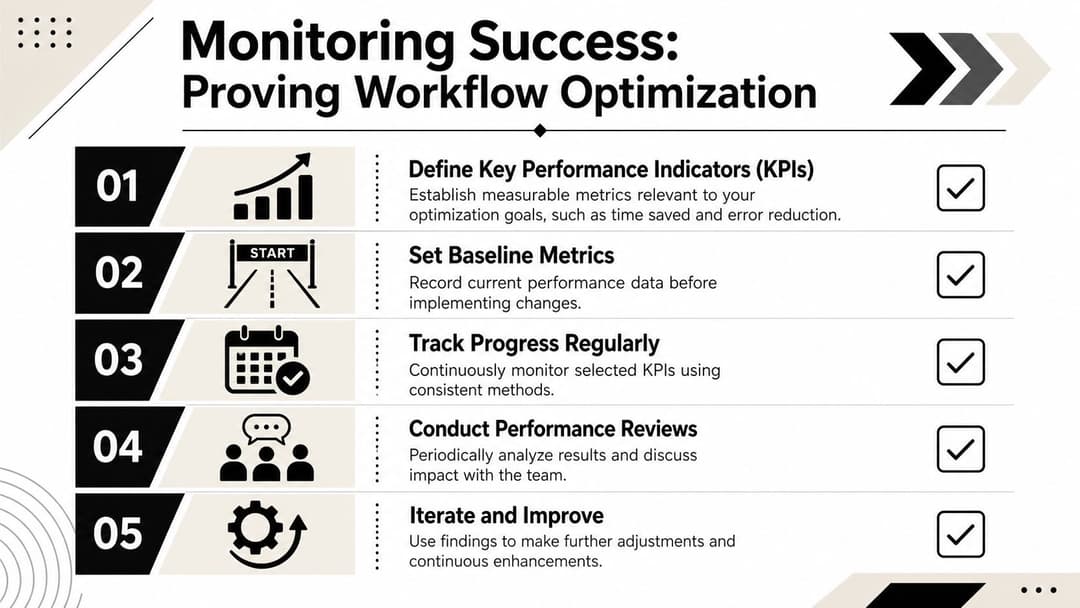
Once the new workflow is live, don't rely on gut feel. Most workflow projects lose momentum because the team can tell things are better, but can't prove where the gains came from.
In ad operations, standard performance metrics still matter. But they won't tell you whether your launch process is healthier. For that, you need process metrics that sit close to execution.
Build a workflow health dashboard
A simple monthly dashboard is enough if the definitions are tight.
Track metrics like these:
Time to launch
Measure the elapsed time from approved brief to campaign going live.Creative iteration velocity
Track how quickly the team can move from test idea to live variation.Manual error rate
Count launch issues tied to setup mistakes such as bad UTMs, wrong budget entries, broken naming, or incorrect targeting.Approval delay pattern
Note where launches wait longest for human sign-off.Rework volume
Record how often campaigns need to be edited immediately after launch because something in the process broke.
Use baseline, trend, and exception views
A common approach involves looking only at averages. That misses the story.
A better dashboard has three views:
| View | What to track | Why it matters |
|---|---|---|
| Baseline | Pre-change workflow performance | Shows whether optimization actually improved execution |
| Trend | Month-over-month movement | Confirms whether gains are sticking |
| Exception | Failures, delays, and escalations | Reveals where the process still breaks |
The exception view matters most in ad ops. One broken launch can erase confidence in a workflow, even if the average trend looks good.
The point of monitoring isn't to create more reporting. It's to catch process drift before it becomes campaign risk.
Keep the review practical
A workflow review meeting shouldn't sound like a board presentation. It should sound like an operations standup with evidence.
Use a recurring set of prompts:
- Where did work slow down this month?
- Which launch errors repeated?
- What did the team still do by hand that should be standardized?
- Which approval or QA steps added protection, and which just added waiting?
- What should be removed, not improved?
For teams that need a cleaner way to connect execution with outcomes, this guide to ad performance tracking across campaigns is useful because it helps tie campaign structure and measurement back together.
This review discipline is what turns workflow optimization from a one-off cleanup into an operating system. Without it, teams drift back into urgency mode. With it, they keep compounding small process gains.
The Continuous Improvement Loop for Peak Performance
The strongest ad teams don't finish workflow optimization. They keep running it.
That's necessary because ad operations never sit still. Creative formats change. Offer strategy changes. Account structure changes. Team composition changes. A workflow that fit the team six months ago may already be causing friction now.
Standardize the repeatable work and protect the exceptions
The mature approach is not to standardize everything. It's to standardize the recurring 80 percent of work and leave room for judgment in the volatile 20 percent.
That distinction matters in growth marketing because some workflows should stay flexible. Research indicates that optimizing highly ambiguous or creative workflows can reduce adaptability and increase rework rates by up to 35%, and only 12% of workflow guides recommend preserving flexible exception paths alongside standardized ones, according to SparkPod's workflow optimization analysis.
A few ad ops examples:
- Standardize campaign naming, asset intake, launch QA, reporting dimensions, and routine budget change requests.
- Keep flexible paths for new offer launches, major creative pivots, unusual audience tests, and platform volatility that requires fast judgment.
- Review exceptions after the fact so the team can decide whether an edge case should become part of the standard process.
A process is healthy when it speeds up normal work without trapping the team when conditions change.
Make workflow review part of team culture
Quarterly reviews work well because they create enough distance to spot patterns without waiting too long. Keep them grounded in real launches, real delays, and real fixes.
Ask operators where they still feel friction. Ask creatives where inputs are still messy. Ask analysts which reporting views still require cleanup. Those answers usually matter more than another top-down process redesign.
Ad teams gain an advantage when they can launch cleanly, test quickly, and adapt without chaos. That's what workflow optimization should deliver. Not prettier diagrams. Better operating capacity.
Ad teams don't need more tabs, more handoffs, or more manual rebuilding. They need a system that turns creative inputs, audience logic, campaign setup, and performance learning into one repeatable flow. AdStellar AI is built for that kind of work, helping teams generate and launch ad variations, centralize campaign inputs, and use AI-driven insights to improve execution without adding more operational drag.