Monday morning usually starts with good intentions and bad mechanics. You need to launch multiple Meta campaigns, each with several ad sets, several creative versions, and slightly different audience angles. By the time you've duplicated campaigns, renamed assets, checked UTMs, matched copy to the right images, and confirmed the pixel is firing, you've spent hours on work that doesn't improve strategy. It just keeps the machine moving.
That's where AI setup gets misunderstood. Marketers often treat it like a software switch. Connect the ad account, click a few buttons, and expect automation to clean up years of messy naming, scattered assets, and fuzzy goals. It doesn't work that way. In paid social, AI only becomes useful when the operational layer is clean enough for the platform to make sane decisions.
The shift is happening fast. McKinsey reported that 88% of organizations used AI in at least one business function in 2025, yet nearly two-thirds were still in pilot or experimentation stages, which tells you adoption is easy but disciplined rollout is harder (McKinsey State of AI). For marketers, that gap shows up in a familiar form. The team buys an AI tool to move faster, but the setup is sloppy, so the results are inconsistent and trust evaporates.
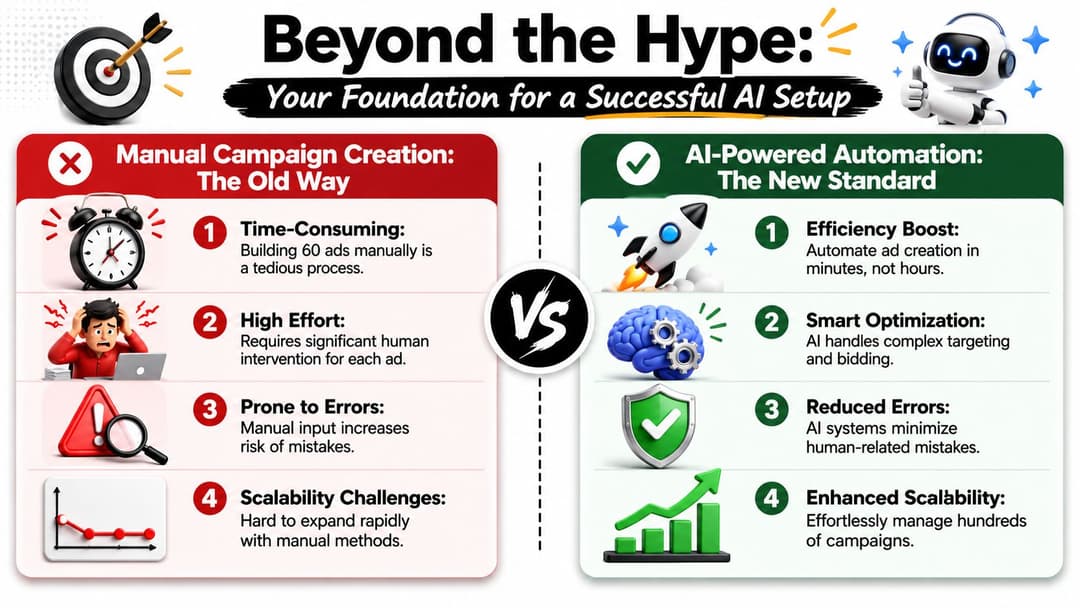
Beyond the Hype Your Foundation for a Successful AI Setup
A first AI setup for ad operations isn't a creative exercise. It's an operating model decision.
If your current workflow lives across Google Sheets, Slack threads, Meta Ads Manager drafts, and a folder of badly named PNGs, AI won't remove the chaos. It will scale it. That's why the first win isn't "automation." The first win is structure. You need a system that tells the platform what matters, what assets belong together, and what good performance looks like.
Why most AI setups stall
The hard part usually isn't the model. It's the team behavior around it. Reports summarized by CloudFactory note that 63% of AI implementation failures are due to human factors rather than technology, and 30% of generative AI projects are expected to be abandoned after proof of concept by the end of 2025 (CloudFactory on AI implementation failures).
In marketing teams, those human factors are easy to recognize:
- Weak ownership: No one owns the AI workflow end to end, so the media buyer assumes ops is handling it and ops assumes the strategist is defining rules.
- Messy inputs: Assets are uploaded without tags, copy variants aren't grouped, and old campaign naming conventions conflict with new ones.
- No success criteria: The team says it wants "better efficiency," but no one defines whether that means lower CPL, stronger ROAS, faster launch cycles, or fewer setup errors.
- Low tolerance for learning: One uneven launch happens and the whole tool gets labeled unreliable.
Practical rule: If your team can't explain why an asset is named a certain way, where conversion data comes from, and which KPI determines a winning campaign, the AI setup isn't ready.
What a strong foundation looks like
A strong setup starts with marketing operations, not prompts. That means campaign logic, permissions, event tracking, asset taxonomy, and review workflows come before automation rules.
A useful mental shift is this: stop asking, "How do we get AI to build ads?" Start asking, "How do we make campaign inputs machine-readable and repeatable?" That's the difference between one flashy launch and a durable workflow.
If you're evaluating what an AI-enabled marketing stack should centralize, this overview of an artificial intelligence marketing platform is a useful reference point because it frames AI as a workflow layer, not just a content generator.
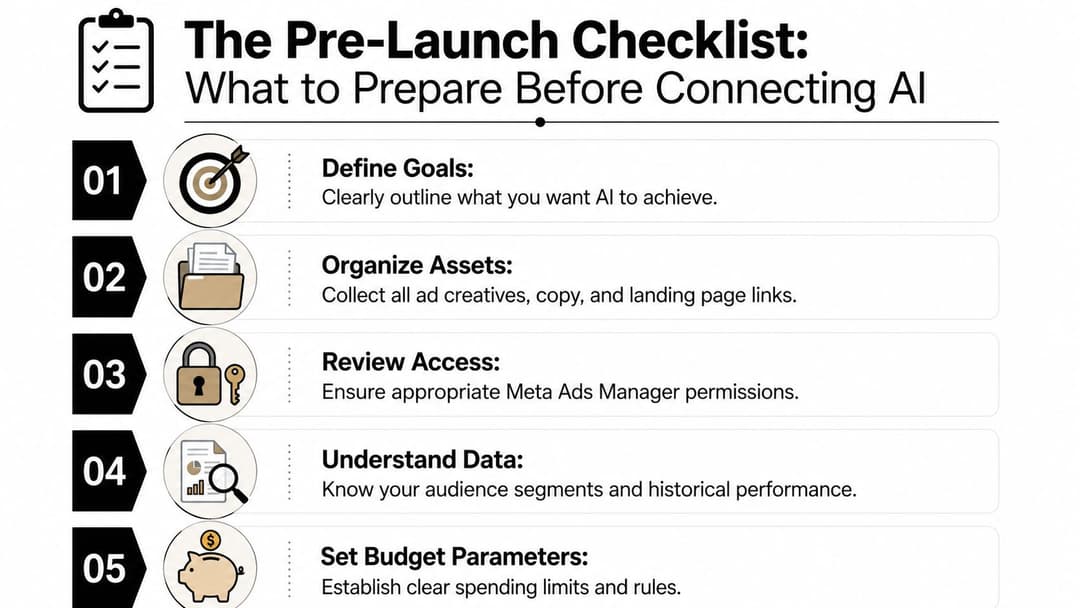
The Pre-Launch Checklist What to Prepare Before Connecting AI
A first AI launch usually fails before anyone clicks "connect." The issue is rarely the platform itself. The issue is that media, creative, tracking, and approval logic still live in different places, so the system inherits confusion at setup.
Clean your asset library first
An AI ad platform can only organize what your team has already defined. If the same video is labeled three different ways across folders, briefs, and live ads, the platform has no reliable way to match creative to campaign intent.
Start with retrieval, not volume. The goal is simple. A strategist should be able to find the right approved asset set in minutes, and the platform should be able to read those assets as structured inputs instead of random files.
A naming convention should cover:
- Funnel stage: TOF, MOF, BOF
- Format: video, static, carousel
- Angle: offer, pain point, social proof, feature
- Market or brand: useful for multi-brand or agency accounts
- Version: enough detail to identify the latest approved asset
Apply the same discipline to copy. Keep approved headlines, primary text, descriptions, and CTA variations in one controlled source. Pulling from old ads sounds efficient, but it usually carries over bad naming, expired offers, and copy nobody has formally approved.
Confirm audience logic and tracking before setup
Audience chaos becomes automated chaos. If saved audiences overlap, exclusions are inconsistent, or retargeting pools were built by different people using different rules, AI will scale those inconsistencies instead of correcting them.
Tracking deserves the same scrutiny. Before connecting anything, verify conversion events, landing page URLs, UTMs, and the handoff between browser and server-side signals. If your team still needs to tighten the setup underneath campaign automation, this guide on how the Meta Pixel works and what to verify before launch covers the basics that should already be in place.
Clear tracking gives the platform a usable optimization signal. Weak tracking produces confident-looking reports built on bad inputs.
Define what "success" means in operations terms
The common mistake is treating setup as a technical task when it is really an operating model decision. Before a platform like AdStellar starts building or optimizing campaigns, the team needs a shared answer to one question: what result matters most in this account right now?
Pick one primary KPI for the first launch. CPL, CPA, or ROAS works. Choosing all three creates conflict inside the setup and inside the review process. A campaign can look efficient on spend and still miss the ultimate business goal.
Baseline the current state before the first sync:
- Choose one primary KPI: Give the platform one clear target.
- Document current performance by campaign type: Keep prospecting, retargeting, lead gen, and sales campaigns separate.
- Record operational benchmarks: Note launch time, QA steps, approval delays, and common setup errors.
- Set guardrails in advance: Define budget caps, creative restrictions, approval paths, and account permissions.
This part matters more than teams expect. Good AI setup in marketing operations is not only about ad output. It is about making asset structure, data inputs, and decision rules clear enough that the platform can execute without introducing new failure points.
Teams that do this prep work usually launch faster, review fewer mistakes, and get cleaner readouts from the first campaign batch. Teams that skip it spend the first month debugging naming conventions, permissions, and broken conversion signals.
Connecting Your Data The Core of AI-Powered Advertising
Marketers don't need to understand the cryptography behind a secure connection. They do need to understand what they're authorizing and why it matters. When you connect an AI ad platform to Meta Ads Manager, you're establishing the data pathway that lets the system read account structure, campaign history, asset performance, and ongoing delivery signals.

What OAuth is doing in plain English
A secure OAuth flow lets you authorize a platform without handing over your password directly. In practical terms, you log into Meta, review the permissions requested, and approve access for a specific business context. That's become the standard because it gives marketers more control over how tools connect to ad accounts.
The important question isn't "Is this normal?" It is. The better question is, "What permissions does this platform need to do its job?" For campaign automation, that usually means reading ad account structure, accessing creative assets tied to the account, and sending approved campaign builds back into Meta.
Why this connection matters operationally
Without data, AI is just a fancy form builder. With historical campaign data, it can start recognizing patterns your team already suspects but hasn't systematically organized.
That includes things like:
- Creative pairing logic: Which messages tend to work with which formats.
- Audience context: Whether a broad audience responds differently from retargeting segments.
- Campaign inheritance: Which prior setups are worth reusing and which should be ignored.
- Feedback loops: How the platform learns from live results instead of staying frozen at launch.
One option in this category is AdStellar AI, which connects to Meta Ads Manager through secure OAuth, ingests historical performance data, and uses that input to help build and launch Meta campaign structures. The point isn't that you need one specific platform. The point is that the platform you choose should reduce manual setup while preserving control.
What to check before approving access
Marketers often rush this step because the connection screen looks simple. Slow down and review:
- Business ownership: Confirm you're connecting the right ad account, not a personal login with partial access.
- Permission scope: Check whether the platform requests only what it needs for campaign creation and analysis.
- Data boundaries: Understand whether the tool is reading historical data, writing campaign drafts, or both.
- Account hygiene: Old test campaigns, duplicate audiences, and poorly named assets don't disappear when connected. They become visible to the platform.
If your stack includes server-side event collection, it's worth understanding how a Conversion API Gateway fits into cleaner signal delivery and stronger downstream optimization.
After the connection is live, spend a few minutes verifying what synced. You want the platform to reflect the account structure you expect, not a half-mapped version of it.
A quick walkthrough helps if you're handling this for the first time:
Approve access like you're granting someone the keys to your campaign archive, because that's effectively what you're doing.
Mapping Your Strategy from Assets to AI Campaigns
Once the data is connected, the key work begins. At this point, marketers either create a scalable system or recreate their old chaos inside a newer interface.
AI needs strategy translated into rules it can apply repeatedly. That means your asset library, audience structure, naming conventions, and budget logic all need to be expressed in a way that the platform can interpret without constant manual correction. The mistake I see most often is giving the AI a pile of approved assets and expecting it to infer campaign architecture on its own.
Turn creative into a usable library
A media library isn't organized just because it has folders. It's organized when another person, or a machine, can pull the right asset without asking for context.
Use tags that describe how an asset should be used, not just what it looks like. "Blue background" is less helpful than "TOF pain-point static" or "BOF offer video." The same applies to copy. Group variations by angle, compliance status, and landing page destination.
If your team is generating a large volume of video variants, a practical resource like this AI video ad creator can help you think through how to systematize production inputs before those assets ever enter the campaign builder.
Encode audience and budget rules
This part is less glamorous and more valuable. Decide what combinations are allowed.
Examples:
- A broad prospecting audience might be allowed to pair only with top-performing educational creatives.
- A warm retargeting segment might be limited to offer-led statics and short testimonials.
- A high-ticket B2B campaign might require manual approval before any budget increase.
That logic can live in templates, tags, or platform rules. What matters is consistency. If one buyer calls an audience "US Broad 25-54" and another calls the same thing "Core Mixed," the AI doesn't see nuance. It sees conflict.
Working rule: If two buyers would map the same assets differently, your setup still depends on tribal knowledge.
Quick-Start AI Campaign Mapping Template
| Element | Naming Convention | Mapping Rule Example | AI Application |
|---|---|---|---|
| Campaign | Brand_Objective_FunnelStage_Geo | Acme_Leads_TOF_US |
Builds a repeatable campaign shell for new launches |
| Ad set | Audience_Placement_Optimization | Broad_AutoPlacements_Leads |
Connects targeting logic to delivery settings |
| Creative folder | Funnel_Angle_Format | TOF_SocialProof_Video |
Helps the platform pull matching assets for the right stage |
| Primary text set | OfferOrAngle_AudienceType_Version | PainPoint_Prospecting_V2 |
Keeps copy variants tied to the intended audience |
| Headline group | ProductBenefit_Goal | FreeDemo_LeadGen |
Aligns short-form messaging with campaign objective |
| Budget rule | Stage_Priority_ControlType | BOF_HighPriority_ManualScale |
Sets guardrails for automation and approvals |
| Exclusion logic | Audience_NegativeRule | Customers_Exclude |
Prevents waste and overlap in generated structures |
A good mapping system should let you answer three questions quickly: which assets belong together, which audiences should see them, and what the AI is allowed to do if results improve or deteriorate. If those answers live only in a senior buyer's head, the setup won't scale.
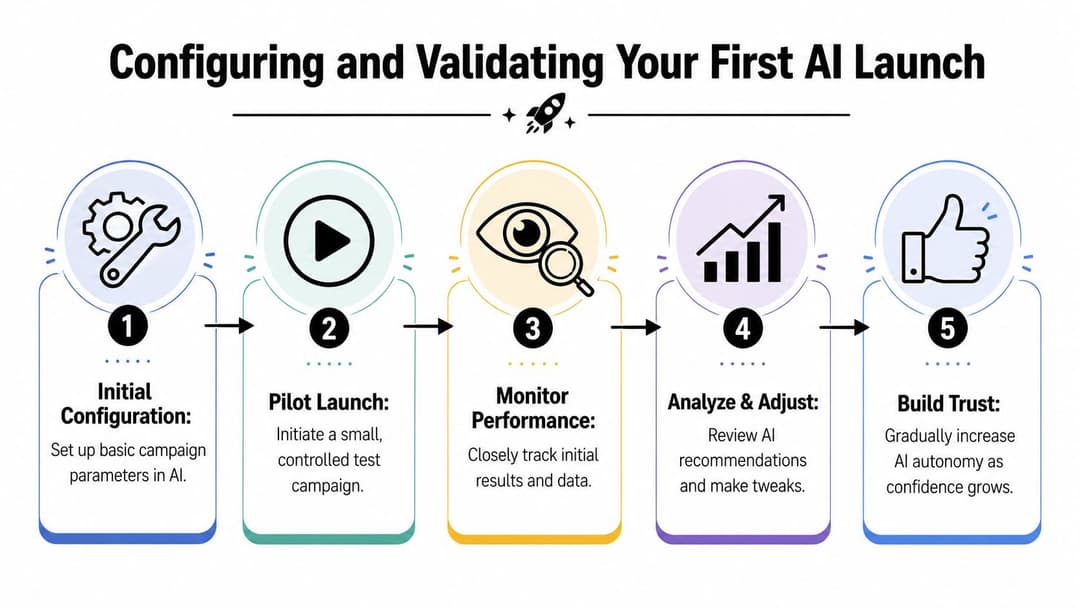
Configuring and Validating Your First AI Launch
The first launch should prove that the system is trustworthy, not that it's aggressive. That's an important distinction. Teams get into trouble when they hand over too much budget too early, then judge the whole AI setup by one unstable launch window.
Build a validation campaign, not a grand rollout
A validation campaign is a controlled test. It uses a limited slice of spend, a small number of audiences, and a defined creative set so you can compare machine-assisted execution against the baseline you documented earlier.
DX recommends a baseline-first measurement approach: establish pre-AI benchmarks, segment users into cohorts when relevant, compare outcomes at the team level rather than the individual level, and track quality guardrails so speed gains don't hide regressions in reliability or maintainability (DX AI measurement methodology). For marketers, the practical translation is simple. Don't judge the AI by speed alone. Judge it by whether faster campaign production still leads to clean launches, stable tracking, and acceptable performance.
The settings that matter first
You don't need every advanced control turned on in the first launch. You do need a few settings defined clearly.
- Learning budget: Give the campaign enough room to gather signal without exposing too much spend during the first cycle.
- Performance thresholds: Decide what counts as acceptable before the platform starts scaling.
- Creative fatigue rules: Set expectations for when an asset should be paused, reviewed, or rotated.
- Approval checkpoints: Keep a human review step for copy, destination URLs, and audience logic.
If your team needs a more technical walkthrough for the handoff between ad account structure and automation logic, this AI ad platform integration guide is useful background.
How to review the first results
Start with comparison, not interpretation. Put the AI-assisted launch next to your pre-AI baseline for the same campaign type and same goal. Then ask straightforward questions.
| Check area | What to review | What a problem usually means |
|---|---|---|
| Build quality | Naming, links, asset mapping, exclusions | Setup logic is incomplete or inconsistent |
| Delivery pattern | Spend allocation, audience concentration, creative distribution | Rules are too loose or historical inputs are skewed |
| KPI movement | CPL, CPA, or ROAS against baseline | The optimization goal may be mismatched |
| Signal health | Event firing and attribution consistency | Tracking issues are contaminating the model |
| Team trust | Whether buyers can explain why the system acted a certain way | Visibility is too low for adoption |
A strong first launch doesn't need to be dramatic. It needs to be legible.
When results are off, diagnose in this order: tracking, audience logic, creative mapping, then automation settings. Most day-one failures come from upstream configuration, not mysterious AI behavior.
Scaling Your AI Workflow Best Practices for Long-Term Success
Once the first launch is validated, the next challenge is operational consistency. AI setup becomes durable when the whole team uses the same asset logic, the same naming standards, and the same review cadence. Without that discipline, each buyer creates a private version of the workflow and performance data fragments over time.
Build a team rhythm around review
Set a regular operating cadence for three things: reviewing new winners, retiring weak assets, and updating templates. The AI should learn from fresh inputs, but the team still decides what belongs in the library and what should never be reused. That governance matters even more in agencies and multi-brand environments where one messy account structure can spill confusion into the next one.
A useful parallel exists in content operations. This guide to human-led AI content is worth reading because it makes the same core point marketers forget in paid media. AI performs better when humans own standards, judgment, and final quality control.
Scale the process, not just the spend
As the workflow matures, centralize your approved audiences, creative taxonomies, landing page rules, and reporting views. Treat them like shared infrastructure. New hires should inherit a system, not a pile of habits. Client teams should launch from templates, not from memory.
For growth teams trying to expand volume without multiplying setup work, this walkthrough on scaling Meta campaigns with AI is a practical next step.
The payoff is bigger than faster launches. Your buyers spend less time duplicating ads and more time deciding what message, offer, and audience deserve the next test.
If you're evaluating ways to make AI setup useful inside real campaign operations, AdStellar AI is built for that specific job. It connects with Meta Ads Manager, helps teams structure campaigns from historical data, and reduces the manual work of building large numbers of ad variations while keeping performance review tied to clear campaign goals.