
You launch a new campaign on a tight timeline. Creative is approved internally, the offer is live on site, and spend is queued up in Ads Manager. Then Meta rejects the ad. Sometimes the reason is obvious. More often, it isn't. The copy looked fine, the image looked clean, and the landing page worked on your laptop.
That’s where many businesses lose time and money. They treat facebook advertising guidelines as a compliance chore instead of an operating system for delivery. In practice, policy knowledge affects speed to launch, approval stability, audience options, and how confidently you can scale.
I’ve seen new media buyers focus almost entirely on bids, hooks, and creative testing while ignoring the approval layer. That’s a mistake. A campaign that never clears review, or gets restricted after launch, can’t produce a clean read on performance. If you’re still calibrating budget expectations, it also helps to understand how much a Facebook ad costs before you build your testing plan.
Navigating Meta Ad Policies for Peak Performance
The most frustrating rejection is the one that lands right before a planned launch window. You’ve lined up inventory, email support, and a paid social calendar. Then one flagged phrase, one risky visual, or one mismatch between ad and landing page forces a rework.
That’s why strong buyers learn policy the same way they learn attribution and creative strategy. It’s part of the job. Meta’s review system combines automation with human judgment, and both respond better when the ad is built to be compliant from the start instead of edited after a rejection.
A clean process starts with knowing where your highest-risk points are:
- Copy risk: Personal attribute language, exaggerated claims, or wording that implies surveillance of the user.
- Creative risk: Crops that hide disclosures, images that feel sensational, or assets that don’t fit placement.
- Targeting risk: Using narrow criteria where policy requires broader treatment.
- Landing page risk: Broken pages, misleading offers, or content that says something stronger than the ad itself.
Teams that handle this well don’t improvise. They work from a repeatable review standard, usually with a policy playbook close at hand. If you want a practical policy reference before building campaigns, this Meta ads policy guide is useful because it translates platform rules into marketer language.
Practical rule: If an ad needs a long explanation to justify why it should be approved, it probably needs a rewrite.
The upside is bigger than avoiding rejections. Better compliance usually means faster launches, fewer interruptions, and cleaner performance analysis. That’s the frame to keep in mind through the rest of this guide.
Understanding the Core Principles of Facebook Ad Guidelines
Most buyers get stuck when they memorize isolated rules but don’t understand the logic behind them. Meta’s policies make more sense when you group them into three working principles.
User experience comes first
Meta protects the feed. If an ad feels disruptive, deceptive, unsafe, or low quality, it works against the platform’s core product. That’s why the review system cares about things many marketers dismiss as minor. Aggressive copy, shocking visuals, bait-style framing, and cluttered creatives don’t just risk rejection. They often hurt delivery quality even when they slip through.
This is also why technical fit matters. A bad crop in Stories, text covered by interface elements, or a landing page that loads poorly creates friction Meta doesn’t want users to experience.
Authenticity matters more than cleverness
A lot of ad account trouble starts with marketers trying to imply more than they can prove. The fastest route to rejection is making a dramatic promise without support, or using language that feels like a workaround for a restricted claim.
A safer and usually stronger approach is to make the ad legible, specific, and honest. Say what the product is. Show what the user gets. Keep the before-and-after transformation framing out of it unless the category clearly permits that style and the claim can stand up.
Ads usually get safer when they become more literal.
Legal and ethical standards shape the edge cases
Some categories aren’t banned, but they’re governed more tightly because the consequences are bigger. Housing, employment, credit, social issues, and similar areas sit in that zone. Health, finance, dating, and age-sensitive offers often do too in practice.
Here’s the useful mental model:
| Principle | What Meta is trying to prevent | What marketers should do |
|---|---|---|
| User experience | Disruption, low-quality interactions | Build clean creatives and match placements correctly |
| Authenticity | Misleading claims and manipulative framing | Use precise language and avoid implication-heavy copy |
| Legal and ethical standards | Discrimination, harm, and regulatory exposure | Apply category restrictions early, not after rejection |
When you review a new concept, ask three questions:
- Could a user feel singled out or misled by this?
- Does the ad promise only what the page can support?
- Would this still look compliant if a human reviewer saw only the ad and landing page together?
That filter catches more problems than memorizing a giant list ever will.
Prohibited Content The Absolute No-Go Zones
Some policy issues are gray. This section isn’t. Certain categories are effectively dead on arrival and can put account health at risk if you keep pushing them.
Content that won’t get a pass
Illegal products and services
If the product itself is unlawful, or the offer facilitates unlawful behavior, don’t try to package it differently. Review systems don’t reward creativity here.Tobacco-related promotion
Tobacco and closely related product promotion is a high-risk area. Even indirect promotional framing can trigger rejection.Weapons and weapon accessories
If the ad promotes sale or use in a way that crosses policy lines, expect rejection. This category is too sensitive to treat casually.Misleading or deceptive offers
Fake scarcity, disguised charges, bait headlines, or pages that don’t deliver what the ad implies are classic rejection triggers. Even when the issue isn’t caught immediately, it can create downstream account problems.
Content that often fails because marketers overreach
Some ads aren’t prohibited because of the product. They’re prohibited because of the framing.
- Personal attribute callouts
Copy that implies the advertiser knows a user’s medical condition, financial status, age, ethnicity, or similar traits is dangerous territory. - Sensational or shocking presentation
Fear-first imagery, graphic visuals, or humiliation-based hooks tend to draw scrutiny. - Guaranteed outcomes
Hard promises around results, especially in regulated or sensitive categories, are one of the fastest ways to create a review problem.
If the ad relies on shock, shame, or certainty, assume it needs to be rebuilt.
A fast screening method
Before a concept reaches design, run it through this quick internal check:
| Question | If the answer is yes |
|---|---|
| Is the product itself prohibited? | Kill the concept immediately |
| Does the copy imply a sensitive trait? | Rewrite from scratch, don’t just soften wording |
| Does the ad promise an outcome as guaranteed? | Replace with factual, supportable language |
| Would the landing page raise a trust concern on first click? | Fix the page before launch |
This is the first line of defense. It saves more time than any appeal process ever will.
Navigating Restricted Content and Special Ad Categories
A campaign can clear the obvious policy checks and still stall in review because the restrictions were handled too loosely. That is where teams lose time, reset learning, and burn spend on assets that never had a real chance to scale.
Restricted categories demand tighter control across copy, targeting, and landing page experience. Alcohol, dating, financial products, and health-adjacent offers are common examples. Meta often allows the offer, but it scrutinizes how the offer is framed. Direct-response habits that work in standard ecommerce, especially aggressive personalization and hard promises, tend to create friction here.
The practical rule is simple. Write to describe the product or service, not the user. If the ad sounds like it is diagnosing a condition, identifying a financial problem, or calling out a private situation, rework it. Keep that restraint on the landing page too, because review does not stop at the ad unit.
I usually check restricted-category campaigns in three places before launch:
- Offer framing: Does the copy explain the offer clearly, or does it overstate the result?
- Audience setup: Does the campaign use only the targeting options available for that category?
- Page follow-through: Does the destination stay consistent with the ad, or does it introduce stronger claims after the click?
That review process improves performance, not just compliance. Cleaner claims and tighter message matching usually mean fewer approval delays and fewer post-launch interruptions. For teams producing a high volume of video, using a repeatable asset QA process alongside these policy checks helps prevent wasted iterations. This reference on Facebook video ad specifications is useful for standardizing creative before it reaches review.
Special Ad Categories change campaign design from the start
Special Ad Categories are a setup decision with media-buying consequences. If the campaign relates to credit, employment, housing, or social issues, targeting restrictions should shape the build before copy is written and audiences are drafted.
According to Taktical’s guide to Facebook ad best practices, standard campaigns can use demographics, interests, and behaviors within Meta’s rules, while Special Ad Categories restrict those controls and push advertisers toward broader criteria such as location. That changes the playbook materially. Tactics that can improve efficiency in a normal DTC account may be unavailable once a special category applies.
Teams get into trouble when they try to force precision into a campaign structure that no longer permits it. The better approach is to accept the constraint early, build for broad eligibility, and let creative, offer strength, and conversion flow do more of the work.
What approval-safe execution looks like
Use these standards before anything goes live:
- Health-adjacent ads: Lead with factual product information. Cut language that implies diagnosis or certainty.
- Finance-related offers: Remove guarantees, disclose terms clearly, and keep ad-to-page consistency tight.
- Dating offers: Avoid suggestive or misleading claims that create safety or trust concerns.
- Special Ad Categories: Build the campaign around restricted targeting from the first draft, not during final QA.
Broad targeting in a special category is part of the operating model. Teams that accept that early usually get ads approved faster and spend more time improving conversion rates instead of fixing avoidable policy errors.
At scale, automation earns its place. Rule-based creative checks, landing page review workflows, and templated campaign builds help teams enforce category-specific standards before an ad ever hits Meta review. That reduces preventable rejects and keeps compliance working like a delivery advantage instead of a last-minute obstacle.
Mastering Creative and Technical Specifications
A compliant idea can still fail if the asset is built badly; design discipline then effectively becomes media-buying discipline. Meta reviews creative for both policy and technical fit, and those two overlap more than many teams fully appreciate.
The non-negotiable asset specs
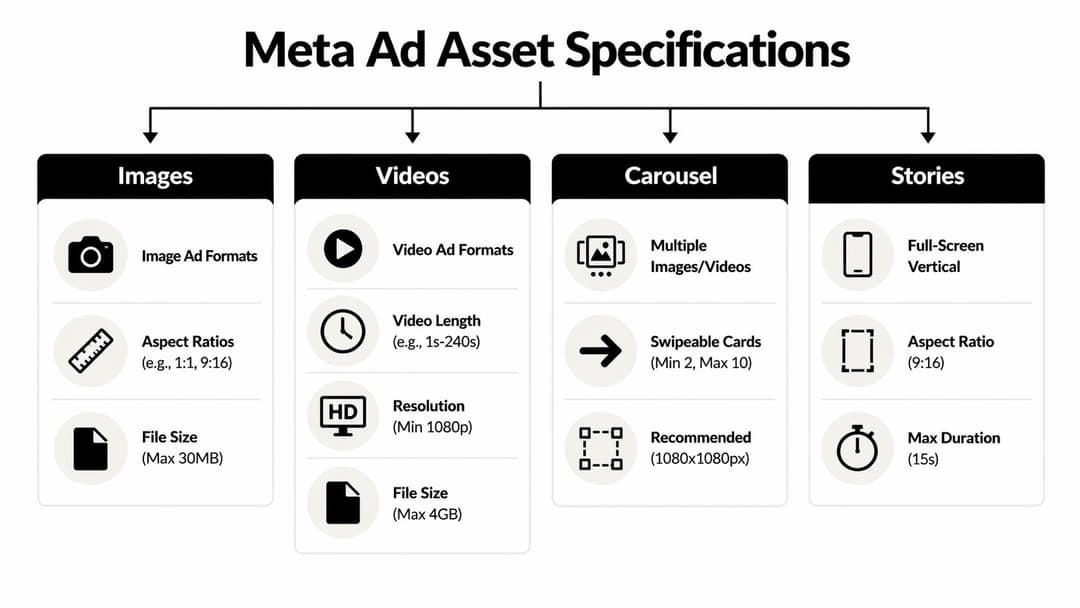
According to Interest Explorer’s breakdown of Facebook ad guidelines, image ads require a minimum resolution of 1080x1080 pixels, recommended aspect ratios from 1.91:1 to 1:1, a maximum file size of 30MB, and JPG or PNG formats. The same source states that video ads are best under 15 seconds, with 1:1 or 4:5 aspect ratios and file sizes up to 4GB.
Those aren’t just publishing specs. They directly affect how the ad renders across placements. If you build one asset carelessly and push it everywhere, you invite bad crops, obstructed text, and weaker delivery.
For teams producing a lot of motion creative, this reference on Facebook video ad specifications is useful because it translates raw requirements into practical format decisions.
What to watch beyond the file requirements
Technical compliance isn’t only about upload acceptance. It’s also about avoiding assets that perform poorly because the creative was built without placement realities in mind.
Use this review lens before launch:
- Text placement: Keep critical text away from edges and interface-heavy zones.
- Visual hierarchy: Make the product, offer, and call to action readable in a fast scroll.
- Captioning and audio: If the video needs sound to make sense, add captions and clean audio handling.
- Motion style: Avoid flashing elements and frantic edits that make the creative harder to clear and harder to consume.
Build rule: If the first frame is confusing without sound, the ad usually needs a stronger opening visual.
A practical spec sheet for handoff
| Asset type | Key requirement | Common failure |
|---|---|---|
| Image | 1080x1080 minimum, JPG or PNG, up to 30MB | Low-resolution exports and poor cropping |
| Video | Best under 15 seconds, 1:1 or 4:5, up to 4GB | Long intros, unreadable subtitles, placement mismatch |
| Carousel | Keep each card visually consistent | Mixed card quality and disconnected landing paths |
| Placement variants | Design for feed and vertical environments separately when needed | One-size-fits-all exports |
The old habit of tossing finished assets to media buying and “seeing what passes” is expensive. Strong teams catch these issues before the upload.
Compliant Audience Targeting and Data Usage
A campaign can have strong creative, clean specs, and a solid offer, then still lose momentum because the audience setup crosses a policy line. I have seen that happen in accounts where the media plan looked sharp on paper, but the targeting logic implied sensitive traits or used customer data too loosely. Meta treats those mistakes as compliance issues. Performance teams should treat them as efficiency issues too, because flagged targeting slows approvals, limits delivery, and creates rework.
Build audiences from behavior you can justify
Audience targeting should be defensible at two levels. It has to make business sense, and it has to hold up under policy review.
Taktical’s guide points out practical audience methods such as layering interests and using exclusions to control overlap. That approach works in standard ecommerce accounts. It breaks down fast in regulated verticals, where Special Ad Category rules force broader targeting and remove some of the precision buyers are used to.
Use a tighter standard before launch:
- Target intent, not identity: Build around shopping behavior, product relevance, or site actions. Do not build audiences that suggest you know a person’s health status, finances, race, religion, or other sensitive traits.
- Use exclusions to protect spend: Exclude recent purchasers, low-value repeat visitors, or overlapping retargeting pools when the goal is prospecting efficiency.
- Set category rules first: If the campaign falls into housing, employment, credit, or another restricted area, configure the category before you build the audience.
- Review ad copy against the audience logic: Even if the targeting is allowed, copy that calls out a personal attribute can still trigger rejection.
That last point gets missed often. A broad audience can still become non-compliant if the ad says, in effect, “we know who you are.”
Pixel and event quality shape both compliance and performance
Clean first-party data usually produces safer audience logic than speculative targeting. Website visitors, product viewers, add-to-cart users, and past purchasers are easier to justify because they are based on observed actions, not assumptions about who someone is.
That starts with correct pixel setup and event mapping. If your team needs an operational reference, this guide on what the Meta Pixel is covers the implementation basics.
The performance angle matters. Better event quality gives Meta clearer signals for optimization and audience building. The compliance angle matters just as much. When events are mislabeled, duplicated, or fired without a clear business purpose, audience creation gets messy fast. Retargeting windows drift. Lookalike seeds degrade. Reporting becomes harder to trust.
Strong teams put controls around this early. They document approved event names, limit who can create new audiences, and audit custom conversions on a schedule. Automation helps here. Rule-based QA in your tracking and campaign workflow can catch bad event mapping, unapproved audience names, missing exclusions, or category mismatches before an ad ever hits review.
Use only data you have the right to use
Meta gives advertisers powerful audience tools. That does not mean every customer list or enrichment source belongs in the account.
Use this check before uploading or activating any audience:
| Audience type | Best use | Main compliance concern |
|---|---|---|
| Core audience | Prospecting with broad relevant signals | Discriminatory or overly sensitive targeting logic |
| Custom audience | Retargeting based on site, app, or customer actions | Consent, source legitimacy, and proper data handling |
| Lookalike audience | Scaling from high-quality seed lists | Weak seed quality and category-specific restrictions |
A few operating rules keep accounts out of trouble:
- Upload only lawfully collected first-party data.
- Do not use purchased, scraped, or unclear third-party lists.
- Keep seed audiences clean: A small list of real customers usually beats a large mixed list for both quality and policy safety.
- Match retention windows to buying behavior: Overly long windows can keep stale users in play and waste spend.
The best-performing accounts are usually more disciplined here than aggressive. They use fewer audiences, cleaner signals, and stricter naming and governance. That tends to produce faster approvals, more stable delivery, and better ROAS over time.
The Ad Approval and Appeal Process Demystified
When an ad gets rejected, the worst response is emotional editing. Small random changes often create a second rejection because they don’t address the actual issue.

Diagnose before you touch the ad
Start with the rejection notice, but don’t stop there. The top-level reason is often broader than the actual problem. Review four things together:
- Primary text and headline
- Creative itself
- Declared category and targeting
- Landing page copy and functionality
Most recurring problems live in the relationship between those pieces. The ad may sound compliant on its own, while the landing page introduces a stronger claim that causes the rejection.
If you’re dealing with a category that repeatedly trips review, this guide on content restricted on Facebook is useful for spotting patterns before you resubmit.
Edit versus appeal
Not every rejection should be appealed. If the ad clearly uses risky wording, edit it. If the policy label looks wrong and the ad appears compliant, appeal with a short factual explanation.
A good appeal is concise:
- State what the ad promotes
- Reference the policy area at issue
- Explain why the ad complies
- Note any edits or clarifications already made
Don’t write an argumentative appeal. Write one that makes a reviewer’s decision easier.
A simple internal workflow
| Situation | Best move |
|---|---|
| Obvious copy issue | Edit and resubmit |
| Landing page mismatch | Fix the page first, then resubmit |
| Wrong policy categorization | Request review with a factual explanation |
| Repeated rejection on same concept | Retire the concept and rebuild |
One more operational point. Keep screenshots and version notes for rejected ads. When a campaign family keeps failing, those records help you identify the recurring trigger instead of guessing from memory.
Common Violations and Real-World Examples
A campaign gets approved all week, then one new variation stalls in review, delivery drops, and the team assumes Meta is being inconsistent. In practice, the trigger is usually small and predictable. A headline implies a personal attribute, a testimonial sounds like a guarantee, or the landing page pushes a claim the ad never introduced.
That matters for more than compliance. Clean ads usually clear review faster, spend more consistently, and give the algorithm better inputs. Teams that treat policy as part of performance work avoid the expensive cycle of reject, edit, resubmit, and relearn the same lesson two days later.
Example one personal attribute language
Rejected direction:
“Struggling with stubborn weight after turning 40?”
This wording signals that the advertiser knows the user’s age and health-related condition. That is exactly the kind of inference Meta flags.
Compliant direction:
“Build a simple wellness routine that fits your day.”
The offer still has a benefit. The difference is framing. Strong advertisers describe the product, use case, or routine. They do not diagnose the person seeing the ad.
Example two unsupported certainty
Rejected direction:
“Guaranteed results in days.”
That claim creates risk immediately in health, beauty, finance, and any offer tied to outcomes you cannot prove for every buyer.
Compliant direction:
“See how customers include it in their daily routine.”
The compliant version lowers legal and policy risk, but it also tends to perform better over time because the click is based on believable expectations. Fewer disappointed clicks usually means cleaner traffic and less post-click friction.
Example three weak tracking creates bad creative decisions
A common failure sits upstream from the ad. The tracking setup is thin, event quality is poor, and retargeting pools are noisy. The team responds by writing more aggressive copy to force performance out of a weak audience.
That is the wrong fix.
A cleaner retargeting structure gives Meta better signals and reduces the temptation to push risky language. Instead of “Last chance to fix your problem fast,” the ad can stay specific and calm because the audience definition is doing more of the filtering. If you want to standardize that review process across campaigns, a Meta ads policy checker software workflow helps catch copy and setup issues before they hit review.
Better signal quality usually leads to better ad restraint.
Example four ad and landing page mismatch
Rejected pattern:
The ad presents a clear product offer, then the landing page opens with a generic lead form, missing pricing context, aggressive popups, and stronger claims than the ad itself.
This is one of the costliest mistakes because it can pass internal review and still fail Meta review or underperform after approval. The problem is not only policy exposure. It is broken message continuity.
Compliant pattern:
The landing page repeats the product, offer, and proof structure introduced in the ad. If the ad says “hydration support,” the page should not switch to “reverse fatigue fast.” If the ad frames a starter bundle, the page should not hide the product behind a quiz before explaining the offer.
Use this quick comparison as a practical filter:
- Bad version: invasive hook, exaggerated promise, mismatched post-click experience
- Better version: product-led framing, supportable claim, consistent landing page message
The repeat offenders are rarely random. Personal attribute language, certainty claims, weak tracking, and ad-to-page mismatch account for a large share of preventable rejections. Teams that remove those issues early usually get more than compliance. They get faster approvals, steadier delivery, and cleaner performance data.
Your Essential Pre-Launch Compliance Checklist
The best pre-launch workflow is boring. That’s a compliment. It means your team is checking the same high-risk areas every time instead of discovering them through rejections.
If you want software support for this process, Meta ads policy checker software is worth reviewing because it mirrors the kind of structured pre-flight review strong teams already use internally.
Pre-Launch Compliance Checklist
| Checkpoint Category | Item to Verify | Status (Pass/Fail) |
|---|---|---|
| Creative Assets | Image exports meet required dimensions and approved file formats | Pass/Fail |
| Creative Assets | Video length, aspect ratio, captions, and audio handling fit intended placements | Pass/Fail |
| Creative Assets | No flashing elements, obstructed text, or cramped layouts | Pass/Fail |
| Ad Copy | No personal attribute language or invasive phrasing | Pass/Fail |
| Ad Copy | No guarantees, exaggerated outcomes, or misleading urgency | Pass/Fail |
| Ad Copy | Offer language matches what the landing page actually delivers | Pass/Fail |
| Category Setup | Restricted category rules reviewed before submission | Pass/Fail |
| Category Setup | Special Ad Category selected if applicable | Pass/Fail |
| Targeting | Audience logic avoids discriminatory or sensitive inference | Pass/Fail |
| Targeting | Exclusions applied where needed to reduce overlap or wasted delivery | Pass/Fail |
| Tracking | Pixel and relevant events are firing correctly | Pass/Fail |
| Landing Page | Page loads, functions, and reflects the same claims as the ad | Pass/Fail |
| Landing Page | Required disclosures, terms, or regulated content labels are visible | Pass/Fail |
The items that catch the most errors
Three checks usually save the most wasted time:
- Match ad to page: Review the destination page immediately after reading the ad, not in separate workflows.
- Review copy aloud: Personal-attribute phrasing sounds more obvious when spoken.
- Check category rules first: Don’t build narrow targeting for a campaign that should have been declared under a special category.
This checklist works best when one person owns the final signoff. Shared responsibility often turns into no responsibility.
Compliance as a Performance Marketing Strategy
Media buyers usually talk about performance in terms of hooks, angles, bids, and budgets. Those matter. But clean execution is part of performance too.
A well-structured Meta account can start testing with budgets as low as $5 per day per ad set, according to Archery Business’s practical guide to Facebook ads. The same source notes that this low entry point makes it possible to test many variations and scale what works, with successful ecommerce campaigns often reaching 2-5x ROAS from that starting level when execution is strong.
That’s the primary advantage of mastering facebook advertising guidelines. You can test more confidently because more of what you build is eligible to launch cleanly. Instead of burning cycles on avoidable rejections, you spend time comparing creative angles, offers, and audience structures that make it into the auction.
Compliance improves operating speed
When teams treat policy as a final review step, they create delays. Design finishes the asset. Paid social flags an issue. Copy rewrites. Legal reviews. Launch slips.
The better model is to encode compliance into production. The copywriter knows what wording is unsafe. The designer understands placement-safe composition. The media buyer sets category and targeting rules before the campaign shell is built. That turns policy into workflow design, not cleanup.
It also sharpens message quality
The best compliant ads are usually clearer ads. They remove fluff, reduce hype, and force the team to prove the value proposition with straightforward language and a credible landing page.
That mindset carries into adjacent channels too. If your team also works with creator campaigns, legal discipline around disclosures and claims matters there as well. This overview of Instagram influencer legal compliance is a useful parallel because it shows how platform growth and regulatory expectations often move together.
Strong accounts don’t just avoid breaking rules. They build systems that make rule-breaking less likely in the first place.
Scaling without losing control
Many teams struggle in this area. It’s manageable to manually review a handful of ads. It gets harder when you’re testing dozens or launching in bulk across offers, audiences, and formats.
The answer isn’t to loosen standards. It’s to operationalize them. Use standardized creative templates, approved claim libraries, category-specific copy rules, landing page checks, and pre-publish QA. When those controls are baked into the workflow, scale stops increasing risk at the same rate.
Compliance isn’t a roadblock. It’s one of the clearest performance levers in the Meta ecosystem because it protects launch velocity, account stability, and the integrity of your testing data.
If your team wants to launch faster without losing policy control, AdStellar AI helps turn Meta ad production into a repeatable system. It’s built for teams creating and testing campaigns at scale, with bulk generation, faster workflow execution, and a structure that makes compliant campaign building easier to maintain across large variation sets.


