
You open Ads Manager expecting the usual routine. Check spend. Check CPA. Kill two losers. Scale one winner. Instead you get the banner no media buyer wants to see. Restricted on Facebook.
Sometimes it's an ad rejection you can live with. Sometimes it's a disabled ad account, a page visibility issue, or the worse version, your personal profile loses access and suddenly every client asset is at risk. The panic is real because Meta rarely explains the issue in a way that matches how marketers work.
That gap matters most for teams moving fast. Agencies, DTC brands, and growth teams don't just launch one or two ads. They duplicate, bulk edit, swap creatives, refresh copy, and push spend quickly when a campaign catches traction. Those are normal operating patterns for performance marketing. They can also look suspicious to automated systems.
The good news is that most restriction situations become manageable once you stop treating them like random punishment and start treating them like an operations problem. If you've dealt with marketplace suspensions before, the logic is familiar. The recovery discipline in this Suspended Amazon Account: A Seller's Reinstatement Guide is a useful parallel. The platform is different, but the pattern is similar: diagnose the trigger, document corrective action, and appeal with precision. For a platform-specific breakdown of ad account issues, this overview of https://www.adstellar.ai/blog/facebook-ad-account is also useful context.
The Sinking Feeling of a Sudden Facebook Restriction
Many marketers' first mistake is reacting too fast.
They submit a vague appeal, duplicate campaigns into another account, ask a teammate to "try from their login," or keep editing assets while the review is pending. That usually makes the trail messier. Meta's systems already struggle with context. Chaos doesn't help.
A restriction usually comes from one of three buckets. Policy risk, account trust, or operational behavior. Policy risk is the obvious one: creative, copy, landing page, or audience setup. Account trust covers identity, payment, business verification, and admin behavior. Operational behavior is the underserved category many generic guides miss. That's where bulk edits, sudden spending spikes, new logins, and frantic scaling habits often trip the system.
Practical rule: Your first job isn't to get the account back. It's to identify what exactly was restricted, what triggered it, and whether the issue is isolated or systemic.
That distinction changes everything. A single ad disapproval calls for one workflow. A Business Manager restriction calls for another. A profile-level lockout is a different emergency entirely.
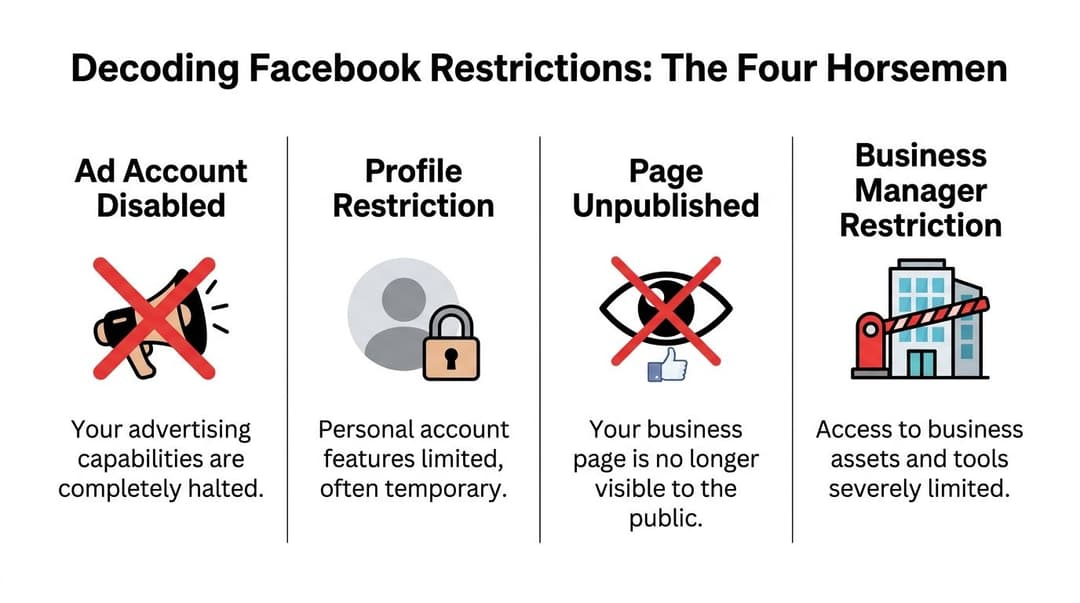
Decoding The Four Horsemen of Facebook Restrictions
Many teams say "our Facebook got restricted" as if it's one thing. It isn't. The platform applies restrictions at different layers, and each layer affects a different part of your operation.
This visual captures the main categories.
What each restriction means
An ad account restriction freezes your ability to run campaigns from that account. Existing ads stop or lose approval status, budget changes fail, and new launches won't go through. If you're an agency, this can block client delivery immediately.
A page restriction affects the public-facing brand asset. Posting can be limited, page visibility can drop, or the page can be unpublished. That hurts more than ads. It breaks social proof, comments, branded search behavior, and often your ad identity.
A Business Manager restriction is more structural. Asset access, sharing, permissions, and ownership workflows get constrained. One issue can spread into multiple accounts, pages, and pixels.
A personal profile restriction is the one many teams underestimate. Your individual profile is the key that provides access to business assets. If Meta limits that profile, you may not be able to access ad accounts, pages, billing settings, or support channels even when the business itself is still technically live.
Facebook Restriction Types At-a-Glance
| Restriction Type | Common Triggers | Impact | Typical Resolution Time |
|---|---|---|---|
| Ad Account Disabled | Repeated ad rejections, payment issues, unusual spending or editing activity, landing page concerns | Campaign delivery stops or becomes heavily limited | Varies widely depending on whether the cause is operational, billing, or policy-related |
| Profile Restriction | Identity concerns, suspicious login behavior, repeated policy associations, security checks | Loss of access to business tools and support paths | Often temporary, but can extend if verification is incomplete |
| Page Unpublished | Content violations, page quality issues, repeated problematic posts or ads tied to the page | Brand page disappears or loses normal functionality | Can be slow because page reviews often require more context |
| Business Manager Restriction | Asset-level policy history, admin behavior, trust issues across multiple connected assets | Broad disruption across accounts, pages, pixels, and permissions | Usually the most complex because multiple assets may need review |
The practical severity order
If you're triaging under pressure, handle them in this order:
Profile restriction first If you lose the profile, you lose your ability to manage almost everything else.
Business Manager second This is your asset infrastructure. Fixing an individual ad won't matter if the container is restricted.
Ad account third Painful, urgent, but often recoverable if the underlying trust signals are clean.
Page issues fourth Still serious, especially for DTC and creator-led brands, but often easier to isolate than profile or BM issues.
Why marketers misread the problem
The platform often surfaces the visible symptom, not the root cause.
An ad account may appear disabled because a payment method failed repeatedly. A page may lose trust because ad creatives linked to it triggered quality issues. A profile may get challenged after login behavior changes during travel, team handoffs, or VPN use. Teams then file an appeal for the symptom and ignore the trigger.
That's why I always tell media buyers to classify the issue before writing a single sentence to support.
If you need a separate policy refresher while sorting that classification, this overview of https://www.adstellar.ai/blog/facebook-ads-policy is a useful companion.
The fastest route to recovery usually starts with the least emotional question in the room: "What layer of the account stack is restricted?"
Your Diagnostic Workflow Pinpointing the Problem
Most restrictions feel random because the review systems are heavily automated. According to this analysis of Facebook moderation systems, machine learning models flagged 80 to 90% of acted-upon content before user reports: https://healthcaresuccess.com/blog/healthcare-marketing/facebook-organic-reach-decline.html. That's why a restriction can seem to arrive out of nowhere after a normal workday.
Use a checklist. Don't rely on memory.

Start where Meta leaves clues
I check these in order:
Account Quality This is usually the cleanest place to identify what asset was flagged. Look for ad account, page, domain, commerce asset, or profile notices.
Business Support Home Cases, review eligibility, and support history often surface here. It can expose whether a review is available or already exhausted.
Email notifications Meta's UI messages are often vague. Emails sometimes mention the asset or action with slightly better detail.
Billing and payment settings Failed charges and payment trust issues can create effects that look like policy enforcement.
Business verification and security settings Missing verification, inactive admins, or weak admin security can compound a restriction.
Trace the first bad event
Don't focus only on the current restriction. Find the earliest sign that account trust started dropping.
That might be:
- A rejected creative that looked harmless but implied a sensitive attribute
- A landing page mismatch between ad promise and on-site experience
- A burst of edits after a campaign started spending
- A login anomaly from a new location, device, or shared account process
- A payment hiccup that caused repeated charge attempts. The visible penalty is often the final step in a chain.
Look for cascading issues
Restrictions rarely stay neatly contained.
A flagged ad can lead to ad account scrutiny. An ad account issue can affect the page it runs from. A profile review can lock you out of the ad account where you need to submit the appeal. That's why diagnosis has to happen across assets, not just in the one screen where you saw the warning.
If you can name the exact asset, the likely trigger, and the first timestamp when things went wrong, your appeal quality improves immediately.
Rule out the boring causes
The glamorous explanation is usually wrong. Before you decide Meta's AI misfired, check the routine stuff:
| Checkpoint | What to verify | Why it matters |
|---|---|---|
| Payment method | Card status, recent failures, backup payment options | Billing problems can pause delivery and trigger trust concerns |
| Admin access | Active admins, removed former staff, role changes | Old or inconsistent access patterns create risk signals |
| Business verification | Status and pending requests | Incomplete verification can limit support and ad functionality |
| Domain setup | Correct domain use and asset ownership | Mismatches can trigger policy and measurement problems |
Capture evidence before you touch anything
Take screenshots. Save ad IDs, campaign IDs, timestamps, rejection text, and any policy labels shown in Account Quality.
Then stop editing unless the issue is obviously isolated to one ad. If you change too much before review, you make it harder to prove what happened.
When delivery issues overlap with restriction anxiety, this troubleshooting guide on https://www.adstellar.ai/blog/facebook-ads-not-delivering can help separate policy problems from simple serving problems.
What not to do during diagnosis
Don't duplicate restricted assets immediately That can look like evasion.
Don't rotate through teammate logins New access patterns can create more trust noise.
Don't submit multiple generic review requests It signals panic and often fragments the case history.
Don't assume the newest ad caused it Sometimes the problem started days earlier with payment, page quality, or admin behavior.
By the time you're done, you should have a single sentence diagnosis. Something like: "Ad account restricted after bulk campaign edits and a cluster of ad rejections tied to one landing page." That's the level of clarity support needs.
Crafting an Appeal That Gets A Response
Most appeals fail because they sound either angry or lazy.
Meta doesn't reward either one. The best appeal reads like an incident report from a calm operator: specific, short, accountable, and easy to review.

Why clarity matters more now
Meta said in early 2025 that it had reduced enforcement mistakes in the US by roughly 50% while shifting focus toward high-severity issues and relying more on user reports for lower-severity cases: https://about.fb.com/news/2025/01/meta-more-speech-fewer-mistakes/. For marketers, that changes the math. A clean, well-structured appeal has a better chance in borderline or lower-severity cases because the system is trying to reduce over-censorship.
That doesn't mean every account comes back. It means sloppy appeals waste a better window than many advertisers realize.
What a strong appeal includes
A useful appeal has five parts:
Asset identification Include the ad account ID, page name, campaign or ad ID, and the exact restriction shown.
A narrow description of the issue State what you believe triggered the review. Don't ramble.
Corrective action already taken Mention paused ads, removed creatives, cleaned admin access, updated billing, or landing page fixes.
Compliance intent Make it clear you're trying to comply, not argue philosophy.
A direct request Ask for manual review of the specific asset.
Tone wins more than emotion
Support teams see a lot of bad tickets. The fastest way to look risky is sounding hostile, sarcastic, or evasive.
Write like this account matters to your business because it does. But keep the temperature low.
"We've reviewed the flagged asset, paused associated ads, and removed the elements most likely to have triggered the restriction. We're requesting a manual review of the account and the affected ad IDs."
That's better than "This is ridiculous, your AI keeps making mistakes."
Appeal template for an ad disapproval
Use this when one ad or a small cluster of ads caused the issue.
Hello Meta team,
We're requesting a review of the disapproved ad(s) under ad account [ID]. After checking the flagged assets, we identified elements in the creative and/or copy that may have conflicted with policy expectations. We have paused the affected ad(s), reviewed the landing page for consistency, and removed the versions most likely to have caused the issue.
We understand the importance of policy compliance and have taken steps to prevent the same problem from recurring. Please review the affected ad(s) manually and let us know if any additional changes are required.
Thank you.
Appeal template for an account-level restriction
Use this when the ad account, Business Manager, or profile access is affected.
Hello Meta team,
We're requesting a manual review of the restriction on ad account [ID] / business asset [ID]. We investigated the issue through Account Quality and our internal review process and identified potential causes related to [brief cause: billing, unusual activity, ad review history, asset permissions, or specific flagged ads].
We have already taken corrective action, including [list the actions you took: removed flagged ads, secured admin access, updated payment settings, completed verification steps, reduced bulk changes, or paused associated campaigns].
This account is used for legitimate advertising activity, and we want to ensure full compliance with Meta's policies and account integrity standards. We would appreciate a manual re-review of the restricted asset. If further documentation is needed, we're ready to provide it.
Thank you for your time.
The mistakes that sink appeals
Overexplaining
You don't need your full company history. Long appeals bury the useful detail.
Admitting violations you don't understand
If you say "we violated policy" without knowing what happened, you make the review easier in the wrong direction. Stick to facts and corrective actions.
Filing duplicate requests
Multiple submissions can split the case trail and create conflicting notes.
Acting before documenting
If you delete everything and then appeal, you lose the evidence that helps a reviewer understand context.
What to attach or mention
If the review form allows it, include:
- Relevant IDs rather than just account names
- Screenshots of the restriction notice
- Short notes on changes made
- Confirmation of verification or security fixes if those were part of the issue
If your account was disabled and you're working through that route specifically, this resource on https://www.adstellar.ai/blog/facebook-ads-account-disabled can help you align your response with the likely review flow.
What works versus what doesn't
What works is precision. "Ad 2387 used imagery that may have been interpreted as a personal health implication. We paused it, removed related variants, and updated the landing page."
What doesn't work is broad defensiveness. "We always follow policy and don't understand why this happened."
One sounds reviewable. The other sounds automated.
Building Your Fortress Proactive Ad Account Protection
Recovery is expensive. Prevention is cheaper.
That matters because the platform acts at huge scale. In Q3 2024, Facebook took action on 11 million pieces of violent and graphic content, according to Statista: https://www.statista.com/statistics/1013880/facebook-violence-and-graphic-content-removal-quarter/. For advertisers, the takeaway isn't just about graphic content. It's that review systems are operating at massive volume, which means your team needs cleaner processes than your intuition alone.
Pillar one: creative compliance
Many teams look for obvious violations and miss the subtle ones.
Audit creatives for implication, not just wording. The image can trigger concern even when the copy looks clean. So can visual contrast, injury-adjacent scenes, body-focused framing, or before-and-after style storytelling that suggests a personal attribute or dramatic transformation.
A pre-launch creative audit should check:
Image interpretation Could a reviewer read this as graphic, sensational, or personally invasive?
Copy implication Does the line imply knowledge of someone's health, finances, identity, or condition?
Landing page continuity Does the destination match the ad's tone and promise?
Variant sprawl Are you pushing many versions that repeat the same borderline element?
Operational takeaway: A compliant ad isn't just one that passes review. It's one that still looks compliant after duplication, localization, cropping, and headline swaps.
If you're in a high-velocity e-commerce workflow, a tactical resource like this Facebook Ads for Dropshipping blueprint is useful because it shows how offer structure and creative setup affect account durability, not just click performance.
Pillar two: audience integrity
Audience issues don't always show up as a direct rejection. Sometimes they weaken account trust over time.
Watch for targeting setups that lean too close to sensitive inference. The problem isn't only who you target. It's how the ad message reads when paired with that audience. A generic headline can become risky when the context implies protected traits or personal hardship.
Good operators pressure-test the pairing:
| Audit area | Healthy setup | Risky setup |
|---|---|---|
| Audience logic | Broad or intent-based segments aligned to offer | Hyper-specific setups that imply sensitive categories |
| Message fit | Product-focused and general | Copy that appears to call out who the user is |
| Expansion behavior | Controlled testing with review | Aggressive duplication across many similar audiences |
Pillar three: account hygiene
This is the part many teams neglect because it doesn't feel like marketing.
It matters anyway.
Secure admin access Require two-factor authentication for everyone with meaningful access.
Clean user permissions Remove former staff, agencies, and anyone who doesn't need live access anymore.
Stabilize spend changes Sudden jumps can create avoidable trust friction, especially on newer or already reviewed accounts.
Limit chaotic bulk edits Editing dozens of variables at once makes diagnosis harder when something breaks.
Use one operating method Shared logins, random devices, and improvised workflows create noise.
A simple operating standard
Teams that stay out of trouble tend to follow the same habits:
- Review new concepts before launch.
- Launch in controlled batches.
- Monitor the first rejections closely.
- Fix the root pattern, not just the individual ad.
- Keep admin, billing, and business records clean.
That doesn't guarantee you won't get restricted on Facebook. It does make your account easier to defend and easier to recover.
Leveraging Intelligent Automation For Scalable Compliance
Manual scaling creates a strange problem. The more disciplined your testing program becomes, the more suspicious it can look to the platform if the execution pattern is messy.
That's especially true for agencies and in-house teams launching large batches.
Why high-velocity teams get flagged
This is the underserved angle that generic restriction guides usually ignore. A lot of problems don't start with "bad ads." They start with normal performance marketing behavior done at a pace or volume that trips trust systems.
According to the referenced analysis, restrictions rose 25% for accounts with over 500 daily edits as Meta's AI ad review systems tightened around unusual activity patterns: https://www.bestever.ai/post/why-facebook-accounted-restricted. That's exactly the environment where bulk launches, mass duplication, and frantic optimization can backfire.
Manual bulk editing versus paced automation
Here's the trade-off many teams face:
| Approach | What happens in practice | Risk profile |
|---|---|---|
| Manual bulk edits | Fast bursts of duplication, naming changes, budget resets, and ad swaps | Higher chance of looking irregular, especially on active accounts |
| Spreadsheet-to-Ads-Manager workflows | Better organization, but still often produces large publishing spikes | Safer than chaos, but still can create review friction |
| Programmatic paced workflows | Structured creation and launch behavior with repeatable rules | Better for compliance consistency and cleaner audit trails |
What useful automation should do
Automation isn't helpful if it only makes bad behavior faster.
A tool in this category should help with:
- Paced launch behavior rather than giant manual bursts
- Historical learning so new variants are based on proven patterns
- Creative and copy organization that reduces accidental policy drift
- Secure account connection methods instead of fragile access workarounds
- Cleaner auditability when a reviewer or team lead needs to trace what changed
A platform like AdStellar AI fits as one option. It connects to Meta Ads Manager via secure OAuth, uses historical performance data, and helps teams generate and launch large batches of ads through a more structured workflow instead of relying on erratic manual bulk actions. That matters because the goal isn't just speed. It's speed that doesn't resemble account abuse.
What works versus what doesn't at scale
What works:
- Controlled publishing windows
- Smaller grouped launches
- Historical winner-based iteration
- Shared naming and approval rules
- Centralized tracking of who changed what
What doesn't:
- Huge same-minute publishing bursts
- Rebuilding account structure during live spend
- Letting multiple buyers free-edit the same campaigns
- Cloning ads across accounts without process discipline
If you want a deeper look at that operating model, this piece on https://www.adstellar.ai/blog/meta-ads-intelligent-automation is worth reviewing.
Fast teams don't just automate creation. They automate restraint.
Frequently Asked Questions About Facebook Restrictions
How long does a Facebook restriction last?
There's no reliable universal timeline. Some reviews resolve quickly. Others drag, especially when the issue touches multiple assets or account trust. What usually slows the process is not the severity alone, but lack of clarity. If Meta has to infer what happened from a messy account history, the path gets longer.
Should I create a new ad account if I'm restricted on Facebook?
Usually no, at least not as your first move.
If the original issue is still unresolved, creating or shifting aggressively into another account can look like circumvention. That's especially risky if the same profile, business, page, domain, payment setup, or creative pattern follows you into the new account. Solve the root issue first.
What if I can't access live support?
That happens often.
When live chat isn't available, your documentation quality matters more. Save IDs, screenshots, and a clean timeline. Use available review forms and keep your message tight. If you later gain access to support through a different channel, the prepared record helps you avoid retelling the story badly.
Can one rejected ad disable the whole account?
It can contribute, but isolated rejections usually aren't the whole story. The bigger issue is pattern. Repeated disapprovals, combined with sloppy edits, billing issues, weak admin hygiene, or risky landing pages, create a broader trust problem.
Does iOS privacy make restrictions worse?
Not directly in the policy sense, but it does make diagnosis harder because measurement can look broken even when delivery is fine.
Meta's Aggregated Event Measurement limits advertisers to eight conversion events per domain, and lower-priority events for opted-out users can be dropped. The same source says this can underreport ROAS by as much as as 40%, while a dual Pixel plus CAPI setup can recover up to 50% of lost conversions: https://www.cometly.com/post/why-facebook-ads-stopped-tracking-conversions.
That means a team may think a campaign is failing, react with frantic edits, and accidentally create the sort of unstable operating behavior that increases restriction risk. Sometimes the account problem isn't the ad. It's the measurement gap leading to bad decisions.
What's the right AEM setup if I'm trying to reduce confusion?
Keep it simple and business-first.
Prioritize your highest-value event first If purchase or lead drives the business, rank it at the top.
Verify your domain Without that, event prioritization gets messy fast.
Use Pixel and Conversions API together Redundant event capture gives you a cleaner view when browser-side tracking drops off.
Check deduplication carefully Bad deduplication creates noise and false confidence.
Can bulk edits really trigger restrictions?
Yes. That's one of the most common problems for advanced teams.
The frustrating part is that bulk editing is normal when you're scaling. But normal for marketers isn't always normal for trust systems. That's why account structure, launch pacing, and disciplined workflows matter more as spend and variation count increase.
Should I pause everything during review?
Not always.
If the issue is clearly isolated, pause the affected assets and preserve the rest. If you suspect a broader trust or Business Manager problem, wider pauses can make sense while you document the account and stop new variables from entering the system. The key is to avoid random motion.
What belongs in a restriction prevention SOP?
A solid SOP usually includes:
- Creative review rules for images, copy, and landing page continuity.
- Admin security standards for access, two-factor authentication, and role cleanup.
- Launch pacing limits so nobody publishes chaotic batches under pressure.
- Escalation rules for what happens after the first rejection.
- Documentation habits for IDs, screenshots, timestamps, and changes made.
When should I escalate internally instead of appealing immediately?
Escalate first when the issue is unclear, touches multiple assets, or may involve billing, verification, or login security. A bad appeal built on a wrong diagnosis wastes time. Internal clarity beats external urgency.
If your team is launching at scale and wants a more controlled way to build, test, and publish Meta campaigns, AdStellar AI is built for that workflow. It helps teams generate large batches of ads, connect through secure OAuth, use historical performance data, and reduce the messy manual bulk actions that often create avoidable restriction risk.


