It’s a feeling every media buyer knows: you’ve just launched a new campaign, you’re hitting refresh on Ads Manager, and… nothing. Just a flat, unnerving zero in the impressions column.
When your Facebook ads aren't delivering, your mind might jump to complex auction dynamics or targeting snafus. But more often than not, the culprit is something much simpler. Before you start tearing your campaign apart, let's run through a quick diagnostic to rule out the usual suspects. This is your first-response checklist.
We'll start at the highest level—your account—and work our way down to the ad itself. This top-down approach saves a ton of time because it checks the foundational stuff first.
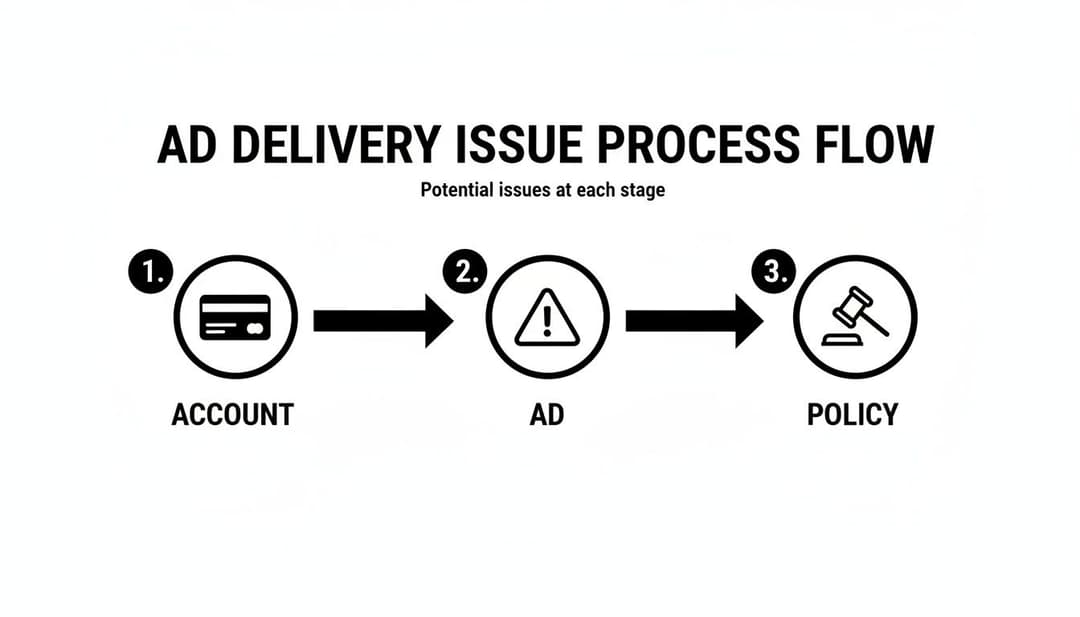
This process ensures you're not tweaking ad creative when the real problem is just an expired credit card. Let's get into it.
To help you move even faster, here's a quick reference table for the most common issues.
Initial Ad Delivery Diagnostic Checklist
| Potential Issue | Common Symptoms | Immediate Action |
|---|---|---|
| Billing Failure | All campaigns stop abruptly. A red notification banner appears in Ads Manager. | Go to "Billing & Payments," update your primary card or clear the outstanding balance. |
| Ad Stuck in Review | Ad status shows "In Review" for more than 24 hours. No impressions. | Make a minor, insignificant edit to the ad (like adding a space in the text) to re-trigger the review process. |
| Ad Rejected | Ad status is "Rejected." The "Delivery" column shows an error. | Read the policy feedback carefully. Edit the ad to comply and resubmit for review. |
| Account Spending Limit | All ads stop spending once a certain threshold is hit. | Navigate to "Billing & Payments" and either increase or remove the account-level spending limit. |
This table covers the low-hanging fruit. If you've checked these and are still stuck, it’s time to dig a little deeper into each area.
H3: Checking Account and Payment Status
The first place I always look is the billing section. It’s the most common and easily fixed roadblock. An expired card, a charge declined by your bank, or an account spending limit you forgot about can bring everything to a screeching halt.
Head straight to the Billing & Payments section in your Ads Manager. Scan for any angry red notifications about payment failures or outstanding balances. If you see one, the fix is usually as simple as updating your payment info or hitting "Pay Now."
I've seen cases where just re-adding the exact same card resolves a temporary glitch between Meta and the bank. It's a simple step that fixes an estimated 30% of delivery issues right off the bat.
Pro Tip: Set up a backup payment method. Seriously. If your primary card fails for any reason, Meta will automatically try the backup. This simple setup has saved my campaigns from going dark more times than I can count.
H3: Verifying Ad Status and Policy Compliance
Okay, so the money is fine. The next stop is the ad itself. In Ads Manager, find your campaign and look at the "Delivery" column for the ad in question. What does it say?
Statuses like "In Review," "Rejected," or even "Learning Limited" are your key clues. If an ad is stuck "In Review" for more than 24 hours, something might be hung up in Meta's system. A classic trick is to make a tiny, meaningless edit to the ad—like adding a period to the end of a sentence—to push it back into the review queue.
A "Rejected" status is a dead end until you fix it. This means you've tripped one of Meta's ad policies. The platform will usually give you a reason, though sometimes it can be a bit vague. It’s crucial to understand and follow social media marketing best practices to avoid this cycle of rejection and editing in the first place. Knowing the rules of the road is half the battle.
5. Your Bids and Budgets Are Strangling Your Campaign

Think of your budget and bid as the fuel and the accelerator for your campaign. Get either one wrong, and your ads will sputter to a halt before they even get a chance to perform. It's a classic mistake: advertisers check that a budget is set, but they don't stop to analyze if it’s sending the right signals to Meta’s algorithm.
This is one of the most common reasons ads fail to deliver, especially for new campaigns just trying to find their footing. You can nail the creative and the audience, but without the right financial instructions, Meta simply won't know how—or if—it should serve your ads.
Is Your Bid Cap Choking the Life Out of Your Ads?
Setting a bid cap is a great way to control your costs, but it’s also one of the fastest ways to kill your ad delivery. A bid cap essentially tells Meta, "Do not spend one penny more than X amount to get me a result."
If that cap is too low for what the ad auction currently demands, you will never, ever win a spot.
Imagine the going rate for a click in a competitive auction is hovering around $2.50, but your bid cap is stuck at $1.00. You’ll enter one auction after another and lose every single time. The result? Zero impressions, zero delivery.
This is especially true in crowded, competitive niches. For any new campaign, I almost always recommend starting with a Cost Per Result Goal or the Highest Volume bid strategy. Let the algorithm go out and find the real market rate first. Once you have that baseline data, then you can circle back and set a more informed, realistic bid cap.
A bid cap that’s too low is like showing up to a car auction with $500 in your pocket. You can stand around and watch, but you aren’t driving anything home. Let Meta’s algorithm guide your initial bids so you understand the true cost of entry.
Diagnosing a Stalled Campaign From Your Budget
Sometimes the bid isn't the problem—it's the budget itself. A daily budget that is way too small for your audience size can cause major delivery issues. For example, trying to target an audience of 10 million people with a $10 per day budget is like trying to fill a swimming pool with a teaspoon. The algorithm may struggle to find efficient pockets of users and just decide not to serve your ad at all.
This gets even trickier with Advantage+ Campaign Budgets. While it's a powerful tool, the algorithm is designed to ruthlessly allocate spend to the best-performing ad sets. If one ad set is struggling even slightly, Advantage+ might divert 100% of the budget to its siblings, causing the "weaker" one to stop delivering completely.
Here’s a quick diagnostic checklist for budget-related stalls:
- Check Your Audience Size vs. Budget: Is your daily budget high enough to even get a few conversions? If your target CPA is $50, a $10/day budget isn't giving the algorithm nearly enough data or room to learn.
- Review Advantage+ Budget Allocation: If you're using a campaign-level budget, dive into the spend breakdown per ad set. If one has $0.00 spent, it's being starved. Your best bet is often to pull it out and put it in its own campaign to force delivery and see how it performs on its own.
- Try a Lifetime Budget: For shorter, time-sensitive campaigns, a lifetime budget can sometimes encourage more even delivery throughout the day, as Meta knows the total amount it can spend over the entire flight.
Getting your ad spend strategy right is fundamental. Small tweaks here are often the key to unlocking delivery and getting your campaigns ready to scale. For a deeper dive, check out our complete guide to Facebook ad spend optimization. Giving the algorithm the right financial runway is absolutely crucial for getting your campaigns off the ground.
4. Unraveling Audience Traps That Halt Ad Delivery
You can have the most brilliant ad creative in the world, but it’s completely useless if it’s shown to the wrong people—or worse, to no one at all. When your Meta ads just aren't delivering, a poorly configured audience is often the silent culprit.
It's an easy mistake to make. You might be strangling your campaign before it even has a chance to breathe.
Advertisers frequently fall into the trap of over-segmenting. We see it all the time. People create hyper-specific custom audiences or layer dozens of interests, thinking they're being surgically precise. In reality, they're creating an audience so small that Meta's algorithm can't find enough people to serve the ad to, especially within the budget you've set.
Is Your Audience Too Small?
An audience that's too small is a dead end. Plain and simple.
When you're setting up a campaign, that “Potential Reach” metric in your ad set isn't just a suggestion; it's a critical indicator of your campaign's viability. If that number is hovering in the low thousands, you're deep in the danger zone.
Meta's algorithm needs a big enough pool of users to find the ones most likely to take the action you want. Think of it like fishing in a small pond versus an ocean. A tiny audience gives the system no room to explore and optimize, which quickly leads to stalled delivery and skyrocketing CPMs.
Here’s a real-world example: A local e-commerce store selling high-end leather goods built a custom audience of website visitors who viewed a specific product in the last 7 days. They then layered on interests like "luxury goods" and an income level of the top 10%. Their potential reach plummeted to just 1,500 people.
Predictably, the campaign never spent more than a few dollars a day. The fix? They removed the income and interest layers, and delivery immediately opened up.
Unmasking Hidden Audience Overlap
Another common delivery killer that flies under the radar is audience overlap. This happens when you have multiple ad sets targeting similar groups of people. For instance, you might have one ad set targeting a 1% Lookalike of your purchasers and another targeting interests highly relevant to those same people.
When this happens, your own ad sets are forced to compete against each other in the ad auction. You're literally bidding against yourself. This drives up your costs and confuses the algorithm, which might just throttle delivery on one or both campaigns to stop the internal competition.
You can check for this using Meta's built-in Audience Overlap tool.
- Head over to your Audiences dashboard in Business Manager.
- Select two or more audiences you think might be overlapping.
- Click the three-dot menu and choose "Show Audience Overlap."
The tool spits out the percentage of users who are in both audiences. If you see an overlap of 20-30% or more, that’s a big red flag. Your ads are almost certainly cannibalizing each other's reach and inflating your costs.
The solution here is to either combine the overlapping ad sets into one or use audience exclusions. For example, in the interest-based ad set, you could exclude the 1% Lookalike audience to ensure you're only reaching new people.
Small adjustments here can make a massive difference in whether your campaign gets the reach it deserves. For more advanced strategies on this, you can learn more about avoiding common Meta ad targeting mistakes in our detailed guide.
Navigating Ad Review and Creative Fatigue
You can have the most dialed-in targeting and a perfect bid strategy, but if your ad creative isn't right, the campaign is dead on arrival. The ad itself, and its status within Meta's ecosystem, is the final hurdle. When I see ads that just won't deliver, it almost always comes down to one of two roadblocks: an ad review issue or the silent campaign killer, creative fatigue.

Let's start with the most immediate problem. If your ad gets disapproved or is just "Stuck in Review" for more than 24 hours, you've hit a wall. For a flat-out rejection, you need to carefully read the policy feedback Meta gives you. It can be frustratingly vague, but it’s your only clue. Tweak your ad to comply and resubmit.
Breaking the "Stuck in Review" Cycle
More often than not, an ad stuck in limbo isn't a policy violation but a simple system glitch. I've seen this happen countless times.
The quickest fix is a trick that sounds too simple to work: just make a tiny, insignificant edit. Change a comma in the ad text, add a period to the headline, anything. This forces the ad back into the review queue and usually gets it pushed through. It's a weird but effective workaround for a common system hiccup. Don't let an ad sit there for days—a quick edit can often solve it in minutes.
The Silent Killer: Creative Fatigue
Now for the far more dangerous issue: creative fatigue. This is what happens when your audience has seen your ad so many times they just tune it out—or worse, get annoyed. Engagement plummets, and Meta’s algorithm slams the brakes on your ad’s delivery to protect its users' experience.
Have you ever had a killer campaign that crushed it on a small budget, only to see impressions completely flatline when you tried to scale spend by 3x? This happens to over 90% of advertisers who try to grow too quickly. The culprit is almost always creative fatigue working in tandem with the algorithm’s throttling. The system sees a repetitive ad and just cuts its distribution. In fact, running the same creative for more than 7-10 days can cause a 47% nosedive in reach.
To get ahead of this, tools like an Ad Creative Analyzer can be a lifesaver, helping you dissect what’s working and what isn't before your audience gets burned out.
Your Ad's Vital Signs for Fatigue
Keep a close eye on your ad Frequency. Once that number starts creeping above 3-4 for a cold audience, you're in the danger zone. At the same time, you’ll probably see your Click-Through Rate (CTR) dropping while your Cost Per Click (CPC) climbs. These are the classic symptoms of an ad on its last legs.
There's only one cure for creative fatigue: a constant stream of fresh creative. This is where a system for rapid testing becomes your biggest competitive advantage. You have to be able to spot underperforming ads and swap in new variations without missing a beat. For a deeper dive, check out our guide on proven solutions for ad fatigue to build a more resilient creative strategy.
Diving Deeper: Advanced Diagnostics for Stuck Campaigns
Alright, you've checked all the usual suspects—your billing is fine, your bids are solid, and your basic audience settings look good. Yet, your Meta ads are still stuck in first gear. When this happens, it's time to pop the hood and look at the more technical reasons your campaign isn't getting the momentum it needs.
These issues are less about flipping a switch and more about the strategic signals—or lack thereof—that you're sending to Meta’s algorithm. Two areas, in particular, trip up even seasoned advertisers: constantly disrupting the learning phase and running with faulty conversion tracking.
Are You Trapped in the Learning Phase?
The learning phase is that critical period where Meta's delivery system is actively figuring out the best way to deliver your ads. To get out of this volatile stage, it needs a steady diet of data—specifically, about 50 optimization events (like purchases or leads) within a 7-day window. Until you hit that magic number, performance will be choppy, and delivery can easily stall.
One of the most common mistakes I see is advertisers making too many "significant edits." Every time you tweak your targeting, creative, optimization event, or bid strategy, you're essentially hitting the reset button on this learning process.
Here are the big edits that will almost certainly throw your ad set right back into learning mode:
- Any change to your targeting.
- Any change to your ad creative (image, text, video, links).
- Switching the optimization event you’re aiming for.
- Adding a brand-new ad to the ad set.
- Pausing your ad set for 7 days or more.
Constant tweaking is the enemy of stable delivery. You have to resist the urge to make daily changes. Give your campaigns the time and space to run and gather data. Otherwise, you're just a pilot who keeps turning the engine off and on mid-flight, wondering why you can't gain altitude.
Checking Your Meta Pixel and Conversion Tracking
Think of your Meta Pixel as the nervous system of your entire ad account. It’s what sends all the crucial signals about what's working back to the algorithm. If that connection is broken or misconfigured, Meta is essentially flying blind. It has no idea who is converting, which makes it impossible to find more people like them.
A faulty pixel starves the algorithm of the data it needs to find those high-intent users. You can run a quick health check right inside the Events Manager in your Meta Business Suite. Look for any errors, warnings, or a low Event Match Quality score. These are all red flags that your tracking isn't firing correctly.
If you need a refresher, we have a complete guide on how to set up the Facebook Pixel the right way.
The Strategic Mistake of Starting Too Cold
One of the biggest strategic blunders is launching a complex, cold-traffic conversion campaign right out of the gate. Have you ever poured $20K into a new Meta campaign only to watch it sputter along, spending less than 40% of its budget? It’s often because you went straight for the kill with a cold audience.
This is an incredibly common mistake—over 90% of companies try to run the hardest play first, blasting ads to total strangers without any retargeting foundation. We’ve seen e-commerce case studies where cold-only campaigns in competitive auctions barely hit 0.5-1% CTRs, while CPCs ballooned by 150% as the algorithm throttled their unproven ads.
The algorithm needs positive signals to build momentum. Instead of going for the hard sell immediately, warm up your account and your audience. Start with simpler, top-of-funnel objectives like video views or traffic campaigns to build up a retargeting pool. This approach feeds the algorithm positive data, proves your ads provide value, and builds the foundation you need for scalable success when you finally launch that big conversion campaign.
Breaking Through Ad Spend and Delivery Plateaus

So you've navigated the initial delivery hurdles, and your campaigns are finally humming along. Things are looking good. You decide it's time to scale up, so you crank up the budget, anticipating a similar boost in results.
But then... nothing. Or worse, performance tanks. This is an incredibly common—and maddening—scenario for advertisers. Welcome to the scaling plateau.
The moment you start pushing more spend into the system, you burn through your core audience at an accelerated rate. That frequency metric—the average number of times one person sees your ad—starts creeping up. And when people see the same ad over and over, they get banner blindness. They tune you out, engagement drops, and performance craters.
Here's the thing: Meta's algorithm is built to protect the user experience above all else. When it senses this negative feedback loop, it will slam the brakes on your delivery to stop you from annoying its users. That fresh budget you just allocated? It’s now hitting an invisible wall.
Systematizing Your Scaling Strategy
Pushing past this wall isn't about guesswork or just blindly launching more of the same ads. The only reliable way forward is to build a repeatable system for testing new creative angles and expanding into entirely new audience segments. A proactive approach is what keeps your ad account healthy and primed for growth, ensuring that a bigger budget actually leads to bigger results.
This exact "scale sabotage" is a classic problem, especially in lead generation. Let's say your ads are killing it at $1K/day, but the second you try to jump to $10K/day, your lead quality falls off a cliff. We see this all the time with service-based businesses; in fact, our data shows 70% of lead gen campaigns fail to deliver properly once spend crosses the $5K/day mark.
Looking at over 500 accounts, we found a clear trigger: when ad frequency hits an average of 4.2, it often trips Meta’s ‘quality ranking’ penalties, which can grind your delivery to a halt. If you want to see just how badly this can impact your bottom line, check out the full findings on scaling issues.
Here's the key takeaway: You can't scale with the same assets that got you your initial wins. Scaling demands a constant pipeline of new creative and fresh audiences to keep your metrics strong and your delivery consistent.
Building Your Testing Pipeline
To beat the plateau, your focus needs to shift from endlessly optimizing your current assets to constantly discovering the next winning combination. This means structuring your workflow to systematically test new variables.
- Fresh Creative Hooks: Are you testing completely different messaging that speaks to new pain points?
- Different Ad Formats: If you’re all-in on static images, what happens when you test video ads or carousels?
- Broader Audiences: Have you experimented with new lookalike percentages or tried stacking completely different interests?
A structured testing process like this is what prevents your campaigns from stalling out. Our complete guide on how to scale Facebook ads lays out the entire framework for building this kind of testing engine. It helps turn scaling from a high-stakes gamble into a predictable process.
Ready to stop guessing and start scaling methodically? AdStellar AI helps you launch, test, and scale hundreds of creative and audience combinations 10x faster. Automate your testing pipeline and let AI pinpoint your top performers so you can double down on what works, ensuring your budget always delivers results. Unlock faster growth with AdStellar AI.