So, you’ve got a Facebook post that’s doing great organically. The likes are rolling in, comments are buzzing, and shares are climbing. What’s next? This is where that little blue “Boost Post” button comes in, and it's probably the simplest way to dip your toes into the world of paid advertising on Facebook.
Think of it as a megaphone for your best content. You're taking something that's already resonating with your audience and amplifying it, pushing it far beyond the people who already follow your Page.
What Is a Boosted Post on Facebook, Really?
At its core, a boosted post is just a streamlined, simplified ad created directly from content you've already published on your Page's timeline. It’s Meta’s express lane for promotion.
Instead of navigating the complexities of the full Ads Manager to build a campaign from scratch, boosting lets you put money behind an existing post in just a few clicks. You’re not creating a new ad; you’re paying to show your organic post to more people.
How Boosting Works
The whole process is built for speed and ease of use. It strips down the ad creation process to three core decisions:
- Your Goal: You pick a simple, straightforward objective. Do you want more likes and comments (engagement), more clicks to your website (traffic), or more DMs in your inbox (messages)?
- Your Audience: You can define who sees your post with some basic targeting options, like location, age, and interests. You can also target people who already like your page and their friends, which is a great way to expand your immediate circle of influence.
- Your Budget & Timeline: You decide on a total budget for the promotion and how many days you want it to run. Simple as that.
What started as a basic tool for reach has grown into a surprisingly capable option for marketers. You can get started with as little as $1 per day or scale up to $100s, making it a fantastic, low-risk way to test the waters with new content or audiences.
It’s also worth noting how boosting plays out on other Meta platforms. While the concept is similar, the specifics can vary. If you're running multi-platform campaigns, check out this guide on what boosting means on Instagram as well.
How the Facebook Boost Post Feature Works
So, what actually happens when you hit that little blue "Boost Post" button? Think of it as a simplified remote control for Meta's incredibly powerful ad delivery engine. While the interface is designed to be quick and easy, every single choice you make is a direct instruction to the algorithm, telling it who to find and what you want them to do.
The whole process kicks off the moment you click "Boost Post" on any given post from your Page's timeline. This brings up a streamlined control panel where you'll make a few key decisions that will shape your entire mini-campaign.
Choosing Your Campaign Goal
First up, and arguably the most important choice, is your objective. This isn't just for show; you're giving a direct command to the Meta algorithm. You're defining what a "win" looks like, which completely changes the type of person it will hunt down to show your post to.
You’ll typically see goals like:
- Get more engagement: This tells the algorithm to find the clickers, likers, commenters, and sharers. It’s perfect for building social proof and just getting your name out there.
- Get more website visitors: Pick this, and you’re signaling that you want traffic. The system will immediately start looking for people who have a history of clicking on links that take them off-platform.
- Get more messages: This objective is all about starting conversations. Your post will be shown to users who frequently use Messenger, Instagram Direct, or WhatsApp to chat with businesses.
This one decision will fundamentally shape your results. A post boosted for engagement might rack up hundreds of likes but only a handful of website clicks—because that's exactly what you told the algorithm to deliver. On the bright side, boosting is known for driving strong engagement. In fact, boosted posts on Facebook see an impressive 5.07% average engagement rate, which even outpaces platforms like TikTok and Instagram. You can dig into more of these kinds of numbers in these social media statistics from buffer.com.
Defining Your Audience and Budget
Next, you get to decide who sees your post. You can let Facebook's algorithm take the wheel with its "Automatic" audience, but the real power is in creating your own. You can dial in specific demographics, locations, and interests to build a custom audience from scratch.
You can also target people who already like your Page and their friends, which is a fantastic way to expand your reach to a warm, receptive audience.
Finally, you set your budget and duration. Just plug in the total amount you’re willing to spend and over how many days. Facebook will give you a ballpark estimate of your reach, which helps you get a rough idea of the potential impact. But even with a simple boost, you have to track what’s happening. For more serious tracking, you'll want to learn how to set up the Meta Pixel to see what actions people take on your actual website.
Once you’ve set everything up and hit the button, your boosted post is officially live. It enters the same ad auction as the complex campaigns built in Ads Manager, competing for a spot in front of your ideal audience.
Boost Post vs. Ads Manager: The Strategic Difference
Choosing between boosting a post and building a campaign in Ads Manager isn’t about which tool is “better.” It’s about knowing the right tool for the job.
Think of it this way: the Boost Post button is your tactical scalpel, perfect for a quick, precise cut. Meta Ads Manager, on the other hand, is your full surgical kit, equipped for complex, multi-layered operations. A savvy performance marketer needs to know when to reach for which one.
The Boost Post feature is all about speed and simplicity. Its greatest strength is amplifying what’s already working. Got an organic post that's getting great likes, comments, and shares? Boosting it is like turning up the volume on a hit song—it takes that proven content and pushes it out to a wider, yet simply defined, audience. Fast.
In contrast, Ads Manager is your strategic command center. It’s built from the ground up to create, manage, and optimize intricate advertising campaigns. Here, you aren't just amplifying a single post; you're engineering entire marketing funnels with specific objectives, microscopic audience targeting, and deep performance tracking.
Comparing Core Capabilities
The real difference snaps into focus when you look at what each tool actually lets you do. Boosting is about immediate impact with minimal fuss. Ads Manager is about total control and long-term scalability.
Here’s where they fundamentally part ways:
- Campaign Objectives: Boosting offers straightforward goals like engagement or link clicks. Ads Manager unlocks the entire suite of objectives, including conversions, lead generation, and app installs—the stuff that really matters for tracking bottom-of-the-funnel results.
- Audience Granularity: With a boosted post, you can set basic interests and demographics. But Ads Manager is where the magic happens. You can build hyper-specific custom audiences from your website traffic, create powerful lookalike audiences, and layer behaviors or life events to pinpoint your ideal customer.
- Optimization and Bidding: Boosting uses a simplified, automated bidding process. Ads Manager hands you the keys, offering manual bidding strategies, cost caps, and the ability to optimize for Return on Ad Spend (ROAS). This gives you direct control over your campaign's financial efficiency.
This decision tree helps visualize the simple "when-to-boost" thought process.
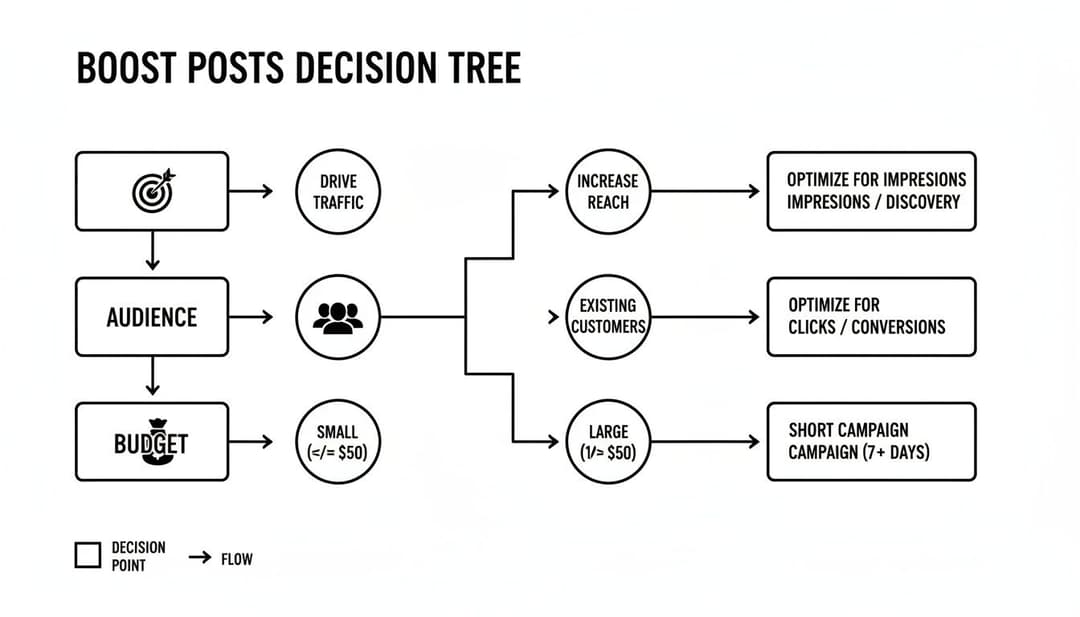
As the diagram shows, if your goals are simple and you don't need complex targeting or budgeting, boosting is a direct and effective path.
Feature Deep Dive: Boost Post vs. Ads Manager Capabilities
To truly grasp the strategic gap between these tools, it's helpful to see their features laid out side-by-side. The table below breaks down the key capabilities, showing where the Boost Post button's simplicity ends and the Ads Manager's professional-grade power begins.
| Capability | Boost Post | Meta Ads Manager |
|---|---|---|
| Campaign Objectives | Limited (Engagement, Messages, Website Visits) | Full Suite (Conversions, Leads, Sales, App Installs) |
| Audience Targeting | Basic (Demographics, Interests, Page Fans) | Advanced (Custom, Lookalike, Behavioral, Retargeting) |
| Creative Control | Limited to a single, existing post | Full (A/B testing, Dynamic Creative, Multiple formats) |
| Placement Options | Automatic (Limited control over where ads appear) | Manual (Full control across Facebook, Instagram, etc.) |
| Bidding Strategy | Automated (Optimized for objective, no manual control) | Manual & Automated (Cost Cap, Bid Cap, ROAS goals) |
| Performance Tracking | Basic Metrics (Reach, Likes, Comments, Clicks) | In-Depth (Pixel Conversions, Custom Events, ROAS) |
| Scheduling | Simple (Set a duration and end date) | Advanced (Dayparting, specific run times) |
This comparison makes it clear: for quick wins and broad reach, boosting is a solid choice. But for any campaign where granular control and deep data analysis are non-negotiable, Ads Manager is the only way to go.
The Financial and Tracking Divide
Cost and tracking also draw a sharp line in the sand. You can get a boosted post running for as little as $1 to $3 per day, making it incredibly accessible for quick creative tests or getting more eyeballs on a popular post. However, this simplicity comes at the expense of deep tracking.
Boosted posts are fantastic for gathering surface-level engagement metrics. But for true performance marketing, you need the pixel-based conversion tracking and custom event measurement that only Ads Manager can provide.
Without the robust tracking infrastructure of Ads Manager, it's nearly impossible to measure the true ROAS of a boosted post or understand its actual impact on your business goals. It gives you social proof, not a sales report. For a closer look at the more powerful tool in the shed, check out our complete guide on what Facebook Ads Manager is and how it works.
Ultimately, the choice boils down to your immediate goal. Need to quickly amplify a winning post to build brand awareness or collect social proof? Boosting is your best friend. But if you need to drive sales, capture leads, and scale a data-driven campaign with surgical precision, Ads Manager is the only professional choice.
Smart Scenarios for Using Boosted Posts
Look, I get it. To a lot of seasoned marketers, the "Boost Post" button feels like a rookie move. The conventional wisdom is that real campaigns are built in Ads Manager. And while that's generally true, writing off boosting entirely is a strategic mistake.
Think of boosting not as a watered-down version of Ads Manager, but as a specialized tool in your marketing toolkit. It’s not a sledgehammer; it’s a scalpel. And in the right hands, it’s perfect for specific, high-impact jobs that call for speed and simplicity.
Amplify and Validate Your Best Content
One of the absolute smartest ways to use boosting is to pour fuel on a fire that’s already burning. You know those organic posts that just take off? The ones racking up genuine likes, thoughtful comments, and shares without you spending a dime? That post has proven its worth. Now’s the time to boost it.
When you boost a high-performing organic post, you're doing two critical things at once:
- Build Massive Social Proof: You're rapidly multiplying the likes, comments, and shares on that original post. Later, if you decide to turn this post into a proper ad in Ads Manager, it will already be loaded with social proof. To a cold audience, that built-in engagement screams credibility and trustworthiness.
- Confirm a Winning Creative: The strong performance from the boost serves as final validation. You've confirmed that the creative, the copy, and the core message all work before you commit a larger budget to it in a more complex campaign.
This approach is all about de-risking your ad spend. You test the waters organically, then use a small boost to amplify the proven winners.
Quick and Dirty Creative Testing
Need to figure out which creative angle or headline clicks with your audience, but don't want the hassle of setting up a formal A/B test in Ads Manager? Boosting is your answer. It's an incredibly efficient way to get a quick read on your messaging.
For example, publish two posts with different hooks or images. Put a small, equal budget behind each as a boosted post and let them run. Within a day or two, you'll have a fast, directional read on which one is getting more engagement or clicks. The winner can then be polished and scaled within a proper Ads Manager campaign.
Boosting lets you gather real-world performance data on your creative ideas fast. It's a low-cost, low-effort way to let your audience vote with their clicks and comments on what they want to see.
This is the perfect tactic for answering those nagging questions like, "Does a question-based headline actually work better than a direct statement?" or "Is this image a better scroll-stopper than that one?"
Finally, boosting is the go-to tool for anything time-sensitive. If you're announcing a flash sale, a webinar that starts tomorrow, or a local in-store event, boosting is the fastest way to get eyes on it. The goal is immediate awareness with minimal setup, and that’s exactly what boosting delivers. For more tips on getting your posts seen, you can explore techniques on how to strategically bump a post on Facebook for maximum impact.
Common Mistakes to Avoid When Boosting Facebook Posts
That big blue "Boost Post" button feels so simple, doesn't it? That's by design. While it makes getting your content in front of more people incredibly easy, it also makes it incredibly easy to waste money if you aren't careful.
Boosting a post is one thing; boosting it effectively is another. It requires a bit of strategy to sidestep the common traps that drain your budget for little to no real return.

One of the biggest blunders I see is boosting content that has weak organic performance. Think about it: if your post isn't already getting genuine likes, comments, and shares from your followers, why would strangers care? Paying to show a dud post to more people is like pouring fuel on a fire that’s already out. A boost can't magically fix a boring post.
Another costly mistake is blindly trusting Facebook's default settings, especially the "Automatic" audience option. It's convenient, sure, but it often casts a wide, generic net, showing your ad to a bunch of people who probably have zero interest in what you're offering.
Misaligned Objectives and Targeting
Choosing the wrong objective is like bringing a hammer to a job that needs a screwdriver. If you want to drive sales but you select "Get more engagement," you're telling Meta's algorithm to find people who are great at liking and commenting—not people who pull out their credit cards. This mismatch is a huge reason for disappointing results.
Don't mistake social media engagement for business impact. Hundreds of likes on a boosted post are a vanity metric if your ultimate goal was to generate leads or drive traffic to a product page.
Just as important is remembering to use audience exclusions. You're just burning cash if you're paying to show your ads to people who have already bought your product or signed up for your list.
Common Pitfalls Checklist
To make sure your boosted posts are pulling their weight, steer clear of these all-too-common missteps:
- Boosting Immediately After Publishing: Don't be too eager. Give your post at least a few hours to collect some organic data first. Boosting something that already has momentum is way more effective.
- The "Set It and Forget It" Mentality: Even a simple boost needs a babysitter. Keep an eye on key metrics like Click-Through Rate (CTR) and Cost Per Click (CPC). If the numbers look bad, turn it off.
- Boosting Low-Quality Creative: No amount of money will save a blurry image, a video with terrible audio, or copy riddled with typos. Your creative has to be good enough to stop the scroll on its own.
- Ignoring Placement Options: Just letting Facebook place your ad everywhere is rarely the best move. A post that looks great in the Feed might be a disaster in Stories or look totally out of place in Messenger.
Scaling Your Wins Beyond the Boost Button
When you strike gold with a boosted post, the immediate temptation is to just throw more money at it. More budget, right? But that’s thinking small. Real growth comes when you treat that initial success not as the finish line, but as the starting gun for a much smarter, more strategic campaign.
That winning post is pure data. It’s a clear signal that a specific creative, message, and audience segment are clicking. The next logical step isn't just to amplify it; it's to systematically scale that success by moving beyond the simple boost button and into the powerful world of structured ad testing.
From Validation to Variation
Trying to manually recreate those winning elements in Ads Manager to build out new tests is a slow, tedious grind. This is exactly where modern ad platforms step in, bridging the gap between a successful boost and a high-performance campaign built for scale.
Instead of just running the same post again, the goal is to break it down into its core components—the image, the copy, the headline, and the audience profile. Advanced tools can then take these validated elements and spin up hundreds of new variations for rigorous A/B testing. This process transforms a simple, proven concept into a full-fledged campaign engineered to maximize your Return on Ad Spend (ROAS).
Think of it like this: your boosted post found the right recipe. Now, you’re using that recipe to bake hundreds of slightly different cakes to find the absolute perfect one for every occasion.
This method lets you explore new audience segments and fine-tune your messaging with incredible speed. To keep track of everything with precision, use a dedicated Facebook UTM builder to monitor performance and attribute every dollar accurately.
By taking this approach, you elevate a simple boost from a one-off tactic into the first step of a powerful, data-driven growth engine. To dive deeper into this process, check out our detailed guide on how to scale your Facebook ads.
Frequently Asked Questions About Boosting Posts
Even with a solid game plan, a few questions always seem to pop up once you actually start boosting posts. Let's run through some of the most common ones we hear from marketers to get rid of any last-minute confusion.
Should I Boost a Post That Already Has Good Organic Engagement?
Yes. A thousand times, yes. In fact, these are the best posts to put money behind.
Think about it: high organic engagement is a direct signal from your audience that your content is hitting the mark. Boosting a post that's already a proven winner is like pouring gasoline on a fire. You're taking something you know works and giving it a massive signal boost, making sure it gets seen by a much wider audience. This is how you maximize your ad spend on a creative that's already been validated.
It's a low-risk investment. The post has already passed the initial audience test, so you're not just gambling on unproven content.
Can You Edit a Boosted Post?
For the most part, no. Once you boost a post and the ad is running, Facebook locks down most of the original content. That means the image, video, and main text are set in stone. You might be able to fix a tiny typo in the ad copy within the boost settings, but you can't overhaul the creative itself.
This is exactly why you need to proofread everything carefully before you hit that boost button. If you spot a major mistake after it's live, your only option is to stop the promotion, delete it entirely, fix the original post, and then start a brand-new boost from scratch.
What Is the Difference Between Reach and Impressions?
It’s easy to mix these two up, but they measure very different things.
- Reach is the total number of unique people who saw your post. One person seeing your ad equals a reach of 1, no matter how many times they see it.
- Impressions are the total number of times your post was displayed on a screen.
So, if one person sees your boosted post three different times, that counts as a reach of 1 and 3 impressions. If your impressions are sky-high but your reach is low, it could be a sign of ad fatigue—the same people are seeing your ad over and over again. When you're ready to grow beyond single boosts, you'll need a more holistic plan for scaling your content marketing.
Ready to move beyond the boost button and scale your ad campaigns with precision? AdStellar AI automates ad creation, testing, and optimization, helping you launch hundreds of variations in minutes and double down on what drives real results. Transform your validated ideas into high-performance campaigns at https://www.adstellar.ai.