When you scroll through your Instagram feed and see that little blue “Boost Post” button, think of it as an express lane for advertising. It’s Instagram’s way of letting you take one of your existing posts, add some budget, and show it to a whole new crowd beyond your current followers.
In a nutshell, it’s the most direct way to turn your best organic content into a paid ad.
What Is an Instagram Boosted Post
A boosted post is basically one of your normal, organic posts that you’ve put money behind to “supercharge” its reach. Instead of just hoping the algorithm shows your content to new people, you're paying Instagram to guarantee it gets seen by a specific audience you choose.
This simple action transforms a post from a conversation with your existing community into a broadcast aimed at potential new fans and customers.
Imagine you created a fantastic Reel that’s already getting tons of love from your followers. By boosting it, you’re essentially adding rocket fuel. You’re ensuring thousands more people—who don’t follow you yet but fit your ideal customer profile—will see it pop up in their Feeds and Stories.
To get a better handle on boosted posts, it helps to look at what they’re actually designed to do. Here’s a quick summary of their core functions.
Boosted Post At-a-Glance
| Feature | Description |
|---|---|
| Objective | Amplify a single, existing organic post. |
| Placement | Instagram Feed, Stories, Explore page, and Reels. |
| Targeting | Basic options (location, age, gender, interests). |
| Primary Goal | Increase reach, engagement, or simple actions. |
| Complexity | Low; designed for quick and easy setup. |
As you can see, the main point is simplicity and speed, making it a great entry point into paid advertising on the platform.
Key Functions of a Boosted Post
The "Boost Post" button isn't a magic wand for sales, but it's incredibly effective for a few specific goals:
- Amplifying Reach: Its main job is to blast your content far beyond your follower list, massively increasing the number of unique accounts that see your post.
- Increasing Engagement: Boosting is perfect for getting more likes, comments, shares, and saves, especially on a post that has already proven to be a hit with your audience.
- Driving Simple Actions: You can use it to send people directly to your profile, push them to click the link in your bio, or encourage them to send you a direct message.
Boosting a post has a direct impact on metrics like reach and engagement. You can learn more about how it all works by checking out our detailed guide on what impressions mean on Instagram.
How the Instagram Boost Post Function Actually Works
When you tap that little blue “Boost Post” button, you're essentially taking the driver's seat of the Instagram algorithm for a short trip. Instead of just hoping your content finds the right people, you get to grab the wheel and set the destination yourself.
Think of it as giving Instagram a simple, clear set of instructions. You’re telling the platform exactly who should see your post, how much you’re willing to spend to make that happen, and for how long. The entire process is designed to be ridiculously straightforward, putting a few key controls directly at your fingertips.
Core Controls of a Boosted Post
The real beauty of the boost function is its simplicity. You don’t need to be a seasoned ad expert to get started. Right inside the app, you get access to the main controls:
- Audience Targeting: You can let Instagram work its magic and automatically find people similar to your followers. Or, you can build a custom audience from scratch based on specific locations, ages, and interests.
- Budget and Duration: You decide on a total budget for the promotion and how many days it will run. Instagram takes care of the rest, calculating an estimated daily spend and telling you how many people you might reach.
- Placement: Your boosted post will show up seamlessly in the Instagram Feed, in Stories, and on the Explore page. To the users who see it, it looks just like any other piece of native content.
Boosting is a powerful first step into paid social, but its effectiveness hinges on strategy. When you boost, the algorithm prioritizes shares, meaning content designed to be sent to friends via DM performs best.
Turning Controls into Performance
These simple controls are your entry point into performance marketing on Instagram. Imagine a local coffee shop wants to promote a new latte. They can boost a post, targeting users within a 5-mile radius who are interested in coffee and cafes. Setting a budget of $50 over 5 days gives them predictable spending and a clear idea of their potential reach.
This direct control is fantastic for learning the basics of advertising spend and returns. You can quickly see how tweaking your budget impacts reach and engagement, giving you valuable intel for your next move. It’s worth taking a moment to understand how Instagram ad costs are determined to get a better feel for this relationship.
On top of that, a smart boost plays into Instagram’s own performance mechanics. Simple things like using location tags, which can bump up engagement by 79%, or writing longer, more thoughtful captions of 1,000-2,000 characters (which can double engagement), make a huge difference. Getting these small details right is what separates a good boost from a great one.
Boost Post vs. Meta Ads Manager: A Critical Comparison
Choosing between boosting a post and launching a full-blown campaign in Meta Ads Manager is a lot like deciding between a point-and-shoot camera and a professional DSLR. Sure, both take pictures, but they’re built for completely different jobs and offer wildly different levels of control. Getting this distinction right is a game-changer for any serious performance marketer.
Think of the “Boost Post” button as your point-and-shoot. It’s incredibly fast, super convenient, and perfect for grabbing a quick snapshot—or in this case, amplifying a post that’s already doing well. The main goal here is to quickly get more eyeballs on your content and drive simple engagement like likes, comments, and profile visits.
Meta Ads Manager, on the other hand, is the professional DSLR. It’s a powerful, intricate system with a full bag of interchangeable lenses, giving you granular control over every last detail of your campaign. This is where you go when you need to hit specific business goals that go way beyond simple engagement.
Objectives and Control: What’s the Real Difference?
The biggest split between the two comes down to the available campaign objectives. When you boost a post, your goals are pretty straightforward: you’re aiming for more profile visits, website clicks, or direct messages. It’s all about top-of-funnel awareness and getting people to interact with your content.
Meta Ads Manager, however, unlocks a massive arsenal of objectives that cover the entire marketing funnel. This is where you can build campaigns specifically for:
- Lead Generation: Collect names, emails, and phone numbers directly on the platform.
- Conversions: Push people to take specific actions on your website, like making a purchase or signing up for a newsletter.
- App Installs: Get users to download and install your mobile app.
- Catalog Sales: Show off products from your e-commerce store to people most likely to buy.
This flowchart breaks down the simple decision-making process for when a boost makes sense.
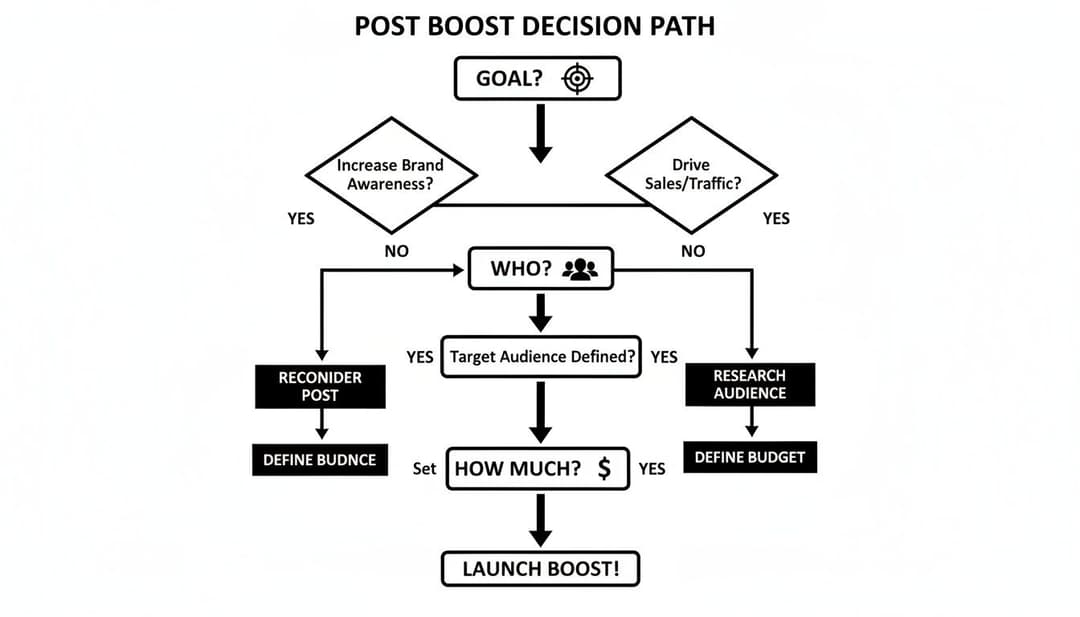
As you can see, boosting is a linear path focused on a single piece of content. You pick a goal, define a simple audience, set a budget, and you're off.
Creative and Targeting Flexibility
Another huge difference is creative flexibility. When you boost a post, you’re stuck with what’s already on your Instagram grid. You can't tweak the image, video, or caption once you hit that button.
Meta Ads Manager allows you to create "dark posts"—these are ads that show up in people's feeds but don't live on your brand's profile grid. This is an absolute must for A/B testing different images, headlines, and calls-to-action without flooding your organic feed with dozens of variations.
Targeting options also get a major upgrade in Ads Manager. While boosting gives you basic demographic and interest targeting, Ads Manager lets you build incredibly sophisticated Custom Audiences from your website visitors, email lists, or app users. From there, you can create powerful Lookalike Audiences to find brand-new users who share the same characteristics as your very best customers.
This table gives a side-by-side look at how the two stack up.
Boost Post vs. Meta Ads Manager Key Differences
| Feature | Boost Post (via Instagram App) | Meta Ads Manager |
|---|---|---|
| Primary Goal | Increase reach and engagement on an existing post. | Achieve specific business outcomes (leads, sales, etc.). |
| Ease of Use | Very simple and fast; designed for beginners. | Complex with a steep learning curve; built for professionals. |
| Campaign Objectives | Limited: Profile Visits, Website Clicks, Messages. | Extensive: Conversions, Lead Gen, App Installs, Catalog Sales. |
| Creative Control | Limited to existing grid posts. No A/B testing. | Full creative control, including "dark posts" for A/B testing. |
| Targeting Options | Basic: Demographics, interests, automatic audiences. | Advanced: Custom Audiences, Lookalikes, detailed behaviors. |
| Placement Control | Automatic placements decided by Instagram's algorithm. | Full control over where ads appear (Feed, Stories, Reels, etc.). |
| Best For | Quickly amplifying top-performing content and building brand awareness. | Driving measurable ROI, scaling campaigns, and full-funnel marketing. |
Ultimately, boosting is a great entry point. It's fantastic for putting a little fuel behind your best organic content and getting a feel for paid promotion.
But when you're ready to drive real, measurable business results and truly scale your advertising, graduating to the advanced toolset inside Meta Ads Manager isn't just an option—it's a necessity. For a deeper dive into other ad formats, this guide on Instagram Lead Ads vs DM Ads offers some great insights.
When Should You Boost an Instagram Post?
Knowing what the "Boost Post" button does is one thing, but knowing when to use it is where the real strategy kicks in. Let's be clear: boosting isn't the magic bullet for every marketing goal. It's a specific tool for high-impact situations where speed and simplicity are what you need most.
Think of boosting as the perfect move for giving your best organic content an extra push. It’s all about capitalizing on momentum that's already there or creating a quick burst of awareness for something time-sensitive.
Key Scenarios for Boosting a Post
So, when does it make sense to hit that blue button? Consider boosting in these situations:
- Amplify Your Organic Winners: Got a post that’s already getting tons of shares and comments on its own? That’s your cue. Boosting it helps you ride that wave of engagement, showing it to thousands of new people who are probably going to love it, too.
- Promote Time-Sensitive Events: Are you running a flash sale this weekend? Announcing a last-minute webinar? Promoting a local event? Boosting is hands-down the fastest way to get the word out to a targeted audience on a tight deadline.
- Drive Traffic to Your Bio Link: When you’ve just dropped a new blog post, launched a product, or updated your link-in-bio with a sign-up form, boosting a related post with a clear call-to-action is a simple way to drive immediate traffic right where you want it.
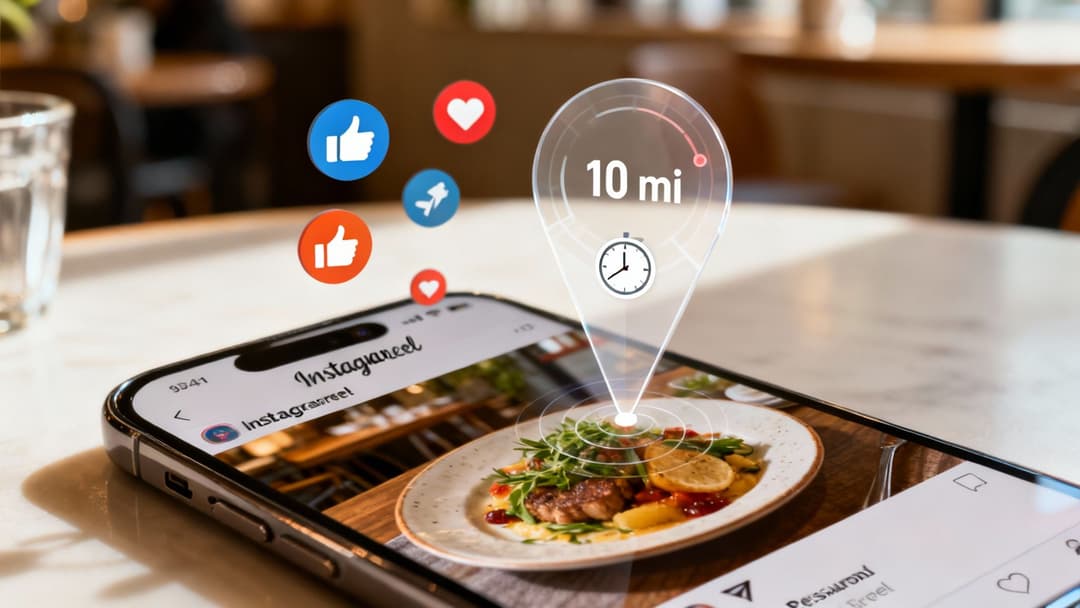
Example in Action: A local restaurant posts a Reel of their new seasonal dish, and it starts gaining traction. They can boost it, targeting users within a 10-mile radius who are interested in "foodie" content. This strategy directly turns online buzz into real-world foot traffic.
Ultimately, the best boosted posts are just an extension of an already-strong organic content strategy. Simple additions like location tags can increase engagement by a whopping 79%, and just posting consistently can lead to 50% better engagement rates overall. By boosting your most optimized and timely content, you’re making sure your ad spend actually delivers. If you want to dive deeper, Buffer has some great insights on Instagram's engagement metrics.
Your Quick Guide to Boosting an Instagram Post
Ready to give one of your posts a little extra push? Boosting is designed to be ridiculously simple. You can take your best-performing content and turn it into an ad in just a couple of minutes, all without ever leaving the Instagram app.
Let's walk through exactly how it's done.
The 5 Steps to Boost Your Post
The whole process gives you just enough control to get the job done without bogging you down with a million confusing settings.
Choose Your Post: First things first, head over to your profile grid and find a post that's already doing well. Look for something with plenty of organic likes, comments, and shares—that’s your best bet for what will connect with a bigger audience. Once you've picked your winner, tap that blue “Boost Post” button right underneath it.
Select Your Goal: Instagram will ask you what you’re trying to accomplish. You’ll usually see three options: More Profile Visits, More Website Visits, or More Messages. Just pick the one that makes the most sense for this specific post. Are you trying to get foot traffic to your profile, send people to a product page, or start a conversation?
Define Your Audience: Now it’s time to decide who sees your ad. You can go with the “Automatic” option, and Instagram will show your post to people who look a lot like your current followers. Or, you can build your own audience from scratch by choosing specific locations, age ranges, genders, and interests.
Set Your Budget and Duration: Here’s where you tell Instagram how much you’re willing to spend and for how many days you want the ad to run. As you adjust the numbers, you'll see an estimated reach, which gives you a ballpark idea of how many people will see your post.
Review and Launch: Take one last look at everything—your goal, audience, budget, and payment info. If it all looks good to go, hit the final “Boost Post” button. Your post will be sent off for a quick review, and then it’s live
From Boosting to True Scale: The Next Step in Your Ad Strategy
Getting a handle on Instagram’s “Boost Post” button is a great first step, but it's just that—a first step. Think of it as learning the ropes. It’s a fantastic way to dip your toes into paid social, get a feel for amplifying your content, and see what happens when you put a little money behind a post. But the kind of explosive, high-return growth that really moves the needle? That lives in the more powerful world of Meta Ads Manager.
But even for ambitious marketing teams, trying to manage complex campaigns manually inside Ads Manager can quickly become a huge bottleneck. This is where modern advertising platforms come into play. They’re built to handle the heavy lifting, automating the complexity so you can generate and test hundreds of ad variations, let AI figure out which creative is a winner, and scale your campaigns way faster than any human could.
The lesson here is simple: Use boosting to understand the fundamentals of paid promotion. But when you’re ready for serious, scalable results, it’s time to bring in the professional-grade tools.
As you start thinking about more advanced social media tactics, consider how a comprehensive AI social media strategy can help you plan and execute well beyond simple boosts. For any brand that’s serious about rapid growth, AI-driven platforms are no longer a "nice to have." To see what this looks like in practice, you can find more information on how to build scalable advertising solutions that deliver real business outcomes.
Got Questions About Boosting Posts? Let's Clear Things Up.
Diving into Instagram's 'Boost Post' feature usually brings up a few practical questions. Getting these answers straight is key to making sure you spend your budget wisely and get the results you're looking for.
Can You Edit a Boosted Post?
The short answer is no. Once your post is live and the boost is running, you cannot edit the caption, image, or video. Instagram locks the ad creative in place to keep the experience consistent for everyone who sees it.
This is a big one to remember. Always, always proofread your caption and give your creative a final once-over before you hit that "Boost Post" button.
Does Boosting Guarantee More Followers?
A boost guarantees more eyeballs on your post—more reach, more visibility—but it does not guarantee more followers. Think of it as putting your content in front of the right crowd.
While showing your best stuff to a targeted audience will likely lead to some new followers, the content itself has to do the heavy lifting. The primary job of a boost is to amplify your message, not to directly purchase followers.
How Much Should You Spend on a Boost?
If you're just starting out, you don't need to break the bank. Dipping your toes in with a small budget is the smartest way to go.
A budget of $25 to $50 spent over 3-5 days is a perfect starting point. It's enough cash to get some real data on how people are reacting without committing to a major spend. See what works, then use those insights to decide where to put your money next time.
Ready to move beyond boosting and scale your ad campaigns? AdStellar AI automates ad creation, testing, and optimization, helping you launch winning Meta campaigns 10x faster. Learn more about AdStellar AI.