
You're probably in one of two spots right now. Either you've boosted a few posts before and realized that isn't the same thing as running a real campaign, or you've opened Meta Ads Manager, seen campaign, ad set, and ad levels, and immediately understood why so many first launches go sideways.
Posting a Facebook ad isn't hard in the narrow sense. Clicking Publish is easy. Getting the ad approved, tracked correctly, structured for learning, and managed like a media buyer is the part most beginner guides skip.
That's the gap that matters. If you want to learn how to post a Facebook ad in a way that gives you a chance to win, treat launch day like the midpoint, not the finish line.
The Essential Pre-Launch Checklist
Most first-time advertisers think the danger starts after launch. In practice, a lot of campaigns fail before they ever enter the auction. The usual blockers are boring but expensive: wrong permissions, no Page connected, payment issues, verification gaps, or missing disclosure settings.
Recent guidance around Meta's ad ecosystem points to the same pattern. The difference between publishing an ad and making it eligible to show often comes down to setup blockers like business verification, identity confirmation, special ad category selection, and whether the Page, payment method, and account permissions are in place before you hit publish, as noted in this Meta Ads Library setup overview.
Start with the account stack
If you're trying to run ads from a personal profile mindset, stop there. Ads should run from a business Page connected to a proper business setup. That gives you access to Meta Ads Manager and keeps ownership, billing, and permissions organized.
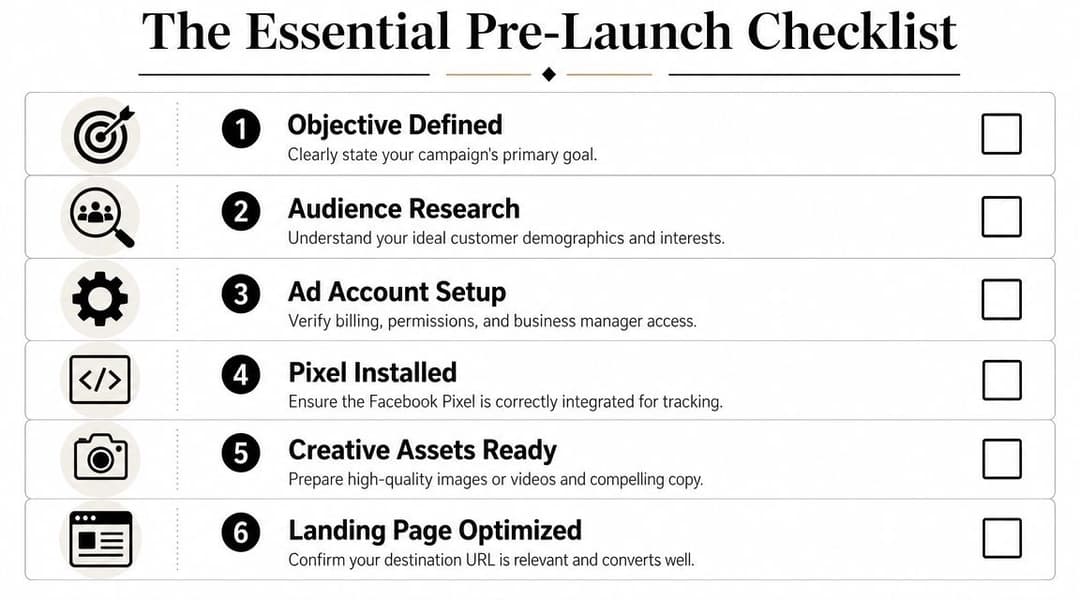
Your baseline checklist should look like this:
- Business assets are connected: Your Facebook Page, Instagram account if you'll use it, ad account, and payment method should all sit under the same business setup.
- Permissions are clean: Make sure the person launching the campaign can create campaigns, edit billing, and publish ads.
- Billing is working: An ad account with a broken payment method can look fine until launch, then stall.
- The destination is ready: The landing page needs to load fast, match the ad promise, and work on mobile.
- Tracking is installed before launch: If you wait until after launch to sort out tracking, your first data set is already compromised.
For a step-by-step account setup flow, this guide on how to create a Facebook ad account is a useful reference.
Don't skip tracking
A campaign without tracking is just paid traffic with opinions attached to it. You need the Meta Pixel in place, and if your stack supports it, Conversions API should be part of the setup too. The reason is simple. Meta can only optimize toward outcomes it can reliably observe.
If you launch first and patch tracking later, you create three problems at once:
- Weak optimization signals
- Bad reporting
- Messy decision-making in the first week
Practical rule: If you can't verify that key events are firing before launch, you're not ready to buy traffic yet.
The junior mistake is obsessing over headline wording while the event setup is still questionable. Senior buyers reverse that order. Measurement first, then messaging.
Check policy and eligibility before creative review
A lot of promising campaigns face delays at this stage. Some verticals require special ad category selection. Some advertisers need identity or business verification. Some accounts have asset ownership issues that only show up when someone tries to publish.
Use this pre-flight review before your first campaign:
| Check | Why it matters |
|---|---|
| Page ownership | The ad needs a valid business Page to run from |
| Identity and business verification | Some accounts can't fully run without it |
| Special ad category | Certain offers require category disclosure |
| Payment method | A valid card or billing source prevents launch failure |
| Domain and tracking access | Reporting and optimization depend on clean setup |
One more practical warning. Don't build creative before you know what the campaign is supposed to do. An ad for purchases, a lead form ad, and a traffic ad can all promote the same offer, but they should not be built the same way.
Structuring Your Campaign for Clear Results
Campaign structure decides how easy this account will be to run on day two, not just how fast you can publish on day one. A messy setup creates muddy reporting, overlapping tests, and bad calls in the first week because you cannot tell what drove the result.
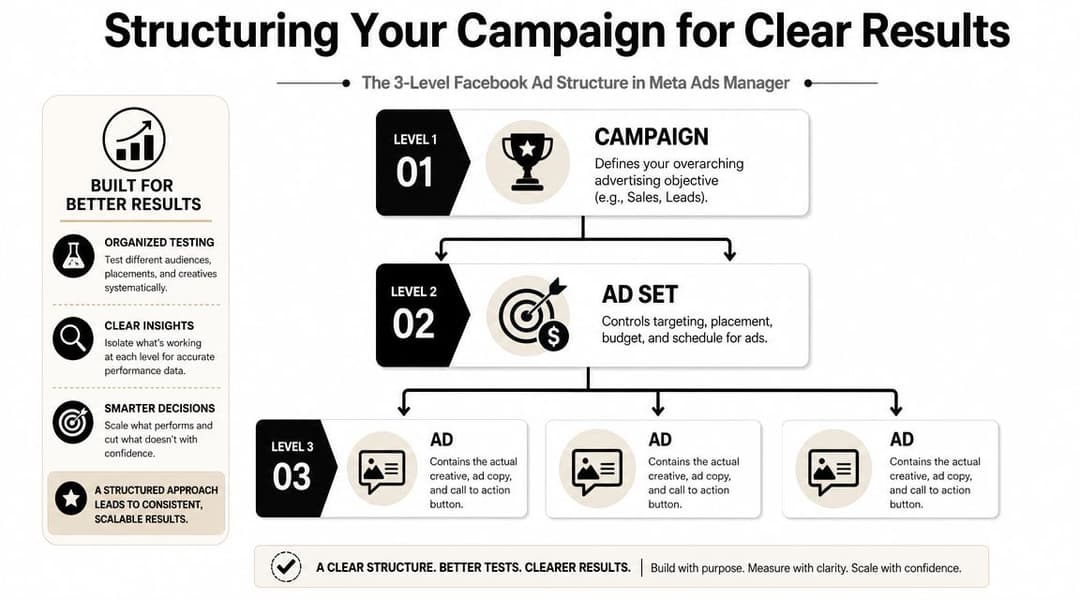
Meta Ads Manager keeps the hierarchy simple. The discipline is in assigning one job to each level and resisting the urge to cram too many decisions into one place.
Know what each level controls
The workflow inside Ads Manager is straightforward. Open Campaigns, click Create, choose the buying type and objective, build the ad set, add the ad creative, then publish. Meta outlines that process in its own Ads Manager campaign creation documentation.
What matters more than the clicks is the role of each layer:
- Campaign: the business outcome you want Meta to optimize toward
- Ad set: the audience, placements, timing, and spend controls
- Ad: the creative, copy, format, and destination the user sees
Keep those roles clean. If a campaign contains multiple business goals, or an ad set mixes too many audience ideas, reading performance gets harder fast.
If you want a deeper breakdown of how these layers work together, this guide to Meta ads campaign structure is worth bookmarking.
Pick the objective like it controls the outcome, because it does
A lot of new advertisers choose Traffic because it feels safer than Sales or Leads. That choice often creates the wrong kind of success. You may get cheap clicks and still miss the business goal.
The trade-off is simple:
| Objective | Best use case | Common mistake |
|---|---|---|
| Sales | E-commerce, purchase-focused offers, strong conversion tracking | Avoiding it because purchase volume feels limited |
| Leads | Forms, consultations, demos, applications | Sending traffic to a page that asks too much and explains too little |
| Traffic | Content promotion, top-of-funnel visits, early audience building | Judging it like a conversion campaign |
If the goal is purchases, use Sales. If the goal is form fills or booked calls, use Leads. Use Traffic when visits are useful on their own, or when you are intentionally building a warmer audience before asking for a harder conversion.
That sounds obvious. In practice, it is one of the biggest reasons first campaigns underperform.
Build a structure you can diagnose quickly
For a first serious launch, simple structure usually beats clever structure. The account should tell you what is happening without forcing you to reverse-engineer your own setup.
A clean starting pattern looks like this:
One campaign per business goal
Keep purchases separate from lead generation. Meta learns faster when the conversion target is consistent.A small number of purposeful ad sets
Split by major audience angle or geography, not by every small hypothesis you can think of.Multiple ads inside each ad set
Give the system a few creative options to test against the same audience conditions.
Placement discipline also matters at this stage. For a new campaign, automatic placements are usually the right default because they give Meta more inventory to work with across Facebook, Instagram, Messenger, and Audience Network. Restrict placements early only when you have a clear reason, such as a format mismatch, a compliance concern, or prior account data showing a placement consistently wastes spend.
Here is the trade-off I usually explain to junior buyers. More control feels better at launch, but extra control can choke delivery before the system has enough signal to make smart choices. Start broad enough to learn. Tighten later with evidence.
Two setup mistakes show up constantly:
Combining cold and warm audiences in one ad set
That hides intent differences and makes performance harder to interpret.Creating too many ad sets with tiny budgets
Each ad set gets too little data, learning slows down, and weak results become harder to judge.
Watch this walk-through if you want to see the interface flow in action:
The best first campaigns are not the fanciest ones. They are the ones you can audit in five minutes, spot problems in one glance, and improve without guessing.
Targeting Your Ideal Customer and Setting Your Budget
Good creative can't rescue bad targeting forever. If the wrong people see the ad, you'll pay for curiosity instead of intent. Most of the effectiveness at this stage sits inside the ad set.
That's where you choose the audience, placements, schedule, and budget. It's also where new advertisers tend to over-control the system before they've earned that right.

Use the three audience buckets correctly
Most audience strategy gets cleaner when you sort it into three buckets.
Core audiences
These are built from demographics, interests, and behaviors. They're useful when you need to reach people who haven't interacted with your business yet.
A simple example: a meal delivery brand might test interests tied to home cooking, healthy eating, or fitness. A B2B SaaS company might lean on job-role signals where available, then broaden from there.
Core audiences are best for prospecting. They're less reliable when you get too narrow and stack too many assumptions into one ad set.
Custom audiences
These are built from people who already know you in some way. Website visitors, customer lists, engaged social users, or video viewers all fit here.
Here, a lot of efficient retargeting happens. Someone who visited your pricing page should usually get a different message than someone seeing your brand for the first time.
Lookalike audiences
These help you find new people who resemble an existing source audience, such as customers or high-intent visitors. The quality of the source matters more than the excitement around the feature.
If your source list is weak, a lookalike just scales weak input. If your source is high quality, it can become one of the easiest ways to expand.
Retargeting captures demand. Prospecting creates it. Lookalikes sit in the middle and usually work best when the seed audience is strong.
Don't over-segment on day one
The usual rookie move is creating too many ad sets with tiny differences. One interest stack for each variation. One age range per ad set. One placement split before any evidence exists.
That makes reporting noisy and slows learning. A better launch setup is usually:
- One broader prospecting ad set
- One retargeting ad set if you have enough warm traffic
- One separate test audience only if there's a clear strategic reason
If you're unsure where to place spend, this resource on optimizing Meta campaign budgets gives a practical framework.
Budgeting choices that keep you sane
You don't need fancy bidding logic to launch well. You need a budget structure you can monitor without guessing.
Here's the practical difference:
| Budget type | When it helps | Watch out for |
|---|---|---|
| Daily budget | Ongoing campaigns you may adjust regularly | Day-to-day fluctuations can tempt overreactions |
| Lifetime budget | Fixed promo windows with a defined end date | Less flexible if your creative or audience changes quickly |
For newer advertisers, daily budgets are usually easier to manage because they create a steadier decision loop. You can review performance, adjust carefully, and keep cleaner notes on what changed.
Placements deserve the same mindset. If you're just starting, automatic placements usually beat manual pruning. Manual control makes sense later, after you've seen consistent placement-level patterns.
Match budget to decision quality
The point of budget isn't to “spend enough to look serious.” It's to buy enough data to make the next decision. If the budget is too low, you won't learn much. If it's too high on an unproven setup, you scale mistakes faster.
A disciplined first launch asks:
- Is this audience broad enough to spend efficiently?
- Is the message right for cold, warm, or returning users?
- Do I know what I'll do if one ad set clearly outperforms the others?
If you can answer those before launch, you're budgeting like a buyer, not just funding a test.
Designing Ad Creative and Copy That Stops the Scroll
This is the part people obsess over, and for good reason. The ad itself has to earn attention fast. But strong creative isn't just “good design” or “clever copy.” It's alignment between audience, offer, message, and landing page.
A lot of mediocre Facebook ads fail for one of two reasons. They either say too little and blend into the feed, or they say too much before the user has any reason to care.
Build the hook before you polish the copy
The first job of the ad isn't to close the sale. It's to stop the scroll. That means the opening line, first visual frame, or headline has to create immediate relevance.
A useful way to approach it is through angles, not just variants. One angle might focus on speed. Another on cost savings. Another on a painful problem your audience wants gone. Creative testing works better when you change the idea behind the ad, not just a few words on the surface.
An angle-first approach to creative testing has become more important as advertisers use tools like the Meta Ad Library to inspect active ads and patterns across formats, countries, and timeframes, as discussed in this piece on creative angles for Facebook ads.
Write copy in the order a user thinks
Most users don't read your ad top to bottom like a brochure. They scan. They ask three quick questions:
- Is this for me?
- Why should I care?
- What happens if I click?
That's the writing sequence that usually works best too.
Primary text
Open with the problem, desire, or offer. Don't warm up for three lines. If your product saves time, say that clearly. If it solves a specific frustration, lead there.
Weak:
- “We're excited to announce...”
Stronger:
- “Still spending hours every week building Meta ad variations by hand?”
Headline
Keep it specific and outcome-oriented. The headline doesn't need to be literary. It needs to clarify the value.
Examples of useful headline directions:
- Save Time Launching Campaigns
- Book More Qualified Demos
- Turn Product Pages Into Paid Winners
CTA
Choose the button and surrounding copy based on readiness. “Learn More” works for colder traffic. “Shop Now” or “Sign Up” works when the offer and intent are more direct.
A clear ad can survive plain design. A confusing ad won't be rescued by beautiful design.
Make the ad match the click
Creative quality isn't just what appears in the feed. It includes what the user expects after the click. If your ad promises a buying guide, don't send users to a generic homepage. If it promises a discount, the landing page should show that offer immediately.
Keep this message chain intact:
- Visual catches attention
- Primary text frames the problem or promise
- Headline sharpens the value
- CTA sets the next action
- Landing page fulfills the promise
Break that chain anywhere and conversion rates usually suffer, even if click-through looks healthy.
Use creative formats for the message, not for novelty
Different formats solve different jobs.
| Format | Best fit | Common misuse |
|---|---|---|
| Single image | Clear offer, fast comprehension, direct response | Using generic stock visuals with no message tension |
| Video | Demonstration, problem-solution storytelling, social proof | Slow intros that lose attention immediately |
| Carousel | Multiple features, product sets, step-by-step education | Treating each card like an unrelated mini-ad |
One more detail that's easy to miss. Add URL parameters to your ads so you can track performance at a more granular level in analytics tools outside Meta. That becomes valuable when several ads point to the same page and you need to know which message drove the visit or conversion.
If your team needs inspiration for format and layout choices, this collection of Facebook ads design ideas is a practical reference.
From Publishing to Profitability and Scale
You hit Publish, refresh Ads Manager an hour later, and see movement. That part feels good. The harder part starts after that, because early numbers can pull a junior marketer toward the wrong conclusion fast.
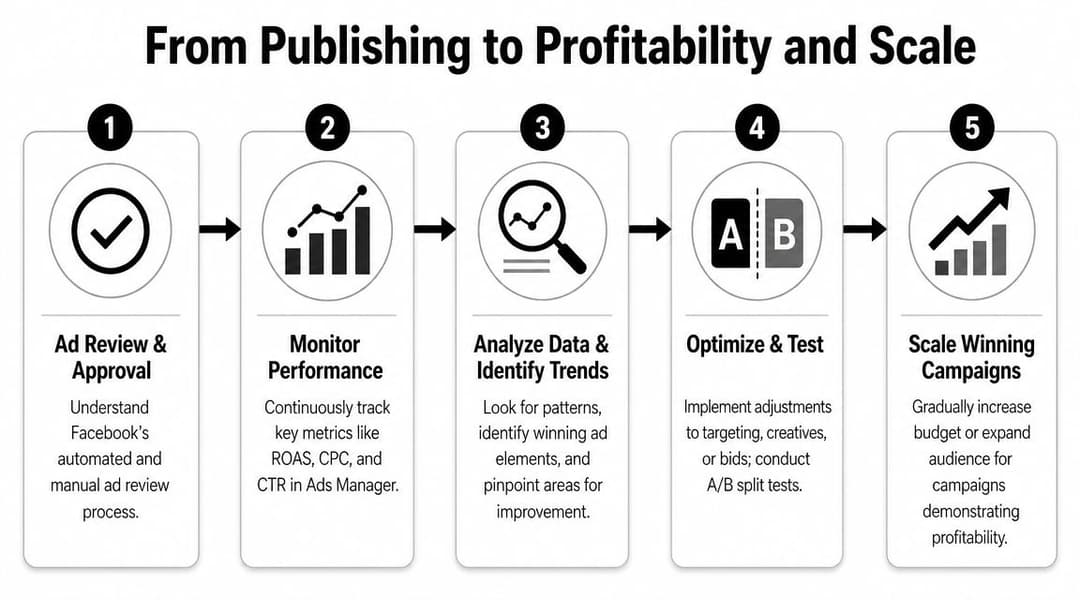
Meta gives you plenty of reporting options, but the default view rarely shows enough to make good decisions. Set up a custom reporting view tied to the result you want, then use breakdowns by placement, device, age, time, and geography to spot where performance is holding and where it is leaking. Meta outlines those reporting tools in its own Ads Manager reporting guide.
Watch the right metrics early
Clean up your view before you touch the campaign.
For a sales campaign, I want purchase value, cost per purchase, conversion rate, link CTR, CPC, and landing page views in one saved column set. For lead gen, I care more about qualified leads, cost per lead, and downstream conversion quality than I do about cheap form fills.
A simple first read after launch usually looks like this:
- CTR shows whether the ad earns attention.
- CPC shows what that attention costs.
- Landing page views help confirm people are reaching the destination, not just clicking and dropping.
- Conversion rate shows whether the traffic and page are working together.
- Cost per result shows whether the campaign can support your economics.
- ROAS matters if purchase tracking is set up correctly and stable.
One warning here. High CTR can hide a weak campaign. If clicks are cheap but conversion rate is poor, the problem usually sits in the audience quality, the offer, or the landing page experience.
Make optimization decisions like a buyer
Good optimization starts with clean comparisons. Compare ads inside the same ad set before comparing across different audiences, budgets, or placements. Otherwise you end up crediting the creative for what the targeting or delivery system changed.
Analysts at Improvado recommend reviewing post-launch performance by ad, then pausing weak variants and shifting budget toward combinations that hold stronger efficiency metrics over time in their Facebook ads optimization analysis. That matches how experienced buyers work in practice. Judge outcomes inside a controlled setup, then make one clear change at a time.
A useful review rhythm looks like this:
- Pause ads that spend meaningfully without producing the target result.
- Keep ads that show strong conversion quality, not just strong click metrics.
- Reduce variables while testing. Change creative, audience, or budget, but not all three at once.
- Check breakdowns before making cuts. Sometimes one placement or device is dragging down an otherwise solid ad.
The first job after launch is finding the combinations worth keeping alive.
Scale what is proven
Scaling gets expensive when done from excitement instead of evidence. A single good day is not enough. Look for consistency across several days, enough spend to trust the sample, and stable conversion tracking before increasing budget.
Once you have that, scale in controlled steps. Raise budget gradually or duplicate into a higher-budget test if you want to protect the original learning setup. Keep the winning message and audience conditions intact long enough to confirm that the result survives more spend.
For teams handling many ad variations, a structured Facebook ad scaling workflow helps keep testing organized and reduces manual rebuilds. The manual version still works well if you stay disciplined. Cut weak variants, shift spend toward winners, and build the next test round from patterns you can verify.
If your team wants a faster way to build, test, and iterate on Meta campaigns without doing every variation by hand, AdStellar AI is built for that workflow. It connects to Meta Ads Manager, helps generate and launch large sets of creative and audience combinations, and uses performance data to surface which messages, creatives, and audiences are worth scaling.


