You open Meta Ads Manager to launch one campaign and end up staring at a control panel that looks built for a flight deck. Campaign objective. Attribution setting. Audience expansion. Placement controls. Creative variations. Columns full of metrics that all seem important until none of them tell you what to do next.
That's where many advertisers get stuck. Not because Facebook ads are impossible, but because they run them as a series of one-off experiments. One media buyer tweaks budgets. Another duplicates ad sets. Someone else swaps headlines based on instinct. A few days later, the account has more clutter than insight.
A good Facebook advertising guide should help you build a system, not just click the right buttons. The difference matters. A system gives you a repeatable way to choose objectives, generate creative angles, test variables cleanly, read results, and scale what wins without rebuilding the whole machine every week.
Moving Beyond the Ad Manager Maze
Most messy accounts don't fail because the team lacks effort. They fail because the process encourages manual tinkering.
A junior buyer launches three campaigns with slightly different audiences. A founder asks for a last-minute creative swap. Budget changes happen mid-test. By the end of the week, nobody can say whether the winner came from the offer, the audience, the hook, or pure luck. Meta Ads Manager is powerful, but power without operating rules creates noise fast.
The fix is simple in concept and hard in practice. Treat the account like a production system. Every campaign needs a job. Every ad set needs a reason to exist. Every test needs one variable that changed.
What a clean operating model looks like
The best-performing teams I've worked with separate Facebook advertising into four lanes:
- Planning: Define the business goal, offer, audience stage, and success metric before launch.
- Production: Build creative variants from a clear angle library, not from random ideas in Slack.
- Testing: Isolate one major variable at a time so results mean something.
- Scaling: Move budget toward proven combinations instead of duplicating chaos.
That sounds basic. It isn't. Many skip straight from idea to launch.
Practical rule: If you can't explain why a campaign exists in one sentence, you shouldn't launch it yet.
For teams that need outside execution support, it's useful to study how specialized Facebook Ads services structure testing, creative iteration, and account management. Even if you keep work in-house, the operating discipline is worth borrowing.
There's also a point where Meta's native interface starts slowing you down. If you're duplicating campaigns just to create more combinations, an AI-driven Facebook ad manager alternative can show what a more scalable workflow looks like.
The shift that changes everything
Stop thinking of ads as individual posts you promote. Start thinking of them as inputs into a learning system.
Your job isn't to make one perfect ad. Your job is to help the platform find the right message, for the right person, at the right stage, with enough structure that your team can repeat the result.
That's how you get out of the maze.
Choosing Your Campaign Destination
A campaign can fail before the first impression if the objective is wrong.
Meta does not optimize for your real business goal unless you tell it to. If you pick Traffic because the click numbers look healthy, Meta will hunt for cheap clicks. It will not hunt for buyers, qualified leads, or booked calls unless the objective and conversion setup point it there. The result is a busy dashboard and a weak pipeline.
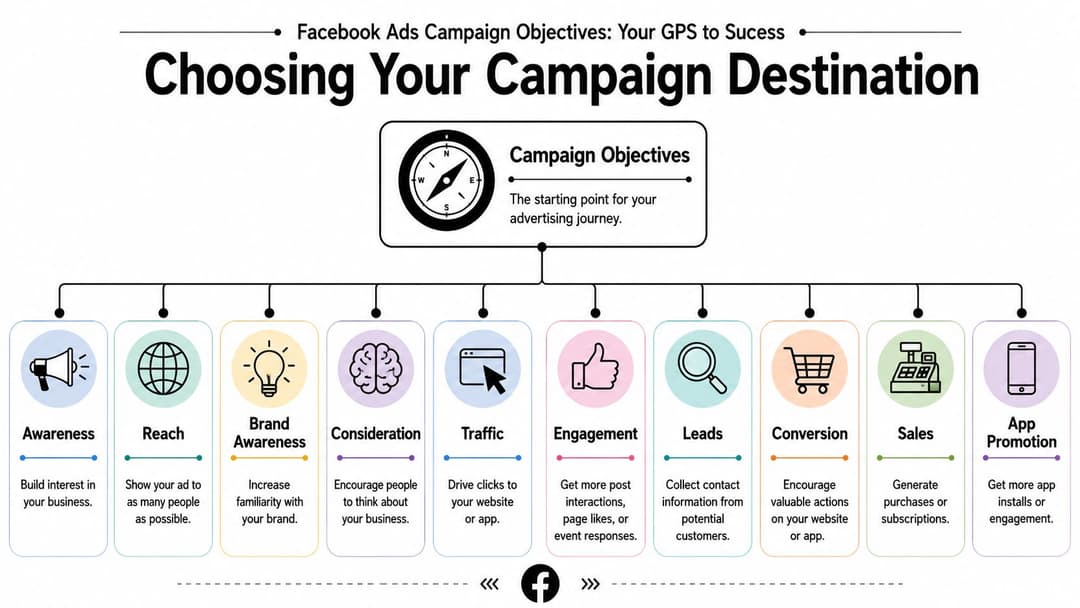
Match the objective to the business outcome
Start with the action that creates value for the business. Then choose the campaign objective that gives Meta the clearest path toward that action.
| Objective | Best use case | Common mistake |
|---|---|---|
| Awareness | New brand exposure, early market entry, broad visibility | Judging it on direct revenue too early |
| Traffic | Sending visitors to content, product pages, or landing pages | Using it when the real goal is purchases or qualified leads |
| Engagement | Building post interaction, comments, shares, or social proof | Treating engagement as a sign of buying intent |
| Leads | Form fills, booked calls, contact capture | Sending leads into slow or weak follow-up |
| App Promotion | Driving installs or in-app actions | Measuring success with clicks alone |
| Sales | Purchases, subscriptions, high-value website actions | Launching before tracking and landing pages are ready |
A clear structure helps here. A practical Facebook campaign structure template for Meta ads makes it easier to map objectives to funnel stages, offers, and budgets before the account gets messy.
Use the objective as a filtering decision
A simple way to choose is to ask three questions.
What outcome matters to the business?
If the business needs purchases, optimize for purchases. If it needs booked demos, optimize for leads or the downstream conversion event you can track reliably.What signal can Meta learn from?
Deeper events usually produce better quality, but only if tracking is clean and the account gets enough volume. A Sales campaign optimized for Purchase sounds right. If you only get a handful of purchases per month, Meta may struggle to learn. In that case, optimizing one step higher in the funnel can be the better temporary choice.What is the user likely to do at this stage?
Cold audiences rarely jump straight to a high-friction action unless the offer is strong and the product has clear demand. Warm audiences can handle a stronger ask because some trust already exists.
That trade-off matters more than marketers admit. The highest-intent objective is not always the best starting point. It is the best destination once the account has enough signal.
What this looks like in practice
A B2B team running demo ads often makes the same mistake. They launch a Traffic campaign to a demo page because they want more visitors first. The campaign delivers inexpensive clicks, the CTR looks fine, and the sales team still gets poor lead flow. Nothing is broken in the platform. The instruction was wrong.
A Leads campaign or Sales campaign tied to the actual conversion event usually costs more per result at the top line. It also filters for users more likely to complete the action that matters. That is a better trade in almost every serious account.
Objective choice also affects testing. If the destination is wrong, creative tests produce noisy conclusions because Meta is finding the wrong kind of responder. Teams then rewrite ads, swap headlines, and blame fatigue when the actual issue sits at the campaign level.
The objective shapes delivery, optimization, and the kind of user Meta tries to find.
Treat that choice like a strategic input, not admin setup. A clean objective decision gives the algorithm a useful job to do, and it gives your team a stable base for repeatable testing instead of manual tinkering.
Mastering Modern Audience Strategy
A lot of outdated Facebook advertising advice still tells marketers to stack interest on top of interest until the audience gets tiny and feels precise. On paper, that sounds smart. In practice, it often starves delivery and traps the algorithm inside a narrow box.
Meta's own guidance says the ad delivery system works best with larger audiences, and many guides still miss that shift. Existing Facebook ad guides often overemphasize narrow interest targeting even though Meta recommends starting broad with audiences of 2 to 10 million people in many cases, as outlined in Meta's ad targeting guidance.
Broad doesn't mean careless
Broad targeting works when the rest of your setup is disciplined. If the offer is clear, the creative is specific, and the conversion signal is clean, a larger audience gives Meta room to find pockets of intent you didn't predict manually.
Similar to hiring a strong sales rep. You don't hand them a list of twelve people and say, "Only talk to these exact contacts." You give them a market, a pitch, and feedback on what closes.
Broad targeting is usually strongest for prospecting, where you're trying to find new buyers. It's less useful if the business depends on message sequencing tied to known user behavior.
Use audience strategy by funnel stage
Prospecting
This is your cold traffic layer. People here may not know the brand.
Broad targeting often wins because it gives the system flexibility. Interest targeting can still help when you're entering a niche market, but treat interests as hypotheses, not as truth. If you're building similarity-based acquisition, this primer on Meta Lookalike Audiences is useful for structuring expansion without guessing.
Retargeting
This is your warm layer. These people already engaged somehow. They visited, clicked, watched, or started the journey.
Retargeting should have different creative. Don't show the same introductory ad again. Answer objections, reinforce product value, and reduce friction.
Retention
This is your hot layer. Existing customers, recent buyers, subscribers, or repeat purchasers live here.
Retention creative should feel like account management and merchandising, not prospecting. Cross-sell, upsell, replenish, and re-activate.
A practical audience decision table
| Situation | Better approach |
|---|---|
| New account with limited learning | Start broad and keep the message clear |
| Mature account with strong customer data | Test broad against lookalikes and key intent segments |
| Highly regulated or nuanced category | Use tighter controls, but avoid shrinking the audience too aggressively |
| Retargeting recent visitors | Segment by behavior and tailor the message |
| Existing buyers | Build retention campaigns with distinct offers |
Field note: Narrow audiences feel safer because they look more controlled. Broad audiences often perform better because the system gets room to learn.
The mistake isn't using interests. The mistake is assuming more filters always produce better results. Audience strategy should widen or tighten based on funnel stage, signal quality, and the kind of learning your account can support.
Crafting Ad Creatives That Convert
A campaign can have the right objective, a sensible audience, and enough budget, then still stall because the creative gives the algorithm nothing strong to work with. Creative is the input that shapes click quality, conversion rate, and how quickly Meta finds pockets of efficient demand.
Bad creative production usually looks like manual tinkering. A founder drops a few ideas in Slack, a designer makes one polished version, the team launches it, and everyone hopes it sticks. That process does not scale. A better system starts with customer language, turns that language into clear angles, and uses AI to produce more first drafts, variations, and pattern analysis without lowering the bar on strategy.
Start with the checklist below.
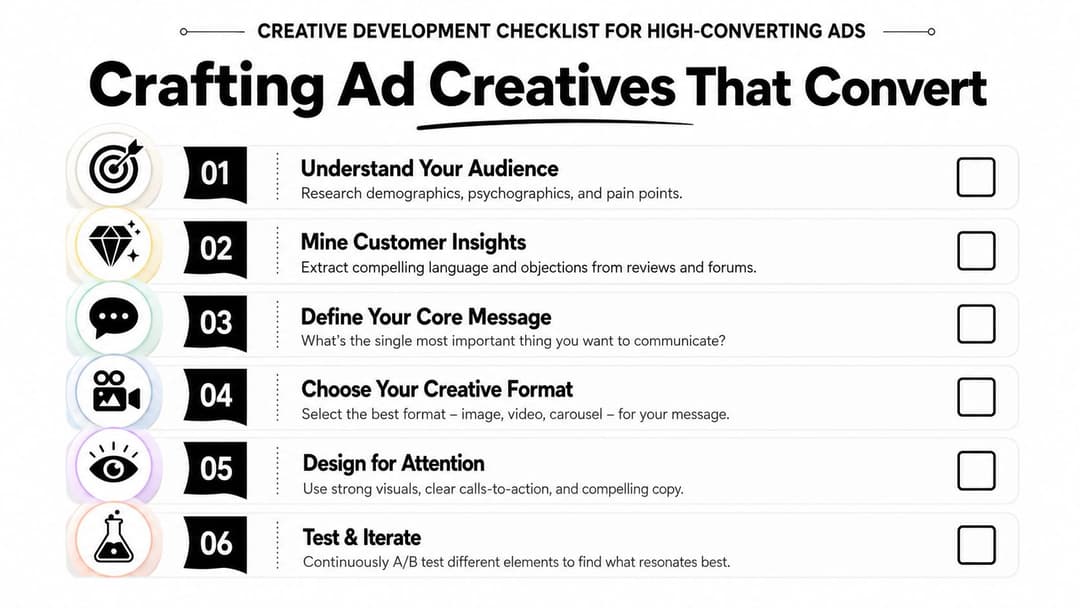
Build angles from customer language
Creative strategy gets stronger when it sounds like the buyer's internal monologue. Reviews, surveys, sales call notes, support tickets, on-site search terms, and competitor feedback all contain raw material for ads that feel specific instead of generic.
The process is simple, but it requires discipline:
- Collect exact phrases: Save the words customers use for pain points, desired outcomes, fears, and objections.
- Group the patterns: Sort them into themes like speed, trust, convenience, status, savings, or risk reduction.
- Write angle statements: Turn each theme into a plain-language idea such as "I need this to save time" or "I want proof before I switch."
- Create variants inside one angle: Build several hooks, visuals, and CTAs around the same core message.
That last step matters. One angle should produce multiple ads, not one. Creative testing works like batting practice. A single swing tells you very little. A bucket of swings shows whether the form is sound.
For execution details on hooks, visual hierarchy, and format choices, these Facebook ad creative best practices are a strong reference.
Structure the ad like a sales conversation
A good ad does not try to close every objection in one frame. It earns the next action.
Use a sequence that matches how people evaluate offers in-feed:
- Stop the scroll: Lead with a sharp problem, a concrete outcome, or a visual that breaks pattern.
- State the value: Explain what improves for the customer in plain language.
- Reduce skepticism: Add proof, demonstration, context, or objection handling.
- Ask for one action: Make the next step obvious.
This matters more on Facebook than many teams realize. Users are not searching with intent. They are browsing. Creative has to create relevance fast, then carry enough credibility to justify the click.
Here's a useful visual refresher before you build your next batch of ads:
Respect the platform specs
Creative quality includes production details, not just message quality.
To support delivery, images should be at least 1080×1080 pixels, and video assets should use a 4:5 ratio for mobile feeds with a maximum duration of 15 seconds, according to this guide to Facebook ad specs. Build assets that fit the placement cleanly, keep the first seconds visually clear, and avoid clutter that makes the ad harder to process on a phone.
The trade-off is real. Brand teams often want dense messaging, small product details, and multiple claims in one asset. Performance creative usually needs less. If the user cannot grasp the offer in a glance, the ad asks for too much work before the click.
Strong creative is persuasion wrapped in platform-fit execution.
The teams that scale do not rely on one winning ad. They build a repeatable creative system that can generate fresh variations quickly, use AI to increase concept and production velocity, and keep the message grounded in what customers care about.
Building a Scalable Testing Framework
Most ad accounts don't have a testing problem. They have a test design problem.
Teams say they're testing, but what they're really doing is changing five things at once and calling the result insight. New audience. New headline. New format. New offer. New landing page. Then performance moves and nobody knows why.
Isolate the variable that matters
A scalable framework starts with one question: what exactly are you trying to learn?
If the question is whether a creative angle works, keep the audience, placement approach, and conversion action stable. If the question is whether broad beats interest-led targeting, keep the offer and creative family as consistent as possible.
That sounds slower than launching everything at once. It's faster because each test teaches something reusable.
Good test design
- One primary variable: Angle, audience, offer framing, or format
- Shared success metric: Same business outcome across variants
- Naming discipline: Clear labels so you can read results later
- Documented hypothesis: Why this variant should win
Bad test design
- Multiple changes bundled together
- Different funnels inside one comparison
- Mid-flight edits that reset the learning
- No log of what changed and why
Turn audience research into a test backlog
Most Facebook advertising guides fail at the part that matters most for creative scale. They don't show how to systematically extract concepts from real data. The better method is to mine customer reviews and ad history, identify recurring patterns, and convert those patterns into testable ad concepts, as described in the earlier discussion on angle extraction from audience data.
That gives you a backlog like this:
| Theme from research | Testable angle | Example hypothesis |
|---|---|---|
| Customers want simplicity | "Done without hassle" | Simple framing will outperform technical detail |
| Buyers fear wasting money | "Safe first purchase" | Risk-reduction language will improve lead quality |
| Users want fast setup | "Start today" | Speed-based hooks will drive stronger early engagement |
Teams usually underinvest, spending time inside Ads Manager and not enough time building better test inputs.
Keep winners and losers for different reasons
Don't only store winners. Store why losers lost.
A weak result can tell you the hook was off, the message promised too much, or the creative format didn't suit the audience stage. That matters because future tests get sharper when you stop recycling ideas that already failed for identifiable reasons.
You're not buying clicks. You're buying learning that compounds if the account is organized.
The practical end state is an internal library. Angles, hooks, offers, formats, audience types, and outcomes. Once that library exists, testing stops feeling like gambling and starts feeling like controlled iteration.
Measuring Performance and Optimizing for Profit
A campaign can look healthy inside Ads Manager and still lose money. That usually happens when the team falls in love with top-of-funnel activity and ignores what happens after the click.
The metrics that matter are the ones tied to unit economics. Cost Per Click, conversion rate, Cost Per Acquisition, and Return on Ad Spend tell you whether the machine is efficient enough to keep feeding.
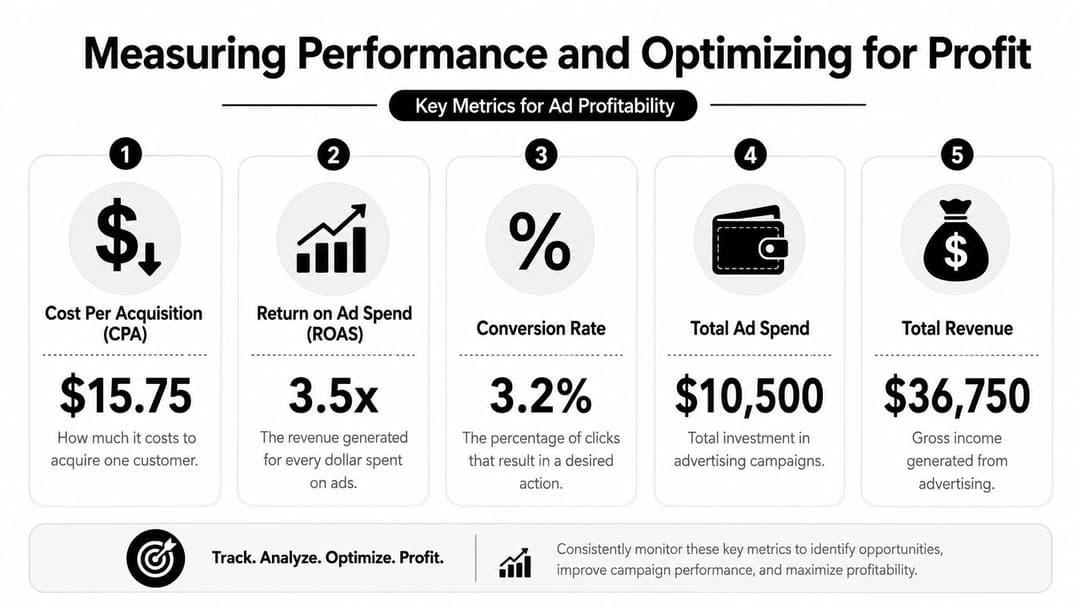
Use benchmarks as context, not as a script
Across industries, the average Facebook Ads CPC is $1.72, the average conversion rate is 9.21%, and the median ROAS for B2C companies is 1.8, meaning businesses generate $1.80 in revenue for every $1 spent, according to WeCanTrack's Facebook ads statistics.
These numbers are useful for calibration. They are not automatic pass-fail lines.
A campaign with above-average CPC can still be excellent if the customer quality is strong. A campaign with a healthy click cost and weak ROAS can still be broken lower in the funnel.
Read the pattern behind the metric
When CTR looks healthy but conversions lag
That usually points to a mismatch after the click. The creative is doing its job, but the landing page, offer framing, or audience expectation may be off.
When CPC rises but ROAS holds
That may be acceptable. More expensive clicks aren't always worse clicks. If revenue quality stays strong, paying more to acquire better traffic can still be profitable.
When CPA climbs and conversion rate falls together
That often means friction entered the journey. Tracking issues, weak landing-page alignment, or creative that attracts curiosity rather than intent can all create this pattern.
A stronger measurement setup also depends on clean event tracking. If you're improving signal quality, this overview of the Facebook Conversions API helps connect media decisions to more reliable attribution.
A simple optimization order
When performance slips, don't change everything. Work down the stack:
- Check tracking first so you're not optimizing phantom data.
- Review the landing page for message match and friction.
- Audit the creative to see whether it attracts the right click.
- Revisit the audience only after the above is clear.
Decision rule: Optimize the weakest link closest to the business outcome, not the metric that happens to be easiest to spot in the dashboard.
Profitability comes from interpretation, not from dashboard watching. The buyer who reads the story correctly usually beats the buyer who reacts fastest.
Advanced Scaling and Automation Strategies
You raise budget on a winning campaign on Monday. By Wednesday, CPA is up, frequency is climbing, and three people on the team have made edits in different places. The account did not suddenly stop working. The system lost control.
Scaling is a process problem before it becomes a media problem. A campaign that performs at $300 a day can break at $3,000 if the team has no rules for budget changes, creative replacement, and decision timing.
Know what you're actually scaling
Do not scale an ad set just because ROAS looked good for two days. Confirm what created the result.
Was it:
- a fresh creative angle getting cheap attention,
- a narrow audience pocket with limited volume,
- a short-term promo lifting conversion rate,
- or a real offer-market match that can handle more spend?
Those cases need different actions. Fresh creative can fade fast. A narrow audience can saturate. A strong offer with broad demand usually gives you more room.
A useful check is simple. If spend rises and CTR, conversion rate, and CPA stay within an acceptable range, the campaign may have headroom. If spend rises and only one metric starts slipping, isolate that variable before raising budget again.
Vertical scaling versus horizontal scaling
| Scaling path | What it means | Best use |
|---|---|---|
| Vertical scaling | Increase budget on an existing winner | Campaigns with stable delivery and consistent conversion quality |
| Horizontal scaling | Add new creatives, audience segments, placements, or campaign structures | Accounts that need more volume without pushing one pocket of demand too hard |
Vertical scaling is faster. Horizontal scaling is usually more durable.
I treat vertical scaling like turning up the pressure in one pipe. It works until the pipe starts shaking. Horizontal scaling adds more pipes, which spreads risk and gives the account more ways to find demand.
What manual scaling gets wrong
Manual scaling often fails for operational reasons, not strategic ones.
- Budget changes happen too fast: Large jumps can reset performance patterns and make results harder to interpret.
- Teams duplicate winners without a naming and testing system: Reporting gets cluttered and overlap becomes harder to spot.
- Creative production cannot keep pace with spend: The account spends more against the same message until fatigue shows up in the numbers.
- Too many edits hit at once: Nobody can tell whether the swing came from budget, audience, bid strategy, or creative.
That is why scaling needs workflow discipline. A strong social media automation strategy helps teams standardize production, approvals, scheduling, and handoffs so media buying does not stall behind execution bottlenecks.
Where automation helps
Automation should handle repetition and pattern detection. Humans should still set the rules.
The best use cases are practical:
- Creative versioning at scale: Produce and launch many controlled variations of the same hook, offer, or format.
- Budget routing: Shift spend toward ad sets or ads that keep hitting margin targets.
- Anomaly detection: Flag sudden drops in CTR, rising CPA, or frequency spikes before they become expensive.
- Reporting cleanup: Standardize naming, asset tagging, and breakdowns so analysis stays usable as the account grows.
AI adds value when the team uses it for speed with structure. Generate more hooks. Classify winners by angle. Review comments and performance patterns faster. Then make decisions with clear thresholds instead of hunches.
A practical scaling system
Use a repeatable operating cadence:
- Set budget change rules before the campaign earns the right to scale.
- Increase spend in controlled steps and give delivery time to stabilize.
- Refresh creative on a schedule tied to fatigue signals, not panic.
- Separate scaling tests from efficiency campaigns so reporting stays clean.
- Review results on a fixed cadence with one owner making the call.
That last point matters more than it sounds. Accounts get noisy when multiple people react to the same dip from different angles.
Scaling breaks when the team cannot produce, review, analyze, and relaunch fast enough to match the account's learning cycle. The advertisers who win at higher spend are rarely the ones making the most edits. They are the ones running the cleanest system.
Avoiding Common Pitfalls and Compliance Guardrails
A profitable campaign can stop cold for reasons that have nothing to do with creative quality or bid strategy. Compliance, landing-page experience, and technical setup can kill performance before optimization even starts.
This is the defensive side of Facebook advertising. It isn't glamorous, but it protects the account.
Fix the landing page before blaming the ads
Meta's ad compliance standards require landing pages to load in under 3 seconds and render correctly on mobile, according to this summary of Facebook ad guidelines. The same source notes that violations of these technical requirements can cause a 40–60% drop in conversion rates, while policy breaches can lead to permanent ad account shutdown.
That should change how you troubleshoot. If clicks are coming in and action is weak, don't assume the audience is wrong. Open the landing page on your phone. Test every button. Submit every form. Check whether the ad promise matches the page headline.
Common mistakes that trigger trouble
Technical mistakes
- Broken forms: Users click, try to submit, and hit an error.
- Slow mobile load: The page stalls before the offer even appears.
- Layout issues: Important elements render badly on smaller screens.
Policy mistakes
- Misleading promise: The ad says one thing, the page offers another.
- Bait-and-switch messaging: Curiosity gets the click, confusion gets the bounce.
- Discriminatory targeting choices: Sensitive categories need extra care.
Operational mistakes
- Launching before QA: Nobody tested the live user path.
- Ignoring rejection reasons: The same violation gets repeated across campaigns.
- Pushing edgy claims: Teams try to squeeze response with wording that triggers review issues.
Build a pre-launch checklist
Before any campaign goes live, the buyer or account manager should confirm:
- Message match: The landing page reflects the exact promise in the ad.
- Mobile experience: Load speed, layout, and usability are clean on phones.
- Working path: Links, forms, and thank-you pages all function correctly.
- Targeting compliance: Audience settings avoid restricted or discriminatory setups.
- Claim review: Copy is clear, supportable, and not exaggerated.
Compliance isn't a legal footnote. It's part of performance marketing because every rejection, delay, or broken page interrupts revenue.
Teams that treat compliance as a launch requirement, not a cleanup step, keep campaigns live longer and learn faster from the spend they already planned.
If your team is buried in manual campaign setup, creative duplication, and slow optimization loops, AdStellar AI is built for exactly that bottleneck. It helps paid social teams launch, test, and scale Meta campaigns faster by automating bulk ad creation, organizing creative and audience combinations, and surfacing the patterns that drive ROAS, CPA, or CPL.