Your Meta account probably isn't failing because your creative suddenly got worse. More often, the signal feeding the system got weaker.
You see it in familiar ways. Purchase reporting starts to drift from what the store or CRM says happened. Retargeting pools feel thinner. Lead quality gets harder to judge inside Ads Manager. The Pixel still fires, but it doesn't capture the full story consistently enough to support aggressive optimization.
That's where Facebook Conversion API stops being a technical side project and becomes an operating requirement. If you run paid social with any real budget, you need a setup that survives browser restrictions, privacy changes, and messy multi-tool data flows. And if your stack already includes GA4, a CRM, offline sales inputs, or server-side tagging, the challenge isn't “how do I turn on CAPI?” It's “how do I implement it without creating duplicate events, broken attribution, and another reporting argument every Monday?”
Why the Facebook Conversion API Is Non-Negotiable in 2026
A lot of teams still treat the Facebook Conversion API like an upgrade. It's closer to infrastructure.
The turning point came after Apple's iOS 14.5 privacy update in April 2021, when browser-based tracking became less reliable for many advertisers and CAPI became the preferred server-side complement to the Meta Pixel, as noted in this industry explainer on Meta Conversions API after iOS 14.5. That shift didn't create all tracking problems, but it made them impossible to ignore.
What breaks when you rely on the browser alone
Browser-side tracking is convenient because it's easy to deploy. It's also fragile. The browser is where ad blockers, tracking prevention, consent constraints, and inconsistent page behavior interfere with event collection.
That matters because Meta can only optimize from the conversion signals it receives with enough confidence. If those signals are incomplete, delayed, or missing key identifiers, campaign performance usually gets noisier before it gets worse.
A few symptoms usually show up together:
- Reporting drift: Your backend shows conversions that Ads Manager doesn't fully capture.
- Audience shrinkage: Retargeting and lookalike inputs become less representative.
- Optimization instability: Campaigns learn from partial event streams instead of reliable conversion feedback.
- Team confusion: Marketing, analytics, and revenue teams stop trusting the same dataset.
Browser-only tracking works until it doesn't. The problem is that you rarely notice the break on the exact day it starts.
Why CAPI changes the operating model
Facebook Conversion API gives you a server-side path to send events to Meta. That changes the discussion from “did the browser cooperate?” to “did our systems send the event correctly?”
That's a better question. It's one your team can control.
If you're reviewing your overall stack, this broader guide to digital marketing tracking tools helps frame where Meta CAPI fits alongside the rest of your measurement setup.
The practical takeaway
In 2026, serious Meta advertisers don't ask whether they need server-side tracking. They ask how to implement it without damaging data quality.
That distinction matters. CAPI won't rescue bad event design, weak naming conventions, or sloppy routing between GA4, your CRM, and ad platforms. But without it, you're asking Meta to optimize from an increasingly unreliable browser signal. That's a bad trade.
Understanding CAPI versus The Meta Pixel
A common failure pattern looks like this. The Pixel fires a purchase from the browser, GA4 records its own version, the CRM confirms revenue later, and Meta receives an incomplete or duplicated picture depending on which source wins. That is why CAPI versus Pixel is the wrong framing for any serious advertiser.
They do different jobs.
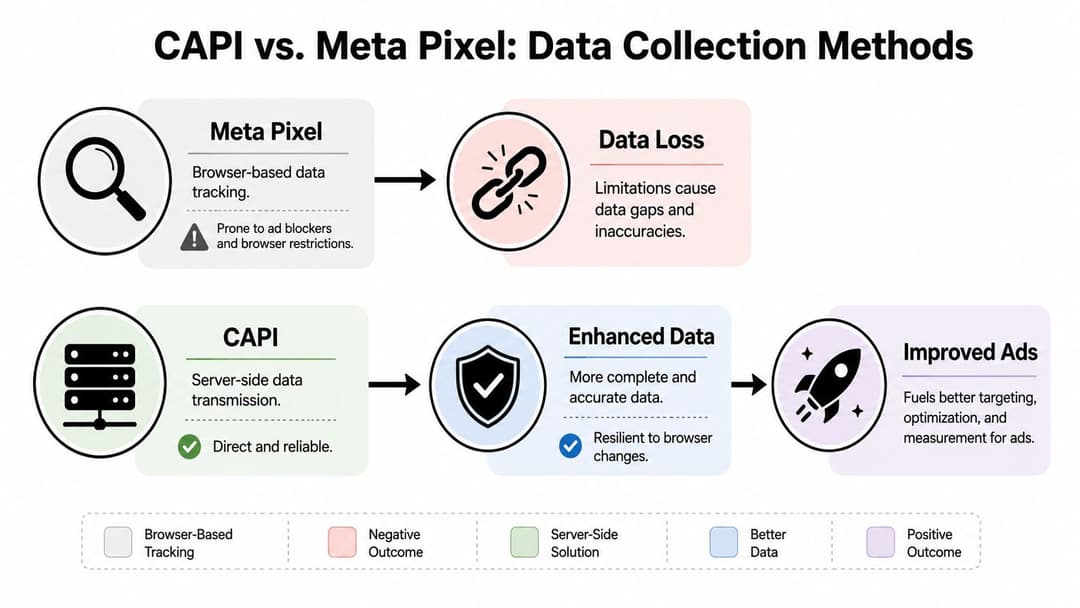
The Meta Pixel captures browser-side activity such as page views, clicks, and form interactions while the user is on your site. Facebook Conversion API sends events from systems you control, including your server, app backend, CRM, or ecommerce platform. In practice, the Pixel is good at observing session behavior. CAPI is better at sending confirmed business events with stronger identifiers and less dependence on browser conditions.
That difference affects performance, not just implementation.
If a browser blocks scripts, drops cookies, or loses the session before the thank-you page loads, the Pixel can miss the event or send weak identity data. CAPI can still send the purchase from the backend after payment is confirmed. If your sales cycle includes lead qualification, offline close data, or post-purchase value from a CRM, the browser alone cannot represent that well. CAPI can.
A practical split looks like this:
- Pixel: on-site behavior, page context, and immediate engagement signals
- CAPI: confirmed conversions, CRM outcomes, offline events, app events, and server-side enrichment
- Both together: broader coverage, better match quality, and a cleaner signal for optimization when deduplication is configured correctly
The mistake is not using both. The mistake is letting both fire the same event without clear ownership.
For example, if the browser sends Purchase at checkout completion and your backend sends Purchase after payment capture, you need a shared event ID and a rule for which system is authoritative. Without that, Meta may count duplicates or struggle to reconcile the event stream. With that structure in place, you get the browser context the Pixel sees and the reliability CAPI adds.
If you need a stronger measurement framework around that setup, this guide to attribution tracking for Meta ads covers the reporting side that usually breaks once multiple sources start feeding Meta.
CAPI also changes what data can become useful for optimization. A basic Pixel setup mostly reflects website behavior. A good CAPI setup can send qualified leads, subscription activations, refunded orders, high-value customer markers, or offline sales updates, assuming your systems can verify those events and pass the right identifiers. This offers a key advantage in a stack that already includes GA4, a CRM, ecommerce data, and ad platforms.
This matters even more if you plan to use AI-driven bidding and automation. Platforms like AdStellar perform better when the conversion signal is consistent, deduplicated, and tied to real business outcomes instead of a thin layer of browser activity. Better inputs do not guarantee better results, but weak inputs reliably limit what the platform can learn.
Use the Pixel for session visibility. Use CAPI for event reliability and business context. Treat them as one measurement system, not two competing tools.
Choosing Your CAPI Implementation Path
Generic articles usually falter at this point. They make implementation sound like a simple toggle.
It isn't, especially when GA4, a CRM, partner apps, offline conversions, and server-side containers already exist in the stack. Twilio's setup guidance highlights that real deployments have to plan around multiple event sources, hybrid flows, identifiers, and deduplication, which is why choosing the path matters as much as turning CAPI on in the first place in this Twilio guide to Facebook Conversions API retargeting.
Start with the ownership question
Before comparing tools, decide who owns the truth for each event.
If “Purchase” can come from Shopify, GA4, your backend, and your CRM, you don't have a tracking setup. You have a duplication problem waiting to happen.
Use these questions first:
- Which system confirms the event occurred? For purchases, that's often the ecommerce backend, not the browser.
- Which system has the best user identifiers? That might be your CRM or authenticated backend.
- Which source should fire first, and which should enrich later? Browser events and server events shouldn't compete for ownership.
- Which events need Meta optimization, and which are only useful internally? Not every internal milestone belongs in Ads Manager.
CAPI Implementation Method Comparison
| Method | Best For | Technical Skill | Cost | Flexibility |
|---|---|---|---|---|
| Partner integration | Ecommerce teams and standard platform setups | Low | Usually lower operational effort | Limited to partner capabilities |
| Conversions API Gateway | Teams that want a middle path with less engineering work | Moderate | Moderate | Moderate |
| GTM server-side container | Teams already using GA4 and Google Tag Manager | Moderate to high | Varies with setup and hosting | High |
| Direct API integration | Custom products, apps, and complex data environments | High | Higher implementation and maintenance effort | Highest |
When each path makes sense
Partner integrations
If you're on Shopify, WordPress, or another supported platform, partner integrations are the fastest route to live server events.
They're useful when speed matters more than customization. They're less useful when you need precise routing across a custom stack, offline events, or a CRM-led conversion model.
Conversions API Gateway
Gateway sits in the middle. It's attractive for teams that want server-side benefits without building and maintaining a fully custom pipeline.
If you're weighing that route, this overview of the Meta Conversions API Gateway can help clarify where it fits.
GTM server-side containers
This is often the most practical option for teams already operating in the Google ecosystem.
It gives you decent control over event routing and transformation without forcing a fully bespoke engineering project. It also creates a cleaner place to coordinate GA4-originated events, identifier handling, and routing logic before anything reaches Meta.
Direct API integration
This is the right move when your business model is custom enough that packaged logic gets in the way.
Examples include subscription products with post-purchase lifecycle events, marketplaces with complex attribution states, or sales motions where conversion confirmation lives in backend systems and CRM stages rather than on a thank-you page.
If your stack is already complicated, the wrong “easy setup” often creates more maintenance than the harder but cleaner option.
The real trade-off
The trade-off isn't just technical complexity versus convenience. It's control versus ambiguity.
A simpler implementation gets events flowing faster. A more controlled implementation makes it easier to answer difficult questions later, like why Meta is counting more leads than Salesforce, or why your purchase event value differs between browser and server paths.
For most mature teams, the right path is the one that gives one system clear event ownership, one deduplication logic, and one documented data flow across tools.
Mastering Event Mapping and Deduplication
Most Facebook Conversion API setups don't fail because the endpoint is wrong. They fail because the event model is sloppy.
LeadsBridge's implementation guidance gets this right. For accurate measurement, teams should map required fields carefully, deduplicate pixel and server events with a unique deduplication ID, and verify delivery using test tools. It also points out that the main operational pitfall is incomplete field mapping or missing deduplication in this LeadsBridge guide to Facebook Conversions API.
Event mapping is where business logic meets Meta logic
Your business doesn't naturally speak in Meta event names. Your site and systems generate actions like “trial started,” “quote submitted,” “checkout paid,” or “call booked.”
Mapping is the process of translating those actions into a Meta event with the right parameters attached.
That means defining:
- Event name: What Meta should call the action
- Trigger point: When the event should be considered true
- Required fields: Value, currency, content details, or user data if applicable
- Source of truth: Browser, server, CRM, or another backend system
A clean mapping document beats a clever implementation every time.
What good mapping looks like
For a purchase event, “user hit the thank-you page” is often not enough. A better trigger is “order was accepted by the backend and assigned a valid transaction reference.” That sounds stricter because it is.
For a lead event, “form submit button clicked” is weaker than “backend accepted the form and created a lead record.” If you optimize to weak events, Meta learns from weak events.
A practical event map often includes:
Business action
Example: completed checkoutMeta event
Example: PurchaseCanonical source
Backend order systemKey parameters
Value, currency, event time, user identifiers, event ID
Deduplication is not optional
If the Pixel sends a Purchase event and your server sends the same Purchase event, Meta needs a way to know those are the same conversion.
That's what the deduplication ID does. Many teams call this event_id. The key requirement is consistency. The browser event and the server event for the same action need the same unique identifier.
Here's the logic in simple form:
- Browser fires
Purchasewith event IDabc123 - Server fires
Purchasewith event IDabc123 - Meta merges them into one conversion event
If the IDs don't match, Meta may count both. That inflates conversion volume and corrupts reporting.
Missing deduplication usually doesn't look like a technical bug. It looks like “great performance” until finance asks harder questions.
A practical payload pattern
You don't need a giant implementation to do this correctly. You do need discipline.
Use a shared event ID generated at the point where the event is defined. Then pass that same ID into both flows:
- Browser side: Include the event ID in the Pixel event call.
- Server side: Include the same ID in the CAPI payload.
- Validation step: Confirm both versions arrive with the same event name and ID.
Common mistakes that wreck reporting
- Using different event names across browser and server
- Generating one static ID for many events instead of one unique ID per event
- Sending incomplete fields from the server
- Treating GA4 names as automatically suitable for Meta without explicit mapping
- Letting multiple systems independently claim ownership of the same conversion
The teams that get CAPI right usually do one boring thing very well. They document the event contract first, then build the pipes.
Verifying Your Setup and Troubleshooting Common Issues
A live endpoint doesn't mean a trustworthy implementation.
You need to confirm that events are arriving, that Meta sees them as server events, and that deduplication and match quality behave the way you intended. That verification step matters before anyone starts making budget decisions from the data.
A short verification checklist
Use this sequence before you trust the setup:
- Check event receipt: Open Test Events in Events Manager and confirm your server events are arriving in real time.
- Confirm source type: Make sure the event is recognized as coming from the server when expected.
- Validate fields: Review event name, value, currency, user data, and event ID.
- Test deduplication: Trigger one event through both browser and server paths and verify Meta reconciles them properly.
- Review diagnostics: Don't ignore warnings if they point to formatting, match keys, or duplication issues.
If your business account setup still has unresolved admin or identity friction, this guide to Meta Business verification can help remove some of the non-tagging blockers that slow implementation.
Symptom, cause, fix
Low event match quality
Likely cause: Your server payload is too thin. Meta can only match users with the identifiers you pass, so sparse or badly mapped user data usually lowers match quality.
Fix: Improve user data mapping where consent and policy allow. Review whether your implementation passes the right identifiers from the canonical source rather than from whatever tool happens to fire first.
Persistent deduplication errors
Likely cause: Browser and server versions of the same event don't share the same event name and unique deduplication ID.
Fix: Audit both payloads together. Don't inspect the browser in isolation and assume the server matches. Compare the exact event name and exact ID.
Large discrepancies between backend and Meta reporting
Likely cause: Event ownership is unclear, or different systems are sending slightly different definitions of the same action.
Fix: Revisit your event contract. One source should confirm the conversion. Other systems can enrich or mirror it, but they shouldn't redefine it.
Server-side tracking is maintenance work, not one-time setup work. The teams that keep it clean review diagnostics and event definitions regularly.
What good verification feels like
You should be able to answer three questions quickly:
- Which system created this event?
- Which identifiers were passed with it?
- If the Pixel also fired, how did Meta deduplicate it?
If your team can't answer those in a few minutes, the setup might be live, but it isn't controlled.
Supercharge Your Ads with CAPI Data and AI Automation
A common failure pattern looks like this. Meta shows plenty of conversions, GA4 shows fewer, the CRM shows a different number again, and the team still expects automation to make smart budget decisions. In that setup, AI does not fix the problem. It scales your tracking mistakes.
Once CAPI is stable and the event contract is clear across Meta, GA4, and your CRM, conversion data becomes something you can optimize with. The gain is not just better reporting. Meta gets a cleaner feedback loop for bidding, and any automation layer sitting above Meta gets a more trustworthy view of which ads, audiences, and offers are driving real outcomes.
Meta has shared benchmark claims that stronger CAPI implementations can improve efficiency, as summarized in this video summary of Meta CAPI benchmark claims. The practical takeaway is simpler than the benchmark itself. Performance tends to improve when event ownership is clear, identifiers are mapped from the right system, and browser and server events support each other instead of colliding.
Clean conversion data improves optimization quality
Reliable purchase, lead, and signup events give Meta better material to optimize against. That matters most in accounts with long sales cycles, offline qualification, or multiple systems claiming credit for the same conversion.
The difference shows up in day-to-day account work. Audience tests become easier to judge. Creative winners hold up longer under spend. Budget shifts rely less on top-of-funnel proxies like clicks and more on outcomes that the business cares about.
Profit still has to be measured outside the ad platform. Teams that need a clearer framework for separating ROAS from actual margin should review this guide to SaaS profit measurement.
AI only works as well as the event stream behind it
This is the part generic CAPI guides usually miss. AI systems need a stable source of truth. If Meta gets one version of a lead from the browser, GA4 records another, and the CRM closes revenue under a third definition, automation learns from noise.
That creates very practical problems. Creative scoring starts to favor ads that generate cheap but low-quality conversions. Audience expansion can push spend toward segments that look efficient in-platform but fail downstream. Rules that scale campaigns based on incomplete event streams often increase spend before sales quality is confirmed.
A cleaner setup gives AI something useful to work with. Performance marketing AI workflows depend on consistent lower-funnel feedback, not just browser-side activity.
Where automation gets practical
With a controlled CAPI setup, automation can support decisions that media teams already make manually:
- Creative analysis: Measure which hooks, formats, and offers correlate with confirmed downstream conversion events
- Audience prioritization: Shift budget toward segments tied to server-confirmed revenue or qualified pipeline, not just front-end form fills
- Campaign assembly: Build new tests from patterns found in ads that produced valid business outcomes
- Scaling logic: Raise spend based on cleaner lower-funnel signals instead of noisy engagement metrics
The video below gives a broader look at how that kind of workflow fits into modern Meta execution.
The strategic value is shared trust in conversion data
Facebook Conversion API matters because it creates a stronger measurement layer for both the ad platform and the systems around it. If GA4, your CRM, and Meta are aligned on what happened, when it happened, and which source owns the event, optimization gets more dependable.
That usually leads to faster testing, fewer reporting disputes, and better use of automation. Those are the outcomes that matter.
If you want a practical way to connect cleaner Meta conversion data with faster campaign execution, AdStellar AI is built for teams that need to launch, test, and scale large sets of Meta ads with more structure and less manual setup.