If you've ever thought about running ads on Facebook or Instagram, you've bumped up against the idea of an ad account. It’s easy to mix it up with your personal profile or even your brand's Business Page, but your Facebook ad account is something entirely different—and it's the key to everything.
Think of it as the engine room for your entire advertising operation. It's the central hub where you manage your campaigns, control your spending, and see all your performance data in one place.
What Is a Facebook Ad Account and Why It Matters

Let's clear up the confusion. Your personal profile is for connecting with friends. Your business page is your brand’s public face on the platform. Your ad account, however, is the dedicated, behind-the-scenes control panel for all your paid marketing efforts.
A great way to think about it is this: Your Business Page is the storefront where customers browse, but your ad account is the back office. It’s where you handle the inventory, pay the bills, and track every single sale to see what's actually working.
Getting this distinction right is absolutely fundamental. Without a properly configured ad account, you’re locked out of the powerful tools you need to target specific audiences, manage your budgets, and actually measure your return on investment.
The Foundation of Your Advertising Efforts
Every ad you build, every dollar you put behind it, and every conversion you track is tied directly to a specific ad account. It’s the container that holds all of your advertising history, your payment details, and your performance metrics. Understanding this structure is the first step toward creating campaigns that are organized, profitable, and ready to scale.
With Meta raking in $196.175 billion in ad revenue in 2025—a 5.8% jump year-over-year—the platform is a massive marketplace. You're competing with over 10 million other active advertisers, and with 93% of social media marketers using Facebook for their paid campaigns, you need to be organized. You can explore more of these numbers in these in-depth Facebook statistics.
More Than Just a Tool
A well-run Facebook ad account is much more than a place to just launch ads. It’s a strategic asset that allows you to:
- Centralize Billing: Keep all your advertising costs in one place, manage different payment methods, and set spending limits to stay firmly in control of your budget.
- Organize Campaigns: Structure all your advertising logically. You can separate campaigns by their goal, the audience you're targeting, or the product you're selling, which makes analysis so much clearer.
- Grant Secure Access: Give team members or agency partners the exact permissions they need without handing over the keys to the entire kingdom.
- Measure Performance: Dive into detailed analytics to see exactly what’s driving results, from which ad creative is performing best to how your audiences are responding.
Before you can truly master your ad account, you need a solid grasp of the basics. Resources like this fantastic Beginner's Guide to Facebook Advertising can give you that essential foundation.
Ultimately, your ad account is where your strategy becomes reality. But it doesn’t work alone. To see how it all fits together, check out our guide on what Facebook Ads Manager is and how to use it.
Navigating the Meta Advertising Ecosystem
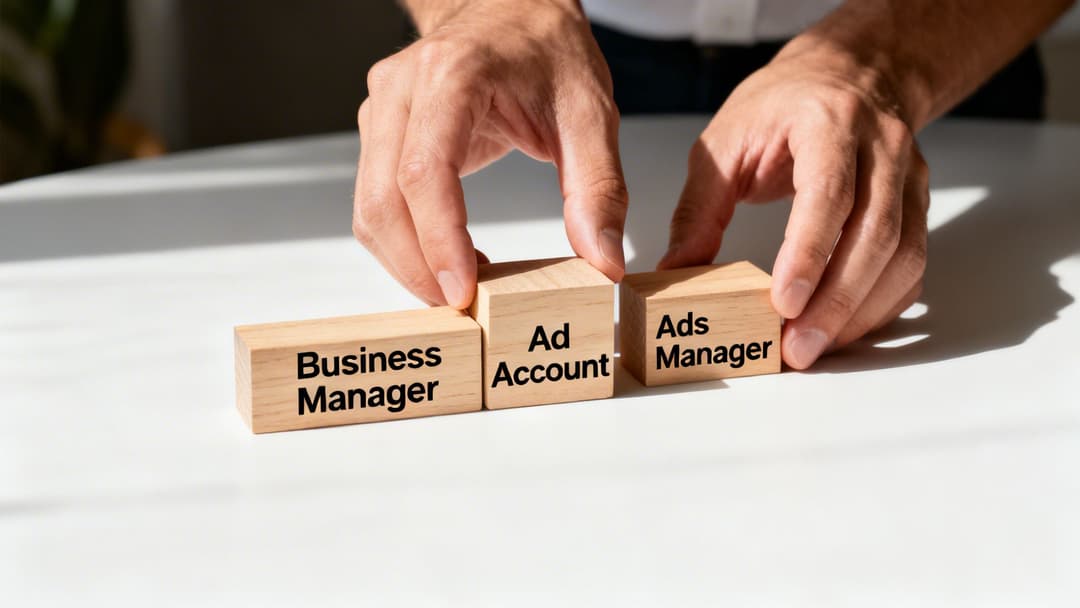
If you’ve ever felt lost in the maze of Meta’s advertising tools, you're not alone. Between Business Manager, Ads Manager, and the Facebook ad account, it’s easy to get tangled up. Let's break it down with a simple analogy that clears things up for good.
Think of Meta Business Manager as your company’s entire office building. It’s the top-level structure that owns and organizes everything—your Pages, your people, your agency partners, and your ad accounts. It’s the big-picture container.
Inside that office, your Facebook ad account is a specific department, like the marketing team. This department has its own budget, its own payment methods, and a complete history of all its past projects (campaigns).
And finally, Meta Ads Manager is the desk inside that department. This is where you actually sit down and get the work done. You build campaigns, write copy, set targeting, and check your reports right from this desk. It’s your hands-on workstation.
The Role of Meta Business Manager
Meta Business Manager, now often called Meta Business Suite or Portfolio, is the administrative command center for any serious advertiser. While a solopreneur might scrape by without one for a bit, it becomes an absolute must-have once you start working with a team or an agency.
So why is it so vital? Business Manager gives you a secure, centralized way to manage all your assets without ever sharing personal login credentials.
- Centralized Asset Control: It keeps a tight grip on all your Pages, ad accounts, Pixels, and product catalogs in one unified space.
- Team Collaboration: You can assign specific roles to team members, so a junior analyst can't accidentally change the company credit card on file.
- Agency Partnerships: It lets you grant an outside agency access to your ad account without handing over the keys to the kingdom.
For any business that plans to scale, setting up a Business Manager is a non-negotiable first step. It establishes clear ownership and protects your most valuable digital assets from day one.
How The Ad Account And Ads Manager Connect
Your Facebook ad account and Ads Manager are partners in crime—one can’t really function without the other. The ad account is the container, and Ads Manager is the tool you use to manage what's inside it.
Think of it this way: Your ad account is like a dedicated bank account just for advertising. It holds the funds and keeps a ledger of every transaction. Ads Manager is the online banking app you use to move money, check your balance, and review spending. You need both to operate.
This separation matters because you can have multiple ad accounts inside a single Business Manager, each with its own unique billing and campaign history. An agency, for example, will manage a separate ad account for each client, all organized neatly within their one Business Manager. They then use the Ads Manager interface to work within each of those accounts. A solid grasp of this system is just one part of the whole picture; you can find more on the wider strategy in this great A Creative Team's Guide to Social Media Marketing.
To make it even clearer, here’s a quick breakdown of how these three core tools fit together and what they’re best for.
Meta Business Tools At a Glance
| Tool | Primary Function | Best For | Key Analogy |
|---|---|---|---|
| Meta Business Manager | Central ownership and secure management of all business assets. | Agencies, teams, and businesses with multiple pages or ad accounts. | The Office Building |
| Facebook Ad Account | A container for all campaigns, billing, and performance history. | Every advertiser who wants to run paid campaigns. | The Marketing Department |
| Ads Manager | The hands-on interface for creating, managing, and analyzing ads. | Media buyers, marketers, and analysts doing daily campaign work. | The Desk |
By understanding this hierarchy, you can set up your advertising operations for clarity, security, and scalability. This structure also has a direct line to your data collection efforts, a topic you can dive deeper into with our guide on the Meta Conversions API and how it sharpens your tracking.
How to Structure Your Ad Account for Success
A messy Facebook ad account is more than just an eyesore—it’s a one-way ticket to wasted spend, confusing data, and missed opportunities. When you can’t tell what’s working and what isn’t, scaling your wins becomes a guessing game. The secret is building a clean, logical structure right from the start.
Think of your entire Facebook ad account as a big filing cabinet. This is the top-level container holding every single one of your advertising efforts, keeping everything neat and secure.
Inside that cabinet, you have your campaigns, which are like the main drawers. Each drawer is dedicated to a single, specific goal—whether it’s generating leads, driving traffic, or making sales. By keeping your campaigns separated this way, you make sure every dollar you spend is chasing a clear objective.
The Hierarchy of Your Campaigns
Now, let's look inside those drawers. Within each campaign, you’ll find ad sets, which act like the manila folders. Each folder is where you define who you're talking to. You might have one folder targeting a lookalike audience of your best customers, and another targeting people interested in hobbies related to your product. This is also where you’ll set your budget, schedule, and placements.
Finally, tucked inside each of those folders are the ads—the individual documents. These are the actual creatives your audience sees in their feed: the images, videos, and copywriting. You can test multiple ads within a single ad set, which is perfect for figuring out which creative resonates most with that specific audience.
A well-structured account isn't just about being tidy; it's about creating a system that produces clear, actionable data. When every campaign, ad set, and ad has a distinct purpose, you can quickly identify your winners and losers, then allocate your budget with confidence.
Properly organizing your campaigns is just one piece of the puzzle. For a deeper look into creating a systematic approach, our guide on how to organize Facebook ad accounts offers more advanced strategies.
Assigning Roles for Secure Collaboration
As your team gets bigger or you bring an agency on board, managing who can do what becomes critical. You have to give people the access they need to do their jobs without handing over the keys to the entire kingdom. Thankfully, Meta built distinct user roles right into the ad account to solve this exact problem.
Each role comes with specific permissions tailored for different functions, striking a perfect balance between security and efficiency. Knowing these roles is vital for your team to work together without a hitch.
Here are the main user roles you'll be working with:
- Admin: This is the highest level of access you can grant. Admins can do everything—add or remove users, change payment methods, and edit any campaign. This role should be reserved for business owners or top-level marketing leaders who need full control.
- Advertiser: This role is built for the hands-on media buyers and marketers running your campaigns. Advertisers can create, edit, and view ads and pull reports, but they can't touch billing information or manage user permissions.
- Analyst: An Analyst has view-only access. They can dive into campaign performance and access reports to analyze data, but they can't make any changes. This is the perfect role for data scientists or stakeholders who need to see results without the risk of accidentally breaking something.
By assigning roles thoughtfully, you build a secure environment where everyone can do their best work. Your media buyer can launch campaigns, your analyst can measure ROI, and your finance team can handle billing—all without stepping on each other's toes or putting the account at risk. Getting both your campaigns and your people structured correctly is what truly sets the stage for smart management and sustainable growth.
Managing Ad Spend and Billing Like a Pro
If you want to win at performance marketing, you have to get a handle on your money. A well-managed Facebook ad account is the only way to keep your campaigns running smoothly without accidentally blowing your entire budget. Mastering the billing and payment settings isn't just admin work—it's a critical part of your strategy.
Every ad account needs a reliable primary payment method, whether that's a credit card, PayPal, or a direct bank transfer. But here's where so many advertisers go wrong: they stop there. Relying on a single funding source is just asking for trouble. A card expires, gets flagged for fraud, or hits its limit, and just like that, your entire ad operation grinds to a halt.
That's why setting up a backup payment method is completely non-negotiable. If your primary payment fails for any reason, Meta will automatically try the backup. This simple step ensures your best-performing ads keep delivering results without any costly downtime.
Understanding Your Billing Threshold
When you first start running ads, Meta doesn't nickel-and-dime you for every click. Instead, you'll be put on a billing threshold. Think of it like starting a tab at your local coffee shop. They trust you'll pay once the bill hits a certain amount, say, $25.
As you keep spending and—more importantly—paying your bills on time, Meta will start to trust you more. That $25 threshold might jump to $50, then $100, and could eventually climb to $750 or even higher. A bigger threshold means fewer charges cluttering up your bank statement, which makes your accounting a whole lot simpler.
Your billing threshold is basically a trust score between you and Meta. A steadily increasing threshold is a great sign that you have a healthy payment history, which is a huge part of maintaining a strong ad account.
Of course, knowing how you pay is only half the battle. You also need to understand how your spending is organized. The very structure of your ad account is designed to help you track every dollar.
This diagram breaks down the standard hierarchy inside a Facebook ad account. It’s how you organize your spending from the big-picture level all the way down to a single ad.
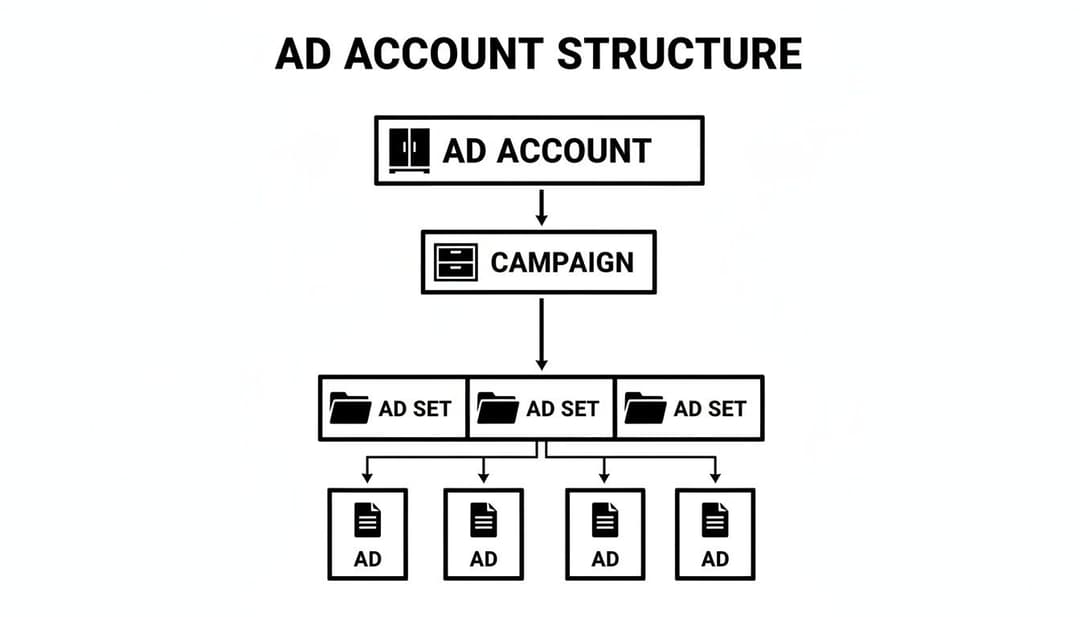
This structure ensures that the budgets you set at the Campaign or Ad Set level are logically passed down to the ads running beneath them. It makes it much easier to see exactly where your money is going and what results you're getting for it.
The Account Spending Limit: Your Ultimate Safety Net
Now for the most powerful financial tool in your entire ad account: the Account Spending Limit. This feature is an absolute lifesaver, especially for agencies managing client money or businesses that need to stick to a strict budget. It works like a kill switch for all spending across your whole account.
Let's say a client gives you a $5,000 budget for the month. You can go into the settings and set the account spending limit to exactly that amount. The moment your total ad spend hits $5,000, every single campaign will automatically pause. It becomes impossible to overspend. You can then reset or raise the limit for the next billing cycle.
This one setting provides incredible peace of mind and prevents the kind of costly mistakes that can ruin a client relationship or gut your marketing budget. Combine this with a solid understanding of your billing and you have total financial control. From there, you can get even more granular by learning how to optimize ad spend allocation between your different campaigns.
These financial guardrails are even more important when you consider the sheer scale of Facebook's platform. With a global ad reach of roughly 2.28 billion users—almost 60% of everyone on the internet—the potential to spend money fast is enormous. The platform's biggest audience is the 25-34 age group (31.1%), a prime target for countless advertisers. You can dig into more of these Facebook audience statistics and trends on uproas.io to see just how big the playground is.
Troubleshooting Common Ad Account Problems
It’s the moment every advertiser dreads. You log in, ready to check your campaign performance, and are greeted by a stark red notification. Your campaigns are stopped, and your account is in trouble.
Sooner or later, we all hit a roadblock with Meta. Whether it’s a disabled Facebook ad account, a mysteriously rejected ad, or a failed payment, these issues can stop you dead in your tracks. The key isn't to avoid them entirely—that's impossible—but to know exactly what to do when they happen.
The most jarring issue is waking up to find your ad account has been restricted or shut down completely. This isn't random. It usually means Meta's automated bots have flagged something that they believe violates their extensive advertising policies. This can be triggered by anything from repeated ad rejections and suspicious login activity to a problem with your payment method.
When this happens, your first and only move should be to head straight to the Account Quality dashboard in your Meta Business Suite. This is your command center for understanding what went wrong. It will show you why the restriction was put in place and give you a path to request a review.
Think of the Account Quality dashboard as your direct line to Meta's policy team. The absolute worst thing you can do is panic and try to create a new account. That's a surefire way to get permanently banned. Instead, use the tools Meta gives you to calmly and professionally make your case.
Diagnosing Ad Rejections
A much more common—and less terrifying—problem is getting a single ad rejected. This happens all the time, often because your ad copy or creative accidentally tripped one of Meta's policy wires. Meta has strict rules about everything from making big claims without proof to the amount of text on an image.
If an ad gets kicked back, here’s the process to follow:
- Read the Policy: Meta will point you to the specific policy you supposedly violated. Don't just skim it. Click the link and actually read the explanation to understand what their bots are looking for.
- Review Your Ad: Look at your ad with fresh eyes, comparing the headline, text, and visuals directly against the policy. Is there a word or image that the algorithm could have misinterpreted?
- Edit and Resubmit: Tweak the ad to bring it into compliance and send it back for another look.
- Request a Manual Review: If you're confident your ad is clean and was rejected by mistake, don't be afraid to request a manual review. This gets a human to look at your ad, and they can often overturn an automated error.
Resolving Payment Failures
Payment failures are another headache that can pause all your campaigns instantly. Fortunately, this is rarely a policy issue and more often a simple clerical error. The usual suspects are an expired credit card, hitting your card's spending limit, or your bank flagging the charge from Facebook as suspicious.
To sort it out, head over to the Billing section in your Ads Manager. Meta will tell you what you owe and why the payment failed.
Here’s your action plan:
- Update Your Payment Method: If your card expired, simply pop in the new details.
- Call Your Bank: If your bank blocked the charge, you might need to give them a quick call to pre-authorize charges from "Facebook Ads."
- Add a Backup Card: This is the best pro-tip. Always have a backup payment method on file. If your primary card fails, Meta will automatically try the backup, keeping your campaigns live without a single interruption.
Dealing with these problems is just part of the game. If you understand the common pitfalls and know the right steps to take, you can handle almost anything Meta throws at you, minimizing downtime and keeping your Facebook ad account healthy.
Scaling Your Ad Account with AdStellar AI

Getting your Facebook ad account structured, billed, and running smoothly is a great first step. But once you've nailed the basics, the real challenge begins: scaling. This is the point where all that hands-on, manual work starts to feel like a bottleneck.
To truly grow, your ad account needs to evolve from something you constantly tinker with into an automated engine for growth. For any serious performance marketer, this means bringing in smart platforms that do the heavy lifting, freeing you up to think about the bigger picture.
Connecting Your Account for Automated Growth
Tools like AdStellar AI plug directly into your Facebook ad account through Meta's official API. This isn't just about giving a tool access—it's about creating a smart connection. The platform pulls in your past performance data, learns what’s worked for you, and uses that knowledge to make building new campaigns ridiculously fast.
This integration is what unlocks a whole new level of speed and efficiency. You can finally stop the slow, painful process of building ads one by one in Ads Manager and start launching in bulk.
Top performance teams aren’t building ads one at a time anymore. They automate the setup process to generate and launch hundreds of ad variations at once, testing countless combinations of creatives, headlines, and audiences in the time it once took to build a single ad set.
Imagine having 10 different images, 5 unique headlines, and targeting 4 distinct audiences. Building all of those combinations manually would be a nightmare. With AI, it’s a single click that instantly populates your Facebook ad account with 200 unique ad variations, all ready to go.
From Manual Guesswork to AI-Powered Insights
Once your ads are live, the next headache is figuring out what's actually working. Out of those 200 ads, which ones are the winners? Instead of getting lost in endless Ads Manager reports, AI gives you clear, actionable answers.
Here’s how it sharpens your decision-making:
- Pinpointing Winners: AI tools automatically sift through your performance data, measuring against your key goals like ROAS, CPA, or CPL. It then ranks everything—your creatives, your copy, your audiences—from best to worst.
- Automated Campaign Building: The system can take these proven winners and build entirely new campaigns for you. Features like "AI Launch" assemble fresh campaigns using the elements that are already driving results.
- Continuous Optimization: The AI models keep learning as new data comes in. It constantly identifies new top-performers and points out exactly how you should scale them for maximum impact.
This completely changes your workflow. You stop wasting hours trying to connect the dots in Ads Manager and start focusing on high-level strategy, letting the technology handle the grunt work. To see this in action, you can learn more about AI optimization and its features and how it can put your account on autopilot.
When you integrate this kind of automation, your Facebook ad account stops being a source of manual labor and becomes a strategic tool for growing revenue. It’s the move every marketer needs to make if they want to stop just managing campaigns and start truly scaling them.
Frequently Asked Questions About Facebook Ad Accounts
When you're getting into Facebook ads, a few questions always seem to pop up, especially around the ad account itself. It’s the core of your advertising, so it’s smart to get it right from the start.
Let’s clear the air and tackle some of the most common questions we hear from performance marketers.
Can I Run Ads Without a Facebook Page?
Nope, not a chance. A Facebook Business Page is non-negotiable for running ads. Think of it this way: your ad account is the engine, but your Business Page is the car's public-facing brand and model.
When someone sees your ad, it’s your Page's name and profile picture they see. It’s a fundamental piece of the puzzle, providing the transparency and brand identity users expect before they click.
How Many Ad Accounts Can I Have?
This is where a lot of advertisers get tripped up. When you first start, your personal Facebook profile can typically create one ad account. The real power, however, comes from Meta Business Manager, which is built to manage multiple ad accounts.
The number of accounts you can add to your Business Manager isn't set in stone. It really comes down to your advertising spend and track record. Meta tends to open the door for more ad accounts once you’ve proven you can manage a significant budget and stick to their ad policies.
The limit isn't just a number; it's a reflection of trust. As you spend more and maintain a healthy account status, Meta often increases the number of ad accounts your Business Manager can hold.
What Is the Difference Between a Personal and a Business Ad Account?
Technically, there’s no such thing as a "personal" vs. "business" ad account type—they all have the same core functions. The real difference is all about how they are owned and managed.
An ad account you create from your personal profile is tied directly to you. An account created inside a Meta Business Manager, on the other hand, is owned by the business itself.
Here’s why that distinction is absolutely critical:
- Ownership: An account in Business Manager is a company asset. If an employee who set it up leaves, the business keeps full control. No frantic calls to get access back.
- Security: You can assign specific roles and permissions to team members or agencies without ever having to share personal login details.
- Scalability: It’s designed from the ground up for teams managing multiple Pages, Pixels, and ad accounts. It’s built to grow with you.
For any serious advertising, your Facebook ad account should always live inside a Meta Business Manager. This is the professional standard. It centralizes everything, tightens up security, and makes sure your ad operations aren't dependent on one person’s profile.
Ready to stop building ads one by one and start scaling your revenue? AdStellar AI connects to your Facebook ad account to automate campaign creation, identify your top-performing creatives, and launch new ads based on what’s already winning. Discover how AdStellar AI can launch your campaigns 10x faster.