
You launch a campaign on schedule. Creative is approved internally, landing pages are live, tracking is in place, and the budget is ready to move. Then Meta rejects half the ads, flags one ad set for a special category issue, and sends another variation into manual review right when the promo window opens.
That’s the core problem with meta ads policy. It isn’t just a list of restrictions. It shapes how your team writes copy, builds audiences, designs assets, structures approvals, and decides whether bulk production is safe or reckless.
Most policy guides stop at “don’t make misleading claims” or “follow special ad category rules.” Useful, but incomplete. Teams that scale on Meta need an operating system for compliance. If you’re launching a few ads a month, you can fix problems one by one. If you’re running many campaigns across e-commerce, DTC, lead gen, health, finance, or agency accounts, that approach breaks fast.
Why Your Meta Ads Get Rejected and What's at Stake
The first rejection usually feels like a small nuisance. The fifth one in a week changes how the whole team works.
A rejected ad can kill timing, but the bigger damage is operational. Buyers start editing under pressure. Designers rush replacement creatives. Copywriters begin writing for fear instead of clarity. Then performance slips because the team is optimizing around what might pass review, not what will convert.

Policy moved from edge case to core workflow
Meta’s current framework didn’t appear out of nowhere. Its advertising policies were reshaped by a 2019 HUD settlement tied to discriminatory practices in housing, employment, and credit ads, which led to Special Ad Categories and tighter targeting restrictions. That policy shift happened against the backdrop of Meta’s scale, with ad revenue growing 22% in 2024 to exceed $160 billion annually, according to this overview of Meta advertising policy changes.
That matters because policy enforcement now sits at the center of the platform, not at the edges. If you run paid social seriously, compliance is no longer a legal footnote. It’s part of campaign architecture.
What’s actually at risk
When teams ignore policy patterns, they usually think the cost is a rejected ad. The actual risks are broader:
- Pipeline disruption: Launch delays matter most when campaigns are tied to promos, inventory windows, or lead flow commitments.
- Performance decay: Even approved ads can underdeliver if Meta reads them as low quality or risky.
- Account health pressure: Repeated issues increase scrutiny and reduce your margin for error.
- Team inefficiency: Every preventable rejection creates rework across media buying, creative, and ops.
- Business continuity risk: If restrictions stack up, recovery gets much harder than prevention.
Practical rule: Treat every rejection as a workflow failure first, not just a creative failure.
A lot of teams wait until an account gets restricted before they take policy seriously. By then, they’re already in triage mode. If your team is dealing with that scenario, this guide on a blocked Facebook ad account is worth reviewing alongside your campaign process.
The Three Pillars of Meta Ad Policy
Most advertisers try to memorize scattered rules. That doesn’t work for long. A better approach is to sort every issue into three buckets so your team can diagnose problems quickly.
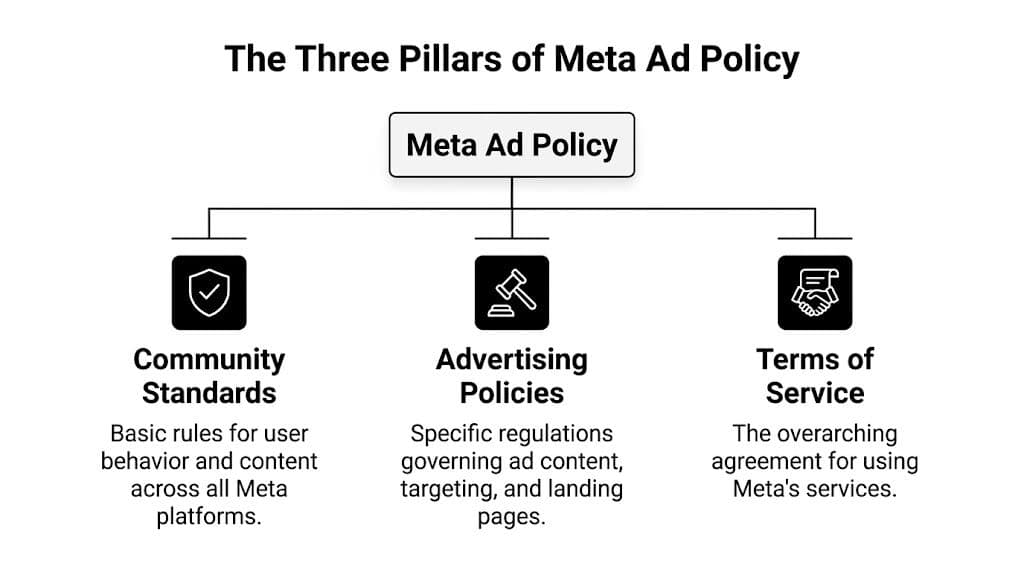
Community standards
This is the baseline layer. If content wouldn’t be acceptable on the platform generally, it won’t become acceptable because you put budget behind it.
Think of this pillar as the broad trust and safety filter. Harmful behavior, deceptive content, illegal activity, and other platform-wide violations can block ads before you even get to ad-specific policy. Creative teams sometimes miss this because they focus only on ad copy. But the visual, angle, and promise all matter.
A useful check is simple: if this appeared organically in-feed, would it raise moderation concerns even before someone saw the CTA?
Advertising policies
Most media buyers spend their time navigating these policies. These rules govern what can be advertised, what needs restrictions, how targeting works, what disclosures are required, and how sensitive categories are handled.
In March 2026, Meta implemented 47 policy updates, described as its most aggressive revision cycle since 2019, with emphasis on AI transparency, broader Special Ad Category enforcement, and multimodal AI review. That same update cycle was associated with 34% higher rejection rates in health and beauty, according to these Meta policy update statistics.
That tells you something important. The review system is no longer reading only your headline and primary text. It’s evaluating combinations of signals across the ad.
Terms of service
This pillar gets ignored because it feels less tactical. That’s a mistake.
Terms issues usually show up through business verification gaps, account misuse, identity mismatch, payment anomalies, or behavior that looks evasive. You can write perfectly compliant ad copy and still create risk if the account structure is messy. Agencies feel this more than in-house teams because multiple users, clients, pages, and billing entities create more points of failure.
Meta policy problems often look like creative problems at first. Many are really account structure problems.
How to use this framework in practice
When an ad gets rejected, don’t ask “what rule did we break?” first. Ask which pillar the problem belongs to.
- If it’s a trust and safety issue, review the concept and framing.
- If it’s an ad policy issue, review category restrictions, claims, targeting, and disclosures.
- If it’s a terms issue, check account setup, authorization, business verification, and admin hygiene.
That distinction makes escalation faster. It also prevents teams from “fixing” copy when the actual problem is data use, targeting, or setup. If your diagnosis process still depends on patching things after launch, your tracking setup likely needs a closer look too. This breakdown of what the Meta Pixel does and where teams misread it helps clarify that side of the stack.
Navigating Prohibited Versus Restricted Content
A lot of rejected ads come from one basic mistake. The team treats prohibited and restricted content as if they’re the same.
They aren’t. Prohibited content usually gets shut down fast. Restricted content can run, but only if your creative, targeting, disclosures, and account setup match the category rules.
Prohibited means stop
Some offers do not belong in Meta ads. If the product, claim, or behavior falls into a hard-ban category, the right move isn’t to “rewrite it more carefully.” The right move is to stop trying to run it.
Many teams often burn time. They keep resubmitting slight copy edits for an offer that was never eligible in the first place. That creates noise in the account and teaches the team the wrong lesson.
Typical signs you’re dealing with prohibited territory include:
- Illegal or unsafe products: If the offer itself is barred, no compliant copy variation will save it.
- Counterfeit or deceptive commerce: The issue isn’t the wording. It’s the underlying offer.
- Clear policy red flags: Some categories trigger immediate automated rejection because the system doesn’t need context to decide.
Restricted means process matters
Restricted categories are more nuanced. Housing, employment, credit, financial services, health, and political or social issue advertising often sit here. These campaigns can be legitimate, but they require tighter discipline.
The team has to ask better questions before launch:
- Does the category require certification or verification?
- Are audience options limited because of fairness or privacy rules?
- Does the copy imply personal traits, outcomes, or vulnerabilities?
- Do landing pages match the ad and disclose what the user needs to know?
If you skip those checks, you’ll mistake a procedural failure for a creative failure.
Special Ad Categories change how you work
Special Ad Categories are where many experienced buyers still get caught. The mistake usually isn’t malicious. It’s operational.
A buyer duplicates a campaign structure from another vertical. A copywriter uses direct-response language that feels normal in e-commerce but sounds too personal in credit or employment. A strategist builds a location filter that would be fine elsewhere but isn’t allowed here. That’s how compliant-looking campaigns get blocked.
If a campaign touches housing, employment, or credit, assume the standard growth playbook needs rewriting.
One practical habit helps a lot. Review live examples before you build. The FB Ad Library is useful for this because it lets you inspect how advertisers in sensitive categories frame offers, disclosures, and creative presentation in public view. It won’t tell you what Meta approved by mistake versus by rule, but it does sharpen your sense of category norms.
What does not work
Teams usually get into trouble through familiar shortcuts:
- Using broad direct-response templates: “Are you struggling with debt?” or “Need a job fast?” often pushes too directly on personal circumstances.
- Repurposing testimonial-heavy health creatives: What works in email or landing pages can trigger scrutiny in ads.
- Duplicating compliant campaigns across categories: A winning structure in supplements may fail in financial services.
- Assuming targeting flexibility exists when it doesn’t: Restricted categories often remove the levers buyers rely on most.
If you’re unsure whether a creative concept crosses the line, review before-and-after transformation angles carefully. This resource on before and after ads on Facebook is helpful because those creative patterns often drift into restricted territory faster than teams expect.
Common Ad Rejections and How to Fix Them
Most ad rejections aren’t random. They come from a handful of repeat mistakes, and nearly all of them start upstream in briefing, copy, design, or landing page review.
The fastest teams don’t just react well. They spot the pattern before the upload.
Text-heavy creatives
Meta no longer uses the old hard cap many advertisers remember, but the practical effect is still there. Ads with more image text can get approved and still perform worse.
According to this breakdown of Meta ad size and text treatment, higher text density in images can reduce delivery by 15% to 30% because the system deprioritizes those ads in the auction. The ad may not be disapproved, but costs can rise and reach can drop.
That’s why “it was approved” is not the same as “it was safe.”
Claims that overpromise
This is the classic performance marketing trap. The copy team wants a hook. The media buyer wants click-through. The founder wants stronger language. The result is an ad that implies certainty where it should show possibility.
Health, finance, beauty, business opportunity, and problem-solution offers are especially vulnerable. The more intense the claim, the higher the review pressure. If the promise sounds absolute, instant, guaranteed, or medically loaded, expect trouble.
Personal attributes
Meta is sensitive to ad copy that appears to identify or call out someone’s condition, status, or vulnerability. This catches advertisers because the language often feels conversational.
“Are you in debt?”
“Have you been rejected for jobs?”
“Do you suffer from low confidence?”
That style may convert in other channels. In Meta ads, it often creates policy risk.
Write to the problem without labeling the person.
Landing page mismatch and broken destinations
A clean ad can still fail if the destination page is weak. Pages that don’t load properly, redirect oddly, hide the promised offer, or feel inconsistent with the ad can trigger rejection or manual review.
That’s one reason launch checklists should include a real click-through test from ad to page. Don’t rely on the URL being technically live. Check the actual journey.
Common Meta Ad Rejection Reasons and Fixes
| Violation Type | What It Looks Like | How to Fix It |
|---|---|---|
| Text-heavy image | Large promotional text over the creative | Move messaging into primary text and headline fields, keep the image visually cleaner |
| Misleading claim | Promise sounds guaranteed, instant, or exaggerated | Rewrite with factual, supportable language and remove certainty cues |
| Personal attribute language | Copy appears to identify the user’s condition or status | Shift to benefit-led or scenario-led phrasing without calling out the user directly |
| Restricted category mismatch | Standard targeting or creative used in a sensitive category | Rebuild around category-specific rules, disclosures, and allowed targeting |
| Landing page issue | Broken link, confusing redirect, or page content doesn’t match ad | Fix the page path, align the message, and test the user journey before submission |
| Sensational creative | Shock visuals or aggressive framing used to force attention | Replace with clearer product storytelling and lower-friction creative angles |
What actually fixes rejection rates
The strongest pattern is boring in the best way. Teams improve outcomes when they standardize preflight checks.
- Review copy separately from creative: A line that looks harmless in a doc may become risky once paired with an image.
- Check every landing page manually: Not just the homepage. The exact URL.
- Write compliant variants on purpose: Don’t wait for rejection to create softer alternatives.
- Adapt by placement: A Reel, a Feed image, and a carousel card don’t tolerate the same visual density.
A lot of “mystery rejections” stop being mysterious once you audit the whole ad unit, not just the words.
The Ad Review and Appeals Process Explained
When Meta rejects an ad, the worst response is panic editing. The second worst is appealing everything automatically.
The review system is faster and stricter than many teams assume. Most ads go through an automated check quickly, but if a submission is flagged, manual review can take much longer. According to this explanation of Meta ad review timing and workflow, most ads are processed within minutes, while manual review can stretch from hours to days. The same source notes that special ad categories require stricter documentation upfront, which is why prevention beats appeals.
What happens first
The automated layer looks at the full ad package. That includes copy, visuals, targeting setup, and landing page behavior. If the system sees a clear hard-policy issue, the ad may be disapproved almost immediately.
If the issue is less obvious, the ad can be routed for additional scrutiny. That’s why one variation in a batch can pass while another nearly identical one gets delayed. Small differences matter.
This is also where understanding broader content moderation helps. The same general logic applies here: automated systems are trained to identify patterns at scale, not to appreciate your intent. If your process depends on the reviewer “understanding what you meant,” the process is weak.
When to edit and when to appeal
Use a simple rule.
- Edit first if the rejection points to a real policy risk you can identify.
- Appeal if the ad appears compliant and the system likely misread context.
- Pause and investigate if multiple ads start failing for different reasons at once. That often signals a broader account or category issue.
Teams waste time by appealing copy that obviously needs rewriting. They also waste momentum by rewriting ads that were likely misclassified. Good operators separate those two cases fast.
Don’t appeal to argue. Appeal to clarify.
What to include in an appeal
Keep it short and specific. State what the ad promotes, why it complies, and what may have been misunderstood. Avoid emotional language and don’t submit a wall of text.
A useful structure looks like this:
- State the offer plainly
- Identify the rejected element
- Explain why it complies
- Mention any relevant category authorization if applicable
- Request a new review
If your team is dealing with repeated restrictions, this guide on being restricted on Facebook is a practical companion because account-level friction often compounds ad-level issues.
What experienced teams do differently
They document every rejection reason, every fix, and every outcome. Over time, that becomes more valuable than generic platform advice because it reflects how your own offers, verticals, and accounts are being interpreted.
Appeals matter. A rejection log matters more.
Building a Compliance-First Workflow for Your Team
Manual compliance review feels manageable when the account is small. It breaks when volume rises.
A team producing a handful of ads can rely on a sharp media buyer and a careful designer. A team launching many variants across formats, audiences, and offers needs a system. Without one, every efficiency gain from automation gets canceled out by rejection cleanup, launch delays, and account friction.

Manual review doesn't scale cleanly
This becomes obvious fastest in sensitive verticals. For advertisers using AI for bulk ad creation, one major challenge is checking outputs for policy alignment. In health DTC, over 60% of ads can face initial rejections, creating a real compliance bottleneck, as noted in this discussion of Meta ad guideline challenges for AI-driven workflows.
That number matters less as a scare statistic and more as a planning signal. If your workflow assumes the first submission will usually pass, and your category doesn’t behave that way, your operating model is wrong.
Build guardrails before production
Many organizations put compliance at the end. That’s backwards.
A stronger workflow starts before copy is written and before creatives are exported. Give the team defaults that are safe by design:
- Approved message zones: Define what claims, benefits, and proof points are acceptable for each offer.
- Restricted language library: Keep a running list of phrases that triggered rejection or manual review.
- Category routing: Flag campaigns early if they touch housing, employment, credit, health, finance, or social issues.
- Landing page signoff: Require URL testing and message match before ads are uploaded.
- Batch review logic: Review templates and variable fields separately so scale doesn’t hide risk.
That turns compliance from a last-minute veto into part of production logic.
Assign ownership clearly
A compliance-first workflow fails when everyone “sort of” owns it.
One person should own final policy signoff. That doesn’t mean they write every ad. It means they decide whether the campaign is ready to face review. In agencies, this is often an ops-minded buyer or strategist. In-house, it may sit with growth operations or the paid social lead.
The rest of the team needs role clarity too:
- Copywriters own claim discipline.
- Designers own visual restraint and placement-aware formatting.
- Media buyers own targeting and category setup.
- Web or CRO teams own destination integrity.
- Ops leads own logs, approvals, and escalation.
A workflow with shared awareness and single-point accountability usually beats a workflow with broad awareness and no owner.
For teams that want policy checks embedded earlier, Meta ads policy checker software is one approach to evaluate. Tools in this category can review assets during creation rather than after bulk upload, which is more useful when your main problem is volume.
After the process is defined, teams often benefit from seeing how others operationalize it in practice.
Use automation for pattern control, not blind speed
Automation helps most when it enforces standards. It hurts when it multiplies weak inputs.
That’s the key trade-off with bulk creation platforms. They can generate a lot of opportunity, but they can also generate a lot of policy risk if they don’t learn from prior disapprovals. A tool such as AdStellar AI fits best when the team uses it to create controlled variations, rank compliant winners, and keep production tied to known-safe structures rather than treating AI output as ready-to-run by default.
The goal isn’t to produce more ads. The goal is to produce more launchable ads.
The workflow that holds up under pressure
The teams that stay stable usually follow a sequence like this:
- Brief with policy in mind
- Generate within approved ranges
- Run pre-submission checks
- Log every rejection and revision
- Feed those learnings back into templates
- Scale only from compliant winners
That loop is less glamorous than chasing new hooks every day. It’s also how serious teams keep spend moving without constant disruption.
Frequently Asked Questions about Meta Ads Policy
Can I run ads if my ad was rejected once
Yes. A single rejection doesn’t mean your account is doomed. What matters is the pattern. If the rejection came from a clear copy or landing page issue, fix it before resubmitting. If several unrelated ads start failing, stop launching new variants until you identify the account-wide cause.
Why did one version pass and another almost identical version fail
Meta evaluates combinations, not just isolated lines of copy. A small change in image, wording, audience setup, or landing page can change how the system classifies the ad. That’s why teams should compare the full ad unit, not only the headline.
Is approved the same as compliant
No. Some ads get approved and still underdeliver because quality signals are weak or the creative sits too close to policy edges. Approval means the ad passed review. It doesn’t mean the ad is low-risk for scale.
Should I duplicate a competitor’s compliant-looking ad
Be careful. Public ads can show you category norms, but they don’t guarantee safety for your account, your offer, or your landing page. Borrow structure, not assumptions.
How should teams handle sensitive categories
Start slower. Use tighter internal review, simpler copy, cleaner creative, and stricter landing page checks. Sensitive categories punish sloppiness more than weak creative. A safer ad that launches reliably often beats an aggressive one that gets stuck in review.
What’s the best way to reduce policy issues over time
Create a rejection log. Track the ad, the reason, the suspected trigger, the fix, and the result. Then turn repeated lessons into templates, banned phrases, and pre-launch checks. Teams that document patterns usually improve faster than teams that rely on memory.
If your team is spending too much time fixing disapprovals after upload, AdStellar AI is worth a look. It’s built for bulk Meta campaign creation and can fit into a compliance-first workflow by helping teams generate variations, learn from past outcomes, and keep launch processes more structured as volume grows.


