
You log in to check spend, CPA, and the morning drop in MER. Instead of Ads Manager, you get a block notice.
That’s the moment a normal workday turns into revenue triage.
For a casual user, a blocked facebook account is annoying. For a marketer, agency, or e-commerce team, it can stop launches, lock historical data, freeze client approvals, and force awkward messages like, “We’re delayed because Meta restricted access.” The worst part is that “account blocked” can mean very different things. Sometimes it’s the personal profile that owns the assets. Sometimes it’s the Facebook Page. Sometimes the ad account is disabled while the profile still works. In the messiest cases, Business Manager access poses the primary problem, and that changes the recovery path completely.
The upside is that blocked accounts are rarely solved by panic, and often improved by process. The teams that recover fastest usually do the same things well. They identify the exact asset that’s restricted, preserve evidence before it disappears, avoid bad appeal behavior, and escalate with clean documentation instead of emotional copy.
The Moment Every Marketer Dreads Your Facebook Account is Blocked
At 8:07 a.m., the message usually looks small. A warning banner. A disabled notice. A request to verify identity. Then the impact lands.
Your campaigns aren’t just “paused.” The launch window is slipping. Retargeting audiences stop refreshing. New creative can’t go live. A founder wants answers. A client wants a timeline. Someone on the team starts asking whether the pixel is still collecting, whether billing is compromised, and whether another admin can get in.

I’ve seen this hit in three distinct ways.
Personal profile block
This is the most underestimated version. If the profile that owns or administers ad assets gets restricted, the business impact can be bigger than the message suggests.
You may still have a live business, live page, and approved ads on paper. In practice, the person who can approve changes, verify identity, or submit the right appeal is gone from the system.
Page block or restriction
This affects publishing, moderation, and trust signals. It also tends to create confusion because some marketers can still access Ads Manager while the Page itself is limited.
That split matters. A Page issue often needs different evidence than a personal profile issue. If you send the wrong appeal, you can waste days.
Ad account or Business Manager block
This is the revenue emergency. If billing, ad delivery, or Business Manager access is blocked, acquisition teams lose control fast.
Recent reports from 2025 described a 40% surge in ad account disables due to automated fraud detection, with users also reporting 6 to 8 week delays and 70% of appeals failing when ad-specific violations weren't addressed in the submission (YouTube report on ad account disable trends).
A blocked profile is stressful. A blocked Business Manager is operational risk.
That’s why generic recovery advice usually fails marketers. It treats every block like a personal login issue. In paid social, the core question is simpler: which asset was blocked, who still has access, and what revenue workflow just broke because of it?
Immediate Steps to Take After an Account Block
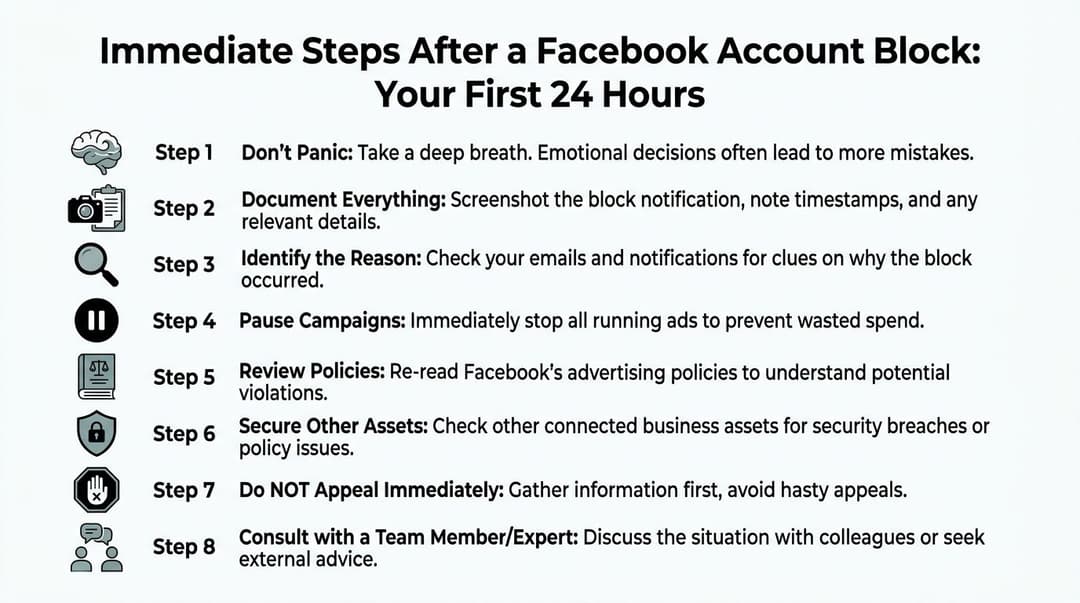
The first day matters more than many realize. Bad appeals usually start with bad triage.
Before you touch an appeal form, slow down and identify what happened.
Separate the type of block
Start with a simple classification pass.
| Asset affected | What it usually disrupts | First question to answer |
|---|---|---|
| Personal profile | Login, ownership, admin actions | Can any other trusted admin still access business assets? |
| Facebook Page | Posting, moderation, Page identity | Is the Page unpublished, restricted, or just limited in features? |
| Ad account | Delivery, billing, campaign edits | Is this a policy disable, payment hold, or suspicious activity review? |
| Business Manager | Shared assets, permissions, governance | Are connected Pages and ad accounts still reachable through another admin? |
If you skip this step, you end up filing a profile appeal for a business problem, or a Page appeal for a billing issue.
Freeze activity before Meta sees more noise
Many teams make the same mistake. They keep clicking around, changing passwords, adding users, launching backup campaigns, and trying random workarounds.
That creates a messy signal.
Use this order instead:
- Capture every notice. Take screenshots of banners, pop-ups, emails, payment warnings, rejected ads, and anything in Account Quality.
- Record timestamps. Write down when the restriction appeared and what changed just before it.
- Pause active workflows. If campaigns are still editable, stop activity that could worsen the issue.
- Check recent logins. Suspicious access changes the tone of the appeal.
- Alert internal stakeholders. One owner should handle appeals so five people don’t create conflicting submissions.
If you need a clean way to stop live spend while you sort the restriction, use a controlled workflow like this guide on how to cancel Facebook ads.
Diagnose likely triggers
Meta doesn’t block accounts for one reason only. In marketer accounts, the trigger is often a cluster.
Common triggers include:
- Policy pressure. Rejected ads, sensitive vertical issues, or repeated borderline creative.
- Billing friction. Failed charges, disputed payments, or changed card details.
- Unusual behavior. New devices, travel, VPN use, or permission changes.
- Activity spikes. Rapid follows, messages, invites, or posting bursts from a profile.
- Identity mismatch. Name differences between account and ID.
Meta’s restriction system is graduated. After one strike, you get a warning. Two to six strikes can limit specific features. Seven strikes lead to a 1-day restriction. Eight strikes lead to 3 days. Nine strikes lead to 7 days. Ten or more strikes lead to a 30-day restriction. Severe violations can trigger ad restrictions from the first strike. Meta also notes activity limits such as mass follows causing bans after 400 to 450 in 24 hours, and IP-related limits can trigger blocks that typically last 24 to 72 hours (Meta account restriction policy).
Build your evidence folder
This sounds boring until you need it. Then it becomes the difference between a vague appeal and a credible one.
Your folder should include:
- Identity files such as the exact legal ID likely to be requested
- Ownership proof like original setup emails, business docs, billing receipts, prior notifications
- Operational context including launch dates, payment references, and which users had admin access
- Security evidence such as login alerts or suspicious activity notices
- Asset map listing profile, Page, ad account, pixel, catalog, and Business Manager relationships
Practical rule: the first appeal should read like a support packet, not a rant.
What not to do in the first 24 hours
Some actions feel productive but usually make recovery harder.
- Don’t submit multiple appeals fast. That can create queue confusion.
- Don’t invent a story. If it was a payment issue, say so. If you suspect a hack, say why.
- Don’t rotate through random admins. Consistency matters.
- Don’t start new ad accounts immediately. That can look evasive if done badly.
- Don’t assume the visible error is the root cause. A blocked facebook account often starts from something connected behind the scenes.
Navigating the Facebook Appeal and Verification Process
A good appeal is specific, boring, and easy to verify. That’s the standard.
The worst appeals are emotional. They say the account is “extremely important,” threaten legal action in the first sentence, and never explain what happened. Meta’s systems don’t reward drama. They reward consistency.
Personal profile recovery
If your personal profile was disabled, start there first. If the profile owns the business assets, nothing downstream gets easier until this piece is addressed.
The basic sequence is:
- Download available account data immediately if you still have access to that function.
- Use the disabled account prompt or official appeal path.
- Submit your full name exactly as it appears on government ID.
- Attach clear identification and any ownership proof.
- Keep the explanation chronological.
A practical version of the explanation looks like this:
On [date], I lost access after a login/restriction notice. I believe this may relate to [suspicious login / identity review / mistaken enforcement]. The account belongs to me. My ID is attached, and the name matches the profile exactly. Recent relevant events: [brief list]. I’m requesting review and restoration.
For disabled accounts, one documented recovery method is to download data first, submit a precise appeal with government-issued ID, and escalate through Meta Verified support if available. Based on aggregated user reports, standard appeals see roughly 10 to 20% reinstatement, which can rise to 30 to 40% for Meta Verified users. A repeated pitfall is over-submission, since multiple appeals within 48 hours can flag the case as spam and delay review by 1 to 2 weeks (Fox News summary of the recovery process).
If your issue specifically affects ad access, this breakdown of a Facebook ads account disabled situation helps separate profile issues from ad account issues before you appeal.
Business Page and ad account appeals
Page and ad account restrictions need more than identity. They usually need business ownership context.
That means you should prepare:
- Business registration evidence
- Tax or company documentation if relevant
- Billing proof
- Page ownership indicators
- A concise timeline of the triggering event
- Any payment dispute references if billing was involved
The “Additional Information” box matters. Don’t waste it.
Use a structure like this:
- The asset affected
- The date you noticed the issue
- The likely cause, if known
- The proof you’re attaching
- The exact action you want reviewed
Good example:
Our Business Page and ad account were restricted on [date]. We believe this may be linked to [billing review / security event / mistaken policy flag]. We’ve attached ownership documentation, account history, and payment references. No intentional policy evasion occurred. We request manual review of the restriction and restoration of ad access if the account is found compliant.
Bad example:
This is insane. We did nothing wrong. Please restore immediately. Our business is losing money.
The second version may be emotionally accurate. It doesn’t help.
What reviewers usually reject
Appeals often fail because the documentation is technically weak, not because the story is impossible.
Watch for these failure points:
- Name mismatch between account and ID
- Unreadable uploads
- No proof of ownership
- Overly long explanations
- Contradictory explanations from different admins
- Appeals sent before the team confirms what was blocked
What works better in practice
Three habits tend to improve appeal quality:
Use exact names everywhere
If the profile says one thing and the ID says another, fix the inconsistency where possible before you submit. Even small mismatches can derail an otherwise clean appeal.
Explain one issue only
Don’t combine a hacked account claim, a policy argument, and a billing complaint in one long message unless they’re clearly linked. Give the reviewer a single path through the case.
Attach proof that maps to the claim
If you say the account was hacked, include suspicious login alerts. If you say billing caused the restriction, include invoices or payment references. If you say the Page belongs to your company, include business ownership proof.
Short appeals win more often than dramatic ones because they give support less to untangle.
Timelines and expectations
Marketers always want one answer to the question, “How long will this take?” There isn’t one.
Simple reviews may move quickly. Complex cases involving identity, billing, multiple linked assets, or Business Manager ownership can drag. The key is to plan for downtime rather than assume same-day recovery.
That means notifying clients early, preserving internal reporting snapshots, and preparing fallback media allocation if Meta access is central to revenue this week.
Advanced Escalation Paths for Stuck Account Appeals
Once the first appeal stalls, many make the situation worse by pressing harder in the same place. More forms. More uploads. More admins trying from more devices.
That usually adds noise.
The better move is to escalate with intent.

Meta Verified as a paid escalation route
For many marketers, Meta Verified is less about status and more about access to support paths that are easier to work through.
That doesn’t guarantee recovery. It can improve the quality of escalation because an agent can at least see the case, ask for missing documentation, and push the issue into a human queue with context.
If you use this route, send a compact packet:
- block notice screenshots
- ID and business docs
- asset IDs
- timeline
- billing references if relevant
- clear summary in plain language
Don’t make the support rep investigate your story from scratch.
Business support and formal case handling
If you have Business Support access, use it for business assets and keep the thread narrowly scoped.
A strong case usually includes:
| Case element | What to provide |
|---|---|
| Asset detail | Exact Page, ad account, or Business Manager involved |
| Trigger window | Date and recent changes |
| Evidence | Ownership docs, billing proof, screenshots |
| Security context | Any suspicious access or unauthorized changes |
| Requested resolution | Manual review, restoration, or clarification of the violation |
This is also the point where teams should review their workflows in Meta Business tools. If access is fragmented or admin coverage is weak, cleanup in Meta Business Suite can reduce confusion while the appeal is live.
Re-appeal strategy that doesn’t tank the queue
If the first attempt gets rejected or ignored, the next step should be better, not louder.
Use this approach:
- Wait before resubmitting if the platform has already acknowledged your prior case.
- Change the evidence quality. Better scans, better ownership proof, cleaner timeline.
- Address the rejection point. If they questioned identity, don’t resend the same policy explanation.
- Use one channel at a time where possible.
For business Pages and ad accounts, one technical appeals benchmark puts reinstatement around 20 to 35%, rising to 40% with Meta Verified. That same source notes that IP or device mismatches contribute to 40% of failures. For very high-stakes situations with ad spend above $100k, litigation is sometimes attempted, but it remains rare, with around 10% success and costs starting at $5k in California under Meta’s terms (technical appeals and escalation benchmarks).
Last-resort options
Most blocked facebook account situations shouldn’t go near legal escalation. It’s expensive, slow, and rarely justified for smaller accounts.
Still, there are edge cases where the account underpins major revenue, the documentation is strong, and the normal channels have failed. In those cases, business operators sometimes consider counsel, formal demand letters, or media inquiry. Those paths are strategic tools, not emotional reactions.
If you escalate, escalate with better evidence. Not with more frustration.
How to Prevent Future Facebook Account Blocks
Recovery matters. Prevention protects revenue.
Many teams treat account health like a background task until Meta cuts access. That’s backwards. If your acquisition engine depends on Meta, account integrity is part of channel operations.
Tighten identity and admin hygiene
The first layer is simple and often neglected.
- Use real names on profiles that own assets. If a future ID check comes in, you want no ambiguity.
- Assign multiple trusted admins. Don’t let one profile become the single point of failure.
- Audit permissions regularly. Remove ex-staff, agencies you no longer use, and stale partners.
- Review connected apps and access paths. Old tools create unnecessary risk.
- Keep billing ownership documented. Save invoices, receipts, and payment history in one place.
Meta removed 698 million fake accounts in Q3 2025 as part of its broader enforcement against inauthentic activity, which shows the scale of automated action legitimate marketers operate inside (Statista summary of Meta fake account removals). At that volume, prevention is partly about not resembling the patterns automated systems are trying to stop.
Reduce false positives from campaign operations
A lot of ad teams trigger avoidable scrutiny through workflow choices, not malicious behavior.
Watch for:
- Aggressive account changes right after setup
- Fast permission turnover across many users
- Unclear payment ownership
- Creative that brushes too close to policy lines
- Bulk operational changes without internal review
Warm up new assets carefully. Keep naming conventions clean. Don’t launch from chaos.
If policy interpretation is part of the problem, build a regular review loop around the current Facebook ads policy instead of waiting for rejections to tell you where the line is.
Protect agencies from cross-account damage
Agencies have an extra problem. One bad setup can contaminate several client relationships.
Use disciplined practices:
- Separate client ownership clearly
- Minimize shared logins
- Avoid sloppy admin sprawl
- Document who changed what and when
- Keep appeal documentation per client, not in one mixed folder
If your client’s brand is dealing with harmful impersonation, unauthorized posts, or reputation issues tied to social content, this guide on how to remove a Facebook post that is not yours is useful to have in your incident-response playbook.
Use tools that lower manual error
Manual account management creates preventable mistakes. That’s especially true when teams are launching many ad variants, duplicating structures, and moving fast across multiple brands.
One practical option is AdStellar AI, which connects to Meta Ads Manager through secure OAuth, centralizes campaign workflows, and helps teams generate and manage large numbers of ad variations with more operational consistency. For scale teams, the benefit isn’t hype. It’s fewer messy handoffs and fewer manual actions that can complicate compliance and troubleshooting.
The safer account is usually the one with cleaner operations, not the one with the longest appeal draft.
Field-Tested Appeal Templates for Marketers
Templates work best when you treat them as scaffolding, not magic text. Keep them short, factual, and tied to evidence you can attach.
Template for suspected account hack
Hello Meta Support, I’m requesting review of a restricted account that I believe may have been affected by unauthorized access. On [date], I noticed [suspicious login / password reset / access change], followed by [restriction or disable message].
I’m the legitimate owner of this account. I’ve attached my government-issued ID, account details, and screenshots of the relevant notifications. Please review the restriction and restore access if the account was flagged due to unauthorized activity.
Thank you.
Use this when the timeline supports a security issue. Don’t claim hacking just because you don’t understand the restriction.
Template for a likely false ad policy flag
Hello, Our ad account/Page was restricted on [date]. We believe this may be a mistaken enforcement action related to ad policy review. We’ve reviewed the account and are not aware of any intentional policy evasion or repeated prohibited behavior.
Attached are the asset details, ownership documentation, and screenshots of the restriction notice. We request manual review of the flagged asset and clarification of the specific issue if further action is needed on our side.
Regards.
This wording works because it stays calm and invites a manual review without sounding defensive.
Template for a payment-related block
Hello Support, We’re requesting review of an account restriction that appears to be related to billing or payment verification. The affected asset is [ad account/Page/Business Manager]. We noticed the issue on [date] after [failed charge / card update / payment review].
We’ve attached relevant payment records and business ownership information. Please review the restriction and confirm whether any additional billing verification is required to restore account functionality.
Thank you.
This helps when the block is operational rather than behavioral. If you have payment references, include them.
Template for agencies appealing on behalf of a client
Hello Meta Support, I’m an authorized representative working on behalf of [client/business name]. The restricted asset is [asset name/ID]. We’re submitting this request with the client’s knowledge and can provide supporting business documentation, account ownership proof, and prior billing records.
The restriction appeared on [date]. Based on our review, the likely cause is [brief explanation]. We request manual review and guidance on the exact remediation needed to restore access while keeping the account compliant.
Sincerely, [Name] [Agency] [Role]
This version does two jobs. It establishes authority and reduces confusion about why the submitting person isn’t the business founder.
How to improve any template
Use this checklist before sending:
- Replace every bracketed field
- Remove adjectives that don’t help
- Keep the story chronological
- Attach proof that matches the claim
- Ask for one clear action
“Please review the attached evidence and confirm the exact reason for the restriction if restoration isn’t possible at this time.”
That sentence is useful because it still gets you information even if the appeal fails.
Regaining Control and Moving Forward
A blocked facebook account feels chaotic because it hits three things at once. Access, revenue, and confidence.
The way out is rarely clever. It’s disciplined. Identify the exact blocked asset. Preserve evidence early. Diagnose before appealing. Use the correct channel. Escalate with cleaner documentation, not more panic. Then tighten your operating system so the next restriction is less likely and less damaging.
That last part matters most for marketers. A healthy Meta setup isn’t just about keeping the lights on. It protects your ability to test, scale, compare creatives, preserve learning, and keep client or internal stakeholders calm when something breaks.
If you want another practical recovery walkthrough, this resource on how to recover your blocked Facebook account is worth bookmarking alongside your internal incident checklist.
The long-term goal isn’t just to get access back. It’s to stop account problems from controlling your media calendar. Strong admin hygiene, cleaner documentation, and better campaign operations reduce the odds that a single restriction knocks your acquisition engine sideways.
If you’re still building your account structure or replacing a messy setup, this guide to create Facebook ad account is a useful starting point.
If your team is spending too much time manually building, duplicating, and troubleshooting Meta campaigns, AdStellar AI can help you run a cleaner operation. It connects to Meta through secure OAuth, centralizes campaign workflows, and helps growth teams launch and manage high volumes of ads with less manual friction.


