
Optimizing your Facebook ads isn't just about tweaking a few settings; it's a systematic process for getting the highest possible return on every dollar you spend. It's about moving beyond just "launching" ads and building a repeatable framework for auditing, testing, and scaling what actually works. This approach ensures your ad spend has a clear purpose.
Building a Bulletproof Foundation for Ad Optimization
Before you can really start optimizing, you have to get the foundation right. Rushing to change bids or test new creative on a messy, poorly structured account is like rearranging deck chairs on the Titanic. The changes won't matter, and you'll just be burning cash.
Real optimization starts with a deep, honest audit of what you've already done.
This means digging past surface-level metrics like clicks and impressions. You need to get into your historical campaign data to find the real story. Which audiences consistently brought in the lowest Cost Per Acquisition (CPA)? What specific creative angles or copy hooks drove the best conversion rates? Answering these questions gives you a data-backed starting point instead of just guessing.
Establishing a Clean Campaign Structure
Once you’ve pulled those insights from your audit, it's time to build a clean, logical campaign structure. A disorganized account with dozens of fragmented campaigns and ad sets is actively working against Meta's learning algorithm. The algorithm needs consolidated data to get out of the "learning phase" quickly and find your best customers.
A simplified structure is your best bet here. For example, a common and effective setup is one campaign for prospecting (finding new customers) and another for retargeting (bringing back warm audiences). Inside these campaigns, you can create distinct ad sets for different audiences—think broad, lookalikes, or specific interests. This clarity prevents your audiences from overlapping and lets your budget flow to the top performers, especially if you're using Campaign Budget Optimization (CBO).
Of course, none of this works without accurate data tracking. If your conversion data is spotty, the algorithm is flying blind. Make sure this crucial first step is handled by reading our instructions on how to set up the Facebook Pixel correctly.
The Power of Naming Conventions and KPIs
This might seem like a small detail, but a consistent naming convention has a massive impact on your ability to optimize. A messy system makes it nearly impossible to analyze performance quickly. You need a standardized structure that tells you what you're looking at with just a glance.
Pro Tip: A simple, effective naming convention could look like this:
[Date]_[CampaignObjective]_[Audience]_[CreativeAngle]. For example:2410_Conversions_LAL1%-Purchasers_UGC-Video. This tells you everything you need to know without even clicking into the ad set.
This level of organization makes analysis faster and more accurate, helping you make smarter decisions. It turns your ad account from a chaotic mess into a clean, readable library of performance data.
Finally, you need to define your Key Performance Indicators (KPIs) based on what actually impacts your business. While metrics like Click-Through Rate (CTR) are useful for diagnosing issues, your primary focus should always be on bottom-funnel results that drive revenue:
- Cost Per Acquisition (CPA): The total cost to get one new customer.
- Return On Ad Spend (ROAS): The revenue you generate for every dollar spent on ads.
- Customer Lifetime Value (LTV): The total predicted revenue you'll get from a single customer over time.
Focusing on these ensures your optimization efforts are tied directly to profitability. For ecommerce brands, in particular, understanding the full customer journey is critical. To build a stronger foundation for your ads, a practical guide to improving ecommerce conversion rates can be a game-changer, especially with its insights on using visuals and AI.
By building this bulletproof foundation—auditing your history, structuring campaigns intelligently, and tracking the right KPIs—you set the stage for sustainable, scalable success with your Facebook ads.
Before diving into new strategies, it's smart to run a quick audit of your account. This checklist helps you spot strengths and weaknesses in your current setup.
Facebook Ads Optimization Audit Checklist
| Audit Area | Key Metric to Check | What to Look For (Good Signs) | Red Flags to Address |
|---|---|---|---|
| Account Structure | Number of active campaigns/ad sets | Consolidated campaigns (e.g., Prospecting, Retargeting) | Dozens of fragmented, overlapping campaigns |
| Tracking & Pixel | Event Match Quality Score | Score of 8.0 or higher; key events firing correctly | Low score; missing purchase/lead events; pixel errors |
| Audience Performance | CPA or ROAS per audience | Consistently profitable audiences identified | High CPA across all audiences; no clear winners |
| Creative Performance | CTR, Hook Rate, Hold Rate (video) | A few clear "winning" ads with high engagement | Creative fatigue (performance dropping); low CTRs |
| Budget Allocation | Spend distribution vs. ROAS | Budget automatically shifting to top performers (CBO) | Manual budget allocation starving winning ad sets |
| Landing Page | Conversion Rate (on-site) | Strong conversion rate (>2% for ecom) | High bounce rate; low conversion rate from ad clicks |
This audit gives you a clear snapshot of where you stand. Once you've identified the red flags, you can prioritize what to fix as you move forward with the optimization framework.
Nailing Your Creative and Copy Testing Workflow
When it comes to Meta ads, your creative is the single biggest lever you can pull to move the needle. You can nail the targeting and perfect your bidding strategy, but it's the ad itself—the image, video, and copy—that actually stops the scroll and gets someone to act. The difference between good and great performance often comes down to having a repeatable, systematic process for testing these creative elements.
This whole process shouldn't start with guesswork. Instead of just throwing random ideas at the wall and hoping something sticks, you need to dig into your past performance to form some solid, data-informed hypotheses. Start by asking targeted questions. Did those raw, testimonial-style videos crush the polished, product-focused carousels? Did short, punchy headlines deliver a better click-through rate than the longer, more descriptive ones? Your testing workflow should be built to find clear answers to questions just like these.
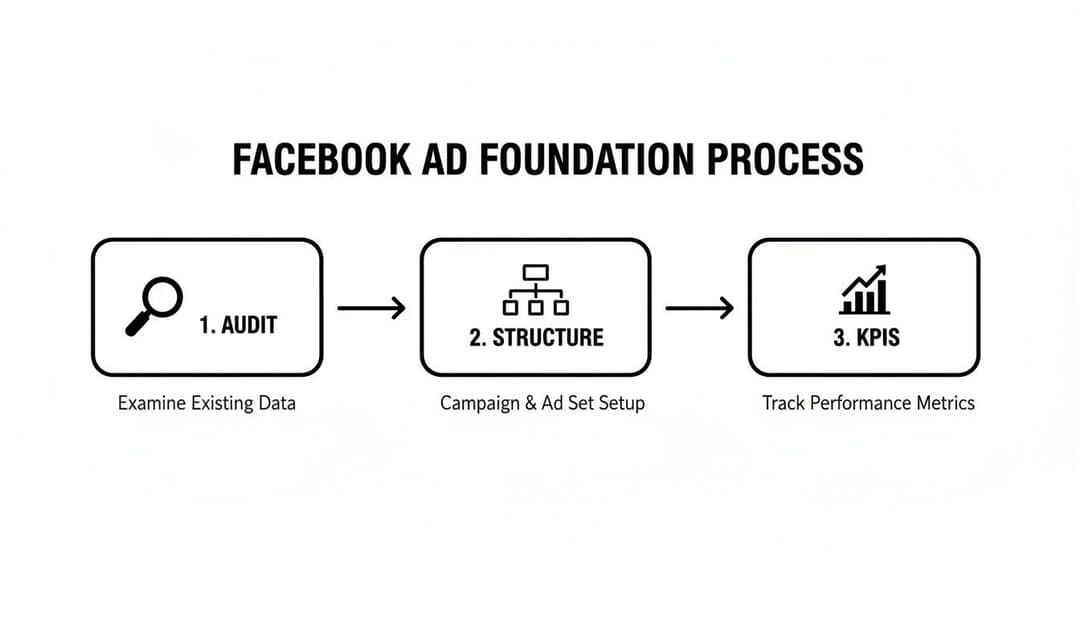
This really just boils down to getting your house in order first. Before you even think about launching a creative test, you need to have audited your account, structured your campaigns for clean data, and defined what success actually looks like (your KPIs). This groundwork is what makes your creative tests reliable, so you can trust the insights you get from them.
Building a Hypothesis-Driven Testing Framework
A structured framework is your best friend for getting clear, actionable results. The most important rule? Isolate your variables. If you test a new image, a new headline, and new body copy all in the same ad, you’ll have absolutely no idea which change actually made a difference.
A simple but incredibly effective approach I've used for years is the 4x2 method. In this setup, you test four distinct creative assets (like different images or videos) against two different copy angles (say, a benefit-driven angle vs. a pain-point angle). This instantly creates eight ad variations, giving the algorithm plenty of options to chew on and find a winning combination fast.
The big takeaway here is that a structured approach moves you from "I think this will work" to "The data shows this works." It’s about replacing gut feelings with hard evidence, which is the only way to scale your ads successfully.
Isolating Variables for Clean Results
To get data you can actually trust, you have to be almost obsessive about isolating variables. This means changing only one key element at a time within an ad set.
Here’s a practical breakdown of how to structure your tests:
- Creative Testing: Use the exact same headline and primary text for every ad in the ad set. The only thing you change is the image or video. This will tell you, without a doubt, which visual resonates most.
- Copy Testing: Flip it around. Use the exact same image or video across all your ads, but test out different headlines or primary text variations. This isolates the impact of your messaging.
- Audience Testing: Keep your ad creative and copy identical, but target each ad set to a different audience (e.g., a Lookalike audience vs. an Interest-based one).
It might feel a little tedious, but this is the only way to know for sure what's driving your results. For more complex situations where you need to test multiple elements at once, you can dive into more advanced methods. To get a better handle on that, check out this guide on what is multivariate testing and how it can apply to your campaigns.
Spotting Creative Fatigue and Building a Feedback Loop
Here's the hard truth: no ad creative works forever. Creative fatigue is what happens when your ad’s performance tanks because your audience has seen it one too many times. The key metric to watch here is Frequency—the average number of times each person has seen your ad. Once you see frequency climbing while your CTR and ROAS start to dip, that's your cue to swap in some fresh creative.
The last piece of this puzzle is creating a continuous feedback loop. The results from one test should directly inform the hypothesis for your next one. It's a simple, repeatable cycle:
- Analyze the Winners: Pinpoint the top-performing ads from your last test.
- Deconstruct Their Success: Break down exactly what made them work. Was it the user-generated content vibe? The direct-response copy? The specific call-to-action?
- Formulate a New Hypothesis: Build your next test based on these insights. For example, "If testimonial videos were the clear winners, let's test three new testimonial variations against our current champion."
When you're trying to refine your ads, it's all about understanding what clicks with people. Take a look at these powerful examples of testimonial ads that absolutely nail social proof. This constant cycle of testing, learning, and iterating is what separates stagnant campaigns from the ones that scale month after month.
Advanced Audience and Targeting Strategies

Let's be honest: a brilliant ad shown to the wrong person is just a wasted impression and a drain on your budget. Moving beyond basic interest targeting is where you really start seeing an impact on your bottom line. Advanced audience strategies are all about precision, relevance, and actually understanding the user journey.
This all starts with getting the most out of your first-party data. Your existing customer list, email subscribers, and website visitors are pure gold. This data feeds Meta's algorithm high-quality signals about who your ideal customer is, forming the bedrock of a powerful targeting strategy.
Building High-Value Lookalike Audiences
Lookalike Audiences are Meta's magic wand for finding new people who share traits with your best existing customers. But here’s the catch—not all source audiences are created equal. The quality of what you put in directly dictates the quality of what you get out.
Instead of just dumping your entire customer list into the machine, segment it first. Create distinct source audiences based on their actual value to your business. This gives the algorithm a much clearer, more focused target to aim for.
Consider building lookalikes from these high-value segments:
- Top 25% LTV Customers: These are your ride-or-dies—the repeat buyers and biggest spenders. A lookalike based on this group is primed to find people with high potential lifetime value.
- Recent Purchasers (Last 30-60 Days): This group is a snapshot of your most current customer profile. It’s perfect for adapting to seasonal trends or recent market shifts.
- High Average Order Value (AOV) Customers: Pull a list of customers who spend more than average per transaction. A lookalike from this source helps you find new users who are likely to make larger initial purchases.
When you create lookalikes from these specific, high-intent groups, you're giving the algorithm a crystal-clear signal of who to find. If you want to go deeper on this, you can learn more about how to create effective Facebook Lookalike Audiences and see how they can completely transform your prospecting campaigns.
Crafting Sophisticated Retargeting Funnels
Effective retargeting isn't about spamming everyone who ever visited your website with the same generic ad. It’s about continuing the conversation in a way that makes sense, guiding prospects through their decision based on the actions they've already taken.
A sophisticated funnel recognizes that someone who added an item to their cart is much further along than someone who just skimmed a blog post. Your messaging—and your offers—need to reflect that difference in intent.
A well-structured retargeting funnel meets users where they are. By segmenting your audience based on their engagement level, you can deliver tailored messages that feel helpful and relevant, not intrusive. This builds trust and significantly increases conversion rates.
For instance, a user who just visited your homepage might see a brand awareness video. Someone who viewed a specific product category could see a carousel ad showcasing top items from that collection. And for the person who abandoned their cart? Maybe they get an ad with a small nudge, like free shipping, to get them over the finish line. This tiered approach respects the user's journey and feels much more natural.
Broad Targeting vs Layered Interests
One of the biggest debates in modern Facebook advertising is when to trust the algorithm with broad targeting versus when to take the reins with specific interest layers. The right answer really depends on your account's data maturity and your campaign goals.
Broad Targeting is incredibly powerful once your Meta Pixel has collected thousands of conversion events. With enough data, the algorithm often has a better grasp of your ideal customer than you do and can find them more efficiently. It’s the go-to for scaling campaigns that are already proven winners.
Layered Interests and Behaviors, on the other hand, are your best friend when you're launching a new product, breaking into a new market, or when your pixel data is still thin. Layering interests—for example, targeting people interested in "hiking" AND "sustainable fashion"—lets you build a highly specific persona to test. You get more control in the early days, but you can limit your scale if you get too narrow.
Ultimately, a strong optimization Facebook ads strategy involves testing both approaches. Start with more defined audiences to gather that initial data, then gradually open up to broader audiences as your pixel gets smarter and you find your winning creative angles. This balanced approach gives you the best of both worlds: control when you need it, and scale when you're ready for it.
Unlocking Smart Bidding and Budget Allocation
How and where you put your ad dollars is every bit as important as how much you spend. You can have the best creative in the world, but it’ll fall flat if your budget isn’t working hard to reach the right people at the right price. Nailing your bidding and budget management on Meta is a core skill for any advertiser who’s serious about getting profitable results at scale.
This isn't about just setting a daily budget and crossing your fingers. It's about understanding how to work with the machine. You have to feed Meta’s algorithm the right inputs by choosing a bidding strategy that matches your goal and structuring campaigns to give it the fuel it needs to find your customers.
Choosing the Right Bidding Strategy
Meta gives you a few different bidding strategies, and each one is built for a different outcome. A classic mistake is just defaulting to "Lowest Cost" without a second thought, which can lead to wild swings in your costs and unpredictable performance.
Let's break down the main options and where they really shine:
- Lowest Cost (Highest Volume): This tells Meta, "Get me the most results you can for this budget." It's a great choice for maximizing sheer volume, like when you're driving top-of-funnel traffic, but your cost per result can fluctuate.
- Cost Per Result Goal (Cost Cap): With this, you set an average cost you’re willing to pay for a result. Meta's algorithm then goes hunting for conversions at or around that target. This gives you way more cost stability and is perfect for campaigns where you have a clear target CPA.
- Bid Cap: This gives you the tightest control. You set a hard ceiling on what Meta can bid in any single auction. While it stops you from overpaying for an impression, it can also starve your campaign if your bid is too low to consistently win auctions.
- ROAS Goal (Minimum ROAS): For e-commerce brands, this is a game-changer. You tell Meta the minimum Return On Ad Spend you need, and it will only go after users who are likely to hit that target. It puts profitability ahead of raw conversion volume.
The right strategy always comes back to your business objectives. If you need predictable costs, a cost cap is your best friend. If you have to guarantee a certain level of profitability, a ROAS goal is the way to go.
The Power of Campaign Budget Optimization (CBO)
One of the biggest shifts in how we run Meta ads has been the move toward Campaign Budget Optimization (CBO). Instead of manually setting budgets for each ad set, CBO lets Meta’s algorithm do the heavy lifting. It dynamically shifts your campaign’s budget in real-time to the ad sets that are performing the best.
CBO has really become the gold standard for scaling campaigns that are already working. Meta itself recommends using 3–5 ad sets per CBO campaign to give the algorithm enough data to learn effectively. Unlike the old-school Ad Set Budget Optimization (ABO) method, CBO uses machine learning to pour your money into the winning combinations of creative, audience, and placement automatically.
By letting the algorithm control the budget at the campaign level, you take the guesswork out of the equation. Your money is always flowing to your top performers, which is absolutely critical for optimizing your Facebook ads.
Scaling Budgets Without Shocking the System
So, you've got a winner. A campaign is crushing it, and the results look great. The obvious next move is to pump more money into it, right? But making big, sudden budget changes can freak the algorithm out and throw it right back into the learning phase, often causing your performance to tank.
The secret is to scale gradually. A widely accepted best practice is to increase the budget of a winning campaign by no more than 20-30% every 24-48 hours. This steady, incremental approach lets the algorithm adjust without resetting all the progress it has made.
For bigger pushes like flash sales or seasonal promos where you need to get aggressive, you can lean on automated rules. For instance, you could set a rule to bump the budget by 20% every day at midnight, but only if the ROAS stays above your target. This lets you scale up fast but with crucial guardrails in place. For a deeper dive into these tactics, check out our guide on how to optimize ad budget allocation. This method helps you scale aggressively but stably, avoiding the common mistake of shocking the system.
Scaling Your Winners with AI and Automation

You’ve done the hard work. You’ve tested, tweaked, and finally cracked the code—a winning combination of creative, audience, and messaging that’s actually delivering results. So, what’s next? The real challenge begins now: scaling that winner without destroying what made it successful in the first place.
This is where your focus needs to shift from pure creativity to sharp data measurement and smart automation. To scale with confidence, you need a crystal-clear picture of your performance, and frankly, that’s getting trickier to nail down.
The first move is to beef up your data signals. Just relying on the Meta Pixel for tracking doesn’t cut it anymore. If you haven’t already, implementing the Meta Conversions API (CAPI) is non-negotiable for a resilient ad strategy. It creates a direct, server-to-server connection with Meta, helping to fill the data gaps caused by browser tracking limitations and giving the algorithm a much fuller picture.
Think of it as giving Meta’s algorithm better eyes. This direct data feed means it can more accurately attribute conversions and find new customers, which is the absolute foundation of scaling effectively.
Knowing When and How to Scale
So, when is an ad actually ready for a bigger budget? The signs are usually pretty clear if you know what to look for. You’re hunting for stable, consistent performance for at least 3-5 days after the campaign has exited the initial learning phase.
Here are the green lights I look for:
- Consistent ROAS/CPA: Your Return On Ad Spend or Cost Per Acquisition is hitting your targets day after day, not just on a fluke.
- Stable CTR: The Click-Through Rate isn't bouncing all over the place. This signals sustained interest from your audience.
- Low Frequency: Your ad is still reaching fresh eyes. If frequency is creeping up, you’re on the verge of ad fatigue, not growth.
When you see these signals, the temptation is to just crank the budget dial way up. Don't do it. As we've covered, big, sudden budget jumps can shock the algorithm and throw performance off a cliff. Stick to small, incremental increases of 20-30% every 24-48 hours. This lets the system adapt, find new pockets of your audience, and maintain stability as you grow.
Another fantastic scaling method is duplication. If an ad set is absolutely crushing it, clone it into a brand new CBO campaign with a much larger budget. This strategy isolates your proven performer, allowing you to scale it aggressively without messing with the original campaign's rhythm and learning.
Leveraging AI for Intelligent Automation
Let's be real—manually watching every ad, making tiny budget tweaks, and trying to spot the next winner is a massive time sink. This is exactly where automation and AI completely change the game. The right tools can take over the repetitive, data-crunching tasks, freeing you up to think about big-picture strategy and creative.
AI-powered platforms plug directly into your ad account and analyze performance data in real time, far beyond what you can see in Ads Manager. They can pinpoint which specific creative elements, copy hooks, or audience pockets are truly driving your core KPIs, often uncovering subtle patterns you'd never spot on your own.
The magic of AI here isn't just about showing you insights—it's about turning those insights into action automatically. Instead of just handing you a report, these systems can take your best-performing assets and immediately build new campaign variations for testing, creating a powerful, continuous optimization loop.
For instance, a platform like AdStellar AI can dig through your data and identify that a specific video, when paired with a "pain-point" focused headline, is consistently delivering your highest ROAS. It can then automatically take that winning combo and start testing it against new lookalike audiences or with slight copy variations, all without you lifting a finger. This massively accelerates your testing cycles and scaling efforts.
This kind of automation is no longer a "nice-to-have"; it's essential for any serious optimization Facebook ads strategy. To dive deeper, we have a complete guide that breaks down how you can benefit from AI for Facebook Ads. By handing the manual work over to an intelligent system, you ensure your budget is always flowing to the most profitable combinations, letting you scale faster and with a whole lot more confidence.
Got Questions? We've Got Answers
Even with the best framework in hand, questions always come up in the day-to-day grind of managing campaigns. Let's tackle some of the most common hurdles advertisers run into when trying to optimize their Facebook ads.
How Long Should an Ad Run Before I Start Tweaking It?
I know the temptation. You see a metric you don't like after 24 hours and your immediate instinct is to jump in and start changing things. Resist that urge.
You really need to give a new ad at least 72 hours to find its footing. This gives it a fair shot to exit Meta's "learning phase." The algorithm is trying to gather enough data—usually aiming for about 50 conversion events—to figure out who your ideal customer is.
If you start tweaking the budget or swapping out creative too early, you risk resetting that entire learning process. It’s like pulling a plant up by the roots to see how it's growing. While you can keep an eye on leading indicators like CTR or cost per landing page view in the first day or two, hold off on any major decisions until you have three full days of data.
What’s a “Good” ROAS for Facebook Ads?
This is the million-dollar question, and the honest answer is: it depends. A "good" Return On Ad Spend (ROAS) isn't a universal number. It’s completely tied to your industry, your specific profit margins, and what you’re trying to achieve.
Sure, you'll hear people throw around a 4:1 ROAS as a general benchmark for e-commerce, meaning for every $1 you spend, you get $4 back in revenue. But that's just a guideline. A business with massive profit margins might be thrilled with a 3:1 ROAS, while another with razor-thin margins might need a 5:1 ROAS just to keep the lights on.
Forget industry averages. The only number that matters is your own break-even ROAS. The formula is simple: 1 / your profit margin. Any ROAS you hit above that number is pure profit for your business. Calculate that first, then you'll have a real target to aim for.
Why Are My Facebook Ad Costs Suddenly Spiking?
It’s frustrating to see your costs creep up, especially your CPM (Cost Per 1,000 Impressions). But it's rarely random. Usually, a few key culprits are to blame, and figuring out which one it is is the first step to fixing it.
Here are the usual suspects for a rising CPM:
- Audience Saturation: You've simply shown your ads to the same people too many times. Check your Frequency metric. If that number is climbing, your audience is getting bored.
- Ad Fatigue: That creative that was crushing it last week? It's gone stale. When engagement rates drop, Meta sees your ad as less relevant and starts charging you more to show it.
- More Competition: Are you running ads during a major holiday or sales event like Black Friday? You're not alone. More advertisers are targeting the same people, which drives up auction prices for everyone.
- Low Ad Quality: Meta might be giving your ad poor relevance scores, or maybe users are hiding it. The algorithm penalizes low-quality ads with higher delivery costs.
The fix? Start by refreshing your creative. If that doesn't work, try expanding your audience targeting to find new pockets of customers. You could even experiment with a different campaign objective to switch up how you enter the ad auction.
Ready to stop the guesswork and scale your Meta ads with confidence? AdStellar AI automates the entire process, from bulk ad creation and rapid testing to identifying your winning combinations with powerful AI insights. Launch, test, and scale your campaigns 10x faster. See how it works at https://www.adstellar.ai.


