You can have a Shopify store that looks healthy on the surface and still feel blind every time you open Ads Manager. Clicks show up, spend moves, the Pixel fires, and yet the question hangs there after every launch, did Meta drive the sale, or did the attribution just miss it?
That's the job of shopify and facebook ads in 2026. The setup still matters, but the merchants who win are the ones who can separate a weak campaign from a weak signal, then feed Meta enough clean data and strong creative to keep learning.
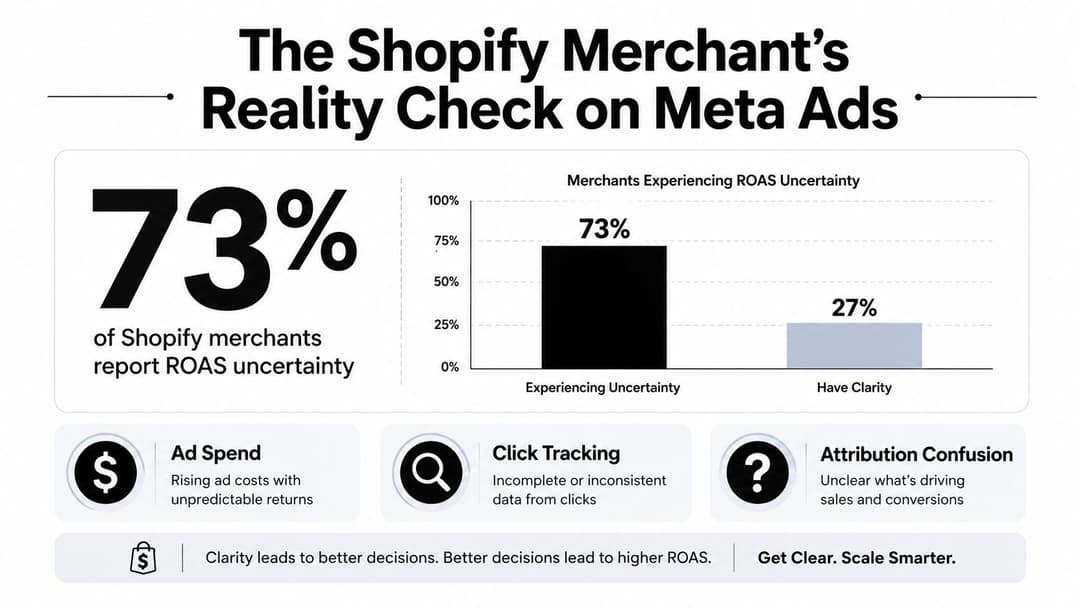
The Shopify Merchant's Reality Check on Meta Ads
A lot of merchants are living in the same loop right now. They launch Meta ads, watch traffic come in, maybe even see add-to-carts rise, then sit in front of two dashboards that do not fully agree. Shopify shows orders, Meta shows fewer conversions than expected, and nobody feels confident cutting spend or scaling it.
That uncertainty is not a side issue, it is the core issue. Shopify's own guidance treats Meta as a measurable performance channel, but only if you use the right benchmarks and measurement stack, including Ads Manager breakdowns and modern signal capture in a privacy-first environment, not just a basic campaign launch. Shopify's traffic campaign data also shows why the channel still matters, with Facebook traffic campaigns averaging 1.71% CTR in 2026, down the line from 1.57% in 2024, and average CPC falling to 70¢ from a higher prior-year level, while lead campaigns averaged 2.59% CTR, $1.92 CPC, and $27.66 cost per lead even after a 21% year-over-year rise in lead cost (Shopify Facebook statistics).
A useful way to read the account is by objective, not by ego. Shopify's guidance says merchants should benchmark at least 1% CTR for Desktop and News Feed ads and at least 2% CTR for Mobile News Feed ads. Shopify also notes that vertical video ads with audio produced 29% higher conversion rates than other ad types on the platform.
| Metric | Average | Good | Excellent |
|---|---|---|---|
| Conversion rate | 1.8% to 2.8% | 2.8% to 4.5% | Above 4.5% |
| Cold-traffic ROAS | 1.8x to 2.5x | Not specified in the verified data | Not specified in the verified data |
| Retargeting ROAS | 4.0x to 6.0x | Not specified in the verified data | Not specified in the verified data |
Practical rule: do not treat low reported ROAS as proof the campaign failed until you have checked whether the signal is incomplete. In Meta advertising for Shopify, under-attribution and true underperformance can look identical on the surface.
A merchant can easily pause a campaign that is working, or keep funding one that only looks good because Shopify is counting more of the sale than Meta can see. The difference matters because measurement gaps change the decision, and the wrong decision burns both budget and learning. The shops that scale are usually the ones that compare reported ROAS with signal quality, then separate creative failure from attribution loss before they make a call.
For the page side of that setup, creating a Facebook Business Page still matters because the merchant identity, business assets, and ad account structure all need to match before the numbers start meaning anything.
Connecting Shopify to Meta and Setting Up the Channel
The cleanest setup starts inside Shopify, not in a dozen disconnected tabs. Use the official Facebook and Instagram sales channel, connect the correct Meta Business assets, and make sure the store, catalog, and ad account all belong to the same business structure before you start pushing budget.
The order matters. If the business page, commerce assets, and domain verification are out of sync, you'll spend your first week debugging permissions instead of learning from campaigns. A solid reference for the page side of that setup is creating a Facebook Business Page, because the page still anchors a lot of the merchant-side identity Meta expects.
What to verify before launch
Start with the basics in Shopify admin, then open Meta Events Manager and confirm the connection is live. You want to see the standard commerce events coming through in a sensible sequence, PageView, ViewContent, AddToCart, InitiateCheckout, and Purchase.
A few practical checks prevent the most common messes:
- Confirm the correct store account: make sure the Facebook and Instagram channel is connected to the same Meta business that owns the ad account.
- Check domain verification: if the domain isn't verified in Meta, reporting and event prioritization can get messy fast.
- Review event flow: a store with decent traffic should not show only purchases, or only page views. The event mix should reflect the customer journey.
- Test from a real browser session: private mode and clean sessions help reveal whether tags are firing, not just cached in your own browser.
The first thing I look for isn't flashy performance. It's whether the store emits a believable trail of actions that Meta can optimize against. If that trail is broken at the start, no amount of creative brilliance will save the account.
A concise internal walkthrough for the setup sequence lives in Facebook conversion API setup for Shopify, and it's worth following the connection order instead of improvising it. The merchants who skip that order often spend weeks trying to diagnose problems that started with a half-finished integration, not bad media.
Installing the Pixel and Conversions API the Right Way
The Meta Pixel still matters, but it's no longer enough on its own. Browser restrictions and privacy changes have weakened client-side tracking, so a Shopify store that relies only on the Pixel is working with a degraded view of what happens after the click.
That's why the Conversions API, or CAPI, is the foundation now. Shopify's own optimization guidance says advertisers should rethink measurement in a privacy-first environment and set up the Conversions API alongside the Meta Pixel, because the browser and server together give Meta a fuller signal than either one alone. For a detailed setup walkthrough, Skup's Pixel guide is a practical reference to keep open while you configure the basics.
Set up the browser and server signals together
Inside Shopify, enable the Facebook and Instagram channel connection and turn on the server-side path through Shopify's customer data platform. Then generate the access token, map the required customer and order parameters, and make sure the same event can be identified on both sides.
That last part matters more than many merchants realize. If the browser sends a Purchase and the server sends the same Purchase without proper deduplication, Meta can double count the event and inflate the signal. Deduplication keeps the Pixel and CAPI aligned so one real purchase stays one real purchase.
Keep the event naming and event IDs consistent, or you'll create noise while thinking you've added data quality.
Watch the quality, not just the connection
A live connection doesn't guarantee a strong one. If your event match quality is weak, Meta may still receive the event but struggle to match it to the right person, which drags on optimization. In Shopify setups, the most important parameters are the ones tied to the purchase itself and the customer context around it, because that's what helps Meta connect an order back to a click or view.
Look for these signs in Events Manager:
- Repeated warnings about missing customer parameters: often a sign the server payload isn't carrying enough identity data.
- Purchase events that appear, but don't match expected order volume: usually a deduplication or parameter issue, not a spending issue.
- One channel dominating the event stream: if the browser carries everything and the server is silent, you're still exposed to tracking loss.
The point isn't to chase a perfect score for its own sake. The point is to make sure Meta has enough high-quality, deduplicated signal to optimize delivery without guessing. When that part is right, creative testing and audience strategy finally start to mean something.
Building Product Catalogs and Dynamic Ad Audiences
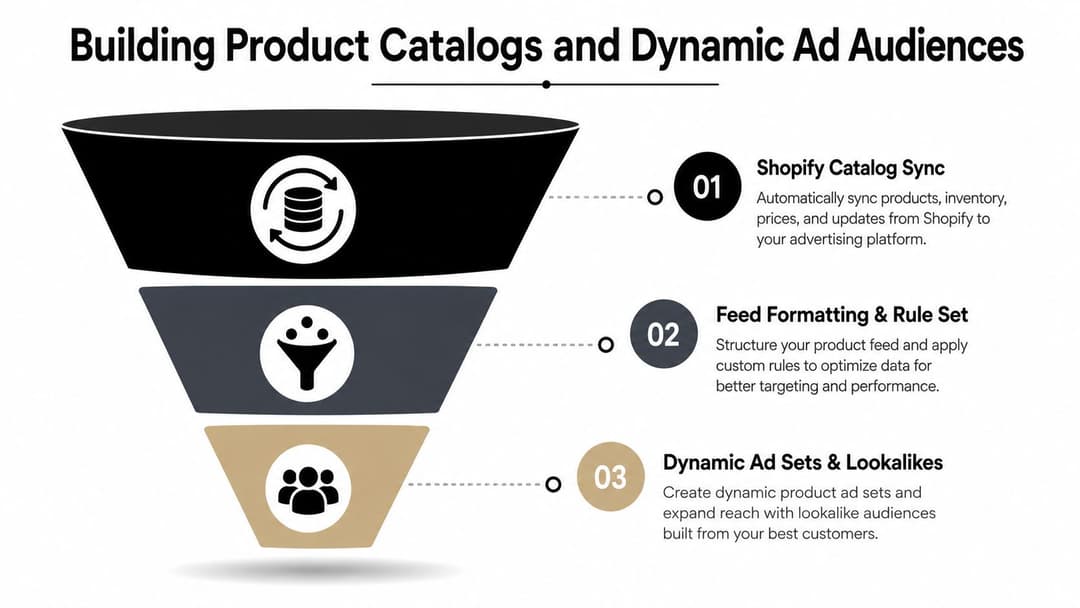
Once the signal is clean, the next move is to give Meta a catalog it can use. A product feed that syncs from Shopify to Meta should feel boring in the best possible way, because boring here means the titles, prices, images, and availability are all stable enough for automated ads to trust.
Dynamic ads are especially useful when the store has enough SKU depth to make retargeting efficient. Meta can pull viewed products from the catalog and serve back the exact items people already showed interest in, which beats rebuilding every retargeting ad by hand.
Feed quality and audience structure
The feed itself needs discipline. Product titles should match how customers search, images should be clean and consistent, and pricing should always reflect what's on the store. If the catalog looks messy, dynamic ads will still run, but they'll reflect that mess back to the shopper.
That catalog is also what supports your audience logic. Wide prospecting audiences give Meta room to learn, while warm audiences let the algorithm harvest intent more efficiently. A Shopify-focused catalog guide like Facebook catalog ads management is useful if you're wiring the feed, but the strategic point is simple, don't over-narrow too early.
A practical audience stack usually looks like this:
- Prospecting: broad enough that Meta can find new buyers instead of fighting tiny interest buckets.
- Site visitors: people who browsed but didn't buy.
- Add-to-carts: shoppers with stronger intent who deserve tighter follow-up.
- Past purchasers: buyers who can be excluded from acquisition or moved into retention flows.
Dynamic ads versus custom creative
Dynamic product ads are great at capturing existing demand. They're less useful for telling a new story about the brand. That's why strong accounts pair catalogs with custom creative instead of letting the feed do all the work.
Catalogs win on relevance. Custom creative wins on persuasion.
The two together beat either one alone. The catalog keeps the response path efficient, and the creative creates the reason to care in the first place.
Creative and Copy Testing That Produces Winners
The fastest way to waste a Shopify-Meta budget is to keep changing copy while ignoring the variable that moved the result. In practice, creative variety is usually the bigger lever, and the testing plan has to reflect that. If you want a fuller framework for setting up those experiments, our guide to Facebook ad creative testing methodology lays out the structure I use before I spend serious budget.
That does not mean every store should chase the same ad style. It means the format deserves the same attention as the offer, because a founder-led clip, a phone-shot demo, and a UGC-style testimonial can all beat a polished product graphic if they give the shopper a clearer reason to click.
Budget discipline beats random testing
A workable testing rhythm is to split spend across 60% prospecting, 25% retargeting, and 15% creative testing, then let each ad set earn enough signal before judging it. The most useful benchmark is straightforward, give each new ad set at least 2 to 3 times target CPA before deciding whether it has failed or deserves more room.
That matters because underfunded tests lie. Stop an ad set too early, and the data is too noisy to trust. Scale something before it has a real signal, and a lucky start can look like a durable winner.
If the account is tracking cleanly, I also want the test to sit in a broader measurement stack that can help you unify your marketing analytics. Creative winners should show up in the platform, the store, and your broader reporting, even if attribution is imperfect and the numbers never line up perfectly.
Here's the way I'd pressure-test a creative lane:
- Hook first: if the opening does not stop the scroll, the rest of the ad will not matter.
- Format second: compare product demo, UGC, founder-led, and static assets before obsessing over small copy edits.
- Offer third: discounts, bundles, shipping hooks, and guarantees can matter, but only after the audience has reacted to the format.
- Narrative last: brand messaging usually needs more time than a simple hook test.
What to do when results flatten
When creative fatigue shows up, do not just duplicate the same idea with a new headline. Pull a new angle from the product itself, the problem it solves, or the proof that makes it believable. If the creative library is thin, tools that generate multiple ad variations from product data, including AdStellar AI, can help teams move faster without rebuilding every asset manually.
The point is not volume for its own sake. The point is enough variation to learn which message, format, and angle deserves more budget.
Measuring Results When Attribution Is Broken
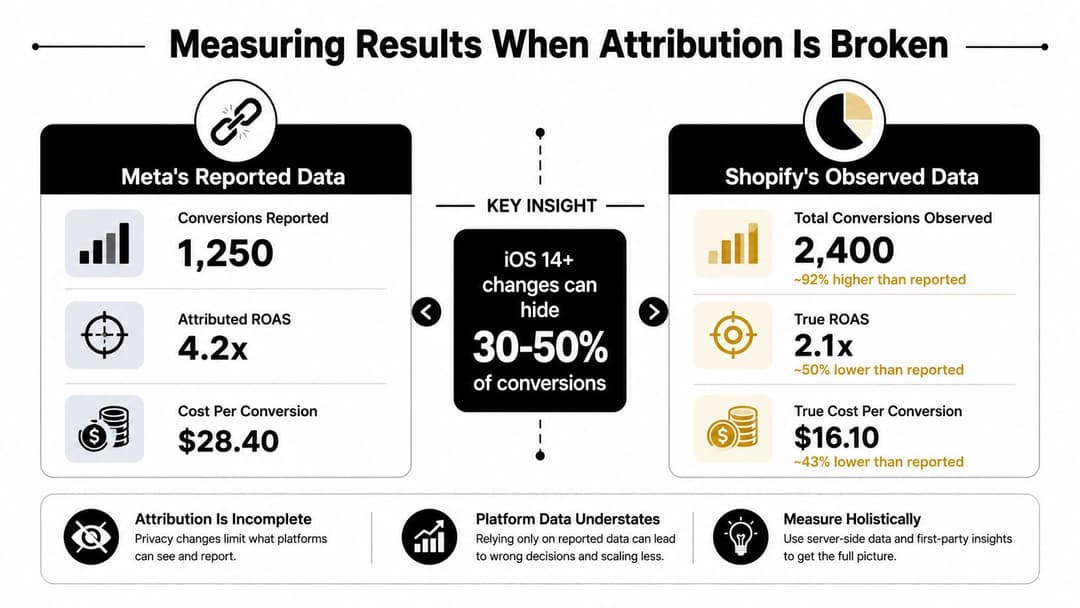
Most Shopify operators get themselves into trouble here. They see weaker reported numbers in Meta, assume the ads failed, and cut a campaign that may have been doing more work than the dashboard admitted.
Privacy changes are the reason. Shopify's guidance explicitly says advertisers need to rethink measurement in a privacy-first environment, and that means the old habit of trusting platform-reported ROAS without cross-checking it is too risky. The cleanest explanation of why the gap matters is in measuring true ad attribution, because the problem is not just loss of data, it's how that loss distorts decisions.
How to tell underperformance from under-attribution
The first comparison is simple, Meta-reported conversions versus Shopify order counts. If the ad platform is lagging far behind what the store shows, the campaign might still be healthy, but the reporting window is incomplete. A central warning from the brief is that iOS 14+ changes can hide 30-50% of conversions, which is why the raw platform count can't be treated as the whole truth.
That's also why I like to triangulate with more than one source. Shopify gives you store-side order truth, GA4 adds another lens on traffic behavior, and post-purchase surveys or holdout tests can help show whether a campaign is creating incremental demand rather than just claiming it.
What to check before you kill spend
A simple diagnostic flow works better than panic cuts:
- Check the store order total first. If the store is stable and Meta is low, attribution may be the problem.
- Review event quality and deduplication. Bad server-side setup can make a strong campaign look weak.
- Look for trend direction, not single-day spikes. One bad day doesn't define a campaign.
- Use incremental thinking. If holdout regions or paused periods still show demand where Meta was active, the platform likely contributed.
A useful resource for teams trying to connect those dashboards into one view is to unify your marketing analytics, because disconnected reporting is what turns normal attribution loss into bad budget decisions.
The main takeaway is blunt. Don't punish a campaign for a measurement problem until you've checked whether the signal is broken.
Scaling, Troubleshooting, and the 90-Day Plan
A good 90-day plan gives the account room to learn without drifting. In the first phase, the goal is setup integrity, verified events, clean catalog sync, and enough spend discipline that Meta can see patterns instead of noise. In the second phase, you keep changes small and let the highest-signal campaigns collect enough data to tell you what's real.
By the third phase, scale only the combinations that hold up under repeat spend. The account should be moving toward a tighter creative system, not a bigger pile of disconnected ad sets.
Common fixes when things go sideways
The same handful of problems show up again and again in Shopify-Meta work:
- Events stop after a theme change: recheck the Shopify channel connection and confirm the Pixel and CAPI are still firing after the theme update.
- EMQ drops after new products or forms: missing customer parameters can weaken match quality fast.
- Catalogs desync after bulk edits: refresh the feed and verify that the product data still matches the store.
- Campaigns stay stuck in learning: small audiences or too many edits can keep delivery unstable.
Keep the troubleshooting tied to the symptom, not the guess. If purchases are being missed, don't start by changing creative. If the catalog is stale, don't blame the audience. If the audience is tiny, don't expect the algorithm to act like it has room to work.
The best scaling moves are boring, stable budget, clean signal, and a creative pipeline that never runs dry.
A simple weekly checklist
- Verify tracking after every site update.
- Review event match quality and deduplication status.
- Compare Meta reporting with Shopify orders.
- Rotate in fresh creative before fatigue shows up.
- Keep prospecting wide enough for learning.
- Use retargeting as a capture layer, not the whole strategy.
That's the discipline that keeps Shopify and Meta from turning into a blame game between the store, the platform, and the ad account.
If you want a faster way to launch and test Meta campaigns from Shopify product data, AdStellar AI can help teams generate ad variations, organize audiences, and push campaigns into Meta Ads Manager with less manual setup. Visit AdStellar AI if you're ready to tighten your measurement, speed up creative testing, and stop guessing which Shopify-Meta campaigns deserve more budget.