
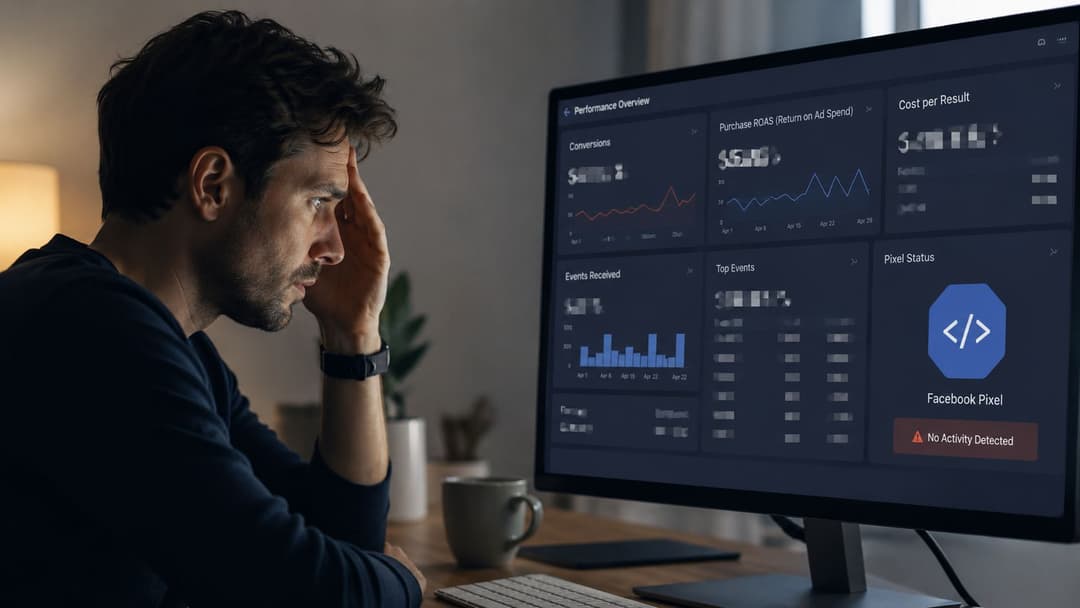
Your Meta account probably still shows conversions. The problem is that many teams no longer trust what they're seeing.
A campaign looks weak in Ads Manager, then sales show up in Shopify or the CRM. Retargeting pools feel thinner than they should. Purchase reporting lags, lead quality gets harder to judge, and every optimization decision starts to feel like an educated guess. That's what signal loss looks like in practice. It doesn't always break tracking completely. It just makes it unreliable enough to hurt decisions.
That's where the FB Conversion API changes the job. Used well, it isn't just a patch for Pixel gaps. It becomes part of the operating system for Meta performance, especially when you care about ROAS, cleaner feedback loops, and feeding better inputs into the tools you already use to scale.
Beyond the Pixel Why the FB Conversion API Is Essential
The old workflow was simple. Install the Meta Pixel, define your events, and let the browser do the rest. That setup still matters, but it's no longer enough on its own.
Browser restrictions, ad blockers, and mobile privacy controls have changed what gets captured and what gets lost before it ever reaches Meta. When that happens, campaign optimization suffers because Meta is working with weaker conversion signals. Reporting gets noisy too, which is why so many buyers spend more time reconciling numbers than acting on them.
What CAPI actually changes
Meta began highlighting Conversions API in the summer of 2020 as a server-side alternative to browser-only tracking, positioning it as a direct connection between an advertiser's marketing data and Meta Ads Manager, according to Portent's overview of Meta Conversions API. That matters because it expands what you can send beyond browser events alone.
With CAPI, businesses can send website events, app events, business messaging events, and offline events from their server. In practical terms, that means you can pass signals tied to purchases, leads, form submissions, phone calls, in-store sales, or CRM activity into Meta without depending only on the browser.
If you want a refresher on the browser-side layer before going deeper, AdStellar's guide to the Meta Pixel basics is a useful starting point.
Practical rule: If your Meta account still depends on browser-only tracking for performance decisions, you're optimizing with partial visibility.
Why this matters for advertisers trying to scale
The biggest mistake I see is treating CAPI like an emergency repair. It's more useful when you treat it like signal infrastructure.
For ecommerce, that means stronger purchase data and cleaner downstream optimization. For lead gen, it means passing qualified actions from the CRM instead of relying on shallow front-end events alone. For multi-channel teams, it means Meta gets closer to the actual business outcome, not just the click-path version of it.
That's also why teams trying to improve creative and offer performance on Facebook should think beyond ad setup itself. Resources like Million Dollar Sellers' Facebook guide are helpful because they connect platform execution with the bigger selling system around it.
Pixel-only setups usually fail in the same way
A Pixel-only account often looks acceptable until you compare ad-platform reporting with backend reality. Then the cracks show:
- Purchase undercounting: Browser-side events don't capture every real transaction.
- Lead ambiguity: Front-end form events may fire, but sales teams later discover weak intent.
- Optimization drift: Meta chases incomplete signals because that's what it can see.
- Audience weakness: Retargeting and lookalike inputs reflect missing data.
The FB Conversion API doesn't make every attribution question disappear. It gives Meta a more dependable server-side data stream so your account has a better chance of optimizing around reality instead of partial browser visibility.
Decoding Your CAPI Setup Options
Teams often don't struggle with whether to implement CAPI. They struggle with choosing the right setup.
The wrong path creates months of maintenance pain. The right one fits your tech stack, your team, and the level of control you need.
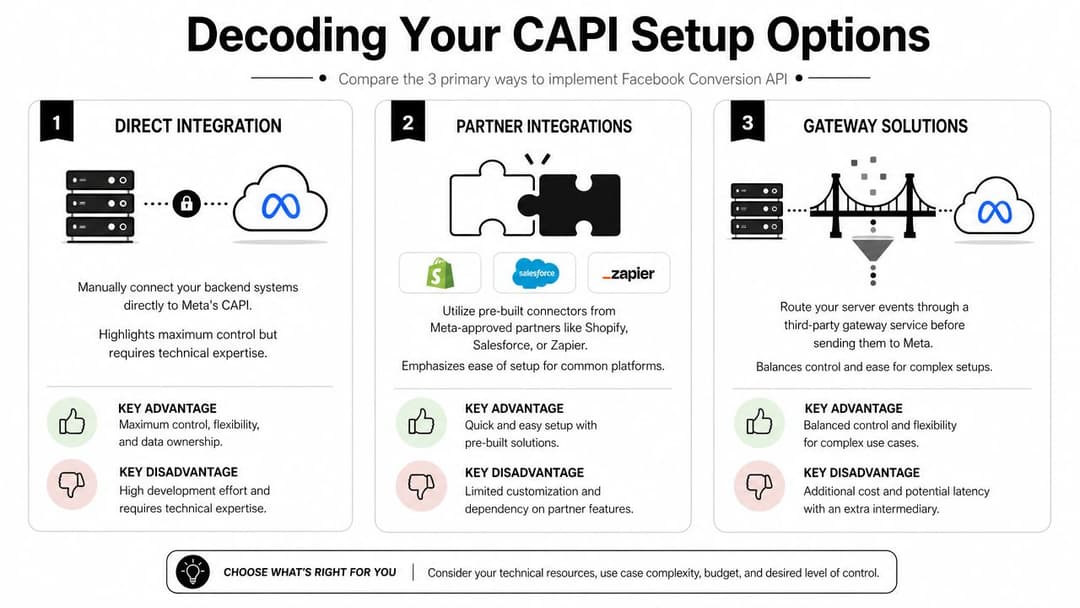
Option one partner integrations
If you're on Shopify, WooCommerce, or another major commerce platform, partner integrations are usually the fastest route to getting live. They reduce engineering lift and give smaller teams a practical starting point.
The upside is speed. The downside is control. You'll often get standard event coverage, but less freedom over event logic, custom parameters, consent handling nuances, or how offline and CRM signals flow in later.
This option fits brands that want a stable baseline quickly and don't have in-house technical resources.
Option two manual direct integration
Manual implementation gives you the most control because your own backend sends events directly to Meta. That's the right move when you have a custom site, a product team, or a serious need to control event schemas and business logic.
Meta and independent guidance consistently recommend dual tracking with Pixel plus CAPI to improve match quality and reliability. CAPI sends hashed first-party server events directly to Meta and can capture conversions that browser-based tracking misses when cookies, ad blockers, or iOS privacy constraints interfere, as noted in DinMo's breakdown of Meta Ads and Conversions API.
Manual setup is usually worth it when conversion quality matters more than installation speed.
The cost is maintenance. Your team owns token handling, data formatting, event governance, troubleshooting, and ongoing updates when site behavior changes.
Option three gateway or server-side container setups
This sits in the middle. You get more flexibility than a simple native app integration, but less custom engineering than a fully bespoke build. For many teams, that balance is ideal.
A gateway or server-side setup is especially useful when you want to centralize event routing, enrich data before sending it to Meta, or create a cleaner long-term foundation across platforms. If that's the direction you're considering, AdStellar's overview of a Conversions API gateway setup is relevant because it frames the trade-off between direct control and implementation speed.
A practical comparison
| Setup path | Best for | Main advantage | Main drawback |
|---|---|---|---|
| Partner integration | Smaller teams on standard platforms | Fastest launch | Limited control |
| Manual direct integration | Custom stacks and advanced teams | Deep control over logic and data | Highest maintenance burden |
| Gateway or server-side container | Teams that want flexibility without full custom work | Good balance of control and usability | Still requires technical ownership |
What usually works best
Here's the blunt version.
- Choose partner integrations if you need to move fast and your business runs on a common platform.
- Choose manual integration if your CRM events, lead stages, or purchase logic are too important to leave to a templated connector.
- Choose a gateway or server-side container if you want a more durable tracking layer without building everything from scratch.
What doesn't work is picking the most complex setup just because it sounds advanced. CAPI should improve signal quality and decision quality. If your team can't maintain the implementation, the extra sophistication becomes a liability.
Configuring CAPI and Pixel for Flawless Data
Most CAPI problems aren't caused by Meta. They're caused by messy implementation.
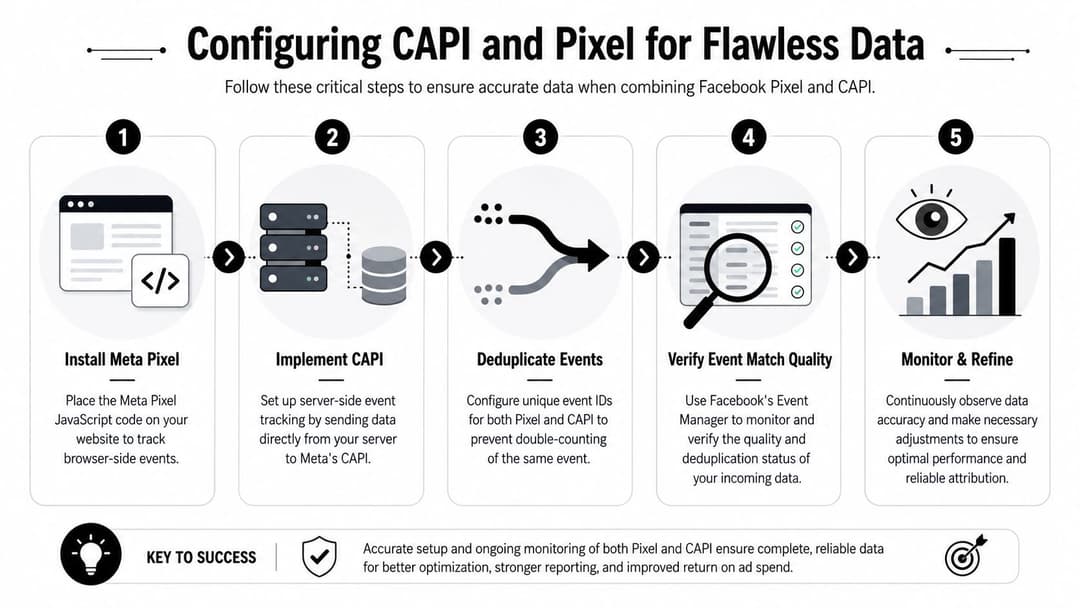
The biggest risk is simple. Your browser event and your server event both fire for the same conversion, but Meta can't tell they represent the same action. That's how you end up with inflated counts, confused reporting, and optimization data you shouldn't trust.
Start with the event plan
Before touching tokens or endpoints, define the events that matter most. Don't start with every event you can send. Start with the events Meta should optimize toward.
For most advertisers, that means mapping a small core set of lower-funnel actions clearly across browser and server. The event names, timing, and parameters need to line up. If the Pixel sends one version of Purchase and the server sends a slightly different one, cleanup gets harder fast.
A useful companion for the tooling side is AdStellar's guide to Facebook Pixel integration tools, especially if your challenge is coordinating browser tracking with a broader implementation stack.
Deduplication is the part you can't fake
Meta's documentation states that Conversions API requests are treated as Marketing API calls, that there is no specific rate limit for Conversions API itself, and that the platform uses a deduplication workflow with event matching keys. Meta's Dataset Quality API also surfaces the percentages of events received from Pixel and Conversions API for each deduplication key, as documented in Meta's Conversions API implementation guidance.
That sounds technical, but the operating lesson is straightforward. If you run Pixel and CAPI together, deduplication has to be intentional.
Use the same event identifier for the browser and server versions of the same conversion.
event_id
That shared value is what helps Meta understand that the browser Purchase and server Purchase belong to one real-world action, not two separate ones.
The configuration flow that avoids most mistakes
The cleanest setup usually follows this order:
- Map your core conversion events first. Decide exactly which actions deserve server-side support.
- Keep naming aligned. A Lead should be a Lead across both systems, not a standard event in one and a loosely related custom event in the other.
- Generate and persist a shared event ID. The browser and server need access to the same identifier for deduplication.
- Send valuable matching data carefully. Strong first-party inputs improve the odds that Meta can connect the event correctly.
- Check event source behavior in Events Manager. Don't assume a live event is a clean event.
What good event mapping looks like
Here's the practical standard I use:
- Purchase: Fire once when payment is confirmed, not when someone lands on a thank-you page that can be refreshed.
- Lead: Tie it to a real submission or validated CRM intake step, not just a button click.
- InitiateCheckout: Keep it tied to the point where checkout begins.
- Custom lifecycle events: Use them when your business model depends on milestones the standard ecommerce funnel doesn't cover well.
What usually breaks data quality
The recurring failures are boring, which is good news because they're preventable.
- Mismatch in event names: Browser says
Purchase, server says something custom. - Bad timing: Pixel fires on page load, server waits for a backend confirmation, then teams compare them as if they're identical.
- Missing shared identifier: Meta receives two events and has no reason to merge them.
- Over-sending events: Teams forward every possible action and dilute the signal they intend to optimize.
If your event logic doesn't reflect your actual business process, cleaner transport won't save it.
CAPI works best when you treat the server event as a business-truth layer and the Pixel as supporting browser context. That combination is what makes the FB Conversion API useful instead of merely installed.
Verifying Your Implementation in Events Manager
A CAPI setup isn't finished when events start appearing. It's finished when you've confirmed they're arriving from the right sources, with the right structure, and without obvious duplication problems.
Events Manager earns its keep by showing you whether your setup is operational or just noisy.
The checks to do before sending real traffic
For manual setup in Events Manager, the usual flow is to open the Pixel, go to Settings, find the Conversions API section, generate an access token, and then manage the system user or API app if needed. That happens after domain verification and Aggregated Event Measurement setup, where you can configure up to eight prioritized conversion events, as described in LeadsBridge's walkthrough of Meta Conversions API setup.
Once that's in place, go into Test Events and trigger the actions you care about. Don't limit this to PageView. Trigger the actual conversion moments that matter, such as lead submissions, checkout starts, or purchases.
What to look for in the event stream
You're trying to answer four questions:
- Is the event arriving at all? If not, you have a transport or trigger problem.
- Is the source correct? You want to know whether it came from the browser, the server, or both.
- Is the payload sensible? Event names and core parameters should reflect the actual action.
- Is deduplication happening where expected? If both paths fire, they should reconcile cleanly.
A common mistake is celebrating the first visible server event. Visibility only tells you the connection works. It doesn't tell you the event is useful for reporting or optimization.
A practical QA routine
I like to validate CAPI using a simple pass:
- Run one browser test action. Confirm the Pixel side appears as expected.
- Run one server-backed test action. Confirm the server version arrives with the expected event name.
- Run a dual-tracked conversion. Check whether Meta recognizes the overlap cleanly.
- Review diagnostics after test traffic. Errors often show up after events process, not instantly.
Good verification is boring on purpose. If your setup feels ambiguous in testing, it will feel worse after scale.
Signs something still needs work
Treat these as warnings, not minor quirks:
| Signal in Events Manager | Likely issue |
|---|---|
| Server events appear but key conversions don't | Wrong trigger or backend logic |
| Browser and server both fire with inflated totals | Deduplication mismatch |
| Event names look inconsistent | Mapping problem |
| Diagnostics keep surfacing warnings | Payload quality or implementation hygiene issue |
The goal isn't to make Events Manager look tidy. The goal is to trust the data enough to let Meta optimize against it.
Navigating Privacy and Compliance with CAPI
Some teams still talk about privacy as if it sits outside performance. In practice, privacy decisions shape the quality, durability, and legal safety of your measurement stack.
That's especially true with server-side tracking. The FB Conversion API gives advertisers more control, which also means more responsibility. You decide what data gets sent, when it gets sent, and how tightly that flow is governed.
Governance is part of implementation
Meta positions CAPI as a way for organizations to decide what data they share. That makes governance a core implementation issue, especially as server-side tracking becomes common while consent and data minimization requirements tighten globally, as discussed in Artefact's analysis of Conversions API implementation choices.
That's the right framing. A sloppy CAPI setup can create as many problems as it solves. If your team pipes everything available into Meta without a clear policy, you haven't built a strong measurement layer. You've built a risk surface.
What disciplined privacy practice looks like
The best implementations are selective.
- Gate data by consent status: If a user hasn't granted the relevant permission, don't send the same payload you would for a consented user.
- Minimize fields: Send what supports valid measurement and optimization. Cut anything that doesn't.
- Hash sensitive user data where required: Treat this as baseline hygiene, not an optional enhancement.
- Align online and offline rules: Don't be careful on web events and careless with CRM or call-center uploads.
Privacy discipline also improves model quality. When event schemas are clean and intentional, your data pipeline becomes easier to audit, debug, and trust.
Why this matters beyond compliance
A lot of performance teams are expanding their measurement mix because platform reporting alone can't answer every budget question. That's where methods like media mix modeling become useful. CAPI doesn't replace broader measurement, but it gives those systems a cleaner source of truth to work from.
Privacy-first tracking usually produces better operations because it forces teams to define what actually matters.
The competitive advantage most teams miss
Brands that take governance seriously move faster later. Their legal team isn't constantly blocking new event ideas. Their analytics team spends less time untangling inconsistent fields. Their media buyers know what a conversion represents.
Compliance isn't the enemy of performance. Undisciplined tracking is.
When you treat privacy as part of the design of your CAPI setup, you get a system that's more sustainable, easier to maintain, and less likely to collapse the next time platform rules shift.
Monitoring Performance and Boosting ROAS with CAPI Data
Installing CAPI is a technical task. Using it to improve ROAS is an operating discipline.
The shift happens when cleaner server-side data changes how you judge campaigns, train Meta's optimization, and feed downstream tools. That's the point where the FB Conversion API stops being an implementation project and starts becoming a performance asset.
Better signal changes bidding decisions
When Meta receives stronger conversion inputs, campaign optimization usually becomes more defensible. Not magical. Just more grounded.
That matters most when the conversion event you optimize toward is close to real business value. If your account had been relying on weak browser-side signals, CAPI can help restore visibility into outcomes that matter. That leads to better budget allocation, sharper creative readouts, and more confidence when you scale or cut spend.
A lot of the same discipline applies when you're working through broader funnel friction. Four Eyes has a useful piece on addressing customer conversion problems because it reminds teams that better tracking doesn't fix a weak conversion process. It helps you diagnose it faster.
Where ROAS gains actually come from
In practice, CAPI helps in three places:
- Measurement quality: You get a better read on which campaigns are tied to valuable outcomes.
- Optimization quality: Meta has stronger signals to work with when learning who is likely to convert.
- Audience quality: Retargeting and modeled audiences benefit from a more complete event picture.
That doesn't mean every account suddenly becomes efficient. If your offer is weak or your funnel leaks, CAPI won't rescue it. What it does is reduce the guesswork around whether poor results are caused by bad marketing or bad signal capture.
Clean data is more valuable when other tools can use it
Teams that run serious Meta programs rarely work inside Ads Manager alone. They compare CRM outcomes, creative data, funnel performance, and platform reporting across multiple systems.
That's why CAPI data becomes even more valuable when paired with analytics and activation workflows. A practical example is AdStellar AI, which connects to Meta Ads Manager, ingests historical performance, and uses campaign results to rank creatives, audiences, and messages against goals like ROAS, CPL, or CPA. When the incoming conversion stream is cleaner, systems like that have a better feedback loop to learn from.
If you're building a stack around more reliable attribution and optimization, this overview of digital marketing tracking tools is a good reference point for deciding where CAPI fits versus analytics, reporting, and modeling layers.
Here's a useful visual walkthrough of the broader performance workflow:
What advanced teams do differently
They don't stop at firing Purchase.
They use CAPI to improve the quality of the signal architecture behind decision-making. That can include passing lead qualification milestones from the CRM, aligning conversion definitions across media and sales, and reviewing whether Meta is optimizing on the event that reliably predicts revenue.
Better tracking doesn't create ROAS by itself. It lets you spot the campaigns, audiences, and creatives that deserve more budget.
That's the strategic use of the FB Conversion API. Not just restoring lost attribution, but tightening the loop between what happens in the business and what Meta learns from.
Troubleshooting Common CAPI Issues and Final Takeaways
Most CAPI issues fall into a few predictable buckets. That's good news because you can usually diagnose them without rebuilding everything.
If match quality feels weak
Start with your inputs, not Meta's output. Weak event quality often comes from inconsistent identifiers, sparse user data, or events firing at the wrong point in the funnel.
Check whether your highest-value events include the information needed for Meta to connect them properly. Also confirm you're sending the events that represent real business milestones, not just superficial site activity.
If deduplication keeps failing
This is usually an implementation mismatch.
Review whether the browser and server versions of the same action share the same event name and the same event ID logic. If the browser generates one identifier and the server invents another, Meta has no clean way to reconcile them. Also check timing. If the two events represent different moments in the customer journey, they may not belong in a deduplicated pair at all.
If Ads Manager disagrees with backend numbers
Some discrepancy is normal. Panic starts when teams assume every mismatch means the setup is broken.
Use a simple diagnostic path:
- Check business logic first: Did the backend confirm the conversion the same way the ad account defines it?
- Review event timing: Was the server event delayed or tied to a later validation step?
- Inspect source coverage: Are some conversions only arriving from browser or only from server?
- Look for over-reporting triggers: Thank-you page reloads and repeated submissions can muddy the picture fast.
What to keep in mind going forward
The FB Conversion API is no longer a niche add-on for advanced advertisers. It's part of the baseline infrastructure for running Meta seriously when browser-side visibility is incomplete.
What works is clear event design, dual tracking where appropriate, disciplined deduplication, privacy-aware governance, and regular QA in Events Manager. What doesn't work is installing CAPI and assuming the data is now trustworthy by default.
Mastering CAPI is really about one thing. Giving Meta better information so your team can make better decisions.
If you want a faster way to put cleaner Meta conversion data to work, AdStellar AI is one option to consider. It connects with Meta Ads Manager, helps teams analyze which creatives, audiences, and messages are driving the outcomes that matter, and makes it easier to launch and scale campaigns using actual performance data instead of guesswork.


