You launch a Meta campaign with a clear offer, solid creative, and a decent budget. A few days later, one ad set is getting traction, another is drifting, and the audience you were sure would work isn't converting. You've likely been there.
The usual reaction is to tweak interests, swap images, and hope the algorithm sorts it out. Sometimes it does. Often it doesn't. The missing step isn't more guesswork. It's learning how to read Facebook audience insights the way Meta works today.
That matters even more now because audience research isn't a separate planning task anymore. It's part of an ongoing loop inside the same places where you build, run, and optimize campaigns.
Why Audience Insights Still Decide Your Ad Performance
A lot of wasted Meta spend starts the same way. Someone picks a few interests that sound right, narrows the age range based on instinct, launches ads, and waits for results. The setup feels logical, but the audience is still mostly a hypothesis.
When performance turns uneven, the problem usually isn't just the bid, the copy, or the landing page. It's that the creative and the targeting weren't built around signals that match how real buyers behave.

Gut feeling breaks faster in automated systems
Meta's ad system now does much more of the targeting work for you. That's helpful, but it also creates a trap. Teams assume broad delivery means audience understanding matters less.
It matters more.
If you don't know which customer signals connect to conversions, broad targeting can become broad wandering. Meta can find people at scale, but you still have to teach it what a good prospect looks like through your inputs, exclusions, creative angles, and conversion signals.
What goes wrong when you skip the insight layer
A weak audience read creates several downstream problems:
- Creative mismatch: Your ad speaks to one motivation, but the people seeing it care about another.
- Bad exclusions: You keep paying to reach people who are unlikely to act.
- Messy testing: You change too many variables at once and learn nothing useful.
- False confidence: A large audience looks promising, but size doesn't mean fit.
Practical rule: Audience insight isn't about finding the biggest group. It's about finding the clearest pattern behind who converts and why.
That shift is the true value of modern Facebook audience insights. You're not using a research tab to admire demographics. You're reading audience composition against actual delivery and actual outcomes.
The new job of audience insight
Think of it less like pre-campaign research and more like a feedback system.
You start with a broad idea of who might care. Then you watch which combinations of audience, message, device context, and behavior produce better outcomes. The goal isn't perfect prediction. The goal is faster learning.
If you've been treating audience insights Facebook-style as a retired feature, that's the disconnect. The interface changed, but the job didn't. The best advertisers still use audience insight to reduce waste before waste compounds.
What Facebook Audience Insights Is and Where It Lives Today
You open Ads Manager to launch a campaign, and one question shows up fast. Where did Audience Insights go?
For years, Facebook Audience Insights was a standalone research tool. It gave advertisers a single place to study broad audience patterns such as demographics, interests, and behaviors, as summarized in this history of Facebook Audience Insights. That made it useful for planning before a campaign went live.
That product changed. Meta retired the standalone version and spread its audience reporting across tools you already use while building and optimizing campaigns.
From separate research tool to live feedback loop
The old setup worked like a library. You went there first, gathered background information, and left with a plan.
The current setup works more like a dashboard in the driver's seat. Audience insight now lives closer to delivery, creative, and results. Instead of researching once and freezing your assumptions, you read audience signals while campaigns are spending.
Meta now surfaces that information through places like Meta Business Suite Insights and Ads Manager, as explained in this overview of the current Meta workflow. The interface changed, but the marketer's job stayed familiar. You still need to understand who responds, what they respond to, and how that pattern shifts over time.
Where to look now
If you are looking for the old Audience Insights tab, you will not find a one-to-one replacement.
You now piece together audience insight from a few surfaces:
- Business Suite Insights for page and content audience patterns
- Ads Manager for breakdowns tied to delivery, placements, and conversion results
- Audience tools and campaign reports for comparing segments, exclusions, and performance trends
That matters because broad targeting and Advantage+ changed the role of research. You are no longer using audience data mainly to hand-pick narrow interest stacks. You are using it to check signal quality. Who is Meta finding inside your broad audience? Which age bands, placements, devices, or content angles are producing action?
If your old process centered on static interest research, it helps to revisit how audience segmentation on Facebook works inside a more connected campaign workflow.
Why this version matters more than the old one
The older tool helped you describe a market. The newer setup helps you compare your assumptions with live performance.
That is the core value of modern Facebook audience insights.
A useful way to frame it is simple. The old version answered, "Who might be in this audience?" The current version is better at answering, "Who is getting reached, engaging, and converting?" That makes audience insight less like archived reference material and more like an operating system for creative decisions, exclusions, and budget shifts.
In practice, Audience Insights still exists. It just lives inside the feedback loop now, not in a retired tab.
How Meta Collects and Organizes Audience Data
A marketer launches a broad campaign, leaves targeting open, and expects Meta to find buyers. A week later, the question is no longer "Who did we hope to reach?" It is "What signals did Meta use to find the people who clicked, watched, and converted?"
That question explains how audience insights work now.
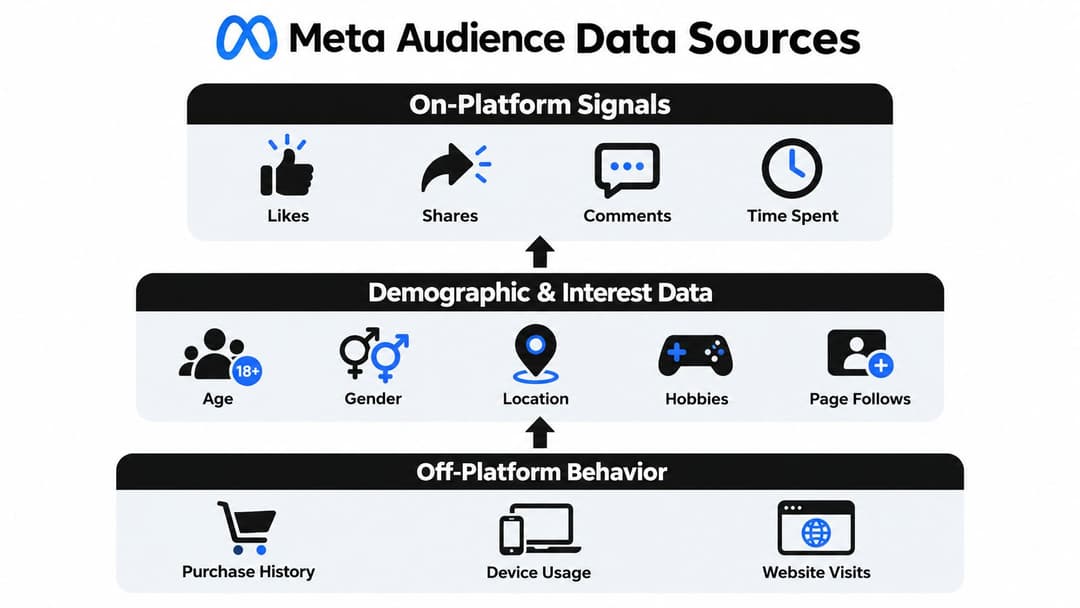
Meta builds its audience view from many small clues. Some are straightforward, like age range, location, language, or activity on a Page. Others come from patterns over time, such as video viewing behavior, ad engagement, device type, and actions people take on websites or apps after leaving Facebook or Instagram.
An independent review of Meta profiling systems describes audience targeting as a mix of first-party and behavioral signals, including demographics, interests, on-platform activity, off-platform web interactions, ad clicks, and device or connection details in this profiling review of Meta ad systems.
Meta groups patterns, not just interests
A single interest tag is only one shelf in the warehouse. Meta's system is sorting for patterns across shelves.
Someone marked as interested in skincare may also watch short-form beauty videos, click mobile-first creative, browse on an iPhone, and visit product pages after seeing an ad. Those signals together give Meta a clearer picture than one label ever could. That is why broad targeting can still produce useful audience learning. The system is matching combinations of behavior, not just declared interests.
Signal quality matters here. A cleaner event setup gives Meta better material to organize. The difference between browser-only tracking and a blended setup is easier to understand in this guide to Conversions API vs Meta Pixel.
Two filters shape what Meta can learn
The first is signal density.
Signal density means how much relevant behavior Meta can connect to one person or one audience cluster. If someone repeatedly engages with related content, clicks ads, visits key pages, and converts, Meta has more context for matching and optimization. Thin signals create a fuzzier picture.
The second is recency.
Recent actions usually carry more weight than old ones because they describe current intent. A click from yesterday is more useful than a site visit from months ago if you are trying to predict who is likely to act now. In practice, analysts usually read signals through this lens:
- Dense, recent activity usually gives Meta a better basis for matching and expansion.
- Thin activity often produces weaker audience patterns.
- Older activity can still help, but it needs to be checked against current campaign results.
- Sensitive categories have tighter limits, so some signals that advertisers once saw directly are no longer exposed in the same way.
Why the audience view feels narrower than it used to
The old Audience Insights tool looked more like a research database. Advertisers could browse highly specific categories, including household details, purchase behavior, and device usage, which made the tool feel richer than basic Page analytics, as noted in this history of how the tool changed under privacy constraints.
Over time, privacy changes reduced how much of that detail stayed visible. The result is a narrower surface area but a more useful workflow for performance teams. The value has shifted from browsing static traits to reading live feedback from delivery, engagement, and conversion patterns inside Business Suite and Ads Manager.
That is the modern frame to keep in mind. Audience insights are not a retired tab with less data than before. They are a continuous feedback loop. Meta collects signals, groups them into patterns, and then reflects those patterns back through performance reports that help you judge audience quality in real campaigns.
How to Read and Interpret Key Audience Metrics
They read audience data too closely. They see an age bucket or a device split and treat it like a command. That's how teams end up over-targeting based on shallow patterns.
The better approach is to read metrics as signals to test, not rules to obey.
Start with composition, then compare it to results
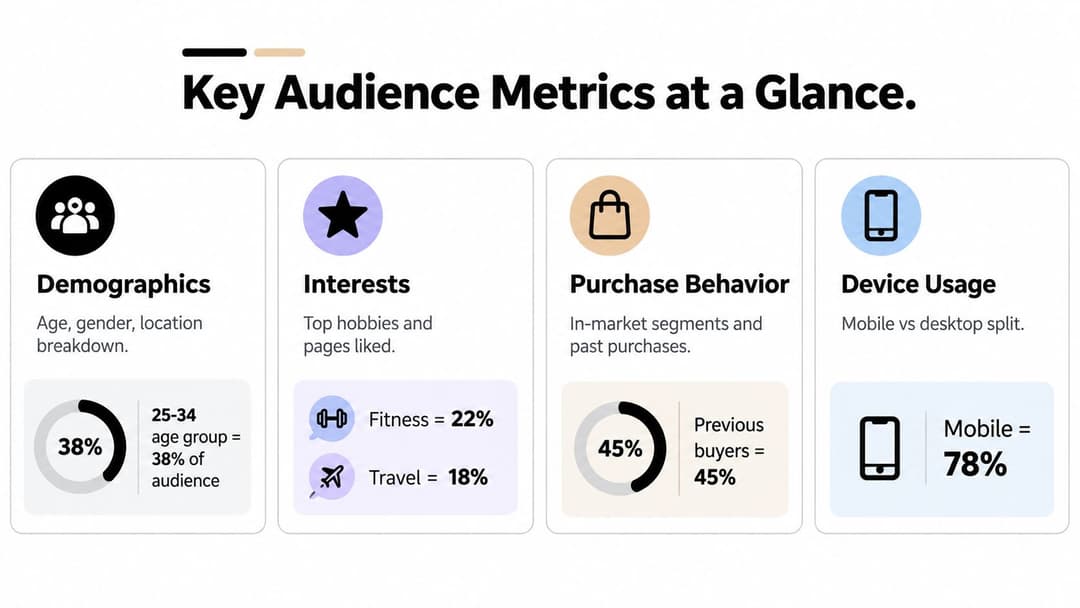
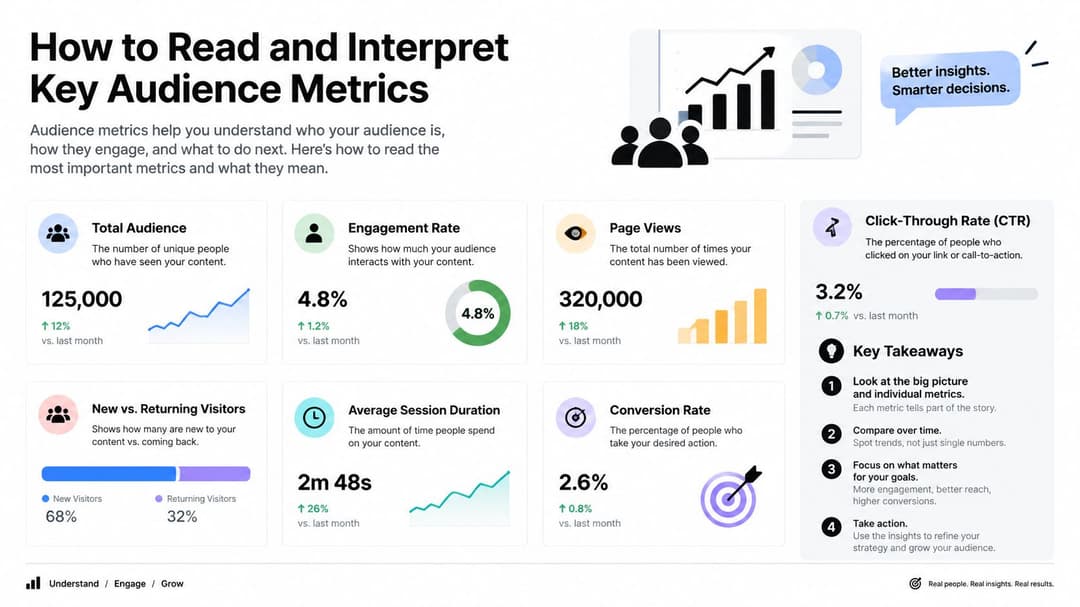
Look at the audience view and ask a simple question: who is this audience made of? Then ask the more important one: which parts of that composition are producing business outcomes?
A useful reading order is:
- Demographics first. Age, gender, and location show basic shape.
- Interests next. These can suggest themes, but they shouldn't drive decisions by themselves.
- Behavior patterns after that. Device context and interaction style often explain why certain creatives work.
- Conversion comparison last. This is the filter that keeps you from acting on vanity patterns.
If you need a clearer framework for reading delivery and outcome data together, this guide to Facebook ad performance metrics explained pairs well with the audience view.
What to trust and what to treat carefully
Some signals deserve more confidence than others.
More reliable for action
- Location trends: Often useful for creative localization, shipping logic, and geo exclusions.
- Device usage: Helpful when your landing page or checkout experience behaves differently by device.
- Consistent demographic skews: Worth testing when the pattern appears across multiple campaigns, not just one.
Less reliable on their own
- Top interest labels: These can be broad and fuzzy.
- Large potential reach numbers: Big doesn't mean qualified.
- Single-campaign skews: One result snapshot can be noise.
Golden rule: Validate any audience pattern against conversion outcomes before you narrow targeting or rewrite creative around it.
Why some older fields disappeared
If you've used older versions of Facebook audience insights, you may remember seeing deeper household or financial-style fields. Those aren't a standard part of the current experience.
That matters because marketers sometimes compare today's audience views to old screenshots and assume Meta removed value at random. The better read is that privacy-related changes narrowed what could be shown and what should be used.
Watch the time window
Historical comparison is another common trap.
One recent update says Meta now limits Reach data to the past 13 months when queries use breakdowns such as age, gender, or country, making longer-term trend analysis harder, according to this Meta API and reporting update summary.
That means you should be careful with statements like "our audience has always looked like this." In many cases, your visible comparison window is shorter, and audience definitions keep evolving.
Turning Insights Into Better Targeting and Creative
You launch a broad campaign. Meta spends across a lot of people. A few days later, one pattern starts to repeat. The winning ads are not random. They pull stronger results from certain age bands, regions, devices, or message angles.
That is the modern job of audience insights.
They no longer work like an old research tab where you build a detailed persona first and target that person forever. They work more like a feedback loop inside Business Suite and Ads Manager. You launch with enough room for delivery, then use audience and creative signals to adjust what Meta is learning from.
Broad targeting changed the controls. It did not remove the need for judgment.
A simple way to frame it is this: targeting sets the guardrails, creative does the sorting, and insights tell you which combinations deserve more budget, cleaner exclusions, or a different message. For a step-by-step framework, see how to target the right audience on Facebook.
How to turn an audience pattern into an action
Use this sequence each time you review performance:
Spot a repeated pattern
Look for a signal that shows up across multiple ad sets or campaigns, such as stronger lead quality from one state, better purchase rates on mobile, or a hook that wins with one demographic group.Match the pattern to the right lever
Not every pattern should change targeting. Some should change creative, offer framing, landing page language, or exclusions.Make one clean adjustment
Keep the test readable. If you change targeting, creative, and optimization together, you will not know what caused the result.Check business outcomes
Judge the change by CPA, ROAS, lead quality, or downstream conversion rate. Cheap clicks can send you in the wrong direction.
Which lever should you pull?
| If you notice this | Start with this change | Why |
|---|---|---|
| One message angle beats others across broad audiences | Creative | The market may be responding to the promise, not the audience setting |
| Certain regions convert well and others waste spend | Geo controls or exclusions | This is a delivery efficiency issue, not a copy issue |
| Older users click but do not convert | Landing page or offer, then age guardrails if needed | The ad may create curiosity without enough fit |
| Mobile drives volume but poor conversion quality | Mobile experience review before device split | Device data often exposes friction after the click |
| Existing customers keep seeing prospecting ads | Exclusions and audience separation | You need cleaner signal inputs so Meta can find new buyers |
| A broad campaign finds a strong pocket repeatedly | Duplicate the winning message for that pocket | You are following observed demand, not guessing interests |
Broad does not mean vague
Many advertisers get stuck. They hear "go broad" and assume they should stop making audience decisions.
The better approach is broader entry, tighter feedback.
For example, if a skincare brand sees that before-and-after proof outperforms ingredient education with colder audiences, that insight should shape the next batch of ads. If the same account also sees stronger purchase rates in urban areas with faster shipping, that may justify location priorities or exclusions. One signal changes the message. The other changes delivery.
Those are different decisions. Mixing them together usually creates noise.
A practical weekly workflow
A short weekly review is enough for many accounts:
- Review top ads by business result. Start with purchases, qualified leads, or booked demos.
- Check breakdowns for repeated skews. Look for patterns that appear more than once.
- Separate targeting problems from creative problems. Ask whether the issue happened before the click or after it.
- Write one next test. Example: "Keep audience broad, but create a version of the ad that speaks directly to busy parents."
- Log what not to repeat. This is how the feedback loop gets stronger over time.
Audience insights still shape performance. The difference is where they matter. Instead of building tiny interest stacks upfront, you use signals from Business Suite and Ads Manager to improve inputs, clean up waste, and give Meta better material to optimize around.
How AdStellar AI Automates Insight Driven Campaigns
Manual audience analysis breaks down when the account gets busy. One campaign becomes six. Six becomes dozens. Then you have too many ad combinations to track cleanly, and the feedback loop slows down.
That's where automation can help, if it stays tied to real Meta performance data instead of generic rules.
What an automated workflow should actually do
A useful workflow should connect directly to your Meta Ads Manager data, pull historical results, and organize performance in a way a media buyer can act on.
AdStellar AI is one option built around that model. Through secure OAuth connection to Meta Ads Manager, it ingests historical performance, surfaces audience and creative patterns against goals like ROAS, CPL, or CPA, and helps teams build large sets of audience and creative combinations from those learnings. It also centralizes campaigns, creatives, audiences, media assets, and breakdown views, which keeps the insight loop closer to execution. You can see how that works in the platform's AI Insights feature.
Where automation saves the most time
The biggest time savings usually come from repetitive production work, not from replacing judgment.
For example:
- Ranking patterns: Instead of digging through many ad sets manually, the system can surface which audience and message combinations are producing stronger business outcomes.
- Scaling structured tests: Teams can generate many creative and audience variations without rebuilding each one by hand.
- Reusing winners: Past high-performing combinations can inform new launches instead of forcing every campaign to start from scratch.
- Continuous learning: As fresh Meta data comes in, the model can keep updating what looks promising.
What should still stay human
Automation helps most when the strategist still controls the questions.
You still decide what a good customer means. You still choose which offers to push, which exclusions belong, which markets matter, and which creative angles deserve another round. The tool can accelerate pattern recognition and campaign assembly, but it shouldn't replace the marketer's reading of context.
That's the balance worth aiming for in modern audience insights Facebook workflows. Let the system handle volume. Keep strategic interpretation in human hands.
Putting Audience Insights to Work for Growth
The old way of thinking about Facebook audience insights was static. Research the audience, save the audience, launch the audience.
That isn't how Meta works now.
The stronger model is a loop. Read the audience. Compare it to delivery. Compare delivery to conversions. Adjust creative, exclusions, and inputs. Then repeat before assumptions harden into wasted spend.
For the next week, keep your focus tight:
- Review one live campaign: Look for audience patterns tied to actual conversion quality.
- Pick one stable signal: Device, geography, or a repeated demographic skew.
- Create one creative test: Match the message to that signal instead of changing everything at once.
- Tighten one exclusion: Remove obvious waste without over-narrowing.
- Document the outcome: If performance changes, note whether the shift came from audience fit or creative fit.
Don't lean too hard on age and gender alone. Don't confuse audience size with audience quality. And don't treat the dashboard like a final answer.
Use it like a compass. That's what modern audience insights Facebook strategy really is.
AdStellar AI gives Meta teams a way to turn audience learning into action faster by connecting to Ads Manager, reading historical performance, and organizing which creative and audience combinations are working against goals like ROAS, CPL, or CPA. If you want a cleaner feedback loop between insight and execution, visit AdStellar AI.