Let’s get one common mix-up out of the way first. OAuth authentication isn't really about authentication—it's about delegated authorization. Think of it like a valet key for your digital life. You wouldn’t give a valet the master key that opens your trunk and glove box; you give them a special key with limited access. OAuth does the exact same thing for your online accounts.
A Simple Guide to Delegated Access
You’ve seen it a million times: those "Log in with Google" or "Connect with Facebook" buttons. That’s OAuth in action. It's the secure handshake that lets one application access your data on another service without you ever handing over your password.

This whole system was created to solve a massive security problem. Back in the early days of social media, apps and widgets often asked for your actual username and password to work. It was a security nightmare. In November 2006, developers from companies like Twitter realized there had to be a better way. They created OAuth as an open standard for delegating access safely, and by 2009, it was refined into a more secure protocol that's now the backbone of API security.
The Four Key Roles in an OAuth Transaction
Every time OAuth is used, four key players work together to make the magic happen. Once you understand who they are, the entire process becomes much clearer.
Here’s a breakdown of each role and what they do, using the example of connecting AdStellar to your Meta account.
| Role | Description | Real-World Example (AdStellar & Meta) |
|---|---|---|
| Resource Owner | This is you—the person who owns the data and can grant access to it. | The marketer who manages the Meta Ads account. |
| Client | The third-party application that wants to access your data. | The AdStellar AI platform. |
| Authorization Server | The service that authenticates you and issues access tokens once you approve. | Meta's secure authorization service. |
| Resource Server | The server that hosts your protected data and accepts the access tokens. | The Meta Ads API, where all your campaign data is stored. |
Basically, you (the Resource Owner) tell the Authorization Server (Meta) that it's okay for the Client (AdStellar) to access your data on the Resource Server (Meta's API).
How It Works in Practice
So, when you click "Connect Meta Account" inside AdStellar, you’re kicking off this OAuth flow. Instead of asking for your Meta password, we send you directly to Meta’s own secure login page.
OAuth ensures that third-party applications can act on your behalf with a specific set of permissions, but they never get the keys to your entire account. This separation is the foundation of modern API security.
On that page, you log in directly with Meta and see a consent screen. It will clearly list everything AdStellar is asking to do, like "read campaign performance data."
Once you click "Agree," Meta's Authorization Server generates a special, short-lived access token—that digital valet key—and gives it to AdStellar. We then use that token to make secure requests to the Facebook Ads API to get your data. Your password is never seen, stored, or even touched by us. It's a clean, secure, and revocable way to grant access.
The Critical Difference Between Authorization and Authentication
One of the biggest misconceptions about OAuth is that it’s a login protocol. You see it everywhere—those "Log in with Google" buttons—so it's an easy mistake to make. But OAuth itself isn't actually handling the login part. This is where we need to draw a sharp line between two core security concepts: authentication and authorization.
Think of it like checking into a hotel.
Authentication is proving you are who you say you are. You walk up to the front desk and show them your ID. The clerk checks it against their system to confirm you're the person who booked the room. That's authentication—verifying identity.
Authorization, on the other hand, is all about what you're allowed to do once you've proven who you are. After the clerk verifies your ID, they hand you a key card. That card doesn’t just have your name on it; it grants you specific permissions. It opens your hotel room (and only yours), gives you access to the gym, but it won't get you into the manager's office. That's authorization—granting permissions.
OAuth is the key card, not the ID check. It’s a framework built purely for delegated authorization. It gives a user a secure way to grant an application limited access to their stuff without ever handing over their master key—their password.
So How Do Logins Actually Work Then?
If OAuth only deals with permissions, how do those convenient "Log in with" buttons work their magic? The secret is another protocol that's built right on top of OAuth 2.0: OpenID Connect (OIDC).
OIDC is a simple identity layer that piggybacks on the OAuth 2.0 flow to handle the authentication piece. It adds one final step. Along with the access token (for authorization), the application also gets an ID token. This ID token is like a digital driver's license, containing basic profile info about the person who just logged in—their name, email, and a unique identifier. It’s the proof of identity.
OAuth says what a user can do. OIDC says who a user is. Together, they form a complete, secure solution for modern login systems, which is why you almost always see them used as a team.
A Marketer's Perspective on This Distinction
For marketers using tools like AdStellar, understanding this separation is vital. When you connect your Meta Ads account to our platform, you're actually watching this two-step process play out in real-time:
- Authentication: First, you’re sent over to Meta's official login page. Here, you enter your password and probably a two-factor code, proving to Meta that you're the real account owner. This is you showing your ID at the front desk.
- Authorization: Once Meta knows it's you, it presents a consent screen. This screen asks if you’re okay with giving AdStellar permission to do specific things, like "read campaign performance." This is you telling the hotel clerk which permissions to program onto the key card.
AdStellar then receives an access token from Meta—that digital key card—which allows our AI to analyze your ads. We never see your password, not for a second. This system keeps everything secure and private, a commitment we detail in our privacy policy. This clean separation of duties is exactly what makes OAuth so powerful and trustworthy.
How the Most Common OAuth 2.0 Flows Work
Now that we have the key players straight and know the difference between authorization and authentication, let's get into how OAuth 2.0 actually works. It isn't a single, rigid process. Instead, OAuth offers several distinct procedures called flows or grant types, each built for a specific job—like connecting a web app, a mobile app, or a server talking to another server.
Think of these flows like different delivery options. Some routes are optimized for maximum security, others for speed, and some for special cases like when you’re not home to sign for a package. OAuth flows work the same way, making sure data gets where it needs to go securely and efficiently.
The Authorization Code Flow: The Gold Standard
The most common and secure flow for web and mobile apps is the Authorization Code Flow. This is the exact method AdStellar uses to connect to your Meta Ads account, and it's widely considered the industry's best practice.
It works like a two-step security check at a high-security event. First, you show your ID (that's authentication) to get a temporary pass (the authorization code). Then, you take that pass to a separate, secure checkpoint where it's exchanged for an official, all-access wristband (the access token). This two-part process is crucial because it ensures the valuable wristband is never exposed out in the open.
Here’s a quick breakdown of the steps:
- You Start the Request: You click "Connect to Meta" inside AdStellar.
- Redirect to Meta: AdStellar sends you over to Meta's secure login and consent page. You are never on AdStellar’s site for this part.
- You Grant Consent: You log in to your Meta account and approve the specific permissions AdStellar is asking for.
- Meta Issues a Code: After you approve, Meta sends you back to AdStellar with a temporary, one-time-use authorization code.
- AdStellar Exchanges the Code: Behind the scenes, in a secure server-to-server channel, AdStellar exchanges this code with Meta for an access token and a refresh token.
This flow is designed to ensure your password and the powerful access token are never exposed in your browser, which dramatically cuts down the risk of them being intercepted.
To really nail down the difference between verifying identity (authentication) and granting permissions (authorization), this diagram shows how they fit together.
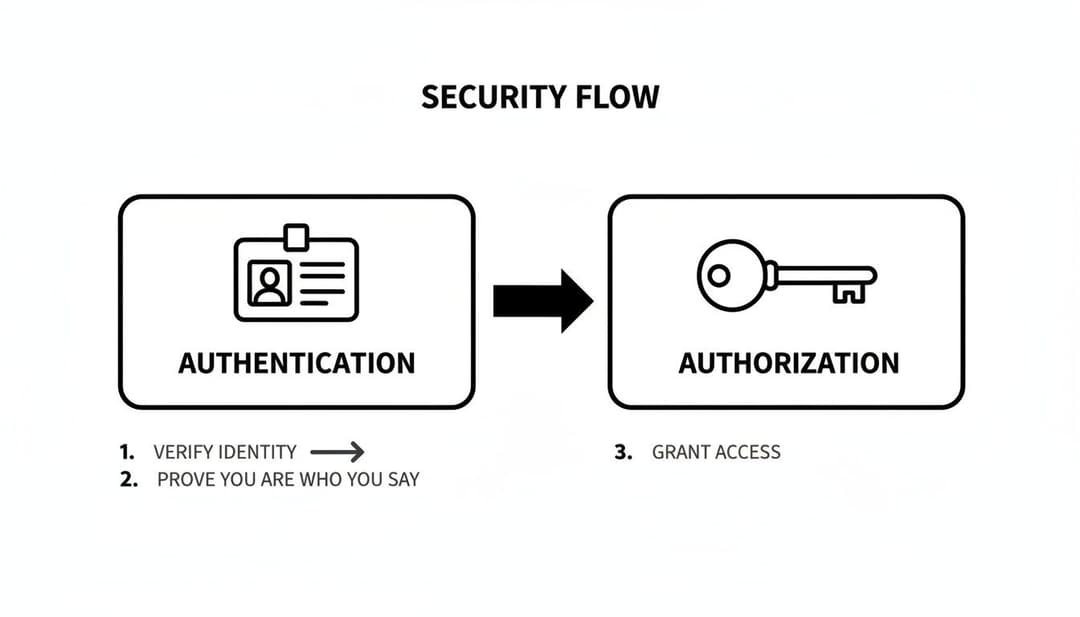
As the image shows, authentication is all about proving who you are, while authorization determines what you're allowed to do.
Securing the Flow with PKCE
To make the Authorization Code Flow even tighter, especially for mobile apps, developers use an extension called Proof Key for Code Exchange (PKCE). You can think of PKCE as adding a secret handshake to the process.
Before sending you to Meta, the AdStellar app creates a secret value. When it later goes to exchange the authorization code for an access token, it has to present that original secret value. If the values don't match, Meta rejects the request, stopping potential attackers dead in their tracks. This clever step prevents a rare but serious attack where a malicious app on your device could try to intercept the authorization code.
Other Important OAuth Flows
While the Authorization Code flow is the star player for apps with user interaction, other flows handle critical machine-to-machine tasks.
Client Credentials Flow: This is for situations where there's no user at all. For example, if AdStellar's internal reporting server needs to pull data from another internal service, it uses its own credentials (a client ID and secret) to get a token directly. It's a simple, direct flow for trusted backend systems.
Device Authorization Flow: Ever logged into Netflix on your smart TV by going to a website on your phone and punching in a code? That’s the device flow in action. It’s designed for devices with clunky or limited keyboards, letting you handle the authorization on a separate, easier-to-use device like your laptop or phone.
Each flow is tailored for a specific scenario, balancing security with user experience. Here is a quick comparison of the most common grant types.
Comparing Common OAuth 2.0 Flows
| Flow Name | Primary Use Case | Security Level | Example |
|---|---|---|---|
| Authorization Code + PKCE | Web and mobile apps where a user is present. | Very High | Connecting AdStellar to your Meta Ads account. |
| Client Credentials | Server-to-server communication; no user involved. | High (in trusted environments) | An internal reporting service fetching data from an API. |
| Device Authorization | Internet-connected devices with limited input (e.g., Smart TVs, consoles). | Moderate | Logging into a streaming app on your TV using your phone. |
As you can see, choosing the right flow is a critical decision for developers. The goal is always to use the most secure option available for the job. Understanding the mechanics of your Meta Ads integration helps you appreciate the security working behind the scenes to protect your data.
Understanding OAuth Access and Refresh Tokens
At the heart of any OAuth transaction are the digital keys that make this all possible: tokens. Instead of tossing your actual password back and forth, OAuth uses these special strings of text to prove an application has permission to act on your behalf. Think of them as temporary, purpose-built credentials.
To really get how OAuth maintains a secure, long-term connection, we need to break down the two main types of tokens that work together as a team.
The Access Token: Your Short-Lived Key
The first and most important player is the access token. This is the actual key that an application, like AdStellar, shows to a resource server—say, the Meta Ads API—when it needs to request your data.
You can think of it like a single-use ticket to a concert. It has a couple of critical features:
- It's Short-Lived: An access token is designed to expire quickly, often in just an hour. This is a huge security feature. If a token were ever intercepted, its usefulness to an attacker would be incredibly limited.
- It's Specific: The token also carries information about the exact permissions—or scopes—it was granted. For example, it might let AdStellar
read_adsbut notdelete_account.
This short lifespan is absolutely crucial. Since these tokens are sent with every single API request, making them temporary minimizes the potential damage if one is ever exposed. Once it expires, it’s just a useless string of characters.
The Refresh Token: Your Long-Term Pass
So, if access tokens expire so fast, how does an application like AdStellar stay connected to your Meta Ads account without making you log in every single hour? That’s where the second key player comes in: the refresh token.
Think of the refresh token as your durable membership card. You don't flash this card at the door for every single event, but you can take it to the box office to get a new single-use ticket (an access token) whenever your old one expires.
The refresh token's sole job is to request new access tokens. It’s a long-lived credential that is stored securely by the application and is only used to trade itself in for a fresh, short-lived access token.
This system strikes the perfect balance between security and convenience:
- The highly sensitive refresh token is stored securely on the application’s server and is transmitted very rarely—only to the authorization server.
- The short-lived access token gets used frequently for API calls, but it becomes worthless if intercepted after its brief expiration time.
This powerful duo ensures AdStellar can continuously sync your campaign data to fuel its AI insights without ever seeing your password or bugging you to constantly re-authenticate. It's a seamless and secure process humming along completely behind the scenes.
Defining Permissions with Scopes
The real power of an access token is defined by its scope. Scopes are the specific, granular permissions you agree to grant during that initial consent process. When you connect your Meta account to AdStellar, the consent screen you see explicitly lists what the platform is asking to do.
These permissions are not a free-for-all; they are clearly defined. For example, the scopes might include:
ads_read: Permission to view performance data from your ad campaigns.ads_management: Permission to create or edit campaigns on your behalf.business_management: Broader access to manage business assets.
You can learn more about how AdStellar uses these permissions to manage campaigns in our guide on the Instagram Ads API. By using narrowly defined scopes, OAuth ensures applications only get the minimum level of access they need to do their job, which keeps you in complete control of your data.
OAuth Security Best Practices and Common Pitfalls to Avoid
While OAuth 2.0 is an incredible framework for delegated authorization, its security isn't a given. The protocol is only as strong as its implementation, and a single misstep can swing the door wide open for data breaches. Getting OAuth security right means sticking to a strict set of modern best practices, not just checking a box.
The stakes have never been higher. When the pandemic hit in 2020, OAuth 2.0 adoption shot up from 35% to 50% in just a few months as businesses scrambled to enable remote work and digital access. But this rush to implement often highlighted the ugly side of flawed setups. Breaches are frequently traced back not to a weakness in OAuth itself, but to how it was used.
Case in point: the August 2025 Salesloft token theft compromised hundreds of businesses, exposing 17.3 million records that month alone due to simple authentication flaws. It’s no wonder API security has become a $2.8 billion industry—it’s all about preventing vulnerabilities that come from poor implementation.
Enforce the Authorization Code Flow with PKCE
If you take away just one thing, let it be this: always, always use the Authorization Code flow with PKCE for any web or mobile application where a user is present.
Older methods, like the Implicit grant, are now considered dangerously insecure and should be completely avoided. The Implicit flow had a fatal flaw: it exposed access tokens directly in the browser's URL, making them easy for attackers to snatch.
The Authorization Code flow fixes this by using a secure, server-to-server channel to swap a temporary code for an access token. Adding PKCE (Proof Key for Code Exchange) on top of that provides a critical layer of defense, effectively shutting down attacks that try to intercept that authorization code, a common threat on mobile devices.
Key Takeaway: For any app involving a user login via a browser or mobile device, the Authorization Code flow with PKCE is non-negotiable. It’s the modern standard for a very good reason.
Safeguard Your Client Secrets and Tokens
Treat your client secrets and refresh tokens like the keys to your entire kingdom. Exposing a client secret is the digital equivalent of leaving your office key under the doormat—it completely undermines every other security measure you have in place.
Follow these essential rules for managing your secrets and tokens:
- Never store secrets in client-side code. Secrets belong on a secure backend server. Period. They should never be found in a mobile app's binary or your web app's JavaScript files.
- Use short-lived access tokens. Keep the lifespan of your access tokens brief—think minutes or an hour at most. This shrinks the window of opportunity for an attacker if a token is ever compromised.
- Securely store refresh tokens. These are powerful, long-lived credentials. They must be stored in a secure, encrypted database or a dedicated secrets management system.
- Implement refresh token rotation. When a refresh token is used to get a new access token, the authorization server should also issue a new refresh token and kill the old one. This is a clever way to detect token theft.
Ignoring these practices can be catastrophic. A single leaked token could give an attacker persistent access to user data. For platforms like AdStellar, sticking to these rules is fundamental to protecting the integrity of your Meta Ads API connection.
Validate Redirect URIs and Scopes
Two of the most common—and devastating—pitfalls are failing to properly validate redirect URIs and using overly permissive scopes.
A redirect URI is the specific URL the authorization server sends a user back to after they’ve granted consent. If your application doesn't use a strict, pre-approved list of URIs, an attacker could trick the server into sending the authorization code to their malicious website instead. This is a textbook phishing attack vector. Beyond the code, user awareness and solid phishing prevention techniques are crucial to defend against attacks that prey on human error.
Equally important is sticking to the principle of least privilege with scopes. Only request the permissions your application absolutely needs to do its job. Asking for full account access when you only need to read campaign data is not just lazy—it's a massive security risk that erodes user trust. Always ask for the bare minimum.
How AdStellar Uses OAuth to Secure Your Marketing Data
Alright, let's pull this out of the clouds and see how it works on the ground for a performance marketer. When you connect your Meta Ads Manager account to the AdStellar platform, you're kicking off a best-in-class OAuth 2.0 flow built from the ground up to protect your data. It’s the process that gives our AI the fuel it needs without ever asking you to hand over your Meta password.

The whole thing starts the moment you click "Connect Meta Account" inside AdStellar. But instead of popping up a form asking for your username and password, we immediately redirect your browser straight to Meta's official, secure login page. At this point, you're interacting directly with Meta. You've completely left the AdStellar environment.
The Consent Screen and One-Time Code
Once you’ve proven to Meta that you are who you say you are, a crucial screen appears: the consent screen. This is where the real power of OAuth authentication shines. The screen clearly lists out the specific permissions—the "scopes"—that AdStellar is requesting, like the ability to read historical performance data.
You get total transparency and you're in complete control. After you click "Allow," Meta’s authorization server creates a temporary, single-use authorization code. It then sends your browser back to AdStellar, tucking this code into the redirect. Think of it as a sealed envelope with a one-time pass inside.
The core idea here is total separation. You prove your identity on Meta's turf, and you explicitly define the permissions you're granting. AdStellar never lays eyes on your login details. It’s a clean, secure delegation of access.
Securely Exchanging for Your Digital Keys
This next part is the most critical exchange, and it happens entirely behind the scenes, server-to-server. Our backend takes that one-time authorization code and opens a secure, direct channel to Meta's server. It presents the code along with our platform’s own confidential credentials to prove AdStellar's identity.
If everything checks out, Meta's server discards the used code and issues two brand new digital keys to AdStellar:
- A short-lived access token to start making API requests right away.
- A long-lived refresh token to get new access tokens in the future without having to bother you again.
These tokens are the digital valet keys. They empower AdStellar’s AI to securely pull your campaign data, analyze historical performance, and find those winning creative combinations. Your Meta password is never requested, sent, or stored—period. This robust OAuth implementation is how our platform delivers game-changing insights while holding to the highest standard of data security.
Of course, here is the rewritten section following your guidelines.
Common Questions About OAuth
Even after getting the hang of the basics, a few specific questions always pop up when people start working with OAuth in the real world. Let's tackle some of the most common ones to clear up any lingering confusion.
Is OAuth 1.0 Still a Thing?
Not really. While you might stumble upon it in some dusty corner of the internet, OAuth 1.0 (and its slightly better revision, 1.0a) is now considered obsolete. The entire industry has moved on to OAuth 2.0.
Why the change? OAuth 2.0 is just far simpler for developers to work with and much more adaptable for today's web and mobile apps. All modern APIs you'll interact with, from Meta's to Google's, use OAuth 2.0 exclusively. If a service is still on 1.0, it's a major red flag that the system is ancient.
What's the Difference Between OAuth and SAML?
This is a classic point of confusion, but the answer is pretty simple: they solve completely different problems.
- OAuth is all about delegated authorization. It’s the valet key for your apps. You’re giving one application (like AdStellar) permission to access resources in another service (like your Meta Ads account) on your behalf.
- SAML (Security Assertion Markup Language) is built for single sign-on (SSO), mostly in corporate settings. It lets a user log in once with their company credentials and then seamlessly access a bunch of internal applications without logging in again.
The bottom line is this: OAuth gives applications permission to talk to each other. SAML lets users log into many different services with one set of credentials. They aren't interchangeable.
Can I Revoke an App's Access?
Absolutely—and you should know how. This is one of the most critical security features built into the OAuth framework. As the owner of your data, you always have the final say on who gets to access it.
You can go into your Meta account settings at any time, find the "Business Integrations" (or a similarly named) section, and see a list of every app you've ever granted permission to. See an app you don't recognize or no longer use? You can kick it out with a single click.
The moment you do that, the access and refresh tokens that AdStellar holds are immediately invalidated. It's like changing the locks. The app can no longer make any requests for your data.
Ready to see how secure, AI-powered ad management can transform your Meta campaigns? AdStellar AI connects seamlessly to your ad account using industry-standard OAuth 2.0, allowing our platform to find winning combinations and scale your results without ever compromising your data. Start your free trial today.