
Monday usually tells you whether your paid social operation is built to scale or held together by tab discipline.
You open Ads Manager for one client to check spend pacing. A Slack message lands asking for a budget shift on another account. Your reporting sheet is still missing yesterday's creative labels because one buyer named the campaign one way and another buyer used their own shortcut. Then someone asks for “a quick duplicate” of last week's winner into three other accounts. That's when the actual risk shows up. Not just wasted time, but the chance that the wrong creative goes live in the wrong account, a budget changes in the wrong place, or a report goes out with numbers nobody trusts.
Many teams don't fail at multi-account management because they lack effort. They fail because effort doesn't scale. Once you're managing dozens of client accounts, the problem stops being media buying alone and becomes operations. The teams that handle this well don't rely on heroic memory. They rely on governance, repeatable workflows, and a tech stack that reduces account switching, catches errors early, and turns account sprawl into something usable.
The Ticking Clock of Multi-Account Chaos
A buyer can manage a handful of accounts with muscle memory. Past that, the cracks start to show.
The first crack is context switching. Every account has different budget rules, approval paths, creative inventories, attribution expectations, and client sensitivities. Even strong media buyers lose sharpness when they bounce between those environments all day. The issue isn't skill. The issue is that each switch carries cognitive cost.
The second crack is fragmentation. Budget pacing lives in one sheet. Launch status lives in a project board. Creative approvals sit in email or Slack. Performance notes sit in someone's head. That setup can function for a while, but it breaks under speed. If you've ever felt that ad account management becomes surprisingly time-consuming in practice, you already know the problem isn't one task. It's the pileup of small operational gaps.
What chaos looks like on a real team
A common Monday sequence looks like this:
- A campaign launch stalls: The media buyer has the brief, but the latest creative file hasn't been approved.
- A report gets questioned: Finance sees spend pacing that doesn't match the buyer's tracker because naming drift broke the rollup.
- An urgent request jumps the queue: A client asks for a same-day test, and now three planned tasks slip because nobody has a clear launch priority system.
- A preventable mistake slips through: Someone duplicates from the wrong campaign shell and carries over an outdated audience exclusion.
None of that sounds dramatic on its own. Together, it creates a team that's always reacting.
The first sign of operational debt in paid social isn't lower output. It's that smart people spend more time checking each other's work than building better campaigns.
Why working harder stops working
There's a phase where managers tell themselves the fix is tighter oversight. More check-ins. More manual QA. More urgent reminders in Slack. That can steady things for a week, but it doesn't fix the model.
Manual oversight scales badly because every new account adds more exceptions, more assets, and more decisions. Without a system, the team becomes dependent on its most organized people. Then those people become the bottleneck. Then they burn out.
What Multi-Account Management Really Means
The term multi-account management often brings to mind access to several ad accounts from one login. That's only the surface layer.
Multi-account management is an operating system for paid social. It defines how accounts are structured, who can change what, how launches move from brief to live campaign, how data gets normalized, and how insights travel from one account to another without creating a mess. Teams that want a better model usually start by tightening how they manage multiple Meta campaigns across accounts, but the actual shift happens when those decisions become policy rather than preference.
The chef, not the short-order cook
The easiest way to explain it is this. A short-order cook can juggle a lot through pure hustle. An executive chef builds stations, recipes, prep flows, and handoff rules so the kitchen can handle volume without panic.
That's how agency teams need to think about paid social operations.
| Model | How it behaves | What happens at scale |
|---|---|---|
| Ad hoc account handling | Buyers manage from memory and personal habits | Output becomes inconsistent and errors become harder to catch |
| Operational multi-account management | The team works from shared rules, templates, and dashboards | Volume grows without every task becoming custom work |
The four parts that matter
Multi-account management usually works when four parts are in place:
- Governance: Clear permissions, approval rules, asset ownership, and escalation paths.
- Workflow design: Standard launch, testing, reporting, and optimization sequences.
- Technology: Shared systems that centralize account actions and remove repetitive manual work.
- Measurement: Operational metrics that show whether the system is speeding the team up or slowing it down.
Access is not the same as control
A lot of teams confuse “we can log into all the accounts” with “we can manage all the accounts well.” Those are different things.
Access helps you enter the room. Control helps you run it.
Practical rule: If two buyers can launch the same type of campaign in two different ways, you don't have a scalable system yet.
The useful mindset shift is this. Multi-account management isn't about juggling more tabs. It's about reducing the number of decisions that need to be reinvented every day.
The High Stakes of Getting It Right
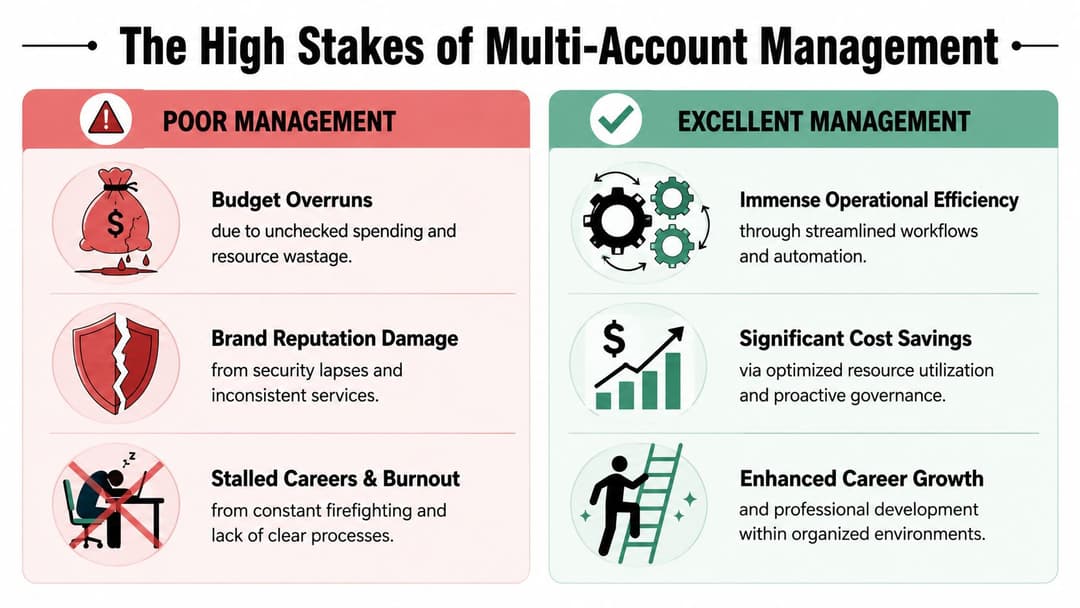
There's a large gap between a team that merely survives multi-account work and one that uses it as an advantage. The difference shows up in profitability, trust, and team stability.
Poor management usually doesn't fail all at once. It leaks performance through small misses. Naming inconsistency breaks reporting logic. Creative approval gets buried. Budget changes happen without visibility. The team spends so much energy keeping the machine running that it has less time to test stronger ideas.
What good operations unlock
When the system is strong, the benefits stack on each other.
- Cross-account learning moves faster: A hook, offer structure, or audience angle that works in one account can be tested in another through a repeatable method rather than a one-off request.
- Reporting becomes more credible: Stakeholders spend less time questioning classifications and more time discussing decisions.
- Teams protect strategic time: Buyers can focus on testing, messaging, and allocation instead of rebuilding the same campaign architecture over and over.
- Account growth stops requiring pure headcount growth: The operation gets more advantage from the same people because the process is carrying more weight.
Where teams usually get hurt
The biggest risks are rarely advanced platform issues. They're operational ones.
A typo in a naming structure can break downstream reporting. A buyer with broad permissions can make a fast change in the wrong account. A mixed asset library can put one client's branded creative too close to another client's workflow. A reporting deck can pull incomplete data because campaign labels don't match the expected taxonomy.
Those problems hit more than performance.
Trust erosion
Clients notice inconsistency quickly. They may not care how your internal process works, but they care when reports change format, when launches slip, or when account actions need explanation after the fact. Once trust drops, every recommendation gets harder to sell.
Team fatigue
Bad multi-account management creates a strange workday. Buyers look busy all the time, but much of that busyness is administrative recovery. They aren't doing more valuable work. They're cleaning up uncertainty.
The teams that seem “fast” from the outside usually aren't improvising well. They've removed enough friction that speed becomes normal.
Brand risk
In paid social, the wrong copy, wrong destination, or wrong audience setup can create problems quickly. Strong governance isn't bureaucracy. It's what lets a team move with confidence.
There is significant risk because paid social is one of the few channels where a small operational error can affect spend, brand presentation, and client confidence on the same day.
Building Your Governance Framework
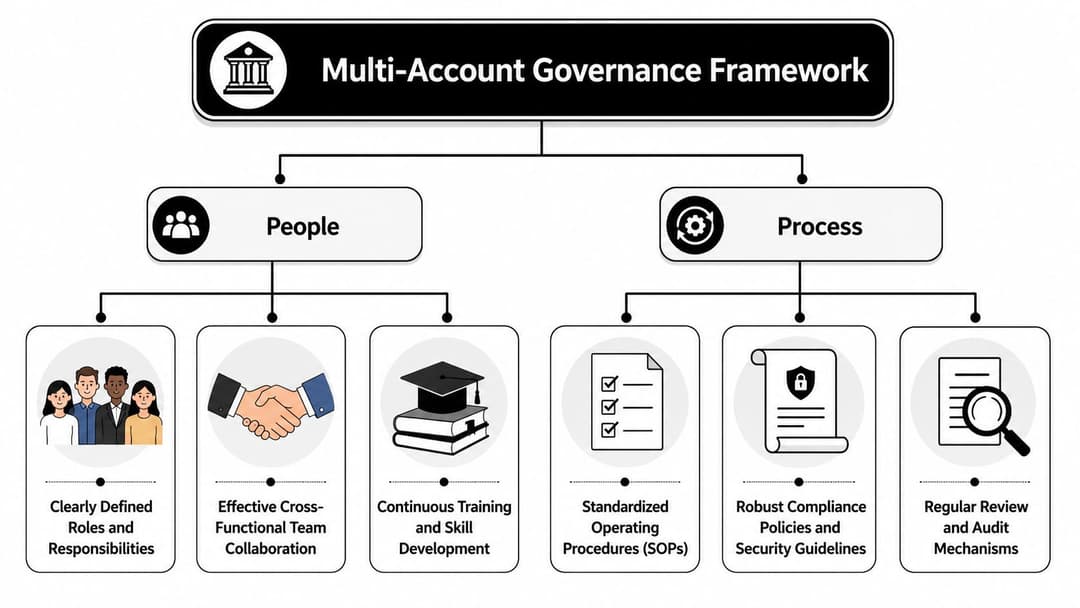
Governance sounds heavy, but in agency reality it's what keeps speed from turning into rework. Good governance doesn't slow buyers down. It removes ambiguity so buyers know exactly how to move.
Start with three areas. Access, naming, and guardrails. If those are weak, the rest of the system stays fragile. Teams that want cleaner execution usually need to formalize their Meta ad account organization methods before they add more tooling.
Set role-based access before you touch workflow
A scalable team doesn't give everyone broad permissions and hope judgment fills the gap.
Use role tiers that reflect actual work:
- Account owners: They approve budget changes, structural shifts, and launch priorities.
- Media buyers: They build, optimize, and document changes within defined limits.
- Analysts or strategists: They need visibility and reporting access, not always launch permissions.
- Creative and client service teams: They should access asset reviews and status views without unnecessary account control.
The point is simple. Match access to responsibility. If someone doesn't need to publish, don't give publishing rights.
Naming conventions are operational infrastructure
Many organizations treat naming as admin work. It's closer to data architecture.
A useful naming system should tell you, at a glance, the client, market, objective, audience logic, creative angle, and date or version marker. It should also be rigid enough that filters, dashboards, and automation can rely on it.
A practical pattern looks like this:
- Campaign level: Client | Region | Objective | Offer | Date
- Ad set level: Audience type | Prospecting or Retargeting | Placement logic | Optimization event
- Ad level: Creative concept | Format | Version | CTA angle
That structure doesn't have to be pretty. It has to be durable.
If your reporting depends on buyers “remembering what they meant,” your naming convention has already failed.
Build asset and budget guardrails
It's a point where many teams get loose, especially when deadlines tighten. Don't.
Use a basic framework such as:
| Control area | Minimum rule |
|---|---|
| Creative approvals | No asset goes live without a final approved version in a shared library |
| Budget changes | Material changes require owner review and documented reason |
| Duplication workflow | Teams duplicate only from approved campaign shells |
| Launch readiness | Brief, creative, tracking, naming, and QA must all be complete before publish |
For distributed teams, this governance also needs a written policy layer. If your agency operates across home offices, freelancers, and multiple time zones, a practical reference like this 2026 guide for remote teams is useful because it covers the policy discipline remote operators often skip.
A short explainer is worth watching if you're tightening governance across account structures and team roles:
Governance works when it's documented, visible, and enforced by the workflow itself. If it only exists in a senior manager's head, it won't survive turnover or growth.
The Cadence of High-Performance Teams
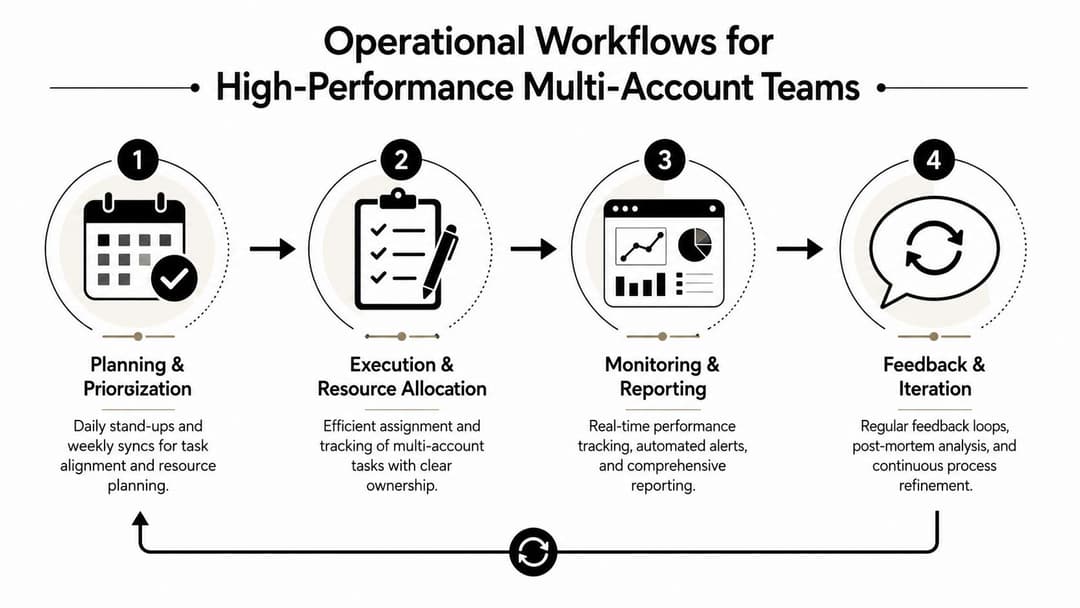
Once governance is in place, the next challenge is rhythm. Strong teams don't manage dozens of accounts through random bursts of effort. They run on cadence.
That cadence should reduce surprise. Buyers should know when launches are reviewed, when creative tests are packaged, when budget pacing is checked, and when cross-account insights are shared. Teams that scale this well usually standardize team-based Facebook Ads management around repeatable handoffs rather than individual habits.
Daily rhythm
A good daily system is short and operational.
- Morning review: Check spend pacing, delivery issues, disapprovals, and urgent client asks.
- Launch queue triage: Confirm what must go live today, what's blocked, and who owns each unblock.
- Midday QA window: Review campaigns built that day before they publish.
- End-of-day logging: Capture meaningful account changes so tomorrow doesn't start with detective work.
This shouldn't become a long meeting culture. The point is clarity, not ceremony.
Weekly rhythm
Most of the effectiveness in multi-account management appears weekly.
Launch batching
Instead of launching every request as it arrives, batch similar work where possible. If three accounts need fresh prospecting tests, use one planning block to prep all three. Buyers make fewer setup errors when they stay in one mode of work.
Creative testing cycles
High-performing teams don't treat each account as a creative island. They maintain a structured way to log what angle, offer framing, format, and opening hook performed well, then decide where else that learning is relevant. The test itself still has to fit the account context, but the insight doesn't need to stay trapped in one client file.
Reporting rollups
Weekly reporting should answer a small set of decisions:
- What changed materially
- What needs intervention
- Which tests deserve expansion
- Which accounts need client communication before the next meeting
A report that lists metrics without decisions creates more reading, not more control.
Good reporting shortens the distance between signal and action.
Monthly rhythm
Monthly operations should focus less on campaign toggles and more on system health.
Review things like workflow bottlenecks, recurring QA failures, asset approval delays, and naming drift. This is also the right time to audit whether account owners are making repeated exceptions that should become formal policy or be removed entirely.
A team managing many accounts needs two calendars running at once. One for campaign performance, another for operational discipline. If you only track the first one, the second will undermine it.
Your Tech Stack for Scaling Paid Social
Process gives you order. Technology gives that order reach.
The usual mistake is buying software before the team has a clear operating model. The other mistake is stopping at native platform tools and expecting them to cover agency-scale complexity. A useful stack for multi-account management has layers. Each layer should solve a different operational problem.
Start with the system of record
For Meta-heavy teams, the base layer is Business Manager and Ads Manager. That's where assets, permissions, billing relationships, and native campaign execution live. It should remain the source of truth for access and account structure.
But native tools alone won't give you enough operational visibility when the number of accounts climbs. That's when teams start looking at a multiple ad account management tool to centralize cross-account workflows and reduce repetitive account-by-account actions.
Add an integration layer
A serious multi-account setup needs systems to talk to each other.
Common examples include:
- Project management tools for launch requests, approvals, and due dates
- Creative storage and review systems for version control and asset retrieval
- Dashboards or BI layers that normalize naming and reporting views
- Alerting workflows for pacing issues, disapprovals, or missing assets
The main question isn't whether a tool is powerful. It's whether it reduces duplicate work. Plenty of teams buy “advanced” software and still copy campaign details by hand because the process never changed.
Use AI as the intelligence layer
At this point, the stack starts to create advantage.
AI is most useful in multi-account management when it sits above the execution layer and helps the team decide faster. That includes surfacing winning creative patterns, identifying repeatable audience combinations, reducing manual ad build work, and packaging launch-ready tests from historical performance.
For example, AdStellar AI connects to Meta Ads Manager through secure OAuth, centralizes workflows across campaigns, creatives, audiences, media assets, and performance breakdowns, and supports bulk ad creation and cross-account management from one interface. In practice, that matters because it reduces the manual burden of building and comparing many ad variations across several accounts.
What works and what doesn't
Here's the blunt version.
| Works | Doesn't work |
|---|---|
| A stack built around one clear workflow | A pile of tools with overlapping ownership |
| Shared templates and centralized libraries | Custom setups for every buyer |
| Automation tied to naming and approval rules | Automation layered onto messy account structures |
| AI used to prioritize and accelerate action | AI used as a substitute for governance |
The strongest teams don't use tech to avoid process. They use tech to enforce process, speed up repetitive work, and turn portfolio-level performance into something the whole team can act on.
Implementation Checklist and Key Metrics
Teams generally shouldn't rebuild everything at once. Start with one controlled rollout, prove that it works, then expand.
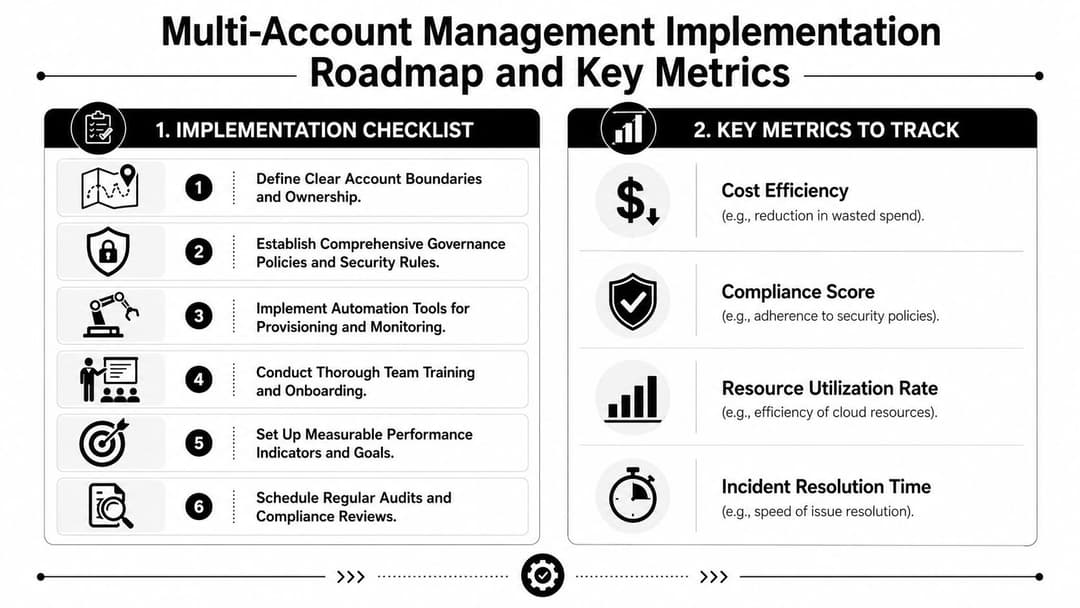
Implementation checklist
- Audit your current state. Review account access, naming consistency, launch workflows, approval paths, and reporting dependencies.
- Define ownership. Assign clear account owners and separate publishing rights from view-only roles where needed.
- Lock the naming taxonomy. Document one convention for campaigns, ad sets, and ads. Then enforce it.
- Create one launch SOP. Use a standard checklist for brief intake, creative approval, build, QA, publish, and post-launch logging.
- Centralize assets and templates. Approved creative, campaign shells, and audience logic shouldn't live in scattered folders.
- Pilot one workflow change first. Pick a narrow use case, such as weekly reporting or creative testing, and get it stable before expanding.
Key metrics that show the system is working
Track campaign results separately from operational health. The second category tells you whether your multi-account management model is becoming more reliable.
- Time to launch: How long it takes to move from approved brief to published campaign
- Campaign error rate: How often naming mistakes, wrong assets, or account selection issues occur
- QA pass rate: How often campaigns clear review without rework
- Cross-account insight application rate: Whether useful learnings get tested elsewhere
- Reporting revision frequency: How often a report needs fixing after it's shared
If those indicators improve, the team isn't just getting busier. It's getting better organized.
Paid social gets hard at scale because every extra account adds complexity faster than generally anticipated. AdStellar AI fits into that environment as an AI-powered execution and intelligence layer for Meta teams that need centralized multi-account workflows, bulk ad creation, and faster testing across a large account portfolio.


