Your app is ready. The prompt logic works. The queue is full. Then the OpenAI API starts returning 429 Too Many Requests, and a launch that looked stable a minute ago begins to stall.
That's the moment when many assume they have a scaling bug. Sometimes they do. But many 429 errors come from less obvious causes, including billing that was never fully activated or requests being routed through the wrong organization. Those problems feel technical because they appear as API failures, yet the fix can be administrative and immediate.
If you're building anything that sends high-volume OpenAI calls, especially for content generation, workflow automation, or campaign setup, you need a practical mental model of how the OpenAI API rate limit works. You also need a troubleshooting path that doesn't start and end with “add retries.”
If you're still early in your stack, it helps to tighten the basics before scaling request volume. This guide on setting up AI systems cleanly is a useful companion for that foundation.
Introduction to OpenAI API Rate Limit
A rate limit is a cap on how much API traffic your account can send in a given time window. OpenAI enforces those caps to protect system stability and to align usage with your account tier.
The confusing part is that “too many requests” doesn't always mean you made too many requests in the obvious sense. A single burst of large prompts can trigger token-based throttling. A brand-new account can hit a limit-looking error because billing isn't active. An agency can send traffic through the wrong organization and inherit a lower quota than expected.
That's why the OpenAI API rate limit matters beyond backend reliability. It affects queue design, user experience, launch timing, and how safely you can automate large batches of work.
Practical rule: Treat every 429 as a routing, billing, and throughput question. Not just a retry question.
The rest of this guide stays focused on the parts that usually trip people up. You'll see how the limits are defined, how they're enforced, how to read the response headers, how to build retry logic that doesn't make spikes worse, and how to spot the non-technical causes that many guides skip.
Understanding Rate Limit Concepts
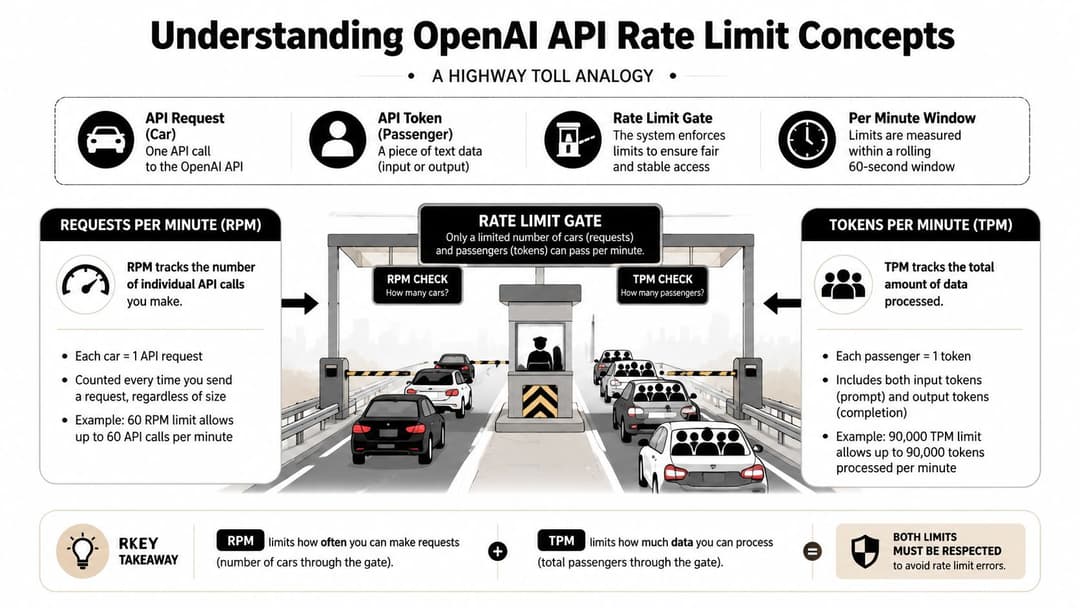
The simplest way to understand the OpenAI API rate limit is to think of a toll road.
Each API request is a car. Each token is a passenger inside that car. OpenAI checks both. You can't just count cars, and you can't just count passengers. You have to fit within both limits at the same time.
RPM and TPM
Requests Per Minute (RPM) measures how many separate calls you send.
Tokens Per Minute (TPM) measures how much text volume the API processes across input and output.
That distinction matters because two apps can send the same number of requests and get very different results. One app might send short prompts and stay healthy. Another might send long prompts with large expected outputs and hit the token ceiling first.
For GPT-4o, organizational accounts have documented limits of 30,000 tokens per minute and 500 requests per minute, and batch processing can raise throughput to 90,000 tokens per minute according to OpenAI's rate limit documentation.
Why teams misread the limit
Developers often watch request count and ignore token size. That works until prompts grow.
A common pattern looks like this:
- Short prompts behave well: early tests stay under both caps.
- Production prompts expand: system instructions, user context, and output length all increase.
- Throughput suddenly drops: request count still looks normal, but token volume pushes the account into throttling.
This matters if you're wiring OpenAI into automation that creates a lot of text in parallel. If you're connecting generation workflows to ad production, this walkthrough on Facebook campaign builder API integration shows the kind of pipeline where these constraints become operational, not theoretical.
Think of RPM as traffic count and TPM as traffic weight. A bridge can fail from too many vehicles or from fewer vehicles carrying too much load.
Tier matters
OpenAI rate limits vary by subscription tier and usage history. Free accounts typically face much tighter caps than paid organizational accounts. These caps don't automatically shift in real time. If you need more capacity, you generally need to request it through your limits settings rather than assume the platform will expand it on the fly.
How Limits Are Enforced
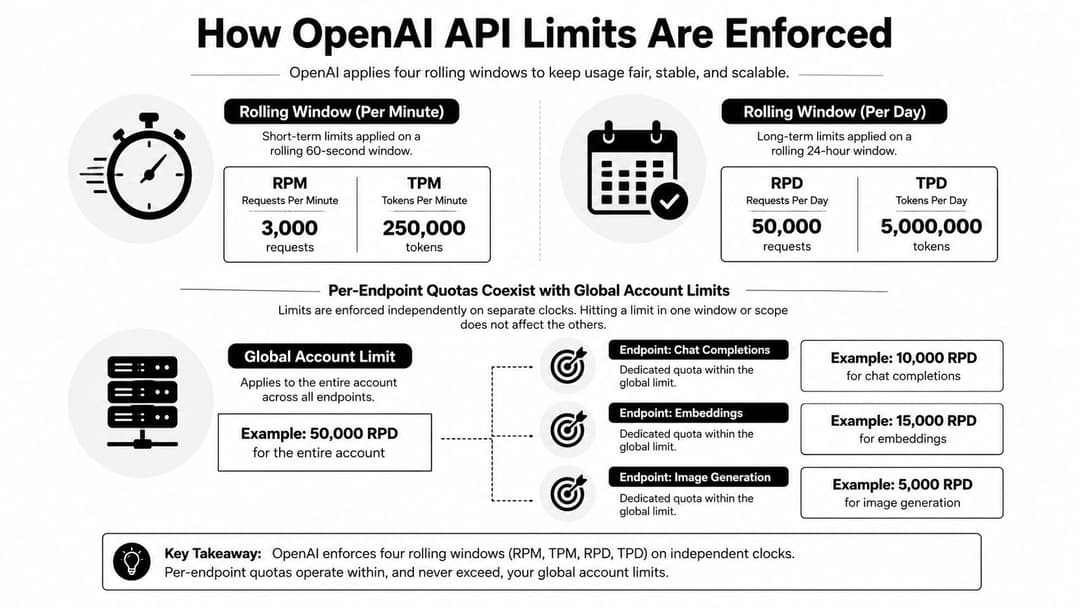
The OpenAI API rate limit isn't one clock. It's several clocks running at once.
OpenAI enforces limits across RPM, TPM, Requests Per Day (RPD), and Tokens Per Day (TPD), and exceeding any one of them can trigger a 429 error according to this guide to OpenAI rate limits.
Independent windows
Many users get tripped up on this point. They assume there's a single bucket that empties and refills once per minute. In practice, you can be healthy on one dimension and blocked on another.
A simple way to put it:
| Limit type | What it controls | What happens if you exceed it |
|---|---|---|
| RPM | Number of calls in a rolling minute window | Request is rejected with 429 |
| TPM | Total token volume in a rolling minute window | Request is rejected with 429 |
| RPD | Number of calls across a day window | Request is rejected with 429 |
| TPD | Total token volume across a day window | Request is rejected with 429 |
That means “I'm under my request count” is not enough evidence that your app is safe.
The throughput formula that changes planning
For high-volume workloads, the effective request rate is constrained by both request and token caps. A practical formula cited in the same rate-limit guide is:
Actual_RPM = min(RPM_limit, TPM_limit / tokens_per_request)
That formula explains why some systems slow down even when request concurrency looks reasonable.
Here's the plain-English version:
- Start with your request cap.
- Estimate how many tokens each request consumes.
- Divide your token budget by tokens per request.
- Use the smaller result.
If each request gets heavier, your usable request rate falls.
The cited guide gives one clear example: with an RPM limit of 5,000 and a TPM limit of 450,000, a request size of 2,000 tokens lowers feasible RPM to 225, because 450,000 / 2,000 = 225. That effectively throttles launch speed even though the RPM ceiling itself wasn't reached.
Endpoint and account behavior
Some limits apply at the account level, while specific endpoints may also have their own constraints. That's why a queue can look balanced overall and still choke on one workload type first.
If you're building middleware between OpenAI and downstream event systems, patterns from a conversion API gateway architecture are useful here. The gateway becomes the place where you smooth bursts, estimate request cost, and avoid sending traffic in a shape the API will reject.
A limiter doesn't care why a request was important. It only checks whether that request fits the current window.
Reading Rate Limit Response Headers
The API already tells you a lot about your current status. Many apps just don't log it.
OpenAI responses can include real-time headers such as x-ratelimit-limit-requests and x-ratelimit-remaining-requests, and you can also query /v1/usage with start_date and end_date to inspect historical consumption, as described in this usage and limits reference.
The headers worth watching
| Header | Description |
|---|---|
x-ratelimit-limit-requests |
Maximum allowed requests in the current request window |
x-ratelimit-remaining-requests |
Remaining request quota before the window is exhausted |
Even this minimal set is enough to improve behavior. If your app reads remaining quota after every call, it can slow itself before it slams into a hard stop.
A simple Python example
from openai import OpenAI

client = OpenAI()

response = client.chat.completions.with_raw_response.create(
    model="gpt-4o",
    messages=[{"role": "user", "content": "Write a short product description"}]
)

headers = response.headers
print("limit:", headers.get("x-ratelimit-limit-requests"))
print("remaining:", headers.get("x-ratelimit-remaining-requests"))

data = response.parse()
print(data.choices[0].message.content)
If you run high-volume automation, don't just print these values. Log them centrally so you can see when throughput drops before users complain.
Checking historical usage
You can also inspect usage over a date range through /v1/usage. The exact implementation depends on your HTTP client, but the idea is simple.
import os
import requests

api_key = os.environ["OPENAI_API_KEY"]

resp = requests.get(
    "https://api.openai.com/v1/usage",
    headers={"Authorization": f"Bearer {api_key}"},
    params={"start_date": "2026-07-01", "end_date": "2026-07-19"}
)

print(resp.status_code)
print(resp.text)
That historical view helps answer a question real teams ask all the time: “Was this a one-off spike or are we operating near the edge every day?”
If you automate marketing workflows, this guide on how to automate Facebook ads is a good example of where usage logging should be built in early, not patched in after failures.
Don't wait for a 429 to begin observing quota. The headers give you warning while you still have room to adapt.
Implementing Retry and Backoff Strategies
Retries help. Bad retries make things worse.
When multiple workers receive a 429 and retry at the same interval, they often collide again. That creates a second wave of failures, then a third. The fix is exponential backoff with jitter, which means each retry waits longer than the last one and adds randomness so workers don't all return at once.
What good retry behavior looks like
A healthy retry policy usually does four things:
- Retries only on temporary conditions: handle 429s and transient server errors, not every client-side failure.
- Waits longer after each failure: each attempt backs off more than the last.
- Adds jitter: a random delay reduces synchronized retry storms.
- Stops after a limit: infinite retries can clog the whole system.
Caching helps too. If the same prompt or lookup appears repeatedly, a cache can reduce duplicate requests and preserve token budget.
Python example
import random
import time
from openai import OpenAI

client = OpenAI()

def create_completion_with_retry(messages, model="gpt-4o", max_retries=5):
    base_delay = 1

    for attempt in range(max_retries):
        try:
            return client.chat.completions.create(
                model=model,
                messages=messages
            )
        except Exception as e:
            status_code = getattr(e, "status_code", None)

            if status_code != 429 or attempt == max_retries - 1:
                raise

            wait_time = base_delay * (2 ** attempt)
            jitter = random.uniform(0, 0.5 * wait_time)
            time.sleep(wait_time + jitter)
JavaScript example
import OpenAI from "openai";

const client = new OpenAI({ apiKey: process.env.OPENAI_API_KEY });

async function createCompletionWithRetry(messages, model = "gpt-4o", maxRetries = 5) {
  const baseDelay = 1000;

  for (let attempt = 0; attempt < maxRetries; attempt++) {
    try {
      return await client.chat.completions.create({
        model,
        messages
      });
    } catch (error) {
      const status = error.status;

      if (status !== 429 || attempt === maxRetries - 1) {
        throw error;
      }

      const wait = baseDelay * Math.pow(2, attempt);
      const jitter = Math.random() * (wait * 0.5);

      await new Promise(resolve => setTimeout(resolve, wait + jitter));
    }
  }
}
Two common mistakes
First, teams retry immediately. That turns a temporary limit into sustained pressure.
Second, teams only add retries and never control outbound flow. A queue with no pacing will keep generating bursts no matter how elegant the retry wrapper looks.
If your system launches large batches, build a dispatcher that meters requests rather than letting every worker fire at once. That matters in workflows like launching hundreds of Facebook ads, where a bursty batch can overwhelm any external API.
Short answer: retrying is reactive. Queuing and pacing are preventive. You need both.
When not to blame code
A 429 doesn't always mean your retry logic is wrong. If a brand-new account has never sent meaningful traffic, check billing before rewriting the worker pool. That saves a surprising amount of wasted debugging time.
Monitoring Usage and Managing Quotas
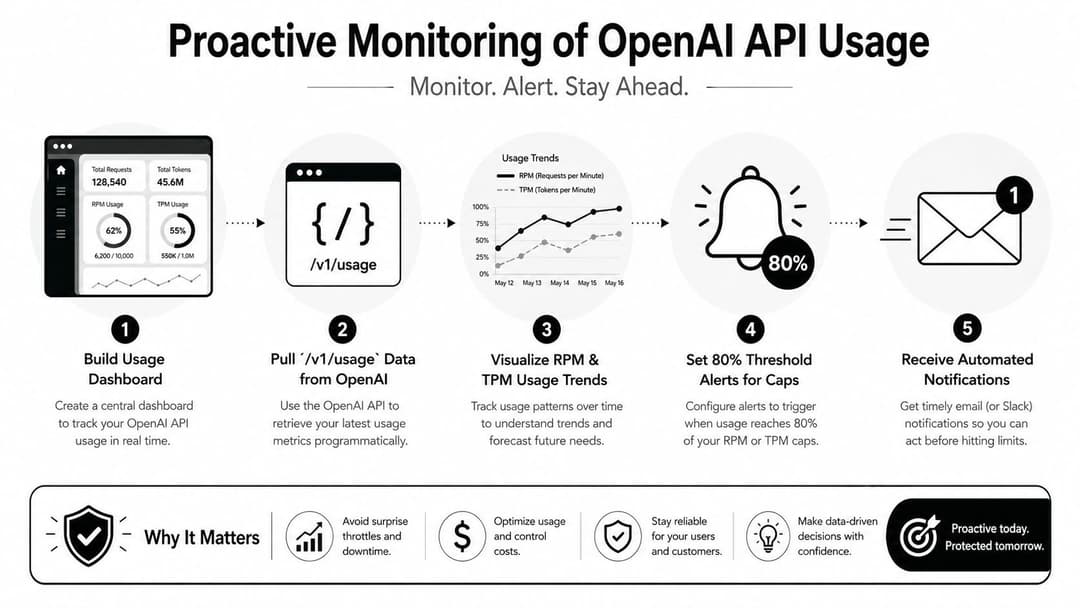
Good monitoring turns rate limits from outages into scheduling signals.
Start with two data streams. One is real-time response headers. The other is historical usage from /v1/usage. Put both into the same dashboard so your team can see what happened now and what trend led up to it.
Build a practical dashboard
A useful internal dashboard should show:
- Current request headroom: based on remaining request headers.
- Current token pressure: based on your own request-size estimates and usage trends.
- Error shape: specifically whether 429s cluster around certain job types.
- Organization context: which billing org each request is using.
The media below gives a helpful walkthrough mindset for teams trying to operationalize API usage monitoring in production.
The multi-org blind spot
Agencies and multi-client teams hit a specific problem that solo developers often never see. A user may belong to several organizations with different billing tiers, but requests can still route through the wrong one if the org context isn't explicit.
In multi-client environments, 40% of unexpected rate limit errors are resolved by explicitly setting the default_organization header to the correct high-tier billing org, according to OpenAI's best practices for managing rate limits.
That means a “rate limit problem” may be a configuration problem.
The billing state trap
A different source of confusion hits new users. Many “I barely used the API and got rate limited” complaints come from inactive billing states rather than real traffic pressure. If your account is new and errors appear immediately, check whether prepaid credits and payment verification are complete before treating the issue as an architecture failure.
For teams building internal tools on top of OpenAI, products like Custom Chatgpt can also be useful reference points for how custom AI applications need stable quota management, org configuration, and predictable usage controls to work well in practice.
If your app serves multiple clients, log the active organization on every request. Otherwise you can spend hours optimizing throughput for a quota you never intended to use.
Conclusion and Next Steps
The OpenAI API rate limit is partly a throughput problem and partly an operations problem. You need both code fixes and account checks.
Start with a short checklist:
- Verify billing before debugging concurrency.
- Confirm the request is routed through the correct organization.
- Read and log rate-limit headers on every response.
- Add exponential backoff with jitter.
- Monitor historical usage so spikes don't surprise you.
- Request higher limits through OpenAI when your workload justifies it.
One billing detail is especially easy to miss. 60 to 70% of new-user rate limit complaints stem from inactive billing profiles rather than actual usage volume, and adding prepaid credits resolves 90% of those errors, based on reports discussed in the OpenAI developer community thread on first-use rate limit issues.
If your team is trying to scale ad creation without getting buried in manual setup, AdStellar AI helps you generate, launch, and optimize large batches of Meta campaigns faster while keeping the workflow organized enough to handle real production volume.