At its core, an AI banner maker is an automated creative engine. It’s a tool that takes text prompts and, using artificial intelligence, churns out display ads, banners, and thumbnails. For performance marketers, this means you can finally sidestep the slow, manual design process and get hundreds of on-brand ad variations in minutes, not weeks. This is all about accelerating your testing and scaling the campaigns that actually work.
Why AI Banner Makers Are Now Essential for Performance Marketers

Let's be real—the pressure on performance marketers is relentless. You're constantly expected to deliver fresh, high-performing ad content, but your creative team is likely already buried in requests. This friction creates a massive bottleneck, slowing down campaign launches and killing your ability to test new ideas on the fly.
This is exactly where an AI banner maker stops being a "nice-to-have" and becomes a core part of your toolkit. These tools fundamentally rewire the creative production workflow. Forget submitting individual creative requests and waiting days for a single banner. Now, you can generate a whole matrix of variations—testing different headlines, images, and CTAs—almost instantly.
This shift directly fuels the engine of performance marketing, where success is all about turning ad spend into revenue. By automating the most time-consuming part of the process, you unlock the bandwidth to test more variables, find your winning ad combinations much faster, and ultimately drive a better Return on Ad Spend (ROAS).
The Shift From Manual Design to Automated Creative Engines
The move to an AI-powered workflow is about more than just speed; it’s about building a system that can scale with your ambitions. To really see the difference, let’s compare the old way with the new.
The table below breaks down the stark contrast between the traditional design process and what's possible with an AI banner maker.
Manual vs AI Banner Creation Workflow
| Task | Manual Workflow (Time/Effort) | AI Banner Maker Workflow (Time/Effort) |
|---|---|---|
| Briefing & Concepting | 1-3 hours of meetings and writing detailed briefs. | 15-30 minutes crafting precise text prompts. |
| Initial Design (3 Variants) | 1-2 days waiting for a designer's first draft. | 5-10 minutes for the AI to generate dozens of options. |
| Revisions & Feedback | 1-3 rounds of feedback, taking another 1-2 days. | 10-15 minutes refining prompts and regenerating. |
| Generating Aspect Ratios | 4-8 hours for a designer to manually resize for all platforms. | 2-5 minutes to automatically generate all required sizes. |
| Final Asset Delivery | Total: 3-5 business days for a few variants. | Total: Under 1 hour for hundreds of testable assets. |
As you can see, the efficiency gains aren't small—they're transformative. You're not just saving time; you're fundamentally changing what's possible in a single workday.
The core value is moving from a one-to-one creation model to a one-to-many generation model. A single well-crafted prompt can produce hundreds of testable assets, giving you the creative volume needed to outpace creative fatigue and discover what truly resonates with your audience.
This capability is completely changing how modern marketing teams operate. Instead of rationing your creative resources, you can finally embrace a more experimental mindset. You can afford to test that bold new angle, a different value proposition, or a unique visual style without blowing up the design queue. This data-informed approach to creativity is a cornerstone of using AI for more effective advertising.
Following the Market Momentum
This operational shift is mirrored by some explosive market growth. The AI image generator market is expanding fast, with projections showing the sector will grow from $0.43 billion to an estimated $0.97 billion by 2030. This growth isn’t just hype; it shows how quickly these tools are moving from experimental novelties to essential marketing infrastructure.
For marketers, the takeaway is clear: the time to adopt an AI banner maker is now. The teams who are already on board are gaining a huge advantage by building more agile, data-driven creative operations that directly fuel campaign performance and business growth.
Building a Creative Strategy for AI-Driven Campaigns
The biggest mistake I see teams make with AI banner tools? They jump straight to the prompt. It’s a classic case of putting the cart before the horse. Getting amazing results from an AI banner maker has less to do with a single, clever prompt and everything to do with the strategy you build beforehand.
Think of it this way: diving into an AI generator without a plan is like handing a new designer a blank canvas and just saying "make something great." You might get lucky, but you'll probably just burn time and resources. To really get these tools to work for you, you have to first get crystal clear on the problem you’re trying to solve.
This all starts with a creative brief, but probably not the kind you're used to. This isn't for a human designer who can read between the lines or interpret vague ideas. It’s a strategic document built to be translated into precise, actionable inputs for an AI. The whole point is to distill your campaign’s core message into its most essential parts.
Your AI creative brief is the DNA of your campaign. It needs to nail down the who, what, and why before you ever touch the "generate" button.
First, you need to get laser-focused on your core value proposition. What is the one thing you absolutely need a potential customer to know about your product? Is it speed? Affordability? Luxury? This becomes the north star for every single creative variation you'll generate.
Defining Your Core Creative Components
Once you’ve nailed your core value prop, you need to break down the key messaging pillars that support it. These pillars are the foundation for your banner copy and visual themes. The trick here is to stop thinking in full sentences and start thinking in variables that the AI can mix and match.
A great starting point includes:
- Pain Points: What specific, nagging problems does your product solve for your audience? For a SaaS tool, this could be "too much time wasted on manual data entry" or "inaccurate reports messing up our forecasts."
- Benefits & Outcomes: Don't just list features. What's the real, tangible result for the user? Instead of "cloud-based storage," frame it as "access your files from anywhere, any time."
- Emotional Hooks: What feeling do you want to create? Relief? Excitement? Confidence? Security? An AI can translate these emotions into specific colors, imagery, and even font choices.
Let's walk through a real-world scenario. Imagine an e-commerce brand that sells sustainable, direct-to-consumer coffee beans.
Their creative brief might break down like this:
- Value Prop: Ethically sourced, specialty-grade coffee delivered fresh to your door.
- Pain Points: Stale grocery store coffee, confusing labels, guilt over unethical sourcing.
- Benefits: Unbeatable freshness, discover unique global flavors, support fair-trade farmers.
- Emotional Hooks: The perfect morning ritual, cozy vibes, conscious consumerism, a small daily luxury.
With these components defined, you've built a strategic library of concepts to feed into your AI banner maker. You're no longer just asking for "a banner for coffee." You're ready to generate specific, targeted creatives that actually work.
Translating Strategy into Effective AI Prompts
Now you're ready to turn that strategy into prompts. The key is to be specific, but also to think in terms of variables. A good prompt is like a recipe with interchangeable ingredients—it provides clear directions while leaving room for the AI to create a diverse menu of options.
For our coffee brand, a weak prompt would be something lazy like: "Create a banner for our coffee subscription."
A strong, strategy-driven prompt structure would look more like this:
Visual Prompt: A flat-lay photo of a steaming ceramic mug of coffee on a rustic wooden table. Next to it, a bag of our branded coffee beans and a half-eaten croissant. The lighting is soft and warm, like early morning sun. Background is slightly blurred.
Copy Variables:
- Headline 1: Tired of Stale Supermarket Coffee?
- Headline 2: Your Perfect Morning Ritual Starts Here.
- Body Text 1: Experience farm-fresh specialty coffee, delivered to your door.
- Body Text 2: Taste the difference with our ethically sourced, single-origin beans.
- CTA 1: Shop Now & Get 20% Off
- CTA 2: Find Your Favorite Roast
This approach doesn't just create one banner; it gives the AI all the ingredients it needs to generate dozens of unique combinations. It can mix and match headlines, body copy, and CTAs, all while sticking to the core visual and emotional theme you defined.
This systematic method is the first step toward building truly high-performing creative ad campaigns that can scale. By front-loading the strategic work, you turn the AI banner maker into a true extension of your marketing team—one that can produce strategically-aligned creative at an incredible pace.
How to Generate and Scale Ad Creatives in Minutes
Alright, you’ve got your strategy locked in. Now for the fun part—actually making the ads. The real magic of an AI banner maker isn't just spitting out a single, decent-looking ad. It’s about taking one solid concept and multiplying it into hundreds of testable variations, all in the time it takes to make a coffee run.
This is less about design and more about a systematic approach. With a tool like AdStellar, you stop thinking one ad at a time. Instead, every piece of your creative—the headline, the CTA, the background image, your logo—becomes a variable you can swap in and out at scale.
This flow chart nails the process. It's not about just hitting "generate." It starts with a smart brief that feeds your prompts, which you then explode with variables to get the scale you need.
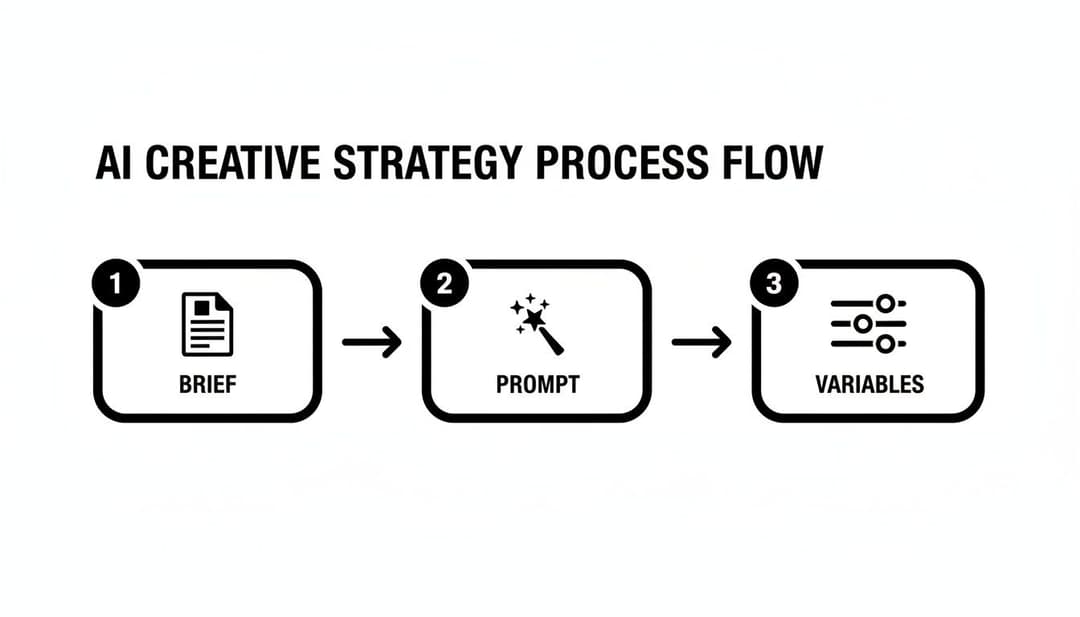
The takeaway here is that great AI-driven creative starts way before the AI. It begins with solid strategy.
Structuring Your Bulk Generation Project
The secret to moving fast is to build one project that churns out all your assets in a single go. A rookie mistake is to create your square ads, then your vertical ones, then your landscape ones. That's the old way. A good AI banner maker should handle every aspect ratio you need, all at once.
You want to generate all your key sizes in one batch to keep things consistent and save yourself a ton of time. For Meta platforms, you absolutely need these three:
- 1:1 (Square): The workhorse for your Instagram and Facebook feeds.
- 9:16 (Vertical): Non-negotiable for Stories, Reels, and anything that looks like TikTok.
- 1.91:1 (Landscape): Still crucial for in-stream video ads and certain Audience Network spots.
Setting up your project to output all three formats from the start means your campaign is ready for any placement. This simple step cuts out hours of tedious resizing and ensures your creative looks sharp across the entire user journey. For a deeper dive, see how top teams are using creative automation tools to dominate their markets.
A single core concept, when combined with a well-structured variable matrix, can easily produce over 100 test-ready ad creatives in under an hour. This isn't an exaggeration; it's the new standard for agile performance marketing teams.
Building Your Creative Testing Matrix
Once your sizes are set, it’s time to build your testing matrix. This is how you systematically test your hypotheses about what message or image will resonate most.
Even a simple matrix can be incredibly powerful. Start with something like this:
- 3 Headlines: Each hitting a different pain point or benefit.
- 3 Background Images: One product-focused, one lifestyle, one abstract/branded.
- 2 CTAs: A direct offer ("Shop Now") versus a softer, benefit-driven one ("See How It Works").
- 2 Value Propositions: Highlighting different key features or outcomes.
Do the math: 3 x 3 x 2 x 2 gives you 36 unique creative combinations. Now, multiply that by your three aspect ratios, and you instantly have 108 assets ready to deploy. That’s a massive test that would have taken a design team weeks to produce manually.
From Generation to Campaign Launch
Okay, the AI has worked its magic, and you now have a folder brimming with ad creatives. What’s next? The old way involved a painful process of downloading everything, organizing files, and manually uploading each one into Ads Manager.
Modern platforms like AdStellar close this loop. They integrate directly with your ad accounts. Instead of a manual upload-a-thon, you can push your entire creative matrix into a new or existing campaign with just a few clicks.
This is the final piece of the puzzle. It connects rapid creative production directly to immediate testing. You can go from a strategic idea to a live, multi-variant A/B test in a fraction of the time. This speed is your new competitive advantage, letting you learn what works, iterate faster, and ultimately get way more from your ad spend.
Integrating with Meta Ads for Seamless Testing
Making hundreds of creatives is one thing, but that’s really just the first leg of the race. The real magic happens when you get those banners live and see what actually moves the needle with your audience. This is where a direct integration with Meta Ads Manager turns your AI banner maker into a true performance machine.
We’ve all been there. The old way was a total productivity nightmare: downloading huge folders of JPEGs, trying to follow some arcane file naming system, and then manually uploading every single variation into Ads Manager. It was slow, mind-numbingly tedious, and a perfect recipe for human error.
Thankfully, modern platforms have completely done away with that bottleneck. Using a secure OAuth connection—the same protocol trusted by major apps to link your accounts—your AI banner tool can communicate directly with your Meta ad account. Your data stays safe, and your workflow gets a massive upgrade.
With that connection in place, you’re not just making banners anymore. You’re building an end-to-end campaign engine.
Pushing Creatives Directly to Meta Campaigns
The real power move here is pushing your entire batch of creative variations into a Meta campaign with a single click. What used to be a multi-hour manual upload session now takes seconds. Just select your creative matrix and send it straight into a new campaign or inject it into an existing one to start testing.
This direct pipeline from generation to launch fundamentally changes your speed of execution. You can go from a new idea to a live A/B test in the time it once took just to brief a designer.
This agility is a massive advantage. It means you can jump on market trends, test new messaging, or get a flash sale running almost instantly. If you want to get into the technical weeds of how this works, check out our guide to Meta Ads API integration.
Best Practices for Structuring Your A/B Tests
Just because you can launch hundreds of ads at once doesn't mean you should throw them all against the wall to see what sticks. A great test needs a smart structure to give you clean, actionable data.
The goal of an A/B test isn't just to find a "winner." It's to learn why that ad won. Was it the headline? The image? The call-to-action? A well-structured test isolates variables to deliver real insights you can build on.
To get reliable results from the creatives you’ve pushed from your AI tool, stick to these best practices:
- Isolate One Variable at a Time. If you’re testing headlines, keep the image and CTA the same across all ads in that test group. If you're testing images, use the exact same copy. It's the only way to know for sure which element is driving performance.
- Set Clear and Consistent Budgets. Give each ad set an equal budget. While Meta's Campaign Budget Optimization (CBO) is great for scaling winners later, you want to give every variation a fair shot to gather data during the initial test.
- Maintain Audience Consistency. Always test your creative variations against the same audience. If you start mixing in different audiences, you’ll muddy your results and won't know if performance changes are from the creative or the targeting.
- Define Your Primary KPI. Before spending a single dollar, decide what success looks like. Is it the lowest CPA (Cost Per Acquisition)? The highest ROAS (Return on Ad Spend)? Or maybe a target CPL (Cost Per Lead)? Aligning on this metric upfront keeps you from cherry-picking data to fit a narrative later on.
By combining the rapid production from an AI banner maker with a direct Meta Ads integration and a disciplined testing plan, you create an incredibly powerful feedback loop. You can generate, test, learn, and iterate at a pace that was completely unimaginable just a few years ago.
Analyzing Performance Data and Automating Winning Ads

Alright, your campaigns are live and data is starting to pour in. This is where the real game begins. Launching is just the first step—now it's all about turning those raw numbers into insights you can actually use to scale your wins.
This is where an integrated platform really proves its worth. It stops being just a creative factory and becomes a full-on optimization engine.
The goal here is to get past the vanity metrics. A high click-through rate (CTR) is great, but if those clicks aren't converting, it’s just expensive noise. The real challenge is digging in to find the specific creative DNA—that one headline, image, or call-to-action—that’s actually getting people to convert.
Identifying Your True Top Performers
Trying to find your winning ads by manually digging through spreadsheets is a nightmare. It's slow, painful, and it’s way too easy to get lost in the numbers and make calls based on a gut feeling instead of solid data.
An AI platform with built-in analytics cuts right through the noise. It automatically surfaces your best ads based on the KPIs you actually care about, whether that's ROAS, CPA, or CPL.
Instead of guessing, you get a clear, data-backed leaderboard of your creative champions. You might discover that headlines pushing "free shipping" consistently crush those talking about a "20% discount," or that your lifestyle images are bringing in a 30% lower CPA than your standard product shots.
This is the kind of granular insight that’s worth its weight in gold. It tells you not just what's working, but gives you a strong clue as to why. This feedback loop is what fuels your next creative sprint, letting you double down on what’s proven to work and kill the ads that are just burning cash. For a deeper dive on this, check out our guide on using a Meta ad performance analytics platform.
Rapidly scaling creative this way is quickly becoming the norm. In fact, over 80% of marketers are now using AI for content creation. What's really interesting is that a small group of power users—just 6%, typically performance marketers—are driving a whopping 74% of all ad production. With AI-generated ad impressions jumping by 53% in the last year, it's obvious the top players are relying on these tools to move faster.
Automating Workflows to Scale Your Wins
Pinpointing your winners is only half the battle. The other, more critical half is acting on that knowledge at scale. This is where automated workflows change everything, letting you set up rules that turn your data insights into action without you having to be hands-on 24/7.
Think of these workflows as simple "if-then" rules for your ad accounts. You can create rules that automatically push more budget to the ads that are crushing your performance targets. This means your best creatives get more runway while the duds are phased out on their own.
Automated workflows close the loop on creative optimization. They take the guesswork and manual labor out of scaling by using real-time performance data to make smart, automatic decisions about budget and creative strategy.
This automation goes way beyond just shuffling budget around. A truly powerful AI banner maker lets you build rules that use your top-performing ads as the direct inspiration for your next batch of creatives.
Here’s what that looks like in the real world:
- Winner-Based Iteration: You can set a rule that automatically generates a new batch of creatives based on the top 5% of ads from the last seven days. The system could take that winning headline and instantly test it against five new background images.
- Budget Reallocation: Automatically pause any ad that goes above your target CPA after spending $50. Then, shift its remaining budget to the best-performing ad in that same ad set.
- Cross-Campaign Learning: The system can identify a killer audience-creative combo in your prospecting campaign and then automatically launch a new ad set in your retargeting campaign using that same winning formula.
These kinds of automated rules let you run a much smarter, more efficient advertising operation. You’re no longer just reacting to data after the fact; you’re building a system that proactively optimizes itself, ensuring your budget is always backing the creative most likely to deliver results.
Of course. Here is the rewritten section, crafted to sound completely human-written and natural, following all the specified requirements.
Your Questions on AI Banner Makers Answered
Jumping into any new tool, especially one driven by AI, naturally brings up a ton of questions. As a performance marketer, you need to know more than just the "how." You're thinking about how it slots into your current workflow, what it'll do to your budget, and, most importantly, if it will actually move the needle on results.
So, let's get into some of the most common questions I hear from teams making the switch to an AI banner maker.
The market for generative AI in content creation is absolutely booming—it’s projected to hit $19.75 billion in 2025 and skyrocket to over $143 billion by 2035. This isn't just hype; it's being driven by the very challenge you're up against: the relentless need for more personalized, high-performing creative at scale. You can dig deeper into the trends shaping this market if you're curious. This kind of rapid growth makes asking the right questions now even more critical.
How Does an AI Banner Maker Handle Branding?
This is usually the first—and biggest—hang-up for marketing and brand teams. Will the AI just spit out a bunch of generic, off-brand designs? The honest answer is: it depends entirely on the platform. A basic, free tool will likely give you a mixed bag. But a professional-grade AI banner maker is built with your brand at its very core.
Top-tier platforms like AdStellar AI solve this with a dedicated brand kit. Before you even think about generating a banner, you set it up with your essentials:
- Logos: The AI learns how to place your logo intelligently, following design best practices.
- Color Palettes: You lock in your exact hex codes, so every single design is on-brand.
- Fonts: Upload your brand's font files to keep all your typography perfectly consistent.
Once that's locked in, the AI treats your brand kit as a set of non-negotiable rules. Every banner it generates feels like it came straight from your in-house design team, not a robot.
Is AI-Generated Creative Actually Original?
Yes, and this is a really important distinction. A true AI banner maker isn't just slapping your logo on a pre-made template like Canva or other older design tools. It generates every single banner completely from scratch based on your specific prompts and brand guidelines.
Think of it less like a template library and more like a junior designer who has perfectly memorized your style guide. You provide the strategic direction, and they create a completely new, original piece of work every time.
This means the creative you get is genuinely unique to you. It's not being recycled and used by a hundred other brands. Since the final output is a direct result of your unique mix of prompts, brand assets, and product shots, the banners are yours and yours alone.
What Is the Cost Structure?
Pricing for AI banner makers can vary quite a bit, so it's good to know what you're looking for. Some tools are leaning into a credit-based system where every action—like generating an image or a set of banners—eats up credits. This model is pretty common, but it can feel unpredictable and make budgeting a headache.
Other platforms, particularly those designed for performance marketing teams, stick to a more traditional seat-based subscription. This gives you a predictable monthly or annual cost, often with unlimited (or very high volume) generation built-in. This is a much better fit for agencies and growth teams that need to churn out tons of creatives without worrying about hitting a limit mid-launch.
When you're looking at the cost, don't just focus on the sticker price. Think about the time you're saving. If a $500/month subscription saves your team 40 hours of tedious manual design work, the ROI is a no-brainer. The right AI banner maker should easily pay for itself, both in efficiency gains and better campaign performance.
Frequently Asked Questions
Here are a few more quick answers to some common questions we get about bringing an AI banner maker into the mix.
| Question | Answer |
|---|---|
| How long does it take to get started? | Set up is surprisingly fast. Once you have your brand assets (logos, fonts, colors) ready, you can have your brand kit loaded and be generating your first banners in under an hour. |
| Can it handle different ad specs and sizes? | Absolutely. Professional platforms are built for this. You can generate a master creative and then have the AI automatically resize and adapt it for all the placements you need—Facebook feeds, Instagram Stories, Google Display, etc. |
| What kind of design skills do I need? | You don't need to be a designer. You need to be a marketer. The skill shifts from knowing Photoshop to knowing how to write a good creative brief and prompt. If you can explain what you want, the AI can build it. |
| Is the creative good enough for paid social? | Yes, that's exactly what it's for. The creative is not only on-brand but also designed based on performance principles. The goal is to generate variations that are ready for A/B testing right out of the gate. |
Ultimately, the goal of these tools isn't just to make more banners; it's to unlock a faster, smarter way to find winning ads.
Ready to stop the creative grind and start scaling your campaigns? With AdStellar AI, you can launch, test, and automate winning Meta campaigns 10x faster. Explore how AdStellar AI can transform your workflow today.