
Your campaigns are ready to scale, but your creative pipeline says no.
The media buyer wants new hooks by tomorrow. The designer is buried in revision rounds. The copywriter is waiting on a brief that still hasn't been cleaned up. Your best ad is fatiguing, but the replacement batch is stuck somewhere between a Slack thread, a Figma file, and a spreadsheet no one trusts.
That’s why many teams start looking for creatives on call. Not because freelancers are trendy. Because the old production model breaks the moment paid social starts moving fast.
The fix isn't “hire a few more people” and it isn't “let AI make everything.” The fix is to build an operating system for creative production. Human judgment handles strategy, messaging, brand fit, and final calls. Automation handles volume, assembly, routing, and repetitive execution. When those two pieces work together, you stop treating creative like a one-off project and start running it like infrastructure.
The End of the Creative Bottleneck
A common pattern shows up when a Meta account finally finds traction.
One ad concept starts pulling weight. The team sees a clear direction. Then growth stalls because nobody can produce enough high-quality variations fast enough to support testing. The account doesn't fail because of targeting. It slows down because creative operations can't keep up.
That gap matters more than most teams admit. The broader creative market keeps expanding because demand for fast, skilled production is real. The U.S. creative economy generated over $1.1 trillion in value added in 2022, accounted for 4.3% of GDP, supported 5.2 million jobs, and grew 4.8% in inflation-adjusted dollars from 2021 to 2022 according to the National Assembly of State Arts Agencies. Paid media teams feel that shift every day.
What changes performance isn't access to more freelance talent in itself. It’s replacing a project mindset with a service model.
Project work breaks under testing pressure
Traditional creative production usually starts too late and moves too slowly. A stakeholder requests assets. Someone writes a brief. The team waits for first drafts. Feedback drags. Final files arrive after the testing window has already moved on.
That workflow can still work for brand campaigns with long lead times. It doesn't work when acquisition teams need a constant stream of new hooks, formats, and angles.
Creatives on call works when it behaves like an internal function
The best version of creatives on call doesn't sit outside the growth team. It acts like an extension of it.
That means:
- Requests follow one intake path: No side-channel asks in email, Slack DMs, and random docs.
- Priorities come from performance data: The next concept is based on what the account already learned.
- Capacity is reserved ahead of time: You’re not negotiating availability every time a winning ad starts to tire.
- Turnaround is built for iteration: The system is designed to test, learn, and replace quickly.
Practical rule: If your creative partner needs a full reset every time you ask for new ads, you don't have creatives on call. You have outsourced project work.
Teams that want to get out of reactive production usually need a workflow change before they need more headcount. If you're diagnosing where the delays happen, this breakdown of the ad creation bottleneck and how to solve it is a useful starting point.
Your Blueprint for Defining Roles SLAs and Briefs
Speed without structure creates expensive messes. Before adding talent or tooling, define how work enters the system, who owns each decision, and what “fast” means.

Start with three core roles
Running creatives on call is often overcomplicated. You don't need a huge bench to run creatives on call well. You need clean ownership.
The creative strategist
This role turns account data into direction.
The strategist reviews winners, identifies repeatable patterns, and narrows the assignment to a small number of viable ideas. That filtering matters. For high-ROAS creative calls, a focused approach works better than flooding the room with weak concepts. The process outlined by Wrapbook recommends reviewing historical data, bringing 1 to 2 concise ideas, and listening for 70% of the briefing call. It also notes that avoiding 100+ underdeveloped ideas can improve creative pitch win rates by 40% to 50% in that context, as described in this creative call guide.
The strategist owns:
- Pattern recognition: What hooks, offers, visual structures, and objections already work.
- Prioritization: Which concept gets made now, later, or not at all.
- Decision quality: Keeping the team focused on a small set of strong bets.
The copywriter
The copywriter doesn't “make it sound better” at the end. They translate strategy into testable messages.
That includes primary text, headlines, CTAs, script lines, overlays, and angle variants. Good copywriters also know when to preserve a winning structure instead of rewriting for novelty.
A useful benchmark is whether your writer can produce distinct versions tied to clear hypotheses, not just cosmetic rewrites. If your team needs sharper messaging inputs, this piece on the Facebook ad copywriter role helps clarify what good ownership looks like.
The designer or editor
This role converts approved concepts into assets that can enter market fast.
For static, video, UGC-style, and motion adaptations, the designer or editor must work from reusable systems. Templates, modular scenes, approved typography, safe zones, and file naming standards all matter more than “creative genius” in a high-volume environment.
Set SLAs before anyone starts work
Teams often say they want speed, then leave turnaround undefined. That creates friction because every request becomes a negotiation.
Use SLAs to remove ambiguity.
| Deliverable | Owner | Suggested SLA |
|---|---|---|
| Brief review and acceptance | Strategist | Same business day or next business day |
| Initial concept direction | Strategist | Short, fixed turnaround agreed in advance |
| First copy draft | Copywriter | Based on request tier |
| First visual draft | Designer or editor | Based on asset type |
| Revision round | Assigned creator | Predefined window |
| Final packaging for launch | Ops owner | Same day once approved |
The exact timeline can vary by team. What shouldn't vary is whether the timeline exists.
A practical setup is to separate work into request tiers:
- Tier one: Light iterations on proven winners
- Tier two: New angle built from existing patterns
- Tier three: Net-new concept requiring more strategy
- Tier four: Full campaign package with multiple formats
That lets you reserve fast lanes for the work that drives performance instead of treating every ask the same.
The best SLA is the one your team can hit consistently without hidden heroics.
Build briefs that remove guesswork
Weak briefs create slow work and bad revisions. Most failed creative output can be traced back to unclear inputs.
A brief for creatives on call should be short enough to use every day and detailed enough to reduce interpretation risk.
Include these fields:
- Business objective: Lead volume, revenue efficiency, trial starts, product sell-through, or another concrete goal.
- Platform and format: Meta feed, Story, Reel, static, short-form video, square video, and so on.
- Audience context: Cold, warm, retargeting, broad, lookalike, or specific segment.
- Performance history: What already worked, what failed, and what should stay constant.
- Core angle: One sentence that defines the job of the ad.
- Mandatory elements: Offer, CTA, disclaimers, brand rules, approved claims.
- Asset inputs: Product shots, testimonials, UGC clips, founder footage, landing page, past winners.
- Definition of done: What needs approval before launch.
Keep the brief opinionated
A brief shouldn't ask the creative team to discover the strategy from scratch.
Bad brief:
- Request: Need fresh ads for this product. Open to ideas.
Better brief:
- Request: Build new variations around the existing “problem-first” hook. Keep the offer constant. Test shorter openings and stronger visual proof in the first seconds.
That single change cuts revision cycles because the team knows what to preserve and what to test.
The Engine Room Tooling and AI Automation
A creatives on call system falls apart if work lives in disconnected tools. The stack doesn't need to be fancy, but it does need to be intentional.

Build around four layers
The cleanest setups usually have one tool for requests, one for conversation, one for asset creation, and one for activation.
A practical stack often looks like this:
- Project management: Asana, Monday.com, ClickUp, or Trello
- Communication: Slack
- Creative production: Figma, Adobe Creative Cloud, CapCut, or Premiere Pro
- Ad execution and analysis: Meta Ads Manager plus your automation layer
The mistake isn't choosing the “wrong” project management tool. The mistake is letting approvals happen in one place, briefs in another, assets in a third, and launch status in someone’s head.
One request path beats five informal ones
Every creative request should enter through a single intake system.
That request should include:
- Campaign goal
- Audience
- Format
- Reference winners
- Priority
- Due date
- Approval owner
If any of that is missing, the request isn't ready. Teams get into chaos when they let “quick asks” skip intake. Quick asks become revision loops. Revision loops become production debt.
AI should handle assembly, not judgment
It is common for teams to either underuse automation or trust it too much.
The useful role of AI in creatives on call is operational amplification. It speeds up repetitive production, creates structured variations, and helps teams move from a few manually built ads to many testable combinations. That’s especially important in Meta environments where volume and iteration matter.
But the trade-offs are real. User forums discussed in the referenced YouTube source report OAuth connection lags in up to 20% of initial setups and a potential 15% to 25% lower ROAS for niche audiences when teams rely only on automation without human oversight, based on this discussion of integration issues and performance trade-offs.
That means the operating model should be hybrid from day one.
What AI should do
- Generate structured variants from proven concepts
- Assemble headline, copy, creative, and audience combinations
- Route outputs into launch-ready batches
- Surface patterns from performance data
- Reduce repetitive setup work
What humans should still own
- Concept selection
- Offer framing
- Brand and compliance review
- Cultural nuance
- Final go-live decisions
Automation works best after strategy has narrowed the brief. It struggles when you ask it to invent good judgment.
Connect the system to performance history
The strongest creative operations don't start from a blank canvas. They start from account memory.
That means ingesting historical winners, reading the account for recurring hooks, and tagging patterns that deserve more testing. The point of automation isn't just faster production. It's better starting points.
A useful supporting read is this overview of creative automation tools, especially if you're comparing point solutions against a more connected workflow.
Expand your creation layer without bloating the team
Most growth teams also need adjacent tools for script drafting, repurposing, image cleanup, voice, video edits, or format adaptation. If you're mapping that broader ecosystem, this roundup of AI tools for content creators is a helpful reference.
The right lesson isn't “add more software.” It's “assign each tool a job.”
If a tool doesn't clearly reduce time, improve consistency, or increase testing throughput, remove it.
A practical checkpoint for the stack is whether someone new can answer these questions in a few minutes:
| Question | If the answer is unclear, you have a tooling problem |
|---|---|
| Where do requests start? | Intake isn't standardized |
| Where is the current approved brief? | The team lacks a source of truth |
| Where are final assets stored? | Version risk is high |
| Where do launch statuses live? | Ops visibility is weak |
| Who approves before publishing? | Accountability is blurred |
A quick look at how the workflow behaves in practice helps. This demo shows the kind of connected setup teams are trying to build:
Designing a Workflow for Rapid Generation and Testing
Once the roles are clear and the tooling is stable, the workflow needs to do one thing well. Turn a sharp brief into live tests without dragging the team through unnecessary handoffs.
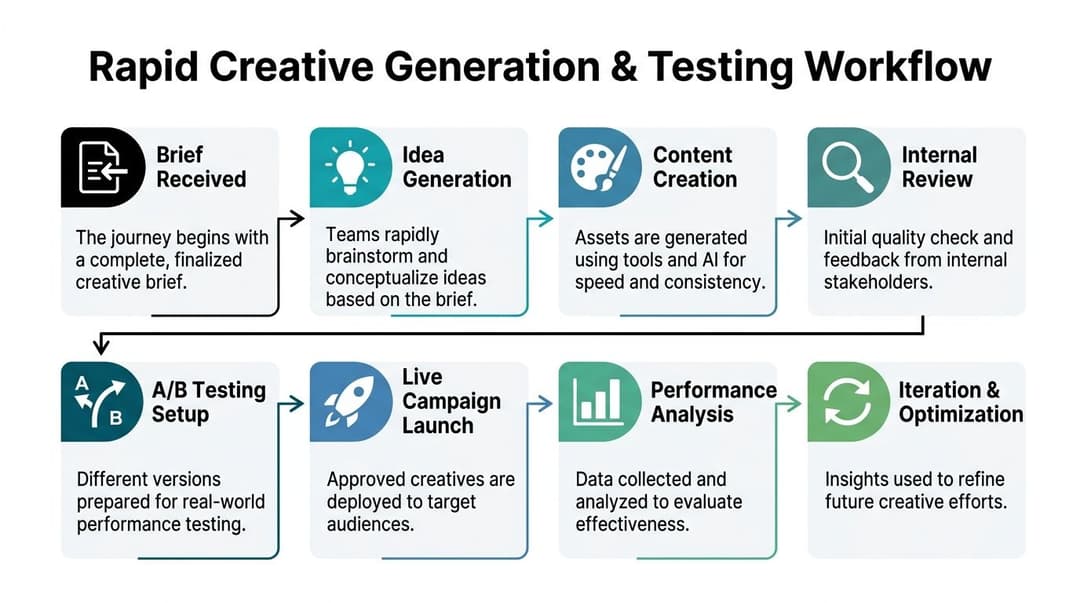
Step one starts after the brief is approved
If strategy is still being debated, don't enter production.
The workflow should begin only when the brief answers three things clearly:
- What are we testing
- What are we holding constant
- What counts as a successful output
That sounds obvious, but a lot of creative churn starts because teams push uncertain direction into production and hope the assets sort it out.
Build one strong concept before generating volume
Rapid generation doesn't mean random generation. Start with a human-selected concept based on account history.
That concept usually includes:
- A hook
- A proof mechanism
- A visual direction
- A CTA structure
- An audience assumption
Then expand from there.
The key is to protect the strategic core while varying execution. When teams skip that step and generate wide from weak inputs, they produce volume without learning.
Field note: The fastest team isn't the one making the most assets. It's the one producing the most assets from a clear hypothesis.
Use automation to multiply winners
For Meta campaign scaling, a data-backed workflow can use AI to auto-generate 100+ variations from winning creatives, helping bypass production cycles that can waste 550+ days per 6,000 ads. The same source notes that 75% of campaign results stem from the creative, which is why rapid iteration matters so much in practice, according to this creative metrics and scaling methodology.
Those numbers matter less as bragging points and more as workflow design principles. If creative drives most of the result, the system should make variation easy.
What to vary first
Start with variables that preserve concept integrity:
- Opening hook
- Headline framing
- First scene or image
- CTA wording
- Body copy length
- Proof ordering
- Audience pairing
Leave major offer changes and full conceptual pivots for separate tests. Mixing too many variables at once makes analysis muddy.
Package tests in launch-ready batches
At this stage, many teams lose the speed they thought they gained.
Don't generate a pile of assets and then figure out naming, routing, and launch later. Every batch should leave production with enough structure to enter Ads Manager cleanly.
A launch-ready batch should include:
- Asset names tied to hypothesis
- Format labels
- Audience mapping
- Copy variants
- Approval status
- Any required notes for media buyers
That makes handoff to paid social operations almost frictionless.
If you're refining the mechanics of fast iteration, this rapid ad testing framework is a good complement to the workflow discipline above.
Review quickly, not casually
Internal review should be short and deliberate.
Use a two-pass approach:
- Strategic pass: Does the asset still express the intended angle?
- Execution pass: Is the copy clean, brand-safe, and format-correct?
What you want to avoid is open-ended group feedback. Once five people start commenting from different goals, speed disappears.
A useful rule is that only named owners can request changes. Everyone else can flag issues, but they don't rewrite the brief through comments.
Launch, read, and feed the system back
The full power of creatives on call appears after launch.
Performance data should feed directly back into the next round of work. That means tagging not just “winners” and “losers,” but the actual elements behind them:
- Hook structure
- Offer framing
- Visual style
- Length
- Proof type
- Audience-context fit
Over time, your workflow gets sharper because the team isn't reacting to isolated ads. It's learning from repeatable creative components.
A healthy loop looks like this:
| Stage | Main owner | Main risk |
|---|---|---|
| Brief approval | Strategist | Vague direction |
| Concept selection | Strategist | Too many ideas |
| Variant generation | Production plus automation | Low-quality inputs |
| Internal review | Named approvers | Opinion overload |
| Launch setup | Media buyer | Bad naming and routing |
| Performance analysis | Strategist plus buyer | Weak tagging |
| Iteration | Full team | Repeating bad tests |
When this loop is working, creatives on call stops feeling like emergency outsourcing. It becomes a repeatable growth input.
Implementing Quality Assurance and Version Control
Fast creative teams don't fail because they move quickly. They fail because nobody built a safety system around the speed.
The more assets you generate, the more likely you are to ship the wrong headline, the outdated product shot, the old disclaimer, or the video cut that was never approved. That’s why quality assurance and version control have to sit inside the workflow, not after it.
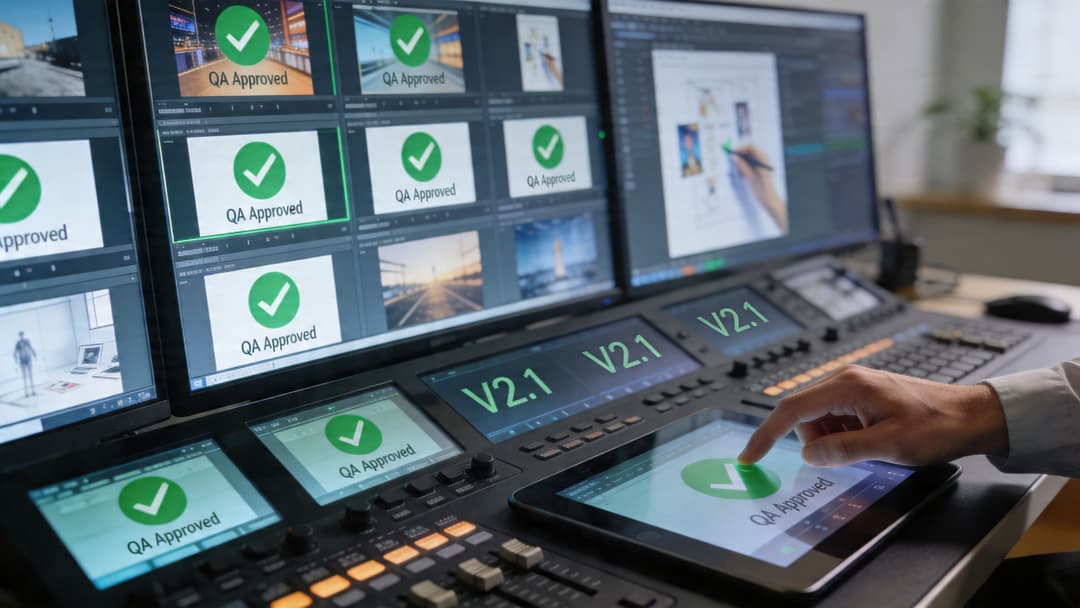
Create one source of truth
If your approved assets live across Slack uploads, local folders, email attachments, and random cloud drives, you don't have version control. You have guesswork.
Use one approved library for:
- Current brand assets
- Approved logos and lockups
- Live offer language
- Legal disclaimers
- Winning ad references
- Current landing page screenshots
- Archived but retired files
The library matters because teams under pressure will use whatever they can find first. If the correct asset isn't easiest to find, the wrong one gets used.
A structured media environment like the one discussed in this guide to ad creative library management helps remove that risk.
QA should check decisions, not just spelling
A weak QA process focuses on typos only. A strong one checks whether the asset still matches the strategic intent.
Use a master QA checklist
A good checklist usually covers four layers:
- Brand layer: Voice, tone, visual consistency, logo use, color, typography
- Offer layer: Correct pricing language if applicable, CTA, landing page match, disclaimer presence
- Platform layer: Aspect ratio, safe zones, crop checks, subtitle readability, thumbnail quality
- Operational layer: Correct naming, correct destination folder, correct approval status, launch readiness
Not every asset needs a long review. But every asset should pass through the same logic.
Bad QA slows production because it asks reviewers to “look it over.” Good QA speeds production because reviewers know exactly what to look for.
Version naming isn't admin work
Teams often treat naming conventions like bureaucracy. In a high-volume environment, naming is part of performance analysis.
A useful file name should tell you:
- Campaign or product
- Angle
- Format
- Variant
- Version status
Example structure:
- product-angle-format-variant-vfinal
- product-angle-format-variant-v2-approved
- product-angle-format-variant-retired
That kind of naming makes it easier to search, compare, relaunch, and analyze later.
Keep feedback loops narrow
The fastest QA model isn't “everyone comments.” It's “the right two people review the right thing.”
A practical split:
- Strategist checks message integrity
- Brand or marketing owner checks compliance and fit
- Media buyer checks launch readiness when needed
If design, copy, paid social, and leadership all edit in parallel, you'll create contradictions faster than improvements.
Archive aggressively
One overlooked habit in creatives on call systems is retirement discipline.
Archive:
- Deprecated offers
- Old product claims
- Expired seasonal references
- Pre-refresh branding
- Losing variants that shouldn't be reused
A clean archive protects the team from accidental reuse and preserves learning. Old files can still be useful reference material, but they shouldn't sit beside current approved assets as if they're interchangeable.
Structuring Pricing and Measuring ROI
Organizations often misprice creatives on call. They price for labor. They should price for usable capacity and decision speed.
That shift matters because this service isn't just “design hours on demand.” It's a production system that helps paid media teams test faster, replace fatigue sooner, and keep learning loops active. If you price only by task or by hour, you'll understate the operational value and overemphasize effort.
Pick a model that matches demand volatility
Some teams need always-on support. Others need bursts around launches or scale periods. The pricing model should reflect that reality.
| Model | Best For | Pros | Cons |
|---|---|---|---|
| Monthly retainer | Brands and agencies with steady testing volume | Predictable capacity, easier planning, stronger team continuity | Can feel expensive if demand drops temporarily |
| Project-based | One-off launches or fixed campaigns | Clear scope, easy approval path | Weak fit for ongoing iteration and fast replacement cycles |
| Hybrid retainer plus overflow | Teams with baseline volume and periodic spikes | Stable core support with flexibility during heavy periods | Needs tighter scope management |
| Credit or unit-based | Organizations that want modular usage | Easy internal budgeting for repeatable deliverables | Can reward output counting over strategic quality |
The best fit usually depends on whether your team treats creative as a campaign input or as a business-critical testing engine. Performance teams almost always need the second model.
Measure operational ROI first
Many leaders jump straight to ROAS and miss the earlier signals that prove whether the system is improving.
Start with operational indicators such as:
- Creative time-to-market
- Number of launch-ready variations produced
- Revision frequency
- Approval cycle length
- Replacement speed for fatigued ads
- Percentage of briefs delivered with complete inputs
Those metrics show whether the service is removing friction.
Then connect them to commercial outcomes:
- Share of spend allocated to strong creatives
- Creative hit rate
- Efficiency trends after new batches launch
- Cost per usable winning concept
- Revenue contribution from ads sourced through the system
If your team needs a cleaner framework for the commercial side, this guide on how to calculate return on ad spend is a practical companion. For broader reporting discipline across channels, this resource on how to measure social media ROI is also useful.
Don't evaluate AI-only output in a vacuum
One of the biggest pricing mistakes is assuming automation alone should deliver the same outcome as a hybrid system in every market and category.
That assumption breaks down quickly in nuanced campaigns. Recent data cited in Q1 2026 reporting shows AI-generated creatives can underperform by 30% on CPL in culturally nuanced ads, while agencies using hybrid AI-human oversight achieve 2.5x scaling efficiency, according to this report on underserved growth channels and creative performance trade-offs.
That has two implications.
First, pricing should reflect strategic supervision, not just asset generation. Second, ROI should be segmented. A hybrid workflow may be overkill for some straightforward retargeting or offer-refresh tasks, but essential for localization, category nuance, or brand-sensitive acquisition.
If your reporting treats all creative output as interchangeable, you'll misprice the service and misread the results.
Tie pricing to service guarantees, not vague effort
A strong offer usually defines:
- Reserved capacity
- What counts as a deliverable
- Turnaround windows
- Revision limits
- Approval responsibilities
- Escalation rules for urgent requests
That's easier for clients and stakeholders to understand than “access to creative support.”
The practical test is simple. A stakeholder should be able to answer two questions without asking for clarification:
- What do we get each month?
- How will we know it's working?
If they can't, the pricing model is too fuzzy.
If your team is buried in briefs, revisions, and launch delays, AdStellar AI can help turn that chaos into a repeatable system. It’s built for growth teams that need to launch, test, and scale Meta campaigns faster by generating large volumes of creative combinations, learning from historical performance, and reducing the manual setup work that slows execution.


