
So, what does "Facebook advertising optimization" even mean? In a nutshell, it's the art and science of systematically tweaking your campaigns to get better results, whether that’s a higher Return on Ad Spend (ROAS) or a lower Cost Per Acquisition (CPA).
It's a continuous cycle of digging into your performance data, testing variables like creative and audiences, and making smart adjustments to your account structure and bidding strategies. Think of it as a constant feedback loop that makes sure every dollar you spend is working as hard as possible.
Build Your Foundation for High-Performance Ads
Jumping straight into testing new ad copy or cranking up your budgets is like building a house on sand. I've seen it happen too many times. Real, sustainable success with Meta ads starts with two things: a thorough audit of your ad account and a rock-solid measurement framework.
This first step is about more than just glancing at surface-level metrics. It’s about diagnosing what’s worked in the past, uncovering hidden opportunities, and tying every single action back to your actual business goals. The hard truth is that a messy account structure or broken tracking can completely sabotage your best efforts. If your data is garbage, you're just making guesses in the dark.
Before you get too deep, it’s also smart to have a solid grasp of the 10 essential types of Facebook advertising. These are the building blocks for any effective campaign.
Conducting a Comprehensive Account Audit
First things first: you need to play detective inside your own ad account. An audit isn't just about spotting what went wrong; it's about understanding what went right and—most importantly—why. This deep dive creates the baseline you'll measure all your future improvements against.
Start by pulling up your campaign, ad set, and ad performance over the last 90 days. Look for patterns. Which audiences consistently delivered your lowest CPA? What creative themes or ad formats drove the highest click-through rates (CTR)? Get all of this down on paper (or a spreadsheet). This simple exercise helps you stop repeating past mistakes and gives you a data-backed launchpad for your first tests.
Defining Your Key Performance Indicators
You can't optimize what you don't measure. Vague goals like "get more sales" just won't cut it. You need specific, measurable Key Performance Indicators (KPIs) that are directly wired to what your business needs to achieve.
Here are a few common examples:
- For E-commerce: Your north star is almost always Return on Ad Spend (ROAS). But you should also keep a close eye on Cost Per Purchase and Average Order Value (AOV).
- For Lead Generation: The focus shifts to Cost Per Lead (CPL) or, for more qualified leads, Cost Per MQL (Marketing Qualified Lead). Don't forget to track your Lead-to-Close Rate, too—it tells you if you're driving quality inquiries or just tire-kickers.
- For App Installs: Cost Per Install (CPI) is the headline metric, but you need to look further down the funnel at things like Cost Per Registration or Cost Per In-App Purchase to see the real value.
A well-defined KPI is your compass. It cuts through the noise and makes every decision—from budget shifts to creative tests—incredibly simple by giving you a single, clear measure of success.
Ensuring Flawless Measurement and Tracking
Your entire optimization strategy lives and dies by the quality of your data. This is non-negotiable.
The Meta Pixel is the heart of this system. You have to verify it's firing correctly on all key pages and that your standard events (ViewContent, AddToCart, Purchase, etc.) are set up properly. If you're not 100% sure, check out our deep-dive guide on what the Facebook Pixel is and how to set it up.
But the Pixel isn't enough anymore. You also need to set up the Conversions API (CAPI) to run alongside it. CAPI creates a direct, server-to-server connection that helps you capture conversions that browsers might miss due to ad blockers or privacy settings.
Getting your tracking right gives Meta's algorithm the clean, comprehensive data it needs to find your customers and optimize delivery. It’s a critical setup step that pays dividends across your entire account.
This checklist can help you stay on track as you shore up your foundation.
Account Audit and Measurement KPI Checklist
Use this quick reference to guide your initial audit and make sure your core metrics are properly defined before you start optimizing.
| Audit Area | Key Metric to Check | Success Indicator |
|---|---|---|
| Pixel & CAPI Health | Event Match Quality | Score of "Great" or "Good" in Events Manager |
| Historical Performance | CPA / ROAS Trends (90-day) | Stable or improving cost/return trends |
| Audience Performance | Audience Overlap | Below 20% to avoid ad fatigue |
| KPI Alignment | Primary KPI Defined | A single, clear metric (e.g., ROAS, CPL) |
| Event Tracking | Funnel Conversion Rates | Healthy drop-off rates from ATC to Purchase |
| Attribution Settings | Click & View Windows | Aligned with your typical customer journey |
Getting these foundational pieces in place isn't the most glamorous part of media buying, but it's the bedrock of every successful account I've ever managed. Once this is solid, you're ready to move on to the fun stuff: creative, audiences, and scaling.
Master Your Creative and Copy Testing Framework
Once you’ve got a solid foundation with clear KPIs and tracking that you can actually trust, it’s time to focus on the real performance driver: your creative. The ad’s visuals and copy are the single biggest levers you can pull to move the needle. Gone are the days of relying on gut feelings or simple A/B tests. For predictable growth, you need a systematic, hypothesis-driven testing framework.
This isn't about throwing random ideas at the wall and hoping something sticks. It’s about turning creative development into a methodical science. You’ll learn to isolate specific variables—like the first three seconds of a video, a headline hitting a particular pain point, or the color of a CTA button—to figure out what truly makes your audience tick. That precision is what separates the okay campaigns from the ones that print money.
A strong ads foundation follows a clear workflow, moving from a deep-dive audit to defining your goals and, finally, tracking what matters.
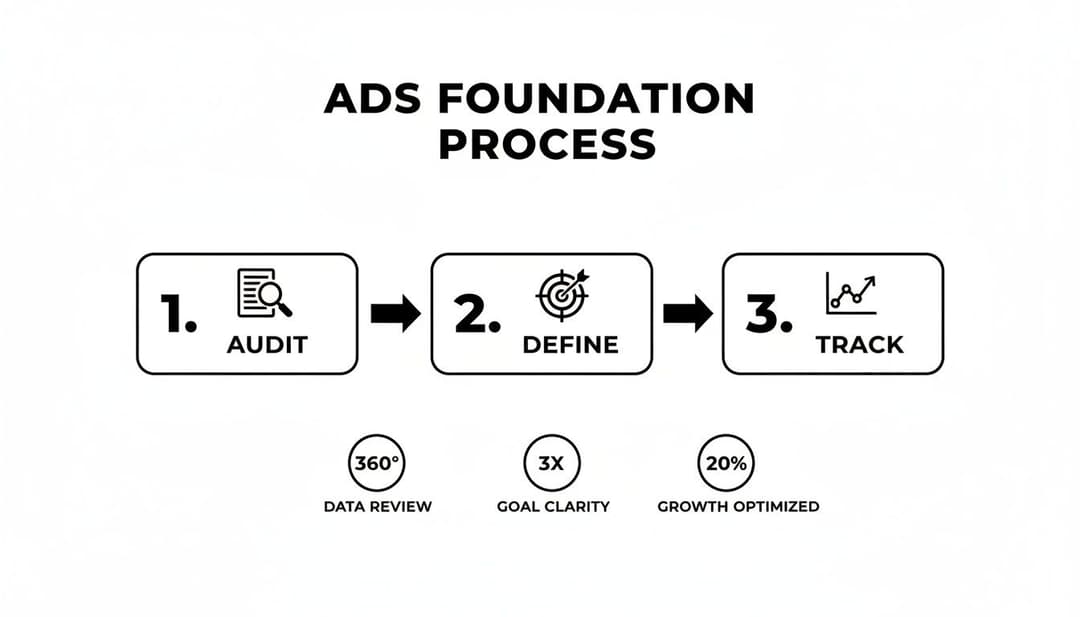
This simple Audit, Define, and Track flow ensures your creative testing is built on a solid strategy, not just a series of disconnected tactics.
Building a Hypothesis-Driven Testing Matrix
A testing matrix is just a structured way to organize and test multiple creative elements without creating a complete mess in Ads Manager. By methodically combining different headlines, primary text, and visuals, you can efficiently pinpoint the combinations that pack the biggest punch.
Everything starts with a clear hypothesis. For instance, a skincare brand might hypothesize: "User-generated content (UGC) videos showing real customer results will get a lower Cost Per Purchase than our polished studio videos because they feel more authentic and build trust."
With that hypothesis in hand, you can build your matrix:
- Variable 1 (Video Style):
- UGC testimonial video
- Polished studio product demo
- Variable 2 (Headline Angle):
- Pain-point focus ("Tired of stubborn acne?")
- Benefit focus ("Get clear, glowing skin in 30 days.")
- Variable 3 (CTA):
- "Shop Now"
- "Learn More"
This simple 2x2x2 matrix gives you eight unique ad variations right out of the gate. Run them in a single ad set, and you let Meta’s algorithm do the heavy lifting, pushing the budget toward the top performers and giving you clean data on what works.
Isolating Variables for Clean Data
The secret to effective testing is to isolate one variable at a time in a controlled environment. If you test a new image, a new headline, and new body copy all in the same ad, you’ll have no clue which change actually moved the needle.
A practical workflow looks something like this: First, test your big ideas—the core concepts, like video styles or value propositions. Once you find a winning concept, then you can start iterating. For example, if a specific UGC video crushed it, your next test could be to isolate different hooks for the first three seconds of that exact video.
Your goal isn't just to find one winning ad. It's to build a library of winning elements—headlines, hooks, images, and copy angles—that you can recombine to consistently produce high-performing creative.
Practical Workflows for Ranking Performance
To manage all this, you need to structure your campaigns for clarity. One of the most effective methods I’ve seen is using one campaign for testing and a separate one for scaling.
- The Testing Campaign: This is where you use Ad Set Budget Optimization (ABO). Create different ad sets for each broad variable you’re testing (e.g., one ad set for "UGC Videos," another for "Studio Videos"). This setup gives you total control over how much you spend testing each core concept.
- The Scaling Campaign: Once you've identified winning ads from your testing campaign, graduate them to a "Winners" campaign running on Campaign Budget Optimization (CBO). CBO lets Meta’s AI automatically distribute your budget across your proven ads, maximizing results with way less manual effort. For a deeper dive, check out our guide on creating powerful creative ad campaigns.
Let’s put it into practice. An e-commerce brand runs this playbook and discovers that a UGC video (the winning concept) paired with a pain-point headline consistently drives a 25% lower Cost Per Acquisition (CPA). They then move that exact ad into their CBO scaling campaign, confident it's a data-backed winner. This systematic approach transforms creative chaos into a predictable engine for growth.
Nail Your Audience Targeting Strategy
If you're still just dumping your budget into broad, interest-based audiences, you're lighting money on fire. It's a common mistake, but it's one that will keep your results frustratingly average. True optimization on Meta hinges on a much smarter, layered audience strategy.
The goal is to meet people exactly where they are in their journey with you—from total strangers to your biggest fans. This means ditching the one-size-fits-all approach for a tiered system that segments users by their intent. When you get this right, you deliver the right message to the right person, and your conversion rates and ROAS will thank you for it.
Get Serious About Custom Audiences
Your most valuable audiences are the ones you already have a relationship with. These are the people who have already raised their hands and shown interest, and they are the absolute bedrock of any high-performing retargeting campaign. This is where Custom Audiences, built from your own first-party data, become your secret weapon.
What makes them so powerful? They're based on actual behavior, not just educated guesses about what someone might be interested in. You can build these from several incredibly high-intent sources:
- Website Visitors: Go after people who visited a specific product page or your pricing section but bailed before buying. It's the perfect setup for a hyper-relevant follow-up ad.
- Customer Lists: Upload your list of email subscribers or past customers to re-engage them with new offers or win back those who've gone quiet.
- App Activity: Got an app? Create audiences from users who hit certain milestones, like completing a level or adding an item to their cart but not checking out.
- Engagement: Target people who have already interacted with you on-platform, like those who've watched your videos or engaged with your Instagram profile.
The real pro move is layering these. For example, create an audience of everyone who visited a key product page in the last 14 days but—and this is crucial—exclude anyone who has already purchased. That level of precision is what separates mediocre retargeting from the campaigns that really drive revenue. For a deeper dive, check out our guide to audience segmentation strategies.
Build Lookalikes That Actually Work
Once you've nailed your Custom Audiences, you can unlock your next best source of new customers: Lookalike Audiences. You’re essentially handing Meta a list of your best people and asking its algorithm to go find more just like them.
Lookalikes are the bridge from your warm retargeting efforts to cold, scalable prospecting. They let you find new customers who behave like your best customers, which is infinitely more powerful than just guessing at interests.
The quality of your Lookalike is completely dependent on the quality of your source audience. Don't be lazy and just upload your entire email list. Instead, get specific and build your source from your most valuable segments:
| Source Audience | Why It Works |
|---|---|
| High LTV Customers | This tells Meta to find people who are likely to become repeat, high-value buyers. |
| Recent Purchasers | This models your Lookalike after people who are converting right now, capturing current buying trends. |
| Engaged Email Subscribers | This finds users who aren't just one-time buyers but are also genuinely engaged with your brand. |
A classic rookie mistake is creating a bunch of similar Lookalikes that end up competing with each other. This is called audience overlap, and it makes your ad sets bid against themselves, driving your costs per result (CPRs) through the roof. Always use the audience overlap tool in Ads Manager to make sure your Lookalikes are distinct enough to avoid this self-sabotage.
Put Your Tiered Strategy Into Action
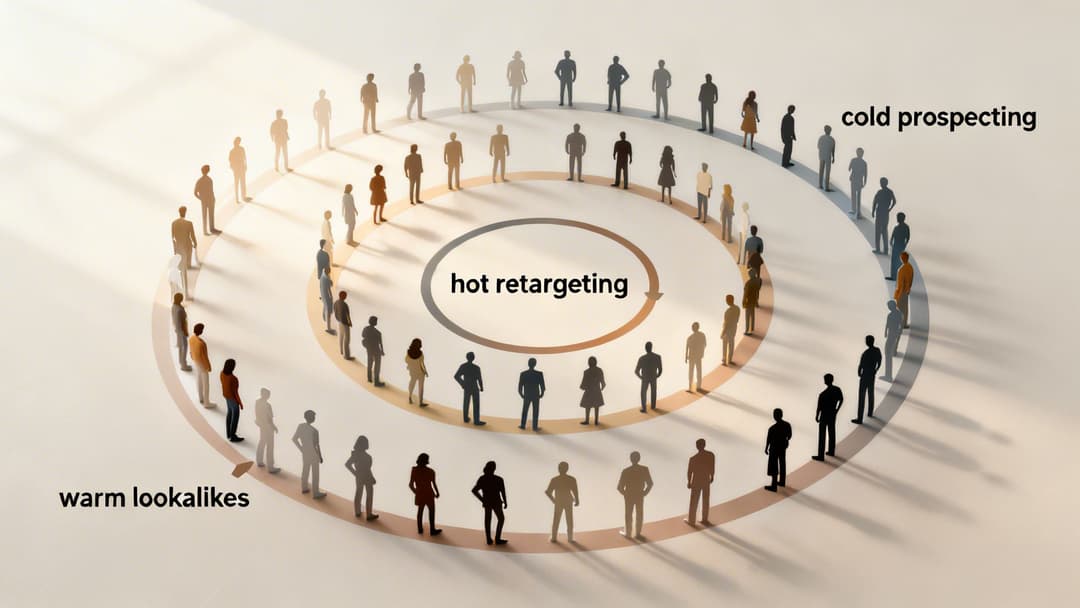
A truly optimized account doesn't just use these audiences in isolation; it integrates them into a full-funnel strategy. I like to think of it in terms of temperature—three distinct layers, each with its own job and its own budget.
- Hot (Retargeting): This is your smallest but mightiest group, full of Custom Audiences like recent website visitors or cart abandoners. The goal here is simple: close the deal. This tier deserves a dedicated slice of your budget to scoop up all that low-hanging fruit.
- Warm (Lookalikes): These are people who don't know you yet but share the DNA of your best customers. Here, the goal is to introduce your brand and get them interested. Once you find a winning Lookalike, this is where you start to really scale your budget.
- Cold (Interest & Behavior): This is your top-of-funnel, where you go exploring. Use this broadest tier to test new markets and bring fresh blood into your ecosystem. The goal is pure awareness and traffic generation, feeding people into your warmer audiences.
When you structure your campaigns this way, you create a self-sustaining growth engine. Cold prospecting fills the funnel, and your hot retargeting machine efficiently turns that interest into sales, giving you more customer data to build even better Lookalikes. That's the feedback loop that powers continuous growth.
5. Dial-In Your Bidding and Budget Strategies
Your creative and audiences get all the glory, but how you actually spend your money—your bidding and budget strategy—is what quietly determines if your campaigns are profitable. Think of it as the engine powering your entire ad account. Get the settings right, and you'll find remarkable efficiency. Get them wrong, and you're just burning cash.
Meta's algorithm is a powerhouse, but it's not a mind reader. It needs clear instructions, and your bidding strategy is how you give them. Are you chasing the most leads possible? Trying to hit a specific cost per purchase? Or are you focused on a minimum return on ad spend? Each goal demands a completely different bidding approach.
H3: Decoding Meta’s Bidding Options
Getting a handle on the main bidding strategies is ground zero for effective Facebook advertising optimization. Each one has a specific job, and matching your choice to your business objective is the first real step toward lowering acquisition costs.
Here’s a quick rundown of the core options you’ll be working with:
- Highest Volume (Lowest Cost): This is you telling Meta, "Get me the most results you possibly can for my budget." It’s a fantastic starting point for top-of-funnel campaigns where you just want broad reach or traffic. It's also perfect for gathering initial data on a brand-new offer before you know your numbers.
- Cost Per Result Goal: With this, you set an average cost you're willing to pay per result. Meta then works to hit that average—sometimes it will pay a bit more, sometimes a bit less, but it will stabilize around your target. This is the go-to for lead gen campaigns where you have a hard CPL you can't exceed.
- Return on Ad Spend (ROAS) Goal: For e-commerce brands, this is the holy grail. You tell the algorithm the minimum ROAS you need (e.g., 300%), and it will only bid on auctions it thinks can meet or beat that target. It’s all about prioritizing high-value sales over just getting a high volume of them.
A classic mistake is jumping to a ROAS Goal too soon. The algorithm needs a good amount of conversion data—think at least 30-50 purchases per week—to figure out who your high-value customers actually are. Kick things off with Highest Volume or a Cost Per Result Goal to feed it data, then make the switch to a ROAS Goal to hone in on profitability.
H3: Choosing the Right Bidding Strategy
To make it even clearer, here’s a simple table to help you decide which bidding strategy aligns with your immediate campaign goals.
| Bidding Strategy | Best For | Primary Goal |
|---|---|---|
| Highest Volume | New campaigns, top-of-funnel traffic, data gathering | Maximizing the number of results within a budget |
| Cost Per Result Goal | Lead generation, campaigns with a fixed CPA target | Maintaining a specific average cost per conversion |
| ROAS Goal | E-commerce, campaigns focused on profitability | Achieving a minimum return on ad spend from purchases |
Choosing the right strategy from the start prevents you from sending the algorithm mixed signals and wasting your budget trying to achieve a goal it's not set up for.
H3: Campaign Budget Optimization vs. Ad Set Budgets
The next big decision is where you set your budget: at the campaign level (CBO) or at the ad set level (ABO). This choice completely changes how Meta’s AI allocates your money.
- Ad Set Budget Optimization (ABO): This is the old-school way. You set a specific daily or lifetime budget for each individual ad set. ABO gives you total control, which is exactly what you want for testing. For instance, you can force a certain amount of spend toward a new Lookalike audience to see if it works, without your proven retargeting audience gobbling up the entire budget.
- Campaign Budget Optimization (CBO): With CBO, you set one budget at the campaign level, and Meta’s algorithm dynamically shifts it in real-time to the ad sets that are performing the best. CBO is built for one thing: scaling. Once you’ve found your winning audiences and creative, you throw them into a CBO campaign and trust the algorithm to find the lowest-cost opportunities for you.
Knowing when to use ABO versus CBO is a core skill in smart ad spend optimization.
H3: A Practical Scenario: Putting It All Together
Let's walk through a real-world example. Imagine you're a SaaS company launching a campaign to get demo sign-ups. You know you can't spend more than $50 per qualified lead (CPL).
You’d start with ABO. You'd build out separate ad sets for your different audiences—one for a Lookalike of your best customers, another for an audience targeting competitor interests, and a third for broad retargeting. You’d set each with a Cost Per Result Goal of $50.
After a week of running, the data is clear. The Lookalike audience is a home run, bringing in leads for just $35. Meanwhile, the interest-based audience is struggling badly, with a CPL of $70.
Now what? You’d take that winning Lookalike ad set, move it into a brand new "Scaling" campaign, and flip the switch to CBO. This lets Meta’s algorithm take the wheel and efficiently find more of those high-quality, low-cost leads without you needing to manually tweak budgets all day.
This kind of strategic approach is more critical than ever. According to recent benchmarks from WordStream, lead generation campaigns have seen a 20% increase in CPL. For advertisers in that space, knowing exactly how to structure bidding isn't just a best practice—it's essential for survival.
Scale Winners and Troubleshoot Underperforming Ads

You’ve done the hard work, run the tests, and finally landed on a winning combination of creative and audience. The numbers look great. The natural instinct is to floor it—crank the budget and watch the sales roll in. But that’s one of the fastest ways to kill a good ad’s performance. Scaling is a delicate art, not a brute-force science.
On the flip side, you’ll always have campaigns that just don't take off. Knowing how to systematically diagnose and fix these underperformers is just as crucial as knowing how to scale your winners. This is about building a resilient system where every outcome, good or bad, gives you a clear next step.
The Art of Scaling Winning Campaigns
When an ad is crushing your target CPA or ROAS, the mission is to get it in front of more people without spooking the algorithm or burning out your audience. Big, sudden budget changes can shock the system, throwing your ad set right back into the learning phase and torpedoing your results. The key is gradual, deliberate expansion.
A tried-and-true method is to increase your budget by no more than 20% every 48-72 hours. This steady ramp-up gives the algorithm enough time to adjust and find new pockets of customers at a similar cost. Rushing this is a classic rookie mistake that almost always leads to volatile, unpredictable performance.
Another powerful way to scale is horizontally. Instead of just pouring more money into a single ad set, you duplicate your winning formula into new, adjacent audiences.
- Expand Your Lookalikes: If your 1% Lookalike of purchasers is killing it, test it against a 1-3% and a 3-5% Lookalike audience.
- Explore New Interests: Take that proven creative and aim it at new, related interest audiences you haven't touched yet.
- Go Broad: Sometimes, the best way to scale is to simply remove the targeting constraints. With a well-seasoned pixel, you can trust Meta's delivery system to find the right customers for you.
Scaling isn't just about spending more money; it's an audience expansion exercise. Your proven creative is a valuable asset. Your job is to find out how many different groups of people will respond to it, turning one single win into many.
A Systematic Approach to Troubleshooting
When an ad or campaign is underperforming, resist the urge to panic and start changing everything at once. That's a surefire way to never learn what actually went wrong. Instead, work through a diagnostic checklist to isolate the real problem.
This turns a failing ad from a frustration into a valuable learning opportunity. Start by asking the right questions, moving from the broadest factors (like your audience) down to the most granular details (like your landing page).
A Quick Troubleshooting Checklist
Work through these common culprits in order to figure out what's holding your ads back.
Check for Audience Saturation:
- Metric to Watch: Frequency. If it's climbing too high—say, above 3-5 for a cold audience in a short time—your audience is seeing the same ad way too often.
- The Fix: Broaden your targeting, introduce a completely new audience, or refresh your creative to fight off ad fatigue.
Evaluate Creative Fatigue:
- Metric to Watch: Click-Through Rate (CTR) and Cost Per Click (CPC). If your CTR is dropping while your CPC is climbing, your creative has likely gone stale.
- The Fix: It's time for new ad variations. Test a different hook in your copy, a new image or video, or a completely different angle on your offer.
Review Your Offer and Landing Page:
- Metric to Watch: Conversion Rate (CVR). If you’re getting tons of cheap clicks but nobody is converting, the problem probably isn’t your ad—it’s what happens after the click.
- The Fix: Make sure your landing page message perfectly matches the ad’s promise. Check your page load speed and double-check that the mobile experience is seamless.
This disciplined process of scaling winners and fixing losers is the core engine of advanced Facebook advertising optimization. And it's a great time to master it. With Meta's 2025 ad revenue hitting a staggering $196.2 billion thanks to an 18% jump in ad impressions, the platform has more inventory than ever before. According to research from WARC, smart advertisers are capitalizing on this growth.
For a deeper dive into growing your campaigns without wrecking performance, check out our guide on how to scale Facebook ads efficiently.
Answering Your Top Facebook Ad Optimization Questions
Even with the best strategy in place, you're going to have questions pop up when you're in the trenches managing campaigns. It just comes with the territory. Answering these common head-scratchers is what separates the pros from the rest.
Let's get into some of the most frequent questions I hear from performance marketers and break down the answers. Getting these details right is how you turn theory into real-world results that actually move the needle.
How Often Should I Be Testing New Creatives?
There’s no magic number here, but you absolutely need a consistent testing rhythm. It’s the only way to beat ad fatigue before it kills your campaigns and keep a steady stream of winners in your back pocket. The right cadence really depends on your spend.
If you're managing a high-spend account—say, over $50,000 a month—you should be pushing new creative concepts out the door every single week. For smaller budgets, a bi-weekly or monthly refresh is a much more realistic place to start. The big idea is to be proactive, not reactive.
Don't wait for performance to tank before you start testing. A proactive approach means you always have a pipeline of validated ads ready to go. It turns creative development into a reliable growth engine instead of a panicked reaction to a sea of red numbers.
Make sure your tests are structured, too. Isolate one variable at a time. Test different video hooks, swap out headlines, or try a completely different value prop. That's how you get clean data that tells you what’s actually working.
What’s the Real Difference Between CBO and ABO?
This one trips a lot of people up, but it really boils down to one thing: control versus automation. Where you decide to put the budget tells Meta’s algorithm how to behave.
Ad Set Budget Optimization (ABO): You’re in the driver's seat. You set a specific budget for each individual ad set. This gives you tight, granular control, which is perfect for testing new audiences or making sure a critical retargeting audience gets the spend it deserves.
Campaign Budget Optimization (CBO): You hand the keys over to Meta. You set one budget at the campaign level, and the algorithm automatically funnels the money to the best-performing ad sets in real-time. It’s constantly looking for the cheapest results and will shift spend accordingly.
My rule of thumb? Use ABO for testing when you need to control the variables. Once you've found your winners, switch to CBO to scale them efficiently. It’s built to maximize your budget without you having to manually move money around all day.
Why Did My Facebook Ad Costs Suddenly Spike?
Seeing your costs jump overnight is never fun, but don't panic. It's almost always a problem you can diagnose. Before you go blowing up your campaigns, you need to play detective and investigate the usual suspects.
I always start by checking these three things:
Audience Saturation: Pop open your columns and look at the Frequency metric. Is it creeping up past 3-5 for a cold audience in just a few days? That’s a huge red flag. People are seeing your ad way too often, and they're starting to tune you out.
Creative Fatigue: Is your Click-Through Rate (CTR) dropping off a cliff while your Cost Per Click (CPC) is climbing? That’s the classic sign of a tired creative. Your ad has run its course and just isn't stopping the scroll anymore.
Auction Competition: Did you forget to look at the calendar? If it’s Black Friday week or another major holiday, the auction is going to be packed. New competitors jumping into your market can also drive up costs for everyone. More competition means higher bids.
Your first move should be to refresh your creative or test a new angle. If that doesn't work, try expanding your audience to bring that frequency down. A quick check of your auction competition metrics in Ads Manager can also tell you if the landscape has simply gotten more crowded.
Ready to stop the guesswork and automate your campaign growth? AdStellar AI is built to launch, test, and scale your Meta campaigns 10x faster. Our platform automates bulk ad creation and uses AI to identify your winning creative, copy, and audience combinations, so you can double down on what works. Unlock more revenue from Meta with less time and spend.


