
Your launch is ready. Creative is loaded. Budget is approved. The audience is clean. Then Meta throws the red notification: Ad Not Approved.
That moment changes the whole day. Media buyers start editing copy under pressure. Designers re-export assets. Clients ask why a campaign that looked fine yesterday is blocked today. If the account already has a history of rejections, the fear gets bigger. One rejected ad can turn into delivery delays, manual reviews, or a wider trust problem inside the ad account.
Teams often treat fb ads policy as a list of forbidden words. That’s the wrong model. Policy is a risk system. Meta evaluates the ad, the creative, the landing page, the audience, and the account’s prior behavior. If enough signals look risky, the system slows you down or stops you cold.
The teams that stay stable on Meta don’t wait for rejection and then improvise. They build campaigns that are compliant before upload. They use checklists, asset rules, clean landing pages, and a disciplined appeal process when something still goes wrong.
The Nightmare of the Red Notification
A lot of advertisers learn fb ads policy during a bad launch.
A common version goes like this. A brand is pushing its biggest seasonal offer. The copy is aggressive because the team wants urgency. The image has too much promotional text. The landing page loads slowly on mobile and the discount shown in the ad doesn’t match the page headline. Ads go into review. Some get approved, some don’t, and the campaign launches fragmented instead of coordinated.
That’s not just an annoyance. It’s a profit problem. Meta’s ad machine is crowded, and Meta’s digital ad revenue rose to over $131 billion by 2023, while average US CPM reached $4.29 in 2024, which means compliant, relevant ads have an advantage in a highly competitive auction environment, as summarized in these Facebook ads statistics.
What the red notification usually really means
The rejection notice is rarely the full story. The visible reason might say misleading claims, personal attributes, adult content, or circumvention. But in practice, the trigger often comes from a combination of signals:
- Aggressive copy: Promise-heavy headlines, exaggerated outcomes, or language that feels manipulative.
- Weak asset quality: Poor formatting, wrong aspect ratio, cluttered visuals, or image text issues.
- Landing page mismatch: The ad says one thing, the page says another, or key information is missing.
- Audience risk: Sensitive targeting choices or category settings that don’t match the offer.
Practical rule: Don’t read a rejection as a copy problem only. Audit the entire ad path from headline to checkout.
If the account already has account quality issues, every new rejection matters more. That’s why teams dealing with repeated problems usually need more than a one-off fix. They need a broader recovery plan like this guide to a blocked Facebook account.
Panic is expensive
When teams scramble, they make bad edits. They change ten things at once. They relaunch without identifying the root cause. Then they lose time and learn nothing.
A better response is slower for ten minutes and faster for the next ten campaigns. Save the original version. Identify the exact risky element. Fix one variable at a time. Rebuild your process so the same mistake doesn’t happen again.
Understanding Meta's Core Advertising Principles
Meta’s policy logic gets easier once you stop reading it like law and start reading it like platform design.
The company has spent years moving toward one priority. Protect the user experience enough that people keep scrolling, clicking, and buying. That priority explains why some ads that are technically clever still get blocked. If an ad feels manipulative, deceptive, invasive, or low trust, it threatens the feed itself.
Why the rules became stricter
Facebook’s self-serve ad platform launched on November 6, 2007, opening access to roughly 50 million active users and introducing features like Pages and Social Ads that used user connections for relevance. Later, the ban on like-gating in late 2014 marked a clear policy shift away from manipulative engagement tactics and toward authentic user experience, as outlined in this history of Facebook ad strategy.
That history matters because today’s fb ads policy still follows the same pattern. Meta will tolerate hard selling only up to the point where it starts degrading trust.
The two principles behind most enforcement
Most policy decisions come back to two tests.
User experience is the first. If the ad shocks, misleads, interrupts, or sets false expectations, it’s risky. This is why sensational before-and-after creative, broken landing pages, fake buttons, and bait-style headlines often get rejected even when the product itself is legal.
Advertiser transparency is the second. Meta wants to know who is advertising, what’s being offered, and who should see it. That’s why identity requirements, disclosures, destination consistency, and regulated-category restrictions keep expanding.
A lot of policy disputes aren’t really disputes. They’re trust failures between the ad, the page, and the user.
Privacy is now part of policy, not just compliance
A common mistake is separating advertising compliance from privacy compliance. On Meta, those systems overlap. If your targeting, tracking, or consent setup looks messy, policy risk rises because the platform sees a higher chance of user harm or regulatory friction.
For teams running in regulated markets, it helps to understand the legal backdrop, especially around consent and data handling. This overview of GDPR and Israeli privacy law is useful because it frames the privacy obligations that often shape ad platform enforcement in practice.
Tracking setup also affects trust and review outcomes. If your events are inconsistent or your destination experience breaks attribution logic, it can create both performance and compliance problems. A clean implementation starts with a proper Facebook Pixel setup guide.
Prohibited vs Restricted Content
A lot of rejected campaigns come from a basic planning error. The advertiser treats a restricted offer like it’s prohibited, or worse, treats a prohibited tactic like it can be fixed with better disclaimers.
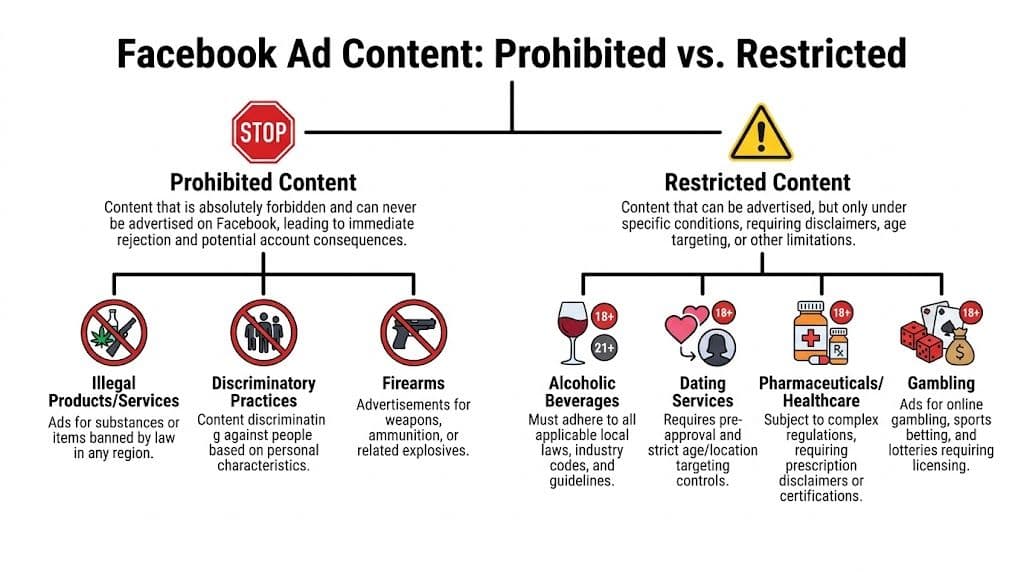
That distinction matters because the response is different. If content is prohibited, no amount of editing will make it eligible. If content is restricted, the ad may still run, but only with the right permissions, targeting, disclosures, and category settings.
The practical difference
Use this rule in planning meetings:
- Prohibited content means stop. Don’t build the campaign.
- Restricted content means qualify. Build only after checking the rules tied to the offer and audience.
Here’s the cleanest way to think about it.
| Category | What it means in practice | Typical response |
|---|---|---|
| Prohibited | The product, claim, or tactic isn’t allowed on the platform | Kill the concept and rebuild |
| Restricted | The offer may run, but Meta controls who can see it and how it must be presented | Add gating, disclosures, category settings, and landing page alignment |
What usually falls into prohibited territory
Certain areas are obvious. Illegal products, deceptive schemes, and discriminatory conduct are dead on arrival.
Three patterns trigger the most avoidable mistakes:
- Illegal or unsafe offers: If the product itself is unlawful or the ad encourages unlawful behavior, it won’t survive review.
- Discriminatory targeting or messaging: If the ad implies exclusion or targets people in a way tied to protected traits, expect rejection or worse.
- Weapons and related categories: Teams often assume accessories or adjacent offers are safe. They often aren’t.
What matters is not just the product. The framing matters too. A legal business can still create a prohibited ad if it uses coercive, misleading, or discriminatory language.
Restricted does not mean easy
Restricted categories are where experienced buyers still get burned. The offer may be allowed, but the route is narrow.
| Restricted area | What to watch |
|---|---|
| Alcohol | Age targeting, local law compliance, and a landing page that clearly reflects the offer |
| Dating services | Suggestive language, sexualized creative, and destination page quality |
| Financial products | Clarity around terms, no misleading outcomes, and strong trust signals on site |
| Pharmaceuticals or healthcare | Extra caution around claims, targeting, and user sensitivity |
| Gambling | Permissions, geography, age restrictions, and disclosure requirements |
A dating app ad can be restricted and still approved if the creative is clean, the page works, and the targeting aligns. The same ad becomes risky fast if it leans into explicit imagery or implies personal deficiencies.
Decision shortcut: If the category involves age, money, health, or vulnerability, assume Meta wants tighter controls than your legal team does.
Build the campaign in this order
Most account issues happen because advertisers do this backward. They build the creative first, then discover the category is restricted.
Use this order instead:
- Classify the offer before anyone writes copy.
- Check age, geography, and disclosure needs at the ad set level.
- Review the landing page for consistency, trust signals, and clear terms.
- Write the ad only after the compliance boundaries are known.
If your team pushes lots of variants, a pre-publish screening tool helps catch category-specific issues before upload. A Meta ads policy checker can thus save time, especially when multiple buyers and designers are producing creative at once.
Creative and Targeting Restrictions You Cannot Ignore
Some of the most frustrating fb ads policy rejections happen when the copy looks harmless. The problem sits somewhere else. The image is low quality. The video crops badly across placements. The landing page headline doesn’t match the ad. The audience setup pushes into a sensitive area.
Meta’s automated review looks at all of it.
Creative specs are policy signals
Meta’s machine learning review process requires image resolution of at least 1080x1080 pixels and aspect ratios between 1.91:1 and 1:1. Violating those specs can increase automated rejection rates by 40%, according to this breakdown of Facebook ad guidelines.
That matters because quality problems don’t just hurt performance. They can make the system treat the ad as lower trust before a human ever reviews it.
Here’s the simple audit I use before any launch:
- Resolution first: Export at or above the required baseline, especially for square and feed-first placements.
- Placement fit: Check whether the image or video still communicates clearly when cropped.
- Text load: Don’t stuff the image with offer text, disclaimers, and urgency labels all at once.
- Button honesty: If the creative visually implies a play button, quiz, or form element, the destination should match that expectation.
Landing pages are part of the ad
A compliant ad can still get stopped if the page breaks trust.
Common issues include slow mobile load, pop-ups that block content, mismatched promotions, hidden prices, vague refund terms, and pages that look unfinished. Meta doesn’t separate the click from the destination. If the destination feels misleading, the ad inherits that risk.
A clean landing page should do four things fast:
| Checkpoint | What good looks like |
|---|---|
| Offer match | The headline and promotion align with the ad |
| Functionality | The page loads, buttons work, forms submit |
| Transparency | Key terms, pricing, shipping, or eligibility are visible |
| Trust | Brand identity, contact details, and policy pages are easy to find |
If the ad promises one experience and the page delivers another, the reviewer usually trusts the page less, not the ad more.
Targeting is where innocent mistakes become policy issues
Many teams get overconfident. They think, “We’re not saying anything discriminatory, so we’re fine.” That’s incomplete. Audience selection itself can create risk.
For Special Ad Categories like credit, employment, and housing, Meta restricts targeting options for a reason. The platform wants to reduce the chance that advertisers exclude people unfairly. Even outside those categories, using sensitive assumptions in copy or audience logic can trigger review problems.
Two habits help:
- Avoid personal attribute language in the ad itself. Don’t call out the user’s health condition, financial stress, age status, or identity traits directly.
- Keep location logic conservative when the nearby context is sensitive, such as clinics, schools, religious sites, or other protected environments.
Teams that want a stronger process should formalize audience review before launch. This checklist for Facebook ads targeting best practices is useful because it forces buyers to validate category fit, exclusions, and risk before they hit publish.
Common Policy Violations and How to Avoid Them
The fastest way to understand fb ads policy is to study what gets flagged. Not the cartoonishly bad ads. The normal-looking ones that experienced marketers still ship.
Violation one claims that outrun the proof
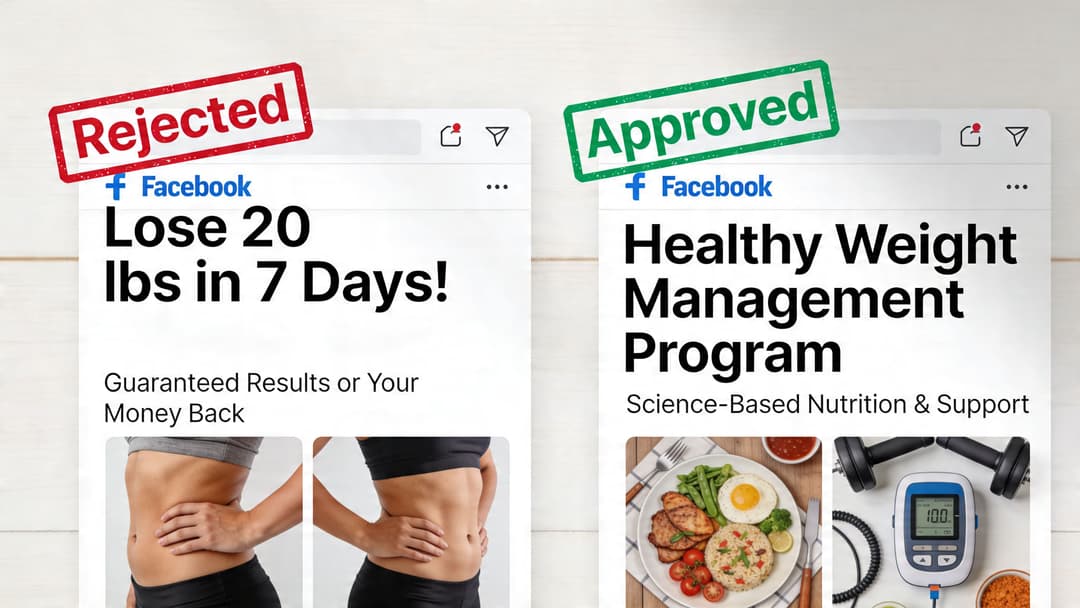
This is the classic one. A supplement promises an outcome. A coaching offer implies guaranteed income. A skincare ad suggests certainty instead of possibility.
What went wrong: the ad makes a claim that reads like a guaranteed result or an unrealistic personal transformation.
How to fix it: shift from outcome certainty to offer clarity. Describe the product, process, or program. Avoid guaranteed language unless the claim is fully supportable and clearly presented.
Before: “Erase stubborn wrinkles fast.”
After: “Daily skincare routine designed to support smoother-looking skin.”
That kind of rewrite sounds less exciting to the creative team. It usually survives review more often.
Violation two fake interaction and mismatched destinations
Another common problem is the ad that looks like one thing and lands on another.
What went wrong: the creative imitates interface elements, overpromises the discount, or suggests a quiz, video, or free tool that the landing page doesn’t provide.
How to fix it: match the ad to the page exactly. If the visual shows a calculator, send traffic to a calculator. If the ad says free trial, don’t land on a hard-sell checkout page.
For teams that want a strong baseline, these best practice Facebook Ads strategies are useful because they reinforce the connection between message clarity, audience intent, and destination consistency.
Violation three sensitive targeting by implication
Official policy bans discrimination, but practical enforcement is messier than most guides admit. A 2022 case showed an anti-abortion group used geofenced mobile data to target users who had recently visited Planned Parenthood clinics, a real example of how sensitive location data can be abused, as reflected in Meta’s advertising standards context.
That case matters because many advertisers still think broad geo tactics are harmless if the ad copy itself is neutral. Not always.
Before and after for location risk
| Risky setup | Safer setup |
|---|---|
| Tight audience logic built around visits to sensitive locations | Broader geographic targeting with neutral messaging |
| Copy that implies knowledge of a user’s private activity | Copy focused on the offer, not the person |
| Retargeting logic that feels invasive | Interest or engagement-based audiences with cleaner privacy posture |
The ad doesn’t have to say “we know where you were” for a user to feel that you do.
Violation four age-restricted products handled casually
Alcohol, finance, and other adult-targeted offers often get tripped up by weak age controls, generic creative, or missing category alignment. This is also where many scaled accounts run into repeated review friction because one approved variant gets duplicated carelessly across markets.
When a team pushes dozens of variants, manual review alone isn’t enough. A workflow that checks copy patterns, landing page cues, and category fit before upload reduces avoidable mistakes. One option is a compliance-friendly ad creation tool that screens creative before it reaches Meta review.
This walkthrough is worth watching if your team needs a visual explanation of common rejection patterns and cleanup steps:
Violation five using Meta branding incorrectly
This one sounds minor until it piles onto other issues. Ads that misuse Meta, Facebook, or Instagram branding can get flagged even when the offer itself is legitimate.
What went wrong: the ad implies platform endorsement or uses brand assets in a misleading way.
How to fix it: be descriptive, not suggestive. “Works with Instagram shops” is very different from “Official Instagram-approved system” unless that approval is real and documented.
Your Step-by-Step Ad Rejection and Appeal Workflow
When an ad gets rejected, the worst move is emotional editing. The best move is controlled diagnosis.
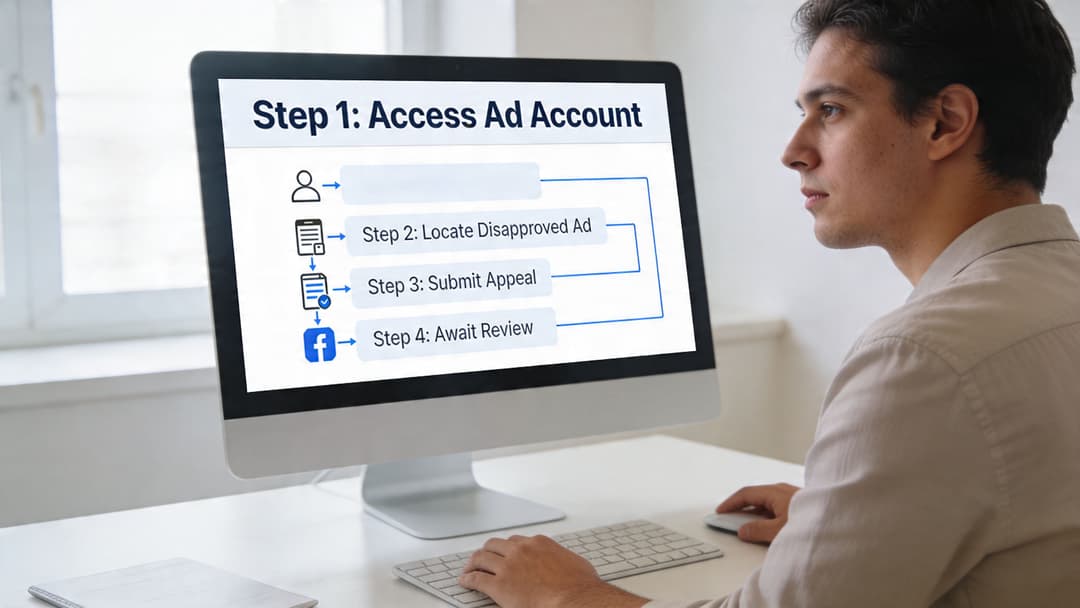
Step one isolate the actual trigger
Start with the rejection notice, but don’t stop there. Meta’s stated reason may be broad. Pull the exact ad version, screenshot the copy, review the creative, and click through the final URL on mobile and desktop.
Check these four surfaces in order:
- Ad copy
- Creative asset
- Landing page
- Audience and category settings
If the ad involves an age-restricted offer, review that first. According to Meta-related age verification reporting, since 2025 Meta has mandated age-gating for 25% more ad categories, and non-compliant campaigns can see up to 40% delivery drops. The same reporting notes that 12% of “adult” audiences include misclassified teens, which creates a messy enforcement gap for advertisers managing regulated products, as discussed in this age verification context.
Step two decide whether to edit or appeal
Not every rejection deserves an appeal.
Use this filter:
| Situation | Best move |
|---|---|
| Clear copy issue or bad creative spec | Edit and resubmit |
| Landing page mismatch or broken page element | Fix the page first |
| Regulated category misclassification | Correct settings, then request review |
| You believe the rejection is wrong | Appeal with evidence |
If the issue is obvious, don’t argue with the system. Fix it. Appeals work better when you can show the ad already complies.
Step three document before you touch anything
Most advertisers skip this and regret it later.
Save:
- Screenshots of the rejected ad
- The destination page as seen by a user
- Category settings and audience setup
- A note explaining why the ad complies or what you changed
This record matters if the rejection escalates into account review. It also helps your team stop repeating the same mistakes.
Write the appeal like a compliance analyst, not a frustrated buyer. Short, factual, specific.
Step four submit a clean appeal
A good appeal is boring. That’s exactly why it works.
Use a format like this:
- State the ad ID and rejection reason
- Explain the offer plainly
- Identify the exact policy concern
- Describe the fix or why the ad complies
- Request manual review
Example:
We reviewed Ad ID [insert ID] after receiving a rejection tied to restricted content. The ad promotes a legal age-restricted product and includes the appropriate audience restrictions and compliant landing page disclosures. We also verified that the destination reflects the same offer shown in the ad. We request a manual review.
Step five prevent the repeat offense
Appeals solve one incident. Process solves the pattern.
The strongest teams keep a pre-flight checklist that screens every ad for claim language, asset specs, page consistency, targeting risk, and regulated-category settings before upload. Some also use automation to catch repeat issues at scale. AdStellar AI is one example. It can generate bulk ad variations and run compliance-aware checks inside the creation workflow so risky copy or creatives can be revised before they hit Meta review.
That doesn’t replace judgment. It just keeps basic errors from consuming your buyers.
Conclusion: Adopt a Proactive Compliance Mindset
The advertisers who struggle most with fb ads policy usually treat it like an obstacle course. They push as hard as they can, get rejected, appeal, and repeat. That cycle wastes time and weakens account stability.
A better approach is compliant by design. Build the category checks first. Match the ad to the landing page. Keep creative specs clean. Treat targeting as a policy decision, not only a performance decision. When a rejection happens, diagnose it methodically and document the fix.
This mindset changes more than approval rates. It improves launch reliability, protects account health, and makes testing easier because fewer variables are contaminated by preventable compliance issues.
Policy discipline also creates speed. When your team isn’t rewriting ads at the last minute or dealing with avoidable reviews, you get more time for testing offers, messages, and creative angles that drive revenue.
Meta’s rules will keep evolving. That’s normal. The stable advantage isn’t memorizing every line in the policy center. It’s building a system that catches risk early and keeps your campaigns trustworthy from the first impression to the final click.
FAQ on Navigating Tricky Ad Policies
Some fb ads policy questions don’t have a satisfying yes or no. They have a safer answer and a riskier answer. Use the safer one when account stability matters.
| Question | Answer |
|---|---|
| Can I mention a customer problem directly in ad copy? | Usually, be careful. Don’t frame it in a way that implies you know the user’s personal condition, identity, finances, or health status. Focus on the product or solution instead of calling out the person. |
| Can I target people near a clinic, religious site, or other sensitive place? | That’s risky. Even if your copy is neutral, highly specific location logic around sensitive places can create serious compliance issues. Use broader geography and avoid any audience logic that feels invasive. |
| Are age-restricted products allowed? | Sometimes, yes. But they need proper age controls, compliant creative, and a landing page that clearly supports the restriction. Don’t assume one approved ad means every duplicated variation is safe. |
| If one ad is approved, can I reuse the same structure across accounts? | No. Approval is not a permanent precedent. Different accounts, landing pages, and audience setups can change the review outcome. |
| Can I appeal every rejection? | You can, but you shouldn’t. If the issue is obvious, fix the ad. Repeated weak appeals don’t help account trust. |
| Does Meta review only the ad itself? | No. Review can involve the ad copy, image or video, landing page, category settings, and audience configuration. |
| Is restricted content the same as prohibited content? | No. Prohibited content should not be advertised at all. Restricted content may run if it meets extra requirements. |
| Do technical specs really matter for policy? | Yes. Asset quality, aspect ratio, and display behavior can affect automated review because poor execution can signal low quality or deceptive presentation. |
| What’s the safest way to write benefit-driven copy? | Talk about the product, process, or offer. Avoid guaranteed outcomes, exaggerated promises, or language that sounds like a diagnosis or accusation directed at the user. |
| What should I do first after an ad is rejected? | Review the exact ad, the landing page, and the audience settings before editing anything. Isolate the cause, then decide whether to fix or appeal. |
If your team is producing lots of Meta variations and wants fewer preventable rejections, AdStellar AI is built for that workflow. It helps teams create campaigns in bulk, screen copy and creatives for policy risk before publishing, and keep launch processes more consistent across accounts.


