
You're staring at the same problem a lot of media buyers run into. The creative is decent, the offer is solid, and yet the campaign still feels too broad, too expensive, or too noisy because the audience spans markets that don't behave the same way. On Facebook, that usually isn't just a creative problem, it's a geography problem.
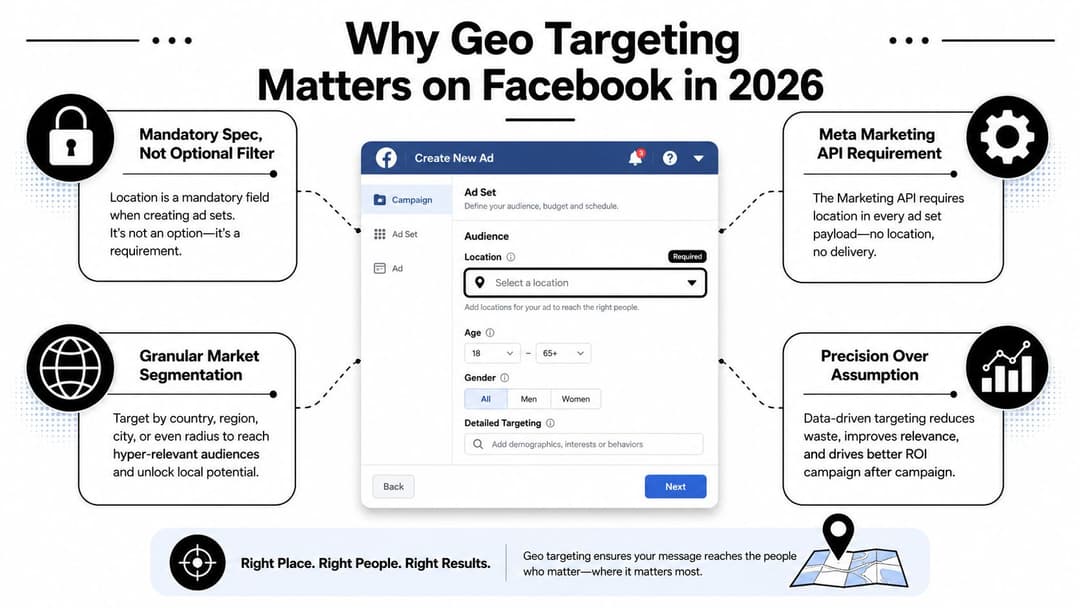
Geo targeting Facebook campaigns work best when location is treated like a core structural decision, not a last-minute filter. Meta's own Marketing API documentation makes that clear, because ad sets require at least one country unless you're using Custom Audiences, which means geography is built into the targeting spec itself, not bolted on later (Meta Marketing API basic targeting). For local stores, regional lead gen, and country-level acquisition alike, that structural choice shapes who can see the ad, how big the pool is, and how tightly the message matches the market.
If you already understand Facebook's auction and ranking dynamics, browse the Facebook algorithm guide for a useful companion read on how delivery and audience decisions interact.
Why Geo Targeting Matters on Facebook in 2026
A local offer can look weak for a simple reason, the campaign is being shown in places where the buyer intent does not match the business model. Meta treats geography as part of the targeting layer itself, so the first real campaign decision is often the market you are willing to reach, not the headline or the creative. The platform also requires at least one country in the ad set unless you are working through Custom Audiences, which makes location a structural setting rather than a cosmetic filter (Meta Marketing API basic targeting).
That changes how the entire account behaves. A campaign built for one city does not act like a national acquisition campaign, because the audience pool is different, the offer feels different, and the standard for good performance changes with it. Store-traffic, regional lead gen, and country-level demand capture can all run on Facebook, but each one asks the delivery system to solve a different problem.
Geography shapes delivery before optimization even starts
The common mistake is treating geo targeting as a clean-up step, something you only use to cut out bad markets. It does more than exclude places. It sets the market frame the algorithm works inside, which means a loose location can waste spend in areas with weak intent, while an overly tight one can choke delivery before the system has enough room to learn.
Practical rule: If the offer only works in a few places, define the market shape before you adjust placements, audiences, or budgets.
That choice affects reach, local message fit, and how much waste you are willing to accept. It also changes how you read the numbers later. A campaign can look expensive or underpowered when the issue is that the geography never matched the business model.
For a useful companion on how delivery systems behave once a campaign enters the auction, browse the Facebook algorithm guide. Geography sits inside that delivery process, not beside it.
If you are mapping this into a live build, start with a practical Facebook campaign setup workflow so the geo structure is in place before testing begins.
Setting Up Location Targeting in Ads Manager
The cleanest setup starts in Ads Manager inside the ad set, not at the ad level. Location targeting lives with the audience definition, so that's where the work belongs. You'll enter a country, then narrow into region, city, postal code, or a dropped pin, depending on how local the campaign needs to feel.
The hierarchy matters because each layer changes the size and shape of the pool. Country gives you broad coverage. Region is useful for state or province-level planning. City and postal code are where local service and storefront campaigns usually start to get useful. Pin-drop gives you the tightest proximity control, which is why it's the setting people reach for when they want store traffic or service-area coverage around a fixed point.
Use the right location field, then verify it on the map
Typing a place name is not the same thing as blindly trusting the text box. Always confirm the map result before you save. Location labels can be broader than people expect, and a “city” selection can map to a larger administrative area than the dense area you had in mind. That's where manual verification saves you from accidental spillover.
Meta's current layout also supports a dropped pin with a minimum radius of 1 mile, about 1.6 km according to independent agency guidance summarizing the platform's 2025 setup (agrowth.io on Facebook location targeting). That is tight enough for storefront campaigns, neighborhood-level service businesses, or local tests around physical inventory. It's also where overconfidence gets expensive, because the wrong pin placement can put spend into low-intent pockets.
Pick the mode before you save
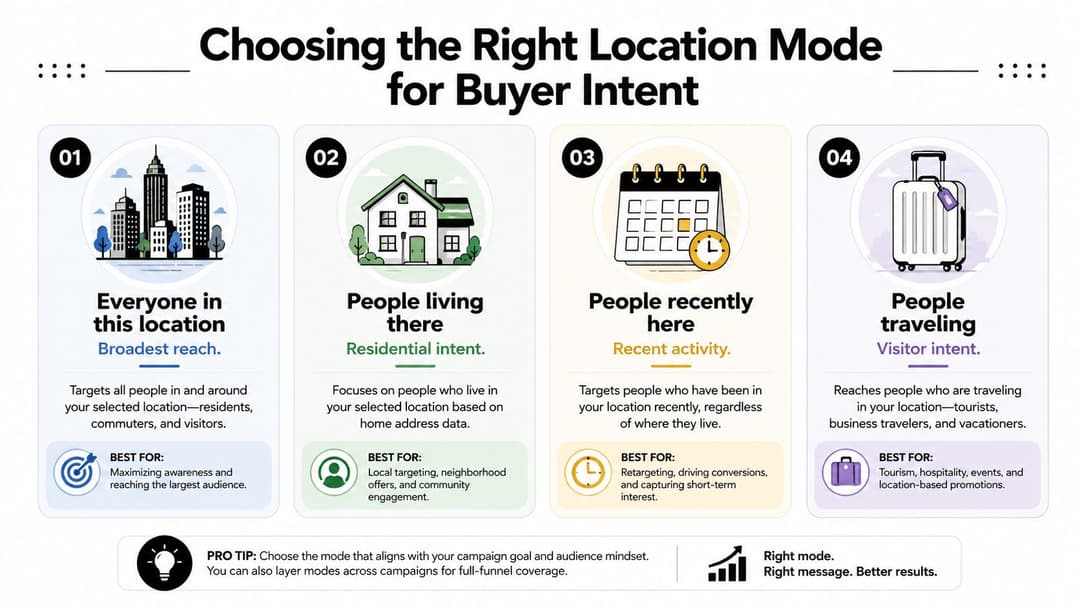
The other decision people leave on autopilot is the location mode. Facebook lets you choose between people in, people living in, people recently in, and people traveling in a place. Don't let the default choose for you. The mode is part of the audience definition, not a cosmetic extra.
For a practical setup walkthrough, the internal tutorial on how to structure a Facebook campaign in AdStellar is a useful reference point if you want to see how location fits into the broader build process. And if you're mapping local service territories, what Waymap location services offer is a helpful outside read for thinking about how proximity and place data get used in real campaigns.
If the campaign can't survive a wrong city selection, don't launch it until the map is right.
Choosing the Right Location Mode for Buyer Intent
Most campaigns don't fail because the geographic boundary is wrong. They fail because the location mode is wrong. Facebook lets you aim at people who live in a place, were recently there, or are traveling there, and those are not interchangeable audiences. A local service business, a hotel, and a commuter-heavy metro all need different assumptions.
The easiest way to think about it is intent. Residence suggests steady local need. Recent presence suggests movement, errands, travel, or event activity. Travel status suggests people who are passing through with a different buying context entirely. If you match the wrong mode to the objective, the ad can reach the right dot on the map and still miss the buyer.
Match the mode to the conversion path
A dental clinic usually cares about people who live nearby. A hotel cares more about people traveling in a location. A restaurant running a lunch offer may care about recent visitors, because that audience is closer to an immediate decision. That's the difference between audience eligibility and actual purchase likelihood.
Dense commuter markets make the wrong setting especially painful. A campaign aimed at residents can pick up people who are physically present but never become customers. A campaign aimed at travelers can bring in visitors who'll see the ad, like the relevance, and disappear after the trip. That's why local intent has to be defined before budget goes live.
Decision rule: If the service is recurring and local, favor residents. If the offer depends on mobility, events, or trips, test recent or traveling audiences first.
Compare the three practical use cases
For local-service campaigns, residents are usually the safest starting point. For tourism and hospitality, traveling audiences make more sense because the buying window is tied to movement. For DTC brands with local pickup or same-day fulfillment, recent visitors can be useful when the store visit itself is part of the conversion path.
This is also where creative has to match the mode. A national message can feel generic when the audience is tightly local. For more on how audience framing affects message construction, AdStellar's demographic ad targeting guide is a practical complement.
The rule is straightforward. Start with the buyer's relationship to the place, not with the place itself. That's how you avoid paying for visibility that never had a path to conversion.
Simulating Geofences When Meta Doesn't Support Them
A lot of marketers still assume Facebook should let them draw a clean polygon around a neighborhood or trade area. It doesn't work that way. The practical workaround is to simulate the boundary with overlapping inclusions and exclusions, then verify the result on the map before any spend goes out.
That matters most for service-area businesses, franchise systems, and local chains. They rarely want a whole city. They want the parts of a city that feed a store, and they want to avoid bleed from nearby areas that don't match the customer profile. The fix is usually less elegant than a true geofence, but it's usable when the account is structured carefully.
Build the shape with inclusion and exclusion
Start by including the broader market you want, then carve out the edges you don't want. For example, a franchise may include a city but exclude a neighboring postal code that overlaps with another store's trade area. A service business may include a metro region, then remove pockets where the travel time is too long for the offer.
The key is to treat the exclusion list as part of the strategy, not a cleanup task. If you don't control the edges, nearby locations will compete with each other and muddy the read on performance. That's especially true when several locations sit inside the same city.
Verify what Facebook actually accepted
Never trust the label alone. Facebook's naming can be broader than the place you had in mind, and the map is the only place where the actual shape becomes visible. A city selection that looks right in the box can still be too loose once it's rendered on the map.
For a multi-location retailer, the cleanest approach is separate audience pools for each store, then exclusions between stores so the markets don't overlap. For a franchise with three locations in one metro, that usually means building three distinct trade areas instead of one shared bucket. The more disciplined the map work, the less you rely on the algorithm to fix geographic leakage later.
If you want a more tactical walkthrough of local business setup patterns, how to advertise your business on Facebook is a useful reference. The big idea is to shape the market first, then let the ad system optimize inside that shape.
Building a Geo Test Matrix You Can Actually Trust
A good geo test isn't “let's see which city wins.” It's a controlled comparison. You pick comparable markets, keep the variables that matter constant, and only change the geography so the result can tell you something.
That means the creative stays fixed, the budget stays fixed, and the winning metric is defined before launch. If you're judging CPL, CPA, ROAS, or store-visit behavior, decide that upfront. Otherwise the test turns into a post-hoc argument about which market “felt stronger,” which is usually code for not having enough structure to trust the data.
Design the matrix like an experiment, not a hunch
Choose two or three markets that are similar enough to compare. Don't mix a dense core city with a scattered suburban region and pretend the results are clean. Then run the same offer, same format, and same naming convention across each cell so the analysis later doesn't become a spreadsheet cleanup project.
Use a log for every cell:
- Market name: Keep the exact city, region, or postal set consistent.
- Location mode: Record whether the ad set used residents, recent visitors, or travelers.
- Creative ID: Note the exact ad or variation, not just the concept.
- Budget assignment: Keep it identical across cells when you want a fair read.
- Primary success metric: Choose one real winner criterion and stick to it.
For more on sizing the test so you're not reading noise as signal, AdStellar's sample-size guide is a practical companion.
Decide how much automation you want in the test
If you use Advantage+ or broader audience expansion, don't let it blur the question. The test should still tell you whether geo control is adding value or whether Meta's broader delivery is doing the heavy lifting. That distinction matters when you move from one market to several.
Testing rule: If you can't explain why one cell won, the matrix wasn't tight enough.
Common Geo Targeting Pitfalls and How to Fix Them
The fastest way to debug a weak geo campaign is to stop blaming the bid and inspect the boundary. Most failures come from a small number of recurring setup errors, and each one has a pretty clear symptom.
If reach is weirdly low in a market that should have volume, the label may be broader than you thought. If leads are coming from the wrong side of town, an exclusion probably missed a nearby pocket. If the ads are getting clicked but not converting, the location mode may be attracting the wrong kind of local traffic.
Use a quick diagnosis before you change everything
- Broader location labels than expected. Symptom, the campaign looks local on paper but behaves like a regional set. Cause, the map definition is wider than the name suggests. Fix, verify the exact boundary on the map before relaunching.
- Accidental exclusions killing reach. Symptom, one priority market barely spends. Cause, an exclusion list overlaps with the main inclusion. Fix, audit inclusion and exclusion lists together, not separately.
- Wrong location mode pulling irrelevant users. Symptom, commuters or visitors show up in the results but don't convert. Cause, the mode doesn't match the buying context. Fix, align the mode with resident, recent, or travel intent.
- Hyper-local geo with national creative. Symptom, the ad gets attention but feels generic. Cause, the copy doesn't reflect local context. Fix, make the headline, offer, or proof point specific to the market.
The point isn't to overcomplicate the account. It's to isolate the source of mismatch before you touch the next variable. A lot of teams pause campaigns that were fine, just misconfigured at the boundary.
Scaling Geo Winners With AI Launch Workflows
Once a geo setup works, the question changes from “Can we make this convert?” to “How do we repeat it without rebuilding everything by hand?” That's where an AI-assisted launch workflow becomes useful. It takes the winning geography, creative, and audience pattern, then reproduces the structure across new markets without making the team rebuild each ad set one by one.
That matters for both DTC and B2B accounts. A strong local offer in one region often needs a different audience boundary, a different creative cue, or a different message frame in the next region. Manual cloning gets tedious fast, especially when you're testing multiple cities or store territories at once.
Reuse the winning structure, not just the ad
The clean scaling pattern is simple. Keep the proven framework, then swap the market inputs. That can mean a new city, a new postal cluster, a different resident-versus-travel mode, or a fresh local headline while the core offer stays the same.
An AI launch workflow can help centralize that process by pushing proven combinations into new geographies, while keeping performance breakdowns visible enough to see which location is carrying the result. For teams that want that kind of workflow inside one system, AdStellar AI is one option that connects to Meta Ads Manager, ingests historical performance, and uses launch automation to assemble new campaigns from winners.
Let the system surface the next move
The scaling advantage isn't just speed. It's consistency. When the same campaign structure is launched across markets with clean naming and unified reporting, you can see which geography deserves more budget and which one is only absorbing spend. That makes budget shifts a response to performance, not a guess.
AdStellar's AI-powered Meta ads guide is a useful read if you want to see how automation fits into repeated launches instead of isolated tests.
The practical end state is a workflow where geo testing feeds scaling, scaling feeds reporting, and reporting feeds the next launch. That's how media buyers stop rebuilding the same successful pattern from scratch every time a new market opens up.
If you're ready to turn geo targeting on Facebook into a repeatable launch system, start by auditing one live ad set, tightening the location mode, and mapping the cleanest include-exclude structure you can defend. Then use that winning setup as the template for your next market, and if you want to automate the handoff from test to scale, A CTA for AdStellar AI.