Launch day often looks worse than anyone admits.
You've got product shots in one folder, three half-finished videos in another, a spreadsheet full of audience ideas, and an Ads Manager account cluttered with duplicates named things like “Test 4 final” and “Test 4 final v2.” You're trying to remember which headline goes with which hook, whether the pixel is firing, and why the same audience is showing up in five ad sets. Nothing feels clean. Everything feels urgent.
That's the actual starting point for many teams learning how to create Facebook ads. Not a blank canvas. A messy account, limited time, and pressure to get results fast.
The problem isn't usually effort. It's the lack of a system. Plenty of marketers can build one decent campaign. Fewer can build an account structure that keeps producing winners without turning every launch into manual labor.
Beyond the Boost Button From Chaos to Clarity
The “Boost Post” button is attractive for one reason. It removes friction. You click a few options, add a budget, and Meta does the rest. That convenience is exactly why it causes so many problems later.
Boosting skips the discipline that serious advertisers need. It blurs campaign purpose, weakens measurement, and turns testing into guesswork. A boosted post might get reach. It might even get clicks. But when you need repeatable customer acquisition, it won't give you the control required to diagnose what's working.
What chaos looks like in practice
A familiar pattern shows up in accounts that were built without structure:
- Campaigns mix goals: One campaign tries to prospect, retarget, and recover abandoned carts at the same time.
- Naming breaks down: Nobody can tell the difference between experiments, evergreen ads, and old tests.
- Creative testing becomes fake testing: Teams change three variables at once, then claim they found a winner.
- Scaling is manual and fragile: Every new variation means more duplication, more QA, and more room for error.
That's where most “how to create Facebook ads” advice falls short. It teaches the interface, not the operating model.
Practical rule: If you can't explain why a campaign exists in one sentence, the structure is already too muddy.
The fix isn't more hustle inside Ads Manager. It's a cleaner framework. Strong Meta accounts separate setup from testing, testing from scaling, and creative production from audience decisions. They also treat the ad itself as only one piece of the system. Your landing page, offer, tracking, and post-click path matter just as much. If your ad clicks through to a weak destination, performance stalls no matter how polished the creative looks. That's also why brands exploring distribution options like a sponsored post on Facebook still need disciplined campaign architecture behind the scenes.
The shift that actually matters
Manual campaign building still has a place. It's useful when you're validating a new offer, checking audience quality, or trying to isolate a variable. But once volume grows, manual workflows become a bottleneck.
The progression looks like this:
- Build a stable foundation
- Create a clean testing architecture
- Identify repeatable creative and audience patterns
- Automate variation production and scaling where it makes sense
That's how chaos turns into clarity. Not with one perfect ad, but with a system that keeps finding the next good one.
Laying the Foundation for Profitable Ads
Monday morning is a bad time to learn your Purchase event stopped firing on Friday. The ads kept spending, Meta kept optimizing, and the account spent the weekend learning from broken signals. That is how profitable campaigns turn into expensive confusion.

Get tracking right before you touch creative
Strong Meta performance starts with signal quality. If Pixel, Conversions API, event prioritization, and domain setup are sloppy, every test after that gets harder to trust. Creative can only do so much when the platform is optimizing against incomplete or duplicated conversion data.
The setup standard is straightforward:
- Run Pixel and CAPI together: Send the same high-value events from browser and server.
- Deduplicate correctly: Use consistent event IDs so Meta can recognize one conversion as one conversion.
- Review Event Match Quality: Low match quality usually means weaker attribution and less stable optimization.
- Prioritize real business events: Purchase, qualified lead, complete registration, or another event tied to revenue. Not vanity actions.
Meta explains the mechanics in its documentation on Conversions API setup and deduplication and best practices for event matching in Events Manager.
This work looks technical because it is technical. It also decides whether the account can scale later with automation. AI-driven bidding and budget systems are only as good as the signals feeding them.
I check tracking before I judge ads.
A simple QA routine prevents a lot of waste. Fire test events. Confirm the right domain is verified. Check that prioritized web events match the actual conversion path. Make sure the event names and parameters are consistent across browser and server. If a team cannot trust attribution at the event level, it should not trust performance conclusions at the campaign level either.
Handle business setup like account infrastructure
Meta is less forgiving than advertisers assume. Access problems, unverified assets, and messy ownership usually show up at the worst time, which is right when spend is increasing or a page gets restricted.
Clean up the account before that happens:
- Verify the business
- Claim and configure the domain
- Confirm page ownership and ad account access
- Assign roles with clear permissions
- Set payment methods and alerting controls
Keep the Facebook Page, Instagram account, pixel, domain, and ad account under the same business structure. That reduces friction when you need approvals, handoffs, or troubleshooting. If the Page setup still needs work, this guide on creating a Facebook Business Page for ads and brand management is a useful reference.
Pick objectives that train the system for the outcome you want
Traffic campaigns have a place. I still use them for cheap click acquisition to top up retargeting pools, test hooks, or validate whether an offer gets any response at all. But traffic is a poor default for brands that care about purchases or qualified leads. It trains delivery toward people who click, not people who finish the job.
Choose the objective based on the action that makes the business money.
| Business goal | Better objective |
|---|---|
| Product sales | Conversions |
| Qualified lead capture | Conversions or leads |
| Content promotion | Traffic or engagement |
| Warm audience reactivation | Conversions |
That choice matters more once you start building a scalable system. Manual setup can tolerate a few rough edges because a buyer is watching every detail. Automated scaling cannot. If the account is trained on weak objectives and muddy events, the platform will find more of the wrong users faster.
The post-click path still decides whether that optimization pays off. Strong media buying cannot rescue a weak page, especially in lead generation. Teams running lead gen should study ReachInbox's B2B landing page guide because the ad and landing page have to carry the same promise, friction level, and qualification logic.
Profitable Facebook ads start with a system that can produce clean feedback. Get the tracking right. Get the business assets under control. Choose objectives tied to revenue. Then the account has a chance to learn fast instead of learning wrong.
Architecting Your Campaign for Testing and Scale
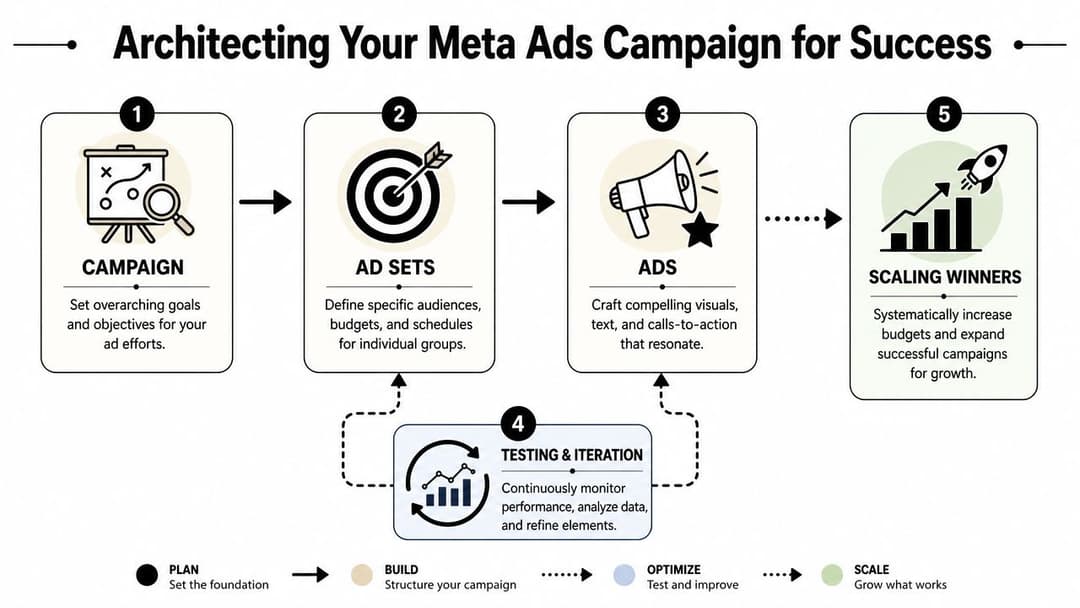
Most Meta accounts don't fail because the ads are terrible. They fail because the structure makes learning too messy. When prospecting, retargeting, and creative experiments are jammed together, you can't tell whether performance changes came from the audience, the offer, or the delivery setup.
Treat campaign structure like account infrastructure
A useful account usually separates activity into three buckets:
- Prospecting: Cold audiences, broader discovery, new customer acquisition
- Retargeting: Site visitors, engaged viewers, cart visitors, lead form openers
- Re-engagement or retention: Existing customers, lapsed buyers, cross-sell and repeat purchase
That separation does two things. First, it reduces audience overlap. Second, it makes diagnosis faster. If prospecting tanks while retargeting stays healthy, the issue probably isn't your checkout flow. It's more likely audience quality or creative fatigue at the top of funnel.
For teams building at scale, a documented framework matters more than clever naming. A campaign should answer one question cleanly. An ad set should isolate one targeting logic. An ad should test one clear message angle at a time. That's the operating discipline behind solid campaign architecture for Meta ads.
Use ABO when you need clean tests and CBO when you need efficient distribution
Teams often overcomplicate things. The decision is usually simpler than they make it.
Use ABO when you need control. It works well during testing because each ad set gets its own budget, which makes it easier to compare audiences or message angles without Meta starving one variant too early.
Use CBO when you've already found enough signal to trust Meta's distribution. At that point, the platform can push spend toward stronger ad sets faster than a person adjusting budgets manually every few hours.
A practical split looks like this:
| Situation | Better fit |
|---|---|
| New audience test | ABO |
| New offer validation | ABO |
| Scaling proven ad sets inside one theme | CBO |
| Mixed funnel stages in one campaign | Usually avoid it |
Operator mindset: Testing needs separation. Scaling needs efficiency. Don't ask one campaign structure to do both jobs well.
Keep the workflow simple enough to survive growth
As ad volume increases, complexity sneaks in through duplication. More clients, more products, more markets, more variants. Suddenly the account is technically organized but impossible to maintain.
That's the point where some brands build internal process, and others look at outsourcing Facebook ad management for execution support. Either path can work. What matters is that somebody owns the system, not just the launches.
A strong architecture usually includes:
- A naming convention that survives handoffs
- Separate campaigns for different funnel stages
- A clear rule for when a test graduates into scaling
- A process for retiring stale ads instead of piling on duplicates
The account should make good decisions easier. If every launch requires heroics, the structure is wrong.
Finding Your Ideal Customer on Meta
A campaign launches with clean creative, a sensible budget, and a conversion objective. Two days later, CPMs are high, CTR is average, and purchases are scattered. The first reaction is usually to keep tightening targeting. In practice, that often makes the account less stable, not more accurate.

Meta targeting works best when each audience has a clear job in the system. Prospecting should find new buyers. Retargeting should convert existing interest. Seed audiences should feed expansion. Once those roles get blurred, it becomes hard to tell whether performance came from targeting, creative, offer strength, or simple audience overlap.
Start with the three audience types that actually matter
Core audiences are for cold acquisition. Use them to test broad demographics, interests, or behaviors without turning the ad set into a pile of guesses. For a premium skincare brand, that usually means starting with one or two relevant interest themes, or going broad, instead of stacking ten filters that crush delivery.
Custom audiences are your warm pool. Site visitors, email subscribers, video viewers, add-to-cart users, and past customers belong here. These audiences help you separate demand capture from demand creation, which matters if you want clean reporting and cleaner scaling decisions.
Lookalike audiences sit in the middle. They are often useful once the account has enough first-party data to seed them properly. A purchase-based lookalike built from recent, high-quality customer data tends to outperform a lookalike built from a messy list of old leads.
The trade-off is simple. More control can give you cleaner tests, but too much constraint can choke delivery before Meta has enough room to optimize.
Build ad sets around one audience idea at a time
Accounts either stay readable or become chaos.
If one ad set targets broad women 25 to 54, recent site visitors, and a 2% purchaser lookalike all at once, you do not have a targeting strategy. You have blended traffic and weak diagnostic value. Keep each ad set centered on one logic so the result holds meaning.
A practical testing stack looks like this:
- Broad prospecting ad set: Minimal constraints, conversion optimized
- Interest ad set: One clear theme, not a stack of micro-interests
- Lookalike ad set: Seeded from purchasers, leads, or high-intent users
- Retargeting ad set: Visitors or engaged users, separated by recency when volume allows
That structure does two things. It gives Meta room to find converters, and it gives you a clean path from manual audience tests to automated scaling.
What usually hurts performance
Old targeting habits still cause a lot of wasted spend:
- Excessive layering: Narrowing by age, gender, interests, and behaviors can reduce volume so much that the system never stabilizes
- Audience mixing: Combining warm and cold users in one ad set makes CPA and conversion rate harder to interpret
- Outdated assumptions: An audience that worked six months ago may now be too small, too expensive, or irrelevant
- Ignoring overlap: Multiple ad sets chasing the same people creates competition inside your own account
Broad targeting has earned more trust over the last few years for a reason. Meta now does more of the matching work that media buyers used to force manually. That does not mean targeting is dead. It means targeting has shifted from micromanaging every filter to feeding the platform better inputs.
If you need stronger ad concepts to support those audience tests, this guide on designing Facebook ads for performance is a useful companion.
Here's a useful walkthrough if you want to see audience setup inside the platform before you build.
Match targeting depth to account maturity
New accounts usually need restraint. If pixel data is thin and the customer file is weak, broad prospecting and simple interest tests are usually enough. Trying to simulate sophistication with tiny audience slices often slows learning and raises costs.
Mature accounts can get more precise, but only where the data justifies it. Strong customer lists, consistent purchase volume, and clean event tracking make custom audiences and lookalikes far more useful. At that stage, the goal is not to find a magic audience. The goal is to build a repeatable audience system, test it cleanly, then let automation push spend toward the segments that keep converting.
Crafting Creatives and Copy That Convert
You launch a campaign on Monday with a clean setup, solid audience logic, and a reasonable bid strategy. By Friday, CPA is drifting up, CTR is flattening, and nothing changed except the ad people keep seeing. That is how a lot of Meta accounts stall. The media buying was fine. The creative system was weak.
Creative drives the pace of testing and the ceiling on scale. In a healthy account, ads are not one-off assets a designer ships and the buyer hopes will last. They are inputs in a repeatable testing system. The job is to produce enough variation to give Meta fresh conversion signals without creating random noise.
Creative fatigue is an operating problem
Accounts burn out creative faster than internal teams expect, especially once spend starts climbing. Meta has even published guidance on ad fatigue and recommends refreshing creative when frequency rises and performance starts to slip. Their own best-practice documentation on ad fatigue, frequency, and creative rotation is worth reviewing if your account keeps fading after a strong start.
The practical takeaway is simple. Build creative in batches, not singles.
A useful rotation set usually includes:
- A new hook: same offer, different first line or opening scene
- A visual change: founder video, UGC clip, product demo, static image
- A CTA adjustment: learn more, shop now, get offer, start free
- A format change: static, carousel, short video, vertical cut
Good testing isolates variables. If the hook, visual, format, and offer all change at once, the winner gives you no clear signal you can scale.
Build for the placement people actually see
A feed ad and a Reel should not be the same asset with different cropping. Meta supports that shortcut. Performance usually does not.
Meta's own design recommendations call for square or near-square creative for feed placements and full-screen vertical for Stories and Reels. Their ad guide also recommends keeping key text and branding inside safe areas so interface elements do not cover the message. You can verify the current specs in Meta's official ad image and video design requirements.
Here's the production setup that keeps teams out of trouble:
| Placement | Aspect Ratio | Recommended Resolution | Copy Guidance |
|---|---|---|---|
| Feed | 1:1 | 1080 x 1080 | Front-load the hook and keep text tight |
| Stories | 9:16 | 1080 x 1920 | Keep the first frame clear and easy to read |
| Reels | 9:16 | 1080 x 1920 | Start fast, assume sound is optional |
Small formatting mistakes cost more than teams think. Cropped product shots, buried headlines, and text covered by UI all reduce the odds that the first impression turns into a click. If your team needs a sharper visual workflow, this guide to designing Facebook ads for performance is useful because it focuses on production choices that affect delivery and response.
Copy still wins or loses in the first seconds
Frameworks help, but only if the offer is clear.
PAS works well for products tied to an obvious frustration.
AIDA works better when the buyer needs context before acting.
The stronger rule is more basic than either framework. Lead with the outcome or pain point. Show the product in use. Answer the objection that blocks the click. Ask for one action.
That usually looks like this:
- Call out the problem or desired result
- Show the product in a real context
- Remove one objection
- Use one clear CTA
Write for distracted people, not for internal approval. Short copy often beats clever copy. Direct claims usually beat brand slogans. And if the offer is weak, no copy structure will rescue it.
The accounts that scale cleanly treat creative like infrastructure. They keep a backlog of hooks, formats, and angles ready to test, then let performance data decide what earns more spend. That is how you move from manual ad creation to a system Meta's automation can work with.
Managing Budgets Bidding and Measurement
A campaign gets its first few conversions, the CPA looks promising, and someone bumps the budget by 40% before lunch. By tomorrow, costs spike, delivery shifts, and the account is back in diagnosis mode. That cycle is common because budget, bidding, and measurement get treated as separate tasks. In practice, they are one system.
Meta will spend whatever freedom you give it. Your job is to set guardrails that match margin, cash flow, and the amount of conversion data the account can generate.
Read performance in sequence, not in isolation
Start with the path that breaks first.
CTR shows whether the ad earns attention. If people are not clicking, the problem usually sits in the hook, the first frame, or audience fit. WordStream's Facebook ad benchmarks by industry put average CTR at 0.90% and average CPC at $0.43 across industries. Those are reference points, not targets. If CTR is stuck under 0.5% for several thousand impressions, I look at creative before I blame bidding.
CPC shows what that attention costs. Rising CPC can mean heavier competition, but it also shows up when the ad loses relevance and Meta has to work harder to find clicks.
CPA shows whether traffic is turning into a business result at an acceptable cost. WordStream's Facebook conversion benchmarks by campaign objective reported an average CPA of $18.68 for conversion-focused campaigns across industries. Useful context, but your benchmark is your contribution margin after shipping, discounts, and repeat purchase behavior.
A simple diagnostic view keeps teams from jumping to the wrong fix:
| Metric | What it usually signals |
|---|---|
| Low CTR | Weak hook, poor audience fit, or creative fatigue |
| High CPC | Expensive auctions, weak relevance, or low click appeal |
| High CPA with decent CTR | Offer, landing page, form, or checkout problem |
| Stable CPA with stable volume | Budget can increase carefully |
Keep bidding simple until the account has signal
Complex bid controls get too much attention. Clean inputs matter more.
Highest Volume is the default for a reason. It gives Meta room to find conversions while the account is still building signal. For newer campaigns or fresh creative tests, that usually beats trying to force efficiency too early.
Cost Per Result Goal makes sense once you know your numbers and have enough conversion volume to support tighter control. Set the target too low and delivery slows down fast. The campaign may look disciplined while it gradually stops spending.
The trade-off is straightforward:
- More control protects efficiency only if the target reflects real auction conditions
- Less control usually finds volume faster, but it needs closer monitoring on spend quality
That is also why scaling works better as a system than a series of manual reactions. Teams using AI-assisted workflows for testing and optimization can standardize those guardrails much faster. This breakdown of how to use AI for Facebook ads is useful if you want to connect bidding decisions to a broader testing and scaling process.
Raise budgets after stability shows up
Good advertisers do not scale off one strong day. They scale after the account proves it can hold efficiency through normal volatility.
Watch CPM for context, not panic. WordStream's Meta advertising cost benchmark data by industry lists an average CPM of $16.12 across industries. A rising CPM does not automatically mean the campaign is deteriorating. It may reflect seasonality, stronger competition, or a broader audience mix. The important question is whether CTR, CPA, and conversion volume remain healthy enough to absorb that higher cost.
A practical rule works well here. Increase budgets only when CPA is stable, conversion volume is real, and the account has enough recent data for Meta to keep learning instead of resetting under pressure.
That is how budget management stops being a guessing game and starts acting like infrastructure for scale.
From Manual Tweaks to AI-Powered Scaling
Manual scaling breaks sooner than typically expected. Duplicating ad sets, changing names, swapping one image, pushing a few more variants live, then checking results in a spreadsheet might work at small volume. It falls apart once the account needs serious creative breadth.
The hard part isn't launching five ads. It's launching dozens or hundreds of meaningful combinations without wrecking learnings, overlapping audiences, or flooding the account with near-duplicates.
Manual bulk testing has a real ceiling
That ceiling shows up clearly in the data. 78% of agencies attempting bulk manual ad variation tests see a 15-20% drop in ROAS due to audience fatigue and algorithmic confusion (bulk variation benchmark).
That lines up with what experienced buyers already know. More variations don't automatically produce better outcomes. Poorly managed variation volume just creates noise.
Manual bulk testing usually fails for three reasons:
- The account structure can't isolate learning cleanly
- Teams launch too many similar variants without deduplication logic
- Reporting becomes slower than the pace of testing
There's also a second shift happening at the high end of the market. Recent independent research says 65% of top-performing DTC brands use historical data patterns to pre-rank creative angles before launch, reducing CPL by 22% compared to reactive testing (predictive creative research reference). That matters because it changes the job. The goal isn't just to test faster. It's to test smarter.
What AI changes in the workflow
Automation starts making practical sense. Not as a replacement for strategy, but as a way to remove repetitive production work and improve decision speed.
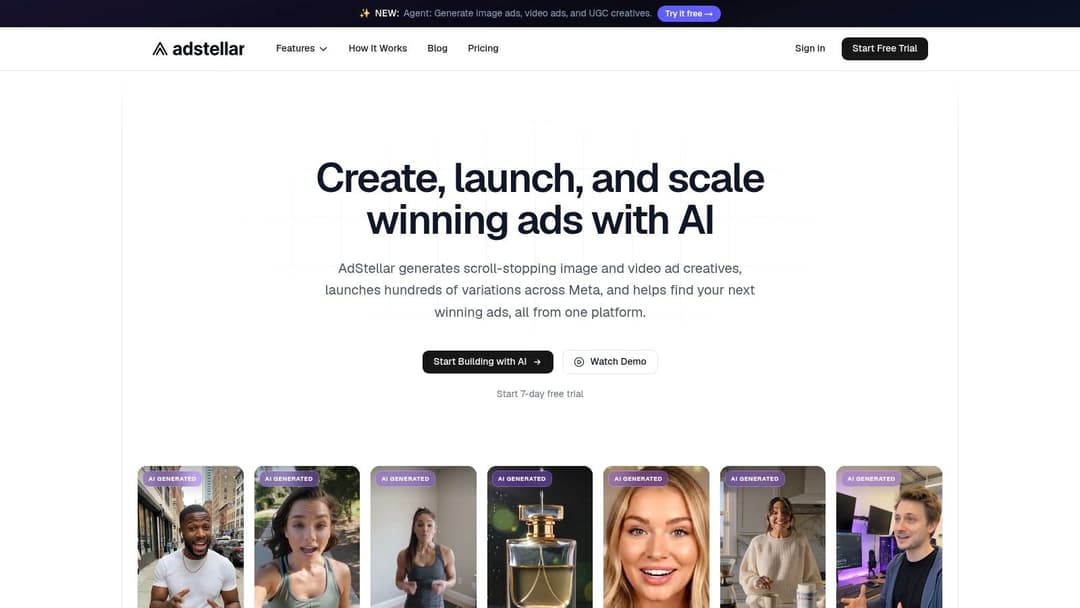
A tool like how to use AI for Facebook ads becomes useful when your team wants to generate many creative, copy, and audience combinations from historical patterns instead of building each variation by hand. One example is AdStellar AI, which connects with Meta Ads Manager, ingests past performance, and helps teams generate, launch, and analyze large batches of ad variations in one workflow.
That kind of setup is especially useful when you already know your variables:
- A set of offers that convert
- A library of proven hooks
- Audience pools worth revisiting
- A business metric that matters, like CPA, CPL, or ROAS
At that point, AI isn't “doing marketing.” It's handling the heavy lifting around production, sorting, and repeated testing patterns so the buyer can focus on judgment.
The strongest operators still do the same core job. They define the offer, decide what deserves testing, and know when a result is a real signal versus random noise. The difference is that they don't waste hours building and naming combinations the machine can assemble more reliably.
If your team is stuck between messy manual launches and the need to test at scale, AdStellar AI is worth evaluating. It's built for Meta advertisers who need to generate large batches of creative, copy, and audience combinations, launch them quickly, and learn from performance data without turning campaign setup into a spreadsheet job.