You're probably toggling between Shopify, Meta Ads Manager, Klaviyo, a repricer, and a spreadsheet right now, trying to keep campaigns moving while inventory, creative, and customer messages all demand attention at once. The frustrating part isn't that any one tool is hard to use. It's that the work keeps bouncing between systems, and every handoff creates delay, mistakes, or a missed follow-up.
That's where ecommerce automation comes in. In plain English, it's software that watches for events in your store, evaluates a rule or model, then takes the next step automatically, so your team doesn't have to babysit every workflow. The useful mental shift is this, automation isn't just about saving time, it's about building a decision layer that helps growth teams protect ROAS, lift AOV, and improve repeat purchase rate without adding more manual checks.
A Day in the Life of an Automated Ecommerce Store
Monday starts with the same scramble. A growth marketer checks spend in Meta, opens Klaviyo to see if the abandoned cart flow is still firing, glances at Shopify for stock levels, and then drops into a spreadsheet to copy the same numbers into a weekly update. By lunch, someone on the team has already asked whether a top SKU should be paused, whether the winning creative needs more budget, and whether the support inbox is getting slammed because a promotion went live too early.
That routine is exactly why automation moved from a nice-to-have to the operating model for modern ecommerce. Thunderbit reports that 77.2% of ecommerce professionals use AI and automation tools daily, up from 69.3% in 2024, and 42.28% juggle six or more ecommerce apps every day, which is a clear sign that the stack is no longer one tool doing one job, it's a connected system across merchandising, marketing, service, and operations. The same source projects the retail automation market at $31.21 billion in 2026 and marketing automation software for ecommerce at $8.14 billion in 2026 (Thunderbit's ecommerce automation adoption statistics).
The working definition
Here's the simplest answer to what is ecommerce automation. It's a set of workflows that detect a store event, decide what should happen next, and execute that action without a person manually pushing every button. That could be an abandoned cart reminder, a low-stock alert, a reorder request, a price update, or a campaign change.
Practical rule: if your team keeps checking the same state twice a day, that's usually a candidate for automation.
The important part isn't the tool count. It's whether the system reduces wasted motion and helps your team make better decisions faster. If the only benefit is fewer clicks, the workflow is probably too shallow. If it improves a revenue metric your team already owns, it starts to matter.
How Ecommerce Automation Actually Works
The cleanest way to understand the mechanic is to think about a thermostat. It doesn't guess, and it doesn't need a human to stand in the room and decide whether the heat should turn on. It watches for a trigger, checks a condition, and then takes an action. Ecommerce automation follows the same pattern.
Trigger, condition, action
A customer adds an item to cart, that's the trigger. The system then checks a condition, maybe the cart value is over a threshold, the buyer is a repeat customer, or the product belongs to a high-margin category. After that, it executes an action, such as sending a reminder email, applying a discount code, or routing the lead to a different segment. BigCommerce describes this as an event-driven workflow system, where triggers and actions are chained together so routine decisions run continuously without human intervention (BigCommerce on ecommerce automation).
That same logic scales into multi-step flows. A low-stock SKU can trigger a supplier reorder, a Slack alert to ops, and a temporary change in campaign focus. A post-purchase event can trigger an order confirmation, a shipping update, and a review request, all from one customer action. The value comes from turning repeated checks into automatic decisions, not from adding more software for its own sake.
Scheduled automation and event-driven automation
Teams often confuse these two, but they're not the same. Scheduled automation runs at a fixed time, like a weekly report or a campaign launch at 9 a.m. Event-driven automation runs when something happens, like a cart abandonment, a failed payment, or a stock threshold breach. Most ecommerce value comes from event-driven logic because it reacts in real time instead of waiting for the next scheduled run.
Automation works best when the business rule is simple enough to trust, but urgent enough that a delay costs money.
This is also why the system is more than task execution. It's a decision layer. That matters when you compare basic rules to AI, because a workflow that merely fires on time is useful, but a workflow that chooses the right next step under changing conditions is far more valuable.
For teams building content or offers around that flow, a resource like generate promo videos automatically can sit alongside the rest of the stack, especially when creative production needs to keep pace with campaign testing. If you're thinking about the broader marketing system, the logic is similar to the workflow framing used in digital marketing automation.
The Five Pillars of an Automated Ecommerce Stack
Most stores don't automate everything first. They automate the places where humans waste the most time or where manual work leaks revenue. In practice, five pillars show up again and again, and each one replaces a different kind of repetitive labor.
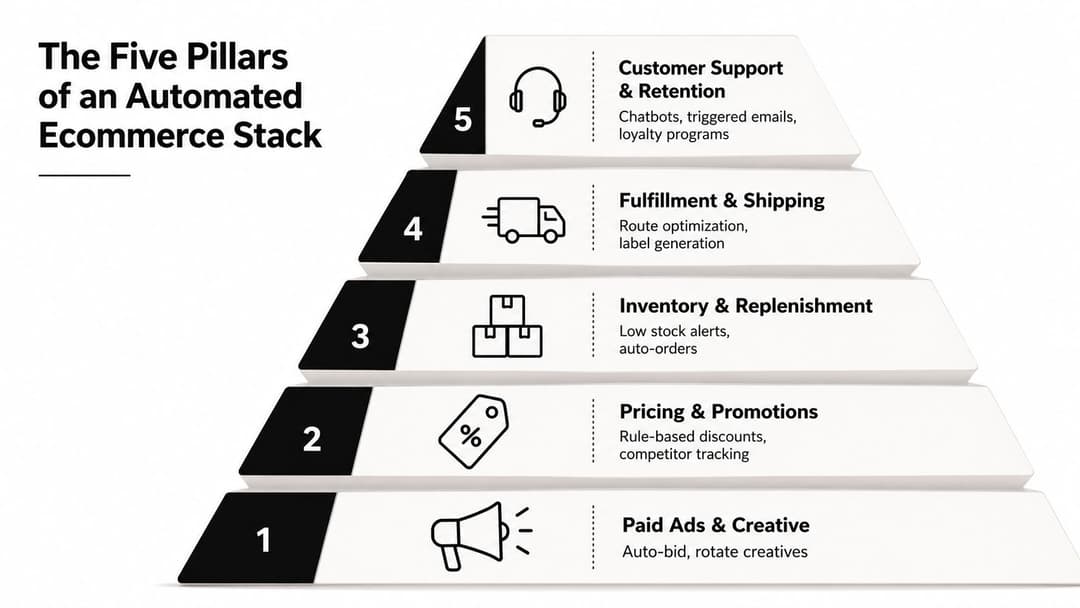
Paid ads and creative production
This is usually where growth teams feel the pain first. People are manually building variants, updating budgets, and guessing which creative deserves more spend. Tools in this bucket automate creative generation, campaign assembly, and winner selection, which is why platforms such as AdStellar AI can fit into a paid social workflow alongside Meta, not replace it. The work it removes is repetitive campaign setup, and the metric it aims at is ROAS, with CPA close behind.
If you want a broader reference point for how AI-based orchestration is being discussed in ecommerce, the agentic side of the conversation is also covered in AI agents for ecommerce. For a hands-on operational view of campaign infrastructure, Meta advertising technology stack is the kind of reading that helps teams understand where automation fits inside the ads system.
Pricing and promotions
Manual discounting usually means someone is checking competitor moves, deciding whether a promotion should apply, and updating the storefront in more than one place. Automation replaces the back-and-forth with rules that can protect margin while still moving inventory. The KPI here is usually conversion rate or AOV, depending on whether the goal is to clear stock, raise basket size, or keep price integrity.
Inventory and replenishment
This is the less glamorous pillar, but it saves teams from overselling, stockouts, and frantic last-minute fixes. A low-stock alert can trigger a reorder, flag an item on-site, or pause paid promotion before a SKU runs dry. The metric to watch is stockout rate, along with how often inventory accuracy breaks down between systems.
Fulfillment and shipping
Once the order lands, automation can route labels, pick the right carrier, and keep customers informed without a person sending every update. The manual task it replaces is status checking and label creation. The operational metric is usually order accuracy, because even small mistakes here create support tickets and damage trust.
Customer support and retention
Triggered emails, SMS, push notifications, and chatbots keep the customer journey moving after the purchase. These automations reduce repetitive service work and help teams send the right follow-up at the right moment. The revenue metric is repeat purchase rate and, when you track it more broadly, lifecycle revenue.
The right question isn't “which tool is most advanced.” It's “which pillar has the biggest leak right now, and which metric proves the leak closed?”
Rule-Based Automation vs AI-Driven Automation
A lot of guides blur these together, but they solve different problems. Rule-based automation is deterministic. If cart value is above a threshold, send this email. If stock falls below a level, trigger a reorder. If a customer hasn't purchased in 30 days, enroll them in a win-back sequence. It's fast, predictable, and easy to audit.
Where rules win
Rules are strongest when you need speed, compliance, and repeatability. They're easier to explain to a teammate, easier to test, and easier to keep stable across a busy stack. A standard cart recovery email with a fixed offer is a good example, because the logic is simple and the cost is predictable.
Where AI wins
AI becomes useful when the decision depends on context that changes from user to user. CommercePundit's 2026 coverage frames the frontier as personalized recommendations, dynamic pricing, demand forecasting, AI-powered search, and customer-service chatbots, which is a good way to think about the difference between automating a task and automating a decision under uncertainty (CommercePundit on AI automation for ecommerce). In plain language, AI can decide which product to recommend, which message to surface, or which audience to prioritize based on patterns in data rather than a single preset rule.
Zoko's ecommerce automation data helps show why that matters. It reports that marketing automation can return $5.44 for every $1 spent, automated email and SMS can outperform traditional messaging by up to 332% in click rates and 2,361% in conversion rates, and automated cart recovery can reclaim up to 5.4% of lost revenue (Zoko's marketing automation ecommerce statistics). Those numbers point to the revenue side of the decision, but they don't mean every workflow should be AI-first.
Bad rules automation is just bad logic running faster.
That's the tradeoff. AI needs cleaner data, tighter monitoring, and clearer success metrics. Rules are safer when the message is regulated, the margin is thin, or the cost of a bad recommendation is high. AI earns its keep when the data is rich enough to make a better call than a static rule could.
Implementing Ecommerce Automation in Phases
The best rollout starts with the leaks your team already feels, not with a platform migration. Teams do better when they treat automation as a sequence of controlled upgrades rather than a single giant switch.
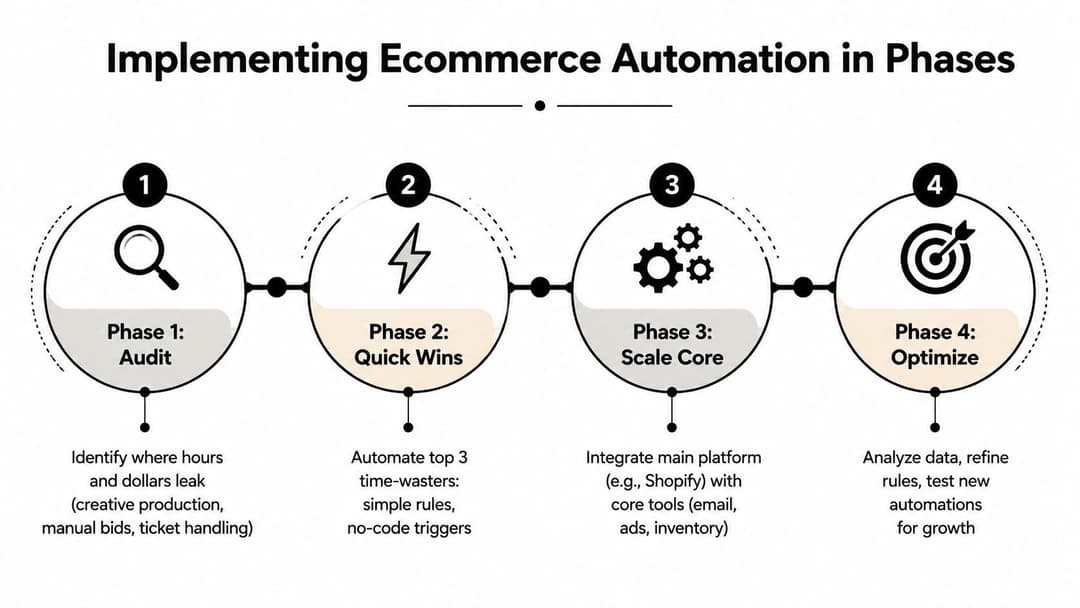
The first checkpoint is an audit. Find where hours and dollars leak, creative production, manual bid changes, support triage, inventory checks, or reporting handoffs. If your team can't name the top three pain points, you're not ready to automate much of anything. A clean audit gives you a baseline, and it keeps you from buying a tool just because it looked useful in a demo.
Phase two is quick wins. Pick one pillar and automate the top time-waster first, usually cart recovery or lifecycle email because the logic is simple and the result is easy to observe. If the workflow is working, the team should stop doing that task by hand. If they still need to inspect every send, the automation isn't mature enough yet.
Phase three is integration. The stack starts talking to itself. Before you move here, you should have a single source of inventory truth and a clear definition of what each system owns. Sana Commerce's implementation guidance is useful here because it emphasizes integrated data flows, API connections, monitoring, and error handling, not just scheduling tasks (Sana Commerce on ecommerce automation). The point is to make sure storefront, CRM, logistics, and marketing tools share the same facts.
Phase four is the AI layer. Once the data is clean and the core automations are stable, AI can help with the jobs where rules plateau, creative ranking, bidding, or forecasting. If the system can't explain why it made a decision, that's fine for a test, not fine for a core revenue flow. A useful checkpoint here is whether your team can review the output against business outcomes before it scales.
For a practical setup reference, AI setup is the kind of guide that helps teams think through readiness before they add learning systems to a workflow.
How a Growth Team Puts It All Together
A DTC brand on Shopify starts the week with one winning Meta creative, two underperformers, and a product that's moving faster than forecast. The media buyer uses automated creative ranking to see which ad variant is carrying the best performance, then shifts budget toward that winner without rebuilding the entire campaign by hand. At the same time, the inventory system spots that the SKU is getting tight, so ops gets a reorder signal and the site can show a subtle availability badge before the product slips into a stockout.
The email and SMS team feels the effect immediately. An abandoned cart flow doesn't send the same generic message to everyone, because the customer profile already tells the system which product they viewed and how recently they engaged. The post-purchase sequence changes too, because a buyer with high predicted value gets a different follow-up path than a one-time buyer who only responded to a discount. That's the compounding effect of automation, one decision in ads changes what happens in email, and one inventory rule changes what the merchandiser does later that day.
The stack as a working loop
The useful mental model is a loop, not a list of tools. Meta drives traffic, Shopify records behavior, Klaviyo reacts to the event, and the 3PL closes the fulfillment side. If one part of that loop changes, the other teams adjust their work the same week, not next month.
A growth team watching this system would usually talk about a few outcomes in standup, not about automation for its own sake. They'd look at ROAS on the ad side, recovery behavior in cart flows, and sell-through on inventory-sensitive products. They'd also ask whether support tickets dropped after shipping updates became automatic, because manual follow-up often hides in the gaps between departments.
The best automation doesn't feel like a machine taking over. It feels like fewer avoidable interruptions across the week.
That's why the stack matters. Each pillar supports the others, and the whole point is to make the next decision easier for the next person in line.
Common Pitfalls and How to Avoid Them
The fastest way to damage an automation program is dirty data. If product names, customer records, or inventory counts are inconsistent, your “personalization” starts looking random, and your flows lose credibility fast. The guardrail is a regular data audit, not just a one-time cleanup, because the stack drifts as soon as new tools or new teammates enter the picture.
Over-automation causes a different kind of problem. A brand voice that sounds scripted on every email, chatbot reply, or post-purchase message starts to feel cold, even if the workflow is technically correct. Keep a human-in-the-loop rule for high-stakes messages, especially refunds, complaints, and anything tied to a customer's trust.
Vendor sprawl is another quiet failure mode. Teams buy one tool for creative, another for email, another for inventory, and soon nobody knows which system owns which logic. A useful check is to ask whether the new tool replaces a workflow or just duplicates one you already pay for.
Monitoring gets skipped more often than it should. If an integration breaks and nobody notices for a week, you're not running automation, you're running risk. The fix is simple, set alerting thresholds and review them on a schedule, so a broken flow shows up as a signal instead of a mystery.
If your team is tying automation to ad measurement, the same discipline applies in campaign performance metrics, because a workflow is only useful if someone watches the metric it's supposed to move. For Meta-specific tracking and event quality, FB Conversion API is a good reminder that signal quality shapes everything downstream.
KPIs That Prove Ecommerce Automation Is Working
The scoreboard is simple. Track ROAS and CPA for ads, conversion rate and AOV for pricing and on-site personalization, repeat purchase rate and lifecycle revenue for email and SMS, and stockout rate plus order accuracy for inventory and fulfillment. Pick one pillar with the biggest leak, ship one automation in 14 days, then review it on a fixed cadence.
AdStellar AI helps teams automate Meta campaign creation, creative production, and winner selection from the same workflow, so you can spend less time rebuilding ads and more time evaluating outcomes. If you're trying to connect ecommerce automation to ROAS and faster iteration, take a look at AdStellar AI and see how it fits into your growth stack.