You've got five channels open, twelve dashboards blinking, a creative queue that never really ends, and a paid social account that still needs today's launches approved before lunch. In that kind of workflow, digital marketing automation stops being a nice-to-have and becomes the layer that keeps audience data, creative production, campaign execution, and measurement from drifting apart.
In 2026, that matters more than ever because automation has moved into mainstream practice, not a niche email helper. One industry roundup says 96% of marketers have already used a marketing automation platform or plan to use one within the next year, while another puts current business usage at 76%. The same research set places the global market at about $6.65 billion in 2024, with forecasts to roughly $13.71 billion to $15.58 billion by 2030, which is a strong signal that teams now expect automation to sit inside the operating model, not beside it.[^1]
What Digital Marketing Automation Actually Means in 2026
The old version of automation was a welcome email and a drip sequence. The current version is broader and more operational, especially for paid social teams that need to move fast without breaking measurement. Digital marketing automation is the system that connects your creative, audiences, and data into a single workflow, so campaign decisions can be triggered, routed, launched, and measured without constant manual handoffs.
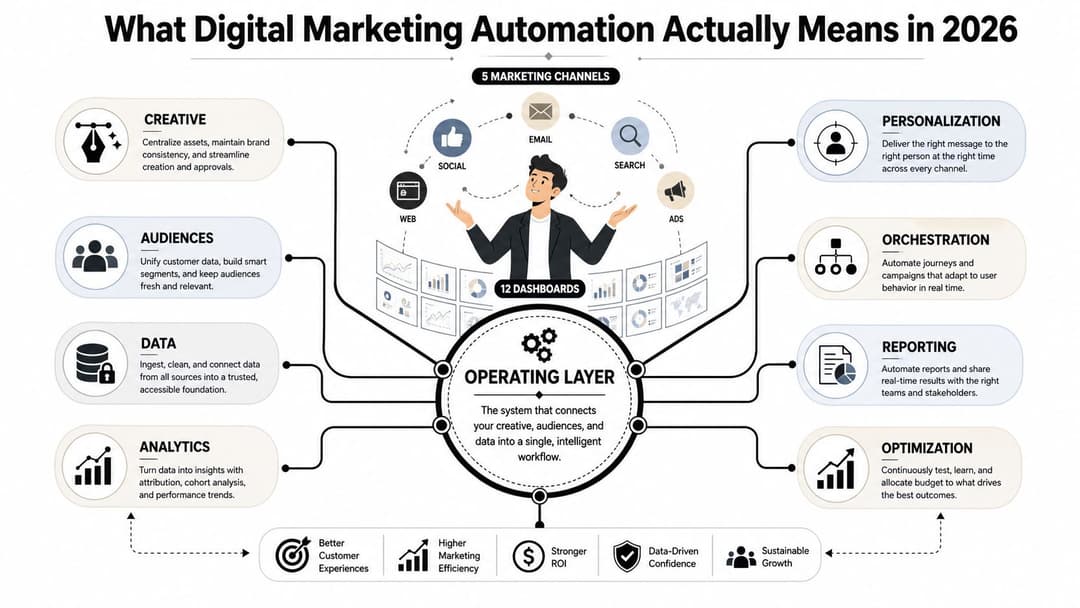
Automation as infrastructure, not a feature
The practical shift is simple. If you treat automation like a feature, you use it for isolated tasks. If you treat it like infrastructure, you let it shape how campaigns are built, how audiences are refreshed, how creative is tested, and how results feed back into the next launch. That's the difference between saving a few clicks and changing how a growth team operates.
For paid social, this means automation can touch ad variant generation, audience deployment, bidding inputs, retargeting logic, and reporting. It's not limited to email, and it shouldn't be. The teams that get the most out of it usually connect it to the same stack they use for paid media, CRM, and analytics, then standardize the workflow so launches don't depend on one person's memory.
Practical rule: if a recurring task depends on a spreadsheet, a Slack reminder, and someone checking three tabs by hand, it belongs in the automation layer.
The point of the internal platform choice isn't the software itself, it's how well the software lets you run a repeatable operating system. A useful starting point is this overview of platforms for digital marketing, especially if you're comparing where orchestration, reporting, and creative workflow live.
The Four Core Components of Digital Marketing Automation
A lot of teams say they “have automation” when they really have one piece of it. They might have saved audiences but no measurement discipline, or creative templates but no orchestration logic. The useful way to think about the stack is as four linked parts: campaign orchestration, creative automation, audience automation, and measurement.
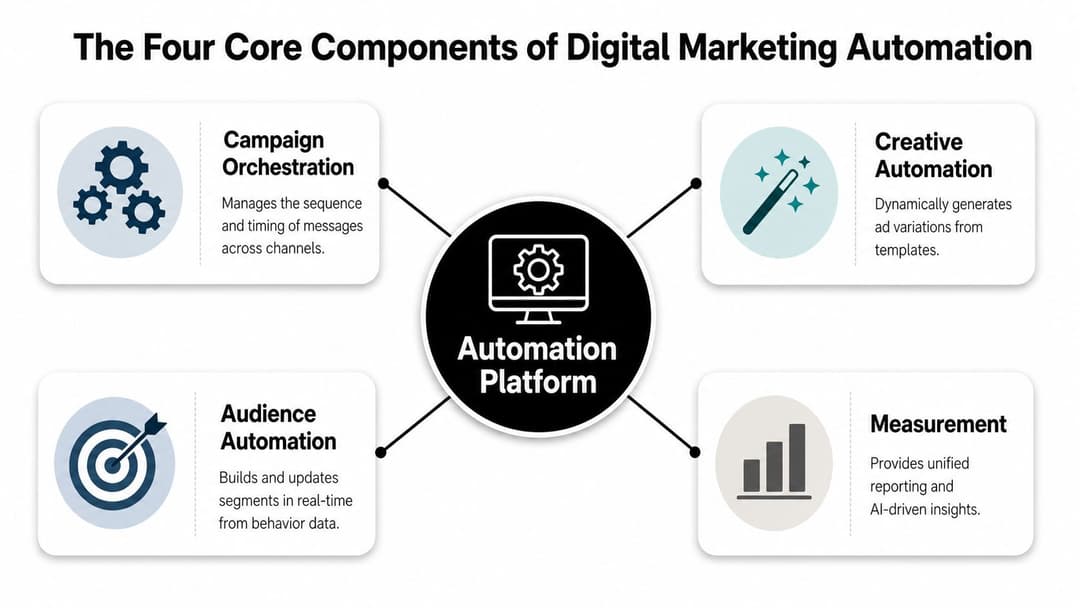
Campaign orchestration and creative automation
Campaign orchestration is the sequencing layer. It decides what happens after a trigger, who sees which message, and when the next action should fire. In paid social, that can mean a prospect who watched a product demo gets routed into a retargeting stream, while someone who already purchased gets excluded from the same offer and moved into a different lifecycle path. It's the logic that keeps campaigns from stepping on each other.
Creative automation is the production layer. In practice, that means bulk variant generation, dynamic assembly, and ranking the combinations that deserve spend. If your team still builds every headline, image, and audience pairing one at a time, creative velocity becomes your bottleneck long before budget does.
Audience automation and measurement
Audience automation is the signal layer. Instead of relying on static saved audiences, it ingests behavioral data, refreshes segments, and keeps audience definitions aligned with what people are doing. That matters when high-intent users move fast and stale segments cause waste.
Measurement is the accountability layer. BDO recommends tracking MQLs, SQLs, and sales cycle length because lead-scoring quality determines whether marketing sends sales-ready leads and whether prospects get stuck in the funnel.[^2] For paid social teams, that same logic applies downstream. If an automated workflow increases clicks but doesn't increase SQL quality or shorten cycle time, the system is working harder than it's working smarter.
The mistake many teams make is investing in one layer and hoping the others magically follow. A creative engine with weak audience hygiene still wastes spend. A strong measurement stack without orchestration just tells you where the leak is after the money is already gone.
A clean automation stack is less about more tools and more about fewer handoffs.
For teams comparing setup complexity across the stack, this ad tech platform overview is useful because it frames automation as something that has to sit inside campaign operations, not outside them.
How Campaign Orchestration Connects Everything
Orchestration is the part marketers talk about least and depend on the most. It's the loop that takes an event, turns it into a decision, pushes the right creative through the right channel, and then feeds the result back into the next decision. Without that loop, automation is just a collection of disconnected rules.
The feedback loop that keeps paid social sane
A real orchestration flow usually starts with a trigger, not a calendar date. A purchase, a churn risk signal, a high-engagement event, or an ad interaction can all route a person into a new path. The system then assigns an audience segment, selects the creative variant, delivers through the relevant channel, and measures the outcome so the next pass is better informed.
That's why orchestration is not the same as scheduling. Scheduling says, “send this tomorrow.” Orchestration says, “if this user hits this behavior threshold, move them into this segment, exclude them from the old audience, and use this message instead.” That distinction matters because the first version saves time, while the second version improves decision quality.
Here's the operational challenge. The loop only works if your CRM, ad account, and analytics layers agree on what happened. If naming is inconsistent, if event data is delayed, or if the audience refresh is stale, the loop breaks and manual cleanup returns fast.
For teams that are serious about the creative side of that loop, this creative-to-conversion platform framing is useful because it forces the question that matters most, how creative decisions are tied back to revenue outcomes.
A 90-Day Implementation Roadmap for Marketing Teams
The fastest way to waste an automation budget is to start by buying software. The safer move is to fix the data path first, then automate the parts of the funnel that already have enough signal to learn from. That usually means a phased rollout, not a big-bang launch.
Days 1 to 30, audit and instrument
Start by inventorying every campaign trigger, audience rule, naming convention, and reporting source. Find where data lives, who owns it, and where it gets translated before it reaches the ad platform or CRM. If your team can't answer those questions cleanly, the first month should be spent on instrumentation, not expansion.
This is also the time to decide which metrics belong in the system of record. If sales cares about SQL quality and cycle length, the automation layer needs to expose those, not just opens or clicks. If paid media needs faster creative iteration, the workflow should make variant production and ranking visible from the start.
Days 31 to 60, pilot one workflow
Pick one channel, one audience, and one measurable business outcome. A common mistake is trying to automate everything at once, which usually creates more debugging than learning. A controlled pilot lets you test segmentation, creative routing, and reporting without making the whole stack brittle.
Decision point: keep the pilot narrow until the team can explain why a result changed, not just that it changed.
Days 61 to 90, scale with governance
If the pilot works, scale the workflows that produced clean signal and retire the ones that didn't. Add governance at the same time, because scale without ownership creates drift. That means documented naming standards, clear data ownership, and a review cadence for anything that touches audiences, offers, or attribution.
For teams formalizing the setup, the practical checklist in this AI setup guide is useful because it keeps the conversation focused on process readiness, not just model features.
Measuring What Matters in Automated Campaigns
Most dashboards mix useful signals with vanity noise. The fix isn't to track less, it's to organize measurement into layers that match the decisions marketers make. A good automation KPI stack has four levels: engagement, conversion, customer behavior, and value or ROI.
What belongs on each layer
Engagement metrics, like CTR, opens, clicks, page time, and bounce rate, tell you whether the message and landing experience are getting attention. They're useful, but they're not enough to judge business impact. Conversion metrics, such as conversion rate and funnel progression, tell you whether that attention became action.
Customer behavior metrics reveal whether the automation system is changing what people do over time. Revenue attribution and customer acquisition cost sit at the value layer, where leadership can judge whether automation is helping pipeline and profit, not just traffic.
Independent guidance recommends integrating CRM and analytics data for real-time dashboards and automated reporting, because clean cross-system data is what lets you optimize against attributable revenue and pipeline velocity.[^3] That's also why naming conventions matter. If one tool calls a campaign by one name and another tool shortens it differently, attribution becomes a manual interpretation exercise instead of a decision system.
A useful split is simple:
- Leadership dashboard: revenue attribution, CAC, SQL volume, sales cycle length.
- Media buyer dashboard: CTR, conversion rate, page time, audience performance, creative ranking.
- Ops dashboard: data freshness, naming consistency, CRM alignment, reporting delays.
For a deeper tactical view of what to track in day-to-day reporting, this campaign performance metrics guide is a practical companion.
Pitfalls That Create More Work Than They Remove
Automation usually fails in boring ways. The tech doesn't implode, the workflow just starts producing more cleanup than it saves. That's why the most common mistakes are rarely about strategy and usually about governance, data hygiene, and channel overuse.
The failure modes that show up first
Recent guidance keeps pointing to the same recurring issues, bad data, weak CRM and MAP alignment, and over-reliance on email-first automation.[^4] Those problems are easy to ignore in a small workflow, but they become expensive fast in paid social because one bad rule can affect dozens of audience splits and hundreds of creative combinations.
The second issue is channel bias. Teams often build automation around email because it's familiar, then try to bolt paid social onto the side. That rarely works well. Paid media has different latency, different creative fatigue patterns, and different audience behaviors, so the automation logic needs to be designed for that environment from the start.
What fixes the mess
- Standardize naming early. If launch names, audience names, and reporting names don't match, every report becomes a translation job.
- Assign data ownership. Someone has to own audience freshness, event mapping, and CRM sync quality.
- Audit the exceptions. Broken rules usually hide in edge cases, not in the happy path.
- Limit channel sprawl at first. One clean workflow beats three half-working ones.
The gap that shows up most often is governance. The bigger the stack gets, the more someone needs to decide what counts as ready, what gets paused, and what gets cleaned up before it spreads.
Scaling Paid Social With AI-Driven Automation
A DTC team I'd trust with a real budget doesn't launch Meta campaigns by hand anymore unless they have to. They use the automation layer to ingest historical performance, rank creative and audience combinations, and build new campaigns from what has already proved itself. That changes the job from setup labor to decision oversight.
How the workflow actually plays out
The team starts by feeding prior campaign data into the platform. Creative variants are grouped, audience signals are scored, and the strongest combinations rise to the top based on the goal the team cares about, whether that's ROAS, CPL, or CPA. Instead of arguing about which ad “feels” better, the team can see which combinations have earned another round of spend.
From there, the system assembles new campaigns using proven winners. Fresh creative is generated in bulk, audience combinations are tested against live performance, and auto-learning models adjust as data flows in. That means the team isn't rebuilding every campaign from scratch. They're reusing the parts that already have signal and replacing the parts that don't.
What matters here is the decision moment. A tool that automates busywork still leaves the strategist staring at spreadsheets. A tool that automates decisions changes what the strategist is responsible for, because the work becomes about setting constraints, reading outputs, and knowing when to override the system.
AdStellar AI is one example of this category, because it connects to Meta account data, generates and launches creative and audience combinations, and ranks performance against goals like ROAS, CPL, or CPA in a single workspace. That doesn't remove judgment, but it does compress the time between testing a hypothesis and acting on the result.
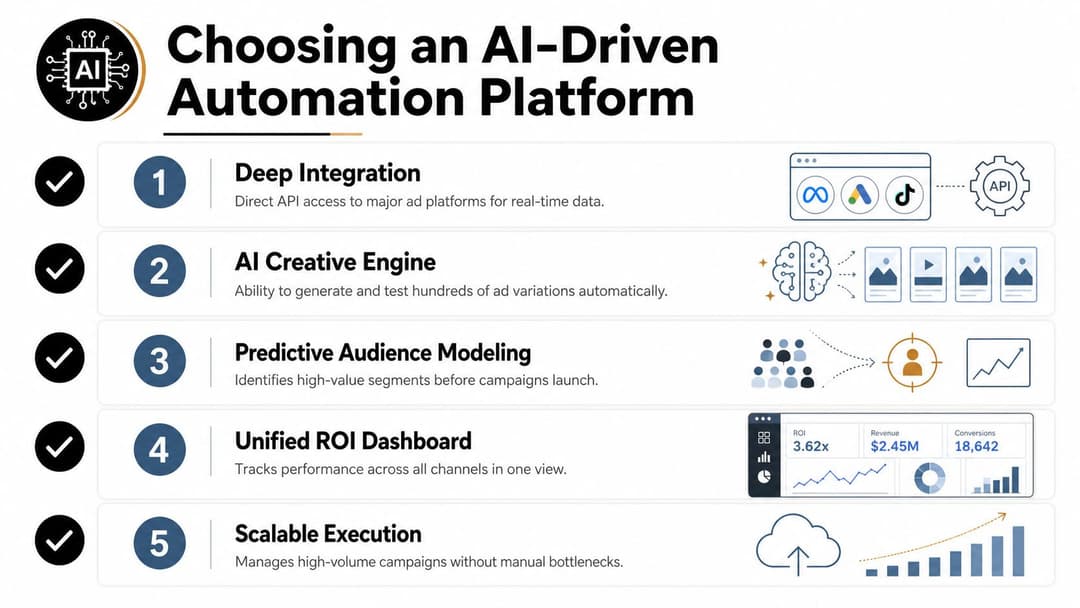
Choosing and Using an AI-Driven Automation Platform
The right platform is the one that matches your data depth, launch volume, and governance needs. Shiny interfaces don't matter if the system can't learn from real history or if your team can't control who launches what.
What to ask in a demo
- Deep integration. Ask how the platform connects to ad accounts, CRM, and analytics, and whether that data is used in real time or on a delay.
- Creative ranking. Ask how it determines which ad variations deserve more spend, and whether you can see the reasoning.
- Audience learning. Ask how historical performance changes future audience recommendations.
- Unified reporting. Ask whether campaign, creative, and audience performance appear in one view or in separate exports.
- Governance. Ask how naming, permissions, and approvals work before anything goes live.
A simple first-two-weeks plan
Start with one account, one objective, and one reporting standard. Bring in only the datasets you trust, then compare the platform's recommendations against your current manual process. If it can't explain why it ranked something highly, or if it creates more version confusion than your current workflow, it's probably not ready for production use.
The test is whether the platform helps your team launch faster without losing control of measurement. If it does that, it belongs in the stack. If it only makes the dashboard prettier, keep looking.
If you want to turn paid social automation into a cleaner operating system instead of another reporting headache, take a look at AdStellar AI. It's built to help growth teams launch, test, and scale Meta campaigns with bulk creative generation, audience testing, and performance ranking in one workflow. If that's the kind of automation layer you're building, start there and compare it against your current process.