You've probably done this before. Someone asks for “three new Meta video ads by Friday,” the product team drops assets late, the brief is half a Slack thread, and by the time the edits are exported nobody agrees on what the ad was supposed to prove in the first place.
That's why most advice on how to create video ads doesn't help much in practice. It treats the work like a production problem. Pick a concept, shoot something polished, trim it for placements, and launch. But Meta rewards teams that can test fast, learn fast, and rebuild creative around what the account is telling them.
Video isn't a side format anymore. One independent survey reported that 91% of businesses used video as a marketing tool in 2026, 92% planned to spend the same or more on it the following year, and 82% of marketers said video delivered a good ROI (Wyzowl video marketing statistics). On the spending side, the IAB reported that digital video ad spend rose 15% in 2023 to $54 billion and was projected to grow 16% in 2024 to $63 billion, then later said digital video ad spend surpassed $80 billion in 2026 (IAB video ad spend report).
That changes how smart teams build creative. The job is no longer making one “great video.” The job is building a repeatable system that can produce multiple hooks, angles, cuts, and calls to action without turning your team into a bottleneck.
Why Most Video Ads Fail Before They Launch
By the time a Meta video ad reaches the edit timeline, the result is usually already set.
I've seen the same failure pattern in accounts of every size. The team asks for more concepts, more formats, and more variations, but nobody defines what the ad is supposed to test. Then the editor inherits a loose brief, a mixed message, and a pile of assets that were never built for placements or variants. The final video may look polished, but it enters the account as a bad test.
That is the core mistake. Video ad creation gets treated like production, when Meta rewards a testing system.
Creative chaos feels busy but produces weak signals
A common workflow looks efficient right up until launch:
- The marketer asks for range: three concepts, two offers, one UGC cut, one founder cut.
- The designer gets no ranking of priorities: every message has to fit.
- The editor builds a master version first: then trims it down for Reels, Stories, and Feed.
- The media buyer launches whatever cleared review: not the asset tied to a clean hypothesis.
The account pays for that confusion. If the hook, offer, proof, and CTA all change in the same round, the team learns very little from spend. A losing ad does not tell you what failed.
Practical rule: If the ad cannot be explained in one sentence before production, the edit will not fix it.
The coordination cost is easy to miss because it looks like work. A two-person team can spend three Slack threads, one review call, and two revision rounds to ship a single ad concept with five loosely related variants in a month. A batched system with one clear brief, one shot list, and predefined cutdowns can ship thirty structured variants from the same production block. One setup creates opinions. The other creates usable data.
One-off production gives you assets. A system gives you learning.
The problem with ad hoc creative is not just inefficiency. It breaks the feedback loop between strategy, production, and media buying.
A one-off workflow produces one nice-looking video. A repeatable workflow produces components you can test again: hooks, problem statements, proof clips, testimonial lines, product demos, offer frames, and CTA endings. Those pieces turn each launch into the input for the next batch.
That matters on Meta because creative fatigue shows up fast, and replacement volume matters almost as much as quality. Teams that rely on hero videos often end up protecting the asset instead of testing it. Teams that build modularly can cut the same message six ways, swap the first three seconds, change the proof element, and get a clearer read on what scales.
The strongest teams run video creation like an operating system:
- Start with one business objective
- Define one test variable per concept
- Plan scenes that can be reused across variants
- Build for placements before editing starts
- Launch in a structure that preserves learning
- Carry winners into the next batch
A polished ad can still be expensive guesswork. A simple ad with a clear test angle is usually more useful.
Planning Your Video Ad Brief and Storyboard That Saves Hours
A good brief doesn't make the ad more “creative.” It makes the ad easier to produce, easier to judge, and much easier to iterate.
When teams skip this step, they end up debating taste. When teams do it well, they debate variables that affect performance.
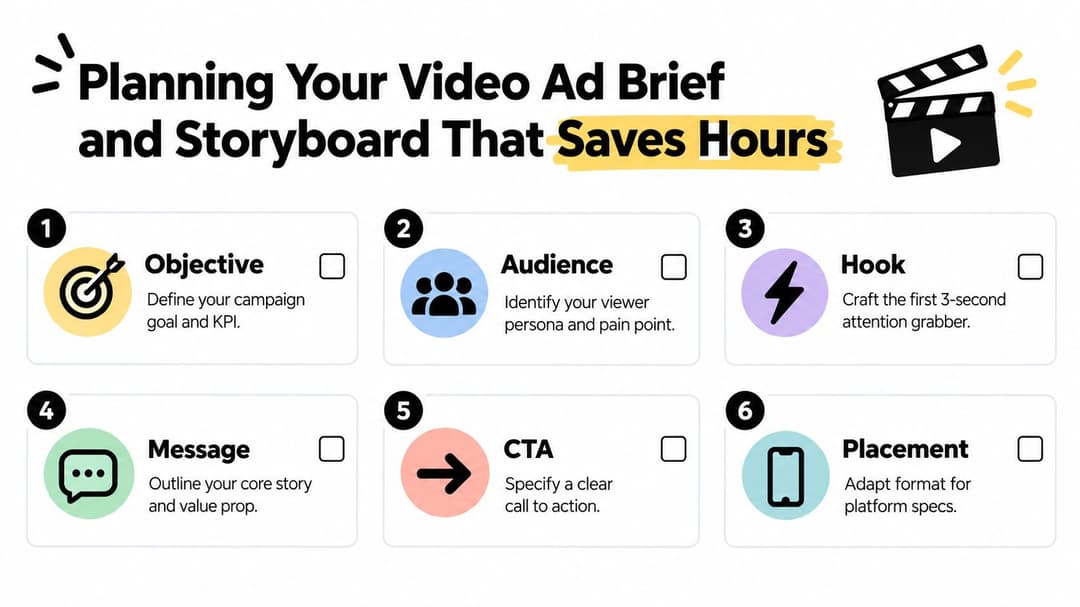
What belongs in the brief
A Meta-ready brief should fit on one page. If it spills into a deck full of optional talking points, it's too loose.
Include these six fields:
Objective
Name the business outcome first. Is this ad meant to drive purchases, leads, trials, or something else? Tie the creative to the metric your team manages, whether that's ROAS, CPL, or CPA.Audience
Describe the viewer like a buyer, not a demographic blob. What problem are they aware of? What objection do they have? What do they need to believe before clicking?Hook
Decide the first visual or line before anything else. On Meta, the opening earns the rest of the watch.Message
Pick one promise. Not three. If the product has many features, choose the one that matches the campaign angle.CTA
The ad gets one action. Shop now. Book a demo. Start a trial. Download the guide. Don't mix signals.Placement notes
State where the creative will run first. Feed-first and Reels-first are not the same editing job.
If you want a starting point, a simple video ad storyboard template is enough. The value is not the template itself. The value is forcing decisions before anyone opens Premiere, CapCut, or After Effects.
Storyboard the cut by duration
Storyboards for Meta should follow duration logic, not film-school logic. A 6-second cut, a 15-second cut, and a 30-second cut need different jobs.
- For 6 seconds: lead with the problem or result, show the product immediately, and land one CTA.
- For 15 seconds: use a tight hook, one proof point, one product moment, one CTA.
- For 30 seconds: only use this when the offer or product needs more setup. Even then, keep the narrative simple.
Here's the structure I see work most often:
| Cut length | Suggested storyboard flow |
|---|---|
| 6 seconds | Hook frame, product visual, outcome, CTA |
| 15 seconds | Hook, pain point, solution demo, proof cue, CTA |
| 30 seconds | Hook, problem setup, product mechanism, objection handling, CTA |
Briefs save the reshoot you didn't plan for
The fastest way to waste time is shooting content before deciding what variable you're testing. If you need three hooks, film three distinct openings. If you need two offers, script both before production. Don't assume you'll “find it in the edit.”
That matters even more on Meta because every missing input creates downstream friction:
- Unclear offer leads to vague on-screen text
- No audience angle leads to generic copy
- No CTA choice leads to an ad that attracts attention but weak clicks
- No placement plan leads to last-minute crops and cluttered safe zones
A strong brief turns production into assembly instead of improvisation. That's the point.
Meta Video Ad Specs and Creative Requirements Made Simple
Meta specs are not admin work. They decide whether a concept survives contact with real placements.
I see this mistake constantly. A team approves one good-looking edit, exports it once, and assumes Meta will handle the rest. The ad serves, but the first frame gets cramped in Reels, the headline drops into the interface in Stories, and the product shot that sold the idea in review is suddenly too small on a phone. The campaign did not fail because of targeting. It lost performance in production.
Build for adaptation, not for a single file
Treat specs as part of the testing system. The brief decides what variable you want to test. The edit delivers that variable clearly. The format adaptation makes sure the same test is still readable in Feed, Stories, Reels, and wider placements.
That means building a master with room to crop, then exporting placement-specific versions on purpose.
Keep the product, face, headline, and CTA close enough to the center that they survive reframing. Leave edge space for platform UI. If a key message only works in one aspect ratio, it is not one ad. It is one placement version.
For a practical reference while producing those versions, keep this Facebook ad creative dimensions guide handy.
Meta Video Ad Specs by Placement
| Placement | Ratio and Resolution | Length and Tips |
|---|---|---|
| Feed | 1:1 and 4:5 are the safest starting points. Export at clear, high resolution so text stays readable. | Feed needs fast clarity. The offer and visual should make sense without extra setup. |
| Stories | 9:16 vertical. Compose for full-screen viewing. | Use larger text, stronger framing, and keep important elements away from the top and bottom UI areas. |
| Reels | 9:16 vertical, built for full-screen mobile viewing. | Reels are less forgiving than Feed. Weak opening frames and small product shots get ignored fast. |
| In-stream or wider placements | Use a version designed for wider viewing if needed, not a quick crop from vertical. | Pacing can be slightly different here, but the message still needs to arrive early. |
Spec mistakes that quietly hurt performance
These are the ones worth catching before launch:
- Late cropping: a stakeholder approves a horizontal cut, then someone repurposes it for vertical without checking framing shot by shot.
- Overloaded captions: too much text turns the ad into a reading task instead of a visual pitch.
- Small product presence: the product appears on screen, but not large enough to register on mobile.
- Low CTA placement: the final action prompt competes with interface elements and loses visibility.
- One-size-fits-all exports: one file gets pushed into every placement, which changes how the hook, proof, and CTA appear.
Use one production rule across every placement. If the ad cannot communicate the offer with sound off and the phone held at arm's length, it is not ready.
One file is not one format. Teams that accept that early waste less time in edit rounds and get cleaner creative tests live faster.
Producing and Editing Video Ads for Mobile Attention
Most Meta video editing advice starts too late. It talks about transitions, subtitles, and music choices after the footage already exists. In reality, mobile performance starts at the moment you decide what the first frame will be.
A large attention study across the US, UK, Canada, and Australia found that video formats averaged 2.73 seconds of active attention on mobile, compared with 1.5 seconds for MPU/native image ads and 0.6 seconds for banners. In the same dataset, 15-second ads delivered 2.8× more active attention than 30-second ads, and ads covering about 80% of the screen generated 6.6 seconds of active attention versus 0.8 seconds for sub-10% screen coverage (mobile video attention study coverage).
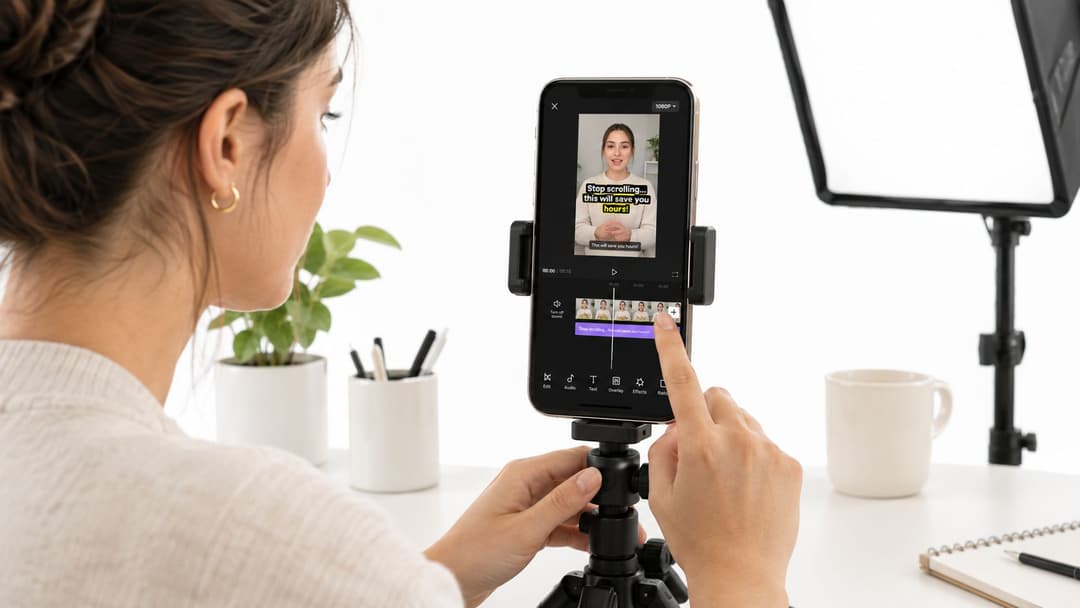
Those numbers line up with what most Meta buyers already feel in the account. If your ad takes too long to reveal the product, the pain point, or the outcome, viewers don't wait politely.
Edit the opening like it decides the campaign
Because it often does.
The first seconds should do at least two jobs:
- Show something visually concrete
- Signal why the viewer should care
That can be a product result, a direct problem statement, an unusual visual, a founder line, a before-and-after moment, or a strong UGC opener. What usually fails is cinematic buildup. Meta isn't a place where suspense earns patience by default.
For vertical creative, this guide to vertical video ad best practices is a good benchmark when you're deciding how aggressive the framing and text hierarchy need to be.
Sound off first, sound on second
A lot of Meta impressions happen in environments where audio isn't guaranteed. That doesn't mean sound doesn't matter. It means the ad has to work without sound before sound adds lift.
Design for both layers:
- On-screen text should carry the claim, offer, or problem.
- Captions should help comprehension, not duplicate every word in a cluttered way.
- Audio should sharpen emotion, pacing, and recall.
If you're cleaning voiceover, layering music, or experimenting with better sound cues in lightweight edits, tools for audio on video for artists can be useful without forcing a full studio workflow.
Memorability is not the same as watch time
A common mistake is editing toward retention as if longer viewing automatically means better ad impact. It doesn't.
Research on Instagram Reels found only a weak correlation between retention duration and memorability, while visuals, storytelling, sound design, and personal relevance had a much larger effect on what viewers remembered. A Harvard Business School study cited in the same paper found that surprise and joy improve retention, but not in the simplistic way people often edit for them. The level of surprise matters more than how fast it arrives, while the speed of joy matters more than its absolute level (study on retention and memorability in short-form video ads).
That's why some rough-looking UGC ads outperform cleaner brand videos. They aren't always “better produced.” They're easier to process, more personally relevant, and stronger at creating immediate narrative tension.
Here's a useful walkthrough before you lock the cut:
What actually improves the edit
The strongest mobile cuts usually share a few traits:
- The brand appears early: not necessarily as a logo card, but as a visible product, packaging, UI, or recognizable context.
- The scene changes feel purposeful: each cut adds information instead of just movement.
- The narrative is easy to follow: viewers don't have to decode what happened.
- The CTA feels earned: it lands after value, not out of nowhere.
A good Meta edit doesn't feel short because it's rushed. It feels short because every second has a job.
If you only fix one thing in your workflow, fix the opening. Most weak video ads don't need better color grading. They need a better first frame and a simpler message path.
Testing Optimizing and Measuring What Actually Works
This is the part most guides barely touch, and it's the part that scales performance.
A lot of teams still treat video creation like a creative event. Build, approve, launch, hope. That approach breaks the minute you need consistent winners across accounts, audiences, and placements. Edge comes from running video as a learning system.
Test variables, not vague “concepts”
When a team says it's “testing creatives,” that can mean almost nothing. If five things changed between ad versions, the result won't teach you much.
A more useful structure is to isolate one major variable at a time:
| Variable | What changes | What stays stable |
|---|---|---|
| Hook test | First line, first shot, opening claim | Offer, body, CTA |
| Length test | 6-second, 15-second, longer cut | Same core message |
| CTA test | Shop now vs learn more angle | Hook, product story |
| Audience-angle test | Problem framing for different segments | Offer, visual system |
That's how you turn creative into a source of decision-making instead of opinion.
Watch the metrics in the right order
The biggest trap is optimizing for watch time alone. That can bias you toward curiosity-driven edits that hold attention but don't produce efficient outcomes.
Look at signal layers in order:
Thumb-stop or opening engagement signals
Did the ad earn enough early attention to deserve spend?Click behavior
Did the message create action, not just passive viewing?Conversion efficiency
Did that click quality hold up against the KPI that matters, whether that's ROAS, CPL, or CPA?Creative pattern recognition
Which hooks, proof types, visual styles, and CTA framings keep repeating among winners?
Nearly 60% of U.S. TV/video ad spend is expected to be digital in 2025, while U.S. digital video ad spend grew 18% year over year in 2024 to $64B and is projected to reach $72B in 2025 (IAB video ad spend report 2025 part one). That matters because the operational question has changed. Teams don't just need one strong ad. They need enough structured variation to keep learning across fast-moving video inventory.
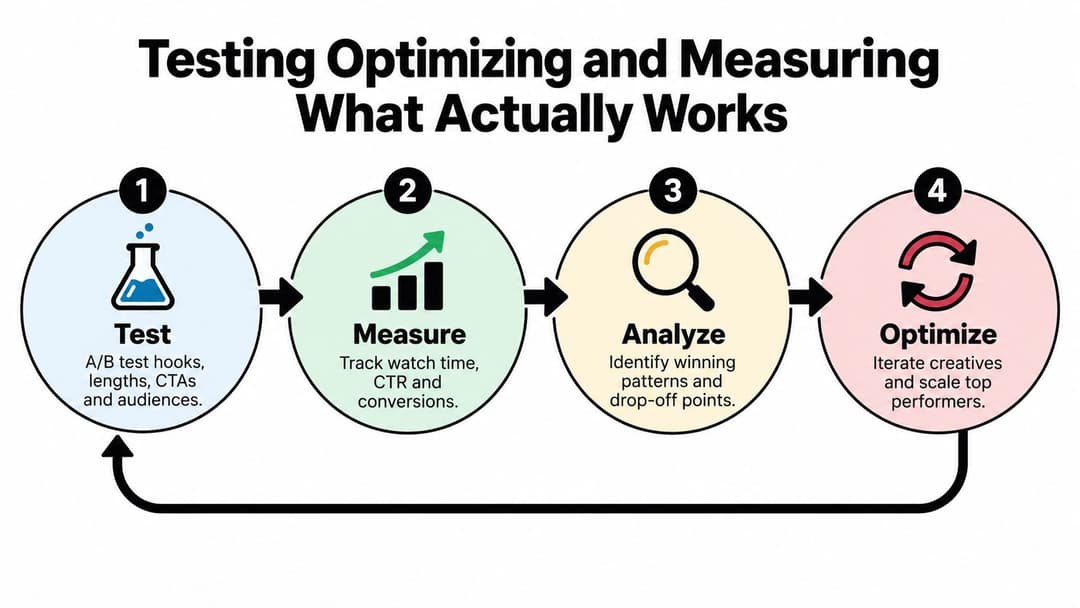
A simple learning loop beats a complicated reporting stack
You don't need an elaborate analytics ritual to improve Meta video ads. You need discipline.
Use a repeatable loop:
- Launch a controlled batch with clear variable separation
- Measure attention, click, and conversion signals together
- Rank creatives by business outcome, not by internal preference
- Kill weak variants quickly
- Iterate the winners into the next batch
For teams building a process around that loop, these best practices for testing are a useful framework.
If you can't explain why one ad won, you're not building a system. You're collecting lucky outcomes.
One more nuance matters here. Recent market analysis noted that average dwell time for video ads in unforced environments was under five seconds, video CTR was slightly lower than image CTR, yet streamed video delivered more measured attention, and interactive CTV formats produced a strong lift in engagement over standard pre-roll (video advertising market analysis). For Meta teams, the takeaway isn't “video always beats image.” It's that attention, interaction design, and format fit matter more than polish in isolation.
Scaling Video Ad Creation Without Burning Out Your Team
The breaking point usually arrives. The account is spending more, the business wants more variants, and the team is still producing ads like each one deserves its own mini production cycle.
That doesn't scale. It creates approval drag, editing queues, messy naming, and launch delays. Then people blame creative quality when the actual issue is throughput.

Batch the system, not just the shoot
The teams that stay sane usually batch four things together:
- Hooks as a library of opening angles
- Bodies as reusable proof or demo sequences
- CTAs as short end-card or spoken variants
- Placements as export templates, not custom one-off rescues
That lets you build many ads from interchangeable parts. One product demo can support multiple audience framings. One UGC shoot can feed several hooks. One founder script can be cut into short and medium versions without rebuilding from zero each time.
This is also the point where AI becomes operationally useful. Not magical. Useful. If a platform can help you generate bulk combinations, organize assets, and rank patterns based on what drives ROAS, CPL, or CPA, it removes manual work that doesn't improve strategy.
For example, creating video ads at scale becomes much more realistic when the workflow connects asset generation, launch structure, and performance feedback in one place. AdStellar AI is one option for that. It centralizes campaigns, creatives, audiences, media, and performance breakdowns, and it uses historical Meta results to help teams produce and prioritize new combinations faster.
Protect the team from fake urgency
Most burnout in creative ops comes from preventable rework.
A few rules help:
- Approve the brief before production: not after the first cut disappoints people.
- Name the test variable upfront: so the editor isn't guessing what matters.
- Use templates for exports and on-screen text: so every launch doesn't restart layout decisions.
- Archive winners by pattern: hook type, offer type, visual proof type, CTA style.
The strongest system doesn't ask your team to be endlessly original. It asks them to be structured, observant, and fast at building the next iteration.
The goal isn't more content. The goal is more useful variation with less manual friction.
If you're serious about learning how to create video ads that convert on Meta, stop thinking in terms of campaigns first and assets second. Think in terms of a production loop that starts with a hypothesis and ends with a better next batch.
That's what scales.
Ad creation gets much easier when your testing system, creative production, and Meta launch workflow live in the same place. AdStellar AI helps teams generate video ad variations, launch bulk Meta campaigns faster, and rank what's working by the outcomes that matter, like ROAS, CPL, and CPA. If your current process depends on too many spreadsheets, handoffs, and last-minute edits, it's worth taking a look.