When you're creating content for Instagram Stories, getting the technical specs right isn't just a suggestion—it's the first step to making an impact. Get it wrong, and you risk awkward cropping, blurry visuals, and a frustratingly high drop-off rate. Nail it, and your content looks sharp, professional, and perfectly formatted for your audience's screen.
The absolute baseline is a 1080x1920 pixel canvas with a 9:16 aspect ratio. This ensures your content fills the entire vertical screen on mobile, which is exactly what users expect. Anything else just looks out of place.
The Essential Instagram Story Specs
While the dimensions are a great starting point, they're only part of the story. You also need to think about file formats, file sizes, and video duration. Ignoring these details can lead to all sorts of problems, like Instagram compressing your beautiful high-res video into a pixelated mess or rejecting your upload altogether.
Think about it from a user's perspective. When they see a horizontal video awkwardly squished into a vertical frame, it’s jarring. It screams low-effort. In fact, content that isn't properly formatted can see completion rates drop by as much as 25%. Given how central Stories are to the platform, that's a lot of lost engagement.
This quick visual breaks down the most critical specs you need to remember.
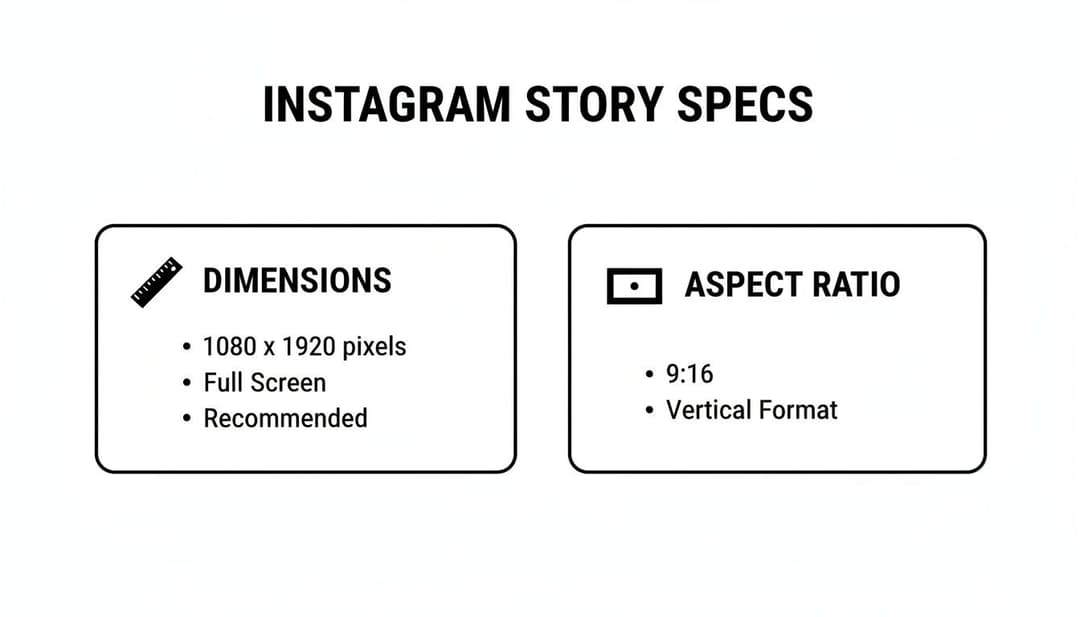
As you can see, everything is built around that full-screen, vertical experience. It's non-negotiable if you want your content to look like it belongs.
Instagram Story Technical Specifications (2026)
To make things even easier, here’s a quick-reference table that covers all the key technical requirements for both images and videos. Keep this handy to avoid any last-minute export issues.
Remember, these rules are specific to Stories, but similar principles apply across the entire Meta advertising ecosystem. For a broader look, check out our complete guide on Meta ad sizes.
| Specification | Image Requirements | Video Requirements |
|---|---|---|
| Dimensions | 1080 x 1920 pixels | 1080 x 1920 pixels |
| Aspect Ratio | 9:16 | 9:16 |
| File Format | JPG, PNG | MP4, MOV |
| Max File Size | 30 MB | 4 GB |
| Max Duration | N/A (displayed for 5 seconds) | 60 seconds per Story segment |
Sticking to these specs will help you bypass compression issues and ensure your content looks exactly as you intended. It's a simple checklist that makes a huge difference in production quality.
Why Nailing Your Story Specs Drives Performance
You’ve probably seen it before: a stunning ad that gets awkwardly cropped in a Story, or a video that looks blurry and pixelated. It’s an instant turn-off. Getting your Instagram Story specs right is about so much more than just dodging technical glitches—it’s a core part of making your content actually perform.
When your Stories are perfectly formatted, they deliver that seamless, immersive, full-screen experience that keeps people watching. Anything less, and you’re just giving them a reason to swipe away. And that polish? That's exactly what the Instagram algorithm is built to reward.

The platform has a clear bias for content that provides a top-notch user experience. Assets sized correctly to 1080x1920 pixels are processed more efficiently by Instagram’s servers, which means they load faster and are more likely to get priority placement in your followers' feeds. That better visibility leads directly to higher completion rates and more chances for your audience to interact.
The Real Link Between Specs and Engagement
It's simple: content that looks good, performs better. Since their launch, Stories have become a complete powerhouse for brands. We're talking about a feature that's now a huge part of the experience for the platform's 3 billion monthly active users projected for 2026.
The data backs this up. Stories often pull in 15-20% higher engagement than traditional feed posts. And with Instagram's ad revenue expected to blow past $68 billion, it’s no surprise that Stories ads now account for a massive 25% of that spend. You can dig into more of this data on Hootsuite's blog about how brands are winning with Instagram.
When you stick to the correct instagram story specs, you're essentially telling the algorithm that your content is high-quality. Think of it as speaking the platform's native language—it understands you better and is more likely to show your content to more people.
How Specs Translate Into Business Results
At the end of the day, following the technical rules is all about maximizing your return on ad spend (ROAS). When your creative is fully optimized, every single dollar you put behind a Story ad has to work that much harder for you.
- Better Reach: The algorithm actively rewards well-formatted content with better distribution, both for organic posts and paid ads.
- Higher Completion Rates: A clean, full-screen experience keeps viewers hooked until the very end, making sure your whole message gets across.
- Stronger Conversion: When your visuals are clear and calls-to-action are properly placed, you drive more effective actions, whether it’s a swipe-up or a tap on a product sticker.
If you ignore these specifications, you’re just leaving money and performance on the table. By treating instagram story specs as a non-negotiable part of your creative strategy, you're setting your content up for success from the second you hit publish.
Mastering Image and Video Story Specifications
Nailing the 9:16 aspect ratio is just the start. If you want your Instagram Stories to look truly professional, you have to get the technical details right. The right file format and export settings are your best defense against Instagram's aggressive compression, which can quickly turn a sharp graphic into a pixelated mess.
Think of these specs as the foundation for quality. Every detail, from the file type you choose to the video bitrate, directly impacts how your Story looks and performs for your audience.
For static images, the choice between JPG and PNG is more important than you might think. JPGs are fantastic for photos because their smaller file size helps Stories load in a snap. But if your design is heavy on text, features a logo, or has any sharp graphic elements, stick with PNG. It’ll keep those edges clean and crisp, avoiding the fuzzy artifacts that JPG compression can create.
Pro Tip: Always export your images using the sRGB color profile. Instagram converts everything to this standard anyway, so starting with sRGB means your brand colors will look exactly as you intended, with no weird color shifts after you upload.
Fine-Tuning Your Video Export Settings
With video, the stakes are even higher. A few wrong settings can leave you with a blurry, stuttering video or, even worse, audio that’s completely out of sync. To get it right, you need to pay close attention to your export settings, especially the codec, frame rate, and bitrate.
These settings are basically the DNA of your video file. Get them right, and you're golden.
Codec (H.264): The H.246 codec is your best friend here. It’s the gold standard for web video because it gives you that perfect sweet spot between high-quality visuals and a manageable file size, which is exactly what you need for mobile streaming.
Audio (AAC): Always pair your video with AAC (Advanced Audio Coding). It delivers crystal-clear sound at low bitrates, so your audio will be sharp without making your file unnecessarily large.
Frame Rate (30 FPS): For Instagram Stories, 30 frames per second (FPS) is the magic number. It creates smooth, natural-looking motion on mobile screens without the massive file size that comes with higher frame rates like 60 FPS.
If you want to go even deeper into the technical side of Instagram video, this ultimate guide to Instagram video formats is a fantastic resource covering everything from resolution to aspect ratios.
Understanding Story Segmentation and Exporting
Even though Instagram now lets you upload a single video file up to 60 seconds long, it will automatically chop it into four 15-second segments on the backend. You need to keep this in mind during the editing process. An abrupt cut right in the middle of a sentence is a surefire way to get viewers to swipe away.
When you’re ready to export from a program like Adobe Premiere Pro or Final Cut Pro, using a preset can get you most of the way there. But it’s always smart to double-check the settings yourself to guarantee a perfect upload. While the specs for other platforms can be different, the core principles of solid video encoding are pretty universal. You can see how they compare in our guide on video dimensions for Facebook ads.
To make it even easier, here’s a quick-reference table with the best export settings for a flawless, high-quality Instagram Story video.
Recommended Video Export Settings for Instagram Stories
| Setting | Recommendation | Why It Matters |
|---|---|---|
| Codec | H.264 | Provides the best balance of quality and file size for web playback. |
| Resolution | 1080 x 1920 pixels | Fills the entire screen and maintains high-definition quality. |
| Frame Rate | 30 FPS | Ensures smooth motion without creating an overly large file. |
| Bitrate | 3,500 kbps | A high enough bitrate to prevent blocky artifacts after compression. |
| Audio Codec | AAC | Delivers clear audio with efficient compression. |
| Audio Sample Rate | 44.1 kHz | The standard sample rate for high-quality audio on the platform. |
Stick to these recommendations, and you’ll avoid the most common compression issues, ensuring your video Stories look and sound exactly how you designed them.
Navigating the Instagram Story Safe Zone
Getting your instagram story specs right is about more than just hitting that 1080x1920 dimension. One of the most common—and frankly, most frustrating—mistakes we see is when crucial content gets hidden by Instagram’s own interface. This is where mastering the “safe zone” separates the pros from the amateurs.
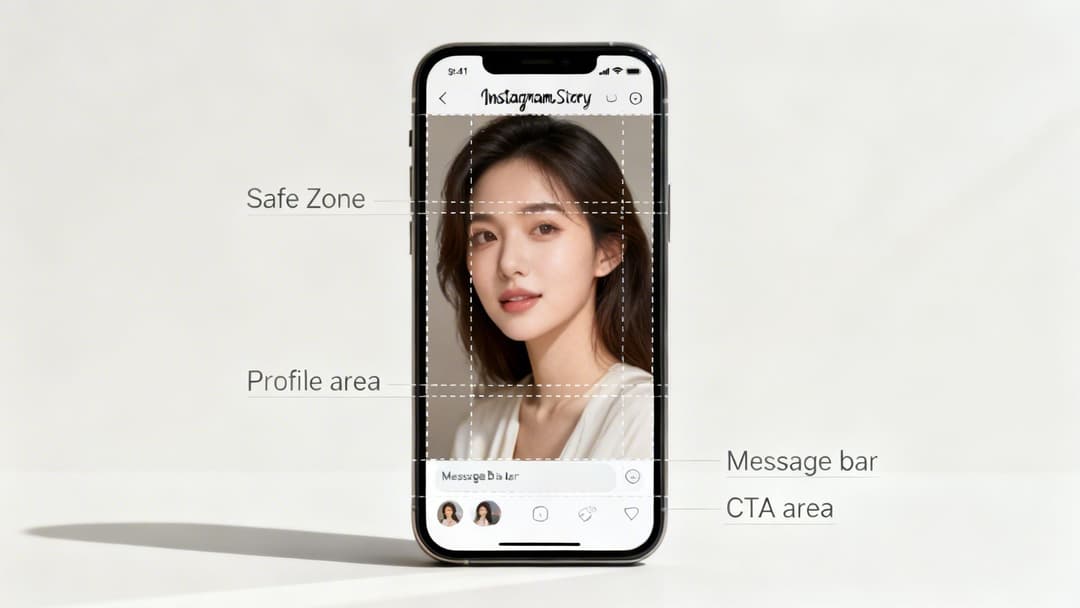
The safe zone is simply the area of your Story that will always be visible, no matter what. When you post a Story, Instagram slaps your profile info at the top and the reply bar at the bottom. If you’ve placed text, logos, or stickers there, they’re going to get covered up.
This is especially deadly for your calls-to-action (CTAs). A "Link in Bio" sticker or an interactive poll that’s partially blocked is a sticker that can't be tapped. That means your creative is dead on arrival and your ad spend is wasted.
Visualizing the Keep-Out Areas
To sidestep this pitfall, you have to design with these overlays in mind from the very beginning. Just think of your 1080x1920 canvas as having no-go zones at the top and bottom.
This visual guide shows you exactly where not to put your important stuff.
As you can see, the top and bottom are reserved for Instagram's UI. Keeping your key elements tucked safely in the middle guarantees they’ll be seen and, more importantly, can be interacted with.
A solid rule of thumb is to leave about 250 pixels of empty space at the top and 340 pixels at the bottom. This buffer gives you plenty of clearance and ensures your message, branding, or interactive elements aren't cut off.
These boundaries are fundamental to designing good vertical content. The concept isn't unique to Instagram, either; for a great comparison, check out this handy TikTok video safe zone guide.
Designing for Tappable and Visible Elements
In practice, this means you should always aim to place your most critical content in the middle 75% of the screen. This ensures it's always visible and tappable.
- Headlines and Key Text: Put your main message right in the center. It’s the first thing people will read, and it won’t be obstructed.
- Logos and Branding: Your logo needs to be clearly within the safe area to get the brand recognition you’re paying for. Don't shove it into a corner where it's likely to get covered.
- Stickers and CTAs: Whether it's a poll, a quiz, or a link sticker, it needs to be fully inside the safe zone so people can actually tap on it.
By working within these boundaries, you make sure every part of your Story is pulling its weight. For a deeper dive into how all the specs work together, check out our complete guide on the size of Instagram Stories. Honoring the safe zone is a simple but powerful step toward mastering your instagram story specs.
Understanding Specs for Organic Stories vs Paid Ads
While the core Instagram Story specs of 1080x1920 pixels and a 9:16 aspect ratio are the same for everyone, the rules change the moment you put money behind your content. The big difference between an organic Story and a paid ad boils down to Meta's strict creative policies, which can make or break your campaign's reach, cost, and overall performance.
For advertisers, these specs aren't just friendly suggestions—they're mandatory. Getting your ads approved and running smoothly in Meta Ads Manager depends on them. Think of it this way: technical compliance is directly tied to your campaign's success. A small mistake can lead to poor delivery or even ad rejection, which is a fast way to waste time and money.
Key Differences for Paid Story Ads
When you step into the world of paid ads, you’ll find a new set of rules meant to standardize the user experience and help your ads perform better. These rules mostly center on things like how much text you can have on the screen and requirements for specific ad formats, like carousels.
The specs for Stories have really evolved alongside their monetization. Since business tools first appeared in 2017, Stories have become a juggernaut for over 200 million business profiles, with half of all users regularly interacting with brands there. For ads, this means a 15-second maximum video length and a tough limit on text. If you go over the recommended 20% text rule, you could see your ad delivery drop by as much as 15%. You can discover more insights about Instagram statistics on Metricool.com to see just how big the platform has become.
Critical Note for Advertisers: You can plaster an organic Story with as much text as you want. But if you do that with a paid ad, Meta's system may penalize you by showing it to fewer people or driving up your costs. Always aim for punchy, visually-driven creative for your ads.
Specs for Different Ad Formats
Your ad's goal—whether it's getting traffic, leads, or sales—will shape your creative. Meta gives you a few different ad formats to choose from within Stories, and each has its own set of rules that go beyond a single image or video.
- Single Image/Video Ads: These stick to the standard Story specs but are also subject to the text overlay rule and safe zone requirements. This is to make sure your call-to-action button is always visible and easy to tap.
- Carousel Ads: Story carousels are perfect for showing off multiple products or telling a longer story. Every card in your carousel must use the 9:16 aspect ratio to keep the swiping experience smooth. If the dimensions don't match, you'll end up with clunky black bars that ruin the flow.
- Collection Ads: This mobile-only format combines a main video or image with a full-screen "Instant Experience" that shows a product catalog. The main creative follows normal Story specs, but the product images inside the collection usually need to be square (1:1).
Ultimately, getting a handle on the differences between organic and paid Instagram Story specs is crucial if you want to scale your efforts. For agencies and brands running dozens of campaigns, following these ad-specific rules from day one means a faster approval process and more predictable results. For a full walkthrough on setting up your campaigns, check out our guide on creating high-performing Instagram ads.
Troubleshooting Common Story Upload Problems
We’ve all been there. You spend hours getting a Story video or graphic just right on your computer, only to see it turn into a blurry mess or get awkwardly cropped the moment you upload it. It's one of the most common frustrations for creators.
These headaches almost always come down to a few small, overlooked details in your export settings or design file. Let's walk through the most frequent culprits and how to fix them for good, so your content always looks as sharp as you intended.
Issue 1: Blurry or Pixelated Video
This is probably the number one complaint about Instagram Stories. Your video looks crystal clear on your desktop, but the uploaded version is a pixelated nightmare. The reason? Instagram's aggressive compression.
To ensure Stories load quickly on mobile, Instagram recompresses every video you upload. If your original file's bitrate is too low, Instagram’s algorithm has very little data to work with, and the quality drops off a cliff.
Diagnosis: Your video's bitrate is too low, you used the wrong codec, or your frame rate is off.
Solution:
- Boost Your Bitrate: When you export, aim for a video bitrate of at least 3,500 kbps (or 3.5 Mbps). This gives Instagram's compression more data to chew on, which helps preserve the details.
- Use the H.264 Codec: Always export with the H.264 codec. It’s the gold standard for web video, offering the best balance between quality and file size.
- Stick to 30 FPS: Don't upload at a higher frame rate like 60 FPS. Instagram will just crush it down to 30 FPS anyway, and that forced conversion can introduce weird motion blur and other visual artifacts.
Issue 2: Black Bars on the Sides of Your Content
Seeing black bars framing your content is an instant giveaway that it wasn't designed for Stories. This happens when you upload an image or video that doesn't fit the native 9:16 vertical aspect ratio—like a standard horizontal (16:9) video or a square (1:1) post. Instagram adds the black bars to fill the empty screen space.
Key Takeaway: Black bars scream "unprofessional." It tells your audience the content wasn't made for them, which is a perfect reason for them to immediately swipe away.
Diagnosis: The asset's aspect ratio isn't 9:16.
Solution:
- Start with the Right Canvas: From the very beginning, set up your design file or video project with 1080x1920 pixels dimensions.
- Crop, Don't Shrink: If you're repurposing content from another format, use your editing software to crop it to a 9:16 ratio. Never just drop a horizontal video into a vertical frame with black padding.
- Check Your Export Settings: Before you hit export, double-check that your final output is locked to 1080x1920 pixels.
If you're exploring creative ways to use different media formats in your Stories, you might also find some helpful tips in our guide on how to upload a GIF to Instagram.
Frequently Asked Questions About Story Specs
Even after you’ve got all the specs down, some specific questions always seem to come up. We've been there. This section tackles the most common snags we see creators and marketers hit, giving you quick answers so you can get back to what you do best.
What Is the Best Resolution for Instagram Stories?
For the best results, you should always aim for a resolution of 1080 x 1920 pixels. This is the magic number. It ensures your content fills the entire vertical screen perfectly, giving your audience a sharp, immersive experience without any weird cropping or distracting black bars.
Why Do My Stories Look Blurry After Uploading?
If your Stories look fuzzy or pixelated, Instagram's aggressive compression is almost always the culprit. When you upload a file that’s already low-quality or has a low bitrate, the platform has very little data to work with. The result is a blurry mess.
Here’s how you can fight back and give Instagram a better "original" file to compress:
- Video Bitrate: Always export your videos with a bitrate of at least 3,500 kbps.
- File Format: Use MP4 for video. For any graphics with crisp text or sharp lines, PNG is your best bet.
- Dimensions: Start your project with a 1080x1920 canvas from the very beginning.
Following these steps gives Instagram’s algorithm more visual information to preserve, which is the key to keeping your content looking sharp and professional.
Can I Post a Horizontal Video to My Story?
Technically, yes, but you really shouldn't. If you upload a standard horizontal (16:9) video, Instagram will just slap it onto the vertical Story canvas and fill the empty space with massive black bars at the top and bottom.
It immediately breaks the native feel of the platform and looks unprofessional, which is a surefire way to get viewers to swipe away. Always take the extra minute to crop your horizontal footage to fit the 1080x1920 frame before you upload.
What Is the Maximum Length for an Instagram Story Video?
For a standard, organic Story, you can upload a single video clip up to 60 seconds long. If your video is between 15 and 60 seconds, Instagram will automatically chop it up into 15-second segments for you, which will play back-to-back.
But here’s a critical distinction for marketers: the maximum length for a single paid Story ad is typically just 15 seconds. When planning your ad campaigns, remember to keep your videos short, punchy, and designed to capture attention right away.
Ready to stop guessing and start scaling? AdStellar AI automates ad creation, testing, and optimization for Meta campaigns. Generate hundreds of ad variations in minutes, identify winning creative with powerful AI insights, and launch campaigns 10x faster. See how leading marketers are unlocking more revenue by visiting https://www.adstellar.ai.