In-app advertising isn't a side channel anymore. It sits inside one of the biggest pools of digital attention and money in the market. The global in-app advertising market was estimated at $182.06 billion in 2024 and is projected to reach $200.46 billion in 2025, then $481.47 billion by 2033, with in-app advertising representing 67% of mobile market revenue worldwide according to Grand View Research's in-app advertising market analysis.
That scale changes how you should think about advertising in app. This isn't just about buying installs. It's about choosing formats that fit the app experience, understanding how auctions and targeting work under tight latency constraints, and measuring whether your spend produced new demand or merely claimed credit for users who were already on their way.
Most beginner guides stop at ad types and targeting options. That's useful, but it misses the question growth teams get grilled on. Did the campaign create incremental growth?
Why In-App Advertising Is a Critical Growth Channel
When marketers talk about mobile growth, they often blur together app store optimization, paid social, mobile web, and app retargeting. Advertising in app deserves its own category because it reaches people where they spend time, inside the products they already use, and it does so in placements built for mobile behavior rather than adapted from desktop.
That matters in practice. In-app placements can be immersive, native to the interface, or tied to a clear user action. A rewarded video inside a game, a native sponsored card in a content feed, and an interstitial shown between actions don't behave like the same media, even if they all technically count as mobile ads.
For teams building an acquisition or re-engagement engine, in-app inventory gives you three advantages:
- Attention that fits the device: The ad appears inside the app environment, not off to the side.
- Format variety: You can match the message to the moment, from passive banner exposure to interactive playable experiences.
- Direct measurement paths: Installs, registrations, purchases, and other post-install events can be tied back to campaign logic, even if measurement has become more complicated.
A lot of mobile strategy mistakes start when teams treat in-app ads as interchangeable with every other placement. They aren't. The format, the auction, the UX cost, and the measurement model all influence performance.
Practical rule: Don't ask whether in-app advertising works. Ask which in-app environments, formats, and measurement methods fit your growth model.
If you're mapping out a broader acquisition plan, this guide on mobile application promotion is a useful companion because it helps place in-app media inside the full mobile growth stack.
Understanding Core In-App Ad Formats
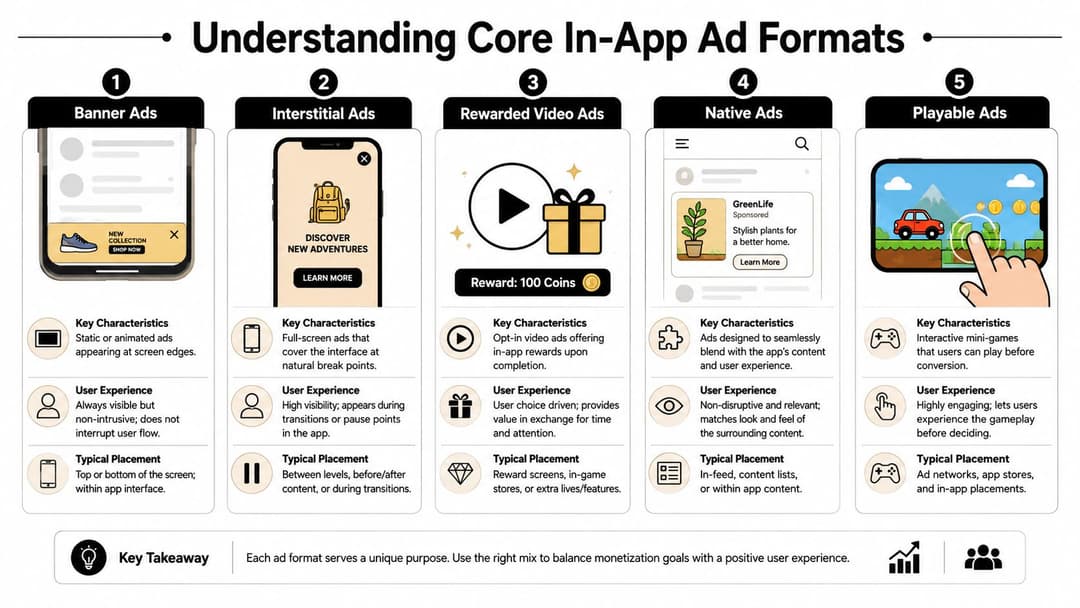
Formats are the marketer's toolbox. A banner is not an interstitial. A rewarded video is not a native ad. If you use the wrong tool, you don't just lower performance. You also damage the user experience and make your measurement harder to interpret.
Banner ads
Banner ads are the smallest unit in the set. They usually sit at the top or bottom of the screen and stay visible while the user continues using the app. That makes them easy to deploy and relatively low-friction from a UX standpoint.
Their downside is obvious. People learn to ignore them. Use banners when you want cheap, broad exposure or when the app environment supports persistent ad space without interfering with key actions.
Interstitial ads
Interstitials take over the screen. They work best at natural pauses, such as level transitions, article breaks, or post-action moments. In the right placement, they command attention. In the wrong placement, they feel like a door slammed in the user's face.
For performance campaigns, interstitials can work well when the message is simple and the app context gives the user a clean stopping point. Don't force them into the middle of a critical task flow.
Rewarded video ads
Rewarded video is one of the clearest value exchanges in advertising in app. The user chooses to watch a video in return for something useful in the app, such as extra lives, content access, or virtual currency.
That opt-in dynamic changes behavior. The user expects the ad, understands the benefit, and is less likely to resent the interruption. If you work in gaming or other engagement-heavy app categories, it's worth studying how audience network rewarded video placements align incentives for both publishers and advertisers.
Rewarded video works best when the reward feels meaningful to the user and natural to the app economy.
Native ads and playable ads
Native ads blend into the interface. They look like part of the app's feed, content stream, or recommendation module. That makes them a scalpel rather than a hammer. They're useful when you want ad exposure without a hard break in the user journey.
Playable ads sit at the other end of the spectrum. They let users test a mini version of the product before they commit. For games especially, that can improve traffic quality because the user gets a preview of the core mechanic before installing.
Here's the simple comparison that new media buyers should keep in mind:
| In-App Ad Format Comparison | |||
|---|---|---|---|
| Ad Format | Description | Best For | Potential Downside |
| Banner | Small static or animated unit at screen edges | Low-friction reach, simple awareness | Easy to ignore |
| Interstitial | Full-screen ad at transition points | Strong attention, direct response | Can feel disruptive |
| Rewarded video | Opt-in video with in-app reward | Engaged users, value exchange | Depends on reward design |
| Native | Ad integrated into app content | Smoother UX, feed environments | Requires better creative fit |
| Playable | Interactive preview before conversion | Game discovery, intent filtering | Higher production complexity |
A practical way to choose is to ask one question first. Are you borrowing attention, interrupting attention, or earning attention? Banners borrow it, interstitials interrupt it, rewarded and playable formats earn more of it.
How In-App Targeting and Auctions Actually Work
Viewers typically focus on the ad's creative elements. The machinery underneath is where a lot of campaign performance is won or lost.
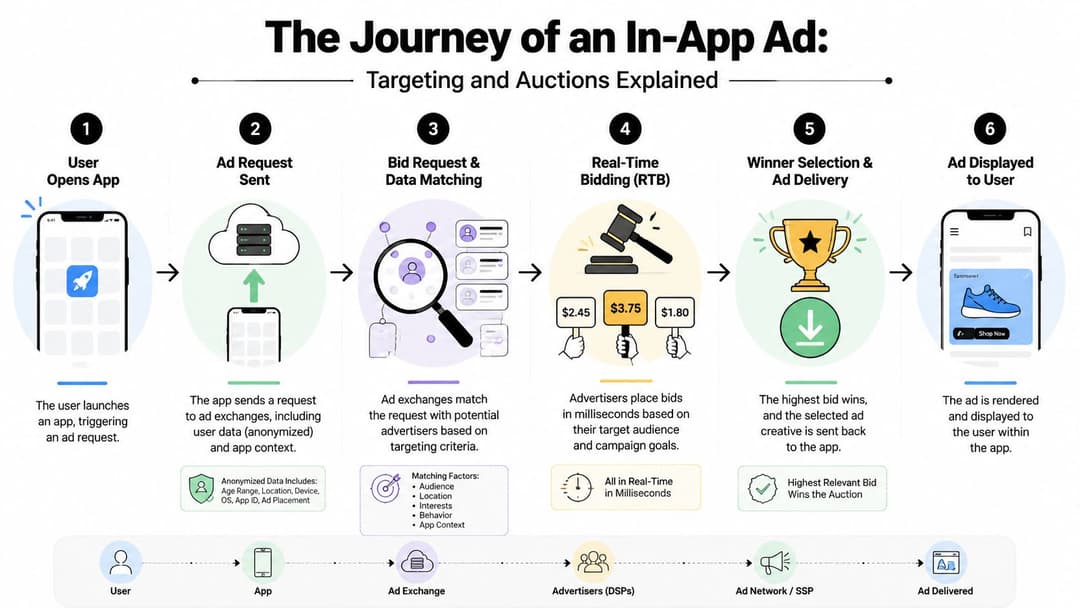
When a user opens an app, the ad opportunity gets evaluated fast. Very fast. The ad request-to-render pipeline typically completes within 30 to 100 milliseconds, and the SDK sends an ad request that triggers a real-time auction among demand sources, as explained in Purrweb's breakdown of how mobile app advertising works.
The auction in plain English
It's a high-speed trading floor built for attention. The app says, “I have one impression available right now.” Buyers evaluate whether this user and context match their campaign rules. They place bids. The system selects a winner. The creative gets returned and rendered inside the app.
All of that happens quickly enough that the user usually experiences it as smooth.
The path looks like this:
- App opens: The SDK detects an available placement.
- Request goes out: The app shares device and context signals.
- Demand evaluates the opportunity: Networks, exchanges, and direct buyers decide whether to bid.
- Auction runs: The system compares bids and eligibility.
- Winning creative returns: The selected ad is sent back.
- Render happens: The ad appears inside the interface.
A lot of campaign issues that get blamed on “bad traffic” are auction or delivery issues. Slow creative loads, poor fit between format and placement, and weak demand competition can all drag outcomes down before the user even sees the message.
A useful reference if you're reviewing audience setup with your team is this primer on demographic ad targeting, especially for separating broad audience logic from actual in-app delivery mechanics.
What targeting signals actually do
Targeting in advertising in app usually combines a few layers:
- Device-level signals: Operating system, device model, and geography
- Behavioral patterns: App usage tendencies or broader activity signals, where privacy rules and platform controls allow it
- Contextual relevance: Matching the ad to what the app is about and what the user is doing in that moment
Contextual targeting matters more than many teams think. If someone is inside a fitness app, health-related creative may outperform a generic acquisition ad because the context lowers the mental jump required.
Later in the process, teams often add mediation logic and fraud checks. Mediation helps publishers compare multiple demand sources. Fraud detection looks for suspicious patterns, such as unusually skewed install behavior from a source that doesn't make sense.
For a quick visual walkthrough, this short video does a solid job of making the system less abstract.
Measuring What Truly Matters in App Campaigns
Most reporting makes in-app campaigns look more certain than they are. A dashboard shows installs, clicks, post-install events, and attributed revenue. That's useful, but it doesn't answer the hardest question. Would those users have converted without the ad?
Attribution is necessary, but it isn't the finish line
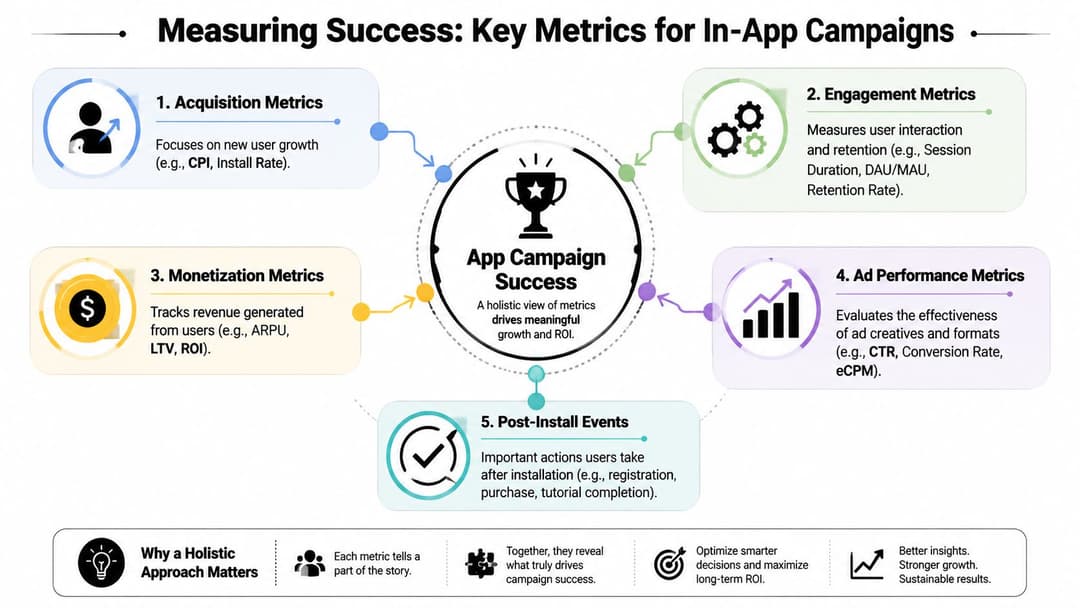
Most app teams use a mobile measurement partner to unify install data, post-install events, and channel reporting. That's the operational layer. It tells you who got credit under a chosen attribution model.
But attribution is bookkeeping, not causality.
If a user was already likely to install, click-based reporting can still assign the win to the last touch. That's why performance marketers need to keep two ideas separate:
- Attributed performance: What the platform or measurement stack says happened
- Incremental performance: What the campaign caused
This distinction has become even more important in privacy-constrained environments. On iOS especially, marketers have had to adapt to aggregated and delayed signal models, including SKAdNetwork, which means you can't lean on deterministic user-level tracking the way many teams once did.
What to measure first
A clean measurement stack usually starts with business outcomes and works backward.
- LTV over vanity metrics: Cheap installs don't matter if they don't retain or monetize.
- ROAS by cohort: Revenue quality matters more than top-line install volume.
- Post-install events: Registration, tutorial completion, subscription start, and purchase often predict whether a campaign is bringing in the right users.
A useful way to evaluate campaign health is to compare early indicators against downstream quality. If click-through rate looks strong but users don't complete meaningful in-app actions, the issue may be message mismatch rather than media buying.
For teams refining that framework, this guide on measuring true ad attribution is worth reviewing because it pushes beyond last-touch logic.
Measurement trap: A campaign can look efficient in attribution reports and still produce very little net new growth.
Incrementality is the question that matters
Independent coverage of in-app advertising measurement notes that 42% of brands and 48% of agencies cite viewability and measurement as key issues, and recommends incrementality experiments that often require 4 to 6 weeks to estimate true lift beyond standard attribution, according to Incrmntal's guide to in-app advertising and incrementality.
That duration frustrates teams because it feels slower than dashboard reporting. But causality usually is slower.
Incrementality testing is closer to running a holdout-based business experiment than reading a media report. You create a control condition, isolate exposure as cleanly as possible, and compare outcomes over enough time to let the effect emerge. The point isn't perfection. The point is learning whether the campaign is generating net new users, moving users forward faster, or mostly intercepting demand that already existed.
If you only optimize to attributed CPI or CPA, you can end up overfunding channels that are good at claiming conversions. If you optimize to incremental lift, budget decisions get tougher, but they get smarter.
From Creative Ideas to Optimized Campaigns
Creative decisions shape campaign economics faster than many teams expect. eMarketer reports that mobile users now spend roughly four hours per day in apps, which means in-app ads compete in a crowded, habit-driven environment where weak creative gets ignored fast, according to eMarketer's mobile app usage coverage.
The practical mistake is familiar. A team cuts one polished video, resizes it for a few placements, and calls that a test plan. The result is usually mixed intent, blurry learnings, and a campaign that looks busy without giving you a clear reason to scale.
Strong teams treat creative like a growth variable with a job to do. It needs to qualify the right user, fit the placement, and set up the action that matters after the install.
Match the creative to the objective
A CPM campaign rewards attention. A CPI campaign rewards qualified curiosity. A CPA campaign rewards pre-framing the action you need after install, whether that is a purchase, registration, or subscription start.
That sounds obvious, but it changes what good creative looks like.
If you buy on CPM, the first seconds have to stop the scroll and make the next tap feel worthwhile. If you buy on CPI, broad appeal can hurt you because cheap installs from weak-fit users often collapse later in onboarding. If you optimize to CPA, the ad should filter harder and explain enough of the product promise that the user arrives with the right expectation.
This is also where incrementality should shape the brief. Creative that inflates click-through but pulls in users who would have converted anyway can make platform reports look healthy while adding little net new growth.
Build tests that answer one question at a time
Creative testing works like diagnosing a leak. If you tear out every pipe at once, you learn nothing about what failed.
Use a simple structure:
- Write one hypothesis for each batch. Test the hook, offer framing, visual treatment, CTA, or audience-message fit. Keep the rest stable.
- Design for the placement. Rewarded video needs a clear exchange. Native units need to match the surrounding experience. Playables should reflect the actual product, not a fantasy version that spikes installs and tanks retention.
- Read past the install. A creative winner that drives low-quality users is not a winner. Judge it against activation, purchase rate, retention, or whatever event ties closest to revenue.
- Promote patterns, not single ads. If user-generated style videos outperform polished motion graphics, carry that learning into the next batch instead of only rerunning one lucky ad.
Teams that want an external reference point can use creative benchmarking to compare hooks, formats, and messaging patterns against broader market behavior before they spend heavily on production.
Sequence the message across exposures
Repeated impressions without a new angle waste money. A better campaign works like a sales conversation. The first touch earns attention. The second explains why the product is different. The third gives proof or urgency.
A simple sequence often looks like this:
- Exposure one: Name the problem or desired outcome fast.
- Exposure two: Show how the product works or why it is credible.
- Exposure three: Ask for the install or post-install action with a specific benefit.
That structure matters because frequency alone does not create lift. Message progression does. If a user sees the same ad three times, performance often plateaus. If each exposure answers the next obvious objection, conversion rates usually hold up longer.
If your team is producing short-form video at scale, this guide on how to create AI video ads that convert is a practical reference for turning concepts into repeatable production workflows.
What usually goes wrong
A few patterns show up in underperforming app campaigns again and again:
- Creative built for approval, not response. It looks polished but never states the offer clearly.
- Placement mismatch. Feed-style storytelling often breaks in interstitials, and long setup hurts short attention placements.
- Misleading qualification. Ads that attract curiosity from the wrong audience can keep CPI low while hurting CPA, retention, and payback.
- Optimization against the wrong signal. Teams keep spending on ads that win installs but fail to produce incremental customers.
The last point is the one I push hardest with growth teams. A creative test is not finished when one variant beats another on click-through or install rate. It is finished when you know whether the winning concept brought in users your business would not have gained otherwise.
That standard is harder to meet. It also leads to better budget decisions.
Scaling Your Campaigns with Automation and AI
Manual campaign management breaks first at the same place almost every time. Creative volume. Once a team finds a promising angle, they need variants for hooks, aspect ratios, copy lines, audiences, placements, and retargeting windows. That's when spreadsheets multiply and learning slows down.
Why manual scaling stalls
The issue isn't that buyers don't know what to do. It's that execution speed lags behind the number of combinations worth testing.
A human can review patterns, but building and launching every variation by hand creates bottlenecks:
- Creative throughput gets stuck: Teams can't produce enough variants to explore message-market fit properly.
- Launch cycles slow down: Valuable ideas sit in review queues instead of reaching the market.
- Budget shifts lag reality: By the time a buyer reacts, the opportunity may already have faded.
Automation thus becomes practical rather than theoretical.
Where AI fits in the workflow
AI tools are most useful when they remove repetitive setup and help teams learn from performance signals faster. That can include generating many creative and copy combinations, packaging winners into fresh test batches, and helping buyers identify which message-audience pair deserves more spend.
For example, AdStellar AI is built to create, organize, and launch large numbers of Meta ad combinations, then surface performance patterns tied to goals like ROAS, CPL, or CPA. In an in-app context, that's relevant for placements across Meta-owned apps where campaign scale often depends on how quickly a team can translate learnings into new variations.
If your raw material starts as longer-form footage, tools that turn long videos into viral shorts can also speed up the first part of the pipeline by giving your team more testable assets to work with.
Automation shouldn't replace judgment. It should remove the manual work that keeps judgment from being applied often enough.
AI's key benefit isn't magic targeting. It's operational effectiveness. More variants tested, faster feedback loops, and fewer hours spent on repetitive build tasks.
Navigating Compliance and Common Pitfalls
Poor compliance decisions waste budget faster than a weak bid strategy. In app campaigns fail at the policy layer, the data layer, and the user-experience layer long before a buyer runs out of optimization ideas.
Privacy rules shape performance directly. Consent quality changes the amount of signal available for targeting, retargeting, and attribution. On iOS, that trade-off is sharper because measurement is more aggregated and delayed. Apple's SKAdNetwork documentation makes the constraint clear. Advertisers get useful signals, but not the user-level visibility many teams were used to.
That changes how campaigns should be judged. A network can report installs and still add little incremental growth. If your read on performance comes only from platform attribution, remarketing, view-through credit, and blended reporting can make recycled demand look like new demand. The operational question is simple: would these conversions have happened anyway?
Teams that handle this well build compliance and measurement together. Consent flows, SDK setup, conversion schemas, fraud filters, and holdout testing need to agree with each other. If one piece is off, optimization starts training on noisy inputs.
The mistakes that keep recurring
Some failure patterns show up in almost every account review:
- Frequency climbs without a message plan: Repeating the same ad to the same user raises annoyance faster than intent.
- Placements interrupt the product experience: Short-term click lift can come with weaker retention and lower downstream value.
- Attribution gets treated as proof: Claimed conversions are not the same as incremental conversions.
- Fraud controls are too loose: Install spikes from low-quality sources can steer bidding toward traffic that never becomes revenue.
- The same playbook gets copied across platforms: iOS and Android often need different measurement expectations, conversion windows, and creative assumptions.
Fraud deserves more attention than it usually gets. Google's policy overview for invalid traffic and ad fraud is a useful baseline because it frames the issue the way buyers should. Bad traffic does not just waste spend. It corrupts the feedback loop. Once an algorithm starts learning from fake or low-intent conversions, CPA can look stable while revenue quality declines.
A practical way to manage the risk is to treat the campaign like a chain of custody. The click is one handoff. The install is another. The post-install event is the part that matters most. If the chain breaks at any step, reported efficiency becomes hard to trust.
AdStellar AI can still help on the execution side when teams need to produce and test many variants across Meta placements. The value is speed and organization, not a shortcut around policy, consent, or measurement discipline.