

Here's the simple truth: Display dynamic ads are personalized advertisements that automatically change their content based on who is seeing them. Imagine a personal shopper who knows exactly what a customer wants and shows them the perfect item at the right time—that’s what these ads bring to the table. They ditch the old one-size-fits-all approach to create a unique, relevant experience for every single viewer.
What Are Display Dynamic Ads
Think of traditional display ads as digital billboards on the side of a highway. They flash the exact same message to every person who drives by, no matter who they are or what they’re interested in.
Display dynamic ads, on the other hand, are more like a friendly concierge who greets each visitor by name, ready with recommendations based on their past actions and preferences.
This personalized approach is a direct answer to major marketing headaches like ad fatigue and rock-bottom engagement. By turning a generic broadcast into a one-to-one conversation at scale, dynamic ads grab attention far more effectively. Instead of seeing a general brand ad, someone who just looked at a pair of running shoes on your site will see an ad featuring those exact shoes, maybe even with a special offer to bring them back.
The Shift From Static to Dynamic Advertising
The advertising world is steadily moving away from static, unchanging content. This evolution is powered by technology that makes incredible personalization possible. The global market for dynamic creative has exploded, projected to hit $27,020 million by 2025 on the back of a 6.2% CAGR through 2033.
This growth isn't just a number; it's a direct result of the demand for ads that can tap into real-time data like a user's location, the local weather, or even live sports scores to deliver a perfectly timed message.
This technology turns passive browsers into active buyers by showing them exactly what they want to see, when they are most likely to convert. It's a fundamental change in how brands communicate with audiences online.
To really get a handle on what dynamic ads can do, it helps to see where they fit in the bigger picture. Understanding foundational concepts like the difference between push and pull marketing clarifies their role. You can build a stronger context by exploring comparisons like Search Ads vs Display Ads.
Static Ads vs Dynamic Ads At a Glance
To really see the difference, let’s put these two ad formats side-by-side. Static ads depend on a single, unchanging creative, while dynamic ads are built from multiple components that can be mixed and matched in endless combinations. That flexibility is their greatest strength.
Here’s a quick breakdown of their core differences:
Static Ads vs Dynamic Ads At a Glance
| Attribute | Static Display Ads | Dynamic Display Ads |
|---|---|---|
| Personalization | Low (one message for all) | High (tailored to each user) |
| Scalability | Low (manual creative updates) | High (automated ad generation) |
| Relevance | General and broad | Specific and contextual |
| User Engagement | Tends to be lower | Tends to be higher |
| Use Case | Brand awareness, top-of-funnel | Retargeting, product promotion |
For a deeper dive into how brands are applying these differences, our guide on dynamic advertising solutions covers more ground.
Ultimately, dynamic ads aren't just a different kind of creative asset; they represent a smarter, data-driven strategy. They give marketers the power to deliver personalized experiences at a scale that was once impossible, turning every ad impression into a chance for a real connection.
How Display Dynamic Ads Actually Work
So, how do these ads manage to feel so personal? It helps to stop thinking of a dynamic ad as a single, fixed creative and start seeing it as a system—a small, automated assembly line.
This assembly line has three core parts working together to build the perfect ad for the right person, right when it matters most. Let's pop the hood and see how the magic happens.
The Data Feed: Your Product Library
At the very center of any dynamic campaign is the data feed. Think of this as your master catalog or a detailed library of everything you want to promote, whether it’s products, flights, or real estate listings.
This feed is usually a spreadsheet or XML file that organizes all the crucial information for each item. It’s far more than a simple list. A solid feed will include specific details, or attributes, for every single item:
- Product ID: A unique code for each product.
- Title: The product's name, like "Women's All-Weather Hiking Boot."
- Image URL: A direct link to the main product photo.
- Price: The current cost, including any sale price.
- Description: A short, punchy summary.
- Availability: Is it in stock, running low, or sold out?
The quality of this feed is non-negotiable. It’s the single source of truth for your entire campaign, and the system is only as good as the data you give it. Clean, accurate, and constantly updated information is critical. This is one area where a powerful product advertising API can be a game-changer, ensuring your feed is always fresh and properly formatted.
The Creative Template: The Blueprint for Your Ad
If the data feed is your library of ingredients, the creative template is the recipe. It’s a pre-designed ad layout with specific placeholders for the dynamic bits and pieces that will be pulled from your feed.
Imagine a picture frame with empty slots for an image, a headline, a price, and a "Shop Now" button. The ad platform uses this template as a blueprint, automatically filling those empty slots with the right information from your data feed for a specific product. This modular design means you can create infinite ad variations without manually building an ad for every last item in your catalog.
This infographic breaks down the fundamental difference between a static ad's one-size-fits-all message and a dynamic ad's personalized approach.
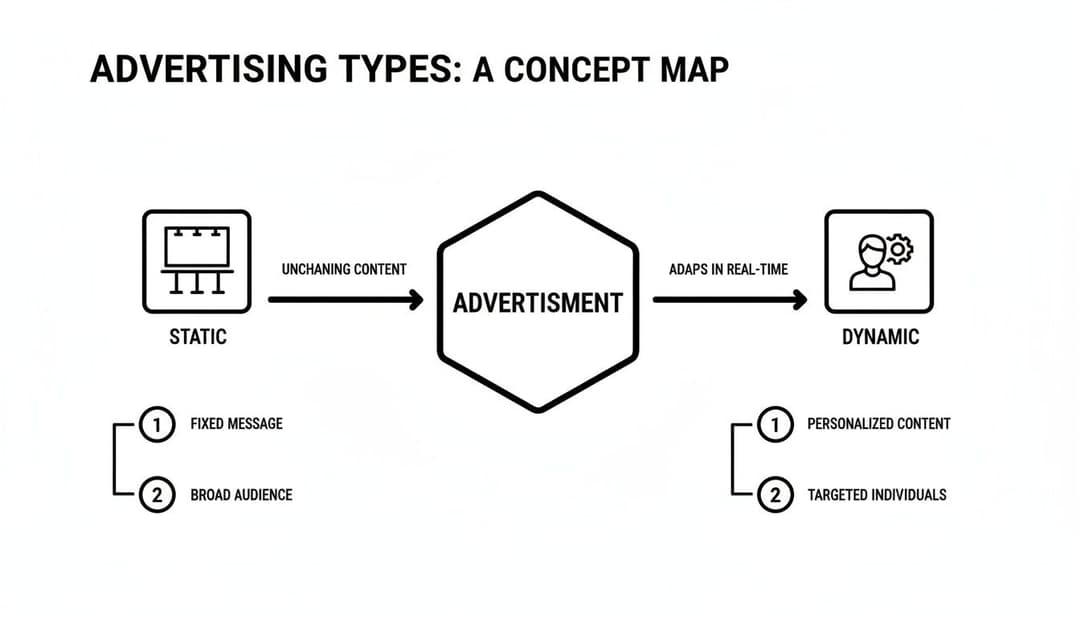
As you can see, static ads shout one message to many people. Dynamic ads, on the other hand, create a one-to-one conversation by pulling in specific product details based on user data.
The Personalization Rules: The Brains of the Operation
The final, and smartest, piece of the puzzle is the set of personalization rules and the targeting engine. This is the logic that decides which products from your feed should be shown in which template to which user.
This "brain" analyzes a ton of user data in real-time to make its decision.
These rules are what connect a person's online behavior to a specific ad creative. It’s the engine that says, "This person just looked at this jacket, left it in their cart, and lives in Miami—show them an ad for that jacket and maybe some sandals, too."
The system looks at all kinds of signals to figure this out, including:
- Browsing History: Showing products a user recently viewed, searched for, or abandoned in their cart.
- Demographics: Targeting based on location, age, gender, and more.
- Contextual Information: Displaying ads that are relevant to the content of the website the user is on right now.
Together, these three components—the data feed (the "what"), the creative template (the "how"), and the personalization rules (the "who and when")—form an incredibly powerful system. They work in perfect sync to build and deliver highly relevant ads at a scale that no human team could ever dream of managing by hand.
Unlocking Performance with Dynamic Creative Optimization
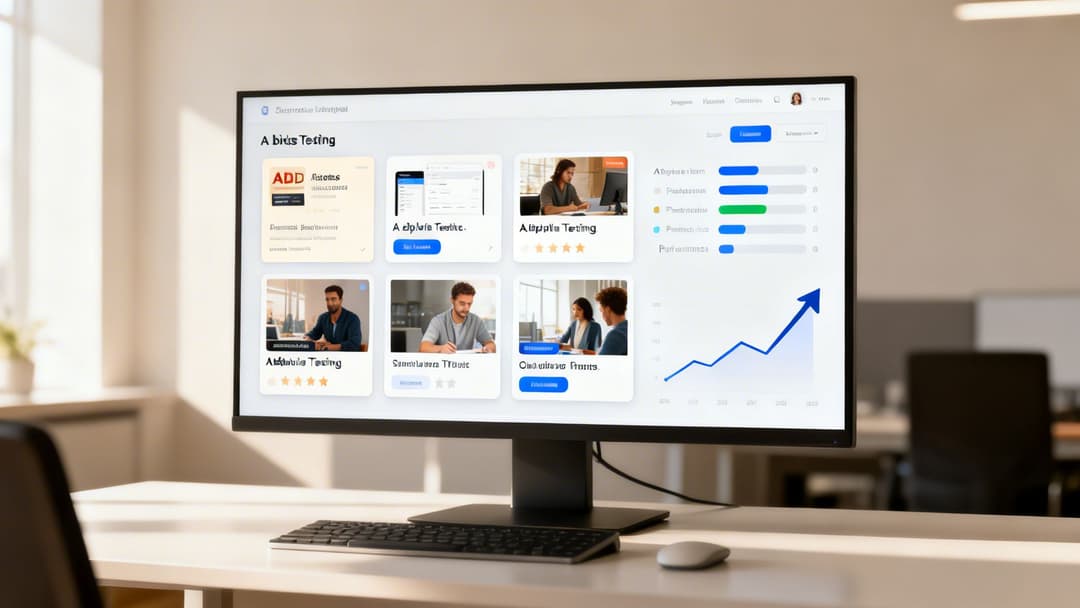
So, we've covered the nuts and bolts of display dynamic ads—the feed, the templates, the rules. But what’s the secret sauce that actually drives blockbuster performance? That's where Dynamic Creative Optimization (DCO) steps in.
Think of it like this: a basic dynamic ad is a smart assembler, putting pre-set pieces together. DCO is the brain behind the operation, an automated, tireless A/B testing machine that runs on a massive scale. It doesn't just assemble; it learns.
DCO uses algorithms to test every creative element in real-time. It's constantly figuring out which headlines, images, calls-to-action, or color schemes work best for different people. This shifts you away from tedious manual analysis and into a world of automated, data-driven decisions. For a deeper dive, our guide on what is Dynamic Creative Optimization breaks it down even further.
How DCO Drives Real-World Results
The real magic of DCO shines when you see it in action. Let’s say an online travel agency is promoting European getaways. A basic campaign might just show everyone a generic ad with the Eiffel Tower. It’s relevant, but it’s not personal.
With DCO, the entire game changes based on what the system knows about the user:
- Someone who just looked up flights to Rome? They see an ad with the Colosseum and a special offer on hotels in Italy.
- A user who was searching for family-friendly beach resorts gets an ad for Greece, complete with visuals of kids splashing in the sea.
- That person living in a cold climate gets an ad that screams "warm, sunny Spain."
But it goes even deeper than just showing a product they viewed. DCO will actively test a "Book Now" button against a "See Deals" button to learn which one converts better for a specific audience segment. To get a more technical look at how this works, check out this excellent resource on Dynamic Creative Optimization.
The Impact on Campaign Performance
This automated optimization isn't just a minor tweak; it's a massive performance booster. It's also the perfect antidote to ad fatigue, ensuring that even if a user sees your ads multiple times, the message can evolve to stay fresh and compelling.
The data speaks for itself. Research consistently shows DCO is a game-changer, with 80% of teams pointing to its real-time adaptability as a top benefit. Agencies using DCO have reported 60% better relevance and 51% higher engagement in their campaigns. In one campaign, Shell found that viewers of their dynamic ads were 3.6 times more likely to visit their website.
DCO turns your ad creative from a static monologue into an interactive, evolving dialogue. It’s the closest digital advertising gets to a live salesperson who can read the room and adjust their pitch on the fly for maximum impact.
For e-commerce brands, the results are even more direct and powerful. When machine learning is used to optimize product feeds and creative rules, businesses regularly see up to 34% higher click-through rates (CTR) and a 38% lower cost per acquisition (CPA).
In the end, DCO is the critical intelligence that makes display dynamic ads truly work. It ensures you're not just serving personalized ads, but are constantly improving them based on real-world feedback. This is how you scale complex campaigns, nail your relevance, and drive meaningful growth.
Implementing Dynamic Ads on Major Platforms
Alright, you’ve got the theory down. Now, let’s talk about where the magic really happens. The true power of display dynamic ads comes from putting them to work on platforms swimming in rich user data. While the basic idea is the same everywhere, each major platform has its own personality—its own strengths, targeting quirks, and ideal use cases.
The big three you'll be working with are Meta (Facebook and Instagram), Google Ads, and the vast world of programmatic Demand-Side Platforms (DSPs). Think of them as different toolkits. Your choice depends entirely on your campaign goals and, most importantly, where your audience actually hangs out online.
Meta Dynamic Ads for E-commerce and Social Commerce
Meta is an absolute beast for dynamic ads, and it all comes down to the incredible depth of its user data. Think about it: billions of people are on Facebook and Instagram, sharing their interests, life milestones, and favorite brands. This creates a goldmine for behavior-based advertising.
That's why it's a non-negotiable for most e-commerce brands. When someone clicks around your website or app, the Meta Pixel (or Conversions API) is watching. Meta then takes that activity and serves up ads on Facebook and Instagram featuring the exact products they viewed, added to their cart, or browsed in a category.
Here’s a perfect example of what this looks like in the wild, pulling product info straight from a catalog to create a personalized ad on the fly.
The carousel format is a winner here. It lets people scroll through a whole lineup of personalized suggestions in one ad, making that click almost irresistible.
Common Use Cases on Meta:
- Abandoned Cart Recovery: The classic "Hey, you forgot this!" reminder, showing the exact items left behind.
- Product Cross-Sells: Selling a camera bag to someone who just bought a camera. It just makes sense.
- Broad Audience Prospecting: Using lookalike audiences to find brand-new customers who act just like your best existing ones.
Google Ads for High-Intent Audiences
Where Meta thrives on social signals, Google’s advantage is its direct line to user intent. It knows what people want because they literally type it into the search bar. Google’s Dynamic Remarketing ads then follow these users across the Google Display Network, YouTube, and Gmail.
So, if someone searches for "best running shoes for trails," your dynamic ad can pop up later that day showing them your top-rated trail runners while they’re reading a blog or watching a video. You're not just guessing they're interested; you know they are.
Google masterfully connects search intent to visual display ads. It builds a bridge between what a user is actively looking for and what you can show them, creating a seamless journey from search to purchase.
Since the IAB's Dynamic Content Ad Standard was ratified in 2017, the game has changed. E-commerce advertisers using metadata for contextual ads have seen 34% CTR lifts and 38% CPA drops. Marpipe's analysis on dynamic product ads really breaks down these performance gains.
Programmatic DSPs for Granular Targeting and Scale
For the most control and the widest reach, you’ll want to look at programmatic advertising through a Demand-Side Platform (DSP). A DSP plugs you into a massive web of ad exchanges, giving you access to an inventory of websites and apps far beyond what Google or Meta offer alone.
DSPs are the playground for advanced marketers. This is where you can layer multiple data sources for incredibly specific targeting. For instance, a B2B software company could use a DSP to target users who not only visited their pricing page but also work for a company of a certain size in a specific industry. That’s a level of precision you can’t get anywhere else.
Strengths of Programmatic Dynamic Ads:
- Third-Party Data: The ability to bring in external data sets for laser-focused audience segmentation.
- Cross-Device Targeting: Reaching the same person on their laptop at work, their tablet on the couch, and their smartphone on the go.
- Advanced Retargeting: Building sophisticated audience funnels based on a whole sequence of actions, not just one.
Picking the right DSP can feel overwhelming, but our guide on the top Demand-Side Platforms is a great place to start your research. Ultimately, the "best" platform is the one that lines up with what you’re trying to achieve—whether that’s driving quick sales on Meta, snagging high-intent searchers with Google, or running a complex, data-heavy campaign through a DSP.
Alright, you’ve got the strategy mapped out. Now it's time to get your hands dirty and actually launch this thing.
Moving from the whiteboard to the real world can feel like a big leap. But honestly, most of the success (or failure) of a dynamic ad campaign is determined before you ever hit "go." It all boils down to getting three things right from the start: your data feed, your tracking pixel, and your creative templates.
Nail these, and you're building on solid rock. Get them wrong, and you're just setting your ad budget on fire. Let's walk through the common traps so you can sidestep them completely.
Step 1: Your Product Feed Is Everything
Let's be crystal clear: your product feed is the heart of your entire dynamic advertising operation. Think of it less like a spreadsheet and more like the DNA of your campaign. Any error in that DNA will be replicated thousands of times across every ad you show.
The most common campaign-killer we see is what we call "dirty data." This isn't just a minor annoyance; it's a full-blown crisis waiting to happen. We're talking about incorrect prices, broken image links, and products listed as "in stock" when they sold out yesterday.
This doesn't just create a frustrating experience for someone who clicks your ad. It's also the fastest way to get your ads disapproved by platforms like Google and Meta.
You have to treat your feed like a living, breathing part of your marketing.
- Validate Relentlessly: Before you even think about uploading, use the platform's own diagnostic tools. Find an error? Don't ignore it. Fix every last one.
- Keep It Fresh: Your feed needs to update automatically and often. If you have inventory that moves quickly, you should be updating it multiple times a day.
- Don't Skimp on Details: Write rich, descriptive titles and descriptions. This isn't just for the user; it helps the ad platforms understand relevance and can give you a nice little SEO boost on the side.
A clean, accurate, and detailed data feed isn't a "nice-to-have." It is the absolute bedrock of successful dynamic advertising. Launching without it is like trying to build a skyscraper on a foundation of sand.
Step 2: Install and Verify Your Tracking Pixel
If the feed is the heart, the tracking pixel is the central nervous system. It’s the bit of code that tells the ad platform what people are actually doing on your website—viewing a product, adding it to their cart, or checking out.
When this system is down, your targeting goes completely blind.
A broken pixel implementation is a catastrophic but shockingly common mistake. If the pixel doesn't fire correctly or passes back the wrong product ID, the platform has no idea what to show. This is how you get those baffling ads for a product you’ve never seen and have no interest in.
Your Pixel Must-Haves:
- ViewContent: Fires when someone looks at a specific product page.
- AddToCart: Fires when they add that product to their cart.
- Purchase: Fires when they complete the sale.
Don't just assume it's working. Use the pixel helper tools provided by your ad platform and test every single event. Double-check that the product_id from the pixel matches the id in your feed exactly. Even a single mismatched character will sever the connection.
Step 3: Design for Flexibility, Not Rigidity
Finally, your creative templates are the vessel that carries all this data to the user. A huge pitfall is designing templates that are too rigid and unforgiving.
What happens when your beautiful template, designed for a 50-character product title, suddenly has to display a 70-character one? It breaks. The text gets cut off, it looks sloppy, and your brand looks unprofessional.
The goal isn't to create one perfect ad; it's to create a flexible system that can generate thousands of perfect ads.
- Embrace Text That Breathes: Your design has to accommodate text of varying lengths. Make sure product names and descriptions can expand and contract without ruining the layout.
- Test Your Image Ratios: You'll have a mix of portrait and landscape images in your feed. Does your template handle both gracefully, or does it awkwardly crop them?
- Keep It Simple: Don't crowd the ad with static logos and extra text. The star of the show is the product. Make sure it shines and the call-to-action is impossible to miss.
By meticulously preparing your feed, obsessively verifying your pixel, and designing adaptable templates, you can launch with confidence. Getting these foundational steps right is the single most important thing you can do to avoid wasted spend and set your campaigns up for long-term, profitable success.
Supercharge Your Workflow with AI-Powered Tools

While the idea behind display dynamic ads is simple enough, actually managing them at scale can feel like you’re trapped in a time loop. Building, testing, and tweaking hundreds of creative variations for different audiences is a surefire way to burn through your week and invite costly human errors.
This is exactly where AI-powered platforms come in.
Instead of just being another tool, platforms like AdStellar act more like a strategic partner. They're built to automate the most grinding, repetitive parts of the job, moving past simple ad assembly and into predictive campaign creation. What once took hours of setup can now be done in minutes.
Ultimately, this new breed of tool changes how teams work. It frees everyone up to think about strategy instead of getting bogged down in endless execution.
From Manual Labor to Automated Scaling
Think about the old way of launching a big campaign. A marketer could easily spend days just building out dozens of ad sets, each with its own unique mix of creative and copy, all to test a handful of ideas. It’s slow, clunky, and nearly impossible to scale up without your whole process falling apart.
AI-powered ad creation platforms cut right through that friction by enabling bulk ad production. You can generate hundreds of ad variations—swapping out images, headlines, body copy, and audience targets—and launch them all with a single click.
This isn't just about working faster; it's about working smarter. AI lets you test more ideas, get data back quicker, and uncover winning combinations that you'd never find through manual effort alone.
This shift turns your team from ad builders into campaign architects. For a deeper dive into how the technology works, you can learn more about AI for ads and how it’s changing modern marketing.
Data-Driven Insights and Predictive Optimization
The real magic of adding AI to your dynamic ad strategy is its ability to learn and predict. These platforms plug directly into your ad accounts, pulling in real-time performance data from channels like Meta or Google.
From there, the AI gets to work analyzing what’s actually driving results. It doesn't just show you which ad did best; it breaks down performance by every single creative element, audience segment, and piece of messaging. This kind of insight replaces guesswork with solid, data-backed decisions.
Key benefits of an AI-driven approach include:
- Identifying Winning Elements: The system automatically pinpoints the exact images, headlines, and audience pairings that deliver the best results against your core goals, like ROAS or CPA.
- Automated Scaling: Once a winning combination is found, the platform can automatically shift more budget toward it, making sure you’re capitalizing on what works without any delay.
- Predictive Campaign Building: The AI even uses historical data to suggest new campaign setups, recommending proven creative elements and audiences so your next launch has a better chance of succeeding right out of the gate.
When you combine the personalization of display dynamic ads with the speed and intelligence of AI, you create a powerful engine for growth. It’s a strategic move that helps you launch better campaigns, optimize them with incredible precision, and unlock a whole new level of efficiency.
Your Top Questions About Dynamic Ads, Answered
Alright, so the theory behind dynamic ads makes sense. But when it comes to actually opening your wallet and putting them to work, the practical questions start to surface.
Let's clear up some of the most common questions marketers have before they dive in.
How Much Do Display Dynamic Ads Cost?
This is the big one, isn't it? The honest answer is: there's no flat rate. Just like most modern digital ads, the cost is decided in a real-time auction. Think of it like a live marketplace where your budget, how competitive your industry is, who you're targeting, and the quality of your ads all influence the price.
You'll typically pay per click (CPC) or per thousand impressions (CPM). But here's the key takeaway: because these ads are so incredibly relevant, they often lead to a much lower cost per acquisition (CPA). When you show people exactly what they want to see, they convert more often, making every dollar you spend work harder.
Can I Use Dynamic Ads for Services?
Absolutely. It’s easy to get fixated on e-commerce examples, but dynamic ads are a powerhouse for service-based businesses, too. The trick is to think of your services like products and organize them into a data feed.
- Travel: A travel agency can show ads for specific flights or hotel deals right after a user has searched for them on their site.
- Real Estate: An agent can automatically display property listings that match a visitor’s recent searches for a specific neighborhood or price point.
- SaaS: A software company can promote different features, plans, or case studies based on the industry of the prospect visiting their website.
The most common and costly mistake is using an incomplete or inaccurate data feed. Your feed is the engine of the entire campaign, and any error will undermine your efforts.
What Is the Biggest Mistake to Avoid?
If you remember one thing, make it this: do not neglect your data feed. This is, without a doubt, the single biggest mistake you can make.
Simple errors like an incorrect price, a broken image link, or showing an item that’s out of stock will get your ads disapproved. Worse, it creates a frustrating experience for potential customers and burns through your budget with zero results.
Before you launch anything, triple-check your feed. Make sure it updates automatically to reflect real-time changes in your inventory or offerings. A clean, accurate feed is the foundation of every single successful dynamic ad campaign.
Ready to stop guessing and start scaling your ads with precision? AdStellar AI automates bulk ad creation and uses AI to pinpoint your top-performing creative, so you can launch winning Meta campaigns 10x faster. Discover how AdStellar AI can transform your workflow today.


