You're in the middle of a launch, the campaign is ready, and Meta Ads Manager keeps throwing Error Performing Request Unknown Error when the integration tries to publish, sync, or fetch account data. That kind of failure is maddening because it doesn't tell you whether the problem is auth, permissions, network stability, or a broken payload, so teams waste time guessing while the clock keeps moving. If you need a practical starting point for the ad side of the workflow, the operational context around eCommerce Facebook ad campaigns can help frame what's at stake when publishing stalls, and the broader Facebook advertising guide is useful for aligning your team on the basics before you dig into the integration.
The phrase error performing request unknown error shows up across platforms, from Apple-related troubleshooting to generic API failures, which is a strong clue that the message is usually a symptom, not a diagnosis, of transport, authentication, or client-side trouble (Apple discussion thread). In Meta Ads work, that means you get more traction when you stop chasing the wording itself and start isolating the request path, the token, the account, and the network that carried the call. If you're supporting launch-heavy teams, this is the kind of issue that should be handled like production debugging, not like a random app glitch.
Introduction to the Error Performing Request Unknown Error
A launch can look healthy right up until the last step, then the request fails with no meaningful explanation. The marketer sees a stalled publish, the developer sees a generic failure, and the growth team gets a vague status update instead of a fix. That's why this message causes so much churn, especially in workflows tied to Meta Ads integrations where the same symptom can come from very different underlying causes.
The right mental model is simple. Treat Error Performing Request Unknown Error as a wrapper around a failed request path, not as a single Meta-specific code. That framing keeps teams from overreacting to the wording and pushes them toward the actual failure domain, whether that's OAuth, permissions, request shape, or the network path carrying the call.
Practical rule: Don't start by trying five fixes at once. Reproduce the failure once, capture the request, then narrow the cause one layer at a time.
That approach saves time, reduces noisy changes, and makes escalations useful instead of speculative. It's also the only way to keep campaign work moving when the failure shows up during launch windows or sync jobs.
Reproduce the Error in Your Setup
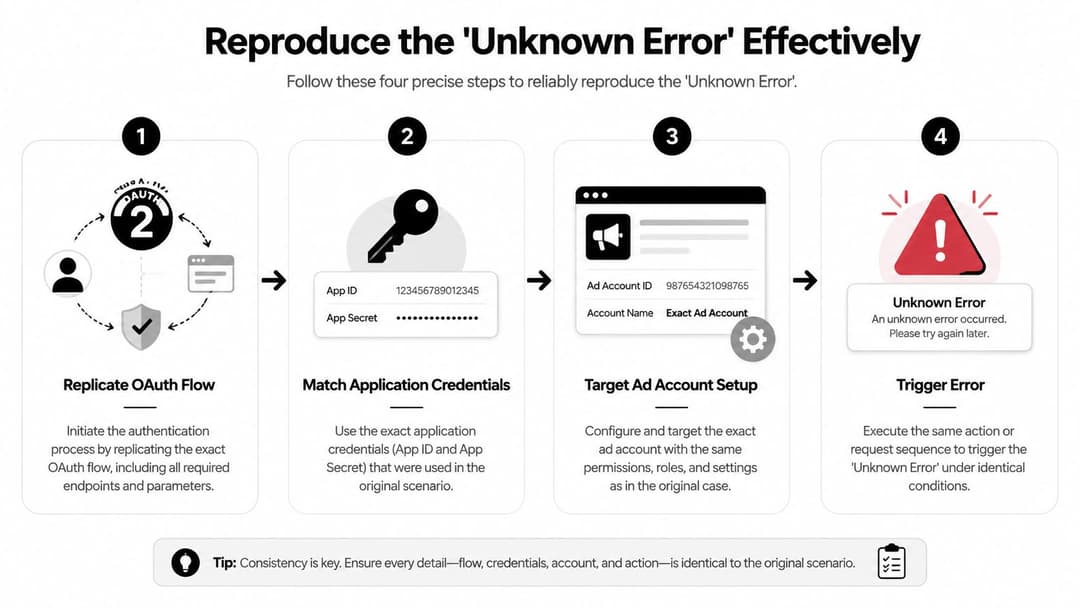
Reproduction matters because a vague error becomes useful only when you can trigger it on demand. Use the same OAuth flow, the same application credentials, and the same ad account that fail in production, then test the request path in a controlled way with cURL or Postman. If the error disappears in a clean test, you've already learned something important about the environment, the browser session, or the specific user context.
Match the failing path exactly
Start with the same account, app, and permissions used by the production integration. If your tool normally calls Meta Ads APIs after a login exchange, don't replace that with a simplified request that skips the authentication step. That shortcut often hides the underlying problem and sends the investigation in the wrong direction.
Capture the full request and response, including headers, body, and any response metadata returned by the API. If the call succeeds in one environment but fails in another, note the difference in the network path, token age, and app configuration. The point is to identify the smallest repeatable version of the failure, not to prove the system is broken in general.
Keep the test script boring
A reproduction script should be stable, plain, and easy to rerun. One clean login, one request, one response, one log entry. That makes it much easier to compare failing and working runs later. If you need a second reference for how support teams think about this kind of setup problem, the Facebook Ads Manager confusion guide is a useful companion for understanding how surface-level symptoms differ from root cause.
The best reproduction is the one another engineer can run without guessing what you meant.
Once you can trigger the error consistently, the rest of the work becomes a narrowing exercise instead of a scavenger hunt.
Check Common Root Causes
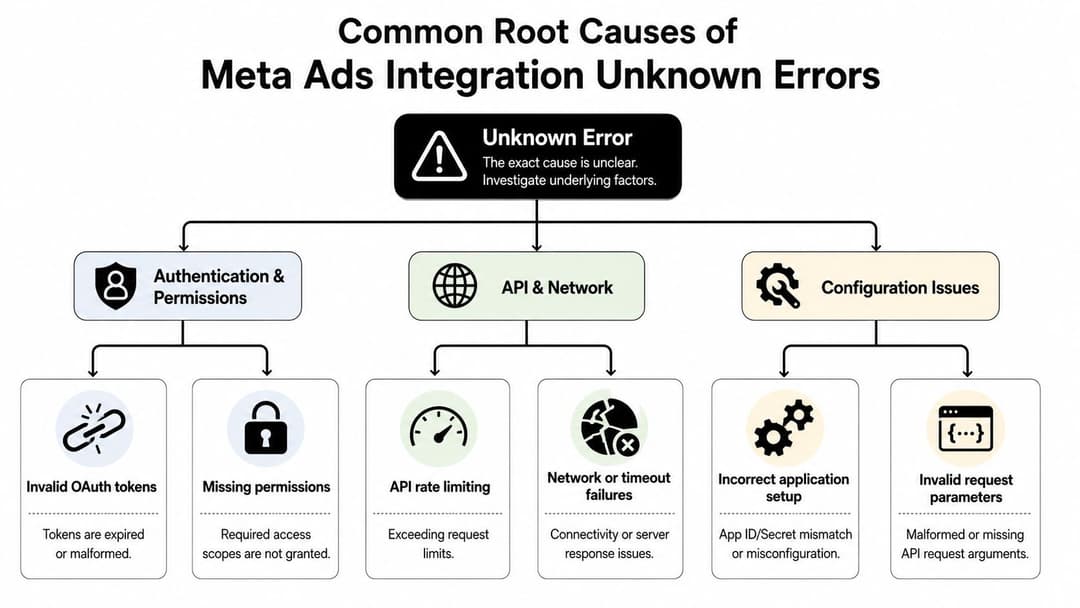
The fastest triage path is to rank the likely failure zones before you touch anything. In Meta Ads integrations, authentication and permissions usually deserve the first look, because a bad token or missing scope can make the request fail before the payload even matters. Next come API and network issues, then configuration problems such as mismatched app setup or malformed parameters.
Akamai's Edge Diagnostics shows why this style of triage works well at scale. Its Get Error Statistics tool reports returned HTTP error codes as a percentage of total traffic and uses a 9-second traffic sample from the last 2 minutes to classify errors, including unknown ones, separately from client and throttle failures (Akamai Edge Diagnostics). That model reflects the reality of production debugging, where the visible message is just the surface signal and the underlying failure lives underneath.
Authentication and permissions first
If the token is stale, malformed, or missing required permissions, the request may fail with almost no helpful detail. That's especially common when a login has been reused across devices, apps, or permissions changes. A fresh token can instantly separate a credential issue from everything else.
API and network next
If the call dies on unstable Wi-Fi, a VPN path, or a timeout-prone route, the app may display the same vague failure. The message doesn't care whether the underlying break happened at the transport layer or inside the app logic. That's why network consistency matters so much in a controlled test.
Configuration last
When the auth layer is clean and the network is stable, check app setup, field names, and request parameters. A small mismatch can make the integration look broken even though the underlying issue is just a bad input shape. That's also where teams often find problems after SDK upgrades or partial refactors.
For teams mapping these failures against launch setup, the Facebook campaign setup errors guide is a useful reference point for understanding where setup drift tends to show up in Meta workflows.
Perform Step By Step Debugging Checks
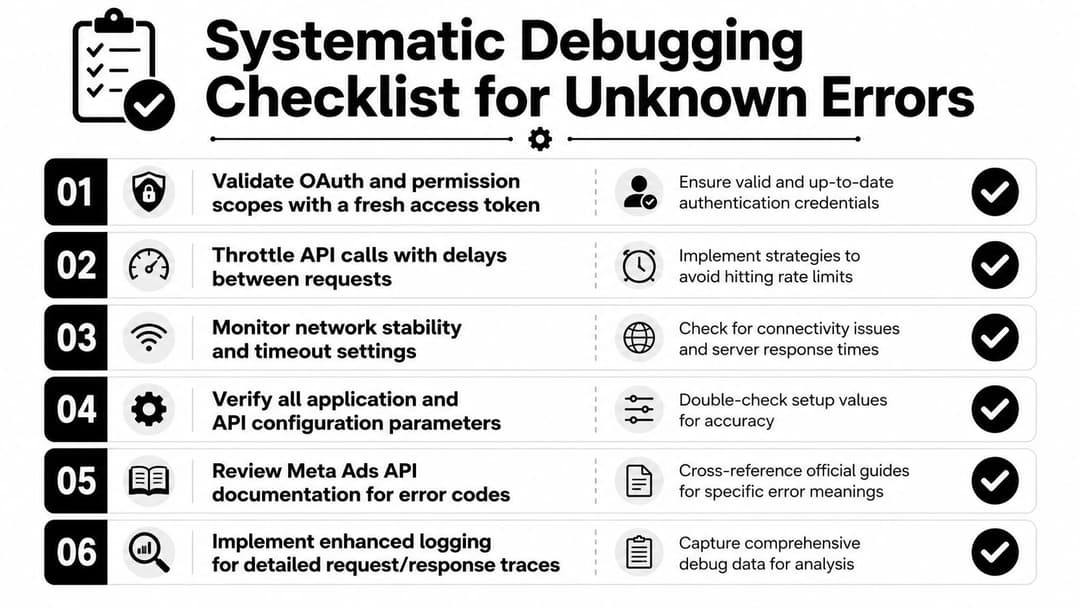
Start with the checks most likely to resolve the issue without collateral changes. A fresh token and a stable request path usually tell you more than a broad reset ever will. If you change too many variables at once, you lose the ability to tell which fix worked.
- Validate OAuth and permission scopes with a fresh access token. Re-authenticate the app or user, then confirm the token still has the scopes your integration expects. If the error disappears immediately after a fresh login, you've probably found a credential or permission mismatch.
- Throttle API calls with delays between requests. If your workflow fires several requests in quick succession, back off and retry more gently. That helps separate rate or burst-related failures from pure auth issues.
- Monitor network stability and timeout settings. Re-run the request on a known-stable connection, with VPNs and traffic filters removed where possible. If the error only shows up on one network path, the problem is environmental rather than logical.
- Verify all application and API configuration parameters. Check app IDs, secrets, account IDs, field names, and payload structure against the expected schema. Small mismatches often masquerade as generic request failures.
- Review Meta Ads API documentation for error codes. Compare the exact request path and the returned response with the official API behavior. Even if the visible message is generic, the surrounding status code or field-level response often gives you the actual category of failure.
- Implement enhanced logging for detailed request and response traces. Capture the outgoing payload, headers, response body, and timing data so the next failure is easier to isolate. Good logs turn a vague complaint into a traceable incident.
The same discipline applies when you're fixing a connected setup like Conversions API. If you need a reference implementation, the Meta CAPI setup guide is a practical companion for seeing how clean request construction and traceability should look in production.
Analyze Logs and Apply Fixes
A request that fails with error performing request unknown error usually leaves a trail in the logs, even when the visible message stays vague. On the client side, the request may leave the app correctly and come back with a generic failure and no useful body. On the server side, you may see a timeout, a rejected payload, or an auth failure right before the request breaks.
The fastest way to narrow it down is to sort the failure by likelihood in Meta Ads integrations. Token issues and payload problems show up far more often than a rare transport bug, so start there before chasing lower-probability causes.
A few patterns usually stand out quickly:
- Expired or invalid token: The request reaches the API, but the auth layer rejects it. Refresh tokens automatically and stop reusing credentials that are no longer valid.
- Malformed JSON or missing fields: The payload structure does not match what the endpoint expects. Validate the schema before sending, and fail fast in your app instead of shipping broken requests.
- Timeout or unstable connection: The request starts, then never completes cleanly. Harden retry logic, reduce request size where possible, and remove avoidable network dependencies.
- SDK mismatch: The library version and the API behavior are out of sync. Pin a known-good version, test upgrades deliberately, and keep change logs visible to the team.
Operational habit: Annotate each failed request with the account, app version, token state, and endpoint name. The next incident gets easier the moment you stop treating logs as disposable.
If your team is working through a connected API flow, such as Conversions API, use the request trace to isolate whether the failure sits in payload construction, auth, or downstream handling. The Master Facebook Conversion API guide is a practical reference for checking how clean request structure and traceability should look in production.
If you are scaling more than one Meta integration, AdStellar AI can help centralize campaign operations, but the same logging discipline still matters because publishing and sync issues are easier to diagnose when request traces stay consistent. Keep the fix tied to the log pattern, not the symptom label.
Verify the Fix in Meta Ads Manager
A fix isn't real until the same request succeeds again under the same conditions. Rerun the reproduction script first, then confirm the previously failing action now completes cleanly in Meta Ads Manager. If the error only disappears in one environment, keep testing until you know whether the change solved the root cause or just side-stepped it.
Check the diagnostics view in Ads Manager for the affected workflow and compare the behavior before and after the update. The important question isn't whether the interface looks cleaner, it's whether the same publish, sync, or account connection now completes without the unknown error returning. A second successful run matters because intermittent failures can hide in the gaps between checks.
Keep one team-facing note that records what changed, what was verified, and what still needs monitoring. That way, if the error comes back after a token rotation, SDK upgrade, or network policy change, nobody has to reconstruct the timeline from scratch. The best verification is repeatable, documented, and tied to the exact request path that failed in the first place.
Conclusion and Preventative Best Practices
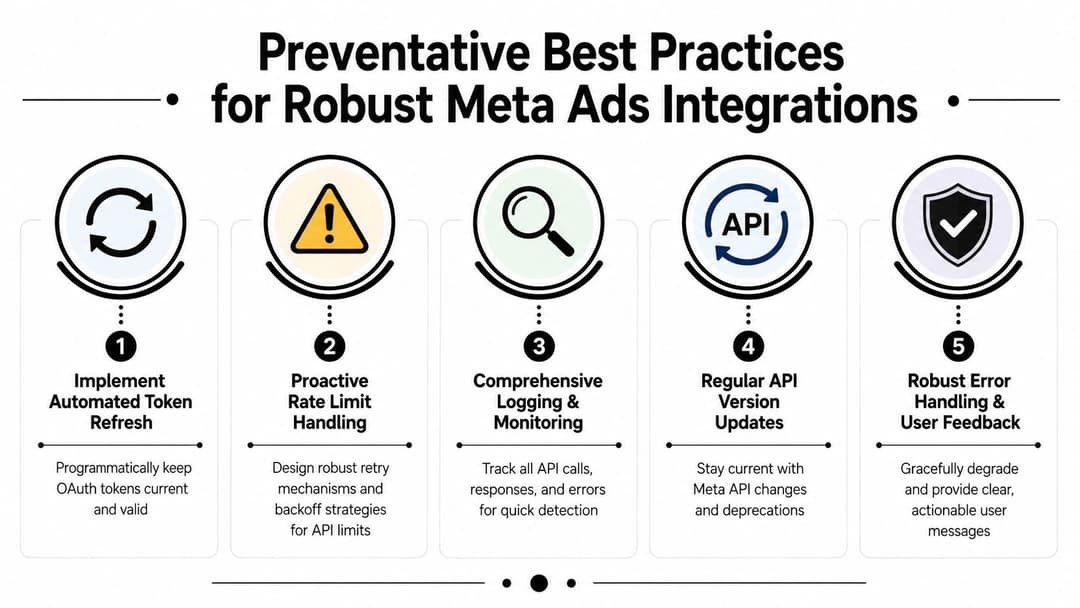
The message is vague, but the work to fix it is not. If you start with fresh auth, repeatable request reproduction, log-based fixes, and verification in Ads Manager, the issue becomes far easier to isolate. In production, the teams that recover fastest focus on the request path first, because the wording rarely tells you what broke.
Prevention is mostly operational discipline. Refresh tokens automatically before they age out, add patient retries when request pressure rises, validate payloads before they leave the app, review SDK updates before rolling them out widely, and keep request traces detailed enough to support the next investigation. That reduces surprise failures, shortens outages, and makes launches easier to control.
Troubleshooting notes are more useful when they point teams toward the most likely causes first, rather than forcing them through a generic sequence. This guide follows that approach, ranking root causes by how often they appear in Meta Ads integrations (Meta Ads integration troubleshooting note).
If your Meta Ads workflow keeps hitting vague request failures, AdStellar AI can help you centralize campaign setup, surface clearer launch diagnostics, and cut the guesswork that slows down publishing. Visit AdStellar AI to see how it supports faster, more repeatable Meta campaign operations.