You're staring at a campaign that needs more runway, the card is already attached, and a small credit just landed in your Meta account. The obvious question isn't how to click redeem. It's whether that Facebook Ad Credit should go into cold testing, retargeting, or a stronger offer that can lower CAC without wasting the gift.
A Facebook ad credit is best treated like a prepaid gift card for ads, but only for Facebook and Instagram. Meta says these credits come through in-product promotions or partnerships, and they're applied before your primary payment method is charged, which makes them a promotional funding tool, not a cash refund or withdrawal, according to Meta's Business Help Center (Meta Business Help Center). That distinction matters because the credit changes what gets charged, not what gets paid back.
Understanding Facebook ad credit
A good way to think about Facebook ad credit is this. You get a store voucher, but the store only accepts it for a specific aisle, and the cashier uses it before your own card. That's how Meta's credit works inside its billing system.
Meta's official description is narrow on purpose. The credit is a form of payment for ads on Facebook and Instagram, and it comes from periodic in-product promotions or partnerships Meta has with other sites or companies (Meta Business Help Center). So if you're looking for a rebate, a withdrawal, or a transferable balance, that's the wrong mental model.
The billing flow is also important. Once a valid credit code is claimed in Payment Settings, the balance is added to the account and then consumed against eligible ad spend before the primary payment method gets charged (AdCore guide to Facebook ad credits). That means the credit behaves like prepaid spend, not a savings account.
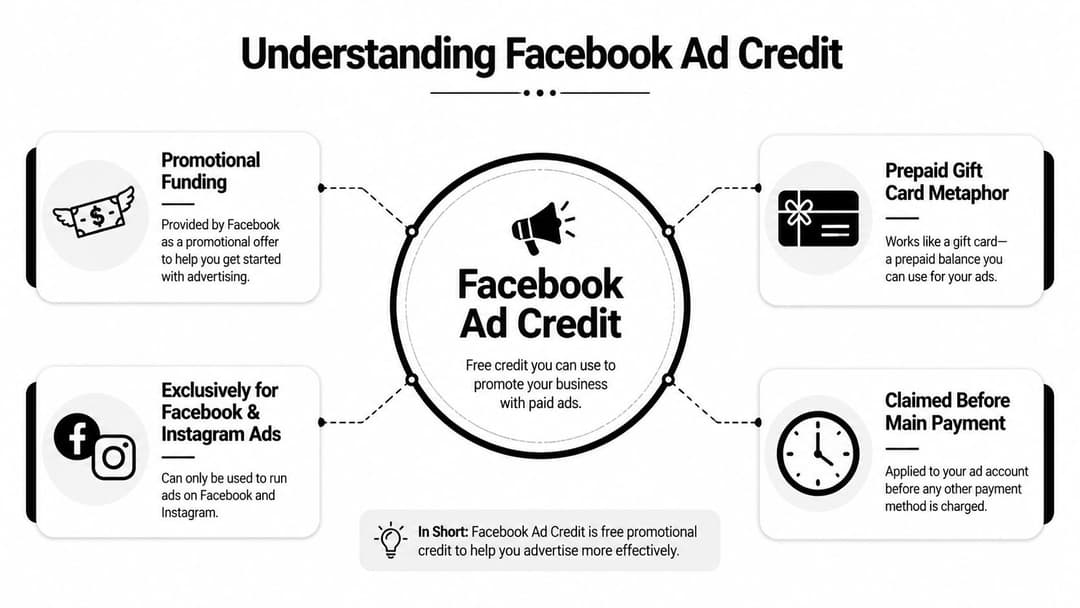
Practical rule: If the credit is attached correctly, it should reduce the amount your main payment method has to cover for eligible delivery, so check the billing setup before you assume the credit is “missing.”
That matters more now because paid traffic costs aren't staying flat. Independent benchmark reporting for 2026 puts average Facebook cost per click at $1.72, up 11% year over year from $1.55 in 2025 (Digital Applied benchmark report). In a pricier auction, even a modest credit can buy enough clicks to validate a message, audience, or offer before you spend your own budget. For setup help around the broader ad stack, this Facebook advertising guide is a useful companion.
Distinguishing credit types
Not every credit in Meta behaves the same way, even if marketers casually call them all “ad credit.” The most useful split is between promotional credits and support or account credits. They can look similar in the billing screen, but they usually arrive for different reasons and need different handling.
Promotional credits
Promotional credits are the most desirable kind. They tend to come from new advertiser offers, partner programs, or other time-limited promotions tied to Meta's ecosystem. In practice, they're the cleanest version of the concept, because they're designed to stimulate first spend and early platform use.
Support or account credits
Support or account credits are different. These are the credits that can appear after billing issues, technical glitches, or other account-related problems. They're less about marketing incentive and more about correcting something that happened in the account.
Here's the simple comparison:
- Promotional credit: usually tied to a campaign or partner offer, meant to drive new spend.
- Support credit: usually tied to an issue resolution, meant to make the account whole.
- Promotional credit: often expires and is account-specific.
- Support credit: can still be limited to the same account and usage rules.
Credits are only useful if you know which bucket they came from, because the reason they were issued usually shapes how fast you should use them and what result you should expect from them.
That distinction also affects strategy. A promotional credit can justify a fast test cycle, while a support credit may only cover the gap created by a billing problem. For teams comparing account setup and verification requirements, this Meta Business verification resource helps put the billing side into a broader account-readiness context.
Checking eligibility and issuance scenarios
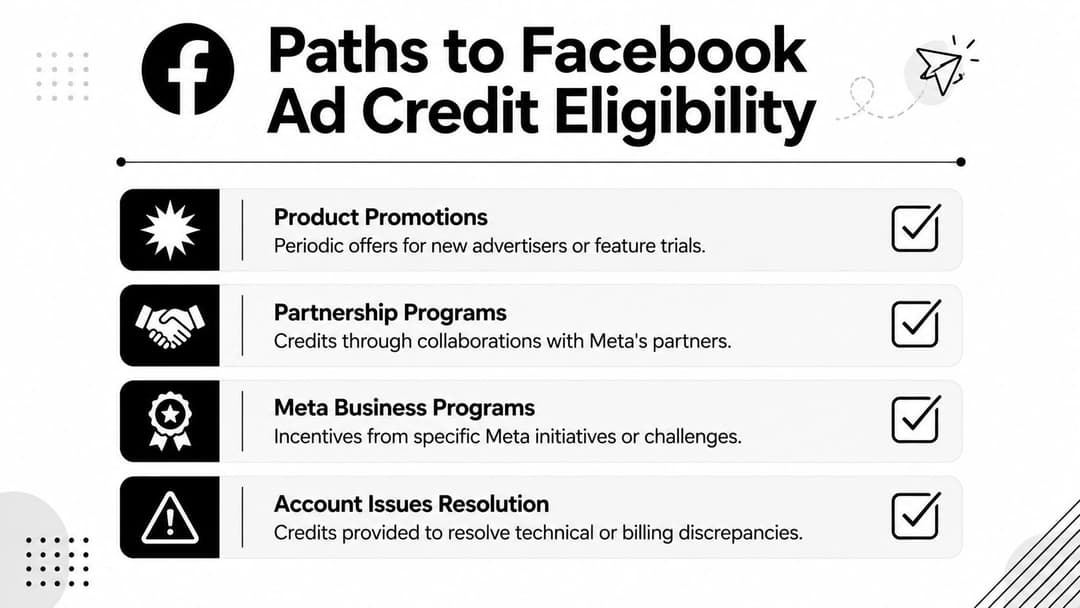
Eligibility for Facebook ad credit usually comes down to where Meta decides to place the offer or which partner program you're using. The key point is that credits are not something you buy on demand, they're something you receive through a qualifying path. That's why many teams miss them, they're looking in the wrong place.
Common ways credits appear
Meta's own model points to two main routes, in-product promotions and partner relationships (Meta Business Help Center). In plain language, that means you might see an offer inside the platform, or you might get a code through a company Meta works with. The surrounding business context matters, because a new advertiser with no history and a mature agency account are often not seeing the same kinds of offers.
A practical example helps. A shop launching its first seasonal sale might receive a promotional offer to encourage trial spend. An agency working through a billing discrepancy might receive a support-related credit instead. A SaaS marketer joining a partner platform could see an offer bundled with that partnership relationship.
The value of that credit is easier to understand against current CPCs. Independent benchmark reporting for 2026 shows average Facebook cost per click at $1.72, up 11% from $1.55 in 2025 (Digital Applied benchmark report). That makes even a modest credit more meaningful during onboarding, because it can fund early signal gathering instead of disappearing into a single expensive test.
Don't treat eligibility like a permanent entitlement. Treat it like a temporary opening, then move quickly enough to turn the credit into learning before the opportunity closes.
For teams building a cleaner account foundation before launch, this Meta business verification guide is worth reading alongside your credit workflow.
Redeeming and applying credits in Ads Manager
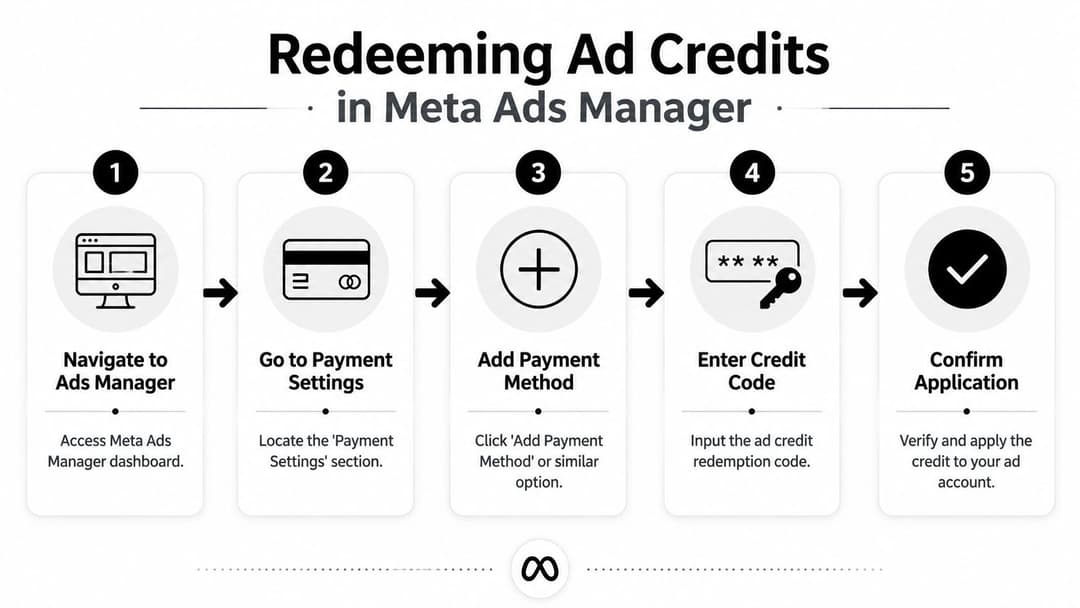
Redeeming a credit is less mysterious than anticipated, but a small mistake in the payment flow can make it feel broken. The goal is to attach the code to the ad account so Meta can apply it to eligible spend before your main payment method is used (AdCore guide to Facebook ad credits).
The redemption path
Open Ads Manager. Start in the account where you want the credit to live. If you're in the wrong ad account, the code can land somewhere useless.
Go to Payment Settings. That's where Meta keeps billing controls, payment methods, and credit-related account data.
Choose the option that lets you add or claim the credit. The exact label can vary by interface, but you're looking for the path that accepts the promo code.
Enter the credit code carefully. Copying and pasting usually reduces typo risk. If the code fails, check for extra spaces first.
Confirm the application. Once accepted, verify that the balance appears in the billing area and that the ad account is eligible to use it.
The basic idea is simple. The credit sits on the account and gets consumed as eligible ads deliver, so the balance should show up as a funding source rather than a separate cash pool. If you're setting up campaigns at the same time, this Facebook ads posting guide is a practical companion.
Here's the main confusion point. People often assume a successful code entry means the credit will act like a wallet balance they can move anywhere. It won't. Meta applies it inside the account, and the billing system uses it against eligible delivery before your normal payment method kicks in.
Navigating reporting billing and troubleshooting
Once the credit is live, it shows up in billing like any other prepaid payment source. Meta's billing flow treats ad credit as a prepaid payment method, and when it's claimed, the balance is consumed against eligible ad delivery spend immediately (AdCore guide to Facebook ad credits). That means the reporting question isn't “Did the credit exist?” It's “Where did the spend go?”
In practice, you want to watch the billing summary and the campaign delivery side together. If the credit is attached properly, you should see eligible spend draw against it before the primary payment method is charged. If delivery is active but the credit doesn't appear to move, check whether the campaign is eligible, whether the account is in the right billing state, and whether the credit was attached to the correct ad account.
When something looks off
- Credit not visible: verify the correct ad account and billing profile.
- Spend not offsetting as expected: check whether the campaign's charges are eligible for credit application.
- Unexpected expiry behavior: confirm the original issuance terms, since credit validity is often limited.
- Billing mismatch: compare the billing summary with the campaign's actual delivery.
For teams already tracking performance, the reporting lens should include CAC, CPA, and spend pacing, not just the credit balance. This campaign performance metrics guide helps frame the numbers that matter once the credit starts flowing.
Best practices for maximizing credit value
The strongest use of Facebook Ad Credit is usually not the loudest one. If you burn it on a weak offer just because the balance exists, you've delayed a bill, not lowered CAC. That's why the best move is to use the credit where it creates the fastest, clearest signal.
Put the credit where learning is cheapest
Cold audiences are useful when you need broad market signal, but they can also eat credit quickly if the creative is unproven. Retargeting usually feels safer, yet it can hide weak acquisition economics because you're working with a warmer pool. High-intent offers often sit in the middle, because they can show whether the funnel converts before you commit more spend.
The useful decision rule is simple. Use the credit on the part of the funnel where a fast answer matters most. If you're validating a new message, put the credit behind the test. If you already know the message works, use it to pressure-test audience quality or landing page conversion.
Practical rule: spend the credit where your team can learn something that will still matter after the credit is gone.
That matters because the credit isn't permanent. Most explainers overlook that credits expire and can't be transferred, so their inherent worth lies in turning them into usable data quickly rather than treating them like spare cash (HeroPay explanation of Facebook ad credit). If a team waits too long, the credit becomes a missed learning window.
For teams that want more structure after the credit runs out, an alternative is to use a system that accelerates iteration. One option is AdStellar AI, which can generate and launch Meta ad variations at scale and learn from performance data as campaigns run. If you're comparing tools for that next phase, this AI ad optimization tools overview pairs well with a credit-first testing plan.
Alternatives and AI optimization tools
A credit is helpful, but it's still a temporary subsidy. Once it's gone, the question becomes how to keep testing without sliding back into manual guesswork. At that point, the comparison is between spending more human time or using a system that speeds up iteration.
Manual control has one advantage, it keeps every decision visible. You can tighten budgets, change bids, and watch each test yourself. The downside is speed, because hand-built experiments take longer to produce and longer to learn from. AI-supported workflows change that balance by making variation generation and launch much faster.
If you're looking for a broader list of fallback strategies, the Facebook Ads Not Working Alternatives roundup from Adwave is a useful external reference for thinking about what to try when standard campaigns stall. That kind of comparison is especially helpful when a credit is small and you need a clearer recovery path than “keep spending and hope.”
For teams managing multiple ad sets, AdStellar AI fits as one operational option because it connects to Meta Ads Manager, generates creative and campaign variations, and uses performance feedback to rank what's working. That doesn't replace strategic judgment, but it can reduce the time between a test idea and a live result. If your main constraint is speed, this matters more than squeezing a few extra clicks from manual tweaks.
Conclusion and next steps
A Facebook ad credit is not a rebate, and it's not just free money. It's a temporary funding advantage that works best when you know what you're trying to learn before the balance starts moving. Meta applies it inside the billing system, and because credits can expire, the main win comes from turning that balance into useful signal fast.
The cleanest next step is to check your account, confirm the credit is attached to the right billing profile, and decide whether it should fund cold testing, retargeting, or a high-intent offer. If you want the credit to do more than delay a charge, pair it with a tight testing plan and a faster production workflow.
A CTA for AdStellar AI.