You launch a Meta campaign with polished creative, a sensible offer, and a carefully researched audience. The ads get delivery, but the results feel flat. On closer inspection, the audience is either too broad, poorly matched to your customer records, or filled with people who have moved beyond the buying moment that made them valuable.
That's where custom audience creation earns its place. It turns first-party signals, website behavior, app activity, purchases, and Meta engagement into targeting assets you can refresh, exclude, test, and reuse. The strongest gains rarely come from adding more interests. They come from improving the quality, freshness, and policy safety of the audience already available to you.
Why Custom Audiences Outperform Broad Targeting
Broad targeting asks Meta to find likely buyers from general signals such as demographics, interests, and platform behavior. That can work for prospecting, but it gives the algorithm a harder starting problem. A custom audience begins with people who have already supplied a stronger signal, such as visiting a product page, submitting a lead form, purchasing offline, using an app, or engaging with a brand account.
Facebook introduced Custom Audiences in 2013, allowing advertisers to upload customer lists and retarget people already known to the business, according to Data Axle's history of Custom Audiences. That launch shifted audience creation away from demographic guesswork toward identity-based matching using identifiers such as email addresses and phone numbers.
The practical difference is significant. A broad audience may contain people who fit a profile but have no relationship with your offer. A customer-list audience, by contrast, can represent known leads, past buyers, trial users, or sales contacts. A website audience can isolate people who showed a particular level of intent, while an engagement audience can reconnect with users who consumed your content inside Meta.
The signal is more useful than the label
A label like “SaaS founders” tells you who someone might be. A segment of pricing-page visitors tells you what someone did. That behavioral context gives your creative and offer a clearer job.
For e-commerce, useful distinctions include product viewers, add-to-cart users, checkout starters, and recent purchasers. For B2B, the stronger divisions often come from CRM stages, known accounts, demo requests, content engagement, and closed-won exclusions. The audience structure should mirror the buying journey rather than a generic persona document.
Practical rule: Build audiences around actions and business relationships first. Use demographic or interest signals only when they add useful context.
Custom audiences also support exclusions. You can remove current customers from acquisition campaigns, separate converted leads from unqualified prospects, and prevent one funnel stage from competing with another. That discipline often matters more than adding another targeting layer.
Even adjacent discovery behavior can provide useful first-party context. For example, marketers researching community-based acquisition may benefit from this guide to Facebook group discovery, particularly when engagement inside relevant communities informs content or prospecting strategy. Audience strategy works best when the underlying signals reflect genuine interaction, not assumptions.
Meta's delivery system still matters, and campaign setup can affect how your audience participates in auctions. The relationship between audience quality and delivery is also worth considering alongside how ad ranking works in Meta campaigns. A well-built audience won't rescue weak creative, but it can give strong creative a more relevant pool to work with.
Building Audiences from Pixel Events and Customer Lists
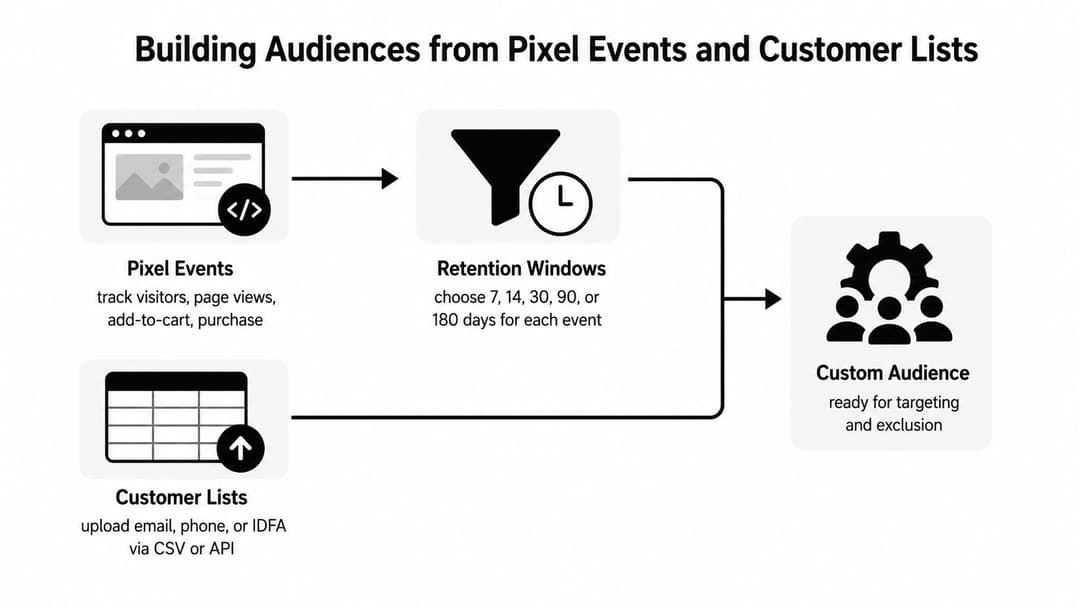
The two most useful starting points are website events and customer lists. They answer different questions. Website events show what people did recently, while customer lists identify people your business already knows.
Start with event quality
Use the Meta Pixel to define audiences from actions that correspond to intent. Page views create scale, but product views, add-to-cart events, checkout activity, lead submissions, and purchases usually provide clearer segmentation. The right event depends on the funnel stage and the message you intend to show.
A recent add-to-cart audience may need a reminder about the product or shipping. A purchaser audience may belong in an exclusion or upsell campaign. A lead-form opener who didn't submit may need reassurance, not the same ad shown to a cold prospect.
Retention settings should match the speed of the decision. Short windows preserve intent for fast-moving purchases. Longer windows can help when the sales cycle is considered, when the product has repeat-purchase potential, or when the available traffic is limited. Don't create one “all visitors” audience and expect it to serve every campaign objective.
Prepare customer lists for matching
Customer-list audiences are uploaded from CRM, commerce, subscription, or sales data. Meta hashes customer data before matching, and large uploads may take 30 minutes to a few hours to process. Match rates commonly fall around 30% to 60% for many lists, as documented in OpenMoves' explanation of customer-data audience matching.
Treat the upload as a data-engineering task, not a file attachment. Standardize fields before export, remove invalid records, normalize phone numbers, and include multiple approved identifiers where you have them. A list containing only one inconsistent field gives the platform fewer opportunities to match a person.
For e-commerce, separate recent buyers, lapsed buyers, high-value customers, and active leads if your data supports those distinctions. For B2B, combine business email with additional standardized identifiers where available. Business-only email lists can be difficult to match because the address in the CRM may not be the address associated with a person's Meta account.
Add engagement and expansion audiences deliberately
Engagement audiences are useful when website tracking is incomplete or when the meaningful interaction happened inside Meta. Video viewers, Instagram engagers, Page engagers, lead-form users, and people who interacted with an Instant Experience can each support a different follow-up message.
Lookalikes are an expansion tool, not a substitute for audience hygiene. Build them from a source that represents the outcome you want, such as qualified customers or completed purchases, rather than a mixed list containing every historical contact.
Your website data architecture also affects audience reliability. Review the implementation differences in Conversions API versus Meta Pixel before deciding which event sources should feed your audience rules.
Retention Windows and Match Rates That Actually Matter
Audience size can look healthy while audience quality declines. A retention window is a moving eligibility rule, not a permanent label. Every day, recent users enter, older users leave, and the value of the pool changes according to the source signal.
Website audiences can extend to 180 days, purchase-based audiences can reach 730 days, and lead-form audiences max out at 90 days, based on recent guidance on Meta audience windows. These limits shouldn't become default settings. They should reflect how quickly intent decays and how much scale your campaign needs.
A short website window is usually appropriate for high-intent retargeting, such as product viewers or checkout users. A longer purchase window can support retention, replenishment, or customer exclusion logic. A lead-form window needs closer attention because the available period is more limited, and stale leads may no longer represent an active opportunity.
Use match rate as a diagnostic
For customer lists, a useful optimization benchmark is a 60% to 80% match rate. Lists made only from business emails may match at just 10% to 15%, according to a technical guide to Facebook Custom Audience match rates.
The gap usually points to identifier quality rather than campaign settings. Standardized formatting, complete fields, current contact records, and list-appending can improve matchability. Don't judge a list only by row count. A smaller, clean list can produce a more usable targeting asset than a larger export filled with old or incomplete records.
| Audience Source | Maximum Retention Window | Target Match Rate | Best Use Case |
|---|---|---|---|
| Website events | Up to 180 days | Not applicable | Intent-based retargeting and exclusions |
| Purchase activity | Up to 730 days | Not applicable | Retention, replenishment, and customer suppression |
| Lead-form activity | Up to 90 days | Not applicable | Follow-up with recent form users |
| Customer lists | Defined by the uploaded records and audience rules | 60% to 80% | CRM targeting, exclusions, and qualified segmentation |
| B2B business-email lists | Defined by the uploaded records and audience rules | 10% to 15% may occur | Testing only after identifier improvement |
The table shows why “maximum” isn't the same as “optimal.” A long window can increase scale while diluting urgency. A short window can preserve intent while restricting delivery. Create separate audiences when one retention rule can't serve both purposes.
Freshness beats theoretical scale when the message depends on immediate intent.
Document the source, event, retention rule, update method, and exclusion logic for each audience. This makes decay visible and helps buyers decide whether a pool needs a new segment or a refreshed data feed. For a broader operating model, see this first-party data activation framework.
Designing Compliant Audiences Under Meta's 2025 Restrictions
More granular targeting isn't automatically better. In regulated categories, extra granularity can expose the very inference that creates policy risk.
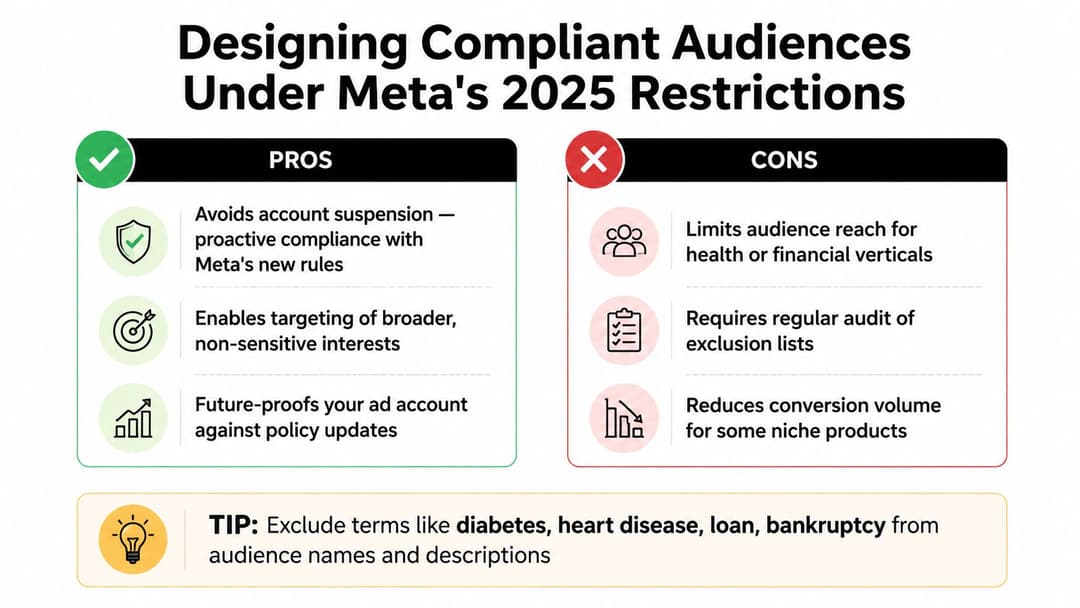
In 2025, Meta began rolling out proactive restrictions on custom audiences and conversions containing indicators of health conditions or financial status, as described in LiveRamp's announcement about Meta restrictions. That changes the design question. The objective isn't to encode every possible customer trait. It's to build audiences around legitimate business interactions without revealing sensitive characteristics.
Remove sensitive inference from the structure
A compliant design generally starts with a neutral event or relationship. “Recent purchasers” describes a transaction. “Demo requesters” describes an action. “Newsletter subscribers” describes a permissioned contact category.
A risky design uses audience names, descriptions, event labels, or conversion logic that signals a health condition, financial status, credit position, or similar sensitive trait. Even when the underlying business relationship is legitimate, the naming and segmentation layer can create avoidable problems.
Use these distinctions when reviewing an audience:
- Safer definition: Recent product purchasers, based on a recorded transaction.
- Riskier definition: People grouped because the product implies a particular health condition.
- Safer exclusion: Existing customers or converted leads.
- Riskier exclusion: People inferred to have a sensitive financial or medical attribute.
Prefer reusable, neutral segments
Regulated advertisers should favor broad, behavior-based segments that can work across markets. Keep descriptions factual and operational. Record the data source and business purpose internally, but don't turn sensitive assumptions into platform-facing audience labels.
Audit seed lists, exclusions, event names, and custom conversions before launch. A compliant audience can still fail if an associated conversion or description introduces the prohibited inference. For broader policy context, review this Meta advertising policy guide.
Compliance is part of audience architecture, not a final approval step.
This approach may reduce the specificity available to some niche verticals, but it creates audiences that are easier to review, maintain, and reuse. The trade-off is deliberate. Stable reach is more valuable than a highly granular segment that gets rejected or requires repeated reconstruction.
Testing and Troubleshooting Audience Performance
A custom audience isn't ready because Ads Manager accepted the upload. It's ready when the source, matching, exclusions, retention rule, and campaign role all make sense together.
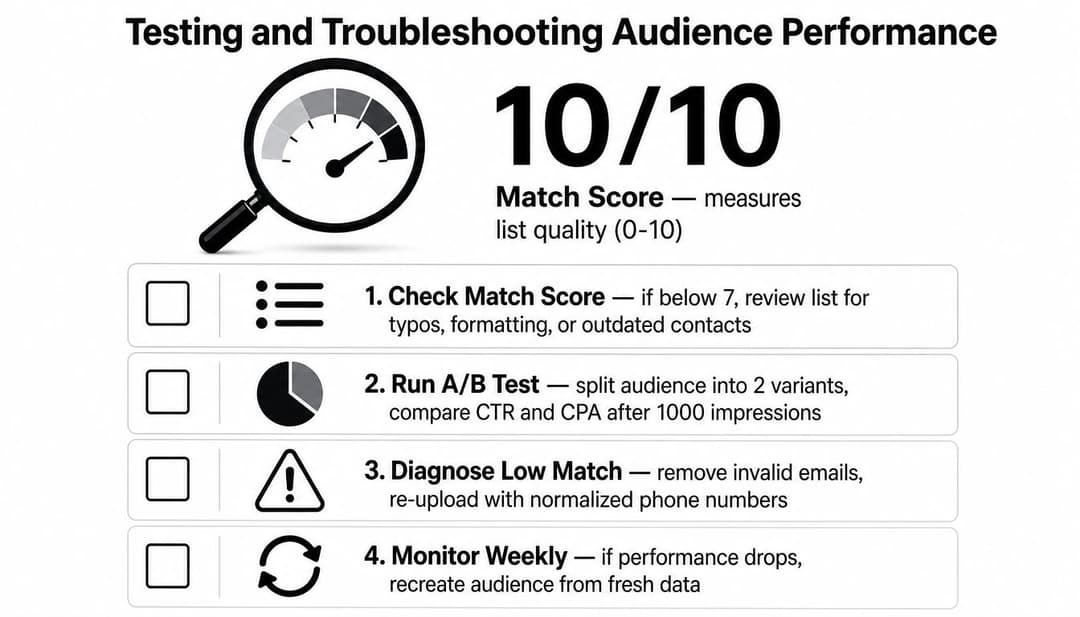
Meta defines custom audiences as segments built from first-party data or Meta engagement data. For customer-list audiences, Meta provides a Match score out of 10, calculated as matched rows divided by uploaded rows, according to Meta's Custom Audiences documentation.
Validate before spending
Check the audience status, source, event rule, retention setting, and mapped identifiers. Confirm that the intended exclusion lists are attached to the correct ad sets. If an audience won't populate, inspect event volume, pixel configuration, permissions, date filters, and whether the source contains enough eligible activity.
Low matching usually starts with the data. Review spelling, whitespace, capitalization, country codes, phone normalization, duplicate records, and outdated contacts. For B2B, test additional identifiers instead of assuming that a business email export will match reliably.
Test the audience's role, not just its existence
Compare audiences with a clear hypothesis. A recent high-intent group might receive a direct conversion message, while a broader engagement pool receives education or proof. Keep the creative, bid strategy, placement mix, and conversion event consistent enough that the audience difference remains interpretable.
Watch frequency, click-through rate, conversion rate, cost per acquisition, and revenue quality. A frequency spike can indicate that the pool is too narrow or that exclusions are missing. Weak results don't always mean the audience is bad. The offer may be mismatched to the user's stage, or the creative may repeat a message they've already acted on.
Use the principles in this Meta Ads testing framework to separate audience learning from creative and campaign-structure changes. Rebuild a stale audience when the source data or rules changed materially. Let a dynamic audience refresh when its event logic remains correct and the problem is normal entry and exit over time.
Automating Audience Workflows with AdStellar AI
Manual audience creation becomes expensive when a media buyer needs many combinations across campaigns, funnels, regions, and client accounts. The bottleneck isn't only the upload. It's naming, applying exclusions, pairing each audience with the right creative, launching variants, and then identifying which combinations deserve more budget.
AdStellar AI can centralize audience, campaign, creative, media, and performance workflows. Its campaign tools can mix audiences, copy, and media into Meta ad variations, while custom instructions can define constraints such as using lookalike audiences, excluding website visitors, separating tests by age range, or focusing on B2B decision-makers.
Turn audience logic into repeatable inputs
The useful shift is to treat audience creation as a system of inputs rather than a series of isolated Ads Manager tasks. Define the source, event, retention rule, exclusion logic, compliance constraints, and campaign objective. Then create controlled combinations instead of changing several variables without a record.
A workflow might include:
- Source selection: CRM segment, website event, app activity, or Meta engagement.
- Freshness rule: Short intent window, longer retention window, or a separate reactivation segment.
- Exclusions: Purchasers, converted leads, employees, or users already in another funnel stage.
- Compliance filter: Neutral names and behavior-based definitions that avoid sensitive inference.
- Business objective: ROAS for commerce, CPL for lead generation, or CPA for acquisition.
AdStellar AI's AI Insights can rank audiences and other campaign components against goals such as ROAS, CPL, or CPA. Its AI Launch can use proven winners to assemble new campaigns, while auto-learning models identify and scale high performers as fresh results arrive.
Keep automation subordinate to judgment
Automation doesn't replace source-data governance. It won't fix an event that fires incorrectly, a CRM field that contains stale records, or a policy-sensitive audience definition. It should execute a clear operating model and surface useful comparisons for the buyer.
The strongest setup keeps humans responsible for data permission, compliance review, funnel logic, and final budget decisions. The platform then handles the repetitive assembly and analysis that makes consistent testing difficult to sustain manually.
Your Action Plan for Scaling Custom Audiences
Start with a small operating system, not a crowded audience library. Build each audience for a defined campaign role and give every segment a clear source, retention rule, exclusion policy, and owner.
The launch sequence
Audit your signals. Confirm that Pixel events, CRM fields, app events, and engagement sources represent real business actions. Remove duplicate or obsolete segments before creating new ones.
Build intent layers. Separate high-intent website actions from general visitors. Keep purchasers and converted leads available as exclusions, retention groups, or upsell audiences.
Improve list matchability. Standardize identifiers, add approved fields where available, and use Meta's Match score to judge data quality. Treat a weak score as a data problem to investigate, not a reason to increase spend.
Choose windows by buying cycle. Use shorter windows when urgency matters and longer windows when the product supports retention or reactivation. Don't force one window across every event source.
Review policy before launch. Remove sensitive inference from audience names, descriptions, events, conversions, and exclusions. Neutral, action-based definitions are easier to audit and maintain.
Test one meaningful variable at a time. Compare audience roles with appropriate creative and offers, then monitor delivery, frequency, acquisition cost, conversion quality, and revenue.
Automate repeatable work. Once the logic is proven, use a workflow such as AdStellar AI to assemble and manage audience combinations, launch variants, and surface the segments that deserve attention.
The position is simple: custom audience creation should be a continuous optimization process, not a one-time upload. Freshness, matchability, and compliance determine whether your audience remains useful after launch. If those controls are documented and tested, your paid social program can learn faster without turning every iteration into manual campaign work.
AdStellar AI helps performance teams generate and test audience, creative, and copy combinations for Meta campaigns, then use AI Insights to compare results against ROAS, CPL, or CPA goals. Visit AdStellar AI to turn your custom audience workflow into a repeatable testing and scaling process.