Before you ever dream of launching a Facebook ad, you need a solid game plan. This means nailing down your business goals, figuring out who you're talking to, and getting your technical house in order with a Meta Business Account and Pixel. This groundwork is what separates campaigns that flop from those that fly.
Building Your Campaign's Strategic Foundation
Let’s be honest—a winning Facebook ad has little to do with a fancy image or a clever headline. The real magic happens before you even open Ads Manager. Skipping this strategic prep is like trying to build a house without a blueprint; you’re just setting yourself up for expensive mistakes.
First things first, you need to turn vague business objectives into concrete campaign goals. "More sales" is a wish, not a strategy. You need specific, measurable outcomes.
For an e-commerce brand, a solid goal might be to "boost online revenue by 15% this quarter," which immediately tells you the campaign needs to focus on driving purchases. A B2B company, however, might aim to "generate 50 qualified marketing leads per month," pointing you toward a lead generation objective. See the difference?
Define Your Ideal Customer Profile
Once you know what you want to achieve, you have to define who you're trying to reach. Crafting a detailed ideal customer profile (ICP) isn't just a nice-to-have; it's a non-negotiable step that dictates every targeting decision you'll make. This goes way beyond basic demographics.
You need to dig deeper. Think about:
- Pain Points: What problems keep them up at night that your product can solve?
- Motivations: What are their goals and dreams? How does your offer help them get there?
- Online Behavior: Where do they hang out online? What blogs, influencers, or brands do they follow?
- Objections: What’s stopping them from buying right now? What doubts do you need to overcome?
A well-defined ICP for a high-end skincare brand isn’t just "women." It’s: "Women aged 30-45, who follow sustainable beauty blogs, engage with brands like Sephora, read Allure, and are actively searching for anti-aging solutions without harsh chemicals." That level of detail is what makes your targeting truly powerful. If you want to see how this fits into the bigger picture, our guide on launching a successful paid social ad provides more context.
Set Up Your Technical Essentials
With your strategy locked in, it’s time to tackle the tech. These are the behind-the-scenes tools that make tracking, reporting, and optimization possible. Getting this right from day one is absolutely critical for understanding what’s actually working.
Key Takeaway: The technical health of your ad account is just as vital as your ad creative. A proper setup feeds Meta's algorithm the clean data it needs to find your customers and deliver your ads efficiently.
First, make sure you have a Meta Business Account. This is your command center for all advertising assets—ad accounts, Pages, Pixels, you name it. It also keeps your personal Facebook profile separate from your business, which is a must for security and team management.
Next up is the Meta Pixel. This little snippet of code is your most valuable player. Once installed on your website, it tracks everything from page views to add-to-carts and purchases. This data not only shows you if your ads are working but also lets you build incredibly effective retargeting audiences. A complete blueprint can be found in this guide on how to run a Facebook Ads campaign that actually converts.
Finally, you have to verify your domain in your Business Account. This is how you prove to Facebook that you own your website. It's a mandatory step for configuring and prioritizing the conversion events that matter to your business. Without it, your ability to track key customer actions will be severely handicapped.
Choosing the Right Objective and Budgeting for Results
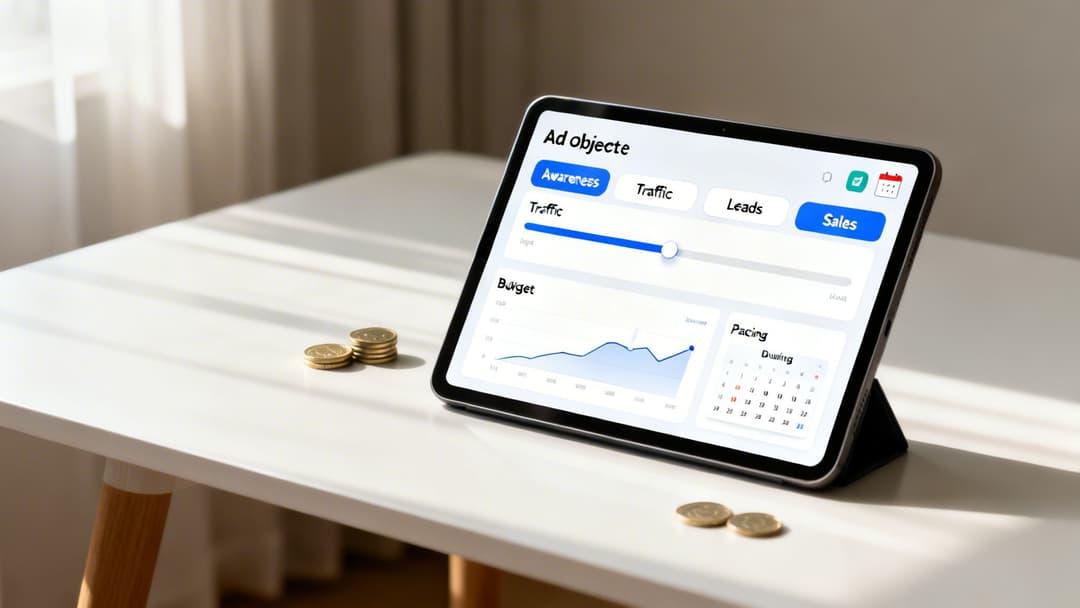
When you're building a Facebook ad, the very first decision you make—your campaign objective—is without a doubt the most important one. This isn't just a setting; it's your primary instruction to Meta's algorithm. You're telling it exactly what you consider a "win," and it will work tirelessly to find people who will deliver that specific outcome.
I’ve seen countless advertisers burn through cash because they got this one thing wrong. For example, picking the "Traffic" objective will absolutely get you a flood of clicks. But if your goal is to actually sell a product, you've just told the algorithm to find cheap clicks, not buyers. You end up with an audience full of window shoppers who love to click but never pull out their wallets.
Aligning Objectives with Business Goals
The secret is to match your campaign objective directly to your real-world business goal. You have to be honest with Meta about what you truly want. If you want to grow an email list, you need the "Leads" objective. If you're running an e-commerce store, the "Sales" objective is your only real choice for finding people ready to buy.
Here’s a quick way I think about it:
- Awareness: This is for making a splash. Use it when launching a brand or a new product to get your name in front of the maximum number of people for the lowest possible cost.
- Traffic: Best for content promotion. If you just published a killer blog post or want eyes on a new piece of content, this is a great, cost-effective way to drive visitors.
- Leads: Perfect for list-building. Think lead magnets, webinar sign-ups, or getting people to download a guide. You're collecting contact information.
- Sales: This is the money-maker for e-commerce. It tells Meta to hunt for users who are most likely to complete a purchase, even if it means fewer clicks overall.
Choosing the "Sales" objective is a commitment to performance. It forces the algorithm to hunt for conversions, which is why it's the foundation of most profitable advertising strategies.
If you really want to get into the weeds on how each choice affects your campaign, we’ve put together a detailed guide on the objectives of the campaign. Getting this right is fundamental to seeing a real return on your ad spend.
Smart Budgeting Strategies
Once your objective is locked in, it's time to talk money. You have two primary ways to manage your budget: Ad Set Budgets (ABO) and Campaign Budget Optimization (CBO). They each have their place.
With ABO, you set a dedicated budget for each ad set. This gives you precise, granular control, which is exactly what you want during the testing phase. For instance, you could give three different audiences $20 each per day to see which one delivers the goods before you scale up.
Conversely, CBO lets you set one master budget at the campaign level. From there, Meta's AI automatically shifts the money to your best-performing ad sets in real-time. This is my go-to for scaling. Once you've found your winning audiences and ads, CBO ensures your budget is always flowing to what's working best.
Knowing the economics behind your budget is also a game-changer. For example, the average cost-per-click (CPC) is around $1.05, but if you're in a competitive field like Finance, that can jump to $3.77 per click. Knowing benchmarks like these, along with industry averages like a 7.72% conversion rate for lead gen, helps you set goals that are ambitious but realistic.
Mastering Audience Targeting for Maximum Impact
 You can have the most compelling ad creative in the world, but if the wrong people see it, you’re just burning cash. Getting your audience targeting right is single-handedly the most powerful lever you can pull to protect your budget and see a real return on ad spend (ROAS).
This is about thinking in layers, moving past basic demographics like age and location. We're going to combine different targeting signals to build a profile of someone who isn't just a casual browser, but a high-intent user actively seeking what you offer.
Layering Interests and Behaviors
The real genius of Meta's ad platform is how it lets you stack different criteria to pinpoint your ideal customer. Instead of just targeting anyone interested in "Shopify," you can get surgical.
Think about it: a truly high-intent audience might be people who are interested in "Shopify" AND are also flagged as "small business owners." This simple "AND" logic immediately weeds out the hobbyists and puts your ad squarely in front of actual entrepreneurs.
Another example? A yoga instructor selling a new course could target users interested in "Lululemon" AND "Yoga Journal" AND who have shown interest in "Mindfulness" content. Suddenly, you've built a highly concentrated, super-relevant audience.
Pro Tip: When you're just starting, don't be afraid to go a little broad. An audience that seems too wide, when paired with a clear Sales objective, can give Meta's algorithm the data it needs to find your customers for you. The machine learning is smarter than you think.
Unlocking Custom and Lookalike Audiences
While interest targeting is your go-to for finding brand-new customers, your most valuable audiences are usually the ones you already have a connection with. This is where Custom and Lookalike Audiences are absolute game-changers.
Custom Audiences: Think of these as your "warm" leads. You can build these audiences from people who have visited your website (tracked via the Meta Pixel), uploaded your email list, or engaged with your Facebook or Instagram profiles. A classic high-ROI strategy is retargeting everyone who added a product to their cart but didn't finish checking out.
Lookalike Audiences: This is how you scale. You can take a high-value Custom Audience—say, your list of top customers—and tell Meta to go find more people just like them. A 1% Lookalike audience will be the most similar to your original list, while a 10% Lookalike will have a much broader reach, giving you more room to scale.
To build a really solid strategy, you have to know all your options. For a deeper dive, check out our guide on the different target market types and how to apply them.
To get a better sense of who you're targeting, it helps to understand the platform's user base. Here’s a quick look at some key demographics from recent data.
Facebook Audience Segments at a Glance (2026)
| Demographic Segment | Statistic | Strategic Implication for Advertisers |
|---|---|---|
| Global Ad Reach | 2.28 to 2.35 billion users | The massive user base offers unparalleled reach, but requires precise targeting to avoid wasted ad spend. |
| Ages 25-34 | 31.1% of total ad audience | This is the largest and often most commercially active demographic, making it a core target for many brands. |
| Male Users (25-34) | 18.4% of total ad audience | The largest single gender and age combination on the platform, crucial for brands with male-oriented products. |
| Female Users (25-34) | 12.7% of total ad audience | A highly engaged and valuable segment, particularly for e-commerce, wellness, and lifestyle brands. |
Understanding these segments allows you to make more informed decisions when building your audience. For instance, knowing that the 25-34 age group is the largest user block can help you prioritize your creative and messaging.
Choosing Your Placements
Finally, don't just gloss over where your ads show up. By default, Facebook will use "Advantage+ placements," which automatically distributes your ads across its entire ecosystem—Facebook, Instagram, Messenger, and its Audience Network. For most beginners, this is the way to go. Let the algorithm do the work.
However, as you get more experienced, you may want to manually select your placements. For instance, if you've shot a killer vertical video, you can create an ad set that only runs on Instagram Reels and Facebook Stories. This gives you complete control, ensuring your creative always looks its best in its native environment.
Creating Ad Creatives and Copy That Convert
After all the strategic work of setting up your campaign and dialing in your audience, we’ve arrived at the moment of truth. Your ad creative—the visual and the text—is what determines if someone actually stops scrolling or just glides right past.
This is where the art and science of advertising really come together. An effective ad has to do three things, and it has to do them fast: grab attention, build some quick trust, and push for a specific action. You're an interruption in their feed, after all. You have to earn that focus.
Writing Scroll-Stopping Ad Copy
The words you choose are your direct line to the customer. Forget about vague, clickbaity promises like "discover a secret loophole"—people see right through that stuff. Your copy needs to be authentic and crystal clear.
A simple but incredibly powerful way to structure your ad copy is to think of it in three parts:
- The Emotional Hook: Kick things off with a relatable story, a genuinely surprising stat, or a question that hits on a core pain point. For an ad selling a real estate course, you might start with a local news story about a family who found unclaimed funds. It makes the abstract concept feel real and immediate.
- The Bridge and Proof: Once you have their attention, you need to connect that hook to your solution. This is where you introduce your product and establish credibility. Use real social proof like customer quotes, media logos ("As seen on..."), or hard data to back up what you're saying.
- The Clear CTA: Tell them exactly what to do next. "Learn More" is okay, but specific calls-to-action like "Get Your Free Quote" or "Download the Guide" almost always perform better. They set a clear expectation and align perfectly with the value you just presented.
Great ad copy isn't always written from scratch. I often find the best language by digging through customer reviews, forums, and news articles in a client's niche. Using the exact words your audience uses to describe their problems makes your ad feel less like marketing and more like a helping hand. For a deep dive on this, check out our complete guide on Facebook ad copy where we break down more proven formulas.
Designing Visuals That Stand Out
In a feed packed with visuals, your image or video has maybe a second to make an impression. It doesn't matter if you're using a static image, a carousel, or a video—the goal is always to be visually arresting and instantly communicate your message.
Static images need to be high-quality and vibrant, with a single, clear focus. Crowded graphics or too much text on the image are a recipe for being ignored. A simple photo of a person actually using your product almost always beats a sterile product shot on a white background. Carousels are brilliant for showing off multiple features, telling a quick story, or cycling through testimonials.
Key Takeaway: Video isn't a "nice-to-have" anymore; it's essential. The good news? Simple, user-generated-style videos often crush high-production commercials because they feel more authentic and native to the platform.
Automating Your Creative Testing with Dynamic Creative
Can you imagine manually creating and testing every single combination of headline, image, and CTA? It’s a massive waste of time. This is exactly why you need to be using Facebook's Dynamic Creative feature.
Instead of building dozens of separate ads, you just give Meta the raw ingredients—say, five headlines, three images, and two CTA buttons.
Meta's AI then becomes your tireless assistant, mixing and matching all those components to create countless ad variations on the fly. It quickly learns which combinations get the best reaction from different people and automatically shifts your budget to the winners. It’s like running a huge, ongoing A/B test without lifting a finger, giving you priceless insights into what really drives results. Mastering this is fundamental to creating a Facebook ad that actually makes you money.
Time To Launch, Analyze, and Optimize Your Ads
You did it. You hit "Publish" on your new campaign. It’s an exciting moment, but this is the starting line, not the finish. The real work—and where the real profit is made—starts right now. Knowing how to dig into your ad performance and make smart tweaks is what separates the marketers who get lucky once from those who build predictable, scalable growth for their business.
This entire post-launch phase is about one thing: turning raw data into profitable decisions. You have to listen to what the market is telling you through your metrics and respond with informed adjustments.
Decoding The Learning Phase
Once your ad set goes live, it enters what Meta calls the “learning phase.” This is a critical window where the delivery system is actively figuring out the best way to show your ads. It's testing different pockets of people within your target audience to find who is most likely to take the action you want (your optimization event).
An ad set needs about 50 of these desired actions within a 7-day window to exit the learning phase. If you make any big changes to your targeting, creative, or budget during this time, you can reset the whole process, forcing the algorithm to start from scratch. This is why patience is one of the most underrated skills in a media buyer’s toolkit.
As a rule of thumb, just let it run. Don't touch a new campaign for at least 3-5 days. This gives the algorithm time to find its footing and gives you enough data to spot real trends instead of just reacting to random daily spikes and dips.
Monitoring The Metrics That Actually Matter
Opening Ads Manager can feel like walking into the cockpit of a 747—dozens of columns, numbers, and acronyms. The secret is to ignore almost all of them. Focus only on the metrics that directly measure the goal of your campaign.
- For a Sales campaign: Your north star metrics are ROAS (Return on Ad Spend) and Cost Per Purchase. Are you actually making money? That's all that matters.
- For a Leads campaign: All you need to watch is your Cost Per Lead (CPL). This tells you exactly how much you're paying to get a new person into your sales pipeline.
- For a Traffic campaign: Keep an eye on Cost Per Click (CPC) and Click-Through Rate (CTR). These measure how good your ad is at getting people to your site.
Of course, secondary metrics like CTR and CPC can help you diagnose why your main metric is off. For instance, a high Cost Per Purchase paired with a low CTR probably means your ad creative just isn't grabbing attention. If you want to go deeper on what to track, exploring different Facebook advertising optimization strategies will give you a much clearer picture.
This simple diagram breaks down the core pieces of an ad that you'll be analyzing and testing.
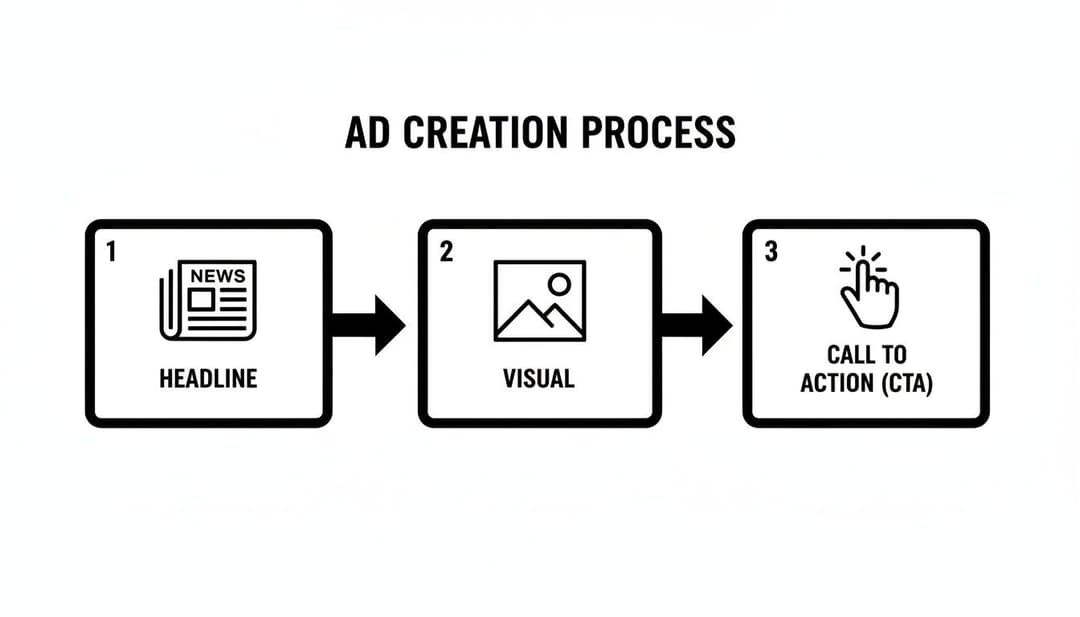
Think of each of these—the headline, the visual, and the CTA—as a lever you can pull to try and improve your ad's results.
A Simple Framework For A/B Testing
"Optimization" is really just a fancy word for methodical testing. To get better results over time, you need a simple framework for A/B testing that lets you isolate what’s working and what isn’t. The golden rule is to change only one major thing at a time. That's how you know for sure what caused the performance to go up or down.
Here’s a logical way to approach it:
- Start with the Creative: Your image or video almost always has the biggest impact. Test two completely different ad concepts against each other. Maybe a raw, user-generated-style video versus a polished graphic with a customer quote.
- Next, Test the Audience: Once you have a winning creative, run it to two different audiences. For example, you could pit a broad, interest-based audience against a 1% Lookalike Audience built from your best customers.
- Finally, Refine the Copy: With a winning creative and audience, you can now test smaller things like your ad copy. Try a short, punchy headline against a longer, story-driven one to see what your audience connects with.
This methodical process turns your ad account from a slot machine into a predictable system for finding winning ads. Over time, these small improvements stack up, leading to massive gains in your overall return. For businesses looking to scale faster or bring in outside expertise, understanding what a performance based marketing agency does can be a game-changer. They live and breathe this kind of data-driven optimization.
Common Questions About Creating Facebook Ads
It's one thing to follow a guide, but it's another to deal with the practical questions that pop up the minute you're live in Ads Manager. When you're spending real money, you need real answers.
Let's tackle some of the most common hurdles I see marketers face. These are the questions that come up time and time again, and getting them right can make all the difference.
How Much Should I Spend on Facebook Ads When I Am Just Starting?
There's no single magic number here, but a good, safe place to start is $10–$20 per day for each audience you're testing. This gives Meta's algorithm enough data to work with without you having to risk a ton of cash right out of the gate.
The real pro move is to work backward from your goals. Let's say you're selling a $50 product with a 50% profit margin. That means your break-even Cost Per Acquisition (CPA) is $25. To give your campaign a fighting chance, your daily budget should be at least double or triple that target CPA.
Expert Tip: The name of the game is to prove your concept first. Find that winning combination of an ad and an audience on a small budget. Only then should you start scaling up. A gradual increase of about 20% every few days is the best way to do this without shocking the algorithm and resetting its learning phase.
Why Are My Facebook Ads Not Getting Approved?
An ad rejection is frustrating, but it's almost always fixable. Most rejections fall into a few common buckets, and knowing what they are can save you a lot of time and headaches.
Before you do anything else, review Meta's official Advertising Policies. Seriously, bookmark that page. Your ad was likely flagged for one of these reasons:
- Prohibited Content: This is the obvious stuff—making misleading claims, using adult content, or trying to sell restricted products like firearms or tobacco.
- Landing Page Issues: Sometimes the ad is fine, but the page it links to is the problem. A broken link, a page that doesn't load, aggressive pop-ups, or a page that doesn't match the ad's promise can all get you rejected.
- Creative Violations: The old "20% text rule" on images is more of a guideline now, but an image covered in text can still cause problems. Another big one is calling out personal attributes (e.g., "Struggling with debt?"). Facebook is very strict about this.
If your ad gets rejected, Meta will give you a reason. Read it carefully. If you think they made a mistake (which happens!), use the "Request Review" option. Just don't keep resubmitting the same ad without making changes—that's a fast track to getting your whole account flagged.
What Is the Difference Between CBO and ABO?
CBO and ABO are just acronyms for where you set your budget. Each has a specific strategic purpose, and knowing when to use which is key.
ABO (Ad Set Budget Optimization): This is where you set a specific budget for each individual ad set. It gives you precise control over how much you spend testing each audience. ABO is your best friend during the initial testing phase when you want to give every audience a fair shot.
CBO (Campaign Budget Optimization): With CBO, you set one budget at the campaign level. Meta's algorithm then automatically pushes your money to the ad sets that are performing best in real-time. CBO is the go-to for scaling your winners. It ensures your budget is always flowing to what's working, maximizing your results.
A classic workflow is to start with ABO to test your audiences and creatives. Once you find your winners, you move them into a new CBO campaign to scale up efficiently.
How Long Should I Let a Facebook Ad Run Before Making Changes?
Patience is a superpower in advertising. You have to give your ads time to exit the "learning phase." This is the period where Meta's algorithm needs to get about 50 optimization events (like purchases or leads) within a 7-day window to figure out who to show your ad to.
If you make major changes during this phase—like swapping creatives, overhauling your targeting, or dramatically changing the budget—you'll reset the process, and the algorithm has to start learning all over again.
As a rule of thumb, let any new campaign run for at least 3 to 5 days before you even think about touching it. This gives the system time to stabilize and gives you enough data to make a smart decision, not just a gut reaction to one good or bad day.
Ready to stop the manual grind and launch winning campaigns faster? AdStellar AI is the AI-powered platform that automates bulk ad creation, testing, and scaling on Meta. Generate hundreds of ad variations in minutes, get AI-driven insights on what’s working, and let our auto-learning models scale your top performers for you. See how performance marketers are unlocking more revenue with less effort at https://www.adstellar.ai.