
Traffic is coming in. Content is getting read. Maybe your product pages are attracting steady visits, or your blog posts finally rank. But revenue from the site itself still feels vague.
That’s where a lot of teams get stuck. They know ads are an option, but “how to put ads on a website” gets treated like a small technical task when it’s really a monetization decision. The code is the easy part. The harder part is deciding which ad model fits your traffic, where ad placements help instead of hurt, and how to tell if the units you added are making the site more profitable or just more cluttered.
A good ad setup should do three things at once. It should create incremental revenue, preserve the user journey, and give you enough control to keep improving performance over time. If one of those breaks, the setup usually underperforms.
Your First Step in Website Monetization
A common situation looks like this: a publisher has solid traffic from search, social, or email, but no clear monetization system. Someone suggests Google AdSense. Someone else says direct sponsors pay better. The developer asks where the script should go. The marketer asks whether ads will tank conversion rates. Everyone is asking a valid question, but they’re asking at different layers of the same problem.

The first move isn’t adding a banner. It’s deciding what role ads should play on the site.
If you run a content-heavy property, ads can become a direct revenue stream. If you run an ecommerce or SaaS site, they may work better in a narrower role, such as monetizing blog traffic that isn’t likely to convert into a customer. If you serve a niche audience, the primary opportunity might not be generic display inventory at all. It may be direct partnerships or native placements aligned with your category.
Start with the business model, not the script
Publishers often treat ad implementation as “paste code and see what happens.” That approach usually creates a messy layout, weak reporting, and internal arguments later when no one can tell which placements are helping.
A better starting checklist is short:
- Know what you’re monetizing: article pages, category pages, tools, forums, or product pages
- Know what you won’t monetize: high-intent pages where ads could distract from your primary conversion goal
- Know your risk tolerance: hands-off automation versus tighter manual control
- Know your benchmark: revenue, engagement, lead quality, or user experience
Practical rule: If your site already has a strong primary conversion path, ads should support the business, not compete with it.
If you need a broader look at publisher-side monetization options before choosing a setup, this guide on getting advertisement for your website is a useful starting point: https://www.adstellar.ai/blog/how-to-get-advertisement-for-your-website
Ads work best when they fit the site
The strongest ad setups feel intentional. The weak ones feel bolted on.
That difference matters because monetization isn’t just about showing more units. It’s about creating a layout where users still trust the page, still consume the content, and still understand what action to take next. When ads interrupt that flow, revenue often becomes unstable even if short-term impressions rise.
Choosing Your Monetization Path
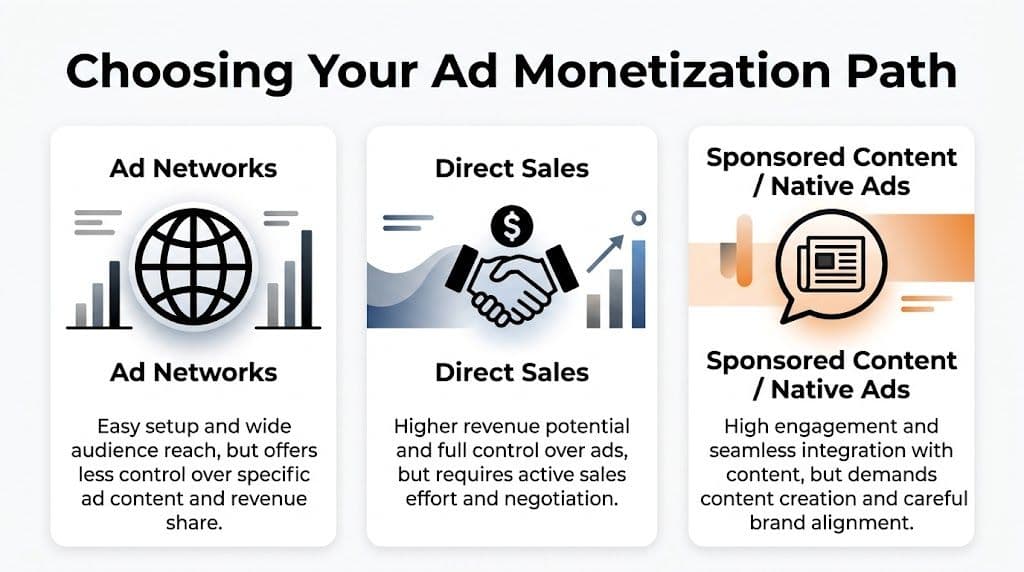
Before you generate a single ad tag, choose the operating model. Most publishers end up in one of three buckets: ad networks, direct sales, or sponsored/native placements. Advanced teams may layer these together, but the starting choice still matters because it affects revenue control, workflow, and what kind of traffic your site needs.
One market reality explains why many sites begin with major platforms. As of 2026, Google and Facebook are projected to collectively control 58.5% of total US digital ad spend, with Google at 38.6% and Facebook at 19.9%, according to WordStream’s digital advertising statistics. That concentration makes major networks the obvious starting point. It also makes diversification important, because depending on a single channel leaves you exposed.
The three practical paths
| Path | Best for | What works | What breaks |
|---|---|---|---|
| Ad networks | Newer publishers or lean teams | Fast setup, low sales overhead, broad advertiser demand | Less control over buyers, formats, and pricing |
| Direct sales | Niche publishers with a clear audience | Better control, stronger brand fit, custom packages | Requires outreach, negotiation, and ongoing account management |
| Sponsored or native ads | Brands with editorial strength or category authority | Ads can feel more relevant to the content experience | Needs careful disclosure and strong brand alignment |
Ad networks are the easiest entry point
If your team wants speed and simplicity, start here. Networks like Google AdSense reduce the operational burden. You create placements, add code, and let the platform fill inventory.
That’s appealing for sites that don’t have a sales team or the time to pitch advertisers. It’s also why ad networks dominate beginner tutorials.
But ease comes with trade-offs. You get less control over specific ad demand, less flexibility in pricing, and fewer ways to package your audience as a premium asset.
Direct sales make sense when your audience is the product
If your traffic is niche and commercially valuable, direct deals can outperform generic network monetization because advertisers are buying context, not just impressions.
A finance publisher, vertical SaaS media site, or high-intent B2B blog can often position inventory around audience quality, newsletter sponsorships, category exclusivity, or custom placements. That’s harder to do through a standard network setup.
The catch is operational. Someone has to prospect, negotiate, traffic campaigns, report performance, and renew deals.
Direct sales pay off when your audience is specific enough that advertisers want access to it, not just reach.
Sponsored and native placements need editorial discipline
Native units and sponsored content can work well because they match the site’s reading flow better than standard banners. That matters for attention and trust.
They also demand judgment. If the ad feels disguised, readers pull back. If it feels irrelevant, performance drops. If it feels useful and clearly labeled, it can become one of the cleanest monetization layers on the site.
For teams evaluating the mechanics behind automated media buying, this overview of programmatic advertising is worth reviewing. It helps clarify where ad exchanges, bidding, and inventory automation fit once you move beyond basic network placements.
A simple way to choose
Use this filter:
- Choose ad networks if you need low-friction monetization now
- Choose direct sales if you have a narrow, valuable audience and sales capacity
- Choose native or sponsored inventory if your editorial environment is strong and brand-safe
Many sites eventually combine all three. They start with a network, add direct deals where demand appears, and reserve certain content surfaces for native inventory.
If you’re comparing providers, formats, and commercial models, this overview of top ad networks for advertisers can help you understand the options: https://www.adstellar.ai/blog/top-ad-networks-for-advertisers
Generating and Placing Your Ad Code
Once the monetization path is set, implementation becomes straightforward. A common mistake here is assuming all ad code placement methods are interchangeable. They aren’t.
The right method depends on how much control you need, who maintains the site, and how often you expect your ad setup to change.

Step one is approval and ad unit creation
If you’re using a network such as AdSense or Adcash, the process starts with account creation, site submission, and review. After approval, you’ll create ad units or choose an automated placement option.
There’s an important trade-off here. Google’s Auto ads can increase fill rates by 15-25%, but they can also create user experience issues if you let automation place too aggressively, according to Adcash’s guide to adding ads to a website.
That’s why I usually separate the decision like this:
- Use Auto ads when speed matters more than layout precision
- Use manual units when page structure, conversion flow, and brand presentation matter
- Use a hybrid approach when you want automation in low-risk areas and manual placements on core templates
Method one works best for simple sites
Manual insertion is still the cleanest option for publishers who want full control.
You generate the JavaScript snippet from your ad platform, then place it directly in the HTML or template where the ad should render. On a custom site, that usually means editing the relevant template files. On a CMS, it might mean placing code in a widget area, article template, or reusable block.
Manual placement is best when:
- You know your templates: blog post, category page, sidebar, header, or footer
- You care about exact position: above content, within content, or after a specific module
- You want predictable behavior: fewer surprises than automated insertion
This method takes more effort, but it’s easier to reason about later when performance differs by page type.
Method two lowers friction for CMS teams
If your site runs on WordPress or a similar CMS, a dedicated ad plugin can save time. It gives marketing teams a layer of control without requiring template edits every time a placement changes.
That matters when you’re testing formats or rotating layouts. A plugin can also help you target placements by page type or content section without custom development.
The downside is that plugin stacks get messy fast. If the site already relies on many front-end plugins, adding another layer for ads can create conflicts, layout drift, or tracking headaches. Keep the stack lean.
A plugin is useful when the team managing monetization isn’t the same team maintaining the theme or codebase.
Method three gives larger teams flexibility
Google Tag Manager is the better fit when your site needs centralized tag control. It lets you deploy and update scripts without touching the codebase every time, assuming your governance is solid.
This approach works well for publishers running multiple ad vendors, event tracking, consent triggers, or different placements by audience segment.
But GTM can become a dumping ground. If no one owns tag hygiene, you end up with duplicated scripts, unclear triggers, and slower troubleshooting.
Placement matters more than people expect
Implementation isn’t just about making the ad appear. It’s about placing it where users will see it without breaking the page.
The same Adcash reference notes that placing ads above the fold can double click-through rates, while in-content units between paragraphs can improve engagement by 20-40%. Those are not small differences. They’re the reason placement decisions should be deliberate, not delegated entirely to automation.
A simple rollout plan looks like this:
Start with one or two high-intent templates
Don’t light up the whole site on day one. Launch on article pages or a specific content hub first.Add one premium visibility slot
A leaderboard or top-of-content slot gives you an early read on viewability and user tolerance.Add one in-content unit
This lets you compare surface-level visibility against embedded reading-flow engagement.Review mobile separately
Desktop layouts often hide problems that become obvious on phones.
For teams that also run paid acquisition, understanding how advertisers structure campaigns helps you make better publisher decisions too. If you need that lens, this guide on how to create Google Ads is a useful companion read.
Here’s a walkthrough video that can help if you want to see the embedding process in action before changing templates or tags:
Don’t forget the tracking layer
A placement without reporting is just decoration. Label units clearly inside your ad platform and analytics setup so you can compare by format, template, and device.
If you also use audience or conversion tracking elsewhere on the site, make sure those systems stay coordinated. This is especially relevant when ad monetization and acquisition measurement live on the same property. A clear reference point for that setup is this guide on implementing the Facebook Pixel: https://www.adstellar.ai/blog/how-to-set-up-facebook-pixel
Designing Ad Layouts for Revenue and UX
Most sites don’t fail at getting ads live. They fail at layout judgment.
That usually shows up in one of two ways. Either the team is too cautious and places low-visibility units that barely monetize, or they get aggressive and turn every scroll into an interruption. Both mistakes cost money. One's effect is quiet, the other's is loud.

The best layouts respect reading flow
The highest-performing placements are often the ones that feel structurally natural inside the page. That’s one reason in-content placements account for 33.5% of total ad revenue, according to the Journal of Business Administration Online research on ad relevance and placement.
The point isn’t “put ads everywhere inside the article.” The point is that embedded placements usually outperform decorative ones because they sit where attention already exists.
Three formats tend to earn their keep:
- Leaderboard units: useful near the top of a page when they don’t push the content too far down
- Medium rectangles: versatile inside content and in certain side rail placements
- Sticky or adhesion units: effective when handled carefully, risky when overused
Viewability is the real filter
An ad that loads isn’t necessarily an ad that performs. If users never see the placement, the inventory looks busy but earns weakly.
That same placement study found that viewable impressions deliver a 95% lift in conversion rates compared to non-viewable impressions. That’s the reason layout work matters so much. Viewability isn’t a reporting nicety. It’s tied directly to monetization quality.
The unit that earns best is usually the one users can actually see without feeling ambushed by it.
Mobile is where discipline shows
Mobile layouts expose weak ad decisions fast. A placement that looks acceptable on desktop can dominate the viewport on a phone and make the content feel secondary.
When designing mobile inventory, keep these principles tight:
- Protect the opening screen: users came for the content, not a wall of ad chrome
- Use responsive formats: fixed-width units often create awkward spacing or clipping
- Watch spacing between paragraphs: in-content ads need breathing room or they feel like interruptions instead of part of the page rhythm
A practical layout review
Use this checklist when evaluating a page:
| Question | Good sign | Warning sign |
|---|---|---|
| Does the ad appear where attention already exists? | Near content transitions or natural pauses | Stuffed into low-attention corners |
| Does the ad compete with the main CTA? | The user can still see the page priority clearly | The monetization path confuses the conversion path |
| Does mobile still feel readable? | Content remains easy to scan | The ad dominates the viewport |
If your team also controls creative execution, banner principles matter as much as placement. Poor visual design can drag down performance even when location is strong. This reference on advertising banner design is useful for tightening that side of the equation: https://www.adstellar.ai/blog/advertising-banner-design
Optimizing Ad Performance Like a Pro
Once ads are live, the job shifts from implementation to yield management. At this point, weak publishers stay passive while strong ones start behaving like performance marketers.
The first change is mental. Stop asking, “Are the ads running?” Start asking, “Which units earn, which units get seen, and which units damage the page more than they pay back?”
Track the numbers that explain the story
You don’t need a bloated dashboard. You need a set of metrics that show inventory quality.
Focus on:
- RPM: what your pages are earning relative to traffic volume
- eCPM: what your inventory is worth after impressions are served
- CTR: whether a unit attracts interaction
- Fill rate: whether the ad demand is showing up for the inventory you created
No single metric tells the truth alone. A placement can have a healthy CTR and still be a bad business decision if it disrupts the page. Another can have mediocre CTR but strong revenue because it delivers stable, high-value impressions.
Test formats, not just positions
A lot of optimization gets framed as “move the ad up or down.” That’s too narrow.
Format choice changes user behavior. Native ads can achieve a 2.3x higher CTR than standard display ads, according to Adrenalead’s placement guide. That doesn’t mean native belongs everywhere. It means format should be tested as seriously as position.
A strong testing cadence compares:
- One standard display unit against one native unit
- Top-of-content versus mid-article
- Desktop behavior versus mobile behavior
- Sticky behavior versus static placements
Operator mindset: Treat every ad slot like a landing page. It has traffic, visibility, friction, and output.
Use technical optimization where it matters
Some gains come from demand. Others come from site performance.
One of the easiest technical wins is below-the-fold lazy loading. The same Adrenalead reference notes that lazy-loading below-the-fold ads can cut initial page load time by 20%, which helps Core Web Vitals and SEO. That matters because a slow page undercuts ad revenue from both sides. It can hurt rankings and reduce the number of users who stay long enough to see the inventory.
For advanced publishers, header bidding often represents the next significant step. The plain-English version is simple: instead of letting one source price your inventory first, you let multiple demand sources compete. That usually gives stronger visibility into true inventory value and can improve yield if your traffic and setup justify the complexity.
Navigating Compliance and Privacy Rules
Ad monetization has a policy layer that many teams ignore until something breaks. That’s a mistake.
Privacy rules affect how you collect consent, how ad platforms can use data, and whether your tracking setup is defensible. Network policies affect whether your site stays approved. Fraud controls affect whether buyers trust your inventory.
The non-negotiable checklist
Keep this short and operational:
- Use a consent workflow: if your site serves users in regulated markets, cookie and tracking consent can’t be an afterthought
- Maintain a clear privacy policy: users and platforms both expect it
- Add an ads.txt file: it helps signal which sellers are authorized to monetize your inventory
- Review platform policies before launch: especially around content categories and prohibited placements
Compliance is also a revenue issue
Publishers often frame privacy and policy as legal overhead. In practice, clean compliance supports monetization because it reduces disputes, protects platform relationships, and keeps your inventory more trustworthy to buyers.
That applies internally too. If your marketing, analytics, and monetization tags all fire without clear governance, debugging becomes painful fast.
For a clean reference point on privacy language and expectations, review this example: https://www.adstellar.ai/privacy
Answering Your Top Monetization Questions
Should you worry about ad blockers
Yes, but don’t build your whole strategy around fighting them. The better response is diversification.
If ad monetization matters to the business, combine display revenue with other models such as sponsorships, direct deals, email monetization, subscriptions, or owned offers. Ad blockers are a reminder not to depend on one revenue stream too heavily.
How long does it take to see meaningful income
Longer than most beginners expect. Fast enough to validate the model, slower to make it material.
You can usually tell early whether a setup is structurally sound. What takes time is gathering enough data to know which templates, devices, and formats deserve more inventory and which ones should be removed.
What matters more, clicks or revenue
Revenue quality matters more. A flashy CTR can distract from the bigger question of whether the placement improves total monetization without hurting user behavior.
If I had to prioritize a short list, I’d watch RPM, viewability, eCPM, and template-level performance before celebrating raw clicks.
What’s the most common mistake
Adding too many units before proving that the first few work.
That habit usually comes from thinking of ads as a volume game. Better monetization comes from stronger placement decisions, cleaner reporting, and disciplined iteration.
Can ads live on the same site as product marketing
Yes, if the roles are clear. The problem isn’t coexistence. The problem is conflict.
Keep ads away from your most commercially important paths if they distract from lead generation, checkout flow, or core product intent. Monetize the traffic that isn’t central to your primary conversion journey first.
If your team also wants to scale paid social execution with less manual setup, AdStellar AI helps launch, test, and optimize Meta campaigns faster by turning past performance into repeatable campaign decisions. It’s built for growth teams that want more output, sharper learning loops, and less time lost in ad ops.


