
When your Facebook ads aren't delivering, the culprit is often something simple. It could be a pending ad review, a rejected ad, or even a billing problem. These are the usual roadblocks that can stop a campaign in its tracks, leaving you with zero impressions and no ad spend.
Why Your Facebook Ads Suddenly Stop Delivering

It’s a feeling every marketer dreads. You’ve just launched what you think is a killer campaign, only to be met with total silence. No spend. No impressions. Nothing.
While alarming, a sudden halt in delivery is almost always traceable to a specific, fixable issue within your account, ad set, or the ad creative itself. This isn't just an annoyance; it’s lost momentum and a missed opportunity. Before you start tearing apart your campaign strategy, it’s best to run a quick diagnostic on the most common offenders.
The Usual Suspects Hiding in Plain Sight
More often than not, the reason your ads have ground to a halt is straightforward. Always start your troubleshooting with the basics before you jump to more complex conclusions. A few minutes checking these areas can save you hours of frustration.
Before you go any deeper, run through this quick checklist.
Initial Ad Delivery Diagnostic Checklist
This table is your first line of defense. Use it to quickly spot the most frequent reasons your ads might not be running before you dive into a more detailed investigation.
| Check Area | Potential Problem | Quick Fix |
|---|---|---|
| Billing & Payments | An expired card or a failed payment has paused the entire ad account. | Update your payment method in the Billing section of Ads Manager. |
| Ad Status | The ad is stuck "In Review," has been "Rejected," or shows an error. | Check the "Delivery" column. If rejected, edit the ad to comply with policies. |
| Spending Limits | You've hit the account-level spending limit you set up months ago. | Go to your Billing settings and either increase or remove the account spending limit. |
| Scheduling | The campaign or ad set has an incorrect start date or a past end date. | Review the schedule at both the campaign and ad set levels and adjust as needed. |
These simple checks solve a surprisingly high number of delivery issues. If you've gone through this list and everything looks correct, it's time to dig into the mechanics of how Meta's system works.
The entire Meta ad auction is built to maximize value for both users and advertisers. If your ad is flagged as a potentially poor user experience—or it fails basic quality checks—it won't even get a chance to compete.
Understanding the Meta Ad Auction
At its core, Facebook’s ad delivery is one massive, continuous, real-time auction. Every single time there’s a chance to show an ad to someone, an auction happens.
Your ad's ability to win that auction comes down to its Total Value. This score is a combination of your bid, the estimated action rates (how likely someone is to take your desired action), and your ad quality. If any one of these pieces is weak, your ad just won't be competitive enough to get shown. It’s why you can have a healthy budget but still see zero delivery, leaving you wondering if advertising on Facebook works at all.
Keep in mind, factors outside your direct campaign settings can also play a role. Issues with your Facebook Page's overall health or reputation can sometimes impact ad delivery, so it pays to manage your Facebook page's online reputation by addressing negative reviews. A holistic view is key to making sure you aren't overlooking something that's holding your campaigns back.
Your Ad Delivery Triage and Diagnostic Workflow
So you’ve already ruled out the simple stuff—a typo in the schedule or a declined credit card—but your ads are still dead in the water. What now?
This is where you need a structured workflow. The worst thing you can do is start poking around and changing things randomly, which can easily make the problem worse. We need to be systematic, starting with the biggest factors Meta’s algorithm cares about and working our way down to the details.
This is my hands-on process for figuring out exactly why your ads aren't delivering, moving from the most common culprits to the more subtle ones.
The Big Five Initial Checks
Before you even think about auction dynamics or audience overlap, you have to start with what I call the "Big Five." These are the most frequent—and frankly, most embarrassing—reasons for a campaign to suddenly stop spending. Getting these cleared first will save you a world of headache.
- Payment Method Health: Is your primary payment method active and valid? A single failed charge can put an immediate stop to your entire ad account. Check it first.
- Ad Status and Policy: Look at the "Delivery" column in Ads Manager. If you see a rejection or an error, that's your problem right there. A policy violation will shut an ad down instantly.
- Account Spending Limit: Pop over to your Billing settings. Have you hit the account-level spending limit? It’s a classic "set it and forget it" mistake that gets even seasoned pros.
- Campaign and Ad Set Schedules: Simple human error. Double-check that your campaign and ad set start and end dates are what you intended them to be.
- Campaign and Ad Set Status: Are both the campaign and the ad set actually toggled on? Yes, it’s basic, but it happens more often than you’d think.
If you’ve checked all five and everything looks good, it means the issue is more nuanced and is probably buried in your campaign setup.
Investigating Nuanced Delivery Blockers
With the basics out of the way, it’s time to dig into the strategic parts of your ad set. This is where most delivery problems hide. An ad can be technically "active" but still get zero impressions if the conditions for delivery just aren't there.
One of the most common issues I see is an overly narrow audience. Precision targeting feels like the right move, but if your audience is too small, you give Meta's algorithm nowhere to go. If your estimated reach is only a few thousand people, the system might not even bother trying to serve your ads, especially for conversion goals. The fix? Try broadening your targeting a bit—add a few more related interests or bump up your lookalike percentage from 1% to 3%.
Another huge one is audience overlap. If you’re running multiple ad sets that are targeting similar groups of people, you’re essentially forcing your own ads to compete against each other. Meta’s auction will usually just pick one "winner" from your account to show, which means your other, overlapping ad sets get left in the dust. You can use Meta's "Audience Overlap" tool to check this. If you find your "Website Visitors - 30 Days" lookalike has an 80% overlap with your "Engaged Instagram Users" lookalike, you’re far better off just combining them into one ad set.
Don't mistake a slow start for a complete failure. The "Delivery" column might show "Learning" or "Active" with very low spend. This often happens in the first 24-48 hours as the algorithm explores placements and audiences. True non-delivery means zero impressions over a significant period.
Finally, take a hard look at your bid strategy. If you've set a manual bid cap or a cost cap that's way too low, you're effectively pricing yourself out of the auction. Let's say the going rate for a result in your niche is around $25, but your cost cap is set at $10. Your ads are almost guaranteed to not deliver. A quick way to test this is to switch the ad set to the "Highest Volume" bid strategy. If it starts spending, you've found your bottleneck—your bid was the problem.
For a deeper dive into navigating these settings, our complete guide on how to use Facebook Ads Manager provides a comprehensive walkthrough.
Fixing Hidden Issues in Your Targeting and Creative
Sometimes, the reason your Facebook ads aren't delivering has nothing to do with your budget or billing status. The problem is more strategic: Meta's algorithm has sized up your ad, looked at your audience, and decided it's just not going to perform well. So, it simply throttles delivery or stops it cold.
Think of it as a protective measure. If the algorithm predicts your ad will create a poor user experience—like showing an ad for retirement homes to a 22-year-old—it slams on the brakes. A major red flag for this kind of problem is a low Quality Ranking or other negative ad relevance diagnostics. These scores are Meta’s direct feedback, telling you there's a fundamental mismatch between your message and your audience.
Diagnosing the Mismatch Between Ad and Audience
When delivery stalls for no obvious technical reason, you have to play detective. The first step is to form a clear hypothesis. Is the ad copy uninspired? Are the visuals weak or just plain irrelevant to the people you're targeting? Or have you created a brilliant ad but are showing it to a completely wrong group of people?
Your starting point should be your ad's relevance diagnostics. You can find these metrics in your Ads Manager columns, and they break down performance into three critical areas:
- Quality Ranking: This compares your ad's perceived quality to other ads competing for the same audience.
- Engagement Rate Ranking: This shows how your ad's expected engagement rate stacks up against the competition.
- Conversion Rate Ranking: This compares your ad's expected conversion rate to ads with similar optimization goals.
Seeing "Average" or "Above Average" is what you're aiming for. But a "Below Average" ranking in any of these categories is a flashing neon sign that something is seriously off. For instance, a low Engagement Rate Ranking might mean your creative isn't compelling enough to stop the scroll. On the other hand, a low Conversion Rate Ranking could point to a weak call-to-action or a landing page that doesn't deliver on the ad's promise. Getting this initial diagnosis right is absolutely crucial for any further optimization of your Facebook ads.
This decision tree gives you a visual roadmap for troubleshooting the most common delivery killers, starting with the simple stuff and moving toward the more strategic issues.
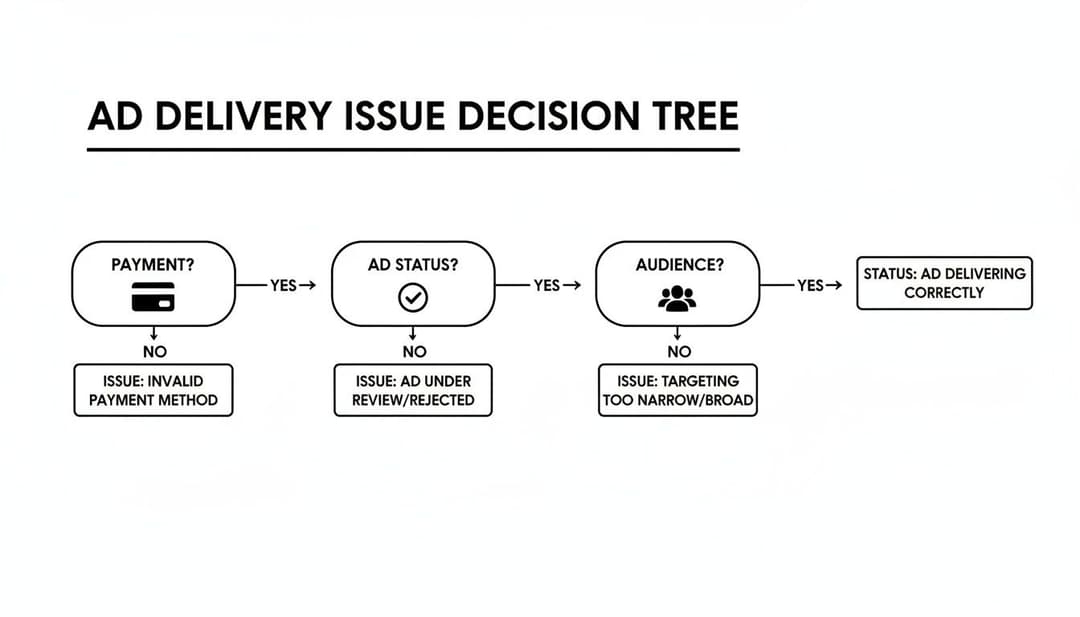
As you can see, the flowchart follows a logical path. Always rule out simple account issues like payment problems before you start tearing apart your audience targeting and creative strategy.
Taking Action on Poor Ad Relevance
Struggling with poor ad relevance is a common battle. In fact, a staggering 62% of small businesses say their paid Facebook ads are failing to produce results, with weak audience targeting being a major culprit. The disconnect often boils down to a lack of rigorous testing across ad copy, visuals, and audience combinations.
The impact of getting this right is massive. In one study, simply improving the targeting for the exact same ad creative resulted in four times more clicks at a lower cost per click. The message is clear: even the best ad will fail if it's shown to the wrong people.
Key Takeaway: Meta's algorithm is designed to reward ads that users will actually enjoy and engage with. A low relevance score is a direct signal that your ad is failing this fundamental test, and the algorithm is suppressing its delivery as a consequence.
Often, the problem lies with the creative itself. Learning how to craft effective Facebook video ads can be a game-changer, helping you prevent these delivery headaches from the start. If your diagnostics point to a creative issue, it's time to head back to the drawing board. Start testing new visuals, headlines, and hooks that align better with what your target audience genuinely wants to see.
2. Your Campaign Is Flying Blind Without Good Data

Sometimes, the real reason your ads aren't delivering has nothing to do with your creative or your audience. The culprit is a silent killer: your tracking is broken. You could have a campaign that’s actually generating sales, but if Meta's algorithm can't see the conversions happening, it will quickly assume the ad is a dud and pull the plug on delivery.
This is a massive—and growing—problem. You might be getting sales and leads, but if your Meta Pixel or Conversions API (CAPI) isn't firing correctly, that critical data never makes it back to Ads Manager. From the algorithm's perspective, you're getting zero results. It's left completely in the dark, with no positive signals to justify spending your budget.
Verify Your Data Foundation
It’s time to start treating your tracking setup with the same level of care you give your ad creative. The first place you need to go is the Events Manager in your Meta Business Suite. This is your mission control for diagnosing any and all data flow issues.
You’re looking for a healthy "Event Match Quality" score. If that score is low, it’s a huge red flag that Meta is having a hard time connecting the conversion events on your site back to the users who saw or clicked your ads.
Here’s a quick diagnostic checklist:
- Check for Redundancies: Are you firing the same event from both the Pixel and CAPI? Make sure you're using Meta’s deduplication feature so a single purchase isn't being counted twice.
- Diagnose Event Errors: The "Diagnostics" tab is your best friend here. It will scream at you if it finds common problems, like misconfigured parameters or server connection issues that are blocking data from being reported.
- Test Your Events: Use the "Test Events" tool to run through a real action on your site, like a test purchase. You can watch in real-time to see if the event fires correctly in Events Manager.
A broken data feedback loop is one of the most insidious reasons for poor ad delivery. The algorithm is designed to seek out conversions, and if it receives none, it will logically conclude the ad isn't working and stop showing it to people.
In today's privacy-first world, perfect 1:1 tracking is a thing of the past. Recent estimates suggest that around 20% of attribution data is simply lost due to privacy regulations and ad blockers, which severely limits optimization. This data gap means tools like the Meta Pixel and CAPI are constantly fighting an uphill battle against browser restrictions. Getting your setup right has never been more critical. You can discover more insights about Meta ad challenges on outsourcing-planet.es.
Making Sense of Modeled Conversions
To fill in these tracking gaps, Meta is leaning more and more on modeled conversions. These aren't directly tracked events. Instead, they are statistical estimates of conversions that likely happened but couldn't be confirmed due to a user's privacy settings.
While they're not as good as a direct signal, these modeled results give the algorithm a more complete picture of what's working. If you're seeing a high number of modeled conversions, it’s a clear sign that your direct tracking has holes.
The best long-term fix is to make your setup as solid as possible. For a full walkthrough, check out our guide on how to set up the Facebook Pixel to build that strong foundation. Integrating first-party data through CAPI is absolutely essential for giving the algorithm the signals it needs for stable, long-term delivery.
Accelerating Your Delivery Fixes with AI Testing
Trying to manually figure out why your Facebook ads aren't delivering is a slow, painful grind. You change a headline, then you wait. You tweak an audience, then you wait some more. This one-at-a-time approach is just too slow to keep up with Meta’s algorithm.
It’s an old-school method full of frustrating guesswork.
Thankfully, there’s a much smarter, faster way. An AI-driven testing approach can systematically diagnose and solve your delivery problems by testing all your hypotheses at once.
Instead of launching a single ad and hoping for the best, an AI platform can generate and deploy hundreds of variations in a single click. We're talking different creative assets, copy hooks, and audience segments, all running simultaneously. This massive, rapid-fire test quickly uncovers the winning combinations that Meta’s algorithm actually wants to see, breaking you out of that delivery dead zone.
Shifting from Guesswork to Systematic Testing
Let's walk through a real-world scenario. Your new e-commerce campaign for a line of running shoes is completely stalled, getting zero impressions.
The manual way? You’d probably guess the problem is your main image and spend a day hunting for a replacement. If that doesn’t work, maybe you blame the headline. This slow-motion troubleshooting could easily eat up a week and leave you with nothing to show for it.
An AI platform like AdStellar flips this entire workflow on its head. It starts by analyzing your historical data to see which creative elements—images, videos, copy snippets—have worked for you in the past. It then uses those insights to automatically generate dozens of new ad variations.
In just a few minutes, you can launch a comprehensive test that includes:
- Five different product images, each showing unique angles and features.
- Four unique headlines, each hitting on a different benefit (like comfort, speed, or style).
- Three distinct audience segments, maybe a lookalike of past buyers, an interest-based group, and a broad audience.
This kind of rapid experimentation is a core principle of what is known as multivariate testing, which you can learn more about in our detailed guide. It’s all about finding the winning formula as quickly as humanly possible.
How AI Finds and Scales Winning Variants
The real magic happens after you hit "launch." The AI doesn’t just deploy the ads and walk away; it watches their performance in real-time. The second a specific combination of creative and audience starts gaining traction and delivering impressions, the system can automatically shift more budget towards it.
This automated process turns a frustrating manual problem into a systematic solution. Instead of randomly searching for a single fix, you're deploying an army of tests designed to find multiple paths to successful delivery.
The AI figures out which ad elements are truly resonating with both Meta’s algorithm and your target audience. It might learn, for instance, that a video creative paired with a "marathon runners" interest group and a headline about "smashing your personal best" is the key to unlocking delivery.
This lets you stop wasting time and money on concepts that are going nowhere and immediately double down on what works. The platform scales the winning variants for you, solving your delivery problem by feeding the algorithm exactly what it wants. Your troubleshooting process transforms from a reactive chore into a proactive, data-backed strategy for growth.
Common Questions About Facebook Ad Delivery
Even after going through a diagnostic checklist, you're often left staring at a campaign that's still dead in the water, wondering what you missed. Let's tackle some of the most common sticking points I see with advertisers to get you some clear, actionable answers.
What's the Difference Between 'Learning Limited' and Not Delivering?
This is a huge point of confusion, but the distinction is critical.
"Learning Limited" means your ad set is actually running. It's spending money and getting some impressions, but it's not getting enough conversions to satisfy Meta's algorithm. The system wants to see roughly 50 conversions per week to really understand who to show your ads to. When it doesn't get that data, delivery can become unstable or expensive, but it doesn't just stop.
"Not Delivering," on the other hand, is a total shutdown. You're seeing zero impressions and your ad spend is stuck at $0.00. This isn't just a performance issue; it signals a hard blocker. Think of it as a locked door—a policy rejection, a failed payment, or a campaign setup that’s so restrictive nothing can get through.
How Long Should I Wait Before Troubleshooting?
Patience is a virtue in advertising, but sitting on your hands for too long can burn through your opportunity window.
For a brand-new campaign, some initial sluggishness is totally normal. Give it at least a full 24 hours to warm up as the algorithm figures things out. You might see spending start and stop, and that's okay.
But if you've seen absolutely zero impressions after 24-48 hours, it's time to sound the alarm. A complete standstill isn't "learning"—it's a sign of a fundamental problem that won't fix itself. This is when you should immediately run through the "Big Five" checks: billing, ad status, spending limits, scheduling, and making sure everything is actually toggled on.
Key Insight: Don't confuse the initial learning ramp-up with a genuine delivery failure. A slow start is normal; a complete standstill after 48 hours is a red flag that requires immediate investigation.
Is My Small Budget the Real Problem?
This is a tricky one. A small budget is rarely the direct cause of zero delivery, but it can absolutely be a major contributing factor to what looks like zero delivery.
An ad with a $5 daily budget won't get rejected outright, but it will have a very hard time competing in an auction where the average cost to get a single purchase is $30. Meta’s system will see your budget and might not even bother entering it into enough auctions for it to get seen.
Think of it this way: your budget is your ticket to the auction. If it's too small for the ride you're trying to get on, you'll be left standing on the platform. This can result in incredibly low or sporadic impressions that feel like the ad isn't delivering at all. A simple test? Temporarily bump the budget up. If things start moving, you've found your bottleneck.
Stop the guesswork and find out exactly what's holding your campaigns back. AdStellar AI can generate, test, and analyze hundreds of ad variations in minutes, pinpointing the winning combinations that Meta's algorithm loves. Launch smarter campaigns and solve delivery issues for good.


