You launch another video ad set on Meta. The hook is clean, the edit looks polished, and the offer is clear. For a few days, performance holds. Then CTR slips, CPC rises, and the same asset that looked strong in review starts behaving like every other generic creative in the account.
That pattern is familiar because most paid social teams still treat video as a single asset, not a system. They produce one version, maybe a couple of cuts, then hope audience targeting does the rest. It rarely does. Once the market is saturated with competent video, relevance becomes the differentiator.
That's where personalized marketing videos stop being a creative novelty and start acting like a performance lever. Instead of showing one generic story to everyone, you use audience data, templates, and automation to serve versions that match the viewer's context. The goal isn't to impress the creative team. The goal is to improve outcomes the media buyer cares about, such as ROAS, CPL, and CPA.
Beyond Generic Why Personalized Marketing Videos Matter
A lot of teams are stuck in the same loop. They know video works, so they keep investing in it. But the workflow is still broad targeting plus broad messaging. The result is decent reach, acceptable watch rates, and weak efficiency once spend scales.
That approach made more sense when video itself was the differentiator. It doesn't anymore. By 2025, 89% of businesses were using video as a marketing tool, 95% of video marketers said it was an important part of their overall strategy, and 93% of marketers reported positive ROI from video marketing according to SundaySky's 2025 video marketing statistics. Video is proven. The problem is that proven formats get crowded.
Why generic creative stalls
In paid social, generic video usually fails in predictable ways:
- The message is too broad: One script tries to speak to first-time visitors, warm prospects, existing customers, and high-intent cart abandoners.
- The offer lands at the wrong moment: A discount message goes to someone who needs education, while a product explainer goes to someone ready to buy.
- The account learns too slowly: When every segment sees the same asset, you can't easily tell whether the audience, the hook, or the message caused the result.
Teams often try to fix this by making more creatives manually. That helps for a while, but it creates a production bottleneck. You end up with too many requests, too many one-off edits, and not enough structured testing.
Generic video usually doesn't fail because the edit is bad. It fails because the same message is being forced across very different intent states.
Personalization changes the unit of optimization
Personalized marketing videos shift the question from “Which video should we run?” to “Which version should each audience receive?” That sounds subtle, but it changes the operating model.
The same logic already applies in other ad formats. If you've worked with personalised engagement banners, you've seen how customized messaging can outperform broad creative by matching the moment and the segment more closely. Video follows the same principle, just with more moving parts and a bigger scaling challenge.
For performance teams, that matters because better message-audience fit improves the odds that spend turns into action, not just views. Personalization is what turns video from a brand asset into a testable conversion asset.
Understanding Personalized Video A Conceptual Blueprint
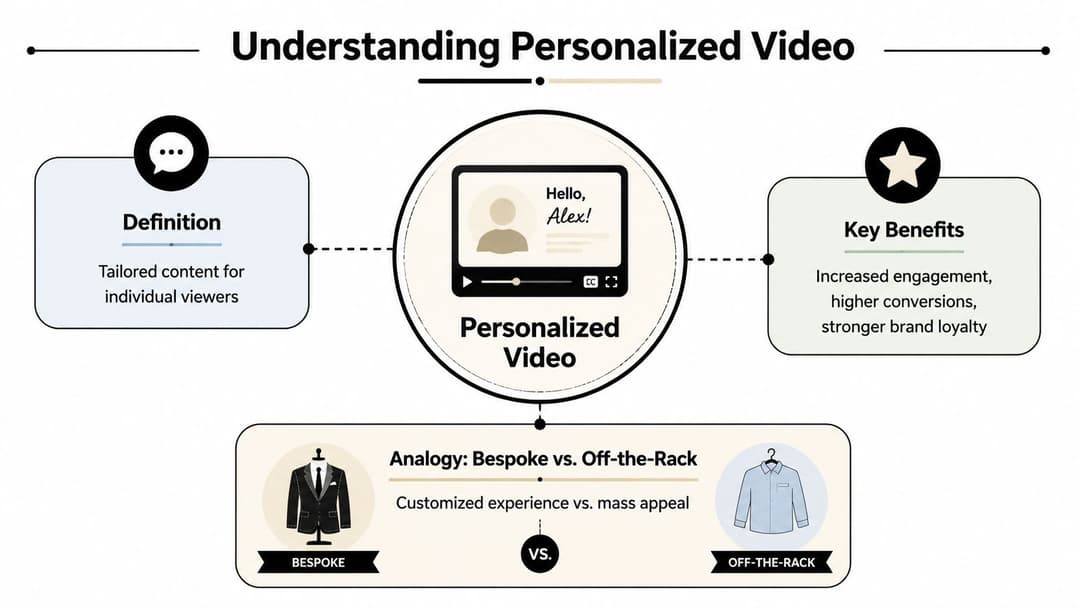
A personalized video is the difference between an off-the-rack jacket and one custom-fitted to the person wearing it. The off-the-rack version might fit well enough. The custom-fitted version accounts for the actual person in front of you.
In advertising, that means the video changes based on viewer data. Sometimes that change is simple, such as swapping the opening line for a different audience segment. Sometimes it's more specific, such as showing a product category that matches browsing behavior or referencing a recent purchase in a retention campaign.
What actually makes a video personalized
A lot of marketers think personalization begins and ends with inserting a first name. That's the shallowest version of it. In practice, personalized marketing videos are built around variables that matter to the campaign.
Those variables often include:
| Personalization layer | What changes in the video | Why it matters |
|---|---|---|
| Audience segment | Hook, pain point, CTA | Aligns message to intent |
| Behavioral context | Featured product, use case, sequence timing | Makes the ad feel timely |
| Customer data | Name, location, purchase reference, recommendations | Increases perceived relevance |
This is where demographic ad targeting still plays a role. Demographics alone won't carry performance, but they can help define the first layer of message variation before you add behavioral or CRM-driven signals.
Why relevance improves performance
The reason personalized video matters isn't aesthetic. It's response. According to Tavus video marketing statistics, personalized videos are 35% more likely to retain viewers than non-personalized videos and can drive up to 4.5× higher unique click-through rates. That combination matters because paid social performance usually breaks when attention drops before the offer or when interest doesn't convert into action.
Practical rule: If the viewer can't tell within the first few seconds that the ad is meant for someone like them, the personalization probably isn't strong enough.
The most useful mental model is this: personalization isn't one special video per person made by hand. It's a structured system where a master creative adapts to different audiences without rebuilding the campaign from scratch. Once marketers understand that, the category becomes much easier to operationalize.
The Three Pillars of Video Personalization
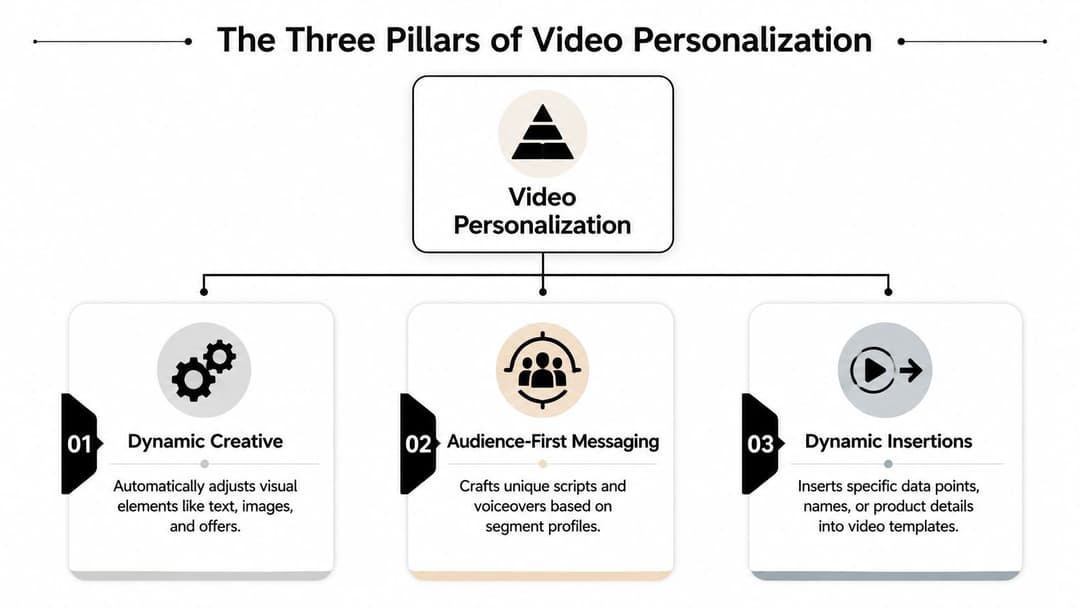
Most scalable personalized marketing videos rely on three mechanisms. They can work separately, but the strongest programs usually combine them. The key is knowing what each pillar needs from your data and when each one is worth the extra complexity.
Dynamic creative
Dynamic creative changes visual or structural elements in the ad based on rules. That might mean different product shots, different offer cards, different intros, or different end frames for different groups.
This works well when the core proposition is stable but the presentation needs to shift. An ecommerce brand can use the same master story while swapping featured collections for shoppers who viewed different categories. A SaaS brand can keep the same demo arc while changing the opening screen to reflect different business types.
The strength of dynamic creative is speed. The weakness is that it can become superficial if all you change is surface-level imagery.
Audience-first messaging
This pillar starts with the segment, not the asset. Instead of asking how to tweak one universal video, you write different narratives for different groups. The creative is still templatized, but the message architecture changes.
For example:
- Cold prospecting: Lead with the problem and category education.
- Warm retargeting: Lead with proof, friction removal, and a direct CTA.
- Existing customers: Lead with complementary products, upgrade paths, or usage prompts.
This is usually where performance improves most because the script itself matches intent. But it also requires discipline. If segmentation is sloppy, message branches multiply fast and become hard to manage.
The best personalized video programs don't personalize everything. They personalize the few moments that determine whether the viewer keeps watching or clicks.
Dynamic insertions
Dynamic insertions are the specific data points dropped into a master video. Think names, locations, company names, recent product views, past purchases, or recommended items. This is the most recognizable form of personalization because it's visible and concrete.
Used well, it makes the ad feel context-aware. Used poorly, it feels gimmicky. A first name alone won't rescue a weak offer. A relevant product recommendation inside a good offer often will.
Here's a simple comparison:
| Pillar | Best for | Common mistake |
|---|---|---|
| Dynamic creative | Fast visual variation at scale | Changing visuals without changing the message |
| Audience-first messaging | Matching intent and funnel stage | Over-segmenting before you have enough data |
| Dynamic insertions | Making the ad feel specific and timely | Using novelty fields that don't affect buying behavior |
Data quality decides how far you can go
All three pillars depend on the same foundation. As Kaltura's overview of personalized marketing videos notes, the personalization layer is only as strong as the underlying customer data. When teams combine CRM records, website analytics, and purchase history, they can automatically recompose the same base creative into many variants. That's the key scalability advantage.
If your CRM is cluttered, your naming conventions are inconsistent, or your event data arrives late, the creative will reflect those weaknesses. Before scaling video personalization, it's worth tightening the data layer. A practical starting point is Distribute.you's guide to CRM growth, which is useful for thinking through enrichment and profile completeness before those issues spill into creative.
Benchmarking also matters. If you're unsure whether your problem is weak messaging, weak segmentation, or just average creative, a process for creative benchmarking helps isolate what the account is reacting to.
The Production and Testing Workflow for Paid Social
The biggest mistake teams make is treating personalized marketing videos like a production project. They should be treated like a testing system. The asset matters, but the workflow matters more.
Start with a simple operating principle: every personalized variant should exist to test a hypothesis tied to a business KPI. If you can't explain what the variant is supposed to improve, it probably doesn't belong in the campaign.
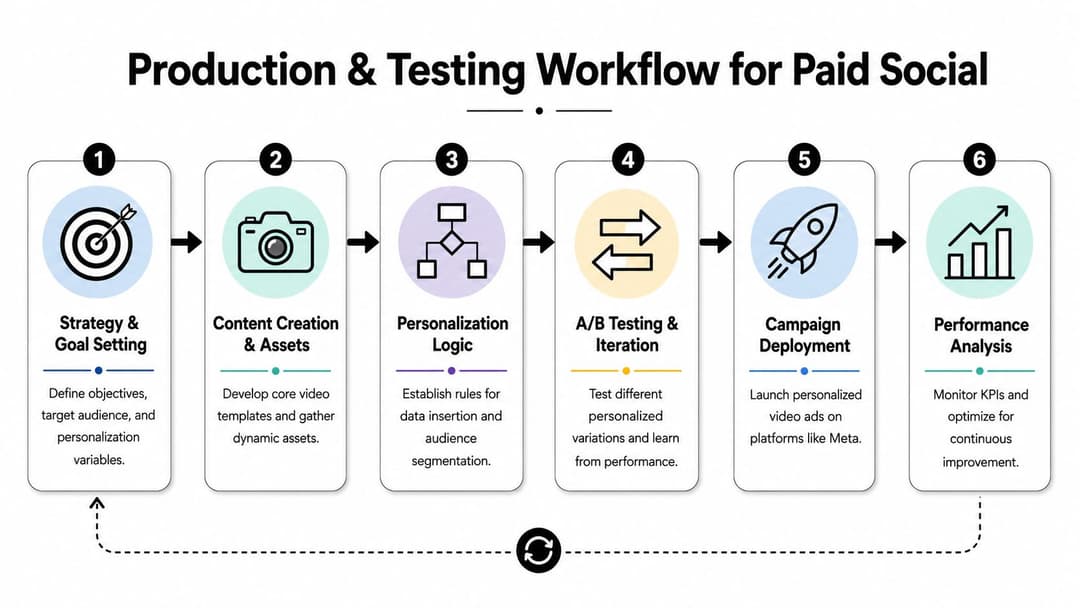
A useful visual for the process is below.
Step one sets the business target
Before touching the brief, define the metric that matters. For lead gen, that may be CPL and lead quality. For ecommerce, it may be ROAS or CPA. For subscription offers, it may be a qualified trial or downstream revenue event.
This sounds obvious, but it prevents a common problem. Teams celebrate stronger watch rates while the finance view of the campaign stays flat. That disconnect is exactly why SundaySky's discussion of personalized video measurement points out the challenge of proving business outcomes beyond attention metrics. Effective teams need A/B tests and downstream KPIs such as ROAS, CPL, or CPA, not just watch rates.
Step two defines the segment logic
Don't begin with ten audience slices. Begin with the fewest segments that have clear behavioral or commercial differences. For most paid social programs, that means something like:
- Cold audiences: Little or no product familiarity.
- Mid-intent visitors: Viewed key pages or engaged with prior ads.
- High-intent users: Cart abandoners, pricing-page visitors, or similar signals.
- Existing customers: Cross-sell, upsell, or retention motion.
Each of those groups should justify a different message angle. If the angle doesn't change, the segment probably shouldn't either.
Step three builds the master template
Your production team, freelancer, or in-house editor should create one master video with clearly defined variable zones. Typical variable zones include:
- Opening hook: Segment-specific pain point or promise
- Product showcase: Category, feature set, or offer matched to behavior
- On-screen text: Audience language, use case, or stage-specific CTA
- End card: Different next steps based on campaign objective
This is also where an AI video ad creation workflow becomes useful. The more standardized the template and naming structure are, the easier it is to generate variants without turning every request into manual post-production.
To ground the process, here's a helpful walkthrough:
Step four structures the test properly
A weak test setup ruins good creative learning. Keep the experiment clean enough that you can isolate the variable that changed.
A workable pattern looks like this:
| Test element | Keep stable | Change deliberately |
|---|---|---|
| Audience | Same targeting logic | Only if audience is the hypothesis |
| Offer | Same commercial terms | Only if the offer is under test |
| Video | Same template structure | Hook, insertion, message branch |
| Budget and timing | Comparable setup | Avoid uneven delivery conditions |
If you need a refresher on how to think about click behavior without getting distracted by vanity benchmarks, optimizing click-through performance is a useful companion read. The important point is that CTR should be interpreted in context, not in isolation.
If a personalized variant lifts clicks but lowers efficiency after the click, you learned something useful. You didn't find a winner. You found a curiosity gap.
Step five reads the results in sequence
Performance marketers should evaluate personalized video in layers:
- First layer: Thumb-stop behavior and view retention
- Second layer: CTR and landing-page engagement
- Third layer: Conversion rate, CPL, CPA, or ROAS
- Fourth layer: Incrementality through controlled comparison where possible
This sequence matters because each layer explains the next. A low CTR may come from a weak hook. A decent CTR with poor ROAS may point to message mismatch after the click. A strong CPA in one segment and weak CPA in another may indicate the creative is good but the audience logic is off.
The point isn't to create endless variants. The point is to learn which combinations deserve more spend, then retire the rest fast.
How AI Platforms Accelerate Personalized Video Creation
Manual personalization usually breaks in the same place. The strategy is sound, the first few variants perform well enough, and then volume becomes the problem. Every new audience needs a new intro, revised copy, fresh exports, updated naming, and another round of QA. The team spends more time coordinating files than learning from performance.
That's why AI platforms matter. They reduce the labor required to move from one promising idea to many testable executions.
What automation should actually solve
A useful AI workflow for personalized marketing videos should help with four things:
- Template expansion: Turning one base concept into many audience-ready variants
- Combination management: Keeping copy, creative, and audience mappings organized
- Launch speed: Reducing the lag between idea, build, and deployment
- Performance feedback: Showing which message-audience pairs deserve iteration
Without that layer, personalization often stays trapped in pilot mode. The team proves the concept, but can't operationalize it widely enough to affect account-level performance.
For ecommerce marketers especially, this has become part of the broader personalization stack. If you're working through product recommendations, lifecycle messaging, and storefront relevance alongside paid media, ecommerce personalization for Shopify is a practical resource for seeing how video fits into a wider personalization program.
Where AI platforms fit in the stack
Different tools solve different parts of the workflow. Some focus on video generation. Some focus on dynamic assembly. Some focus on campaign deployment and analysis.
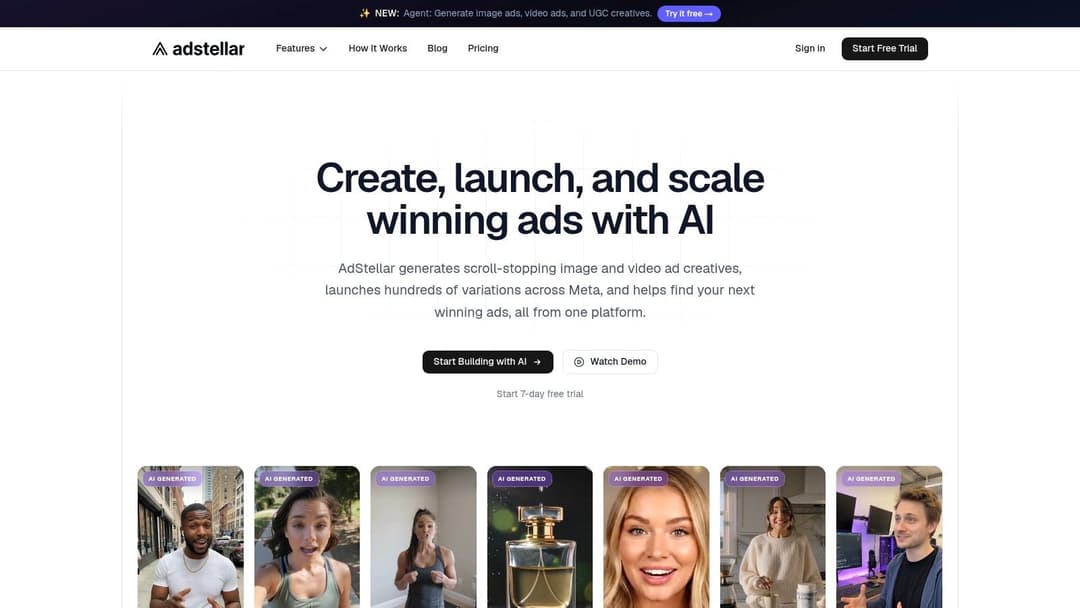
One example is AdStellar AI, which supports bulk ad creation, combines creative and audience variations, connects to Meta through secure OAuth, and surfaces performance patterns tied to goals like ROAS, CPL, or CPA. For teams already working with structured templates, that kind of system reduces the operational burden of launching and reading large creative matrices. If you're exploring that category, this guide to AI-generated video ads gives a closer look at the workflow considerations.
Automation doesn't replace the strategist. It replaces repetitive assembly work that prevents the strategist from testing enough ideas.
The practical takeaway is simple. Personalization without automation becomes artisanal. That may work for a small outbound sequence or a narrow retargeting campaign, but it won't hold once you need dozens or hundreds of combinations running across audiences and offers.
Putting It All Together Best Practices for Success
The teams that get the most from personalized marketing videos don't chase novelty. They build a repeatable system that ties data, creative, and measurement together.
A strong operating checklist looks like this:
- Start with segment clarity: Personalize for real differences in intent, not for the sake of having more variants.
- Use one master template: Build modular videos with defined variable zones so production doesn't collapse under revision volume.
- Feed the system clean data: CRM, web behavior, and purchase signals should be current enough to support relevant messaging.
- Test one hypothesis at a time: Change the hook, angle, or insertion deliberately so the result is interpretable.
- Judge performance on business metrics: Watch rates matter only if they help move ROAS, CPL, CPA, or another commercial KPI.
- Automate once the pattern is proven: Don't scale handcrafted personalization. Scale a workflow that can keep learning.
The bigger point is that personalized video isn't a separate discipline from paid social. It's a better way to run paid social when generic creative has stopped producing efficient growth.
If your team already knows how to build video ads but struggles to launch enough personalized variations fast enough to learn, AdStellar AI is worth a look. It's built for generating combinations at scale, pushing campaigns live quickly, and reading performance through the metrics media buyers use.