
So, what exactly is TikTok Ad Manager? It’s the central hub for creating, launching, and tracking all your paid advertising campaigns on TikTok. Think of it as your brand's mission control, giving you all the tools needed to connect with millions of users through targeted, performance-driven video ads.
Why TikTok Ad Manager Is a Performance Marketing Powerhouse

It’s time to forget what you think you know about social advertising. The TikTok Ad Manager isn’t just another place to drop your ads; for performance-focused marketers, it's a serious growth engine. Getting a handle on this tool gives you a real competitive advantage, and understanding its core strengths is the first step.
Imagine stepping into the cockpit of a fighter jet. You're surrounded by sophisticated systems, but your eyes are locked on the heads-up display projecting critical data right where you need it. That’s a great way to think about TikTok Ad Manager. The platform's algorithm is your heads-up display, constantly processing user signals to serve your creative to the perfect audience at just the right moment.
Built for Engagement and Action
Unlike other platforms where users mindlessly scroll past ads, TikTok’s entire world is built on participation. This creates an environment primed for action, making it a goldmine for marketers who live and breathe measurable results. Here’s what makes it different:
- Creative-First Environment: On TikTok, the creative is the targeting. The algorithm rewards content that feels native and authentic, giving brands a direct path to connect with audiences in a way they actually enjoy.
- Unmatched User Engagement: A recent study found that a staggering 92% of TikTok users are inspired to take action after watching a video on the platform. That kind of intent translates directly into better ad performance.
- Direct Impact on Core Metrics: The platform is engineered to drive key performance indicators (KPIs) like Return on Ad Spend (ROAS) and Cost Per Lead (CPL), making it a beast for results-driven campaigns.
For any performance marketer, video is everything. Just look at how effective real estate video marketing that closes deals faster can be—it’s a testament to how powerful a compelling video can be. The same exact principle applies on TikTok, where a single, well-crafted video can fuel massive business growth.
The real magic of the TikTok Ad Manager is its ability to turn cultural moments into conversion opportunities. It's less about interrupting people and more about joining the conversation they're already part of.
This guide will walk you through the specific strategies you need to tap into the platform’s raw power. From setting up campaigns and targeting audiences to creative best practices and performance analysis, you'll learn how to navigate the cockpit and pilot your campaigns toward real success. If you're curious about how TikTok fits into the broader paid media landscape, our guide on the top ad networks for advertisers offers some great context.
Navigating the TikTok Ad Manager Dashboard

Jumping into the TikTok Ad Manager for the first time is a lot like walking into a professional kitchen during the dinner rush. It’s powerful, fast-paced, and can feel a little intimidating. But once you know your stations, you'll see it’s built for one thing: efficiency.
Think of it this way: to run a kitchen, you need a prep station for your ingredients, a cooking line to build the dishes, a quality check to see what’s working, and a front-of-house view of the whole operation. The TikTok Ad Manager works the same way, guiding you from prep to performance analysis.
The Four Pillars of the Interface
Your command center is the main navigation bar at the top of the screen. It’s organized into four simple tabs that you’ll need to master: Dashboard, Campaigns, Assets, and Reporting.
Dashboard: This is your mission control. It gives you a high-level view of your key performance metrics, total spend, and the status of your active campaigns. It's the first thing you see and your daily go-to for a quick pulse check.
Campaigns: Welcome to the cooking line. This is where the action is—you'll build, manage, and tweak all your campaigns, ad groups, and individual ads. If you're launching or optimizing, you'll be spending most of your time right here.
Assets: This is your prep station. Before you can start cooking, you need all your ingredients ready to go. The Assets tab is home to all your reusable components: creatives (videos, images), audiences (Custom and Lookalike), and your all-important TikTok Pixel.
Reporting: Think of this as quality control and customer feedback. After your campaigns have been running, this is where you dive deep into the data. You can build custom reports, schedule data pulls, and really get into the nitty-gritty of what’s driving results.
If you're coming from the Meta world, this structure will feel familiar, though the names and locations of certain tools differ. A great way to get oriented is to compare it with what you already know; our guide to the Meta Ads dashboard can help you connect the dots.
For marketers jumping between platforms, knowing the key differences is half the battle. Here's a quick rundown of how TikTok's setup compares to Meta's.
TikTok Ad Manager vs Meta Ads Manager Key Differences
| Feature | TikTok Ad Manager | Meta Ads Manager |
|---|---|---|
| Campaign Structure | Campaign > Ad Group > Ad | Campaign > Ad Set > Ad |
| Creative Focus | Heavily video-first; native, vertical formats are critical. Strong built-in creative tools. | More forgiving of static images and various formats. Creative tools are robust but less integrated into the native "feel." |
| Audience Targeting | Broad targeting combined with interest/behavioral data works very well. The algorithm is powerful. | Relies heavily on granular interest targeting, detailed demographics, and Custom/Lookalike audiences. |
| Placement Control | Placements are simpler: TikTok, Pangle, and Automatic. Less granular control within the app. | Extensive placement options across Facebook, Instagram, Messenger, and Audience Network with granular control. |
| Optimization Algorithm | The algorithm is known for its rapid learning and scaling capabilities, often favoring broader audiences. | Mature algorithm that excels with specific conversion data and well-defined audience segments. |
While the core logic is similar, TikTok’s emphasis on creative velocity and trusting the algorithm with broader audiences is a key strategic shift from the hyper-segmented approach many are used to on Meta.
A Closer Look at the Campaign Tab
The Campaigns tab is the heart and soul of the Ad Manager. It operates on a three-level hierarchy that’s standard practice for any seasoned performance marketer.
Campaign > Ad Group > Ad
This structure is the backbone of your entire advertising setup. The Campaign sets your overall objective (like conversions or traffic). The Ad Group level is where you define your audience, placements, and budget. Finally, the Ad level is where you place the actual video or image creative that people will see.
This tiered system keeps your work organized and makes it easy to test different variables methodically. For instance, you can have one campaign with multiple ad groups, each targeting a different audience but using the same set of ads.
Key Tools Within the Assets Tab
Your Assets tab is where you get everything ready before you launch. Think of it as your digital pantry. Two items in here are absolutely essential for any serious advertiser:
Audiences: This is your audience library. Here, you’ll build and manage your Custom Audiences (from website visitors, email lists, or in-app activity) and your Lookalike Audiences. Building a strong foundation of these audience segments is non-negotiable for effective retargeting and scaling your best performers.
Pixels: Found under the "Events" section, this is where you’ll manage your TikTok Pixel. This snippet of code is the brain of your conversion tracking. It tells the platform what actions users take on your website, feeding crucial data back to the algorithm so it can find more people likely to convert.
By moving between preparing your ingredients in Assets, cooking up campaigns in the Campaigns tab, and analyzing the results in Reporting, the platform turns a complex job into a straightforward, repeatable workflow.
Alright, you've got your head wrapped around the TikTok Ad Manager interface. Now for the fun part: turning all that theory into a live, high-performance campaign. This is where your business goals meet the algorithm, and a clear, structured process is your best friend for launching with confidence and not burning through your budget.
Think of it like building a race car. You don't just throw parts together and hope for the best. First, you decide what kind of race you're in (your objective). Then, you build the engine and chassis (your ad group structure). Finally, you design the sleek, aerodynamic body that will cut through the noise (your ad creative). Each step is critical for building a campaign that's primed to win from day one.
Step 1: Choose the Right Campaign Objective
This is, without a doubt, the single most important decision you'll make. Your campaign objective tells the TikTok algorithm exactly what you want to accomplish. It dictates who sees your ads, how your budget gets spent, and what success looks like. Getting this wrong is like punching the wrong address into your GPS—you’ll end up somewhere, just not where you intended.
TikTok breaks down its objectives into three buckets that follow a classic marketing funnel: Awareness, Consideration, and Conversion.
- Awareness: The main goal here is Reach. This objective is all about getting your ad in front of the maximum number of unique people possible. It’s perfect for new brands just trying to get their name out there.
- Consideration: This is the middle ground. It includes goals like Traffic (sending people to your site), Video Views, and Community Interaction (driving profile visits or follows). These are great for engaging an audience that might know you but isn't quite ready to pull out their wallet.
- Conversion: This is where the magic happens for performance marketers. The Sales objective is engineered to find users who will take valuable actions on your website, like making a purchase or filling out a lead form. If you're running an e-commerce store, this will be your home base.
For a direct-to-consumer brand launching a new product, choosing the Sales objective is non-negotiable. It explicitly tells the algorithm to go hunt for users with a history of buying things, not just people who like to watch videos.
Step 2: Structure Your Ad Groups for Success
Once your campaign objective is locked in, you’ll drop down to the ad group level. This is where you set your targeting, placements, budget, and schedule. A smart structure here is what separates the amateurs from the pros, as it makes testing and scaling a methodical process instead of a guessing game.
First, decide on your placements. You can let TikTok handle it with Automatic Placements, showing your ads across its network (which includes partner apps through Pangle), or you can manually select to run ads only on TikTok itself. If you're just starting out, Automatic is often the way to go; it gives the algorithm more data to find the cheapest and most effective spots for your ads.
Next up is your budget. You can set either a daily budget or a lifetime budget. The big decision here is whether to use Campaign Budget Optimization (CBO). When you turn on CBO, you're giving TikTok permission to automatically shift your budget to the best-performing ad groups in real time. It's an incredibly powerful tool for squeezing every last drop of efficiency out of your ad spend.
Step 3: Upload and Optimize Your Ad Creative
The final piece of the puzzle is the ad itself. This is where you upload your video, write your copy, and select your call-to-action (CTA). Just remember the golden rule of the platform: Don't make ads, make TikToks. Your creative has to feel native to the feed if you want it to stand a chance.
Take advantage of TikTok's built-in Video Editor. It’s a quick way to add trending sounds, text overlays, and effects that help your content blend in and feel more organic. As you upload your video, nail these key elements:
- Ad Text: Keep it short and to the point. Use emojis and ask questions to spark a conversation in the comments.
- Call-to-Action (CTA): Be direct. Choose a clear CTA button that tells people exactly what to do next, like "Shop Now," "Learn More," or "Sign Up."
- Thumbnail: Pick an eye-catching frame from your video or upload a custom cover image. It’s the first thing people see before your video auto-plays, so make it count.
By following these three steps—setting the right objective, building a smart ad group structure, and creating native-style creative—you’ll be ready to launch a campaign that is genuinely built to perform. For a deeper dive into the nuts and bolts, check out our guide on how to launch successful ad campaigns.
Mastering Audience Targeting on TikTok
Even the most brilliant creative will fall flat if it’s shown to the wrong people. On TikTok, your profitability lives and dies by your ability to get your ads in front of the right audience. The TikTok Ad Manager has a powerful set of tools that let you go way beyond basic demographics and connect with users who are actually ready to engage with your brand.
Think of it like casting a net. You could throw out a giant, generic net and just hope for the best (that’s broad targeting). Or, you could use a specialized net in a specific part of the ocean where you know your ideal fish are swimming. While TikTok’s algorithm is surprisingly good at making that big net work, the real money is made when you strategically narrow your focus.
The flowchart below shows you the basic campaign launch process. You'll see that targeting decisions are made at the ad group level, right after you set your objective.
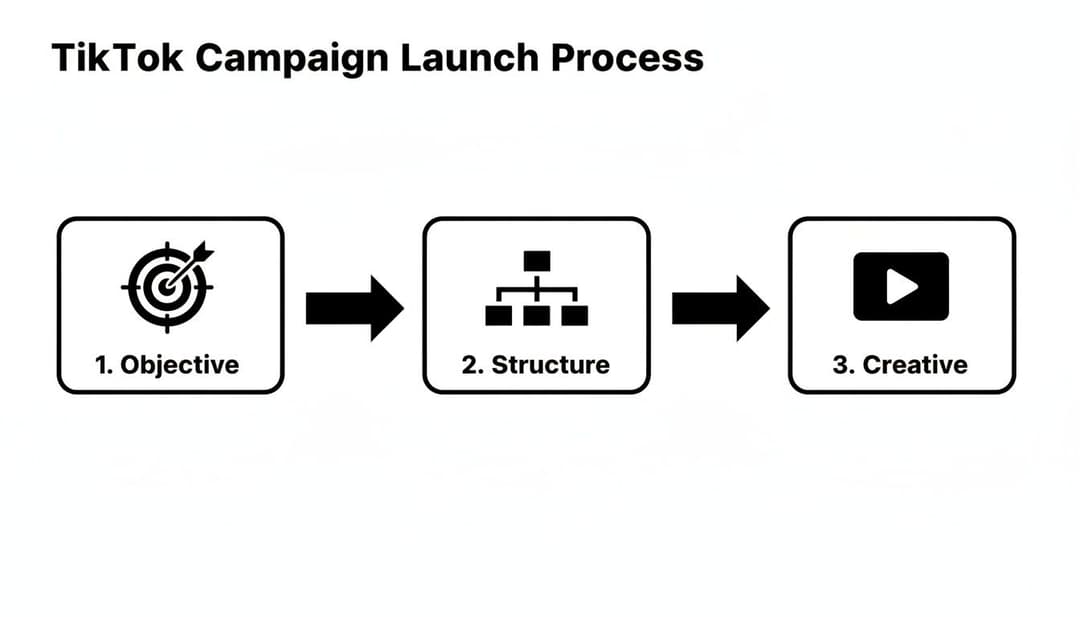
This just goes to show how your main goal (the objective) directly influences your campaign structure, which is where you define who you're talking to before you even think about launching your ads.
The Core Targeting Options
Your targeting strategy always starts with the fundamentals. The TikTok Ad Manager gives you three main levers to pull when building your initial audience. You can use them on their own or, for better results, layer them together.
- Demographics: This is your foundation. You can target users by Location (country, state, or even city), Age, Gender, and Language. In some regions, you can even get as granular as household income.
- Interests: This option lets you find people based on the kind of content they consistently watch and engage with. If someone is always liking videos about "Skincare" or "Home Improvement," you can put your ad right in their feed.
- Behaviors: Here’s where it gets really powerful. You can target users based on their specific actions on TikTok, like video interactions (if they watched to the end, liked, commented, or shared) or creator interactions (if they followed or viewed profiles of certain creators).
Let's say you're a sustainable fashion brand. You could layer these options to target women aged 25-44 in California who are interested in "Apparel & Accessories" and have recently engaged with videos from creators known for promoting eco-friendly products. That’s a highly specific, high-intent audience.
Unlocking Performance with Custom Audiences
While core targeting is great for finding new people, Custom Audiences are your ticket to getting the most value from users who already know who you are. These are high-intent audiences built from your own data, making them perfect for retargeting.
A Custom Audience is like having a private conversation with your warmest leads. These are people who have already raised their hand and shown interest, making them far more likely to convert.
You can build several types of powerful Custom Audiences:
- Website Traffic: Using the TikTok Pixel, you can create audiences of people who visited your site, viewed a specific product, added an item to their cart, or made a purchase. The classic "abandoned cart" audience is a high-ROAS workhorse for a reason.
- Customer File: Have a customer list? You can upload their emails or phone numbers, and TikTok will match them to user profiles. This lets you re-engage past buyers with new offers or, just as importantly, exclude them from your acquisition campaigns to avoid wasting money.
- App Activity: If you have an app, you can create audiences based on events like installs, sign-ups, or reaching a certain level in a game.
- Engagement: Build audiences from users who have interacted with your ads or your organic TikTok profile (like visiting your page or liking one of your posts).
Knowing how to use these tools effectively is a cornerstone of modern digital advertising. To dig deeper, you can check out our complete guide on targeted advertising on social media.
Scaling Your Winners with Lookalike Audiences
Once you find a high-performing Custom Audience—like your list of best customers—you can't just market to them forever. You need to find more people just like them. That’s exactly what Lookalike Audiences are for.
A Lookalike Audience tells the TikTok Ad Manager to analyze the common traits of your source audience (say, your "Website Purchasers" list) and find millions of other TikTok users who share similar characteristics and behaviors. This is hands-down the most effective way to scale your campaigns. You can even control the audience size, from a narrow 1% (most similar to your source) to a broad 10%, giving you the flexibility to choose between precision and reach.
Creating Ads That Convert on TikTok
If you're coming from other platforms, there's one massive mindset shift you need to make for TikTok. On other networks, your targeting choices dictate your creative. On TikTok, it's the other way around: the creative is your targeting. This is the single most important thing to grasp when you open the TikTok Ad Manager.
The golden rule here is simple but absolutely critical: Don't make ads, make TikToks.
Slick, overproduced commercials that feel corporate are the fastest way to get scrolled past. People are on TikTok for authentic, entertaining content that feels like it’s part of a community. Your ads have to blend right in if you want to stop the scroll and actually get results.
The First Three Seconds Are Everything
You have an incredibly small window to grab someone's attention before their thumb keeps swiping. If you don't land a compelling hook in the first three seconds, your ad is practically invisible. It doesn't matter how brilliant the rest of your video is if no one sticks around to watch it.
Jump straight into the action. Start with a surprising question, a visually jarring scene, or anything that breaks the pattern. Ditch the slow logo fades and corporate intros that scream "commercial." Your only job is to make the user stop and wonder, "What's going on here?"
The job of the first three seconds isn't to sell the product; it's to sell the next three seconds. Hook them immediately, or you’ve already lost.
The Anatomy of a High-Converting TikTok Video
Beyond a strong hook, the best-performing TikTok ads all share a similar DNA. They’re built from the ground up to feel native to the platform, using the same elements that make organic content go viral.
- Sound-On by Design: Unlike other feeds where users often watch with the sound off, TikTok is a sound-on world. Trending audio is the lifeblood of the feed. Dig into the TikTok Ad Manager to find popular sounds that genuinely fit your brand's message.
- Authentic, User-Generated Feel: It's counterintuitive, but lo-fi, phone-shot videos frequently crush high-budget studio productions. Content that looks like a real person made it feels more trustworthy and less like a sales pitch.
- Clear Value Proposition: While entertainment is crucial, your ad still has a job to do. You have to clearly and quickly communicate what your product is and why the viewer should even care.
- Strong, Obvious Call-to-Action (CTA): Tell people exactly what to do next. Whether it's a verbal CTA in the video, a text overlay, or the clickable button, make it impossible to miss. "Shop Now," "Learn More," or "Download Now" should be direct and to the point.
Treating your ad creative as a central part of your strategy is non-negotiable for success. You can dive deeper into this idea by reading our article on the role of creatives in digital marketing.
Amplify Authenticity with Spark Ads
One of the most effective tools inside the TikTok Ad Manager is Spark Ads. This ad format lets you boost existing organic posts—either from your own brand’s profile or, with their permission, from a creator’s account.
The magic is in the authenticity. When you promote a post that already has organic likes, comments, and shares, you're tapping into powerful social proof. The ad feels less like a corporate broadcast and more like a genuine recommendation, which almost always drives higher engagement and a better return on your ad spend.
A Framework for Systematic A/B Testing
You'll almost never strike gold on your first try. The secret to long-term success on TikTok is relentless, systematic A/B testing. You can use the ad group structure in the TikTok Ad Manager to isolate variables and learn what actually moves the needle with your audience.
Here’s a simple framework to get you started:
- Test Different Hooks: Make three versions of your ad, each with a unique opening for the first three seconds. The rest of the video should be identical.
- Test Different CTAs: Run the same video but switch up the call-to-action button ("Shop Now" vs. "Learn More") or change the verbal CTA spoken in the video.
- Test Different Video Styles: Pit a polished, branded video against a raw, user-generated-style video. Then see which one delivers a lower cost per acquisition (CPA).
By methodically testing and learning from the data, you transform creative development from a guessing game into a repeatable science. This is how you ensure your ads don't just rack up views—they drive results that directly impact your bottom line.
How to Analyze Performance and Scale Your Winners
Getting your campaign live in the TikTok Ad Manager is just the first step. The real work—and the real profit—begins when you start digging into the data to figure out what's working and what isn't.
Think of your initial launch as sending out a few scouts to explore new territory. Now, you need to read their reports to decide where to send in the full army. This means jumping into your dashboard and learning to read the story your numbers are telling. You’re not just glancing at vanity metrics like views anymore; you’re a detective on the hunt for clues that lead to profitable growth.
Decoding Your Key Performance Indicators
Before you can make smart moves, you have to speak the language of performance. Don't let all the columns in the TikTok Ad Manager overwhelm you. Your focus should be on the few core metrics that truly matter for your campaign goals.
For most marketers focused on results, these are the ones to live by:
- Cost Per Acquisition (CPA): This is your true cost to get a new customer or lead. If you spent $100 and brought in 10 sales, your CPA is $10. It’s your most important efficiency metric.
- Return On Ad Spend (ROAS): This tells you how much money you’re making for every dollar you spend. A 3:1 ROAS is simple: for every $1 you put in, you got $3 back.
- Click-Through Rate (CTR): This is the percentage of people who saw your ad and actually clicked on it. A low CTR is often the first sign that your creative isn't stopping the scroll.
- Conversion Rate (CVR): Of all the people who clicked, what percentage actually did what you wanted them to do (like make a purchase)? A strong CVR tells you that your landing page and offer are hitting the mark.
To really connect the dots between your TikTok ads and business growth, you have to measure marketing effectiveness beyond just what the platform tells you. This is how you prove your ad spend is actually moving the needle.
The Decision Framework: Cut or Scale
After your campaign has been running for a few days and has exited the learning phase, you'll have enough data to start making calls. The framework here is brutally simple: cut your losers and scale your winners.
Don't get emotionally attached to an ad you thought was great. The data doesn't lie. If an ad isn't performing, kill it quickly and reallocate that budget to one that is.
Use this quick checklist to decide what to do next:
- Identify Winners: Scan your report for ad groups or specific ads that have a CPA below your target or a ROAS above your goal. These are your champions.
- Identify Losers: Find any ads with a high spend but few (or zero) conversions. These are just burning cash and need to be paused immediately.
- Analyze the Middle Ground: Some ads will just be okay—maybe breaking even. Dive into their CTR and CVR. Is the problem the creative, or is your landing page failing to convert the traffic?
Proven Strategies for Scaling Success
Once you've found a winning ad, it's tempting to just crank up the budget. But making sudden, drastic changes can throw the algorithm for a loop and actually tank your performance. Scaling is a game of precision, not brute force.
Horizontal Scaling:
- Duplicate the Ad Group: Take your winning ad group and simply duplicate it. This creates a fresh entry into the auction with a proven combination of creative and targeting.
- Test New Lookalike Audiences: If your campaign is working with a Custom Audience (like "Purchasers - Last 30 Days"), build new Lookalike audiences from it. Test out 1-2%, 2-5%, and 5-10% ranges to find entirely new pockets of customers.
Vertical Scaling:
- Increase the Budget Slowly: Instead of doubling the budget overnight, increase it gradually. A good rule of thumb is to raise the daily budget by about 20% every 24-48 hours. This gives the algorithm time to adjust without resetting its learning.
By combining disciplined analysis with these methodical scaling strategies in the TikTok Ad Manager, you can turn those initial sparks of success into a predictable engine for growth.
Frequently Asked Questions About TikTok Ad Manager
Diving into TikTok Ads Manager for the first time? You've probably got a few questions. It’s a powerful platform, but like any tool, it comes with a learning curve. Let's tackle some of the most common questions marketers have when they're getting started.
How Much Does It Cost to Advertise on TikTok?
There’s no single answer here, as your costs will really depend on your industry, audience, and campaign goals. The platform does have some minimums to get you in the door, though.
You'll need a budget of at least $50 per day at the campaign level and $20 per day for each ad group within that campaign. While some advertisers see an average cost-per-click (CPC) around $1.00, this figure can swing wildly. The smartest move is to run a small test campaign to establish your own benchmarks before you decide to scale up your spending.
What Is the Difference Between Spark Ads and Regular Ads?
This is a great question because the two serve very different strategic purposes. Regular In-Feed Ads are what you’d expect—creatives you build from scratch right inside your ad account. They look and feel like ads.
Spark Ads, on the other hand, let you put ad spend behind existing organic posts. You can boost content from your own TikTok profile or, with permission, from a creator's profile. Their biggest advantage is authenticity. Spark Ads carry all the original social proof—the likes, comments, and shares—which builds instant trust and often drives much better engagement.
What’s a "good" Return On Ad Spend (ROAS) on TikTok? It really varies by your business's profit margins. For e-commerce brands, a 3:1 or 4:1 ROAS is a common target—that’s $3 to $4 in revenue for every $1 spent. Before you even start, you need to calculate your break-even ROAS. Your goal is to blow past that number.
Your video length is another key factor. While you can run longer ads, the sweet spot for performance is almost always between 15 and 30 seconds. Honestly, your entire focus should be on the first 3 to 5 seconds. That’s your one shot to stop the scroll with a killer hook.
Ready to take your paid social to the next level? AdStellar AI automates Meta ad creation and optimization, letting you launch hundreds of creative variations in minutes. Stop guessing and start scaling with AI-powered insights. Unlock faster growth with AdStellar AI.


