

You’re probably in one of two situations right now.
Either your display campaigns are live, spend is moving, and the reporting looks busy but not especially clear. Or you’re newer to paid media, staring at terms like placements, viewability, exchanges, responsive ads, retargeting, and DCO, trying to figure out how all of it connects to revenue instead of just dashboards.
That confusion is normal. Digital ad display looks simple from the outside because users just see a banner, a product image, or a short video on a site or app. Under the hood, it’s a chain of creative decisions, targeting rules, technical constraints, and measurement choices. If one part is weak, the whole campaign leaks efficiency.
The useful way to think about display isn’t as “those ads on websites.” Think of it as a system. You create assets, buy attention, qualify who should see what, measure whether the ad was viewed, and then feed those results back into the next round of testing. Modern AI tools matter because they compress that loop. They help you create more variants, test faster, and spot what to scale before the market moves on.
What Is Digital Display Advertising
A familiar scenario. You launch a campaign with decent creative, a clear offer, and what feels like sensible audience targeting. A few days later, the account shows impressions across many sites and apps, but clicks are thin, conversions are uneven, and nobody on the team agrees on what the problem is. Is the targeting off? Is the creative weak? Are people even seeing the ads?
That’s where a clean definition helps.
Digital display advertising is visual advertising delivered across websites, apps, and digital platforms. It includes banners, image ads, animated units, rich media, and video placements. If search ads are like store signs people look for on purpose, display ads are more like digital billboards on the information superhighway. They appear while people browse, read, watch, compare, and scroll.
The scale is enormous. Global digital ad spending is projected to surpass $700 billion by 2025, and the average banner ad click-through rate can be as low as 0.05%, which is why execution matters so much for ROI, according to digital advertising statistics compiled here.
That combination trips up newer marketers. Big budgets in the market make display sound easy. Low baseline response rates make it hard in practice.
Why display still matters
Display works well when you need reach, repeated exposure, and flexible creative formats. It can support:
- Awareness building: Put a product, brand, or offer in front of people before they search for it.
- Consideration nudges: Remind shoppers about a category while they read related content.
- Return visits: Bring back people who browsed but didn’t act.
- Creative testing: Compare messages, visuals, and offers quickly.
A simple example helps. If a person visits your product page and leaves, search won’t automatically bring them back unless they search again. Display can reappear during the rest of their browsing session or later, keeping your brand in consideration.
Practical rule: Don’t judge digital ad display by clicks alone. Its job often starts earlier in the buying journey.
A lot of confusion also comes from format overlap. A banner ad, a responsive image ad, and a native-looking placement may all belong to the same broader display family, even though they look different in the wild. If you want a grounding in the most recognizable format, this guide to web banner ads is a useful starting point.
Skill isn’t memorizing definitions. It’s learning how creative, placement, and measurement fit together so you can make display behave like a controllable growth channel instead of a vague awareness line item.
Understanding the Digital Display Ecosystem
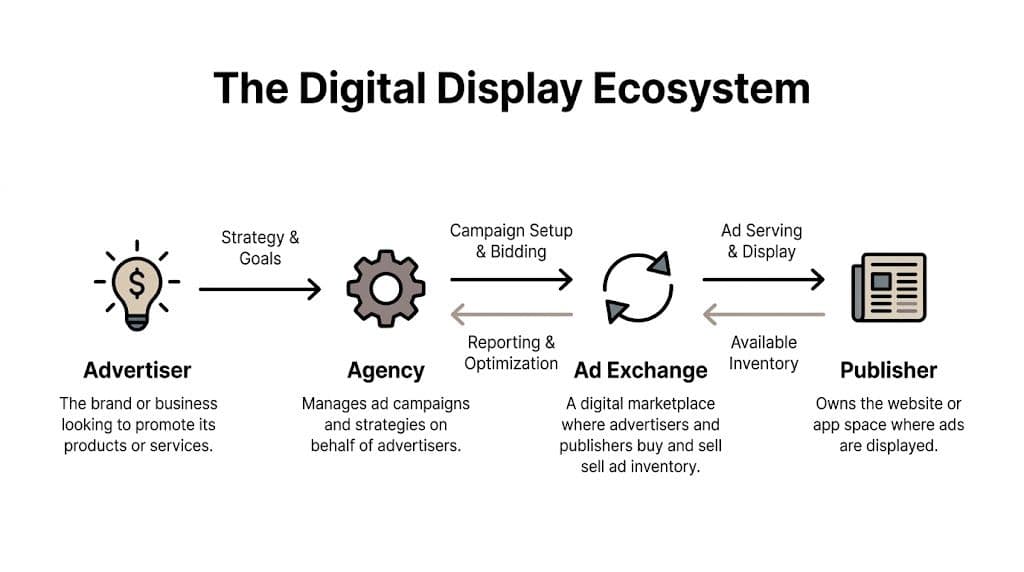
Organizations frequently waste money in display when they don’t understand who is involved in a single impression. The ad appears instantly on a screen, so it feels like one platform did everything. In reality, several players each handle a different part of the transaction.
A useful analogy is a supply chain. A brand wants shelf space. A store owns the shelf. A marketplace helps match buyers and sellers. Software automates which product gets placed on which shelf at what price, based on who’s walking by.
The four main actors
Here’s the simplest way to map the ecosystem.
| Actor | What they do | Why you should care |
|---|---|---|
| Advertiser | Owns the brand, offer, budget, and business goal | Sets the success metric and creative direction |
| Publisher | Owns the website or app where the ad appears | Controls the environment and available inventory |
| Ad exchange or network | Matches demand and supply in a marketplace | Affects reach, transparency, and inventory quality |
| Buying platform or agency | Operates the campaign and bidding logic | Determines how efficiently budget turns into results |
The exact labels vary by platform, but the roles stay consistent.
How an impression gets bought
A user opens a page. That page has an ad slot. The publisher makes that slot available. The exchange or network presents that opportunity to buyers. The buyer-side system decides whether that user, page, and placement are worth bidding on. If it bids and wins, the ad renders.
All of that happens extremely fast.
For a newer marketer, the main takeaway is this: your ad isn’t just “running on the internet.” It’s being matched against specific inventory through rules and auction logic. That’s why placement quality, audience logic, and creative compatibility matter so much.
Why this matters in daily campaign work
When performance is weak, you need to know where to look.
- If reach is broad but relevance is poor, the issue may sit in audience selection or inventory quality.
- If clicks are weak but placements are decent, the creative may not fit the environment.
- If traffic arrives but doesn’t convert, the mismatch may be between ad promise and landing page.
- If spend scales too fast without stable results, bidding automation may be pursuing volume without enough guardrails.
The ecosystem isn’t complicated because marketers like jargon. It’s complicated because each participant controls a different part of the outcome.
That’s also why platform choice matters. Some teams need broad network reach. Others need tighter control through a DSP or agency workflow. If you want a practical rundown of the buying side, this overview of top demand-side platforms helps clarify where DSPs fit and when they make sense.
The more clearly you understand this chain, the faster you can diagnose waste. You stop asking, “Why is display underperforming?” and start asking the useful question, “Which layer broke first?”
Choosing Your Digital Ad Display Formats
Format decisions seem cosmetic at first. They aren’t. The format determines how much you can say, how quickly the ad loads, how the placement behaves on different screens, and whether the unit even gets a fair chance to perform.
The biggest mistake newer teams make is choosing a format because it looks impressive in a mockup. The better approach is to choose based on job. If the ad needs to introduce a product quickly, a static image may do the work. If it needs to demonstrate a feature, motion usually helps. If the campaign depends on broad inventory compatibility, simpler assets are often easier to scale.
The main display formats
| Ad Format | Description | Pros | Cons |
|---|---|---|---|
| Static image | A single visual with logo, message, and CTA | Fast to produce, easy to test, broadly compatible | Limited storytelling space |
| Animated GIF | Lightweight motion sequence | More eye-catching than static in some placements | Can feel dated or distracting if overused |
| HTML5 rich media | Interactive or dynamic creative unit | More flexible and immersive | More technical setup and QA work |
| Video ad | Motion-based storytelling unit | Strong for product demos and narrative | Heavier production lift and stricter asset needs |
How to choose without overthinking it
Use static when the offer is clear and the audience already understands the category. Use animation when one movement helps direct attention. Use rich media when interaction itself adds value, not just novelty. Use video when seeing the product or workflow matters.
A simple example. If you’re advertising accounting software, a static ad with a strong benefit and CTA can work. If you’re advertising a home exercise product, short video often communicates the value faster because users can see the product in action.
Viewability changes how format decisions work
A display ad can only influence someone if it’s visible. The industry standard for a viewable display ad impression is when at least 50% of the ad’s pixels are visible on-screen for a minimum of one continuous second, with average viewability rates hovering around 65%, according to this display advertising statistics reference.
That standard changes how you should think about specs.
- File weight matters: Heavy creative can render slowly, especially on mobile.
- Layout fit matters: A format that fights the page structure may lose visibility.
- Message speed matters: If the ad is only partially seen for a brief moment, the value prop must land fast.
Technical constraints are performance constraints
In the context of display advertising, junior marketers often separate “creative” from “ops” too much. In display, they’re connected.
If the ad size is awkward for the placement, it may appear in less favorable positions. If the file is too heavy, rendering can lag. If the text is too small, mobile users won’t process it. If your CTA only becomes clear after a few seconds of animation, many users won’t stay long enough.
Key takeaway: A beautiful ad that loads poorly or fits the placement badly isn’t a strong ad. It’s a missed impression.
You’ll also need to think about device context. Mobile placements often demand tighter visual hierarchy, larger text, and simpler messaging than desktop layouts. This breakdown of the mobile banner ad is helpful if most of your inventory skews mobile.
A practical format workflow
Instead of debating formats abstractly, use this decision path:
- Start with the campaign goal. Awareness, retargeting, or direct response each favor different creative styles.
- Match the format to the message. Product demo, social proof, price drop, or feature explanation each call for different presentation.
- Check placement realities. Ask where the ad will appear and what that environment supports well.
- Design for fast comprehension. Users won’t study your ad. They’ll glance.
- Test simple against complex. Richer formats aren’t automatically better.
The strongest teams don’t fall in love with one format. They build a format mix, then let performance data tell them where to put more effort.
Smart Targeting and Measurement for Display Ads
Good display performance usually comes from restraint, not just expansion. You don’t want to show every ad to every possible person. You want to match the right message to the right context, then measure success with the metric that fits the job.

Four targeting approaches that matter
Contextual targeting places ads beside relevant content. Think of running project management software ads on productivity blogs or cybersecurity offers near IT news. This works well when the environment itself signals interest.
Audience targeting focuses on user traits or behaviors. You define who matters, then let the platform find people who fit that pattern across inventory. This is useful when relevance follows the person more than the page.
Placement targeting is the most hands-on option. You choose where ads should appear, or where they shouldn’t. It’s valuable when you know certain publishers or app environments align well with your brand.
Retargeting follows prior interaction. Someone visited your site, viewed a product, or started a signup flow. You use display to reconnect with them later. If your team needs a plain-English explanation of sequencing and use cases, Adwave’s retargeting advertising guide is worth reading.
Match the targeting to the campaign goal
Don’t treat these methods as interchangeable.
- Use contextual when you want relevance without relying heavily on identity-based signals.
- Use audience targeting when you have a strong customer profile and enough signal quality to pursue it.
- Use placement targeting when inventory quality varies and you need control.
- Use retargeting when your priority is recovering interested visitors and shortening the path back.
A common failure pattern is using retargeting creative with prospecting audiences. That ad assumes prior familiarity the audience doesn’t have. The reverse also hurts. Generic awareness creative aimed at cart abandoners usually feels too broad.
Measure according to intent
Newer teams often mix awareness KPIs and direct response KPIs in the same conversation. That creates noise.
Use this split instead:
| Goal type | Useful KPIs | What they tell you |
|---|---|---|
| Awareness | Impressions, reach, viewability | Whether the campaign is actually delivering visible exposure |
| Consideration | CTR, engagement quality, landing page behavior | Whether the ad earns attention and sends qualified traffic |
| Performance | Conversions, CPA, CPL, ROAS | Whether spend is turning into business outcomes |
Not every campaign should optimize toward the same number. A broad awareness campaign can do useful work even if its direct click volume looks modest. A retargeting campaign usually needs a tighter performance lens because the audience is already warm.
If the campaign goal is fuzzy, the KPI stack will be messy, and optimization decisions will drift.
Where teams get confused
Two places create most reporting problems.
First, they overvalue clicks. A click can be cheap and still unhelpful if the traffic is weak. Second, they treat all impressions as meaningful exposure, even when viewability is low or the placement quality is poor.
A better review rhythm is:
- Confirm delivery quality first. Are ads showing in environments you want?
- Check message fit next. Does the audience-targeting choice align with the creative?
- Then judge efficiency. Look at CPA, CPL, or ROAS once the first two conditions are in order.
For teams refining audience strategy on display and adjacent channels, this guide to display ad targeting is a practical extension.
The point isn’t to use every targeting type. The point is to choose one that matches buyer intent, then hold it accountable with the right metric.
How AI Automation Scales Display Ad Performance
Manual display management breaks first at the creative layer. Teams can usually launch a few ads by hand. The trouble starts when they need dozens of message variants, multiple audience angles, different sizes, fresh iterations for fatigue, and clean reporting on what moved the business metric.
That’s where AI helps. Not because it replaces strategy, but because it speeds up the test loop that strategy depends on.

What AI should automate
The strongest use of AI in digital ad display is operational.
- Variant generation: Create multiple combinations of headlines, visuals, offers, and CTAs.
- Creative organization: Group assets by theme, angle, audience, or funnel stage.
- Testing logic: Push structured experiments live without manual duplication.
- Performance pattern detection: Surface which combinations are worth additional spend.
- Reuse of winners: Build new ads from messages and visual structures that already proved useful.
That workflow matters more than flashy outputs. If AI helps you make more ads but doesn’t improve selection, testing, or iteration, the team still drowns in noise.
A practical AI workflow
Here’s the version I’d give a newer media buyer.
Start with one offer and three message angles. For example: savings, speed, and ease of use. Pair each angle with a few visual approaches. Then create matching CTA variants. Instead of building every asset one by one, use AI to assemble combinations systematically.
From there:
- Launch a controlled batch. Don’t dump every possible variation into one noisy ad set.
- Read results by pattern. Did a message angle win across multiple creatives, or did one visual carry weak copy?
- Promote the signal. Scale the patterns, not just the single ad.
- Refresh intelligently. Use winning structures to generate the next round.
That’s also where dynamic creative optimization becomes practical. The system can combine asset elements and continue learning from live performance instead of relying on one static “hero ad” for too long.
A lot of marketers first understand this model through adjacent visual workflows. FurnitureConnect’s guide to AI is a good example of how AI can speed creative production and iteration in visual asset pipelines, even outside media buying itself.
Where AdStellar fits
One example is AdStellar’s AI for ads. AdStellar connects to Meta Ads Manager through secure OAuth, ingests historical performance, helps teams generate large sets of creative, copy, and audience combinations, and ranks outputs against goals like ROAS, CPL, or CPA. In practice, that means a team can move from scattered manual ad building to a more repeatable test-and-learn process.
That matters for display-adjacent workflows because the same underlying challenge keeps showing up. Too many combinations. Not enough time. Too much guesswork about which creative to keep.
Automation works best when the team decides the testing frame first. AI should accelerate judgment, not replace it.
A short demo helps make this more concrete:
What to watch out for
AI doesn’t remove the need for discipline.
Weak inputs still produce weak campaigns. If your offer is vague, your audience logic is broad, or your landing page breaks the promise of the ad, automation only helps you fail faster.
Too many tests can blur learning. More variants are useful only if the account structure lets you read the results clearly.
Creative fatigue still exists. AI can generate fresh combinations, but someone still needs to judge whether the ideas feel repetitive, off-brand, or misaligned with the funnel stage.
The best use of AI in display isn’t “make ads automatically.” It’s “turn campaign building, testing, and scaling into a disciplined system the team can run every week.”
Your Next Steps in Digital Display Advertising
Digital ad display becomes much easier once you stop treating it as one tactic. It’s a chain. The ecosystem determines where you buy. The format determines how the message appears. Targeting determines who sees it. Measurement determines whether you learn anything useful. Automation determines how quickly you can improve.
That’s why strong teams don’t ask whether display “works.” They ask whether their system is built to make display work. If the answer is no, they usually see the symptoms fast. Too few creative variants. Messy audience logic. Reporting that overweights clicks and underweights actual business outcomes. Slow iteration after fatigue sets in.
A better operating model is simple:
- Pick one clear campaign goal
- Match format and message to that goal
- Use a targeting method that fits buyer intent
- Review performance with the right KPI stack
- Feed the results into the next round quickly
That last step is where many teams still lag. They know they should test more, but the process is too manual. They know they should refresh creative, but production takes too long. They know timing matters across channels, but planning is fragmented. If your work also touches commerce or social, HiveHQ’s piece on when to add paid ads to your TikTok Shop strategy is a useful reminder that ad timing and channel readiness matter just as much as creative quality.
The competitive edge now isn’t just better ideas. It’s a faster feedback loop. Teams that can launch, learn, and adjust quickly will keep pulling ahead. Start small if you need to. Tighten one campaign structure, improve one creative system, and automate one part of the workflow. Then repeat.
Frequently Asked Questions About Digital Ad Display
How do you reduce ad fraud in digital ad display
You reduce ad fraud by controlling where budget flows and by validating traffic quality instead of trusting surface-level delivery.
Start with placement review. If you let campaigns run broadly without regular exclusions, low-quality inventory can soak up spend. Next, compare engagement quality after the click. Fraudulent or low-value traffic often reveals itself through weak on-site behavior, poor conversion quality, or suspicious spikes that don’t align with the rest of the account.
A practical checklist:
- Review placement reports: Exclude sites or apps that don’t fit your brand or show poor downstream quality.
- Use reputable buying paths: Prefer inventory sources and partners that give you more transparency.
- Watch conversion quality: A flood of cheap clicks means very little if lead quality or purchase quality collapses.
- Align analytics with ad data: Don’t evaluate media platform metrics in isolation.
Fraud prevention isn’t one setting. It’s an ongoing hygiene process.
What’s the difference between display ads and native ads
Display ads are usually more visibly promotional. Native ads are designed to match the surrounding content or platform style more closely.
The easiest way to explain it to a new teammate is this: a classic banner usually wants to be noticed as an ad. A native ad tries to feel like part of the page experience while still being sponsored. That difference affects both creative approach and user expectation.
Here’s the strategic split:
| Format type | Typical feel | Best use |
|---|---|---|
| Display | Visual, promotional, fast to scan | Awareness, retargeting, broad creative testing |
| Native | Blended into content flow | Education, softer engagement, reduced banner blindness |
Neither is automatically better. Native can help when audiences ignore standard ad placements. Traditional display can work better when you need direct visual branding, stronger CTA treatment, or clearer product promotion.
The mistake is trying to use the same creative in both environments without adaptation. Native usually needs a softer touch. Display usually needs clearer hierarchy and a more obvious value proposition.
Treat native and display as cousins, not clones. They solve different attention problems.
What should marketers do about the cookieless future
The practical answer is to build strategies that rely less on fragile tracking assumptions.
For years, many display workflows leaned heavily on user-level tracking and easy retargeting. As privacy expectations and platform rules evolve, marketers need to diversify how they find and evaluate opportunity.
Focus on three shifts.
First, strengthen contextual thinking. If you can match ads to relevant environments, you’re less dependent on tracking people across the web.
Second, invest in first-party signals. Your CRM, site behavior, customer lists, and conversion events become more important when third-party visibility gets weaker.
Third, simplify measurement. Teams often respond to tracking loss by adding complexity. Usually the smarter move is the opposite. Keep reporting tied to business outcomes and hold channels accountable over time, not just at the last click.
A good adaptation plan looks like this:
- Audit where your current strategy depends on third-party data
- Build audience frameworks that can work with first-party inputs
- Expand contextual and placement-based testing
- Use incrementality-minded thinking, not just platform attribution
- Keep creative testing strong so better messaging can offset weaker tracking precision
Can AI help optimize digital display viewing angles on screens or DOOH setups
Yes, in principle, but this is still an underdeveloped area.
The hardware side of commercial displays often focuses on screen specs and viewing angles. The software side of campaign optimization often ignores that data completely. Yet visibility changes when a display is mounted poorly, viewed from the side, or used in environments with glare, crowd movement, or different audience heights.
What matters here is not a clean benchmark, because the available content still shows a major data gap. What matters is the logic. If angle and visibility affect whether people can see the ad, that information should influence creative choice, brightness settings, and how performance is judged.
A sensible future workflow would connect screen-level visibility conditions with campaign tools that can:
- Adjust creative layout for likely viewing positions
- Favor stronger contrast in glare-prone environments
- Test shorter message structures when off-angle readability drops
- Compare performance by physical screen context
That’s especially relevant in retail and digital out-of-home environments where hardware conditions shape ad quality before a user ever has a chance to respond.
What’s the simplest way to improve a struggling display campaign
Don’t change everything at once.
Start with one diagnosis question: is the main problem who sees the ad, what the ad says, or where the ad appears? Then fix the most likely bottleneck first.
A clean recovery sequence looks like this:
- Tighten targeting if traffic quality is poor
- Refresh creative if delivery is fine but engagement is weak
- Cut bad placements if spend is leaking into low-quality inventory
- Review landing page match if clicks happen but conversions stall
- Rebuild the test structure if you can’t tell what’s winning
That sequence keeps you from chasing phantom problems. Most campaign turnarounds come from better diagnosis, not more activity.
If you want a faster way to turn display and paid social testing into a repeatable workflow, AdStellar AI helps teams generate creative combinations in bulk, learn from historical performance, and launch structured campaigns with less manual setup. It’s a practical fit for marketers who want clearer testing loops, faster iteration, and tighter control over what gets scaled.


