Facebook retargeting ads are your secret weapon for bringing back people who've already checked you out. Think of anyone who has visited your website, liked a post, or watched a video—they've already raised their hand and shown interest. By serving them a relevant ad, you're essentially guiding them back to finish what they started, turning those window shoppers into paying customers.
What Are Facebook Retargeting Ads and Why They Matter
Ever had a friendly store clerk remind you about an item you were looking at a few minutes ago? That’s exactly what Facebook retargeting ads do in the digital world. Instead of shouting into the void at a cold audience that has no idea who you are, you’re focusing your ad budget on people who are already warmed up to your brand. It’s a simple shift, but it makes retargeting one of the most powerful and cost-effective moves you can make in digital marketing.
These ads tap into a simple, powerful psychological trigger: familiarity breeds trust. The more someone sees your brand in a helpful, non-intrusive way, the more they start to remember and trust you. This gentle, repeated exposure keeps you top-of-mind, so when they’re finally ready to pull the trigger and buy, you’re the first one they think of.
Recovering Lost Sales and Nurturing Leads
One of the biggest wins with retargeting is clawing back lost sales. It’s a painful fact that a staggering 70-80% of online shopping carts are left abandoned. Retargeting gives you a direct line to these high-intent shoppers. You can hit them with a simple reminder ad or maybe even a small discount to nudge them over the finish line.
The data doesn't lie. Retargeting ads are 76% more likely to get clicks than a standard display ad, and retargeted users are 70% more likely to convert. This is a huge reason why so many advertisers still ask, "Do Facebook ads work?". The answer is a resounding yes, especially when you’re smart about it.
Take this example from a beauty brand. They can retarget someone who browsed a specific lipstick or foundation on their site.

The ad feels personal because it’s a direct reflection of what the user was just looking at, making it way more compelling than some generic brand ad. The results can be incredible—some retailers have seen conversions jump by 161% just by putting a solid retargeting strategy in place.
Building an Efficient Marketing Funnel
But retargeting is more than just an abandoned cart recovery tool. It’s a critical piece of the puzzle for nurturing leads all the way through your marketing funnel. By smartly segmenting your audiences based on the actions they took, you can deliver customized messages that speak directly to where they are in their journey.
Here’s why this is so important:
- Maximizes Ad Spend: You’re talking to a warm audience that already knows you. This almost always results in a much higher Return On Ad Spend (ROAS) than you’d ever get from prospecting campaigns.
- Builds Brand Loyalty: Those consistent, helpful touchpoints build brand recall and trust. You become a familiar face, not just another random company.
- Drives Repeat Business: You can retarget people who have already bought from you with new products or accessories. This is how you turn a one-time buyer into a loyal, repeat customer for life.
To make the difference crystal clear, let's break down how retargeting stacks up against standard prospecting ads.
Retargeting Ads vs Prospecting Ads at a Glance
| Metric | Facebook Retargeting Ads | Standard Prospecting Ads |
|---|---|---|
| Audience | Warm: Users who have already interacted with your brand (website visitors, past customers). | Cold: New users who have likely never heard of your brand. |
| Goal | Drive conversions, recover abandoned carts, build loyalty. | Build brand awareness, generate new leads, find new customers. |
| Cost-Effectiveness | Typically lower Cost Per Acquisition (CPA) and higher ROAS. | Generally higher CPA and lower initial ROAS. |
| Conversion Rate | Significantly higher due to audience familiarity and intent. | Lower, as you're reaching people at the top of the funnel. |
Prospecting is all about filling the top of your funnel with new faces. Retargeting is about making sure the people already in your funnel don't leak out before they convert. You absolutely need both, but they serve two very different—and equally important—roles in a healthy marketing strategy.
Building Your Foundation with the Meta Pixel
If you want to run effective retargeting ads on Facebook, you first need a way to listen to what your visitors are doing on your site. The Meta Pixel is your digital listening device—a small snippet of code that acts like a tripwire on your website.
Think of it as a friendly scout that observes user behavior and sends back intelligence. When a visitor takes a meaningful action, like viewing a product or adding an item to their cart, the Pixel "fires" and reports this data back to Meta. This intelligence is exactly what you’ll use to build powerful Custom Audiences for your campaigns.
Without the Pixel, you're essentially flying blind. You have no way of knowing who visited your site or what they were interested in. Installing it is the non-negotiable first step toward a profitable retargeting strategy.
For a detailed walkthrough, you can check out our comprehensive guide on how to set up the Facebook Pixel from start to finish.
How to Install and Verify Your Pixel
Getting the Pixel onto your site is more straightforward than you might think. Most modern e-commerce platforms and website builders, like Shopify or WordPress, have direct integrations that boil the process down to just a few clicks.
You just need to find your unique Pixel ID in Meta's Events Manager and paste it into the designated field on your website's backend.
Once it's installed, you'll want to confirm it’s actually working. The Meta Pixel Helper is a free Chrome browser extension that shows you if a Pixel is active on a site and what specific events are firing. Just head over to your website, click the extension's icon, and it will tell you if your setup is successful. A green checkmark means you're good to go.
Setting Up Essential Tracking Events
A working Pixel is a great start, but its real power comes from tracking specific user actions, which Meta calls standard events. These events correspond to the key steps in your customer's journey. Tracking them gives you the granular data needed to segment your audiences with real precision.
Here are the most critical events you should prioritize:
- ViewContent: This event fires when someone visits a key page, like a product page or a landing page. It signals initial interest and is perfect for building a broad retargeting audience.
- AddToCart: This tracks when a user adds an item to their shopping cart. It's a powerful buying signal, identifying a high-intent user who is just one step away from purchasing.
- Purchase: The ultimate goal. This event fires when a user completes a transaction. Tracking this allows you to measure your campaign's success (ROAS) and, just as importantly, exclude recent buyers from seeing more ads.
The screenshot below from Meta's Events Manager shows what a healthy setup looks like, with various events actively receiving data.
This dashboard is your mission control for data, confirming that actions like "Page View," "Add to Cart," and "Purchase" are being tracked correctly.
Navigating the Challenges of iOS 14+
The digital advertising world got a major shakeup with Apple's iOS 14 update, which introduced stricter privacy controls that limit data tracking. This has made the Pixel's job more challenging, but not impossible. To adapt, Meta introduced Aggregated Event Measurement, a protocol that requires you to take a few extra steps.
Key Takeaway: In a post-iOS 14 world, prioritizing your conversion events is crucial. You must tell Meta which user actions are most important to your business so it can optimize your campaigns effectively, even with limited data.
First, you have to verify your website domain with Meta Business Manager. This is a simple step that proves you own the site and gives you the authority to configure its tracking settings.
Next, you'll need to configure your events. Meta now only allows you to track and optimize for a maximum of eight standard events per domain. You must rank these events in order of priority. For most e-commerce businesses, the hierarchy is simple: Purchase is at the top, followed by AddToCart, and then ViewContent. This tells Meta's algorithm to focus its efforts on delivering ads that are most likely to drive your most valuable conversions. Setting this up correctly is absolutely essential for maintaining tracking accuracy and campaign performance today.
Creating High-Intent Audiences for Maximum Impact
Alright, your Meta Pixel is installed and humming along, pulling in data. Now the real fun begins. This is where we shift from the technical nuts and bolts to pure strategy—transforming that raw data into powerful, segmented audiences that will fuel your entire retargeting machine.
Blasting ads at "all website visitors" is one of the most common rookie mistakes. The real magic happens when you get specific.
Think of your website visitors less like a single, faceless crowd and more like individuals at different points in their journey. Someone who bounced off your homepage is worlds away from someone who spent five minutes comparing product specs or actually dropped an item in their cart. Our job is to group these users by their actions, building Custom Audiences that let us serve up the perfect message at the exact right moment.
The image below breaks down the typical hierarchy of events your Pixel is tracking. These actions are the building blocks for our audiences.
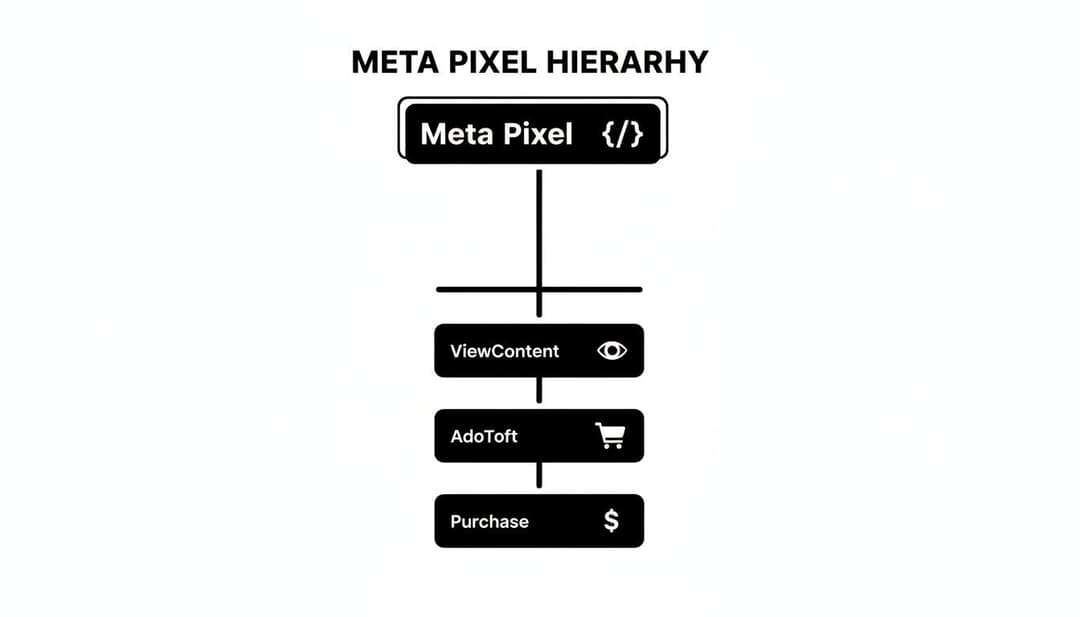
As you can see, each step signals a deeper level of commitment, with Purchase being the ultimate goal we're all chasing.
Building Your Core Retargeting Audiences
Let’s get our hands dirty and build the essential segments every business needs. These are your bread-and-butter audiences, designed to capture users at the most critical decision points. You can build all of these right inside Meta's Ads Manager under the "Audiences" tool.
Here are a few proven recipes for powerful Custom Audiences to start with:
- Website Visitors by Time Window: Don't just lump everyone together. Create separate audiences for visitors from the last 7, 14, and 30 days. This lets you tailor how aggressive your messaging is based on how "warm" the lead is.
- Specific Page Visitors: Go after people who visited high-value pages, like your pricing page, a specific product category, or a lead magnet landing page. Their visit tells you exactly what they're interested in.
- Video Viewers: This is a goldmine. Create audiences of people who watched 50%, 75%, or even 95% of your video ads. Anyone who sticks around for almost an entire video is a highly qualified prospect.
- Social Media Engagers: Group together users who have liked, commented on, or shared your content on Facebook or Instagram. These people are already raising their hands and showing they like your brand.
For a more detailed breakdown, our complete guide on Facebook Ads Custom Audiences will walk you through the creation process step-by-step.
Targeting High-Intent Users for Quick Wins
While broader retargeting is great for staying top-of-mind, your highest Return on Ad Spend (ROAS) will almost always come from your highest-intent audiences. These are the folks who were this close to converting before life got in the way.
Pro Tip: If you're on a tight budget, pour your initial retargeting dollars into your cart abandoners. They've shown the clearest possible intent to buy, and a timely reminder is often all it takes to close the deal.
Your absolute top priority should be the "Added to Cart but Did Not Purchase" audience. This is the lowest-hanging fruit on the tree. By creating a Custom Audience of users who fired the AddToCart event but not the Purchase event in the last 7 or 14 days, you can hit them with hyper-relevant ads reminding them of what they left behind.
The Power of Strategic Exclusions
Who you don't target is just as important as who you do. There's no faster way to waste money and annoy a brand-new customer than by showing them ads for a product they just bought.
Always, always exclude recent purchasers from your prospecting and retargeting campaigns.
Create a Custom Audience of everyone who has triggered the Purchase event in the last 30 days (or whatever timeframe makes sense for your product's buying cycle). Then, apply this audience as an exclusion to your ad sets. This one simple step keeps your campaigns efficient and ensures you're not bugging your happy customers.
This table breaks down some of the most effective audience segments and how to approach them.
Key Retargeting Audience Segments and Strategies
Here’s a practical look at how to segment your key retargeting audiences and the kind of creative that works best for each.
| Audience Segment | Intent Level | Retargeting Window | Creative Strategy |
|---|---|---|---|
| All Website Visitors (Excluding Purchasers) | Low | 14-30 Days | General brand awareness, showcase your value proposition or best-sellers. Keep it top-of-funnel. |
| Visited Specific Product/Category Pages | Medium | 7-14 Days | Remind them of the category or specific product they viewed. Use dynamic ads or carousels. |
| Video Viewers (75%+) | Medium-High | 7-14 Days | Show them a follow-up video, a customer testimonial, or an ad that pushes them to the next step (e.g., visit site). |
| Added to Cart (No Purchase) | High | 3-7 Days | Show them the exact products they abandoned. Consider a small, time-sensitive offer like free shipping to nudge them over the line. |
| Initiated Checkout (No Purchase) | Very High | 1-3 Days | This is your hottest audience. Hit them quickly with a strong call-to-action, address potential concerns (shipping, returns), and create urgency. |
| Past Purchasers | N/A (for upsell/cross-sell) | 30-90 Days | Exclude from core retargeting, but create separate campaigns to upsell or cross-sell complementary products. |
Using a tiered strategy like this allows you to invest your budget where it will have the most impact—on users who are closest to making a purchase.
You've nailed down your audience segments and they're packed with high-intent users. That's a huge win, but it's only half the battle. The best audience in the world won't convert if your ad is generic and uninspired. This is where your creative strategy becomes everything—you need to design Facebook retargeting ads that connect with what a user has already done and gently nudge them back toward the finish line.
Your ad shouldn’t feel like a hard sell. Think of it more like a helpful reminder. The goal is to acknowledge their past interest in a way that feels personal and relevant. When you get this right, a potentially annoying ad turns into a welcome touchpoint that actually strengthens their connection with your brand.

Harnessing the Power of Dynamic Product Ads
For any e-commerce brand, Dynamic Product Ads (DPAs) are an absolute game-changer. Forget about manually creating an ad for every single item in your store. DPAs automatically pull in and display the exact products a person viewed, added to their cart, or even just browsed on your site.
The level of personalization here is just incredibly powerful. Imagine someone spent five minutes checking out a specific pair of blue running shoes on your website. A few hours later, an ad for those exact shoes pops up in their feed. That’s not just advertising; it's a direct, one-to-one conversation that basically says, "Hey, we remember what you liked."
To get DPAs running, you'll need to upload your product catalog to Meta. Once it's all connected, the platform's algorithm does the heavy lifting, matching user activity with the right products to create hyper-relevant ads on autopilot.
Moving Beyond Repetition with Sequential Messaging
One of the biggest mistakes I see with retargeting is showing the same ad to the same person over and over for 30 days straight. This is a fast track to ad fatigue, where your audience either starts ignoring you or, worse, gets actively annoyed. The smarter play here is sequential messaging.
Sequential messaging tells a story over time. You guide the user through their decision-making process with a series of different ads, each with a different purpose.
- Touchpoint 1 (Days 1-3): Start with a direct reminder. This is the perfect spot for a DPA showing the product they left behind. Keep the copy simple, like, "Still thinking it over?"
- Touchpoint 2 (Days 4-7): Time to handle objections. Use a carousel ad to spotlight key benefits, show off some glowing customer reviews, or feature a video testimonial related to that product category.
- Touchpoint 3 (Days 8-14): If they still haven't bitten, create some urgency. Now's the time to introduce a compelling offer. A small discount or a "free shipping ends soon" message can be the final nudge they need to commit.
This tiered approach respects the user's journey and keeps your ads from getting stale, which will dramatically boost your results over time.
Writing Copy That Acknowledges and Converts
Your ad copy is where you connect all the dots for the user. It has to speak directly to what they did on your site and give them a clear reason to come back. Vague, generic copy is a waste of money when you're talking to a warm audience.
The Golden Rule of Retargeting Copy: Your ad should make it crystal clear that you know who you're talking to and what they did. Acknowledge their journey to build an instant connection.
Here are a few practical examples:
- For Cart Abandoners: "Forgot something? Your items are waiting for you. Complete your order now and get 10% off at checkout!"
- For Pricing Page Visitors: "See why [Your Product] delivers the best value. Our [Key Feature] helps you achieve [Benefit] faster than any other solution on the market."
- For Blog Readers: "Enjoyed our article on [Topic]? Take the next step and see how [Your Product] can put those ideas into action with a free demo."
Learning to write compelling ad copy is a must-have skill for any serious marketer. Facebook retargeting also happens to be a powerful form of marketing automation, letting you serve up timely ads without living in Ads Manager. For more ideas on this, check out these ecommerce marketing automation strategies to help grow your store. When you combine smart automation with persuasive writing, you create campaigns that really convert. To go deeper on the writing side, take a look at our guide for writing good ad copy that grabs attention and gets clicks.
How to Measure and Optimize Your Retargeting ROAS
Getting your Facebook retargeting ads live is just the first step. The real magic happens in the daily grind of optimization—that’s how you win the race. To build truly profitable campaigns, you have to learn how to read the story your data is telling you. This means looking past vanity metrics and zeroing in on the numbers that actually grow your bottom line.
The key is realizing that success looks totally different for a warm, retargeted audience. Your benchmarks here shouldn't be anywhere near your prospecting campaigns. With retargeting, you should be aiming for a much higher Return On Ad Spend (ROAS) and a way lower Cost Per Acquisition (CPA). It's a different ballgame.
Decoding Your Key Performance Metrics
Before you can start tweaking things, you need to speak the language of your Ads Manager dashboard. For retargeting, some numbers matter a whole lot more than others.
Let’s break down the metrics you absolutely have to keep an eye on:
- Return On Ad Spend (ROAS): This is your north star. It’s the simplest way to measure how much revenue you’re making for every single dollar you put into ads. A 4x ROAS means you made $4 for every $1 you spent. Simple.
- Cost Per Acquisition (CPA): This tells you exactly what you’re paying to get a new customer. For retargeting, this number needs to be significantly lower than what you’d pay to win over someone from a cold audience.
- Frequency: This shows you the average number of times each person in your audience has seen your ad. It's your early warning system for ad fatigue.
One of the biggest wins with Facebook retargeting is its power to slash CPAs by 40-70% compared to cold traffic, making it an absolute must for scaling efficiently. We see it all the time—retargeting drives 3x higher engagement, and specific tactics like sequential messaging for cart abandoners just crush it. You can dig into more of these powerful Facebook ad statistics on uproas.io and see how they translate to real revenue.
A Framework for Smart Optimization Decisions
Data is just a pile of numbers without a clear plan of action. The thing that separates the pros from the amateurs is knowing when to scale a winner and when to pull the plug on an ad that’s bleeding money.
Start by setting crystal-clear performance targets. What ROAS does your business need to be profitable? Once you have that number, you can create simple rules. If you want to get into the weeds on this, our guide explains in detail how to calculate ROAS and set goals that make sense for your campaigns.
If an ad set is hitting or blowing past your target ROAS, you’ve got a winner on your hands. It's time to think about scaling. But do it slowly—bump the budget by about 15-20% every few days to avoid sending the algorithm into a tailspin. On the flip side, if an ad set is performing way below your target after it’s had time to learn, don’t hesitate to cut it loose. Pouring money into a losing ad is the fastest way to drain your budget.
Managing Ad Frequency to Avoid Burnout
Finally, keeping your Frequency in check is non-negotiable for long-term success. If people see your ad too many times, they’ll tune it out or, worse, get annoyed. That’s when performance tanks and the negative comments start rolling in. We call this ad fatigue.
For a high-intent audience (like cart abandoners from the last 7 days), a good rule of thumb is a frequency around 3-5. For broader audiences (like all website visitors from the last 30 days), try to keep it below 3. If you see your frequency creeping up while your Click-Through Rate (CTR) is dropping, that’s a massive red flag. Your audience is tired of your creative, and it's time to swap in a new ad or a fresh offer to keep things interesting.
Advanced Strategies and Common Pitfalls to Avoid
Alright, once you’ve got your basic campaigns humming along, it’s time to move beyond the fundamentals. This is where you can really start pulling away from the competition, layering in more sophisticated strategies and—just as crucial—dodging the common mistakes that quietly bleed your budget dry.
Think of your funnel less like a single net and more like a series of carefully placed traps. Instead of just one "cart abandoners" audience, build out tiers. For example, you could show a punchy video testimonial to someone who viewed a product three times but never added it to their cart. That little bit of social proof might be the exact nudge they need to finally commit.
Avoiding Critical Retargeting Mistakes
Even the most brilliant strategy will crumble if it’s built on a shaky foundation. So many marketers make the same preventable errors, leading to wasted ad spend and, worse, annoyed customers. The good news? They’re incredibly easy to fix once you know what to look for.
Here are the biggest pitfalls I see time and time again, and exactly how to sidestep them:
Forgetting to Exclude Recent Buyers: This is, without a doubt, the number one mistake. Nothing is more frustrating for a new customer than getting hammered with ads for the very product they just bought. It’s a waste of your money and a surefire way to sour a new customer relationship.
- The Fix: This is non-negotiable. Always create a Custom Audience of anyone who has triggered a
Purchaseevent in the last 30-60 days. Then, make sure you apply this audience as an exclusion on all of your bottom-of-funnel retargeting ad sets.
- The Fix: This is non-negotiable. Always create a Custom Audience of anyone who has triggered a
Using Generic, One-Size-Fits-All Creative: Showing a generic brand ad to someone who literally just abandoned their shopping cart is a massive missed opportunity. Your ad creative has to acknowledge what they did. It needs to feel personal and relevant.
- The Fix: If you’re in e-commerce, use Dynamic Product Ads (DPAs). They will automatically show people the exact items they were looking at. For everyone else, get specific with your copy. If someone visited your pricing page, your ad should hit on value and tackle common cost objections head-on.
Scaling and Integrating Your Efforts
Once your campaigns are running smoothly and you've plugged these common leaks, the next move is to think bigger. Your retargeting efforts shouldn't live on an island. To truly get the most out of them, you need to see how they fit within your overall marketing automation strategies and contribute to the bigger picture of business growth.
A huge pitfall is simply hammering a small audience into oblivion. If you see your ad frequency skyrocketing while your click-through rate takes a nosedive, that’s a flashing red light for ad fatigue. Your audience is sick of seeing your ads.
When you see this happening, you need to act fast. Either hit them with fresh ad creative from a totally new angle, or just pause the ad set to give that audience a break. Another slick move is to broaden your retargeting window—say, from 7 days to 14 days. This brings more people into your audience, which naturally helps keep that frequency number down. Mastering these little tweaks is what separates okay campaigns from consistently profitable ones.
Answering Your Top Retargeting Questions
Once you get into the weeds of Facebook retargeting, a few practical questions always pop up. How much should this actually cost? Am I showing my ads too much? Let's clear up some of the most common sticking points.
How Much Should I Spend on Facebook Retargeting Ads?
A great rule of thumb is to dedicate 20-30% of your total Meta ad budget to your retargeting efforts. It’s a solid starting point that gives you enough firepower without neglecting your top-of-funnel campaigns.
To see results fast, aim that initial budget at your most valuable segments. Think people who abandoned their cart in the last 7 days. These are your lowest-hanging fruit, and getting a good return on ad spend (ROAS) here will prove the model and give you the confidence to expand.
The key metric to keep a close eye on is ad frequency. If you see it creeping up past 5-7 impressions for the same person in a week, that’s a red flag. It means your audience is too small for the budget you're pushing, and you risk burning them out with ad fatigue. When dialed in correctly, your retargeting cost per acquisition (CPA) should always be significantly lower than your prospecting campaigns.
What Is a Good Ad Frequency for Retargeting Campaigns?
There's no magic number here—the right frequency is all about the audience's intent and how time-sensitive your offer is. It’s a balancing act.
Here’s a simple framework to follow:
- High-Intent Audiences: Someone who ditched their cart 3 days ago is on the verge of buying. For this group, a higher frequency of 5-10 can be incredibly effective. You're creating urgency and staying right in front of them when it matters most.
- Lower-Intent Audiences: For a broader audience, like all website visitors from the last 30 days, you need to be more careful. A lower frequency of 2-4 per week is much safer. It keeps you on their radar without becoming wallpaper they start to ignore.
Always let the data be your guide. If your click-through rate starts to tank as your frequency goes up, that’s the clearest sign of ad fatigue you can get. It’s time to swap in fresh creative or dial back the budget for that audience.
Can I Run Retargeting Ads Without a Website?
Absolutely. While the Meta Pixel is the classic way to do it, you can run incredibly effective Facebook retargeting ads using engagement that happens right on Facebook and Instagram. This is a game-changer for brands that are heavy on social content or are still getting their website off the ground.
You can easily build potent Custom Audiences from people who have:
- Watched a portion of your video ads.
- Engaged with your Facebook Page or Instagram profile (think likes, comments, and shares).
- Opened or filled out one of your Lead Forms.
These "on-platform" audiences are pure gold. They're made up of people who have already raised their hand and shown interest in your brand, even if they’ve never made it to your site.
Ready to stop guessing and start scaling your Meta campaigns? AdStellar AI automates your ad creation, audience testing, and performance analysis, letting you launch winning campaigns in minutes, not days. See how AdStellar AI can transform your ad performance.