You're looking at a Meta Ads dashboard full of leads, but the sales team's spreadsheet tells a different story. Some leads never respond, some become qualified opportunities, and a smaller group eventually buys after a call, demo, store visit, or negotiation. Meta can't optimize toward those outcomes if your systems never send them back.
That's the operational problem behind how to track offline conversions. The task isn't installing a pixel or uploading a file. It's building a dependable pipeline that preserves the ad identifier, connects it to the right customer record, records the business outcome, and returns that outcome to Meta in a form its delivery system can use.
Why Offline Conversion Tracking Changes Everything for Meta Advertisers
A lead-generation campaign can look healthy while producing weak commercial results. Meta reports the form submission, your CRM records the follow-up, and the sales team knows whether the prospect became qualified or bought. If those systems remain separate, the campaign is judged on the easiest event to count, not the event that pays the bills.
That distinction matters most for high-consideration purchases, B2B sales cycles, phone-led businesses, and retailers that close transactions away from the website. A pixel can record a landing-page view, form completion, or online purchase. It can't reliably infer that a prospect who submitted a form later signed a contract in a sales office unless your business sends that outcome back through an appropriate server-side or offline workflow.

The measurement gap is a business problem
Suppose two ad sets generate similar lead volume. One produces price shoppers who never progress. The other generates fewer inquiries, but its leads become qualified opportunities and closed deals. If Meta only receives the initial lead event, it has no reliable reason to favor the second ad set.
Offline conversion tracking supplies the missing feedback. A sales-qualified lead, completed appointment, paid invoice, or in-store purchase becomes an event tied back to the original acquisition record. That lets your team compare campaigns using pipeline quality and revenue signals, rather than treating every form fill as equal.
The same principle applies when you're deciding how to optimize ad spend with tracking. Better tracking doesn't automatically improve creative or targeting, but it gives those decisions a more credible foundation.
Why pixel-only measurement falls short
Browser events remain useful. They tell Meta that someone interacted with your site and provide fast signals for campaign delivery. The problem begins when the online event is only a proxy for the commercial outcome.
A form submission may represent an unqualified inquiry. An add-to-cart may never become a purchase. A store visitor may buy later using a different device or through a salesperson. Offline events complement browser signals by showing what happened after the visible digital interaction.
Your attribution model also affects how you interpret the result. Teams working across paid social, search, CRM, and retail touchpoints should document whether they're using platform reporting, first-touch analysis, last-touch analysis, or a blended model. A useful primer on marketing attribution models can help your team define that distinction before campaign reports start driving budget decisions.
Practical rule: If revenue happens in the CRM, point-of-sale system, call center, or finance platform, those systems must participate in your advertising measurement.
The Four-Step Offline Conversion Loop Explained
A reliable workflow has four connected stages: capture the ad identifier, attach it to the lead, record the actual event, and send the result back quickly. Each stage needs an owner, a field definition, and a failure check.
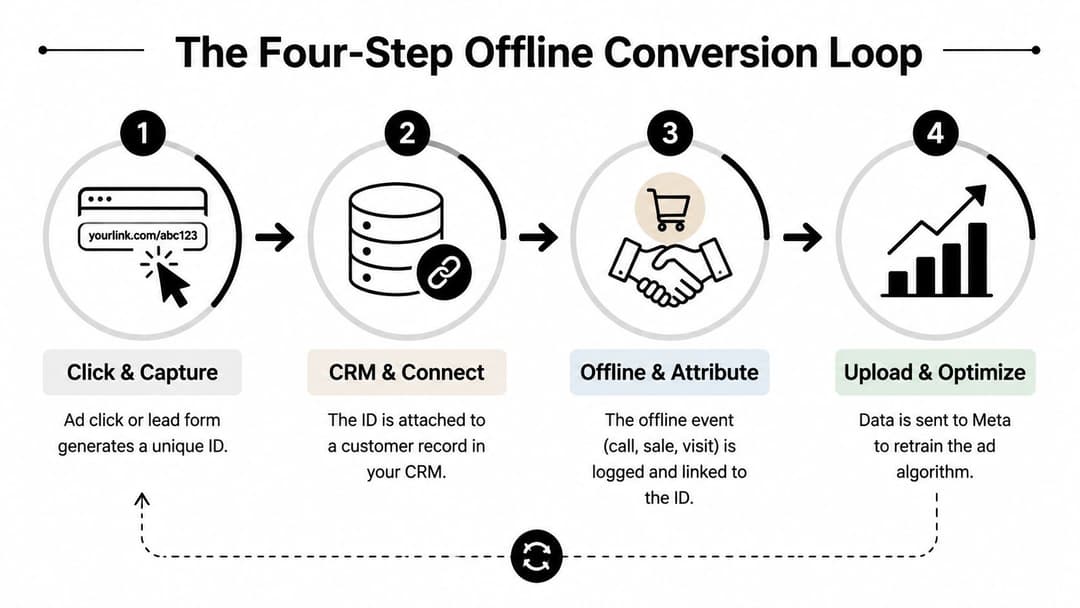
Capture identifiers before the form is submitted
Meta traffic can include identifiers such as fbclid. Capture that value when the visitor arrives, then persist it through the session and place it into a hidden form field. Don't rely on the landing page alone. Redirects, multi-step forms, embedded forms, and third-party scheduling tools can all strip parameters unless your implementation carries them forward.
A practical lead record might include:
- Meta click identifier:
fbclid - Landing page: the first page associated with the lead
- Campaign metadata: campaign, ad set, ad, and placement values where available
- Lead creation time: the timestamp generated by the CRM or form system
- Consent status: the permission state required for your data policy
The identifier has to survive the handoff. If your form posts to HubSpot, Salesforce, or a custom database, confirm that the destination stores the value rather than merely receiving it in the request.
Attach the identifier to a durable person record
Create explicit CRM fields instead of hiding acquisition data in notes. Useful fields include meta_click_id, original_campaign_id, original_ad_id, lead_created_at, and offline_event_sent_at. Keep the original value immutable. If a lead returns through another campaign, store later touches separately instead of overwriting the first record.
Many pipelines fail during CRM migrations. A field can exist in the form tool but not map to the CRM, or it can be copied to a contact record while the opportunity record lacks it. Test both the person and deal objects if your sales process uses separate records.
Record the business event with its real date
Choose the event that represents a meaningful commercial step. That might be qualified_lead, appointment_completed, sale_closed, or purchase_in_store. Define the trigger precisely. “Sales team updated the record” is too vague, while “opportunity stage changes to Closed Won” is testable.
Store the event timestamp from the system that owns the event. A delayed upload shouldn't change the date on which the sale occurred.
Send, reconcile, and retry
Your final stage should transmit the event through Meta's supported offline or server-side integration, then record the response. Store an idempotency key or equivalent deduplication value so a retry doesn't create a duplicate event.
Lifecycle-stage drift is another common break. If one salesperson uses Won, another uses Closed, and a third skips the stage entirely, your automation won't have a consistent trigger. API outages can also create silent gaps unless failed requests enter a retry queue and someone reviews them.
For broader automation context, compare this pipeline discipline with the principles in performance auto AI workflows. Automation only helps when the underlying event definitions and records remain consistent.
Setting Up Meta Offline Event Sets and Conversions API
Meta's setup begins with the destination, not the spreadsheet. In Events Manager, create an Offline Event Set and define the business events you intend to send. Use names that describe outcomes clearly, such as QualifiedLead, CompletedAppointment, or Purchase, rather than internal abbreviations that sales and marketing won't recognize.

Define the event schema before choosing the integration
Your event payload should answer four questions:
- When did it happen? Send the event timestamp from the CRM, point-of-sale system, or order system.
- What happened? Use a stable event name tied to a documented lifecycle definition.
- Who was involved? Supply permitted match keys, such as email or phone, according to Meta's requirements.
- What was the value? Include monetary value and currency when the event represents a transaction and your business has those fields available.
Meta's matching workflow generally requires customer information to be normalized and hashed before transmission. Email addresses should be lowercased and trimmed, while phone numbers should be normalized consistently before applying SHA-256 hashing. Never send raw personal information through a payload just because a test environment accepts it. Your privacy, consent, retention, and access controls still apply.
A simplified internal mapping might look like this:
| CRM field | Meta field | Transformation |
|---|---|---|
closed_at |
Event time | Convert to the accepted timestamp format |
deal_stage |
Event name | Map approved stages to stable event names |
email_normalized |
Hashed email | Normalize, then SHA-256 hash |
phone_normalized |
Hashed phone | Normalize, then SHA-256 hash |
deal_value |
Value | Send only when the value is meaningful |
currency_code |
Currency | Use the transaction's currency |
Choose CSV for control, API for continuity
A CSV upload can work for a small operation with a disciplined CRM export process. It's easy to inspect, easy to archive, and useful for a controlled first test. It also creates a recurring manual dependency. Someone has to export the correct records, normalize fields, hash match keys, remove duplicates, upload the file, and reconcile accepted versus rejected events.
The Conversions API is more appropriate when sales outcomes arrive continuously or when multiple accounts and data sources need one repeatable process. A server-side worker can listen for a deal-stage change, construct the payload, send it to Meta, log the response, and retry failures. That design removes the weekly spreadsheet bottleneck, but it requires stronger engineering around authentication, schema validation, deduplication, monitoring, and consent.
Browser-side events and server-side events can coexist. Use browser signals for immediate digital interactions, then use server-side events for outcomes that occur in systems Meta's browser tag can't see. Don't send the same event through both paths without a deduplication strategy.
This Meta Conversions API guide is a useful reference when your team is deciding how CRM and offline events should reach Meta.
A short implementation video can help align marketers and developers before the build begins:
Start with a test event that uses a known internal record. Confirm that the event lands in the intended Offline Event Set, then test a duplicate submission, a missing match key, an invalid timestamp, and a failed API response. Those tests reveal more than a successful happy-path upload.
Validating Your Offline Conversion Data Actually Matches
An accepted API request doesn't prove that Meta matched the event to an ad interaction. Validation needs to separate three conditions: the event was sent, Meta received it, and Meta attributed it.
Begin with a traceable sample from the source system. Select records that contain the original Meta identifier, the event name, the event timestamp, and the match keys used in the payload. Follow each record through the integration logs and into the Offline Event Set. If the record appears in Meta but isn't attributed, the problem is different from a request that never arrived.
Diagnose the match rate without worshipping it
A match-rate report is a directional health signal, not a revenue guarantee. A high rate can still reflect poor event definitions, duplicated records, or a CRM stage that doesn't represent a real commercial outcome. A low rate can point to missing identifiers, malformed hashes, inconsistent phone normalization, timestamp problems, consent filtering, or a mismatch between the selected event source and the account configuration.
Use a working diagnostic table rather than treating one threshold as universally healthy:
| Match rate range | Data quality assessment | Common causes | Recommended actions |
|---|---|---|---|
| High | The pipeline is likely passing usable identifiers consistently | Stable field mapping and complete records | Reconcile attributed events with CRM outcomes and monitor for drift |
| Mixed | Some records are usable, but important segments may be missing | Incomplete CRM fields, inconsistent normalization, or partial integrations | Compare matched and unmatched records by source, event, and lifecycle stage |
| Low | Meta is receiving insufficient information for dependable matching | Lost identifiers, hashing errors, invalid timestamps, or wrong event-source configuration | Trace individual records, correct the schema, then resend only according to platform rules |
Offline conversion audits have found misattribution rates of 10% to 20% in retail accounts when the loop breaks, with failures linked to disappearing IDs, lifecycle-stage drift, and API or outage-related loss (Render Analytics' offline conversion workflow). Treat that range as an audit finding, not as a universal benchmark for every account.
Build monitoring around the source of truth
Your CRM or transaction system should remain the authority for whether the event occurred. Meta is the advertising destination and attribution view, not the master ledger. Reconcile event counts, event names, dates, values, and rejected requests between both systems.
Review the results in Meta Events Manager and Ads Manager, then use test tools and integration logs to identify where the record stopped. Teams that want a more detailed operating framework can use this guide to track conversions accurately in Meta.
Set alerts for missing identifiers, sudden drops in accepted events, duplicate responses, delayed uploads, and unusual differences between CRM outcomes and Meta-reported conversions. Catching a broken field mapping on the day it changes is far cheaper than discovering it after a campaign has optimized around incomplete data.
Feeding Offline Results Back into Meta Ad Optimization
Measurement becomes useful when the event changes a decision. Sending sale_closed to Meta but continuing to optimize exclusively for cheap leads leaves the most valuable signal outside the bidding objective.
Start by choosing a conversion event that represents a meaningful business outcome and occurs often enough to provide usable feedback. A B2B advertiser might use qualified_opportunity when closed revenue arrives too slowly. A retailer may use purchase or an in-store transaction event. The choice should reflect the point at which the business can distinguish quality, not the point that produces the prettiest dashboard.
Use a signal hierarchy
Keep online and offline events in a deliberate hierarchy:
- Top-of-funnel events capture immediate response, such as landing-page engagement or form completion.
- Mid-funnel events represent qualification, appointment completion, or a meaningful sales handoff.
- Business outcomes represent closed deals, paid orders, or completed retail purchases.
Don't delete the earlier signals. They help diagnose delivery and funnel volume. The mistake is allowing a proxy event to remain the only optimization signal after your team has a reliable downstream event.
When deal sizes vary, pass value where your source system records it consistently. Value-based optimization only makes sense when the value field reflects a real business rule and isn't filled with estimates that sales teams update arbitrarily. If values are unreliable, optimize toward a stable qualification event and use revenue for reporting until the data model improves.
Turn feedback into budget and creative decisions
Offline outcomes should influence more than campaign-level reporting. Compare creative concepts, audience groups, placements, and messages against qualified pipeline or revenue. A creative that generates fewer leads but stronger downstream outcomes may deserve more budget than one that wins on cost per lead alone.
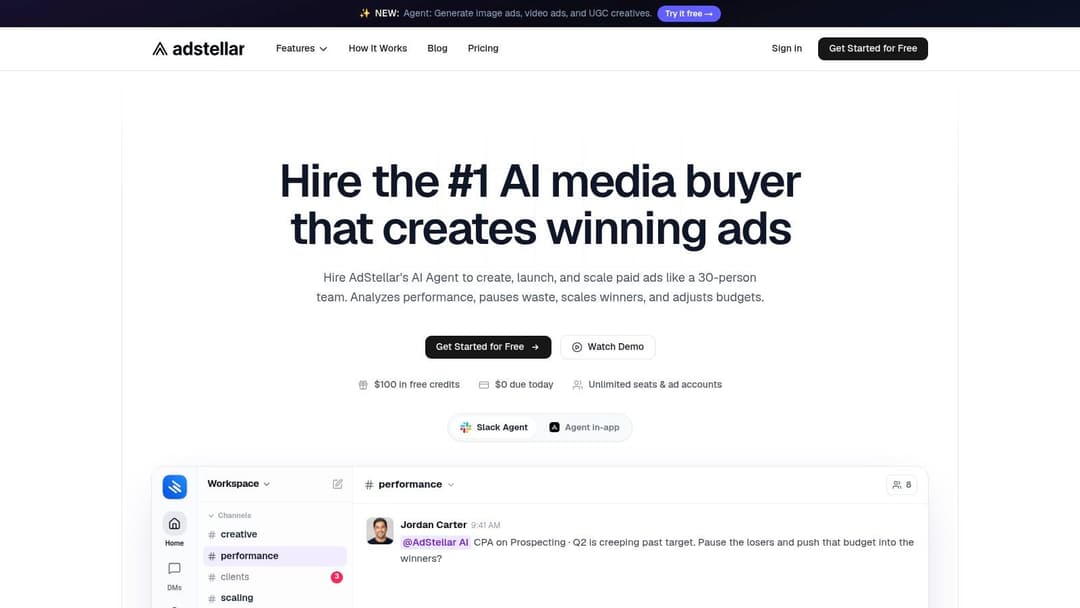
Tools such as AdStellar AI can connect Meta campaign workflows with attribution inputs, including Meta Pixel and Cometly sources. Its AI Insights can rank creatives, audiences, and messages against goals such as ROAS, CPL, or CPA, while server-side attribution data can incorporate offline outcomes such as phone sales or in-store purchases. That makes it an option for teams that want the analysis and campaign production workflow in one operating environment, rather than another disconnected report.
The practical workflow is straightforward:
- Rank by commercial signal: Compare ads using qualified outcomes, not lead volume alone.
- Protect learning quality: Don't change budgets aggressively while a data break is making recent results incomplete.
- Refresh proven angles: Use high-quality creative and audience combinations as inputs for new tests.
- Separate reporting from optimization: A conversion can be useful for analysis without being the right event for automated delivery.
For a broader operating process, see this guide to Facebook ad optimization. The principle is simple: Meta can only learn from the business outcomes your pipeline sends consistently.
Navigating the 2026 Data Manager API Migration
A legacy upload can keep reporting alive until one field changes, one token expires, or one delayed CRM record misses the import window. Google recommends using Data Manager API for current and future offline conversions and enhanced conversions for leads, instead of building new workflows around older upload methods (Google Ads offline conversion imports). Industry coverage identifies June 15, 2026 as the deprecation date for the legacy UploadClickConversions path (Farsiight's migration coverage).
The migration still matters to Meta advertisers. A single CRM-to-ad pipeline may supply several platforms, and changing one endpoint can expose undocumented assumptions about field names, identifiers, authentication, timestamps, consent, and retry behavior. Treat the work as a pipeline change, not a one-time API swap.
Protect continuity before changing endpoints
The documented import process covers preparing data, uploading conversions, and reviewing imported actions. Offline uploads must connect each conversion to a click identifier such as GCLID. Uploads arriving more than 90 days after the associated last click will not be imported, and imported statistics typically appear in about 3 hours, per that same guidance.
Those limits create practical failure modes. A CRM delay can place an event outside the import window. Reporting latency can also make a successful upload appear broken during a same-day check. Keep raw events, API responses, and platform status separate so the team can identify which stage failed.
Use this migration checklist:
- Inventory dependencies: List every CRM object, field, webhook, script, spreadsheet, connector, and account using the legacy method.
- Freeze definitions: Record event names, click-ID fields, timestamps, values, currencies, consent rules, and deduplication keys.
- Build the new path: Recreate mappings for Data Manager API and Enhanced Conversions for Leads where applicable.
- Test known records: Check accepted, rejected, duplicated, delayed, and missing-identifier cases.
- Preserve history: Archive exports, request logs, and source records before changing endpoints.
- Monitor the cutover: Compare CRM events, API responses, and platform reporting for gaps after the switch.
Marketing owns conversion definitions, sales owns lifecycle accuracy, data teams own source records, and engineering owns delivery reliability. AdStellar AI can help teams connect attribution inputs with Meta campaign workflows, so validated offline outcomes remain available when deciding which campaigns to scale. All four functions need documented ownership before the endpoint changes.
Common Mistakes and How to Avoid Them
Offline conversion tracking fails when teams treat the first successful upload as the finish line. It is a continuous pipeline. CRM field renames, sales-process changes, API errors, and platform migrations can all break attribution.
Late uploads may fall outside Google's 90-day import limit, creating permanent gaps. Imported statistics can also take about 3 hours to appear, as noted in the same Google Ads documentation cited above. Keep a retry queue for failed events, retain the original click identifier, and inspect the conversion date rather than treating the upload date as the customer journey.
A high match rate does not prove that the event represents revenue. “Salesperson contacted lead” and “customer purchased” require different event names, values, and CRM mappings. Keep online events for immediate intent, then send qualified offline outcomes to Meta for optimization.
Assign ownership before fields disappear. Marketing defines event rules, sales maintains lifecycle accuracy, and data or engineering teams protect identifiers and delivery logs. Review the pipeline after every CRM or API change.
AdStellar AI connects attribution inputs with Meta campaign workflows and creative analysis, helping teams use verified offline outcomes when evaluating campaign scaling. Visit AdStellar AI for its campaign and insight tools.